先修改配置文件
# 把server和server后面那一段删了在后面加一句include vhost/*.conf;[root@localhost nginx-1.17.8]# vim /usr/local/nginx/conf/nginx.conf# 配置完是这样的user nobody nobody;worker_processes 2;error_log /usr/local/nginx/logs/nginx_error.log crit;pid /usr/local/nginx/logs/nginx.pid;worker_rlimit_nofile 51200;events{use epoll;worker_connections 6000;}http{include mime.types;default_type application/octet-stream;server_names_hash_bucket_size 3526;server_names_hash_max_size 4096;log_format combined_realip '$remote_addr $http_x_forwarded_for [$time_local]'' $host "$request_uri" $status'' "$http_referer" "$http_user_agent"';sendfile on;tcp_nopush on;keepalive_timeout 30;client_header_timeout 3m;client_body_timeout 3m;send_timeout 3m;connection_pool_size 256;client_header_buffer_size 1k;large_client_header_buffers 8 4k;request_pool_size 4k;output_buffers 4 32k;postpone_output 1460;client_max_body_size 10m;client_body_buffer_size 256k;client_body_temp_path /usr/local/nginx/client_body_temp;proxy_temp_path /usr/local/nginx/proxy_temp;fastcgi_temp_path /usr/local/nginx/fastcgi_temp;fastcgi_intercept_errors on;tcp_nodelay on;gzip on;gzip_min_length 1k;gzip_buffers 4 8k;gzip_comp_level 5;gzip_http_version 1.1;gzip_types text/plain application/x-javascript text/css text/htmapplication/xml;include vhost/*.conf;}[root@localhost nginx-1.17.8]# mkdir /usr/local/nginx/conf/vhost[root@localhost nginx-1.17.8]# cd /usr/local/nginx/conf/vhost/## 刷新配置文件[root@localhost vhost]# /usr/local/nginx/sbin/nginx -tnginx: the configuration file /usr/local/nginx/conf/nginx.conf syntax is oknginx: configuration file /usr/local/nginx/conf/nginx.conf test is successful# 重新加载[root@localhost vhost]# /usr/local/nginx/sbin/nginx -s reload
1.配置
[root@localhost vhost]# vim default.conf
server
{
    listen 80 default_server;
    server_name aaa.com;
    index index.html index.htm index.php;
    root /data/nginx/default;
}

[root@localhost vhost]# /usr/local/nginx/sbin/nginx -t
nginx: the configuration file /usr/local/nginx/conf/nginx.conf syntax is ok
nginx: configuration file /usr/local/nginx/conf/nginx.conf test is successful
[root@localhost vhost]# /usr/local/nginx/sbin/nginx -s reload
2.测试
[root@localhost vhost]# mkdir -p /data/nginx/default
[root@localhost vhost]# echo " default server! " > /data/nginx/default/index.html
[root@localhost vhost]# curl -x127.0.0.1:80 bbb.com
 default server!
[root@localhost vhost]# curl -x127.0.0.1:80 aaa.com
 default server!

二、用户认证
1、整个域名认证
1.1、配置
[root@localhost vhost]# ls
default.conf
[root@localhost vhost]# vim test.com.conf
server
{
    listen 80;
    server_name test.com;
    index index.html index.htm index.php;
    root /data/nginx/test.com;
    autoindex off;
    location /
    {
    auth_basic "Auth";
    auth_basic_user_file /ust/local/nginx/conf/htpasswd;
    }
}

[root@localhost vhost]# yum install -y httpd
[root@localhost vhost]# htpasswd -c /usr/local/nginx/conf/htpasswd yx
New password:
Re-type new password:
Adding password for user wsw
[root@localhost vhost]# /usr/local/nginx/sbin/nginx -s reload
[root@localhost vhost]# mkdir /data/nginx/test.com
[root@localhost vhost]# echo "test.com" > /data/nginx/test.com/index.html
1.2、测试
[root@localhost vhost]# /usr/local/nginx/sbin/nginx -t
nginx: the configuration file /usr/local/nginx/conf/nginx.conf syntax is ok
nginx: configuration file /usr/local/nginx/conf/nginx.conf test is successful
[root@localhost vhost]#  /usr/local/nginx/sbin/nginx -s reload
[root@localhost vhost]# curl -x127.0.0.1:80 test.com
<html>
<head><title>401 Authorization Required</title></head>
<body>
<center><h1>401 Authorization Required</h1></center>
<hr><center>nginx/1.17.8</center>
</body>
</html>
[root@localhost vhost]# curl -usxs -x127.0.0.1:80 test.com
Enter host password for user 'sxs':
<html>
<head><title>403 Forbidden</title></head>
<body>
<center><h1>403 Forbidden</h1></center>
<hr><center>nginx/1.17.8</center>
</body>
</html>
2、针对目录认证
一般用来保护后台admin目录
2.1配置
针对目录做用户认证要修改location后面的路径
[root@localhost vhost]# vim test.com.conf
server
{
    listen 80;
    server_name test.com;
    index index.html index.htm index.php;
    root /data/nginx/test.com;
    autoindex off;
    location /admin/
    {
    auth_basic "Auth";
    auth_basic_user_file /ust/local/nginx/conf/htpasswd;
    }
}
[root@localhost vhost]#  mkdir /data/nginx/test.com/admin
[root@localhost vhost]# echo "asdfadmin" > /data/nginx/test.com/admin/index.html
[root@localhost vhost]# /usr/local/nginx/sbin/nginx -t
nginx: the configuration file /usr/local/nginx/conf/nginx.conf syntax is ok
nginx: configuration file /usr/local/nginx/conf/nginx.conf test is successful
[root@localhost vhost]# /usr/local/nginx/sbin/nginx -s reload
2.2测试

3、URL认证
针对URL做认证,即链接中带了某个关键字
3.1配置
[root@localhost vhost]# vim test.com.conf
server
{
    listen 80;
    server_name test.com;
    index index.html index.htm index.php;
    root /data/nginx/test.com;

location  ~ admin.php
    {
        auth_basic              "Auth";
        auth_basic_user_file   /usr/local/nginx/conf/htpasswd;
}
}
3.2测试
[root@localhost vhost]# /usr/local/nginx/sbin/nginx -t
nginx: the configuration file /usr/local/nginx/conf/nginx.conf syntax is ok
nginx: configuration file /usr/local/nginx/conf/nginx.conf test is successful
[root@localhost vhost]# /usr/local/nginx/sbin/nginx -s reload
[root@localhost vhost]# curl -x127.0.0.1:80 test.com/admin.php
<html>
<head><title>401 Authorization Required</title></head>
<body>
<center><h1>401 Authorization Required</h1></center>
<hr><center>nginx/1.17.8</center>
</body>
</html>
三、域名重定向
1、配置
[root@localhost vhost]# vim test.com.conf
server
{
    listen 80;
    server_name test.com test2.com test3.com;
    index index.html index.htm index.php;
    root /data/nginx/test.com;
    if ($host != 'test.com' ){
        rewrite ^(.*)$ http://test.com/$1 permanent;
}
}
2、测试
[root@localhost vhost]# /usr/local/nginx/sbin/nginx -t
nginx: the configuration file /usr/local/nginx/conf/nginx.conf syntax is ok
nginx: configuration file /usr/local/nginx/conf/nginx.conf test is successful
[root@localhost vhost]# /usr/local/nginx/sbin/nginx -s reload
[root@localhost vhost]# curl -x127.0.0.1:80 test2.com
<html>
<head><title>301 Moved Permanently</title></head>
<body>
<center><h1>301 Moved Permanently</h1></center>
<hr><center>nginx/1.17.8</center>
</body>
</html>
[root@localhost vhost]#  curl -x127.0.0.1:80 test2.com -I
HTTP/1.1 301 Moved Permanently
Server: nginx/1.17.8
Date: Mon, 06 Sep 2021 06:58:37 GMT
Content-Type: text/html
Content-Length: 169
Connection: keep-alive
Location: http://test.com//
在windows上测试需要将两个域名都写入hosts文件,并使用没有缓存的浏览器。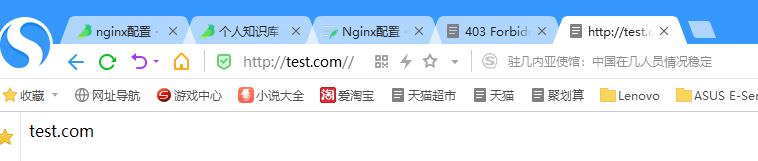
四、nginx访问日志
1、配置
[root@localhost vhost]# grep -A2 log_format /usr/local/nginx/conf/nginx.conf
log_format combined_realip '$remote_addr $http_x_forwarded_for [$time_local]'
' $host "$request_uri" $status'
' "$http_referer" "$http_user_agent"';
[root@localhost vhost]# vim test.com.conf
server
{
    listen 80;
    server_name test.com;
    index index.html index.htm index.php;
    root /data/nginx/test.com;
    access_log /tmp/1.log combined_realip;
}
2、测试
[root@localhost vhost]# /usr/local/nginx/sbin/nginx -t
nginx: the configuration file /usr/local/nginx/conf/nginx.conf syntax is ok
nginx: configuration file /usr/local/nginx/conf/nginx.conf test is successful
[root@localhost vhost]# /usr/local/nginx/sbin/nginx -s reload
[root@localhost vhost]# curl -x127.0.0.1:80 test.com
test.com
[root@localhost vhost]# cat /tmp/1.log
127.0.0.1 - [06/Sep/2021:15:04:55 +0800] test.com "/" 200 "-" "curl/7.29.0"
五、nginx日志切割
[root@localhost sbin]# vim /usr/local/sbin/nginx_log_rotate.sh
#!/bin/bash
##假设nignx的日志存放路径为/data/logs/
d=`date -d "-1 day" +%Y%m%d`
logdir="/tmp/"
nginx_pid="/usr/local/nginx/logs/nginx.pid"
cd $logdir
for log in `ls *.log`
do
mv $log $log-$d
done
/bin/kill -HUP `cat $nginx_pid`
[root@localhost sbin]# chmod 755 /usr/local/sbin/nginx_log_rotate.sh
[root@localhost sbin]# ls /tmp/
1.log             systemd-private-9a0947fcdf0046f9adf8aab32dfe3701-chronyd.service-p4tR4a
1.log-20210905    vmware-root_659-4013788787
ks-script-vtnb9n  vmware-root_660-2697467306
mysql.sock        vmware-root_662-2689143848
pear              vmware-root_682-2697467275
php-fcgi.sock     yum.log-20210905
[root@localhost sbin]# sh -x /usr/local/sbin/nginx_log_rotate.sh
++ date -d '-1 day' +%Y%m%d
+ d=20210905
+ logdir=/tmp/
+ nginx_pid=/usr/local/nginx/logs/nginx.pid
+ cd /tmp/
++ ls 1.log
+ for log in '`ls *.log`'
+ mv 1.log 1.log-20210905
++ cat /usr/local/nginx/logs/nginx.pid
+ /bin/kill -HUP 69053
[root@localhost sbin]# ls
nginx_log_rotate.sh
[root@localhost sbin]# ls /tmp/
1.log             systemd-private-9a0947fcdf0046f9adf8aab32dfe3701-chronyd.service-p4tR4a
1.log-20210905    vmware-root_659-4013788787
ks-script-vtnb9n  vmware-root_660-2697467306
mysql.sock        vmware-root_662-2689143848
pear              vmware-root_682-2697467275
php-fcgi.sock     yum.log-20210905
六、配置静态文件不记录日志并添加过期时间
和LAMP一样,配置静态文件不记录日志,并添加过期时间。 目的是为了减少记录不必要的日志文件。缓存文件为了下次访问速度变快。
[root@localhost sbin]# vim /usr/local/nginx/conf/vhost/test.com.conf
server
{
    listen 80;
    server_name test.com test1.com test2.com;
    index index.html index.htm index.php;
    root /data/nginx/test.com;
    if ($host != 'test.com' ) {
        rewrite ^/(.*)$ http://test.com/$1 permanent;
    }
    location ~ .*\.(gif|jpg|jpeg|png|bmp|swf)$
    {
        expires 7d;
        access_log off;
    }
    location ~ .*\.(js|css)$
    {
         expires 12h;
    }
    access_log /tmp/1.log combined_realip;
}
[root@localhost sbin]# echo '111' > /data/nginx/test.com/1.js
[root@localhost sbin]# echo '222' > /data/nginx/test.com/2.jpg
[root@localhost sbin]# touch /data/nginx/test.com/1.jss
[root@localhost sbin]# /usr/local/nginx/sbin/nginx -t
nginx: the configuration file /usr/local/nginx/conf/nginx.conf syntax is ok
nginx: configuration file /usr/local/nginx/conf/nginx.conf test is successful
[root@localhost sbin]# /usr/local/nginx/sbin/nginx -s reload
[root@localhost sbin]# echo > /tmp/1.log
[root@localhost sbin]# curl -I -x127.0.0.1:80 test.com/1.js
HTTP/1.1 200 OK
Server: nginx/1.17.8
Date: Mon, 06 Sep 2021 07:17:20 GMT
Content-Type: application/javascript
Content-Length: 4
Last-Modified: Mon, 06 Sep 2021 07:16:43 GMT
Connection: keep-alive
ETag: "6135c05b-4"
Expires: Mon, 06 Sep 2021 19:17:20 GMT
Cache-Control: max-age=43200
Accept-Ranges: bytes

[root@localhost sbin]# curl -I -x127.0.0.1:80 test.com/2.jpg
HTTP/1.1 200 OK
Server: nginx/1.17.8
Date: Mon, 06 Sep 2021 07:17:29 GMT
Content-Type: image/jpeg
Content-Length: 4
Last-Modified: Mon, 06 Sep 2021 07:16:50 GMT
Connection: keep-alive
ETag: "6135c062-4"
Expires: Mon, 13 Sep 2021 07:17:29 GMT
Cache-Control: max-age=604800
Accept-Ranges: bytes

[root@localhost sbin]# curl -I -x127.0.0.1:80 test.com/1.jss
HTTP/1.1 200 OK
Server: nginx/1.17.8
Date: Mon, 06 Sep 2021 07:17:38 GMT
Content-Type: application/octet-stream
Content-Length: 0
Last-Modified: Mon, 06 Sep 2021 07:16:56 GMT
Connection: keep-alive
ETag: "6135c068-0"
Accept-Ranges: bytes

[root@localhost sbin]# cat /tmp/1.log

127.0.0.1 - [06/Sep/2021:15:17:20 +0800] test.com "/1.js" 200 "-" "curl/7.29.0"
127.0.0.1 - [06/Sep/2021:15:17:38 +0800] test.com "/1.jss" 200 "-" "curl/7.29.0"
七、Nginx防盗链
[root@localhost sbin]# vim /usr/local/nginx/conf/vhost/test.com.conf
server
{
    listen 80;
    server_name test.com test1.com test2.com;
    index index.html index.htm index.php;
    root /data/nginx/test.com;
    if ($host != 'test.com' ) {
        rewrite ^/(.*)$ http://test.com/$1 permanent;
    }
        location ~* ^.+\.(gif|jpg|png|swf|flv|rar|zip|doc|pdf|gz|bz2|jpeg|bmp|xls)$
        {
         expires 7d;
        valid_referers none blocked server_names  *.test.com ;
         if ($invalid_referer) {
         return 403;
         }
         access_log off;
        }
}
[root@localhost sbin]# /usr/local/nginx/sbin/nginx -t
nginx: the configuration file /usr/local/nginx/conf/nginx.conf syntax is ok
nginx: configuration file /usr/local/nginx/conf/nginx.conf test is successful
[root@localhost sbin]# /usr/local/nginx/sbin/nginx -s reload
[root@localhost sbin]# curl -x127.0.0.1:80 -e "http://aaa.com/1.txt" test.com/2.jpg -I
HTTP/1.1 403 Forbidden
Server: nginx/1.17.8
Date: Mon, 06 Sep 2021 07:19:48 GMT
Content-Type: text/html
Content-Length: 153
Connection: keep-alive

[root@localhost sbin]# curl -x127.0.0.1:80 -e "http://test.com/1.txt" test.com/2.jpg -I
HTTP/1.1 200 OK
Server: nginx/1.17.8
Date: Mon, 06 Sep 2021 07:19:56 GMT
Content-Type: image/jpeg
Content-Length: 4
Last-Modified: Mon, 06 Sep 2021 07:16:50 GMT
Connection: keep-alive
ETag: "6135c062-4"
Expires: Mon, 13 Sep 2021 07:19:56 GMT
Cache-Control: max-age=604800
Accept-Ranges: bytes
八、访问控制
1、针对目录进行访问控制
1.1 配置
[root@localhost sbin]# vim /usr/local/nginx/conf/vhost/test.com.conf.
server
{
    listen 80;
    server_name test.com test1.com test2.com;
    index index.html index.htm index.php;
    root /data/nginx/test.com;
    access_log /tmp/1.log combined_realip;

location /admin/ {
        allow 192.168.200.12;
        allow 127.0.0.1;
        deny all;
}
}
1.2 测试
[root@localhost sbin]# curl -x127.0.0.1:80 test.com/admin/1.html
1234
[root@localhost sbin]# /usr/local/nginx/sbin/nginx -s reload
[root@localhost sbin]# curl -x192.168.200.12:80 test.com/admin/1.html
<html>
<head><title>403 Forbidden</title></head>
<body>
<center><h1>403 Forbidden</h1></center>
<hr><center>nginx/1.17.8</center>
</body>
</html>
九、nginx解析PHP
配置
[root@localhost php-5.6.30]# vim /usr/local/nginx/conf/vhost/test.com.conf
server
{
    listen 80;
    server_name test.com test1.com test2.com;
    index index.html index.htm index.php;
    root /data/nginx/test.com;
    access_log /tmp/1.log combined_realip;

location ~ \.php$ {
    include fastcgi_params;
    fastcgi_pass unix:/tmp/php-fcgi.sock;
    fastcgi_index index.php;
    fastcgi_param SCRIPT_FILENAME /data/nginx/test.com$fastcgi_script_name;
    }
}
[root@localhost php-5.6.30]# vim /data/nginx/test.com/3.php
<?php
phpinfo();
?>
[root@localhost php-5.6.30]# cat /usr/local/php-fpm/etc/php-fpm.conf
[global]
pid = /usr/local/php-fpm/var/run/php-fpm.pid
error_log = /usr/local/php-fpm/var/log/php-fpm.log
[www]
listen = /tmp/php-fcgi.sock
listen.mode = 666
user = php-fpm
group = php-fpm
pm = dynamic
pm.max_children = 50
pm.start_servers = 20
pm.min_spare_servers = 5
pm.max_spare_servers = 35
pm.max_requests = 500
rlimit_files = 1024
测试
[root@localhost php-5.6.30]# /usr/local/nginx/sbin/nginx -t
nginx: the configuration file /usr/local/nginx/conf/nginx.conf syntax is ok
nginx: configuration file /usr/local/nginx/conf/nginx.conf test is successful
[root@localhost php-5.6.30]# /usr/local/nginx/sbin/nginx -s reload

十、Nginx代理
一个没有公网IP的服务器要提供web服务,可以通过代理实现。
配置
[root@localhost php-5.6.30]# vim /usr/local/nginx/conf/vhost/proxy.conf
server
{
    listen 80;
    server_name ask.apelearn.com;

    location /
    {
        proxy_pass      http://47.104.7.242/;
        proxy_set_header Host   $host;
        proxy_set_header X-Real-IP      $remote_addr;
        proxy_set_header X-Forwarded-For $proxy_add_x_forwarded_for;
    }
}
[root@localhost php-5.6.30]# curl -x127.0.0.1:80 ask.apelearn.com/robots.txt
<html>
<head><title>404 Not Found</title></head>
<body>
<center><h1>404 Not Found</h1></center>
<hr><center>nginx/1.17.8</center>
</body>
</html>
[root@localhost php-5.6.30]# /usr/local/nginx/sbin/nginx -t
nginx: the configuration file /usr/local/nginx/conf/nginx.conf syntax is ok
nginx: configuration file /usr/local/nginx/conf/nginx.conf test is successful
[root@localhost php-5.6.30]# /usr/local/nginx/sbin/nginx -s reload
[root@localhost php-5.6.30]# curl -x127.0.0.1:80 ask.apelearn.com/robots.txt
##
# robots.txt for MiWen
#

User-agent: *

Disallow: /?/admin/
Disallow: /?/people/
Disallow: /?/question/
Disallow: /account/
Disallow: /app/
Disallow: /cache/
Disallow: /install/
Disallow: /models/
Disallow: /crond/run/
Disallow: /search/
Disallow: /static/
Disallow: /setting/
Disallow: /system/
Disallow: /tmp/
Disallow: /themes/
Disallow: /uploads/
Disallow: /url-*
Disallow: /views/
十一、负载均衡
1、配置
[root@localhost php-5.6.30]# yum install -y bind-utils
//安装dig命令
[root@localhost php-5.6.30]# dig www.baidu.com

; <<>> DiG 9.11.4-P2-RedHat-9.11.4-26.P2.el7_9.7 <<>> www.baidu.com
;; global options: +cmd
;; Got answer:
;; ->>HEADER<<- opcode: QUERY, status: NOERROR, id: 64553
;; flags: qr rd ra; QUERY: 1, ANSWER: 3, AUTHORITY: 0, ADDITIONAL: 1

;; OPT PSEUDOSECTION:
; EDNS: version: 0, flags:; udp: 512
;; QUESTION SECTION:
;www.baidu.com.                 IN      A

;; ANSWER SECTION:
www.baidu.com.          134     IN      CNAME   www.a.shifen.com.
www.a.shifen.com.       146     IN      A       110.242.68.4
www.a.shifen.com.       146     IN      A       110.242.68.3

;; Query time: 22 msec
;; SERVER: 114.114.114.114#53(114.114.114.114)
;; WHEN: 一 9月 06 17:03:14 CST 2021
;; MSG SIZE  rcvd: 101

[root@localhost php-5.6.30]# dig baidu.com

; <<>> DiG 9.11.4-P2-RedHat-9.11.4-26.P2.el7_9.7 <<>> baidu.com
;; global options: +cmd
;; Got answer:
;; ->>HEADER<<- opcode: QUERY, status: NOERROR, id: 40976
;; flags: qr rd ra; QUERY: 1, ANSWER: 2, AUTHORITY: 0, ADDITIONAL: 1

;; OPT PSEUDOSECTION:
; EDNS: version: 0, flags:; udp: 512
;; QUESTION SECTION:
;baidu.com.                     IN      A

;; ANSWER SECTION:
baidu.com.              200     IN      A       220.181.38.251
baidu.com.              200     IN      A       220.181.38.148

;; Query time: 27 msec
;; SERVER: 114.114.114.114#53(114.114.114.114)
;; WHEN: 一 9月 06 17:03:31 CST 2021
;; MSG SIZE  rcvd: 70
//用百度做测试
#upstream来指定多个web server
# upstream后面的名字要和proxy_pass后面的名字相同
测试
[root@localhost php-5.6.30]# curl -x127.0.0.1:80 www.baidu.com
 default server!
[root@localhost php-5.6.30]# /usr/local/nginx/sbin/nginx -t
nginx: the configuration file /usr/local/nginx/conf/nginx.conf syntax is ok
nginx: configuration file /usr/local/nginx/conf/nginx.conf test is successful
[root@localhost php-5.6.30]#  /usr/local/nginx/sbin/nginx -s reload
[root@localhost php-5.6.30]# curl -x127.0.0.1:80 www.baidu.com
<!DOCTYPE html>
<!--STATUS OK--><html> <head><meta http-equiv=content-type content=text/html;
charset=utf-8><meta http-equiv=X-UA-Compatible
content=IE=Edge><meta content=always name=referrer><link rel=stylesheet
type=text/css href=http://s1.bdstatic.com/r/www/cache/bdorz/baidu.min.css><title>
百度一下,你就知道
十二、SSL
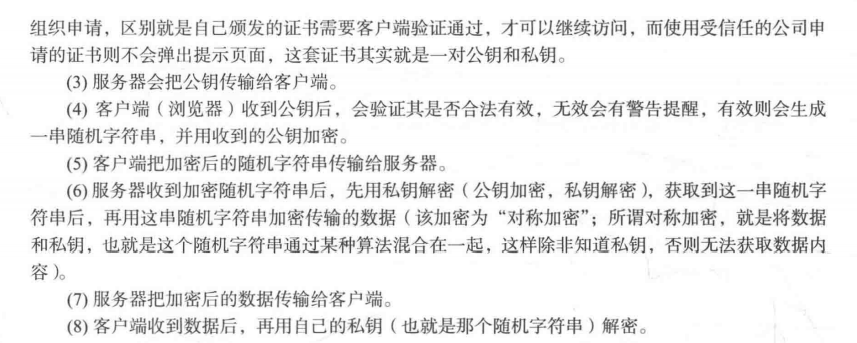
我们通常访问的网站有http和https 其中https就是和ssl证书有关。
SSL工作流程


[root@localhost ~]# rpm -qa  openssl
openssl-1.0.2k-21.el7_9.x86_64
[root@localhost ~]# cd /usr/local/nginx/conf/
[root@localhost conf]# genrsa -des3 -out tmp.key 2048
-bash: genrsa: 未找到命令
[root@localhost conf]# openssl genrsa -des3 -out tmp.key 2048
Generating RSA private key, 2048 bit long modulus
.............................................................................................................................................+++
......+++
e is 65537 (0x10001)
Enter pass phrase for tmp.key:
Verifying - Enter pass phrase for tmp.key:
[root@localhost conf]# openssl rsa -in tmp.key -out aminglinux.key
Enter pass phrase for tmp.key:
writing RSA key
[root@localhost conf]# ls
aminglinux.key        fastcgi_params.default  mime.types          scgi_params          uwsgi_params.default
fastcgi.conf          htpasswd                mime.types.default  scgi_params.default  vhost
fastcgi.conf.default  koi-utf                 nginx.conf          tmp.key              win-utf
fastcgi_params        koi-win                 nginx.conf.default  uwsgi_params
[root@localhost conf]# rm -rf tmp.key
[root@localhost conf]# openssl req -new -key aminglinux.key -out aminglinux.csr
You are about to be asked to enter information that will be incorporated
into your certificate request.
What you are about to enter is what is called a Distinguished Name or a DN.
There are quite a few fields but you can leave some blank
For some fields there will be a default value,
If you enter '.', the field will be left blank.
-----
Country Name (2 letter code) [XX]:66
State or Province Name (full name) []:bj
Locality Name (eg, city) [Default City]:bj
Organization Name (eg, company) [Default Company Ltd]:cncn^H^H
Organizational Unit Name (eg, section) []:cn
Common Name (eg, your name or your server's hostname) []:cn
Email Address []:1711065547@qq.com

Please enter the following 'extra' attributes
to be sent with your certificate request
A challenge password []:1234
An optional company name []:1234
[root@localhost conf]# openssl x509 -req -days 365 -in aminglinux.csr -signkey aminglinux.key -out aminglinux.crt
Signature ok
subject=/C=66/ST=bj/L=bj/O=cncn\x08\x08/OU=cn/CN=cn/emailAddress=1711065547@qq.com
Getting Private key
配置SSL
[root@localhost nginx-1.17.8]# vim /usr/local/nginx/conf/vhost/ssl.conf
server
{
    listen 443;
    server_name 1234.com;
    index index.html index.php;
    root /data/wwwroot/1234.com;
    ssl on;
    ssl_certificate aminglinux.crt;
    ssl_certificate_key aminglinux.key;
    ssl_protocols TLSv1 TLSv1.1 TLSv1.2;
}
[root@localhost nginx-1.17.8]# /usr/local/nginx/sbin/nginx -t
nginx: [emerg] unknown directive "ssl" in /usr/local/nginx/conf/vhost/ssl.conf:7
nginx: configuration file /usr/local/nginx/conf/nginx.conf test failed
# 重新编译安装nginx
[root@localhost nginx-1.17.8]# cd /usr/local/src/
[root@localhost src]# ls
libmcrypt-2.5.7         mysql-5.6.47-linux-glibc2.12-x86_64.tar.gz  nginx-1.17.8.tar.gz  php-5.6.30.tar.gz
libmcrypt-2.5.7.tar.gz  nginx-1.17.8                                php-5.6.30
[root@localhost src]# cd nginx-1.17.8
[root@localhost nginx-1.17.8]# ls
auto  CHANGES  CHANGES.ru  conf  configure  contrib  html  LICENSE  Makefile  man  objs  README  src
[root@localhost nginx-1.17.8]# ./configure --help |grep ssl
  --with-http_ssl_module             enable ngx_http_ssl_module
  --with-mail_ssl_module             enable ngx_mail_ssl_module
  --with-stream_ssl_module           enable ngx_stream_ssl_module
  --with-stream_ssl_preread_module   enable ngx_stream_ssl_preread_module
  --with-openssl=DIR                 set path to OpenSSL library sources
  --with-openssl-opt=OPTIONS         set additional build options for OpenSSL
  [root@localhost nginx-1.17.8]# ./configure --prefix=/usr/local/nginx --with-http_ssl_module
  [root@localhost nginx-1.17.8]# make && make install
  [root@localhost nginx-1.17.8]# /etc/init.d/nginx restart
  Restarting nginx (via systemctl):                          [  确定  ]
[root@localhost nginx-1.17.8]# netstat -ntlp
Active Internet connections (only servers)
Proto Recv-Q Send-Q Local Address           Foreign Address         State       PID/Program name
tcp        0      0 0.0.0.0:80              0.0.0.0:*               LISTEN      72612/nginx: master
tcp        0      0 0.0.0.0:22              0.0.0.0:*               LISTEN      1039/sshd
tcp        0      0 127.0.0.1:25            0.0.0.0:*               LISTEN      1195/master
tcp        0      0 0.0.0.0:443             0.0.0.0:*               LISTEN      72612/nginx: master
tcp6       0      0 :::22                   :::*                    LISTEN      1039/sshd
tcp6       0      0 ::1:25                  :::*                    LISTEN      1195/master
tcp6       0      0 :::3306                 :::*                    LISTEN      13729/mysqld
[root@localhost nginx-1.17.8]# mkdir -p /data/nginx/1234.com
[root@localhost nginx-1.17.8]# echo "ssl test" > /data/nginx/1234.com/index.html
在hosts中加入域名测试

若有收获,就点个赞吧
0 人点赞


