一、什么是Git
Git 是一个开源的分布式版本控制系统,用于敏捷高效地处理任何或小或大的项目。
Git 是 Linus Torvalds 为了帮助管理 Linux 内核开发而开发的一个开放源码的版本控制软件。
Git 与常用的版本控制工具 CVS, Subversion 等不同,它采用了分布式版本库的方式,不必服务器端软件支持。
二、单机使用Git
安装
yum install -y git
配置基本信息
[root@localhost ~]# git config --global user.name "yx"
[root@localhost ~]# git config --global user.email "example@qq.com"
[root@localhost ~]#

初始化仓库
[root@client ~]# mkdir -p /data/gitroot
[root@client ~]# cd /data/gitroot/
[root@client gitroot]# git init
初始化空的 Git 版本库于 /data/gitroot/.git/

2、使用
添加新文件
[root@client gitroot]# echo "hello  word" >1.txt
[root@client gitroot]# git add 1.txt
[root@client gitroot]# git commit -m "add new file 1.txt"
[master(根提交) 540e708] add new file 1.txt
 1 file changed, 1 insertion(+)
 create mode 100644 1.txt

查看当前仓库状态是否有改动的文件
[root@client gitroot]# echo 'asafa' >> 1.txt
[root@client gitroot]# git status
# 位于分支 master
# 尚未暂存以备提交的变更:
#   (使用 "git add <file>..." 更新要提交的内容)
#   (使用 "git checkout -- <file>..." 丢弃工作区的改动)
#
#       修改:      1.txt
#
修改尚未加入提交(使用 "git add" 和/或 "git commit -a")

对比本次修改了什么内容
[root@client gitroot]# git diff 1.txt
diff --git a/1.txt b/1.txt
index dc05884..15e9bf0 100644
--- a/1.txt
+++ b/1.txt
@@ -1 +1,2 @@
 hello  word
+asafa

版本回退
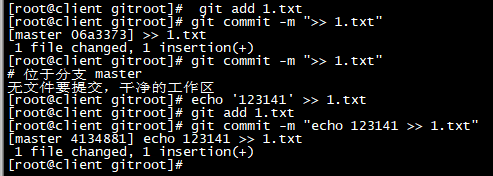
[root@client gitroot]#  git add 1.txt
[root@client gitroot]# git commit -m ">> 1.txt"
[master 06a3373] >> 1.txt
 1 file changed, 1 insertion(+)
[root@client gitroot]# git commit -m ">> 1.txt"
# 位于分支 master
无文件要提交,干净的工作区
[root@client gitroot]# echo '123141' >> 1.txt
[root@client gitroot]# git add 1.txt
[root@client gitroot]# git commit -m "echo 123141 >> 1.txt"
[master 4134881] echo 123141 >> 1.txt
 1 file changed, 1 insertion(+)
[root@client gitroot]#
查看日志
[root@client gitroot]# git log
commit 413488157fa9b5b671abbfa5a87d892382bdeafb
Author: yx <example@qq.com>
Date:   Thu Aug 26 12:32:03 2021 +0800

    echo 123141 >> 1.txt

commit 06a3373f61944bdf46ff9f70d1d7cc4e35b24d34
Author: yx <example@qq.com>
Date:   Thu Aug 26 12:31:15 2021 +0800

    >> 1.txt

commit 540e7086b6843855bb5cb18f08d23d0b2ba5ddf1
Author: yx <example@qq.com>
Date:   Thu Aug 26 12:28:21 2021 +0800

    add new file 1.txt

日志一行显示
[root@client gitroot]# git log --pretty=oneline
413488157fa9b5b671abbfa5a87d892382bdeafb echo 123141 >> 1.txt
06a3373f61944bdf46ff9f70d1d7cc4e35b24d34 >> 1.txt
540e7086b6843855bb5cb18f08d23d0b2ba5ddf1 add new file 1.txt
[root@client gitroot]#

版本回退
[root@client gitroot]# git reset --hard 540e7086b6
HEAD 现在位于 540e708 add new file 1.txt
[root@client gitroot]# cat 1.txt
hello  word

撤销修改
[root@client gitroot]# rm -rf 1.txt
[root@client gitroot]# git checkout -- 1.txt
[root@client gitroot]# ls
1.txt
[root@client gitroot]# cat 1.txt
hello  word
[root@client gitroot]#

如果1.txt文件修改,add后但没有commit,再想回退到上一次提交的状态,#可以使用git reset HEAD 1.txt,再执行git checkout — 1.txt。
[root@client gitroot]# echo "1231224" >> 1.txt
[root@client gitroot]# git add 1.txt
[root@client gitroot]# git reset HEAD 1.txt
重置后撤出暂存区的变更:
M       1.txt
[root@client gitroot]# cat 1.txt
hello  word
1231224
[root@client gitroot]# git chexkout -- 1.txt
[root@client gitroot]# cat 1.txt
hello  word
[root@client gitroot]#

查看所有历史版本
[root@client gitroot]# git reflog
540e708 HEAD@{0}: reset: moving to 540e7086b6
4134881 HEAD@{1}: commit: echo 123141 >> 1.txt
06a3373 HEAD@{2}: commit: >> 1.txt
540e708 HEAD@{3}: commit (initial): add new file 1.txt
[root@client gitroot]#

删除文件
[root@client gitroot]# echo -e "11111\n2222222222" > 2.txt
[root@client gitroot]# git add 2.txt
[root@client gitroot]# git commit -m 'add 2.txt'
[master 24bb20c] add 2.txt
 1 file changed, 2 insertions(+)
 create mode 100644 2.txt
[root@client gitroot]#  git rm 2.txt
rm '2.txt'
[root@client gitroot]# git commit -m 'rm  2.txt'
[master 257c194] rm  2.txt
 1 file changed, 2 deletions(-)
 delete mode 100644 2.txt
 [root@client gitroot]# ls
1.txt

三、gitee
3.1添加公钥
先搜索gitee,注册
然后点击设置,选择ssh,把虚拟机的公钥复制上去
虚拟机的公钥
[root@client gitroot]# ssh-keygen
Generating public/private rsa key pair.
Enter file in which to save the key (/root/.ssh/id_rsa):
/root/.ssh/id_rsa already exists.
Overwrite (y/n)? y
Enter passphrase (empty for no passphrase):
Enter same passphrase again:
Your identification has been saved in /root/.ssh/id_rsa.
Your public key has been saved in /root/.ssh/id_rsa.pub.
The key fingerprint is:
SHA256:3gxJZHZJWn1t5mgaaF3lBvGFwwsoWEBX/9Pnqv5r/4s root@client
The key's randomart image is:
+---[RSA 2048]----+
|     .o+*o=+ .o=o|
|      .=.+o.o *+=|
|        o. o.+ B+|
|       . .o o.+o.|
|        S.   +o o|
|       . +  .  o.|
|        . o     .|
|              o. |
|           .oE++=|
+----[SHA256]-----+
anaconda-ks.cfg  myproject
[root@client ~]# cd .ssh
[root@client .ssh]# ls
id_rsa  id_rsa.pub
[root@client .ssh]# cat id_rsa.pub
ssh-rsa AAAAB3NzaC1yc2EAAAADAQABAAABAQC6lu+Cucod5E/C+HzmG/3wOLjjW6ggrwDRoiG1eMNCbAIGqW2YJnZQkRekCvJTz6wqthwn+s3KgNRie5N3PL8z0fn+gPCBoLVyHhhvvWGBPKGOkiVtXmBags9QaFLFej8IEyghZyC7iqcyxvH12844oYiXo4UemPmIBimjkEJX0b+FqT2vNK+8vzYsJ3ZYfrSFCqitk3gmodqs4Iiw3+Ap0VIjnpd87FOexvyzHLSVgxaILlz2wIbh+/8unW3p1TuXudNuBVadOmmwpRhE6PD4TNxheLewXb0pRLYvCJF/bxu+YShu4pxvFfWET+5Tph/A3SCgrPbeylV71DXKfy1B root@client
[root@client .ssh]#


3.2创建仓库


3.3连接远程仓库
[root@client gitroot]# git remote add origin https://gitee.com/yan-xu12312345/yx1.git
[root@client gitroot]# ls
1.txt
[root@client gitroot]# git push -u origin master
Username for 'https://gitee.com': 15947285046
Password for 'https://15947285046@gitee.com':
Counting objects: 7, done.
Compressing objects: 100% (4/4), done.
Writing objects: 100% (7/7), 527 bytes | 0 bytes/s, done.
Total 7 (delta 1), reused 0 (delta 0)
remote: Powered by GITEE.COM [GNK-6.0]
To https://gitee.com/yan-xu12312345/yx1.git
 * [new branch]      master -> master
分支 master 设置为跟踪来自 origin 的远程分支 master。

3.4克隆远程仓库
从这里找仓库链接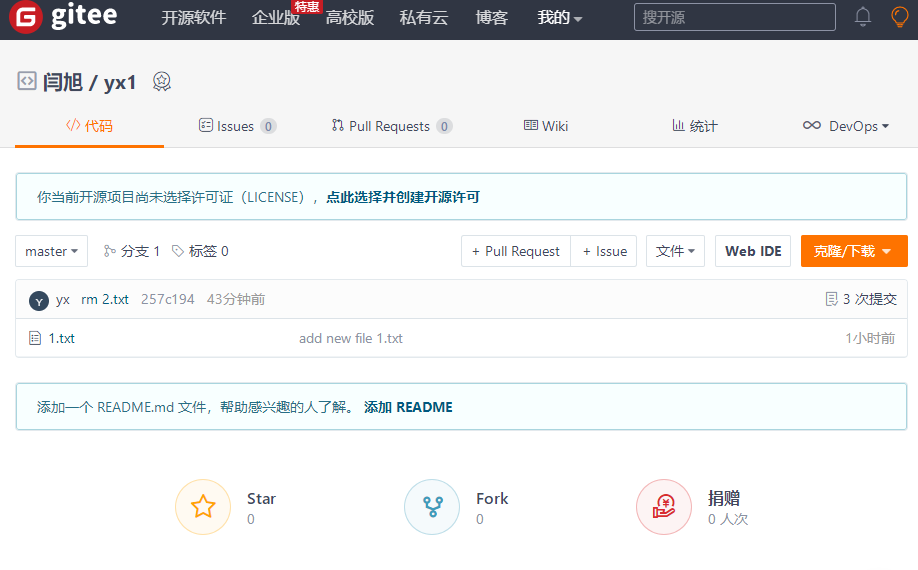
[root@client gitroot]# cd /opt/
[root@client opt]# git clone https://gitee.com/yan-xu12312345/yx1.git
正克隆到 'yx1'...
remote: Enumerating objects: 7, done.
remote: Counting objects: 100% (7/7), done.
remote: Compressing objects: 100% (4/4), done.
remote: Total 7 (delta 1), reused 0 (delta 0), pack-reused 0
Unpacking objects: 100% (7/7), done.
[root@client opt]# ls
myproject  yx1
[root@client opt]# cd yx1
[root@client yx1]# ls -a
.  ..  1.txt  .git
[root@client yx1]#
3.5推送远程服务端
[root@client yx1]# cd /data/gitroot/
[root@client gitroot]# ls
1.txt
[root@client gitroot]# echo "1231224" >> 2.sh
[root@client gitroot]# git add 2.sh
[root@client gitroot]# git commit -m "add 2.sh"
[master 096c24a] add 2.sh
 1 file changed, 1 insertion(+)
 create mode 100644 2.sh
[root@client gitroot]# git push
warning: push.default 未设置,它的默认值将会在 Git 2.0 由 'matching'
修改为 'simple'。若要不再显示本信息并在其默认值改变后维持当前使用习惯,
进行如下设置:

  git config --global push.default matching

若要不再显示本信息并从现在开始采用新的使用习惯,设置:

  git config --global push.default simple

参见 'git help config' 并查找 'push.default' 以获取更多信息。
('simple' 模式由 Git 1.7.11 版本引入。如果您有时要使用老版本的 Git,
为保持兼容,请用 'current' 代替 'simple' 模式)

Username for 'https://gitee.com': 15947285046
Password for 'https://15947285046@gitee.com':
Counting objects: 4, done.
Compressing objects: 100% (2/2), done.
Writing objects: 100% (3/3), 264 bytes | 0 bytes/s, done.
Total 3 (delta 0), reused 0 (delta 0)
remote: Powered by GITEE.COM [GNK-6.0]
To https://gitee.com/yan-xu12312345/yx1.git
   257c194..096c24a  master -> master
[root@client gitroot]#

Git 分支
几乎所有的版本控制系统都以某种形式支持分支。 使用分支意味着你可以把你的工作从开发主线上分离开来,以免影响开发主线。 在很多版本控制系统中,这是一个略微低效的过程——常常需要完全创建一个源代码目录的副本。对于大项目来说,这样的过程会耗费很多时间。
有人把 Git 的分支模型称为它的“必杀技特性”,也正因为这一特性,使得 Git 从众多版本控制系统中脱颖而出。 为何 Git 的分支模型如此出众呢? Git 处理分支的方式可谓是难以置信的轻量,创建新分支这一操作几乎能在瞬间完成,并且在不同分支之间的切换操作也是一样便捷。 与许多其它版本控制系统不同,Git 鼓励在工作流程中频繁地使用分支与合并,哪怕一天之内进行许多次。 理解和精通这一特性,你便会意识到 Git 是如此的强大而又独特,并且从此真正改变你的开发方式。
1.分支创建切换
查看项目
[root@client gitroot]# ls
1.txt  2.sh
[root@client gitroot]# ls -a
.  ..  1.txt  2.sh  .git
[root@client gitroot]#
查看所有分支
[root@client gitroot]# git branch
* master
[root@client gitroot]#
创建分支
[root@client gitroot]# git branch yx
查看分支
[root@client gitroot]# git branch
* master
  yx
切换分支
[root@client gitroot]# git checkout yx
切换到分支 'yx'
在新分支下创建一个文件,提交
[root@client gitroot]# echo "12141" > 123.txt
[root@client gitroot]# git add 123.txt
[root@client gitroot]# git commit -m "add 123.txt"
[yx b529001] add 123.txt
 1 file changed, 1 insertion(+)
 create mode 100644 123.txt
[root@client gitroot]# ls
123.txt  1.txt  2.sh
切换回其他分支发现并没有新文件
[root@client gitroot]# git checkout master
切换到分支 'master'
[root@client gitroot]# ls
1.txt  2.sh
[root@client gitroot]#
2.分支的合并
如果master分支和lsk分支都对2.txt进行了编辑,当合并时会提示冲突,需先解决冲突才可以继续合并。
解决冲突的方法是在master分支下,编辑2.txt,改为lsk分支里面2.txt的内容。然后提交2.txt,再合并lsk分支。
但是这样有一个问题,万一master分支更改的内容是我们想要的呢?此时可以编辑2.txt内容,改为想要的,然后提交。切换到lsk分支,然后合并master分支到lsk分支即可(倒着合并)。
合并分支有一个原则,那就是要把最新的分支合并到旧的分支。也就是说merge后面跟的分支名字一定是最新的分支。
[root@client gitroot]# git checkout master
已经位于 'master'
[root@client gitroot]# ls
1.txt  2.sh
[root@client gitroot]# git merge yx
更新 096c24a..b529001
Fast-forward
 123.txt | 1 +
 1 file changed, 1 insertion(+)
 create mode 100644 123.txt
[root@client gitroot]# ls
123.txt  1.txt  2.sh
[root@client gitroot]#
3.分支删除
如果分支没有合并,删除之前会提示,那就不合并,强制删除
[root@client gitroot]# git branch -d yx
已删除分支 yx(曾为 b529001)。
强制删除
[root@client gitroot]# git branch -D yx
4.分支使用原则
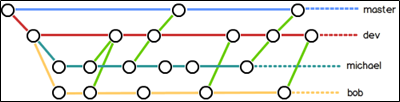
① master分支是非常重要的,线上发布代码用这个分支,平时我们开发代码不要在这个分支上。
②创建一个dev分支,专门用作开发,只有当发布到线上之前,才会把dev分支合并到master。
③开发人员应该在dev的基础上再分支成个人分支,个人分支(在自己PC上)里面开发代码,然后合并到dev分支。
5.远程分支
本地新建的分支如果不推送到远程,对其他人就是不可见的。
查看远程分支命令为git ls-remote origin,可以看到所有分支。
[root@client gitroot]# git ls-remote origin
096c24a46b8a6e700c8e1c707d883f048fa15522        HEAD
096c24a46b8a6e700c8e1c707d883f048fa15522        refs/heads/master
[root@client gitroot]#
对于git push分支分两种情况:
①当本地分支和远程分支一致时
git push会把所有本地分支的变更一同推送到远程,如果想只推送一个分支,使用git push origin branch-name命令。
②当本地分支比远程分支多
默认git push只推送本地和远程一致的分支,想要把多出来的本地分支推送到远程时,使用git push origin branch-name命令如果推送失败,先用git pull抓取远程的新提交。
git clone的时候默认只把master分支克隆下来。如果想把所有分支都克隆下来,需要手动创建,在本地创建和远程分支对应的分支,使用git checkout -b branch-name origin/branch-name命令,需要注意本地和远程分支的名称要一致。
Git标签与别名
1.标签
标签类似于快照功能,可以给版本库打一个标签,记录某个时刻库的状态。也可以随时恢复到该状态
[root@client gitroot]# git tag v1.0
[root@client gitroot]#  git show v1.0
commit b529001f3f469195e067febdf1bb2a6e0ca9d5c5
Author: yx <example@qq.com>
Date:   Thu Aug 26 13:36:09 2021 +0800

    add 123.txt

diff --git a/123.txt b/123.txt
new file mode 100644
index 0000000..ca5cf1c
--- /dev/null
+++ b/123.txt
@@ -0,0 +1 @@
+12141
[root@client gitroot]# gir tag
-bash: gir: 未找到命令
[root@client gitroot]# git tag
v1.0
[root@client gitroot]# git log --pretty=oneline --abbrev-commit
b529001 add 123.txt
096c24a add 2.sh
257c194 rm  2.txt
24bb20c add 2.txt
540e708 add new file 1.txt
[root@client gitroot]#  git tag v0.9 096c24a
[root@client gitroot]# git tag -a v0.8 -m "add tag! " b529001
[root@client gitroot]# git tag
v0.8
v0.9
v1.0
[root@client gitroot]# git tag -d v0.8
已删除 tag 'v0.8'(曾为 d73df08)
[root@client gitroot]# git ta
git:'ta' 不是一个 git 命令。参见 'git --help'。

您指的是这其中的某一个么?
        tag
        mktag
        stage
        stash
        var
[root@client gitroot]# git tag
v0.9
v1.0
[root@client gitroot]# git push origin v1.0
Username for 'https://gitee.com': 15947285046
Password for 'https://15947285046@gitee.com':
fatal: Authentication failed for 'https://gitee.com/yan-xu12312345/yx1.git/'
[root@client gitroot]# git push origin v1.0
Username for 'https://gitee.com': 15947285046
Password for 'https://15947285046@gitee.com':
Counting objects: 4, done.
Compressing objects: 100% (2/2), done.
Writing objects: 100% (3/3), 290 bytes | 0 bytes/s, done.
Total 3 (delta 0), reused 0 (delta 0)
remote: Powered by GITEE.COM [GNK-6.0]
To https://gitee.com/yan-xu12312345/yx1.git
 * [new tag]         v1.0 -> v1.0
[root@client gitroot]# git push --tag origin
Username for 'https://gitee.com': 15947285046
Password for 'https://15947285046@gitee.com':
Total 0 (delta 0), reused 0 (delta 0)
remote: Powered by GITEE.COM [GNK-6.0]
To https://gitee.com/yan-xu12312345/yx1.git
 * [new tag]         v0.9 -> v0.9
[root@client gitroot]# git tag  v1.0 -d
已删除 tag 'v1.0'(曾为 b529001)
[root@client gitroot]# git push origin :refs/tags/v1.0
Username for 'https://gitee.com': 15947285046
Password for 'https://15947285046@gitee.com':
fatal: Authentication failed for 'https://gitee.com/yan-xu12312345/yx1.git/'
[root@client gitroot]# git push origin :refs/tags/v1.0
Username for 'https://gitee.com': 15947285046
Password for 'https://15947285046@gitee.com':
remote: Powered by GITEE.COM [GNK-6.0]
To https://gitee.com/yan-xu12312345/yx1.git
 - [deleted]         v1.0
[root@client gitroot]#
2.Git别名
别名和Linux里的alias类似
设置别名
[root@client gitroot]# git config --global alias.ci commit
[root@client gitroot]# git config --global alias.co  checkout
[root@client gitroot]# git config --global alias.br  branch
[root@client gitroot]# git config --list |grep alias
alias.ci=commit
alias.co=checkout
alias.br=branch
使用别名
[root@client gitroot]# git br
* master
小技巧 设置log
[root@client gitroot]# git config --global alias.lg "log --color --graph --pretty=format:'%Cred%h%Creset -%C(yellow)%d%Creset %s %Cgreen(%cr) %C(bold blue)<%an>%Creset' --abbrev-commit"
查看日志
[root@client gitroot]# git lg
* b529001 - (HEAD, master) add 123.txt (48 分钟之前) <yx>
* 096c24a - (tag: v0.9, origin/master) add 2.sh (53 分钟之前) <yx>
* 257c194 - rm  2.txt (2 小时之前) <yx>
* 24bb20c - add 2.txt (2 小时之前) <yx>
* 540e708 - add new file 1.txt (2 小时之前) <yx>
[root@client gitroot]#
取消别名
[root@client gitroot]# git config --global --unset alias.br

若有收获,就点个赞吧
0 人点赞


