1、准备软件包
| 软件包 | 版本 | 大小 |
|---|---|---|
| lnmp1.7.tar.gz | 1.7 | 165kB |
| wordpress-4.7.3-zh_CN.zip | 4.7.3 | 8995KB |
| CentOS-7-x86_64-DVD-1511.iso | 1511 | 4.03GB |
2、解压lnmp1.7.tar.gz及运行lnmp包
tar -zxf lnmp1.7.tar.gzcd lnmp1.7./install.sh
3、配置mysql
# mysql -uroot -plnmp.org#9926mysql> create database wordpress;Query OK, 1 row affected (0.00 sec)mysql> grant all privileges on *.* to root@localhost identified by '000000' with grant option;Query OK, 0 rows affected (0.00 sec)mysql> grant all privileges on *.* to root@"%" identified by '000000' with grant option;Query OK, 0 rows affected (0.01 sec)mysql> Ctrl-C -- exit!
4、配置WordPress
# 解压wordpress

unzip wordpress-4.7.3-zh_CN.zip

ls

# 删除nginx默认文件

rm -rf /home/wwwroot/default/index.html

# 把wordpress文件 全部复制到nginx的默认目录当中

cp -rvf wordpress/* /home/wwwroot/default/

ls /home/wwwroot/default/

# 赋予777权限

chmod 777 /home/wwwroot/default/*

# 修改wordpress模板

cd /home/wwwroot/default/

ls

cp wp-config-sample.php wp-config.php

vi wp-config.php
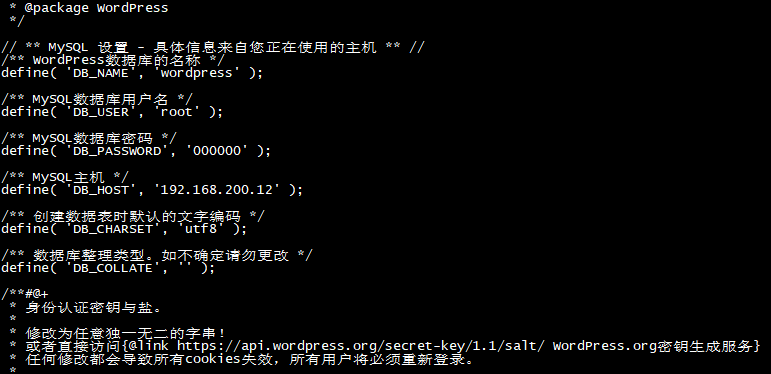
我这里是弄出来网页是报404file not found我在vhost中新建了一个aa.conf 然后再建一个bb目录把vhost中的其他文件移到bb中编辑aa.conf
[root@localhost vhost]# vim bb.conf
server
{
location ~ \.php$ {
    root           /var/www/html;
    fastcgi_pass   127.0.0.1:9000;
    fastcgi_index  index.php;
    fastcgi_param  SCRIPT_FILENAME  $document_root$fastcgi_script_name;
    include        fastcgi_params;
}
}
[root@localhost vhost]# service nginx restart ##重启Nginx
5、验收
在浏览器中输入虚拟机IP地址,进入wordpress安装界面,填写必要信息,单机左下角安装按钮即可。
我这里是忘记截图了直接进去了


若有收获,就点个赞吧
0 人点赞


