一、GitLab权限
Gitlab权限管理
Gitlab用户在组中有五种权限:Guest、Reporter、Developer、Master、Owner
Guest:可以创建issue、发表评论,不能读写版本库
Reporter:可以克隆代码,不能提交,QA、PM可以赋予这个权限
Developer:可以克隆代码、开发、提交、push,RD可以赋予这个权限
Master:可以创建项目、添加tag、保护分支、添加项目成员、编辑项目,核心RD负责人可以赋予这个权限
Owner:可以设置项目访问权限 - Visibility Level、删除项目、迁移项目、管理组成员,开发组leader可以赋予这个权限
Gitlab中的组和项目有三种访问权限:Private、Internal、Public
Private:只有组成员才能看到
Internal:只要登录的用户就能看到
Public:所有人都能看到
| Action | Guest | Reporter | Developer | Maintainer | Owner* |
|---|---|---|---|---|---|
| Download project | ✓ (1) | ✓ | ✓ | ✓ | ✓ |
| Leave comments | ✓ (1) | ✓ | ✓ | ✓ | ✓ |
| View allowed and denied licenses | ✓ (1) | ✓ | ✓ | ✓ | ✓ |
| View License Compliance reports | ✓ (1) | ✓ | ✓ | ✓ | ✓ |
| View Security reports | ✓ (3) | ✓ | ✓ | ✓ | ✓ |
| View Dependency list | ✓ (1) | ✓ | ✓ | ✓ | ✓ |
| View License list | ✓ (1) | ✓ | ✓ | ✓ | ✓ |
| View licenses in Dependency list | ✓ (1) | ✓ | ✓ | ✓ | ✓ |
| View Design Management pages |
✓ | ✓ | ✓ | ✓ | ✓ |
| View project code | ✓ (1) | ✓ | ✓ | ✓ | ✓ |
| Pull project code | ✓ (1) | ✓ | ✓ | ✓ | ✓ |
| View GitLab Pages protected by access control | ✓ | ✓ | ✓ | ✓ | ✓ |
| View wiki pages | ✓ | ✓ | ✓ | ✓ | ✓ |
| See a list of jobs | ✓ (3) | ✓ | ✓ | ✓ | ✓ |
| See a job log | ✓ (3) | ✓ | ✓ | ✓ | ✓ |
| Download and browse job artifacts | ✓ (3) | ✓ | ✓ | ✓ | ✓ |
| Create new issue | ✓ (1) | ✓ | ✓ | ✓ | ✓ |
| See related issues | ✓ | ✓ | ✓ | ✓ | ✓ |
| Create confidential issue | ✓ (1) | ✓ | ✓ | ✓ | ✓ |
| View confidential issues | (2) | ✓ | ✓ | ✓ | ✓ |
| View Releases | ✓ (6) | ✓ | ✓ | ✓ | ✓ |
| View requirements | ✓ | ✓ | ✓ | ✓ | ✓ |
| Manage user-starred metrics dashboards (7) | ✓ | ✓ | ✓ | ✓ | ✓ |
| Assign issues | ✓ | ✓ | ✓ | ✓ | |
| Label issues | ✓ | ✓ | ✓ | ✓ | |
| Set issue weight | ✓ | ✓ | ✓ | ✓ | |
| Lock issue threads | ✓ | ✓ | ✓ | ✓ | |
| Manage issue tracker | ✓ | ✓ | ✓ | ✓ | |
| Manage related issues | ✓ | ✓ | ✓ | ✓ | |
| Manage labels | ✓ | ✓ | ✓ | ✓ | |
| Create code snippets | ✓ | ✓ | ✓ | ✓ | |
| See a commit status | ✓ | ✓ | ✓ | ✓ | |
| See a container registry | ✓ | ✓ | ✓ | ✓ | |
| See environments | ✓ | ✓ | ✓ | ✓ | |
| See a list of merge requests | ✓ | ✓ | ✓ | ✓ | |
| View project statistics | ✓ | ✓ | ✓ | ||
| View Error Tracking list | ✓ | ✓ | ✓ | ✓ | |
| Create new merge request | ✓ | ✓ | ✓ | ✓ | |
| View metrics dashboard annotations | ✓ | ✓ | ✓ | ✓ | |
| Create/edit requirements | ✓ | ✓ | ✓ | ✓ | |
| Pull packages | ✓ | ✓ | ✓ | ✓ | |
| Publish packages | ✓ | ✓ | ✓ | ||
| Create/edit/delete a Cleanup policy | ✓ | ✓ | ✓ | ||
| Upload Design Management files |
✓ | ✓ | ✓ | ||
| Create/edit/delete Releases | ✓ | ✓ | ✓ | ||
| Create new branches | ✓ | ✓ | ✓ | ||
| Push to non-protected branches | ✓ | ✓ | ✓ | ||
| Force push to non-protected branches | ✓ | ✓ | ✓ | ||
| Remove non-protected branches | ✓ | ✓ | ✓ | ||
| Assign merge requests | ✓ | ✓ | ✓ | ||
| Label merge requests | ✓ | ✓ | ✓ | ||
| Lock merge request threads | ✓ | ✓ | ✓ | ||
| Approve merge requests (9) | ✓ | ✓ | ✓ | ||
| Manage/Accept merge requests | ✓ | ✓ | ✓ | ||
| Create new environments | ✓ | ✓ | ✓ | ||
| Stop environments | ✓ | ✓ | ✓ | ||
| Enable Review Apps | ✓ | ✓ | ✓ | ||
| Add tags | ✓ | ✓ | ✓ | ||
| Cancel and retry jobs | ✓ | ✓ | ✓ | ||
| Create or update commit status | ✓ (5) | ✓ | ✓ | ||
| Update a container registry | ✓ | ✓ | ✓ | ||
| Remove a container registry image | ✓ | ✓ | ✓ | ||
| Create/edit/delete project milestones | ✓ | ✓ | ✓ | ||
| Use security dashboard | ✓ | ✓ | ✓ | ||
| View vulnerability findings in Dependency list | ✓ | ✓ | ✓ | ||
| Create issue from vulnerability finding | ✓ | ✓ | ✓ | ||
| Dismiss vulnerability finding | ✓ | ✓ | ✓ | ||
| View vulnerability | ✓ | ✓ | ✓ | ||
| Create vulnerability from vulnerability finding | ✓ | ✓ | ✓ | ||
| Resolve vulnerability | ✓ | ✓ | ✓ | ||
| Dismiss vulnerability | ✓ | ✓ | ✓ | ||
| Apply code change suggestions | ✓ | ✓ | ✓ | ||
| Create and edit wiki pages | ✓ | ✓ | ✓ | ||
| Rewrite/remove Git tags | ✓ | ✓ | ✓ | ||
| Manage Feature Flags | ✓ | ✓ | ✓ | ||
| Create/edit/delete metrics dashboard annotations | ✓ | ✓ | ✓ | ||
| Run CI/CD pipeline against a protected branch | ✓ (5) | ✓ | ✓ | ||
| Use environment terminals | ✓ | ✓ | |||
| Run Web IDE’s Interactive Web Terminals | ✓ | ✓ | |||
| Add new team members | ✓ | ✓ | |||
| Enable/disable branch protection | ✓ | ✓ | |||
| Push to protected branches | ✓ | ✓ | |||
| Turn on/off protected branch push for devs | ✓ | ✓ | |||
| Enable/disable tag protections | ✓ | ✓ | |||
| Edit project settings | ✓ | ✓ | |||
| Edit project badges | ✓ | ✓ | |||
| Share (invite) projects with groups | ✓ (8) | ✓ (8) | |||
| Add deploy keys to project | ✓ | ✓ | |||
| Configure project hooks | ✓ | ✓ | |||
| Manage Runners | ✓ | ✓ | |||
| Manage job triggers | ✓ | ✓ | |||
| Manage CI/CD variables | ✓ | ✓ | |||
| Manage GitLab Pages | ✓ | ✓ | |||
| Manage GitLab Pages domains and certificates | ✓ | ✓ | |||
| Remove GitLab Pages | ✓ | ✓ | |||
| Manage clusters | ✓ | ✓ | |||
| Manage Project Operations | ✓ | ✓ | |||
| View Pods logs | ✓ | ✓ | |||
| Read Terraform state | ✓ | ✓ | ✓ | ||
| Manage Terraform state | ✓ | ✓ | |||
| Manage license policy | ✓ | ✓ | |||
| Edit comments (posted by any user) | ✓ | ✓ | |||
| Manage Error Tracking | ✓ | ✓ | |||
| Delete wiki pages | ✓ | ✓ | |||
| View project Audit Events | ✓ | ✓ | |||
| Manage push rules | ✓ | ✓ | |||
| Manage project access tokens |
✓ | ✓ | |||
| Switch visibility level | ✓ | ||||
| Transfer project to another namespace | ✓ | ||||
| Rename project | ✓ | ||||
| Remove fork relationship | ✓ | ||||
| Remove project | ✓ | ||||
| Archive project | ✓ | ||||
| Delete issues | ✓ | ||||
| Delete pipelines | ✓ | ||||
| Delete merge request | ✓ | ||||
| Disable notification emails | ✓ | ||||
| Force push to protected branches (4) | |||||
| Remove protected branches (4) | |||||
| View CI\CD analytics | ✓ | ✓ | ✓ | ✓ | |
| View Code Review analytics | ✓ | ✓ | ✓ | ✓ | |
| View Insights | ✓ | ✓ | ✓ | ✓ | ✓ |
| View Issues analytics | ✓ | ✓ | ✓ | ✓ | ✓ |
| View Repository analytics | ✓ | ✓ | ✓ | ✓ | |
| View Value Stream analytics | ✓ | ✓ | ✓ | ✓ | ✓ |
官方地址:https://docs.gitlab.com/ee/user/permissions.html
二、Git拉取GitLab项目
生产秘钥:
Generate a new ED25519 SSH key pair:ssh-keygen -t ed25519 -C
RSA:ssh-keygen -t rsa -b 4096
找到公钥: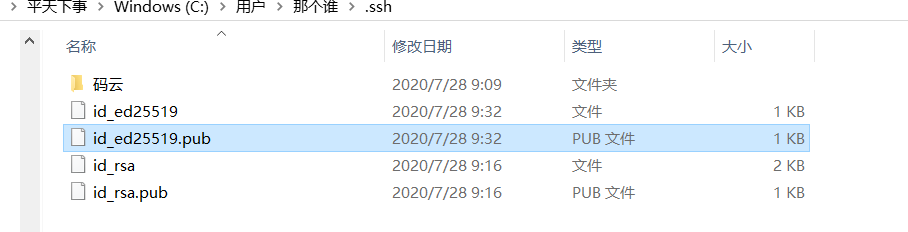
在GitLab上添加公钥
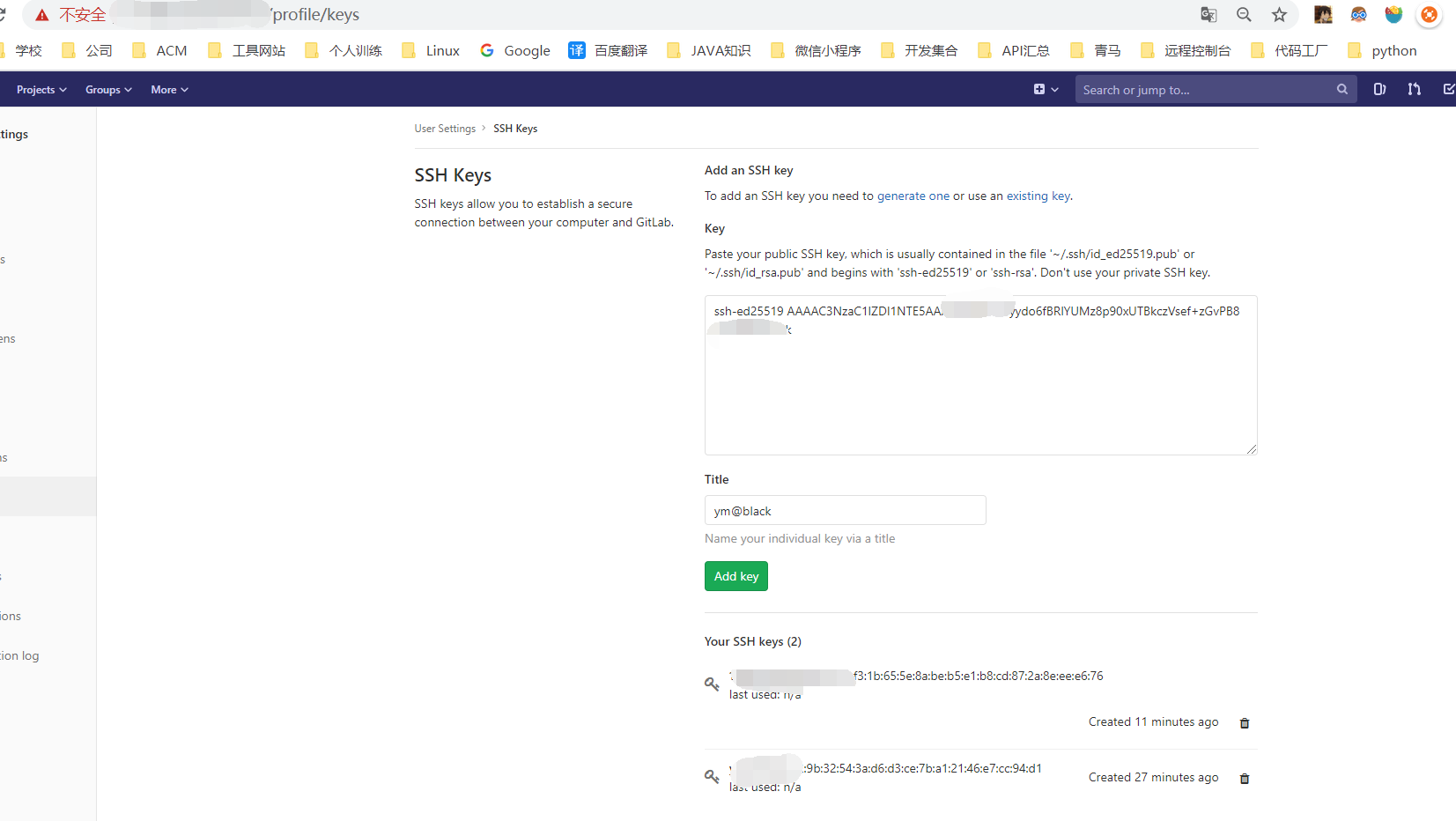
复制SSH
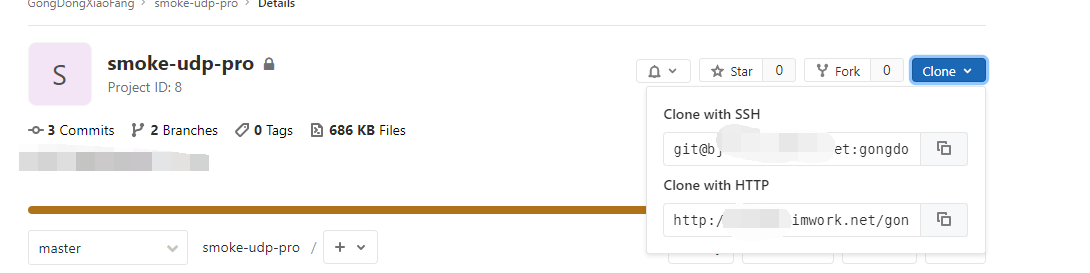
然后发现报错
Cloning into '***'...ssh: connect to host bjxwyl.imwork.net port 22: Connection refusedfatal: Could not read from remote repository.Please make sure you have the correct access rightsand the repository exists.
测试是不是加密?( 不是)是不是我权限问题?(我至少拥有拉取代码的权限,因为我都能下载)
最后怀疑是不是端口的问题,参考下面博客https://www.cnblogs.com/sxdcgaq8080/p/10509660.html
复制SSH,添加端口9000,
git@***:***/***.git
ssh: connect to host ***.***.***.* port 22: Connection refused
fatal: Could not read from remote repository.

Please make sure you have the correct access rights
and the repository exists.
测试域名是否能正常Ping(就是估算GitLab的地址和下载的地址是否相同)
能ping通,但是看IP好像不是同一个?头大
复制Http下载,修改域名为GitLab的地址
git clone http://**.**.**.**:9000/**/***.git
提示出入用户名、密码。正常输入,clone成功!<br />既然发现是地址的问题,我们再测试下使用ssh拉取<br />发现直接让输入密码:<br /><br />测试SSH免密登录
ssh -T git@**.**.**.**
git@**.**.**.**'s password:
百度查询无果,需要重启远程仓库的gitlab服务? 告辞…..
三、IDEA拉取
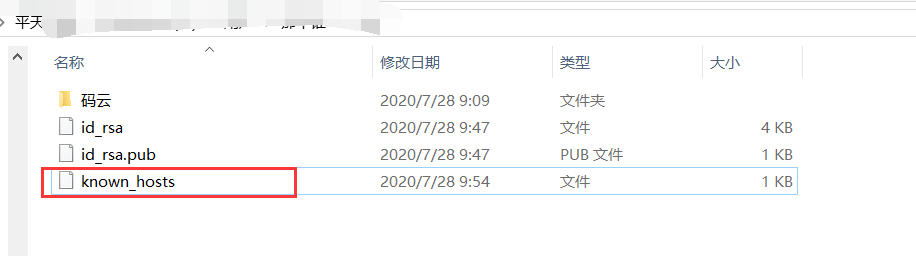
同样,使用http拉取,地址不变,输入用户名、密码
四、IDEA 添加分支
1、Git
左下角点击newBranch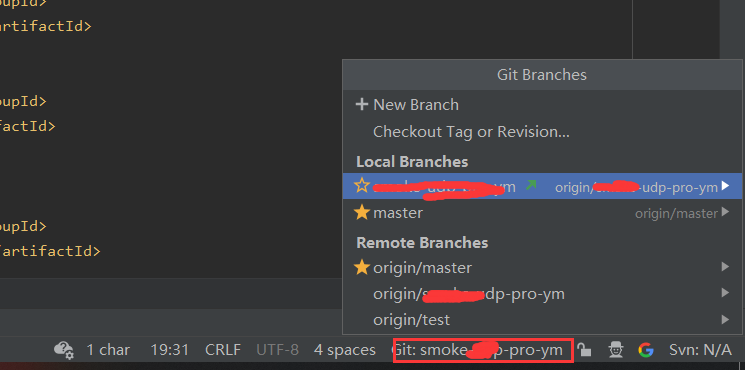
点击推送,新建分支
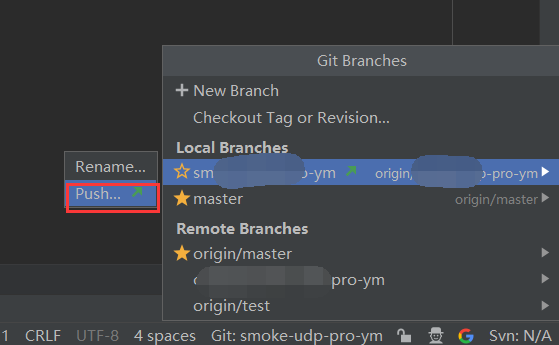
ctrl+K PUSH 到分支
check out:
2、 SVN
分支:https://blog.csdn.net/bigcharsen/article/details/82230249

若有收获,就点个赞吧
0 人点赞


