一、NIO
位置:rt.jar.nio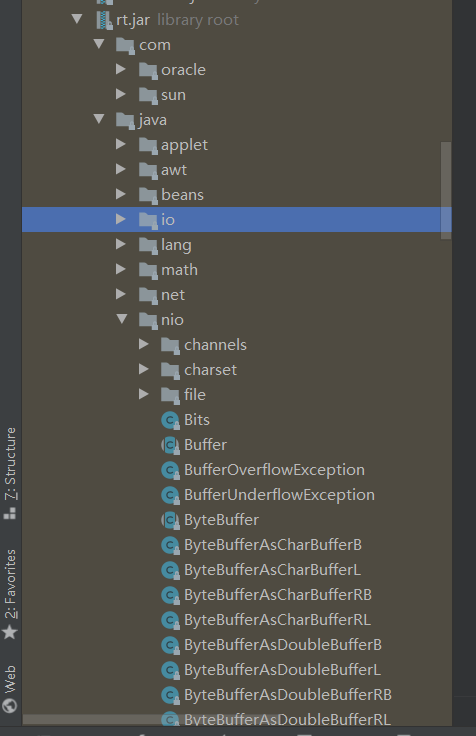
1.1 Buffer
缓存,线程不安全 多线程记得加锁(尽量使用轻量级的锁)
三个重要的标记:
- mark:当前读的位置
- position:目前写给外部的位置
- limit:限制
```java
/*
A buffer’s position is the index of the next element to be
- read or written. A buffer’s position is never negative and is never
- greater than its limit. *
A buffer’s capacity is the number of elements it contains. The
- capacity of a buffer is never negative and never changes. *
A buffer’s limit is the index of the first element that should
- not be read or written. A buffer’s limit is never negative and is never
- greater than its capacity. */
比较常用的方法:<br />clear()<br />让Buffer为下一个通道做好准备,清空postion 为0:```java<li><p> {@link #clear} makes a buffer ready for a new sequence of* channel-read or relative <i>put</i> operations: It sets the limit to the* capacity and the position to zero. </p></li>** <li><p> {@link #flip} makes a buffer ready for a new sequence of* channel-write or relative <i>get</i> operations: It sets the limit to the* current position and then sets the position to zero. </p></li>** <li><p> {@link #rewind} makes a buffer ready for re-reading the data that* it already contains: It leaves the limit unchanged and sets the position* to zero. </p></li>
flip()
让buffer写就绪,设置当前limit到当前的位置,设置posttion到0;
rewind()
重新读已经包含的数据,保持limit不变,设置position为0;
1.2 ByteBuffer
extends Buffer(继承的是Heap-X-Buffer),也是线程不安全
put(byte): 读写单个字节
get(byte[]): 将连续字节传输到数组汇中
put(byte[]): 读取到该buffer中
flip():翻转缓存区?
/**
     * Flips this buffer.  The limit is set to the current position and then
     * the position is set to zero.  If the mark is defined then it is
     * discarded.
     *
     * <p> After a sequence of channel-read or <i>put</i> operations, invoke
     * this method to prepare for a sequence of channel-write or relative
     * <i>get</i> operations.  For example:
     *
     * <blockquote><pre>
     * buf.put(magic);    // Prepend header
     * in.read(buf);      // Read data into rest of buffer
     * buf.flip();        // Flip buffer
     * out.write(buf);    // Write header + data to channel</pre></blockquote>
     *
     * <p> This method is often used in conjunction with the {@link
     * java.nio.ByteBuffer#compact compact} method when transferring data from
     * one place to another.  </p>
     *
     * @return  This buffer
     */
    public final Buffer flip() {
        limit = position;
        position = 0;
        mark = -1;
        return this;
    }
static allocate(int capacity)): 直接分配一个新的缓冲区
 /**
     * Allocates a new byte buffer.
     *
     * <p> The new buffer's position will be zero, its limit will be its
     * capacity, its mark will be undefined, and each of its elements will be
     * initialized to zero.  It will have a {@link #array backing array},
     * and its {@link #arrayOffset array offset} will be zero.
     *
     * @param  capacity
     *         The new buffer's capacity, in bytes
     *
     * @return  The new byte buffer
     *
     * @throws  IllegalArgumentException
     *          If the <tt>capacity</tt> is a negative integer
     */
    public static ByteBuffer allocate(int capacity) {
        if (capacity < 0)
            throw new IllegalArgumentException();
        return new HeapByteBuffer(capacity, capacity);
    }
public static ByteBuffer wrap(byte[] array):把array封装成ByteBuffer,给其他方法使用
1.3、SocketChannel
//打开一个套接字并连接到远程主机
public static SocketChannel open(SocketAddress remote)
        throws IOException
    {
    SocketChannel sc = open();
        try {
            sc.connect(remote);
        } catch (Throwable x) {
            try {
                sc.close();
            } catch (Throwable suppressed) {
                x.addSuppressed(suppressed);
            }
            throw x;
        }
        assert sc.isConnected();
        return sc;
    }
读:
/**
     * @throws  NotYetConnectedException
     *          If this channel is not yet connected
     */
    public abstract int read(ByteBuffer dst) throws IOException;
//其他
/**
     * @throws  NotYetConnectedException
     *          If this channel is not yet connected
     */

public abstract long read(ByteBuffer[] dsts, int offset, int length)
        throws IOException;
/**
     * @throws  NotYetConnectedException
     *          If this channel is not yet connected
     */
read的返回情况:
当socketChannel为阻塞方式时(默认就是阻塞方式)read函数,不会返回0,阻塞方式的socketChannel,若没有数据可读,或者缓冲区满了,就会阻塞,直到满足读的条件,所以一般阻塞方式的read是比较简单的,不过阻塞方式的socketChannel的问题也是显而易见的。这里我结合基于NIO 写ftp服务器调试过程中碰到的问题,总结一下非阻塞场景下的read碰到的问题。注意:这里的场景都是基于客户端以阻塞socket的方式发送数据。
1、read什么时候返回-1
read返回-1说明**客户端的数据发送完毕,并且主动的close socket**。所以在这种场景下,(服务器程序)你需要关闭socketChannel并且取消key,最好是退出当前函数。注意,这个时候服务端要是继续使用该socketChannel进行读操作的话,就会抛出“**远程主机强迫关闭一个现有的连接**”的IO异常。
2、read什么时候返回0
其实read返回0有3种情况,一是某一时刻socketChannel中当前(注意是当前)没有数据可以读,这时会返回0,其次是bytebuffer的position等于limit了,即bytebuffer的remaining等于0,这个时候也会返回0,最后一种情况就是客户端的数据发送完毕了(注意看后面的程序里有这样子的代码),这个时候客户端想获取服务端的反馈调用了recv函数,若服务端继续read,这个时候就会返回0。
总结:当客户端发送的是文件,而且大小未知的情况,服务端如何判断对方已经发送完毕。如单纯的判断是否等于0,可能会导致客户端发送的数据不完整。
注意:这里有一个问题就是通过这种while循环读取的方式,实际上它只有一次NIO事件通知,而且在这个处理过程中,其他事件就得不到及时处理,除非while结束。
// 用来设置字符集
Charset DEFAULT_CHARSET = Charset.forName("UTF-8");
public static String read(SocketChannel client, Charset charset) throws IOException {
        StringBuffer buffer = new StringBuffer();
        String receiveText = null;
        //分配大小
        ByteBuffer byteBuffer = ByteBuffer.allocate(1024);
        while(true) {
            byteBuffer.clear();
            int count = client.read(byteBuffer);
            if (count <= 0) {
                return buffer.toString();
            }

            byteBuffer.flip();
            //解码buffer并转化成char形
            receiveText = new String(charset.decode(byteBuffer).array());
            buffer.append(receiveText);
        }
    }
写:
public abstract int write(ByteBuffer src) throws IOException;
public static void write(SocketChannel client, Charset charset, String sendData) throws IOException {
        ByteBuffer writeBuffer = ByteBuffer.wrap(sendData.getBytes(charset));
        client.write(writeBuffer);
    }
非阻塞并且保证线程安全的队列:ConcurrentLinkedQueue
1.3 Selector
多路复用,用来管理多个channels
- 创建
通过调用Selector.open()方法创建一个Selector对象,如下:
Selector selector = Selector.open();
- 注册Channel 到Selector
Channel必须是非阻塞的(FileChannel 不适用)
register() 方法的第二个参数。这是一个“ interest集合 ”,意思是在通过Selector监听Channel时对什么事件感兴趣。可以监听四种不同类型的事件:
- Connect 连接就绪 SelectionKey.OP_CONNECT
- Accept 接收就绪 SelectionKey.OP_ACCEPT
- Read 读就绪 SelectionKey.OP_READ
- Write 写就绪 SelectionKey.OP_WRITE
- 多个使用 | 分割
channel.configureBlocking(false);
SelectionKey key = channel.register(selector, Selectionkey.OP_READ);
- SelectionKeys
返回的是一个Set集合
Set
- SelectionKey
一个SelectionKey键表示了一个特定的通道对象和一个特定的选择器对象之间的注册关系。
key.attachment(); //返回SelectionKey的attachment,attachment可以在注册channel的时候指定。
key.channel(); // 返回该SelectionKey对应的channel。
key.selector(); // 返回该SelectionKey对应的Selector。
key.interestOps(); //返回代表需要Selector监控的IO操作的bit mask
key.readyOps(); // 返回一个bit mask,代表在相应channel上可以进行的IO操作。
- key.readyOps()
ready 集合是通道已经准备就绪的操作的集合。JAVA中定义以下几个方法用来检查这些操作是否就绪.
//创建ready集合的方法
int readySet = selectionKey.readyOps();
//检查这些操作是否就绪的方法
key.isAcceptable();//是否可读,是返回 true
boolean isWritable()://是否可写,是返回 true
boolean isConnectable()://是否可连接,是返回 true
boolean isAcceptable()://是否可接收,是返回 true
key.isReadable() ; //是否可读,是返回true
从SelectionKey 访问Channel 和selector:
Channel channel = key.channel();
Selector selector = key.selector();
key.attachment();
可以将一个对象或者更多信息附着到SelectionKey上,这样就能方便的识别某个给定的通道。例如,可以附加 与通道一起使用的Buffer,或是包含聚集数据的某个对象。使用方法如下:
key.attach(theObject);
Object attachedObj = key.attachment();
还可以在用register()方法向Selector注册Channel的时候附加对象。如:
SelectionKey key = channel.register(selector, SelectionKey.OP_READ, theObject);
从Selector中选择channel
- 已注册的键的集合(Registered key set)
所有与选择器关联的通道所生成的键的集合称为已经注册的键的集合。并不是所有注册过的键都仍然有效。这个集合通过 keys() 方法返回,并且可能是空的。这个已注册的键的集合不是可以直接修改的;试图这么做的话将引发java.lang.UnsupportedOperationException。 - 已选择的键的集合(Selected key set)
所有与选择器关联的通道所生成的键的集合称为已经注册的键的集合。并不是所有注册过的键都仍然有效。这个集合通过 keys() 方法返回,并且可能是空的。这个已注册的键的集合不是可以直接修改的;试图这么做的话将引发java.lang.UnsupportedOperationException。 - 已取消的键的集合(Cancelled key set)
已注册的键的集合的子集,这个集合包含了 cancel() 方法被调用过的键(这个键已经被无效化),但它们还没有被注销。这个集合是选择器对象的私有成员,因而无法直接访问。
- 已注册的键的集合(Registered key set)
select()
通过Selector的select()方法可以选择已经准备就绪的通道 (这些通道包含你感兴趣的的事件)。比如你对读就绪的通道感兴趣,那么select()方法就会返回读事件已经就绪的那些通道。下面是Selector几个重载的select()方法:
- int select():阻塞到至少有一个通道在你注册的事件上就绪了。
- int select(long timeout):和select()一样,但最长阻塞时间为timeout毫秒。
- int selectNow():非阻塞,只要有通道就绪就立刻返回。
一旦调用select()方法,并且返回值不为0时,则 可以通过调用Selector的selectedKeys()方法来访问已选择键集合 。如下:
Set selectedKeys=selector.selectedKeys();
进而可以放到和某SelectionKey关联的Selector和Channel
总的来说:
- 首先创建ServerSocketChannel ,设置地址、端口,是否阻塞型
- 创建Selector,把ServerSocketChannel注册到Selector,创建处理器
- 等待selector的通知
- 判断各种类型,相应进行处理
简单的Demo
import java.io.IOException;
import java.net.InetSocketAddress;
import java.nio.channels.SelectionKey;
import java.nio.channels.Selector;
import java.nio.channels.ServerSocketChannel;

/**
 * @author MT
 * @date 2019-12-10 10:08
 */
public class SocketChannelServer {
    public static void main(String[] args) throws IOException {
        // 创建serversocketchannel 监听8081端口
        ServerSocketChannel socketServer = ServerSocketChannel.open();
        // 通过serverSocket绑定8081端口
        socketServer.socket().bind(new InetSocketAddress(8081));
        //设置为非阻塞
        socketServer.configureBlocking(false);
        Selector selector = Selector.open();
        //Channel注册到selector上,必需在非阻塞模式下
        socketServer.register(selector, SelectionKey.OP_ACCEPT);

        // 创建处理器
        Handler handler = new Handler(1024);

        while (true) {
            if (Util.select(selector)) {
                continue;
            }
            System.out.println("\n处理请求");

            // 网上用的迭代器,这里使用foreach跟迭代器是一样的
            for (SelectionKey key : selector.selectedKeys()) {
                // 如果key是有效的

                // 接收到链接请求超时
                if (key.isValid() && key.isAcceptable()) {
                    handler.handleAccept(key);
                }
                // 读数据
                if (key.isValid() && key.isReadable()) {
                    System.out.println("可读:isReadable");
                    handler.handleRead(key);
                }
                // 写数据
                if (key.isValid() && key.isWritable()) {
                    System.out.println("可写:isWritable");
                    handler.handleWrite(key);
                }
                // 关闭客户端
//                handler.handleClose(key);
                // 移除已读取的key
                selector.selectedKeys().remove(key);
            }
        }
    }
}
客户端:
import com.alibaba.fastjson.JSON;

import java.io.IOException;
import java.net.InetSocketAddress;
import java.nio.ByteBuffer;
import java.nio.channels.SelectionKey;
import java.nio.channels.Selector;
import java.nio.channels.SocketChannel;
import java.nio.charset.Charset;

/**
 * @author MT
 * @date 2019-12-10 10:28
 */
public class SocketChannelClient {
    private Selector selector;
    private SocketChannel socketChannel;

    private ByteBuffer writeBuffer = ByteBuffer.allocate(1024);
    private ByteBuffer readBuffer = ByteBuffer.allocate(1024);

    public SocketChannelClient(String hostname, int port) {
        try {
            // 创建SocketChannel 监听8081端口
            socketChannel = SocketChannel.open();
            // 设置为非阻塞
            socketChannel.configureBlocking(false);
            socketChannel.connect(new InetSocketAddress(hostname, port));

            selector = Selector.open();
            //Channel注册到selector上,必需在非阻塞模式下
            socketChannel.register(selector, SelectionKey.OP_CONNECT);
        } catch (IOException e) {
            e.printStackTrace();
        }
    }

    // 发送消息
    private void sendMsg(String msg) throws IOException {
        // 清空缓冲区
        writeBuffer.clear();
        // 将要发送的消息提交到缓冲区
        writeBuffer.put(msg.getBytes("UTF-8"));
        // 翻转缓冲区:该限制设置为当前位置,然后将该位置设置为零。 如果标记被定义,则它被丢弃。
        //在通道读取或放置操作的序列之后,调用此方法来准备一系列通道写入或相对获取操作
        writeBuffer.flip();
        // 如果还有剩余,一直写入
        while (writeBuffer.hasRemaining()) {
            socketChannel.write(writeBuffer);
        }
        // 清空缓冲区
        writeBuffer.clear();
        // 压缩此缓冲区,以防后续写入数据不完整,从缓冲区写入数据之后调用此方法
        writeBuffer.compact();
    }

    // 接收读取消息
    private void readMsg() throws IOException {
        if (socketChannel.read(readBuffer) == -1) {
            System.out.println("没有返回消息");
            return;
        }
        //改写入为读取
        readBuffer.flip();
        String receivedRequestData = Charset.forName("UTF-8").newDecoder().decode(readBuffer).toString();
        readBuffer.clear();
        Result returnResult = JSON.parseObject(receivedRequestData, Result.class);
        if (returnResult != null) {
            System.out.println(returnResult.toString());
        } else {
            System.out.println("没有返回消息");
        }
    }

    // 关闭socket
    private void close() throws IOException {
        socketChannel.close();
    }

    public static void main(String[] args) throws IOException {
        SocketChannelClient socketChannelClient = new SocketChannelClient("192.168.1.163", 8081);
        // 需要发送的数据
        Result result = Result.getInstance();
        result.setCode(1);
        result.setData("测试");
        result.setSuccess(true);
        result.setMsg("测试JSON连接");

        // 如果连接已完成
        if (socketChannelClient.socketChannel.finishConnect()) {
            int i = 0;
            while(true){

                result.setCode(i);
                // 将对象转为json字符串
                String message = JSON.toJSONString(result);

                socketChannelClient.sendMsg(message);

                try {
                    Thread.sleep(1000);
                } catch (InterruptedException e) {
                    e.printStackTrace();
                }

                socketChannelClient.readMsg();
                i++;
            }
        }
    }
}
util-0.0.1.jartcp-0.0.1.jarcommon-0.0.1.jarbase-0.0.1.jar
上面四个文件仅供个人参考学习。
二、Thread
2.1 关系图
ThreadPoolExecutor 关系图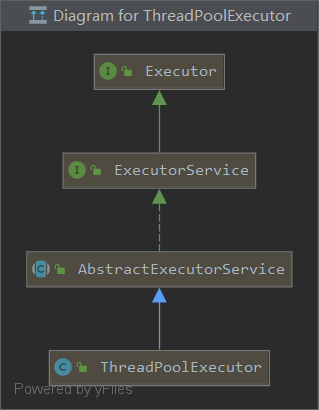
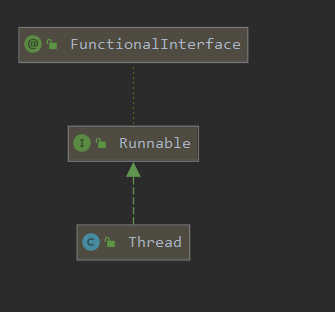
2.2 Executors
直接使用Executors,创建线程池。
- newCachedThreadPool
创建一个可缓存线程池,如果线程池长度超过处理需要,可灵活回收空闲线程,若无可回收,则新建线程。
PS: 最大线程为Integer.MAX_VALUE???
public static ExecutorService newCachedThreadPool() {
        return new ThreadPoolExecutor(0, Integer.MAX_VALUE,
                                      60L, TimeUnit.SECONDS,
                                      new SynchronousQueue<Runnable>());
    }
- newFixedThreadPool
产生固定线程数。
/**
     * Creates a thread pool that reuses a fixed number of threads
     * operating off a shared unbounded queue.  At any point, at most
     * {@code nThreads} threads will be active processing tasks.
     * If additional tasks are submitted when all threads are active,
     * they will wait in the queue until a thread is available.
     * If any thread terminates due to a failure during execution
     * prior to shutdown, a new one will take its place if needed to
     * execute subsequent tasks.  The threads in the pool will exist
     * until it is explicitly {@link ExecutorService#shutdown shutdown}.
     *
     * @param nThreads the number of threads in the pool
     * @return the newly created thread pool
     * @throws IllegalArgumentException if {@code nThreads <= 0}
     */
public static ExecutorService newFixedThreadPool(int nThreads) {
        return new ThreadPoolExecutor(nThreads, nThreads,
                                      0L, TimeUnit.MILLISECONDS,
                                      new LinkedBlockingQueue<Runnable>());
    }
- newScheduledThreadPool
创建一个定长线程池,支持定时及周期性任务执行
 /**
     * Creates a thread pool that can schedule commands to run after a
     * given delay, or to execute periodically.
     * @param corePoolSize the number of threads to keep in the pool,
     * even if they are idle
     * @return a newly created scheduled thread pool
     * @throws IllegalArgumentException if {@code corePoolSize < 0}
     */
    public static ScheduledExecutorService newScheduledThreadPool(int corePoolSize) {
        return new ScheduledThreadPoolExecutor(corePoolSize);
    }
newSingleThreadExecutor
创建一个单线程化的线程池,它只会用唯一的工作线程来执行任务,保证所有任务按照指定顺序(FIFO, LIFO, 优先级)执行。
单个线程执行任务public static ExecutorService newSingleThreadExecutor() { return new FinalizableDelegatedExecutorService (new ThreadPoolExecutor(1, 1, 0L, TimeUnit.MILLISECONDS, new LinkedBlockingQueue<Runnable>())); }2.3 ThreadPoolExecutor
使用ThreadPoolExecutor创建线程池
/**
   * Creates a new {@code ThreadPoolExecutor} with the given initial
   * parameters.
   *
   * @param corePoolSize the number of threads to keep in the pool, even
   *        if they are idle, unless {@code allowCoreThreadTimeOut} is set
   * @param maximumPoolSize the maximum number of threads to allow in the
   *        pool
   * @param keepAliveTime when the number of threads is greater than
   *        the core, this is the maximum time that excess idle threads
   *        will wait for new tasks before terminating.
   * @param unit the time unit for the {@code keepAliveTime} argument
   * @param workQueue the queue to use for holding tasks before they are
   *        executed.  This queue will hold only the {@code Runnable}
   *        tasks submitted by the {@code execute} method.
   * @param threadFactory the factory to use when the executor
   *        creates a new thread
   * @param handler the handler to use when execution is blocked
   *        because the thread bounds and queue capacities are reached
   * @throws IllegalArgumentException if one of the following holds:<br>
   *         {@code corePoolSize < 0}<br>
   *         {@code keepAliveTime < 0}<br>
   *         {@code maximumPoolSize <= 0}<br>
   *         {@code maximumPoolSize < corePoolSize}
   * @throws NullPointerException if {@code workQueue}
   *         or {@code threadFactory} or {@code handler} is null
   */
  public ThreadPoolExecutor(int corePoolSize,
                            int maximumPoolSize,
                            long keepAliveTime,
                            TimeUnit unit,
                            BlockingQueue<Runnable> workQueue,
                            ThreadFactory threadFactory,
                            RejectedExecutionHandler handler) {
      if (corePoolSize < 0 ||
          maximumPoolSize <= 0 ||
          maximumPoolSize < corePoolSize ||
          keepAliveTime < 0)
          throw new IllegalArgumentException();
      if (workQueue == null || threadFactory == null || handler == null)
          throw new NullPointerException();
      this.corePoolSize = corePoolSize;
      this.maximumPoolSize = maximumPoolSize;
      this.workQueue = workQueue;
      this.keepAliveTime = unit.toNanos(keepAliveTime);
      this.threadFactory = threadFactory;
      this.handler = handler;
  }
1、corePoolSize核心线程数大小,当线程数
2、maximumPoolSize 最大线程数, 当线程数 >= corePoolSize的时候,会把runnable放入workQueue中
3、keepAliveTime 保持存活时间,当线程数大于corePoolSize的空闲线程能保持的最大时间。
4、unit 时间单位
5、workQueue 保存任务的阻塞队列
6、threadFactory 创建线程的工厂 (可选)
7、handler 拒绝策略 (可选)
workQueue 参数设置
在ThreadPoolExecutor线程池的API文档中,一共推荐了三种等待队列,它们是:SynchronousQueue 、LinkedBlockingQueue 和 ArrayBlockingQueue
- 有界队列
- SynchronousQueue(不存储元素阻塞队列内部任何元素的阻塞队列,任何一次插入操作的元素都要等待相对的删除/读取操作,否则进行插入操作的线程就要一直等待,反之亦然。)
- ArrayBlockingQueue(基于数组结构的有界的阻塞队列。此队列按 FIFO(先进先出)原则对元素进行排序。
新元素插入队列的尾部,从头部获得元素。不能再添加额外的容量)
- 无界队列
- LinkedBlockingQueue(单链表的无界阻塞队列,如果指定了的容量大小,那么它反映出来的使用特性就和
ArrayBlockingQueue类似)常用
- LinkedBlockingQueue(单链表的无界阻塞队列,如果指定了的容量大小,那么它反映出来的使用特性就和
- LinkedBlockingDeqeue(基于双向链表的无界的阻塞队列,双向队列因为多了一个操作队列的入口,在多线程同时入队时,也就减少了一半的竞争。
PriorityBlockingQueue 是一个按照优先级进行内部元素排序的无限队列。存放在
PriorityBlockingQueue中的元素必须实现Comparable接口,这样才能通过实现compareTo()方法进行排序。优先级最高的元素将始终排在队列的头部;不会保证优先级一样的元素的排序,也不保证当前队列中除了优先级最高的元素以外的元素,随时处于正确排序的位置。LinkedTransferQueue 也是一个无限队列,它除了具有一般队列的操作特性外(先进先出),还具有一个阻塞特性:LinkedTransferQueue可以由一对生产者/消费者线程进行操作,当消费者将一个新的元素插入队列后,消费者线程将会一直等待,直到某一个消费者线程将这个元素取走,反之亦然。
任务执行的顺序:
- 当线程数小于corePoolSize时,创建线程执行任务。
- 当线程数大于等于corePoolSize并且workQueue没有满时,放入workQueue中
- 线程数大于等于corePoolSize并且当workQueue满时,新任务新建线程运行,线程总数要小于maximumPoolSize
- 当线程总数等于maximumPoolSize并且workQueue满了的时候执行handler的rejectedExecution。也就是拒绝策略。
ThreadPoolExecutor默认有四个拒绝策略:
- ThreadPoolExecutor.AbortPolicy() 直接抛出异常RejectedExecutionException
- ThreadPoolExecutor.CallerRunsPolicy() 直接调用run方法并且阻塞执行
- ThreadPoolExecutor.DiscardPolicy() 直接丢弃后来的任务
ThreadPoolExecutor.DiscardOldestPolicy() 丢弃在队列中队首的任务
自定义拒绝: ```java int corePoolSize = 1; int maximumPoolSize = 2; int keepAliveTime = 10; // BlockingQueue
workQueue = new LinkedBlockingQueue (); BlockingQueue workQueue = new ArrayBlockingQueue (5); ThreadFactory threadFactory = Executors.defaultThreadFactory(); //线程池和队列满了之后的处理方式 //1.跑出异常 RejectedExecutionHandler handler = new ThreadPoolExecutor.AbortPolicy(); RejectedExecutionHandler handler2 = new ThreadPoolExecutor.CallerRunsPolicy(); RejectedExecutionHandler handler3 = new ThreadPoolExecutor.DiscardPolicy(); RejectedExecutionHandler handler4 = new ThreadPoolExecutor.DiscardOldestPolicy();
    ThreadPoolExecutor threadPoolExecutor = new ThreadPoolExecutor(corePoolSize, maximumPoolSize, keepAliveTime, TimeUnit.SECONDS, workQueue, threadFactory, handler2);


    for (int j = 1; j < 15; j++) {
        threadPoolExecutor.execute(new Runnable() {

            public void run() {

                try {
                    System.out.println(Thread.currentThread().getName());
                    TimeUnit.SECONDS.sleep(1);
                } catch (InterruptedException e) {
                    e.printStackTrace();
                }


            }
        });
    }

    System.out.println(threadPoolExecutor);

}
阿里规范建议:<br />**1、不显式创建线程**<br />新建线程时,必须通过线程池提供(AsyncTask 或者 ThreadPoolExecutor或者其他形式自定义的线程池),或者使用HandlerThread,不允许自行显式创建线程,如上面反例。<br />好处:<br />使用线程池的好处是减少在创建和销毁线程上所花的时间以及系统资源的开销,解决资源不足的问题。如果不使用线程池,有可能造成系统创建大量同类线程而导致消耗完内存或者“过度切换”的问题。 另外创建匿名线程不便于后续的资源使用分析,<br />对性能分析等会造成困扰。
```java
//反例:
new Thread(new Runnable() {
      @Override
      public void run() {
              //操作语句
              ...
       }
}).start();
2、不允许使用 Executors 去创建
线程池不允许使用 Executors 去创建,而是通过 ThreadPoolExecutor 的方式,这样的处理方式让写的同学更加明确线程池的运行规则,规避资源耗尽的风险。
说明:
Executors 返回的线程池对象的弊端如下:
- FixedThreadPool 和 SingleThreadPool : 允 许 的 请 求 队 列 长 度 为Integer.MAX_VALUE,可能会堆积大量的请求,从而导致 OOM(outer of Memory);
- CachedThreadPool 和 ScheduledThreadPool : 允 许 的 创 建 线 程 数 量 为Integer.MAX_VALUE,可能会创建大量的线程,从而导致 OOM。
3、定义线程名称
新建线程时,定义能识别自己业务的线程名称,便于性能优化和问题排查。
public class MyThread extends Thread {
     public MyThread(){
          super.setName("ThreadName");
          …
      }
}
4、设置存活时间
ThreadPoolExecutor 设置线程存活时间(setKeepAliveTime),确保空闲时线程能被释放。
5、参数设置
核心线程数:CPU可用核心数
最大线程数:CPU可用核心数x2
最大空闲时间:1s
任务队列:任务等待队列,最大等待数量Integer.MAX_VALUE,超过后抛异常
拒绝策略:自定义策略
工作线程是不是越多越好?显然不是,CPU的核心数有限,所以并发处理的线程数也是有限的,1核CPU设置1000个线程数没有任何意义。
对于核心线程数,一般情况参考阿里规范设置即可,但有更严谨的应用方案,区分IO密集型还是计算密集型:
- IO密集型=2Ncpu(可以测试后自己控制大小,2Ncpu一般没问题)(常出现于线程中:数据库数据交互、文件上传下载、网络*
数据传输等等) - 计算密集型=Ncpu(常出现于线程中:复杂算法)
java中:Ncpu=Runtime.getRuntime().availableProcessors()
6、Threadlocal
ThreadLocal存放的值是线程封闭,线程间互斥的,主要用于线程内共享一些数据,避免通过参数来传递
线程的角度看,每个线程都保持一个对其线程局部变量副本的隐式引用,只要线程是活动的并且 ThreadLocal 实例是可访问的;在线程消失之后,其线程局部实例的所有副本都会被垃圾回收
在Thread类中有一个Map,用于存储每一个线程的变量的副本。
对于多线程资源共享的问题,同步机制采用了“以时间换空间”的方式,而ThreadLocal采用了“以空间换时间”的方式
ThreadLocal类用于创建一个线程本地变量
在Thread中有一个成员变量ThreadLocals,该变量的类型是ThreadLocalMap,也就是一个Map,它的键是threadLocal,值为就是变量的副本。通过ThreadLocal的get()方法可以获取该线程变量的本地副本,在get方法之前要 先set,否则就要重写initialValue()方法。
ThreadLocal的使用场景:
数据库连接:在多线程中,如果使用懒汉式的单例模式创建Connection对象,由于该对象是共享的,那么必须要使用同步方法保证线程安全,这样当一个线程在连接数据库时,那么另外一个线程只能等待。这样就造成性能降低。如果改为哪里要连接数据库就来进行连接,那么就会频繁的对数据库进行连接,性能还是不高。这时使用ThreadLocal就可以既可以保证线程安全又可以让性能不会太低。但是ThreadLocal的缺点时占用了较多的空间。
三、JAVA 锁机制
各种锁简单介绍图
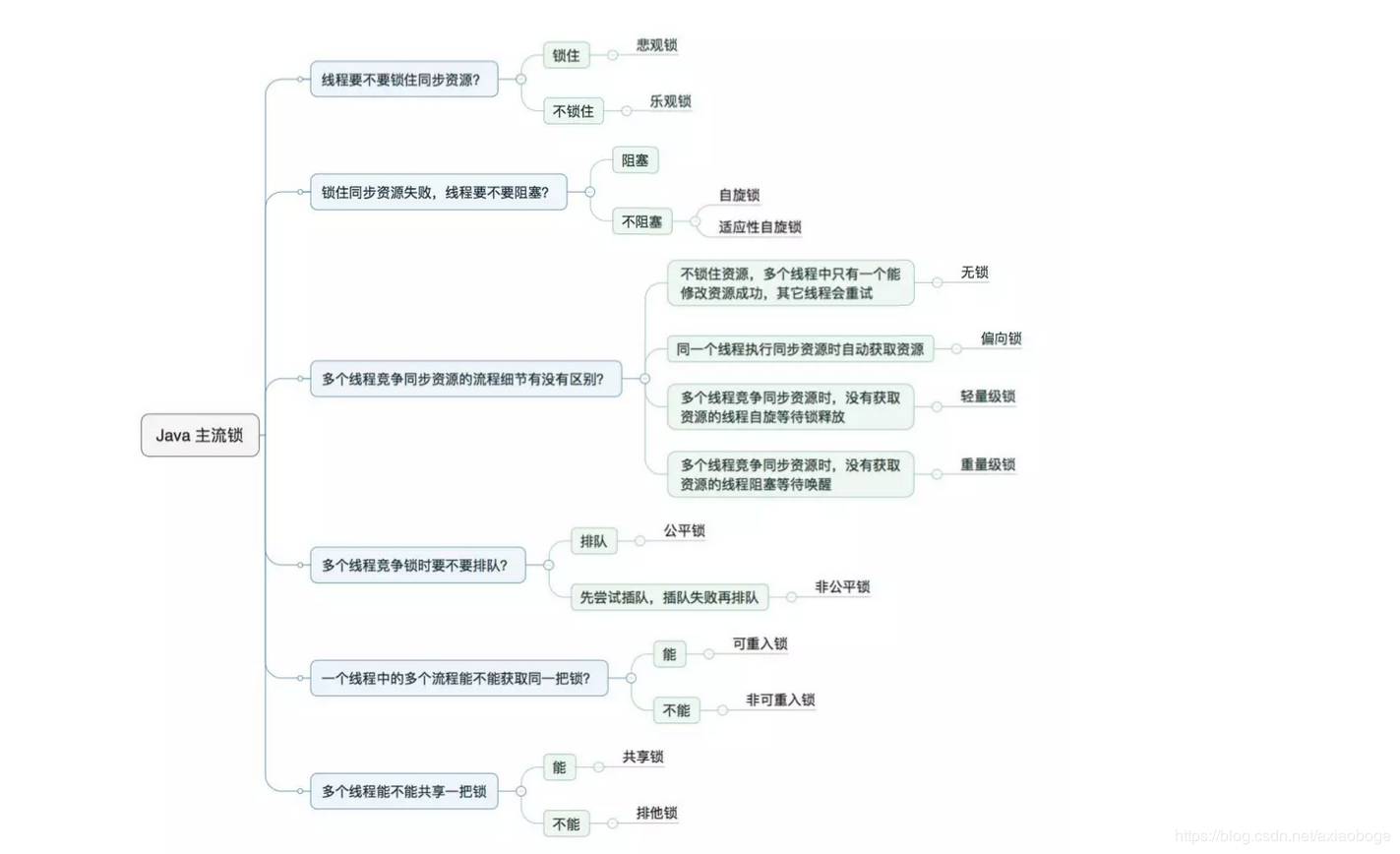
3.1 乐观锁 VS 悲观锁
乐观锁与悲观锁是一种广义上的概念,体现了看待线程同步的不同角度。在Java和数据库中都有此概念对应的实际应用。
先说概念。对于同一个数据的并发操作,悲观锁认为自己在使用数据的时候一定有别的线程来修改数据,因此在获取数据的时候会先加锁,确保数据不会被别的线程修改。Java中,synchronized关键字和Lock的实现类都是悲观锁。
而乐观锁认为自己在使用数据时不会有别的线程修改数据,所以不会添加锁,只是在更新数据的时候去判断之前有没有别的线程更新了这个数据。如果这个数据没有被更新,当前线程将自己修改的数据成功写入。如果数据已经被其他线程更新,则根据不同的实现方式执行不同的操作(例如报错或者自动重试)。
乐观锁在Java中是通过使用无锁编程来实现,最常采用的是CAS(Compare And Swap)算法,Java原子类中的递增操作就通过CAS自旋实现的。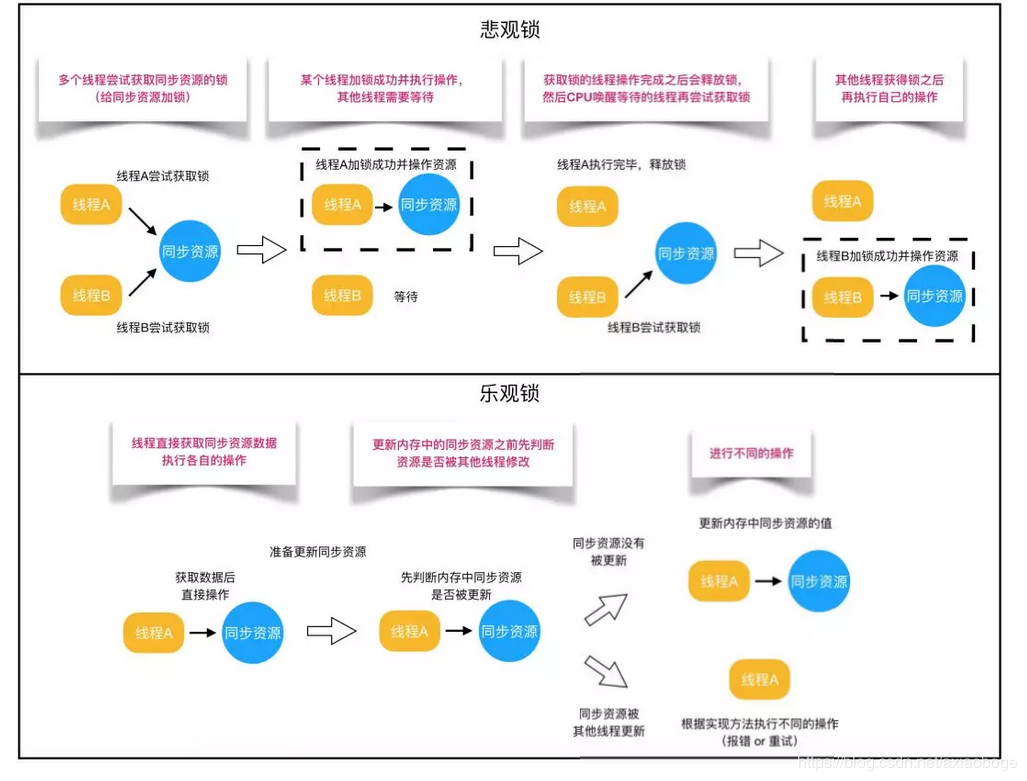
- 悲观锁适合写操作多的场景,先加锁可以保证写操作时数据正确。
- 乐观锁适合读操作多的场景,不加锁的特点能够使其读操作的性能大幅提升。
3.1.1 悲观锁
synchronized关键字和Lock的实现类都是悲观锁;
synchronized
重量级锁,自动加锁解锁,不能中断!!
—把代码块声明为 synchronized,有两个重要后果,通常是指该代码具有 原子性(atomicity)和 可见性(visibility)。
1.1 原子性
—原子性意味着个时刻,只有一个线程能够执行一段代码,这段代码通过一个monitor object保护。从而防止多个线程在更新共享状态时相互冲突。
1.2 可见性
—可见性则更为微妙,它要对付内存缓存和编译器优化的各种反常行为。它必须确保释放锁之前对共享数据做出的更改对于随后获得该锁的另一个
线程是可见的 。
1.3 作用:如果没有同步机制提供的这种可见性保证,线程看到的共享变量可能是修改前的值或不一致的值,这将引发许多严重问题。
使用注意
- 修饰在方法上,多个线程调用同一个对象的同步方法会阻塞,调用不同对象的同步方法不会阻塞。(java对象的内存地址是否相同)
- 修饰代码块,这个this就是指当前对象(类的实例),多个线程调用同一个对象的同步方法会阻塞,调用不同对象的同步方法不会阻塞。(java对象的内存地址是否相同)
- synchronized加到static静态方法上是对Class类上锁,而synchronized加到非static方法上是给对对象上锁。Class锁可以对类的所有对象实例起作用。
疑问:
在方法上加synchronized 能把方法块全部锁住,但是对类的某个属性加锁,不能锁住,改成this就能锁住?
代码如下:
 @Test
    public void tstLock1()
    {
        MyClass myClass=new MyClass();
        MyClass myClass1 = new MyClass();
        new Thread(myClass,"线程一").start();
        new Thread(myClass,"线程二").start();
        new Thread(myClass,"线程三").start();
        while(true);
    }
    public class MyClass implements Runnable
    {
        private int i=0;
        private String msg="sf";
        void doSomething() throws InterruptedException
        {
            synchronized (msg)
            {
                System.out.println( Thread.currentThread().getName()+"拿到了锁");
                msg=Thread.currentThread().getName();
                System.out.println("现在的msg是"+msg);
                System.out.println("准备休息");
                TimeUnit.SECONDS.sleep(3);
                System.out.println("再看msg:"+msg);
                System.out.println("工作完毕");
            }
        }

        @Override
        public void run()
        {
            try
            {
                doSomething();
            }
            catch (InterruptedException e)
            {
                e.printStackTrace();
            }
        }
    }
    /**
    线程一拿到了锁
    现在的msg是线程一
    准备休息
    线程二拿到了锁
    现在的msg是线程二
    准备休息
    线程三拿到了锁
    现在的msg是线程三
    准备休息
    再看msg:线程三
    工作完毕
    再看msg:线程三
    工作完毕
    再看msg:线程三
    工作完毕


    */
ReentrantLock
可重入锁:一个线程可以多次重复拿到同一把锁,可中断的阻塞。
总结的不是很好:点击跳转
ReentrantLock虽然具有完全互斥排他的效果即同一时间只有一个线程正在执行lock后面的任务,效率稍微底下,不如下面的可重入读写锁。
关系:
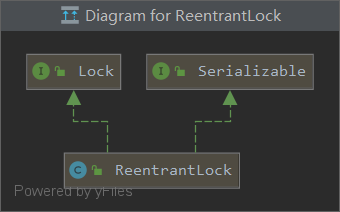
默认是非公平锁
  - 公平锁:等待时间长的先进行
  - 非公平锁: 下一个进来的时候会先询问,是否就绪,就绪了那就直接开始。
/**非公平锁**/
final boolean nonfairTryAcquire(int acquires) {
            final Thread current = Thread.currentThread();
            int c = getState();
            if (c == 0) {
                //直接先询问状态
                if (compareAndSetState(0, acquires)) {
                    setExclusiveOwnerThread(current);
                    return true;
                }
            }
            else if (current == getExclusiveOwnerThread()) {
                int nextc = c + acquires;
                if (nextc < 0) // overflow
                    throw new Error("Maximum lock count exceeded");
                setState(nextc);
                return true;
            }
            return false;
        }


/**公平锁*/
protected final boolean tryAcquire(int acquires) {
            final Thread current = Thread.currentThread();
            //获得当前的状态
            int c = getState();
            //值为0,那么当前独占性变量还未被线程占有
            if (c == 0) {
                //直接从队头里面找
                if (!hasQueuedPredecessors() &&
                     //成功cas,那么代表当前线程获得该变量的所有权,也就是说成功获得锁
                    compareAndSetState(0, acquires)) {

                    // setExclusiveOwnerThread将本线程设置为独占性变量所有者线程
                    setExclusiveOwnerThread(current);
                    return true;
                }
            }
            else if (current == getExclusiveOwnerThread()) {
                //如果该线程已经获取了独占性变量的所有权,那么根据重入性
                //原理,将state值进行加1,表示多次lock
                //由于已经获得锁,该段代码只会被一个线程同时执行,所以不需要
                //进行任何并行处理
                int nextc = c + acquires;
                if (nextc < 0)
                    throw new Error("Maximum lock count exceeded");
                setState(nextc);
                return true;
            }
            return false;
        }
//定义锁
private ReentrantLock reentrantLock=new ReentrantLock(false);
void doLock()
        {
            reentrantLock.lock();
            try{
                System.out.println( Thread.currentThread().getName()+"拿到了锁");
                msg=Thread.currentThread().getName();
                System.out.println("现在的msg是"+msg);
                System.out.println("准备休息");
                TimeUnit.SECONDS.sleep(3);
                System.out.println("再看msg:"+msg);
            }
            catch (InterruptedException e)
            {
                e.printStackTrace();
            }
            //建议使用finall防止出现死锁
            finally
            {
                reentrantLock.unlock();
            }
        }
ReentrantReadWriteLock:
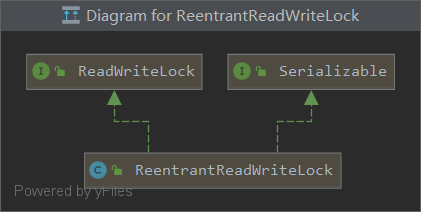
也分为公平和不公平锁(默认是不公平,因为快)
查看内部类图,分别有一个读锁和一个写锁还有一个Sync。读锁支持多个对象进行读写多个对象可以拥有,但是写锁只能有一个对象拥有、
里面的Sync就是继承了AQS,Sync extends AbstractQueuedSynchronizer。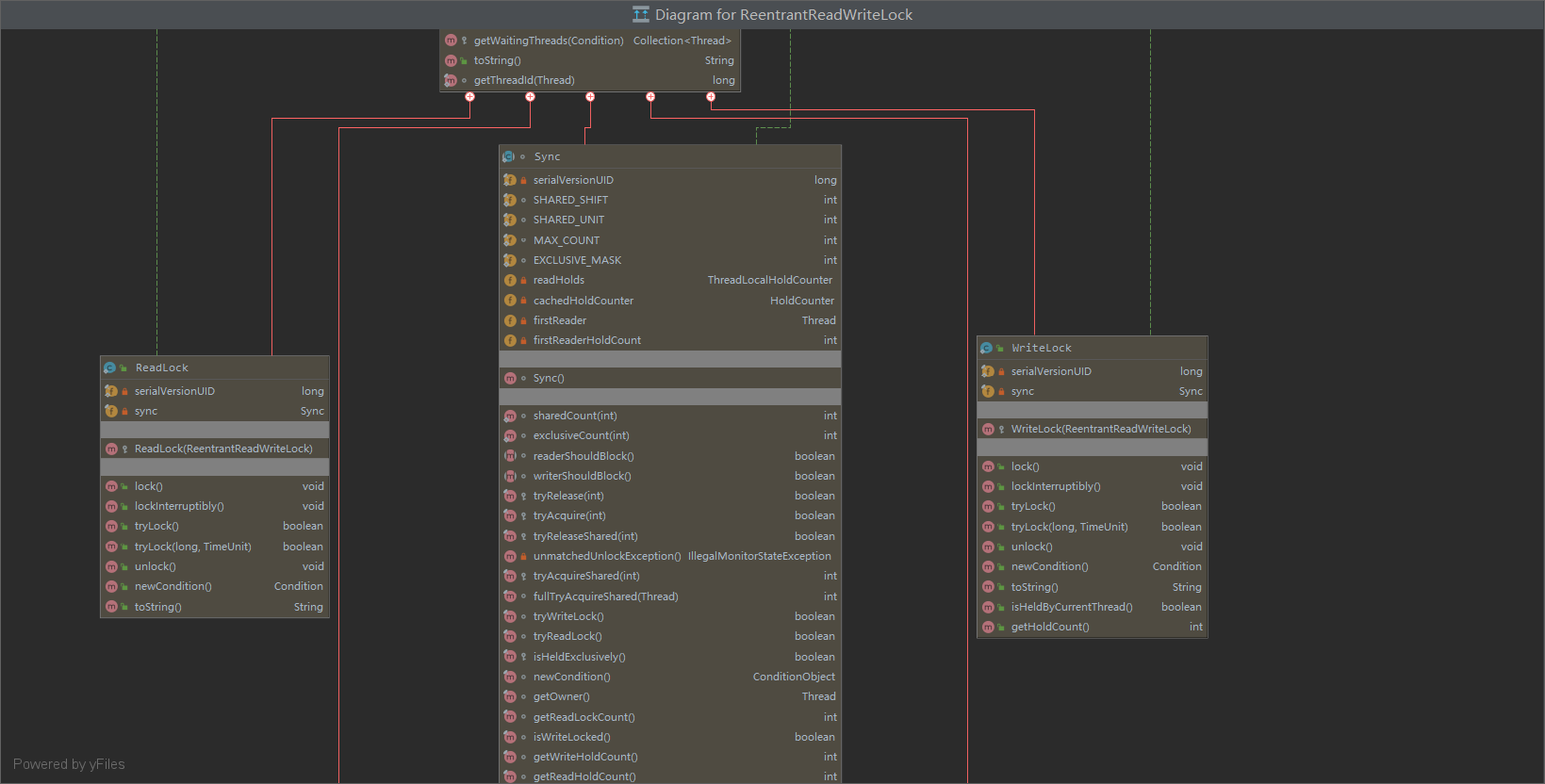
读锁过程分析:
     - 读锁的类public static class ReadLock implements Lock, java.io.Serializable {...}
     - 加锁
    public void lock() {
            sync.acquireShared(1);
        }
  //调用sync 也就是AQL情况
    /**
     * Acquires in shared mode, ignoring interrupts.  Implemented by
     * first invoking at least once {@link #tryAcquireShared},
     * returning on success.  Otherwise the thread is queued, possibly
     * repeatedly blocking and unblocking, invoking {@link
     * #tryAcquireShared} until success.
     *
     * @param arg the acquire argument.  This value is conveyed to
     *        {@link #tryAcquireShared} but is otherwise uninterpreted
     *        and can represent anything you like.
     */
    public final void acquireShared(int arg) {
        if (tryAcquireShared(arg) < 0)
            doAcquireShared(arg);
    }

    //如果被标记了写锁直接fase
    // 添加可重复的次数
    //
    protected final int tryAcquireShared(int unused) {
            /*
             * Walkthrough:
             * 1. If write lock held by another thread, fail.
             * 2. Otherwise, this thread is eligible for
             *    lock wrt state, so ask if it should block
             *    because of queue policy. If not, try
             *    to grant by CASing state and updating count.
             *    Note that step does not check for reentrant
             *    acquires, which is postponed to full version
             *    to avoid having to check hold count in
             *    the more typical non-reentrant case.
             * 3. If step 2 fails either because thread
             *    apparently not eligible or CAS fails or count
             *    saturated, chain to version with full retry loop.
             */
            Thread current = Thread.currentThread();
            int c = getState();
            if (exclusiveCount(c) != 0 &&
                getExclusiveOwnerThread() != current)
                return -1;
            int r = sharedCount(c);
            if (!readerShouldBlock() &&
                r < MAX_COUNT &&
                compareAndSetState(c, c + SHARED_UNIT)) {
                if (r == 0) {
                    firstReader = current;
                    firstReaderHoldCount = 1;
                } else if (firstReader == current) {
                    firstReaderHoldCount++;
                } else {
                    HoldCounter rh = cachedHoldCounter;
                    if (rh == null || rh.tid != getThreadId(current))
                        cachedHoldCounter = rh = readHolds.get();
                    else if (rh.count == 0)
                        readHolds.set(rh);
                    rh.count++;
                }
                return 1;
            }
            return fullTryAcquireShared(current);
        }

//解锁
public void unlock() {
            sync.releaseShared(1);
        }

public final boolean releaseShared(int arg) {
        if (tryReleaseShared(arg)) {
            doReleaseShared();
            return true;
        }
        return false;
    }
/**源码部分*/
public class ReentrantReadWriteLock
        implements ReadWriteLock, java.io.Serializable {
            /** Inner class providing readlock 读锁*/
            private final ReentrantReadWriteLock.ReadLock readerLock;
            /** Inner class providing writelock 写锁 */
            private final ReentrantReadWriteLock.WriteLock writerLock;
}
读写锁表示两个锁,一个是读操作相关的锁,称为共享锁;另一个是写操作相关的锁,称为排他锁。我把这两个操作理解为三句话:
1、读和读之间不互斥,因为读操作不会有线程安全问题
2、写和写之间互斥,避免一个写操作影响另外一个写操作,引发线程安全问题
3、读和写之间互斥,避免读操作的时候写操作修改了内容,引发线程安全问题
前面两个pass.
读写互斥:
void doLock()
        {
            try{
                writeLock.lock();
                System.out.println( Thread.currentThread().getName()+"拿到了锁");
                msg=Thread.currentThread().getName();
                System.out.println("msg修改成功"+msg);
                TimeUnit.SECONDS.sleep(4);
                System.out.println(Thread.currentThread().getName()+"再看msg:"+msg);
            }
            catch (InterruptedException e)
            {
                e.printStackTrace();
            }
            finally
            {
                writeLock.unlock();
            }
        }
        void doRead()
        {
            try{
                readLock.lock();
                System.out.println( Thread.currentThread().getName()+"拿到了读锁:"+msg);
                TimeUnit.SECONDS.sleep(3);
                System.out.println(Thread.currentThread().getName()+"再看msg:"+msg);
            }
            catch (InterruptedException e)
            {
                e.printStackTrace();
            }
            finally
            {
                readLock.unlock();
            }
        }
        @Override
        public void run()
        {
            //先写读,读锁排斥
            doLock();
            doRead();
            System.out.println(Thread.currentThread().getName()+":工作完毕");
        }
//非公平情况,四先读信息
线程一拿到了锁
    msg修改成功线程一
    线程一再看msg:线程一
    线程二拿到了锁
    msg修改成功线程二
    线程二再看msg:线程二
    线程三拿到了锁
    msg修改成功线程三
    线程三再看msg:线程三
    线程四拿到了锁
    msg修改成功线程四
    线程四再看msg:线程四
    线程四拿到了读锁:线程四
    线程一拿到了读锁:线程四
    线程二拿到了读锁:线程四
    线程三拿到了读锁:线程四
    线程四再看msg:线程四
    线程四:工作完毕
    线程一再看msg:线程四
    线程一:工作完毕
    线程二再看msg:线程四
    线程二:工作完毕
    线程三再看msg:线程四
    线程三:工作完毕
   //公平情况下
   线程一拿到了锁
    msg修改成功线程一
    线程一再看msg:线程一
    线程二拿到了锁
    msg修改成功线程二
    线程二再看msg:线程二
    线程三拿到了锁
    msg修改成功线程三
    线程三再看msg:线程三
    线程一拿到了读锁:线程三
    线程二拿到了读锁:线程三
    线程三拿到了读锁:线程三
    线程三再看msg:线程三
    线程一再看msg:线程三
    线程一:工作完毕
    线程二再看msg:线程三
    线程三:工作完毕
    线程二:工作完毕
疑问:当对象加了写锁,并且在另外一个线程已经被锁了,但是还是能直接修改对象的属性值?
代码如下:
 public void tstLock1() throws InterruptedException
    {
        MyClass myClass=new MyClass();
        MyClass myClass1 = new MyClass();
        new Thread(myClass,"线程一").start();
        new Thread(myClass,"线程二").start();
        new Thread(myClass,"线程三").start();
        new Thread(myClass,"线程四").start();
        System.out.println("准备写数据");
        TimeUnit.SECONDS.sleep(3);
        myClass.setMsg("经过写了");
        System.out.println("写入完毕");
        while(true);
    }


 public class MyClass implements Runnable
    {
        private int i=0;
        private String msg="sf";
        //可重入锁
//        private ReentrantLock reentrantLock=new ReentrantLock(false);
        private void setMsg(String m){this.msg=m;}
        private ReentrantReadWriteLock reentrantReadWriteLock=new ReentrantReadWriteLock();
        private ReentrantReadWriteLock.ReadLock readLock = reentrantReadWriteLock.readLock();
        private ReentrantReadWriteLock.WriteLock writeLock = reentrantReadWriteLock.writeLock();
        void doLock()
        {
            try{
                writeLock.lock();
                System.out.println( Thread.currentThread().getName()+"拿到了锁");
                msg=Thread.currentThread().getName();
                System.out.println("msg修改成功"+msg);
                TimeUnit.SECONDS.sleep(4);
                System.out.println(Thread.currentThread().getName()+"再看msg:"+msg);
            }
            catch (InterruptedException e)
            {
                e.printStackTrace();
            }
            finally
            {
                writeLock.unlock();
            }
        }
        @Override
        public void run()
        {
            doLock();
            System.out.println(Thread.currentThread().getName()+":工作完毕");
        }
       }
      /***输出
          准备写数据
        线程一拿到了锁
        msg修改成功线程一
        准备休息
        写入完毕
        再看msg:经过写了
        线程二拿到了锁
        msg修改成功线程二
        准备休息
        线程一:工作完毕
        */
AbstractQueuedSynchronizer(AQS,抽象队列同步器):
是个链表,将节点放到队尾。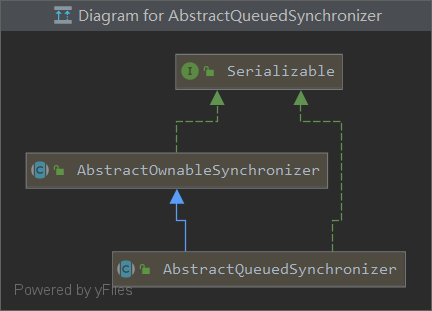
不是很懂!!
Semaphore: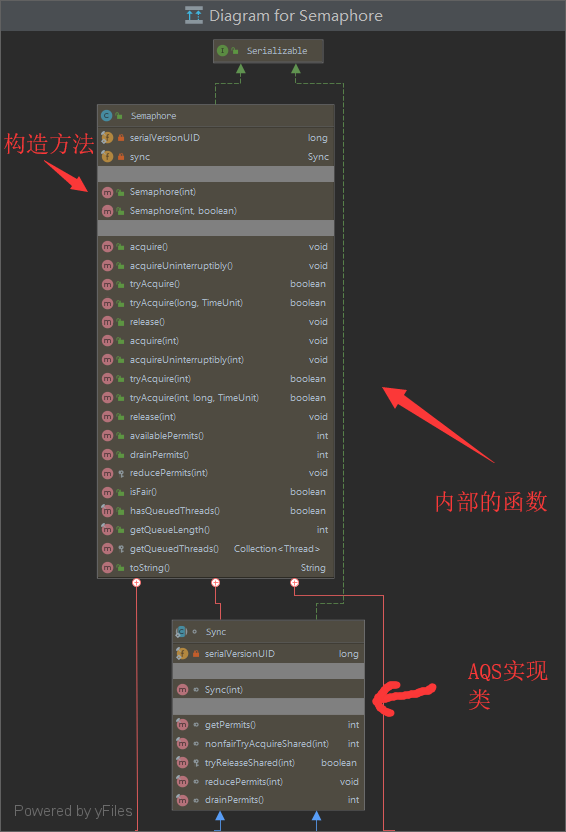
同样,构造方法包括公平和非公平锁
构造方法需要传入一个int,表示同一时间允许多少线程运行部分重要源码
/**
     * Acquires a permit from this semaphore, blocking until one is
     * available, or the thread is {@linkplain Thread#interrupt interrupted}.
     *
     * <p>Acquires a permit, if one is available and returns immediately,
     * reducing the number of available permits by one.
     *
     * <p>If no permit is available then the current thread becomes
     * disabled for thread scheduling purposes and lies dormant until
     * one of two things happens:
     * <ul>
     * <li>Some other thread invokes the {@link #release} method for this
     * semaphore and the current thread is next to be assigned a permit; or
     * <li>Some other thread {@linkplain Thread#interrupt interrupts}
     * the current thread.
     * </ul>
     *
     * <p>If the current thread:
     * <ul>
     * <li>has its interrupted status set on entry to this method; or
     * <li>is {@linkplain Thread#interrupt interrupted} while waiting
     * for a permit,
     * </ul>
     * then {@link InterruptedException} is thrown and the current thread's
     * interrupted status is cleared.
     *
     * @throws InterruptedException if the current thread is interrupted
     */
    //查看是否能够进入,能的话减少一个信号量,不能则禁用,进入休眠,排队
    public void acquire() throws InterruptedException {
        sync.acquireSharedInterruptibly(1);
    }
    /**
     * Acquires in shared mode, aborting if interrupted.  Implemented
     * by first checking interrupt status, then invoking at least once
     * {@link #tryAcquireShared}, returning on success.  Otherwise the
     * thread is queued, possibly repeatedly blocking and unblocking,
     * invoking {@link #tryAcquireShared} until success or the thread
     * is interrupted.
     * @param arg the acquire argument.
     * This value is conveyed to {@link #tryAcquireShared} but is
     * otherwise uninterpreted and can represent anything
     * you like.
     * @throws InterruptedException if the current thread is interrupted
     */
    public final void acquireSharedInterruptibly(int arg)
            throws InterruptedException {
        if (Thread.interrupted())
            throw new InterruptedException();
        if (tryAcquireShared(arg) < 0)
            //失败,继续循环获取
            doAcquireSharedInterruptibly(arg);
    }

/**
     * Attempts to acquire in shared mode. This method should query if
     * the state of the object permits it to be acquired in the shared
     * mode, and if so to acquire it.
     *
     * <p>This method is always invoked by the thread performing
     * acquire.  If this method reports failure, the acquire method
     * may queue the thread, if it is not already queued, until it is
     * signalled by a release from some other thread.
     *
     * <p>The default implementation throws {@link
     * UnsupportedOperationException}.
     *
     * @param arg the acquire argument. This value is always the one
     *        passed to an acquire method, or is the value saved on entry
     *        to a condition wait.  The value is otherwise uninterpreted
     *        and can represent anything you like.
     * @return a negative value on failure; zero if acquisition in shared
     *         mode succeeded but no subsequent shared-mode acquire can
     *         succeed; and a positive value if acquisition in shared
     *         mode succeeded and subsequent shared-mode acquires might
     *         also succeed, in which case a subsequent waiting thread
     *         must check availability. (Support for three different
     *         return values enables this method to be used in contexts
     *         where acquires only sometimes act exclusively.)  Upon
     *         success, this object has been acquired.
     * @throws IllegalMonitorStateException if acquiring would place this
     *         synchronizer in an illegal state. This exception must be
     *         thrown in a consistent fashion for synchronization to work
     *         correctly.
     * @throws UnsupportedOperationException if shared mode is not supported
     */
    //返回附属表示失败,返回0表示共享模式,
    protected int tryAcquireShared(int arg) {
        throw new UnsupportedOperationException();
    }

    /**非公平锁的实现类*/
    //对acquire进行减少
    final int nonfairTryAcquireShared(int acquires) {
            for (;;) {
                int available = getState();
                int remaining = available - acquires;
                if (remaining < 0 ||
                    compareAndSetState(available, remaining))
                    return remaining;
            }
        }
Semaphore
简单点来说就是初始设置一个阈值,每个线程竞争到资源就会让内部的信号量减少一,申请的超过阈值后就会阻塞队列;线程完成资源后又送还信号量,让值+1;
大概使用:
- 使用semaphore.acquire(); semaphore.release(); 来进行请求资源,释放资源。
- 可以控制同时访问的线程数
- 可以Thread.interrup() 打断
CyclicBarrier
回环珊栏,等值barrier状态在全部同时进行
简单来说就是一组线程,到达某个地方就等待,直到需要的线程都达到后然后一起执行下一步。
可以重复使用。
简单Demo
CyclicBarrier cyclicBarrier = new CyclicBarrier(4);
       cyclicBarrier.await(); //没有达到数量就会一直卡在这里
        // 重载:可以设置超时自动抛出异常await(long timeout, TimeUnit unit)
CountDownLatch
线程计数器,首先设置需要满足计数的个数,每到一个线程就会让计数器减少1,知道到达满足条件,await()才会放行。
        CountDownLatch countDownLatch = new CountDownLatch(2);
        //其他线程调用这个,让计数器减少1
        countDownLatch.countDown();
        //主线程等待其他线程完成任务
        countDownLatch.await();
主要用于一个线程等待其他线程完成。
比较
- CyclicBarrier 是一组线程互相等待,然后再执行,可以重用
- CountDownLatch侧重一个主线程等待其他线程完成,不可重用
- Semaphore 和锁有点类似,控制线程同时访问的数量,对某组资源的控制。
ConcurrentHashMap
(粗略介绍)线程安全,分段锁,一般线程安全需要将整个Hashmap锁住,但是这里使用了分段锁,将资源分段,如果要写,那么直接锁住某段资源就好,其他段还能正常读。所以要想写必须先获取它对应的Segment锁。
详细看数据结构模块。

若有收获,就点个赞吧
0 人点赞


