Service介绍
虽然每个Pod都会分配一个单独的Pod IP,然而却存在如下两问题:
- Pod IP 会随着Pod的重建产生变化
- Pod IP 仅仅是集群内可见的虚拟IP,外部无法访问
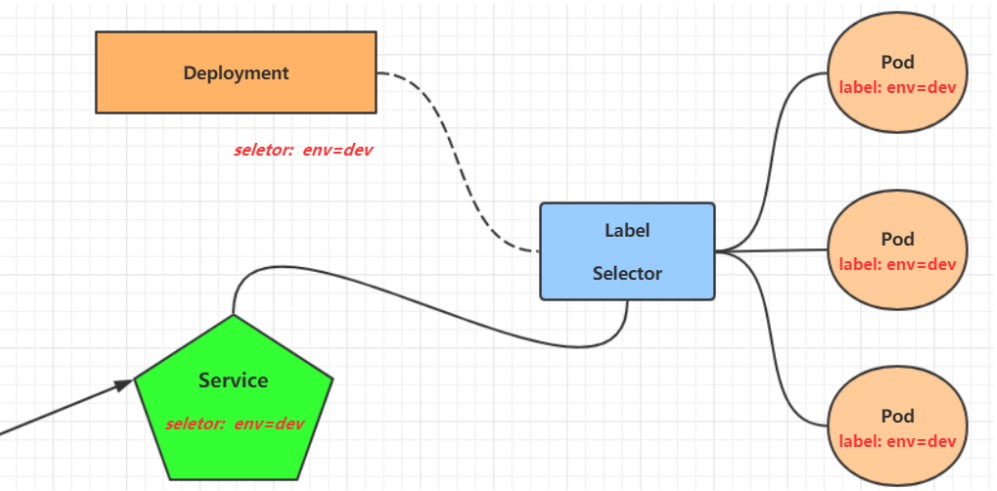
为了解决这个问题,Kubernetes提供了Service资源,Service会对提供同一个服务的pod进行聚合(通过标签的方式),提供一个统一的入口地址,通过访问Service的入口地址来访问到后端的pod服务
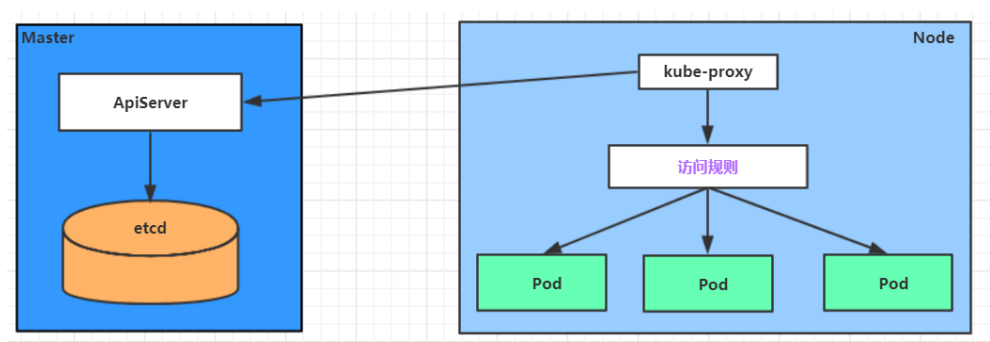
Service在很多情况下只是一个概念,真正起作用的其实是kube-proxy服务进程,每个Node节点上都运行着一个kube-proxy服务进程,当创建service资源的时候会通过api-server向etcd写入创建的service的信息,而kube-proxy会基于监听的机制发现这种service的变动,然后它会将最新的service信息转换成对应的访问规则
Service资源配置清单文件格式:
kind: Service # 资源类型apiVersion: v1 # 资源版本metadata: # 元数据name: service # 资源名称namespace: dev # 命名空间spec: # 描述selector: # 标签选择器,用于确定当前service代理哪些podapp: nginxtype: # Service类型,指定service的访问方式clusterIP: # 虚拟服务的ip地址sessionAffinity: # session亲和性,支持ClientIP、None两个选项ports: # 端口信息- protocol: TCPport: 3017 # service端口targetPort: 5003 # pod端口nodePort: 31122 # 主机端口
Service分类
Service资源类型:
- ClusterIP:默认值,它是Kubernetes系统自动分配的虚拟IP,只能在集群内部访问
- NodePort:将Service通过指定的Node上的端口暴露给外部,通过此方法,就可以在集群外部访问服务
- LoadBalancer:使用外接负载均衡器完成到服务的负载分发,此模式需要外部云环境支持
- ExternalName: 把集群外部的服务引入集群内部,直接使用
环境配置:准备3个含有容器Nginx的Pod,标签为app:nginx
[root@k8s-master ~]# vim deployment.yamlapiVersion: apps/v1kind: Deploymentmetadata:name: nginxspec:replicas: 3selector:matchLabels:app: nginxtemplate:metadata:labels:app: nginxspec:containers:- image: nginx:latestname: nginxports:- containerPort: 80[root@k8s-master ~]# kubectl apply -f deployment.yaml

修改主页文件
[root@k8s-master ~]# kubectl exec -it nginx-8d545c96d-jn64g /bin/bash/# echo "10.244.1.6" > /usr/share/nginx/html/index.html[root@k8s-master ~]# kubectl exec -it nginx-8d545c96d-m7c5c /bin/bash/# echo "10.244.2.6" > /usr/share/nginx/html/index.html[root@k8s-master ~]# kubectl exec -it nginx-8d545c96d-schbb /bin/bash/# echo "10.244.1.5" > /usr/share/nginx/html/index.html[root@k8s-master ~]# curl 10.244.1.510.244.1.5[root@k8s-master ~]# curl 10.244.1.610.244.1.6[root@k8s-master ~]# curl 10.244.2.610.244.2.6
ClusterIP
[root@k8s-master ~]# vim service-clusterip.yamlapiVersion: v1kind: Servicemetadata:name: service-clusteripspec:selector:app: nginxclusterIP: 172.16.66.66 # service的ip地址type: ClusterIPports:- port: 8888 # service端口targetPort: 80 # pod端口[root@k8s-master ~]# kubectl get serviceNAME TYPE CLUSTER-IP EXTERNAL-IP PORT(S) AGEkubernetes ClusterIP 172.16.0.1 <none> 443/TCP 44dservice-clusterip ClusterIP 172.16.66.66 <none> 8888/TCP 75s# 访问clusterIP:port[root@k8s-master ~]# curl 172.16.66.66:888810.244.2.6[root@k8s-master ~]# curl 172.16.66.66:888810.244.1.6[root@k8s-master ~]# curl 172.16.66.66:888810.244.1.5# 查看映射规则[root@k8s-master ~]# ipvsadm -LnProt LocalAddress:Port Scheduler Flags-> RemoteAddress:Port Forward Weight ActiveConn InActConnTCP 172.16.66.66:8888 rr-> 10.244.1.5:80 Masq 1 0 0-> 10.244.1.6:80 Masq 1 0 0-> 10.244.2.6:80 Masq 1 0 0
Endpoint
[root@k8s-master ~]# kubectl describe svc service-clusteripName: service-clusteripNamespace: defaultLabels: <none>Annotations: <none>Selector: app=nginxType: ClusterIPIP Family Policy: SingleStackIP Families: IPv4IP: 172.16.66.66IPs: 172.16.66.66Port: <unset> 8888/TCPTargetPort: 80/TCPEndpoints: 10.244.1.5:80,10.244.1.6:80,10.244.2.6:80 # 注意此行Session Affinity: NoneEvents: <none>
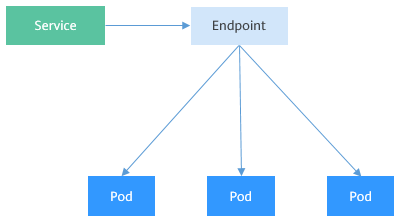
Endpoint是kubernetes中的一个资源对象,存储在etcd中,用来记录一个service对应的所有pod的访问地址,它是根据service配置文件中selector描述产生的
一个Service由一组Pod组成,这些Pod通过Endpoints暴露出来,Endpoints是实现实际服务的端点集合,也就是说,Service和Pod之间的联系是通过Endpoints实现的
[root@k8s-master ~]# kubectl get endpointsNAME ENDPOINTS AGEkubernetes 192.168.31.100:6443 44dservice-clusterip 10.244.1.5:80,10.244.1.6:80,10.244.2.6:80 26m
负载分发策略
对Service的访问被分发到了后端的Pod上去,目前kubernetes提供了两种负载分发策略:
- 默认使用kube-proxy的策略,比如随机、轮询
- 基于客户端地址的会话保持模式,即来自同一个客户端发起的所有请求都会转发到固定的一个Pod上(在spec中添加
sessionAffinity: ClientIP选项)
# 没有修改之前[root@k8s-master ~]# while true;do curl 172.16.66.66:8888;sleep 1;done;10.244.1.610.244.1.510.244.2.610.244.1.610.244.1.510.244.2.6[root@k8s-master ~]# kubectl delete service service-clusterip[root@k8s-master ~]# vim service-clusterip.yamlapiVersion: v1kind: Servicemetadata:name: service-clusteripspec:selector:app: nginxclusterIP: 172.16.66.66 # service的ip地址type: ClusterIPsessionAffinity: ClientIPports:- port: 8888 # service端口targetPort: 80 # pod端口[root@k8s-master ~]# kubectl apply -f service-clusterip.yaml# 修改之后[root@k8s-master ~]# while true;do curl 172.16.66.66:8888;sleep 1;done;10.244.2.610.244.2.610.244.2.610.244.2.610.244.2.610.244.2.6
NodePort
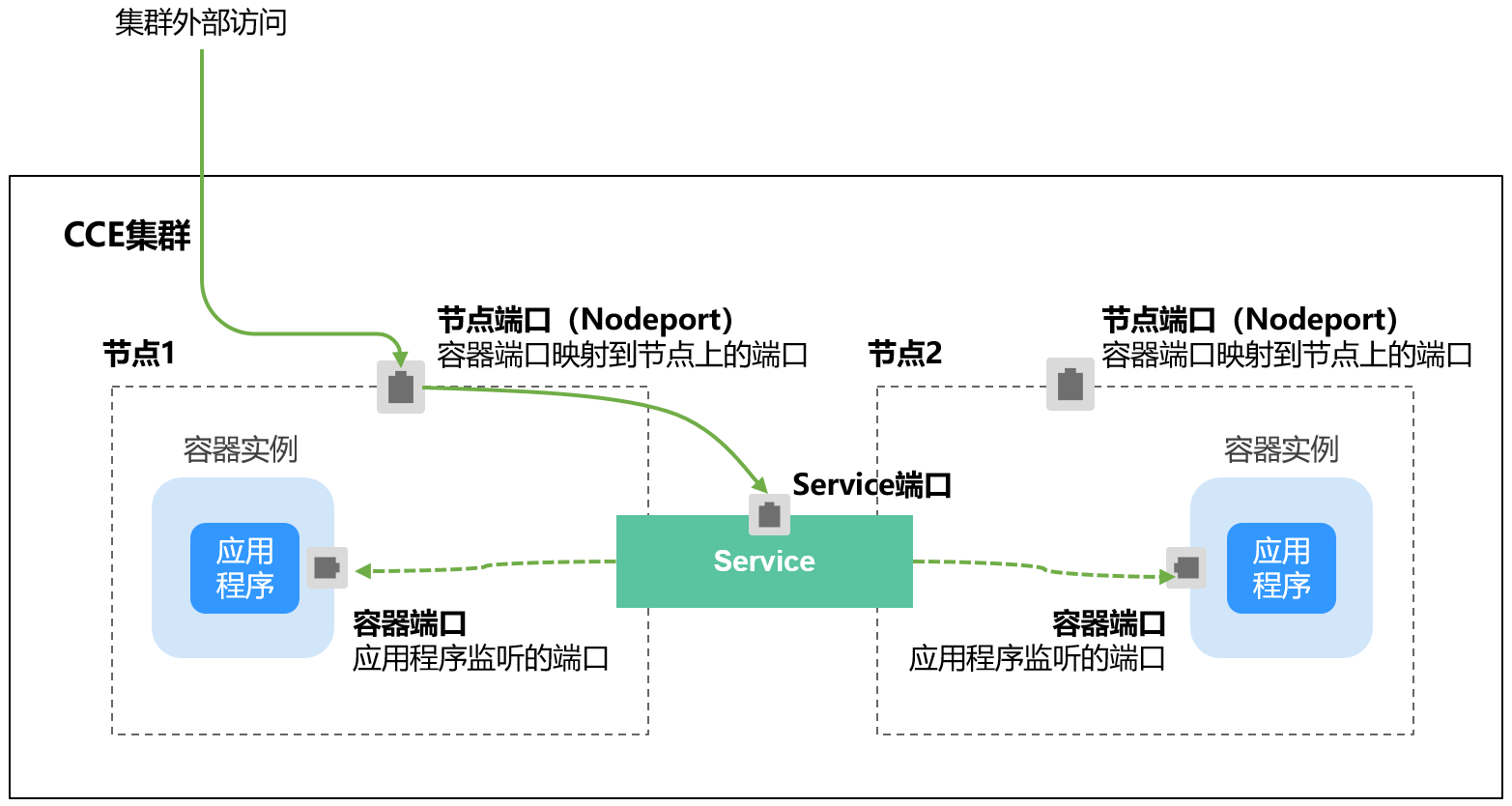
在之前的样例中,创建的Service的ip地址只有集群内部才可以访问,如果希望将Service暴露给集群外部使用,那么就要使用到另外一种类型的Service,称为NodePort类型
NodePort的工作原理其实就是将service的端口映射到Node的一个端口上,然后就可以通过NodeIp:NodePort来访问service,service再去访问对应的Pod
请求路径为:NodePort→Service→Pod
[root@k8s-master ~]# vim service-nodeport.yamlapiVersion: v1kind: Servicemetadata:name: service-nodeportspec:selector:app: nginxtype: NodePortports:- port: 8888 # service端口nodePort: 32222 # Node端口(取值范围是30000-32767)如果不指定则默认分配targetPort: 80 # pod端口protocol: TCP[root@k8s-master ~]# kubectl apply -f service-nodeport.yaml[root@k8s-master ~]# kubectl get svc -o wideNAME TYPE CLUSTER-IP EXTERNAL-IP PORT(S) AGE SELECTORkubernetes ClusterIP 172.16.0.1 <none> 443/TCP 44d <none>service-nodeport NodePort 172.16.95.173 <none> 8888:32222/TCP 34s app=nginx[root@k8s-master ~]# ipvsadm -LnIP Virtual Server version 1.2.1 (size=4096)Prot LocalAddress:Port Scheduler Flags-> RemoteAddress:Port Forward Weight ActiveConn InActConnTCP 192.168.31.100:32222 rr-> 10.244.1.5:80 Masq 1 0 0-> 10.244.1.6:80 Masq 1 0 0-> 10.244.2.6:80 Masq 1 0 0# 访问Node1[root@k8s-node1 ~]# ipvsadm -LnTCP 192.168.31.101:32222 rr-> 10.244.1.5:80 Masq 1 0 0-> 10.244.1.6:80 Masq 1 0 0-> 10.244.2.6:80 Masq 1 0 0[root@k8s-master ~]# curl 192.168.31.101:3222210.244.2.6[root@k8s-master ~]# curl 192.168.31.101:3222210.244.1.6[root@k8s-master ~]# curl 192.168.31.101:3222210.244.1.5# 访问Node2[root@k8s-master ~]# curl 192.168.31.102:3222210.244.2.6[root@k8s-master ~]# curl 192.168.31.102:3222210.244.1.6[root@k8s-master ~]# curl 192.168.31.102:3222210.244.1.5
LoadBalancer
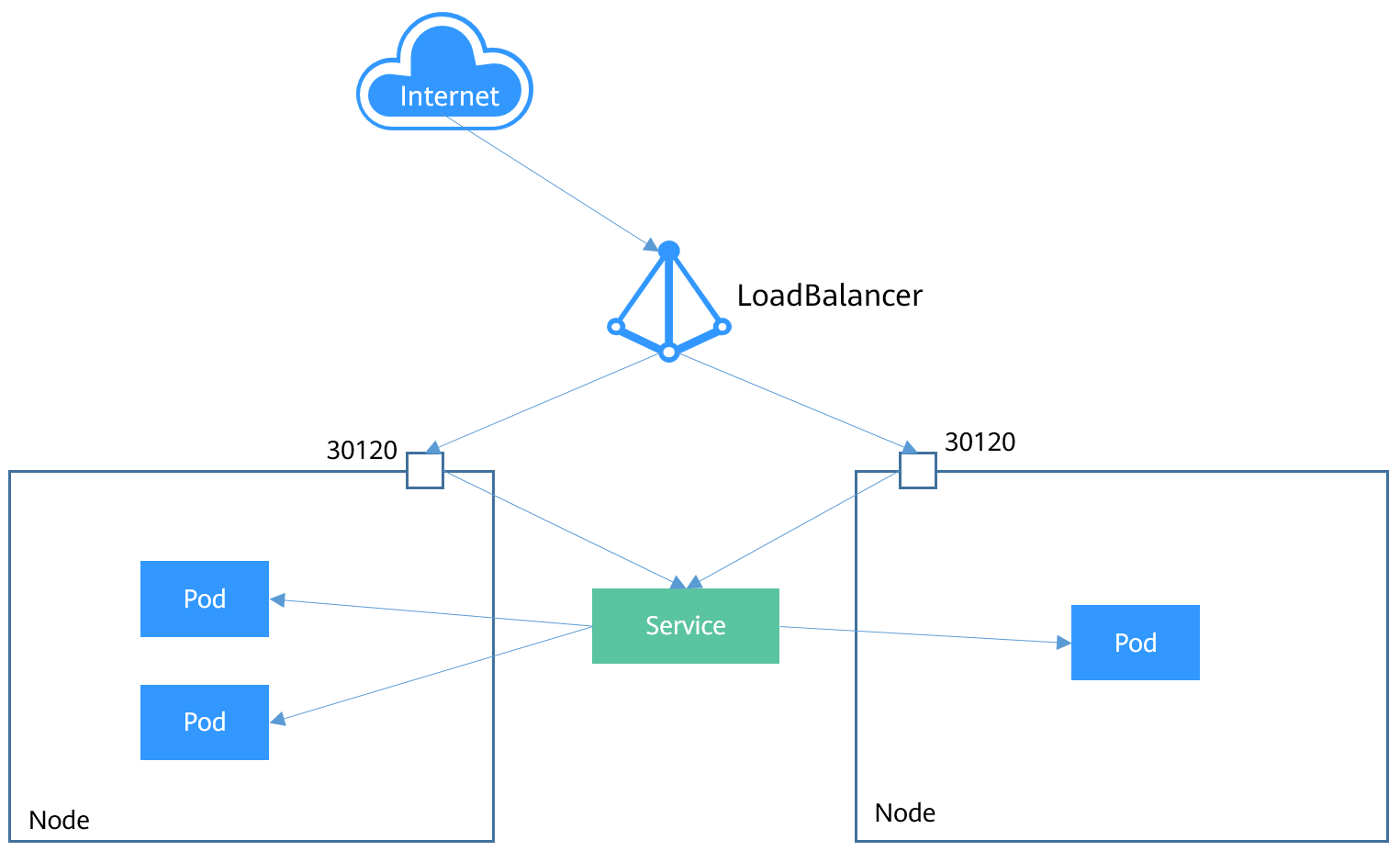
LoadBalancer类型的Service其实是NodePort类型Service的扩展,通过一个特定的LoadBalancer访问Service,这个LoadBalancer将请求转发到节点的NodePort,因此对于NodePort类型还需要再新增一个负载均衡设备
请求路径为LoadBalancer → NodePort → Service → Pod
LoadBalancer本身不是属于Kubernetes的组件,这部分通常是由具体厂商(云服务提供商)提供,因此需要额外的成本费
HeadLess
前面的Service解决了Pod的内外部访问问题,但还有下面这些问题没解决
- 同时访问所有Pod
- 一个Service内部的Pod互相访问
Headless Service正是解决这个问题的,Headless Service不会创建ClusterIP,并且查询会返回所有Pod的DNS记录,这样就可查询到所有Pod的IP地址,StatefulSet中StatefulSet正是使用Headless Service解决Pod间互相访问的问题
Ingress介绍
Service对集群之外暴露服务的主要方式有两种:NodePort和LoadBalancer,但是这两种方式,都有一定的缺点:
- NodePort方式的缺点是会占用很多集群机器的端口,那么当集群服务变多的时候,这个缺点就愈发明显
- LB方式的缺点是每个service需要一个LB,浪费、麻烦,并且需要Kubernetes之外设备的支持
基于这种现状,Kubernetes提供了Ingress资源对象,Ingress只需要一个NodePort或者一个LB就可以满足暴露多个Service的需求
Service是基于四层TCP和UDP协议转发的,而Ingress可以基于七层的HTTP和HTTPS协议转发,可以通过域名和路径做到更细粒度的划分,如下图所示:

Ingress相当于一个七层负载均衡器,它的工作原理类似于Nginx,可以理解成在Ingress里建立诸多映射规则,Ingress Controller通过监听这些配置规则并转化成Nginx的反向代理配置,然后对外部提供服务
Ingress工作原理
要想使用Ingress功能,必须在Kubernetes集群上安装Ingress Controller,Ingress Controller有很多种实现,最常见的就是Kubernetes官方维护的NGINX Ingress Controller
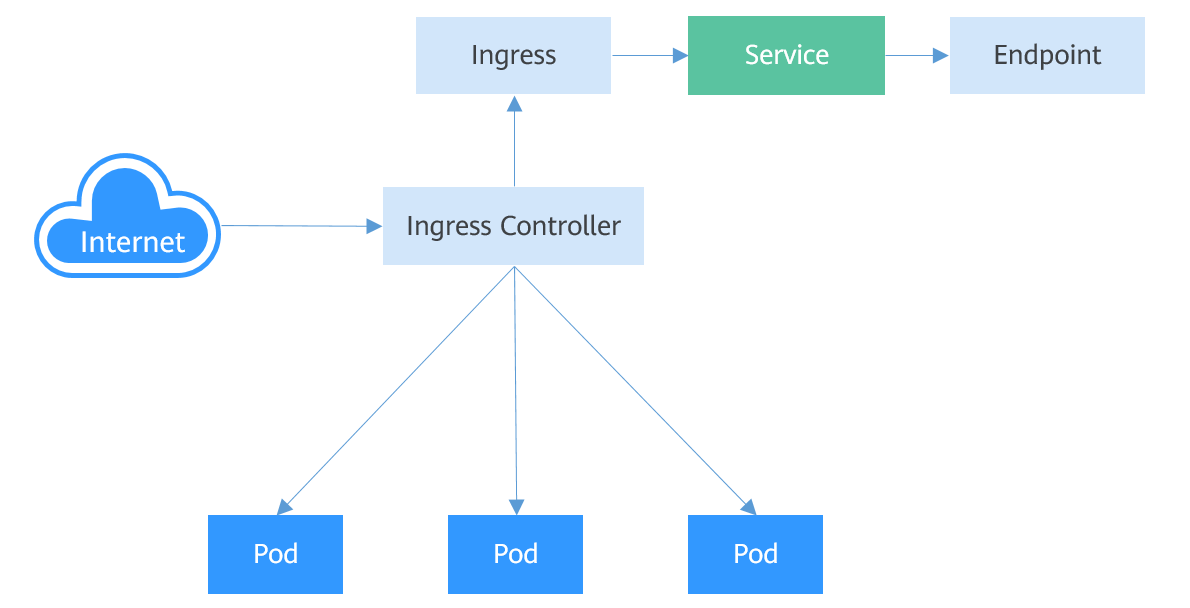
Ingress:是kubernetes中的一个对象,作用是定义请求如何转发到service的规则
Ingress Controll:具体实现反向代理及负载均衡的程序,对Ingress定义的规则进行解析,根据配置的规则来实现请求转发,实现方式有很多,比如Nginx、Contour、Haproxy等等
外部请求首先到达Ingress Controller,Ingress Controller根据Ingress的路由规则,查找到对应的Service,进而通过Endpoint查询到Pod的IP地址,然后将请求转发给Pod
Ingress使用
准备初始环境
[root@k8s-master ~]# wget https://raw.githubusercontent.com/kubernetes/ingress-nginx/controller-v1.0.4/deploy/static/provider/baremetal/deploy.yaml

# 在所有节点上提前pull镜像,防止启动失败
docker pull registry.cn-hangzhou.aliyuncs.com/eagleslab/service:ingresswebhook111
docker tag c41e9fcadf5a k8s.gcr.io/ingress-nginx/kube-webhook-certgen:v1.1.1

docker pull registry.cn-hangzhou.aliyuncs.com/eagleslab/service:ingresscontroller104
docker tag a9f76bcccfb5 k8s.gcr.io/ingress-nginx/controller:v1.0.4

docker images | grep k8s.gcr
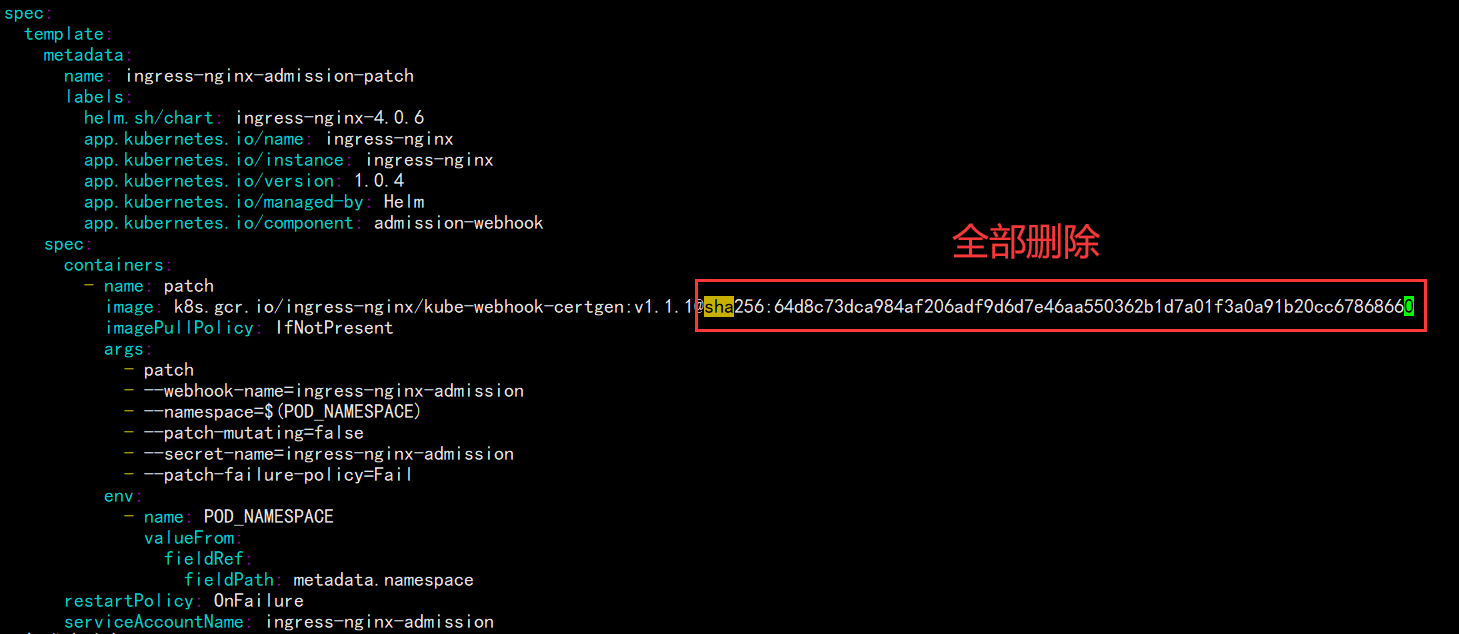
删除所有对sha256的检查,然后运行
[root@k8s-master ~]# kubectl apply -f deploy.yaml
[root@k8s-master ~]# kubectl get pods -n ingress-nginx
NAME                                        READY   STATUS      RESTARTS   AGE
ingress-nginx-admission-create-vwkxt        0/1     Completed   0          32s
ingress-nginx-admission-patch-bvnrp         0/1     Completed   0          32s
ingress-nginx-controller-578b854f96-2hw4w   1/1     Running     0          32s
[root@k8s-master ~]# kubectl get svc -n ingress-nginx
NAME                                 TYPE        CLUSTER-IP      EXTERNAL-IP   PORT(S)                      AGE
ingress-nginx-controller             NodePort    172.16.182.60   <none>        80:30409/TCP,443:30565/TCP   50s
ingress-nginx-controller-admission   ClusterIP   172.16.149.5    <none>        443/TCP                      50s
准备service和pod
架构如下图所示:

创建tomcat-nginx.yaml
[root@k8s-master ~]# vim tomcat-nginx.yaml
apiVersion: apps/v1
kind: Deployment
metadata:
  name: nginx-deployment
spec:
  replicas: 3
  selector:
    matchLabels:
      app: nginx-pod
  template:
    metadata:
      labels:
        app: nginx-pod
    spec:
      containers:
      - name: nginx
        image: nginx
        imagePullPolicy: IfNotPresent
        ports:
        - containerPort: 80

---

apiVersion: apps/v1
kind: Deployment
metadata:
  name: tomcat-deployment
spec:
  replicas: 3
  selector:
    matchLabels:
      app: tomcat-pod
  template:
    metadata:
      labels:
        app: tomcat-pod
    spec:
      containers:
      - name: tomcat
        image: tomcat
        imagePullPolicy: IfNotPresent
        ports:
        - containerPort: 8080

---

apiVersion: v1
kind: Service
metadata:
  name: nginx-service
spec:
  selector:
    app: nginx-pod
  clusterIP: None
  type: ClusterIP
  ports:
  - port: 80
    targetPort: 80

---

apiVersion: v1
kind: Service
metadata:
  name: tomcat-service
spec:
  selector:
    app: tomcat-pod
  clusterIP: None
  type: ClusterIP
  ports:
  - port: 8080
    targetPort: 8080
启动控制器及Service
[root@k8s-master ~]# kubectl create -f tomcat-nginx.yaml
[root@k8s-master ~]# kubectl get svc
NAME             TYPE        CLUSTER-IP      EXTERNAL-IP   PORT(S)        AGE
kubernetes       ClusterIP   172.16.0.1      <none>        443/TCP        45d
nginx-service    ClusterIP   None            <none>        80/TCP         54s
tomcat-service   ClusterIP   None            <none>        8080/TCP       54s

创建Http代理
[root@k8s-master ~]# vim ingress-http.yaml
apiVersion: networking.k8s.io/v1
kind: Ingress
metadata:
  name: ingress-nginx
spec:
  rules:
  - host: nginx.moodye.cn        # 域名
    http:
      paths:
      - path: /        # 需要路由的URL
        pathType: Prefix
        backend:
          service:
            name: nginx-service        # 后端Service的名字
            port:
              number: 80        # Service的端口
  ingressClassName: nginx

---

apiVersion: networking.k8s.io/v1
kind: Ingress
metadata:
  name: ingress-tomcat
spec:
  rules:
  - host: tomcat.moodye.cn
    http:
      paths:
      - path: /
        pathType: Prefix
        backend:
          service:
            name: tomcat-service
            port:
              number: 8080
  ingressClassName: nginx
启动Ingress
[root@k8s-master ~]# kubectl apply -f ingress-http.yaml
[root@k8s-master ~]# kubectl get ingress
NAME             CLASS   HOSTS              ADDRESS          PORTS   AGE
ingress-nginx    nginx   nginx.moodye.cn    192.168.31.101   80      6m50s
ingress-tomcat   nginx   tomcat.moodye.cn   192.168.31.101   80      6m50s
[root@k8s-master ~]# kubectl describe ingress
...
Rules:
  Host             Path  Backends
  ----             ----  --------
  nginx.moodye.cn
                   /   nginx-service:80 (10.244.1.14:80,10.244.1.15:80,10.244.2.15:80)
...
Rules:
  Host              Path  Backends
  ----              ----  --------
  tomcat.moodye.cn
                    /   tomcat-service:8080 (10.244.1.16:8080,10.244.1.17:8080,10.244.2.16:8080)
...
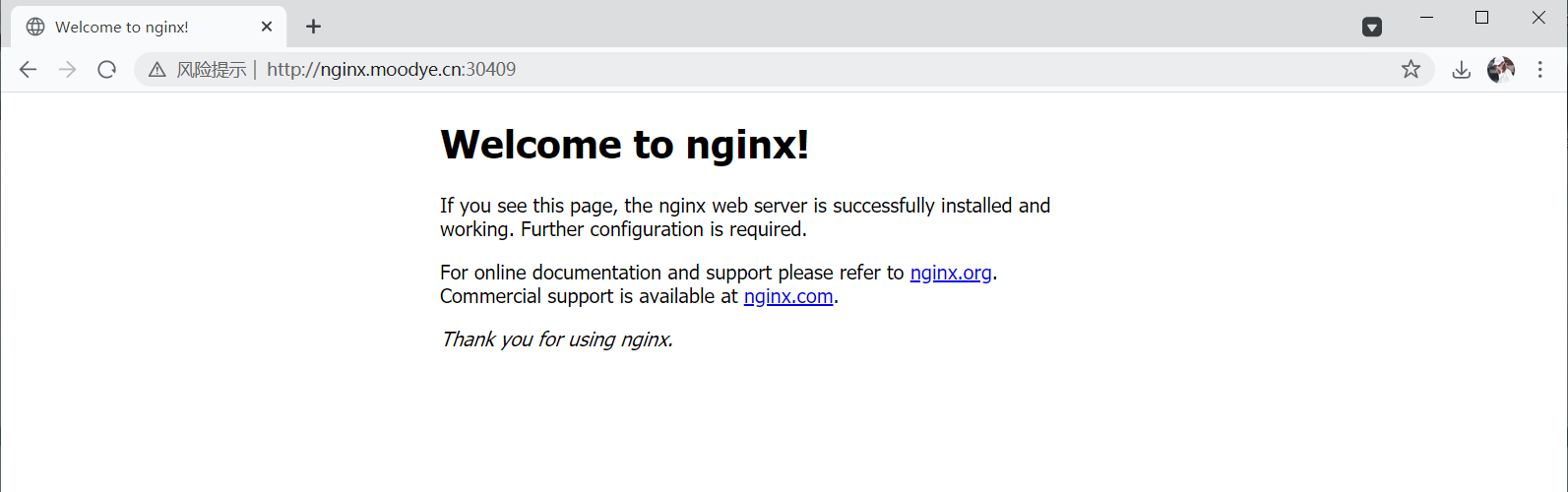
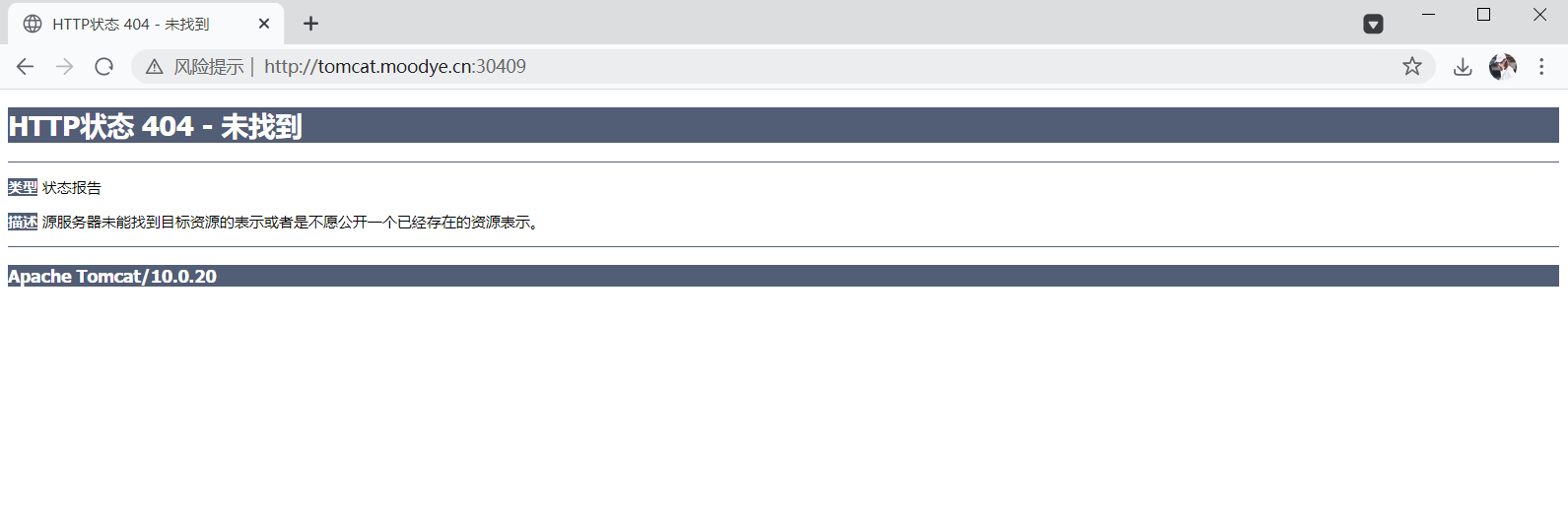
在物理机的hosts文件中加上域名解析,写入任意一个节点的IP地址对应上两个域名
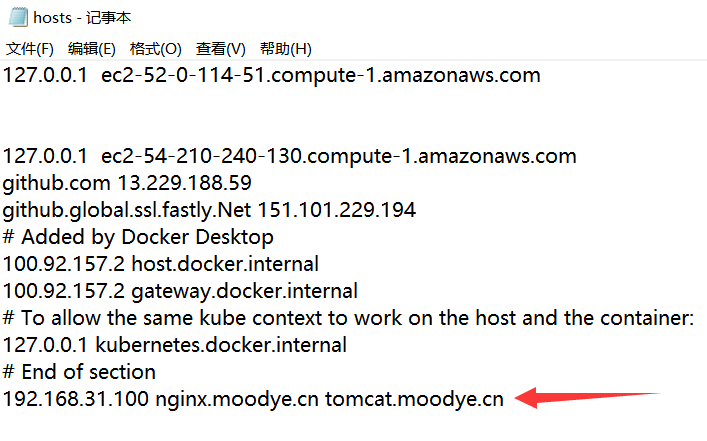
然后在浏览器中输入网址域名:30409(因为没有配置HTTPS)


若有收获,就点个赞吧
0 人点赞


