1.请求参数为空判断
先看一下效果图,需要输入phone、password缺少其中一项时提示缺少的字段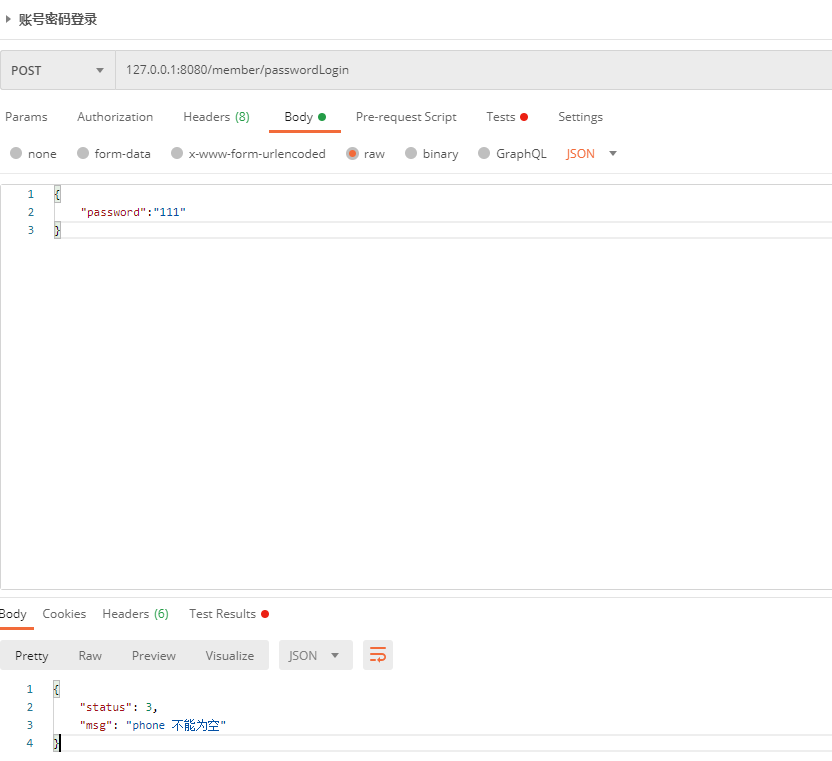
具体实现步骤
public class LoginCodeDto {@NotBlankprivate String phone;@NotBlankprivate String code;@NotNullprivate Double price;@NotEmptyprivate Set<String> page;}
- @NotNull:不能为null,但可以为empty (“”,” “,” “)
- @NotEmpty:不能为null,而且长度必须大于0 (“ “,” “)
- @NotBlank:只能作用在String上,不能为null,而且调用trim()后,长度必须大于0 (“test”) 即:必须有实际字符
- 注意:一定得是装箱类型
捕获该异常信息
@ExceptionHandler(MethodArgumentNotValidException.class)@ResponseStatus(HttpStatus.INTERNAL_SERVER_ERROR)public ResponseVo<String> notValidExceptionHandle(MethodArgumentNotValidException e) {BindingResult bindingResult = e.getBindingResult();Objects.requireNonNull(bindingResult.getFieldError());return ResponseVo.error(ResponseEnum.PARAM_ERROR,bindingResult.getFieldError().getField() + " " + bindingResult.getFieldError().getDefaultMessage());}
加上@Valid才能生效
@PostMapping("/passwordLogin")ResponseVo<LoginDataInfo> passwordLogin(@Valid @RequestBody LoginPasswordDto passwordDto) {return memberService.passwordLogin(passwordDto);}
2.解决springboot跨域问题
@Configurationpublic class CorsConfig implements WebMvcConfigurer {@Overridepublic void addCorsMappings(CorsRegistry registry) {registry.addMapping("/**").allowedOrigins("*").allowedMethods("GET", "HEAD", "POST", "PUT", "DELETE", "OPTIONS").allowCredentials(true).maxAge(7200).allowedHeaders("*");}}
3.环境配置注解Profile
使用方法非常的简单注解加到配置类或者Service上面就可以了。
如下两个使用场景:
1.使用在定时任务
希望定时发送邮件的任务在线上跑,但是测试环境和开发环境不跑,那我就这样配置。
@Configuration@EnableScheduling@RequiredArgsConstructor(onConstructor = @__(@Autowired))@Slf4j@Profile(value = {"prod"})public class SchedulingTaskServiceImpl implements SchedulingTaskService {}
2.swagger
测试环境才允许看到swagger,线上不允许看到这种隐私的接口文档。
@Configuration@EnableSwagger2@Profile(value = { "test"})public class SwaggerConfiguration implements WebMvcConfigurer {}
4. Redis秒杀超卖问题
1.没有加任何锁的情况下
/*** @author 杨胖胖*/public interface OversoldService {/*** redis解决超卖的问题* @param repertory 库存id* @param userId 用户id* @return 秒杀结果*/boolean oversold(String repertory, String userId);}
/*** @author 杨胖胖*/@Service@RequiredArgsConstructor(onConstructor = @__(@Autowired))@Slf4jpublic class OversoldServiceImpl implements OversoldService {private final RedisTemplate<String, String> redisTemplate;@Overridepublic boolean oversold(String repertory, String userId) {// 拼接的用户idString userIdKey = "userId:";// 库存为null的时候,秒杀还没有开始String repertoryNum = redisTemplate.opsForValue().get(repertory);if (StringUtils.isEmpty(repertoryNum)) {log.info("秒杀未开始");return false;}// 判断用户是否重复秒杀Boolean isOversold = redisTemplate.opsForSet().isMember(userIdKey, userId);assert isOversold != null;if (isOversold) {log.info("已秒杀成功,不能重复秒杀");return false;}// 商品数量少于1,秒杀结束if (Integer.parseInt(repertoryNum) <= 0) {log.info("秒杀已经结束了");return false;}// 库存-1redisTemplate.opsForValue().decrement(repertory);// 把秒杀成功用户添加清单里面redisTemplate.opsForSet().add(userIdKey, userId);log.info("秒杀成功了");return true;}}
/*** @author 杨胖胖*/@RestController@RequiredArgsConstructor(onConstructor = @__(@Autowired))public class OversoldController {private final OversoldService oversoldService;@GetMapping("oversold")public boolean oversold(@RequestParam String repertory, @RequestParam String userId) {return oversoldService.oversold(repertory, userId);}}
库存添加10个后执行的效果,这里使用了jmeter作为压测的工具,只有10个商品但是11个人秒杀成功了,商品数量-1,建议并发多测试几次才能看到效果,我是1000个线程并发。

2.使用redis的乐观锁解决
/*** @author 杨胖胖*/@Service@RequiredArgsConstructor(onConstructor = @__(@Autowired))@Slf4jpublic class OversoldServiceImpl implements OversoldService {private final RedisTemplate<String, String> redisTemplate;@Overridepublic boolean oversold(String repertory, String userId) {// 拼接的用户idString userIdKey = "userId:";// 监视库存redisTemplate.watch(repertory);// 开启事务不然会报错redisTemplate.setEnableTransactionSupport(true);// 库存为null的时候,秒杀还没有开始String repertoryNum = redisTemplate.opsForValue().get(repertory);if (StringUtils.isEmpty(repertoryNum)) {log.info("秒杀未开始");return false;}// 判断用户是否重复秒杀Boolean isOversold = redisTemplate.opsForSet().isMember(userIdKey, userId);assert isOversold != null;if (isOversold) {log.info("已秒杀成功,不能重复秒杀");return false;}// 商品数量少于1,秒杀结束if (Integer.parseInt(repertoryNum) <= 0) {log.info("秒杀已经结束了");return false;}// 使用事务redisTemplate.multi();// 组队操作redisTemplate.opsForValue().decrement(repertory);redisTemplate.opsForSet().add(userIdKey, userId);// 执行List<Object> result = redisTemplate.exec();if(result.size() == 0){log.info("秒杀失败了");return false;}log.info("秒杀成功了");return true;}}
2.1 乐观锁引发的库存问题
库存500,并发数1000个就可以导致这个问题,我的电脑上面是这样。
2.2 使用lua脚本解决库存问题
/*** @author 杨胖胖*/@Service@RequiredArgsConstructor(onConstructor = @__(@Autowired))@Slf4jpublic class OversoldServiceImpl implements OversoldService {private final RedisTemplate<String, String> redisTemplate;@Overridepublic boolean oversold(String repertory, String userId) {Long skillResult = skill(repertory, userId);if (skillResult == 0) {log.info("已抢空!!");return true;} else if (skillResult == 1) {log.info("抢购成功!!!!");return true;} else if (skillResult == 2) {log.info("该用户已抢过!!");return true;} else {log.info("抢购异常!!");return true;}}public Long skill(String repertory, String userId) {String secKillScript = "local userid=KEYS[1];\r\n" +"local prodid=KEYS[2];\r\n" +"local qtkey=prodid;\r\n" +"local usersKey='userid';\r\n" +"local userExists=redis.call(\"sismember\",usersKey,userid);\r\n" +"if tonumber(userExists)==1 then \r\n" +" return 2;\r\n" +"end\r\n" +"local num= redis.call(\"get\" ,qtkey);\r\n" +"if tonumber(num)<=0 then \r\n" +" return 0;\r\n" +"else \r\n" +" redis.call(\"decr\",qtkey);\r\n" +" redis.call(\"sadd\",usersKey,userid);\r\n" +"end\r\n" +"return 1";List<String> keys = new ArrayList<>();keys.add(userId);keys.add(repertory);DefaultRedisScript<Long> redisScript = new DefaultRedisScript<>(secKillScript, Long.class);return redisTemplate.execute(redisScript, keys, userId, repertory);}}
同样是500的库存,1000的线程数,执行后库存为0,购买成功人数500,完美解决!!!
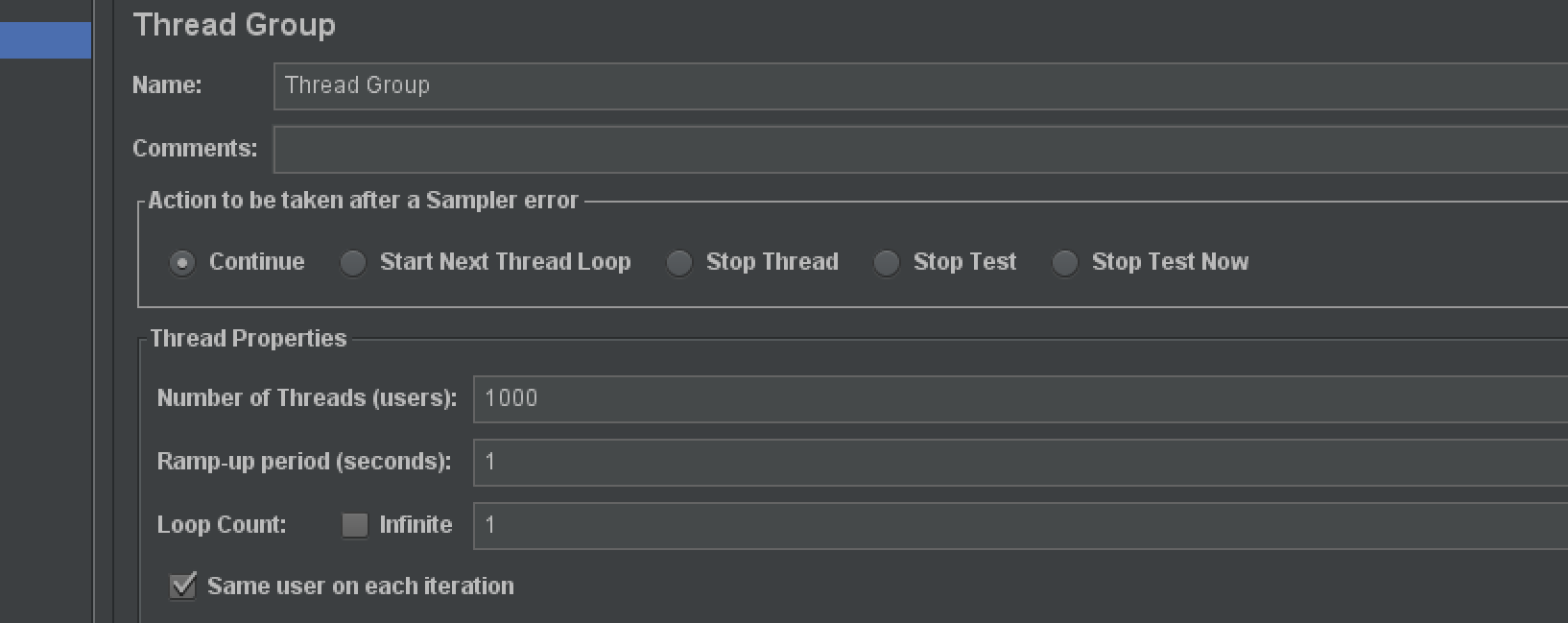
3.最后献上我的jmeter脚本

5.Redis配置代码
import org.springframework.context.annotation.Bean;import org.springframework.context.annotation.Configuration;import org.springframework.data.redis.connection.RedisConnectionFactory;import org.springframework.data.redis.core.RedisTemplate;import org.springframework.data.redis.serializer.JdkSerializationRedisSerializer;import org.springframework.data.redis.serializer.RedisSerializer;import org.springframework.data.redis.serializer.StringRedisSerializer;import java.util.Map;/*** @author 杨胖胖*/@Configurationpublic class RedisConfig {@Bean(name = "redisTemplate")public RedisTemplate<String, Object> getRedisTemplate(RedisConnectionFactory factory) {RedisTemplate<String, Object> redisTemplate = new RedisTemplate<>();redisTemplate.setConnectionFactory(factory);// key的序列化类型redisTemplate.setKeySerializer(new StringRedisSerializer());// value的序列化类型redisTemplate.setValueSerializer(new JdkSerializationRedisSerializer());return redisTemplate;}@Bean(name = "redisTemplateMap")public RedisTemplate<String, Map<String, String>> getRedisMapTemplate(RedisConnectionFactory factory) {RedisTemplate<String, Map<String, String>> redisTemplate = new RedisTemplate<>();redisTemplate.setConnectionFactory(factory);// key的序列化类型redisTemplate.setKeySerializer(RedisSerializer.string());// value的序列化类型redisTemplate.setValueSerializer(RedisSerializer.string());redisTemplate.setHashValueSerializer(RedisSerializer.string());redisTemplate.setHashKeySerializer(RedisSerializer.string());return redisTemplate;}}

若有收获,就点个赞吧
0 人点赞


