一.下拉菜单
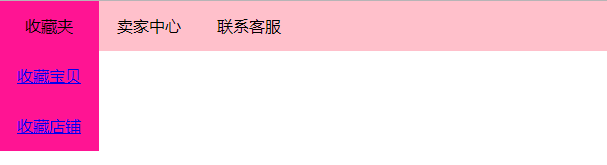
<style>*{margin:0;padding:0}ul{list-style: none;/* overflow: hidden; */line-height: 50px;background: pink;}li{width:100px;float: left;text-align: center;}li:hover{background: deeppink;}.drop-menu{position: relative;}.drop-content{display: none;width:100px;position: absolute;background: deeppink;}.row::after{content:"";display: table;clear: both;}.drop-content a{display: block;}.drop-menu:hover .drop-content{display: block;}</style></head><body><ul class="row"><li class="drop-menu">收藏夹<div class="drop-content"><a href="#">收藏宝贝</a><a href="#">收藏店铺</a></div></li><li>卖家中心</li><li>联系客服</li></ul></body></html>
二.遮罩

<style>
        *{margin: 0;padding: 0}
        .parent{
            width: 200px;
            height: 300px;
            position: relative;
            border: 1px solid #333;
            overflow: hidden;
        }
        img{
            width: 200px;
            height: 300px;
        }
        .cover{
            z-index: 100;
            position: absolute;
            left: 0;
            top: 0;
            width: 200px;
            height: 300px;
            background: rgba(51,51,51,0.822);
            transform-origin: right
            bottom;
            transform: rotate(90deg);
            transition: all 1s;
        }
        .parent:hover .cover{
            transform: rotate(0deg)
        }
    </style>
</head>
<body>
    <div class="parent">
        <img src="images/bg.jpg" alt="">
        <div class="cover">

        </div>
    </div>
</body>
</html>
三.img在div中的间隙问题
 <style>
        div{
            background: red;
            /* font-size: 0; */
        }
        img{
            vertical-align: bottom;
        }
    </style>
</head>
<body>
    <div>
        <img src="images/../timg.jpg" alt="">
    </div>
</body>
</html>
四.input输入框下拉框
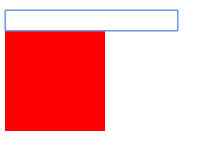
<style>
        div{
            width: 100px;
            height: 100px;
            background: red;
            display: none;
        }
        input:focus+div{
            display: block;
        }
    </style>
</head>
<body>
    <input type="text">
    <div></div>
</body>
</html>
五.鼠标悬停旋转
<style>
        div{
            width: 100px;
            height: 100px;
            background: red;
            margin: 100px;
            animation: animate 3s linear infinite;
            /* animation-play-state 动画播放状态 */
            animation-play-state: paused;
        }
        div:hover{
            animation-play-state: running;
        }
        @keyframes animate{
            0%{
                transform: rotate(0deg)
            }
            50%{
                transform: rotate(180deg)
            }
            100%{
                transform: rotate(360deg)
            }
        }
    </style>
</head>
<body>
    <div>

    </div>
</body>
</html>
六.鼠标在父级悬停,子元素hover
<style>
        .parent{
            width: 200px;
            height: 200px;
            background: red;
        }
        .child{
            width: 100px;
            height: 100px;
            background: pink;
        }
        .parent:hover .child{
            background: green;
        }
    </style>
</head>
<body>
    <div class="parent">
        <div class="child">

        </div>
    </div>
</body>
</html>
七.鼠标悬停旋转
 <style>
        div{
            width: 100px;
            height: 200px;
            background: red;
            transform: rotate(90deg);
            transition: all 1s;
            transform-origin: right bottom;
        }
        div:hover{
            transform: rotate(0deg)
        }
    </style>
</head>
<body>
    <div></div>
</body>
</html>

若有收获,就点个赞吧
0 人点赞


