放大镜
1.写出布局

主要知识要点:定位
<div id="container">
    <img class="small" src="images/small.jpg" alt="">
    <div class="move"></div>
  <div class="large">
      <img src="images/small.jpg" alt="">
  </div>
</div>
*{
    padding: 0;
    margin: 0;
}
#container{
    width: 420px;
    height: 420px;
    background-color: red;
    margin: 100px;
    position: relative;
}
.small{
    width: 420px;
    height: 420px;
}
.move{
    width: 120px;
    height: 120px;
    background: url('../images/move.png');
    position: absolute;
    top: 0;
    left: 0;
    display: none;
}
.large{
    width: 420px;
    height: 420px;
    position: absolute;
    top: 0;
    left: 480px;
    overflow: hidden;
    display: none;
}
.large img{
    width: 700px;
    height: 700px;
    position: absolute;
}
2.原理图
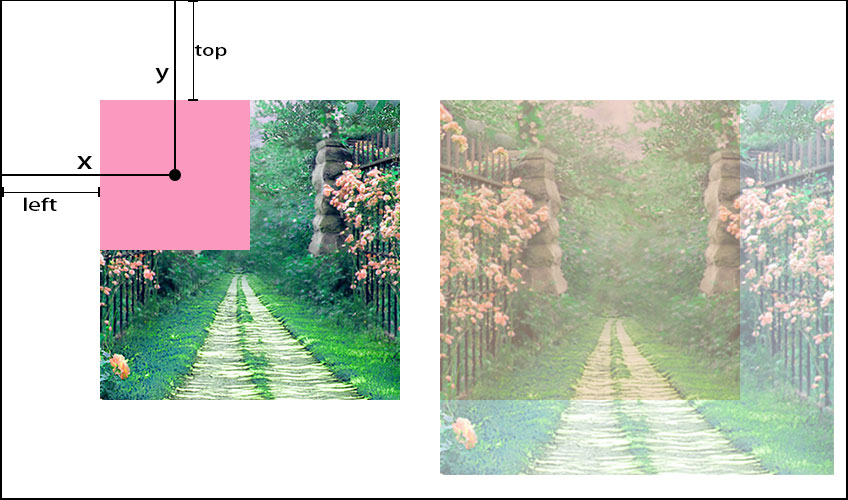
2.引入jquery
<script src="https://cdn.bootcss.com/jquery/3.4.1/jquery.js"></script>
3.鼠标悬停move large的显示和隐藏
主要知识要点:
mouseover 鼠标悬停
mouseout  鼠标移出
show() 显示
hide() 隐藏
// 鼠标放进去显示移动区域和右边的图片
$("#container").mouseover(function(){
  $(".move").show();
  $(".large").show();
})
// 鼠标移出去隐藏移动区域和右边的图片
$("#container").mouseout(function(){
  $(".move").hide();
  $(".large").hide();
})
4.让move随鼠标的移动而移动
mousemove //鼠标在元素上移动时, mousemove 事件触发
$(".move").mousemove(function(event){
4.1获取鼠标相对于x y的偏移量
MouseEvent.clientX,   提供事件发生时的应用客户端区域的水平坐标
MouseEvent.clientY,   提供事件发生时的应用客户端区域的垂直坐标
 $(".move").mousemove(function(event){
  var x = event.clientX;  //获取鼠标距离浏览器x轴的位置
  var y = event.clientY;  //获取鼠标距离浏览器y轴的位置
  // console.log(x + ":" + y)
4.2获取container相对于x y的偏移量
offset()返回元素相对于文档的偏移
var left = $("#container").offset().left;
var top = $("#container").offset().top;
// console.log(top + ":" + left)
4.3(move给绝对定位)获取move相对于container的偏移量
var offsetX = x - left;
var offsetY = y - top;
// console.log(offsetX+":"+offsetY)
4.4利用css() 方法设置被选元素的一个或多个样式属性
$(this).css({
  "left": left_left + "px",
  "top": top_top + "px"
})
5.获取move中心点偏移量
var top_top = offsetY - $(this).height()/2;
var left_left = offsetX - $(this).width()/2;
// console.log(top_top+":"+left_left)
6.限制move边界
var maxWidth = $('#container').width()-$('.move').width();
var maxHeight = $('#container').height()-$('.move').height();
if(top_top < 0){
  top_top = 0
}else if(top_top > maxHeight){
  top_top = maxHeight
}
if(left_left < 0){
  left_left = 0
}else if(left_left > maxWidth){
  left_left = maxWidth
}
7.计算move移动的比例
var width = left_left / (maxWidth);
var height = top_top / (maxHeight);
console.log(width + ":" + height)
9.计算大图对应移动距离
var large_left = ($(".large img").width() - $(".large").width()) * width ;
var large_top = ($(".large img").height() - $(".large").height()) * height ;
$(".large img").css({
  "left" : -large_left + "px",
  "top" : -large_top + "px"
});

若有收获,就点个赞吧
0 人点赞


