
先看看阿里云对物模型的概念解释:物模型是阿里云物联网平台为产品定义的数据模型,用于描述产品的功能。本文介绍物模型相关概念和使用限制。(https://help.aliyun.com/document_detail/88239.html)
站在我的角度看,mqqt层面是没有物模型这个概念的。理论上讲只要你定义要topic,定义好传递的palyload就行了。和平时写给前端的接口文档是一个样子的,我可以用post当作get查询,也可以get中实现post数据新增的功能。但是为了专业行的沟通和统一,大家最后搞出一个restful 风格的api开发模式。所以我在我看来所谓物模型就是阿里云iot平台帮你定义好的和嵌入式沟通的“接口文档”和“开发规范”,这就和咋们restful api开发规范是一个道理。
1-功能定义
正如前面所阐述的一样,物模型就是一个阿里云总结定义好的和嵌入式沟通的“接口文档”和“开发规范”,和咋们restful api开发规范是一样。那么我们在和前端对接接口文档的时候是以“功能”作为载体的,比如我会告诉前端:这是登陆的接口文档。
所以真正实现物联网功能的是i阿里云的”功能定义“,功能定义以”物模型“的方式给出。也就是“功能定义”是“登陆功能”,“物模型”是restful风格的api 接口文档。
1.1-功能定义

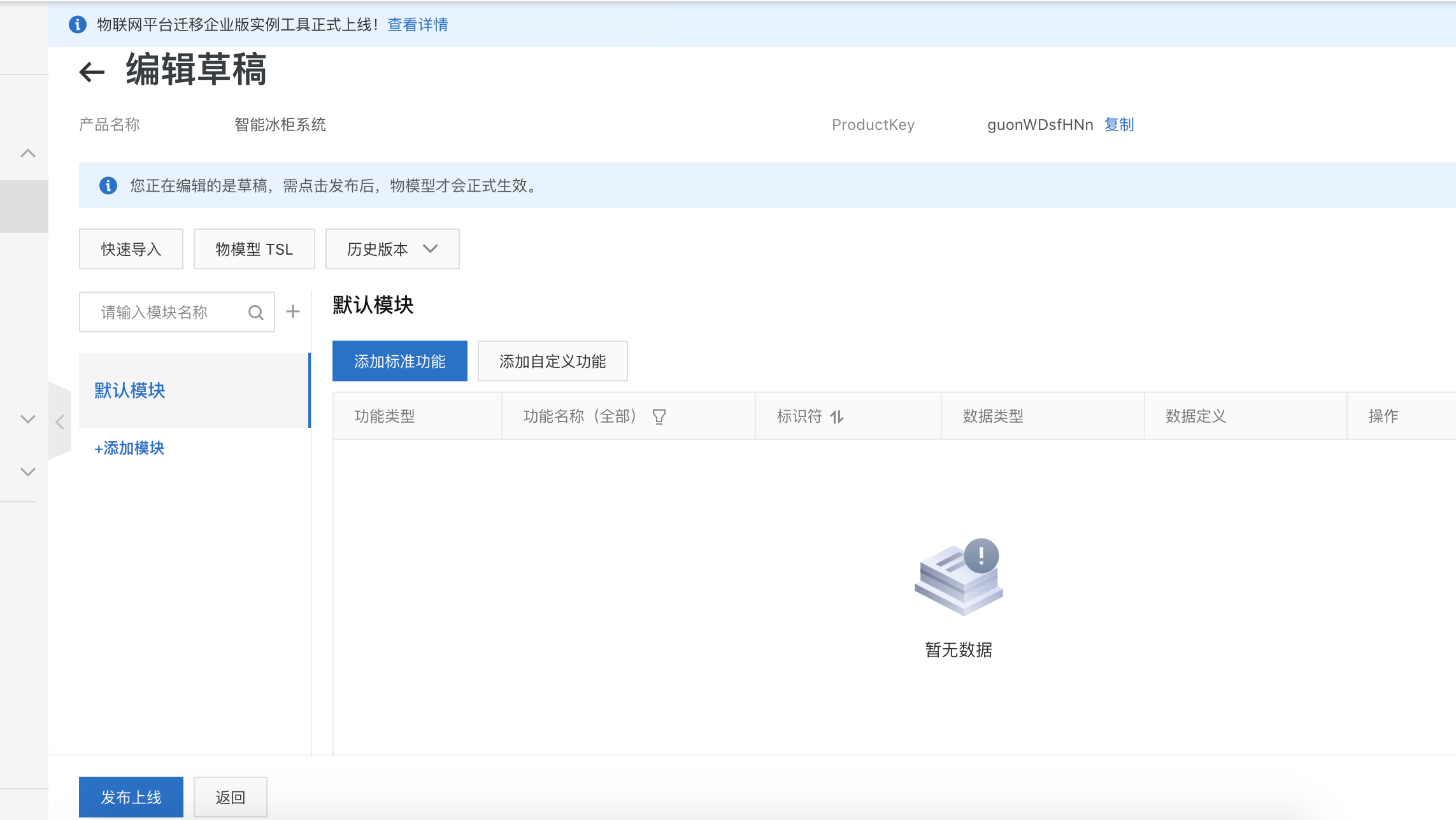
所谓标准功能也是阿里云物联网帮你定义的一些场景的接口参数,比如“cpu使用率”,我们这里选择自定义
2.创建自定义功能
2.1-添加自定义功能
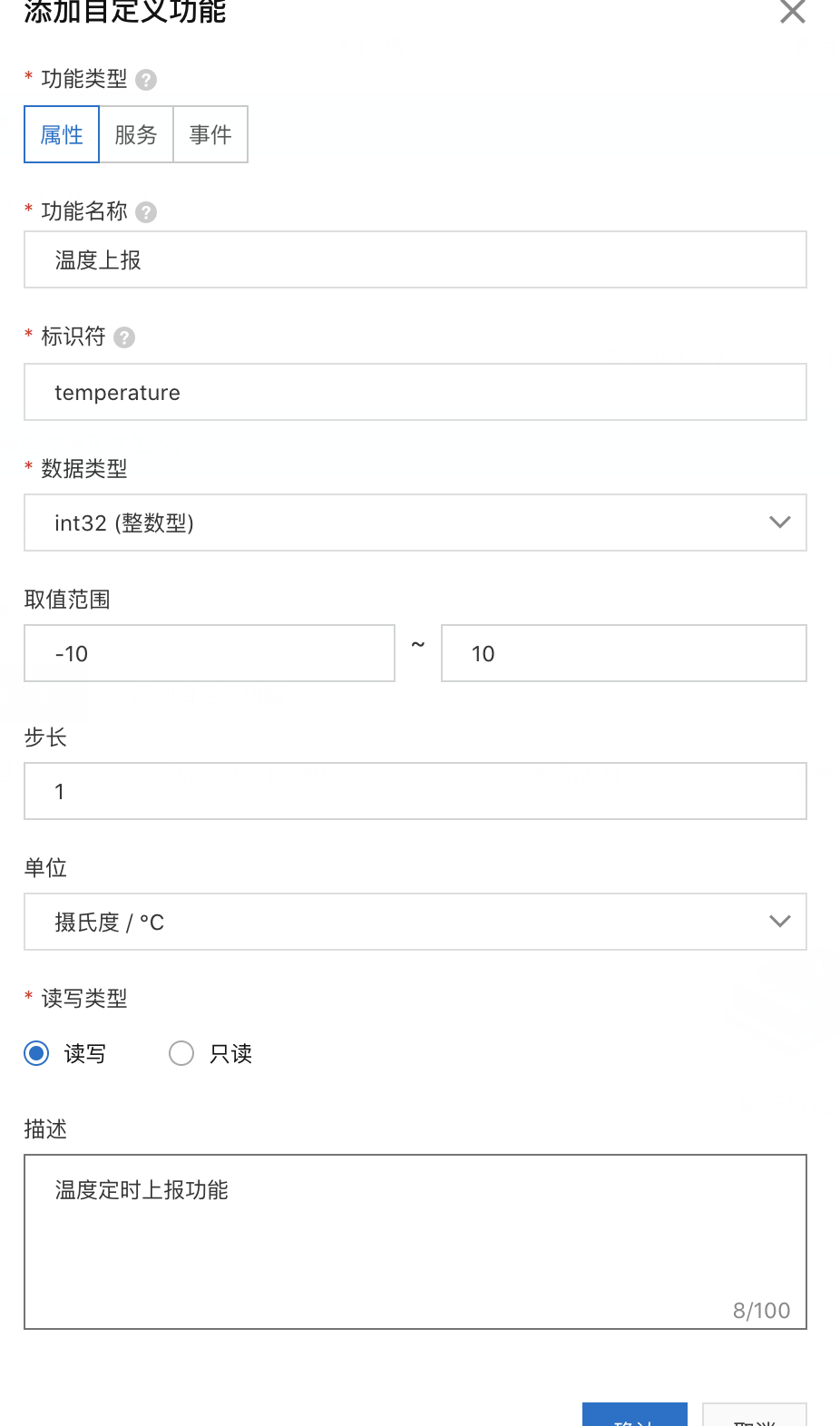
属性 事件 服务三个区别体现在哪里?
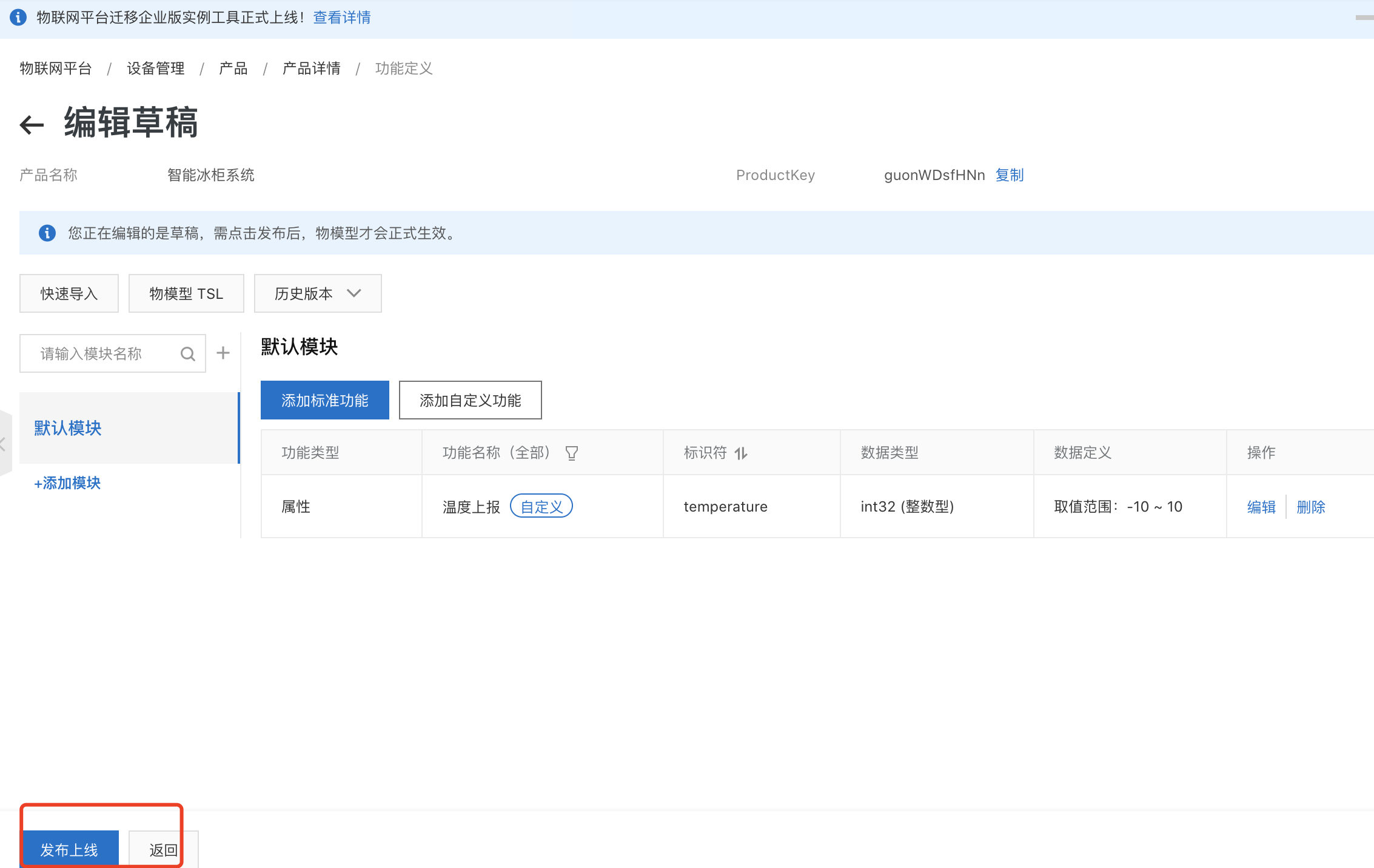
2.2-物模型
那么功能定义的意义在哪里体现呢?
和前面说的一样这些功能是依托于物模型的,也就是和前端交互的api接口文档,所以我们来看看创建的温度上报功能的“接口文档”也就是“物模型”长什么样子。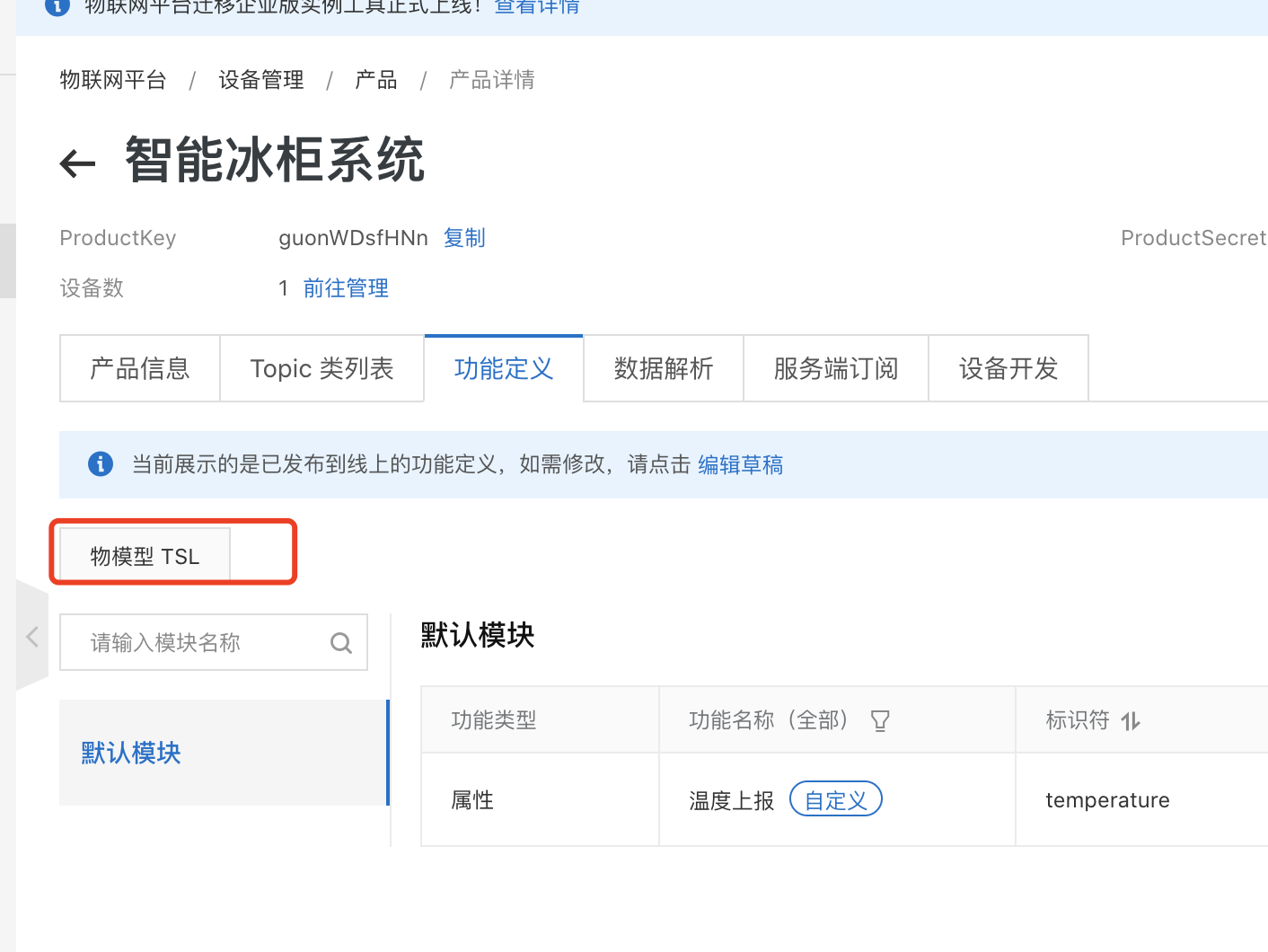
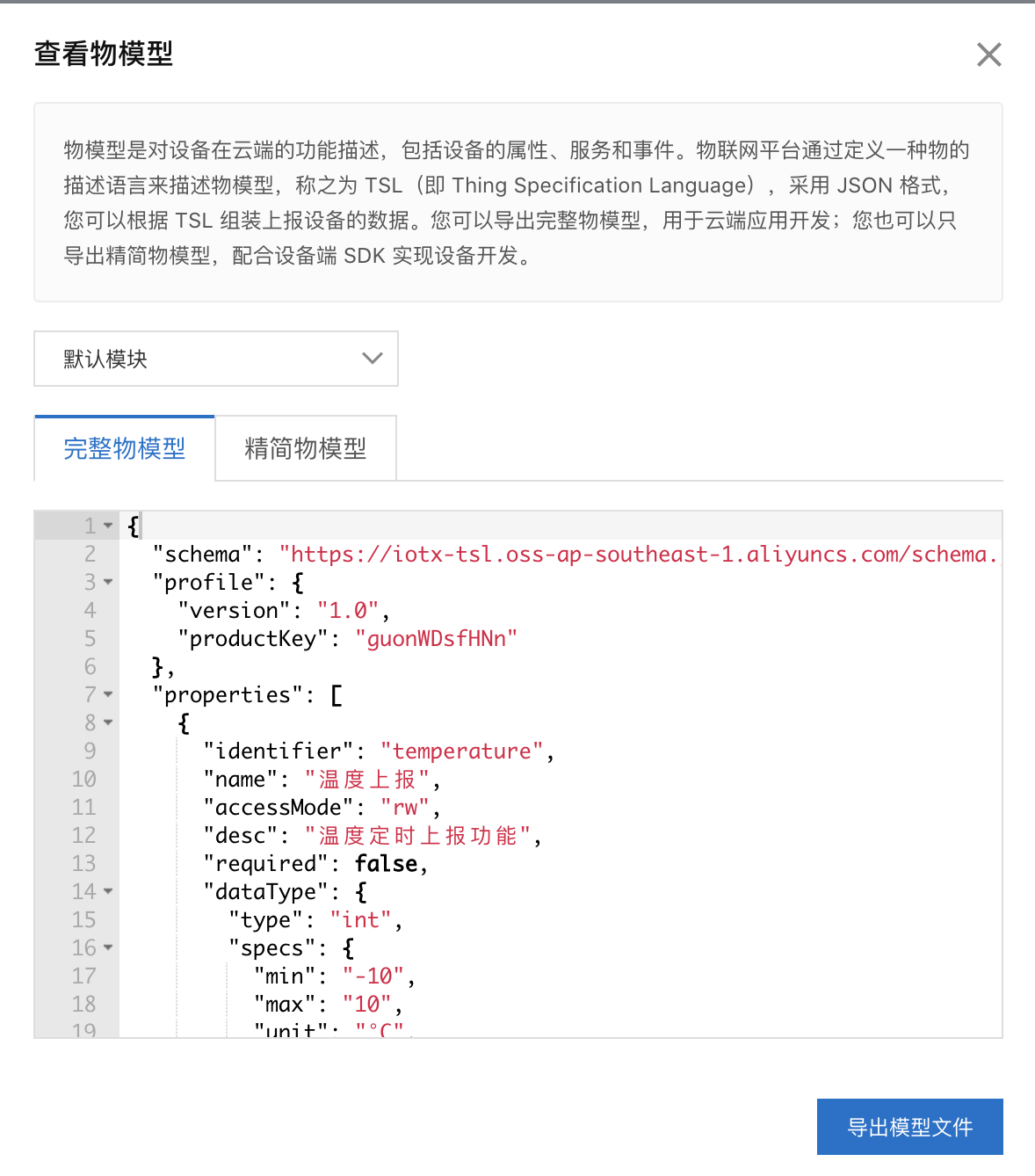
完整版物模型:
{"schema": "https://iotx-tsl.oss-ap-southeast-1.aliyuncs.com/schema.json","profile": {"version": "1.0","productKey": "guonWDsfHNn"},"properties": [{"identifier": "temperature","name": "温度上报","accessMode": "rw","desc": "温度定时上报功能","required": false,"dataType": {"type": "int","specs": {"min": "-10","max": "10","unit": "°C","unitName": "摄氏度","step": "1"}}}],"events": [{"identifier": "post","name": "post","type": "info","required": true,"desc": "属性上报","method": "thing.event.property.post","outputData": [{"identifier": "temperature","name": "温度上报","dataType": {"type": "int","specs": {"min": "-10","max": "10","unit": "°C","unitName": "摄氏度","step": "1"}}}]}],"services": [{"identifier": "set","name": "set","required": true,"callType": "async","desc": "属性设置","method": "thing.service.property.set","inputData": [{"identifier": "temperature","name": "温度上报","dataType": {"type": "int","specs": {"min": "-10","max": "10","unit": "°C","unitName": "摄氏度","step": "1"}}}],"outputData": []},{"identifier": "get","name": "get","required": true,"callType": "async","desc": "属性获取","method": "thing.service.property.get","inputData": ["temperature"],"outputData": [{"identifier": "temperature","name": "温度上报","dataType": {"type": "int","specs": {"min": "-10","max": "10","unit": "°C","unitName": "摄氏度","step": "1"}}}]}]}
精简版物模型:
{"properties": [{"identifier": "temperature","dataType": {"type": "int"}}]}
首先说看到这里我第一眼想起来的就是我们api的swagger文档的格式,所以阿里云肯定是利用swagger文档的语法规则作为物模型的tsl语法来进行校验和解析。真他娘的聪明。 但是实际开发中用阿里云提供的api或者sdk不会直接使用这些原生的物模型json串,更多的是让我们更深刻的去理解物模型这个概念和落地的样子。
2.3-物模型的使用
还是之前的那句话,mqqt层面只需要有topic就可以。
我们这里定义的“温度上报”功能选择的功能类型是“属性”,我们在产品下面的topickankan属性上报的topic是什么:
/sys/guonWDsfHNn/${deviceName}/thing/event/property/post
我们还是用mqqt.fx模拟设备上报数据:
阿里云日志: 两条信息,一条设备到云(mqtt topic),一条数物模型相关的数据状态码是失败的
设备到云消息: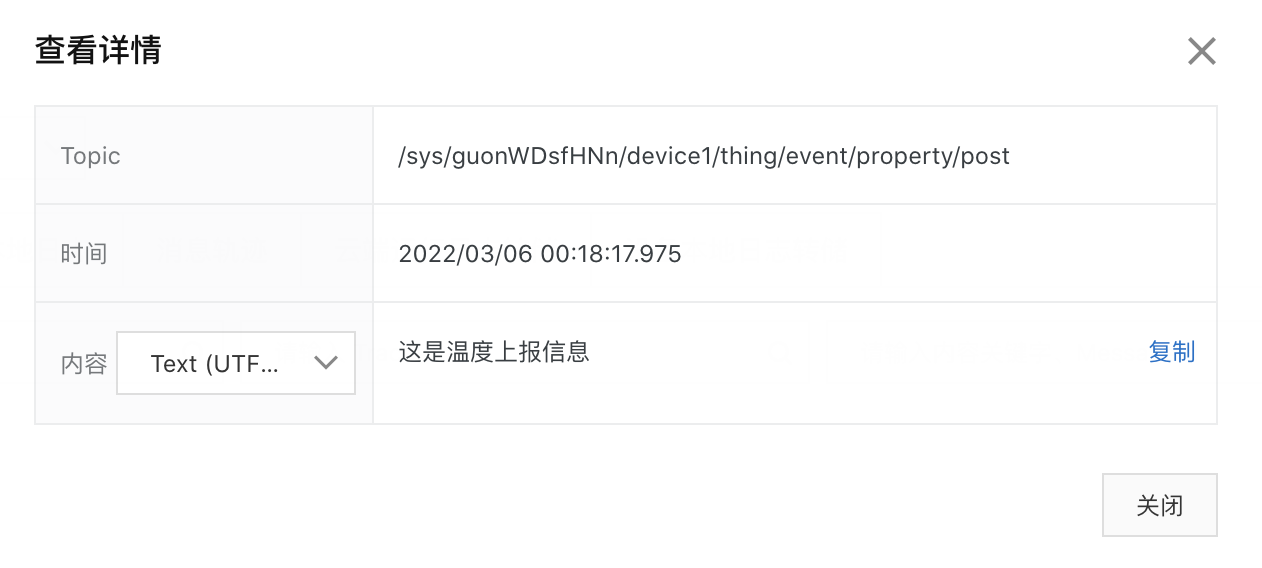
设备到云消息就是我们在mqtt.fx客户端发送的消息内容是一样的。但是物模型的状态是6027,根据文档查阅得到(https://help.aliyun.com/document_detail/44542.html?spm=5176.11485173.help.dexternal.405559afEEnnXX)是数据的格式有误:
所以导致device1的设备是没有数据上来的:
服务端订阅的数据也没有:
云产品流转的数据也是没有上来的: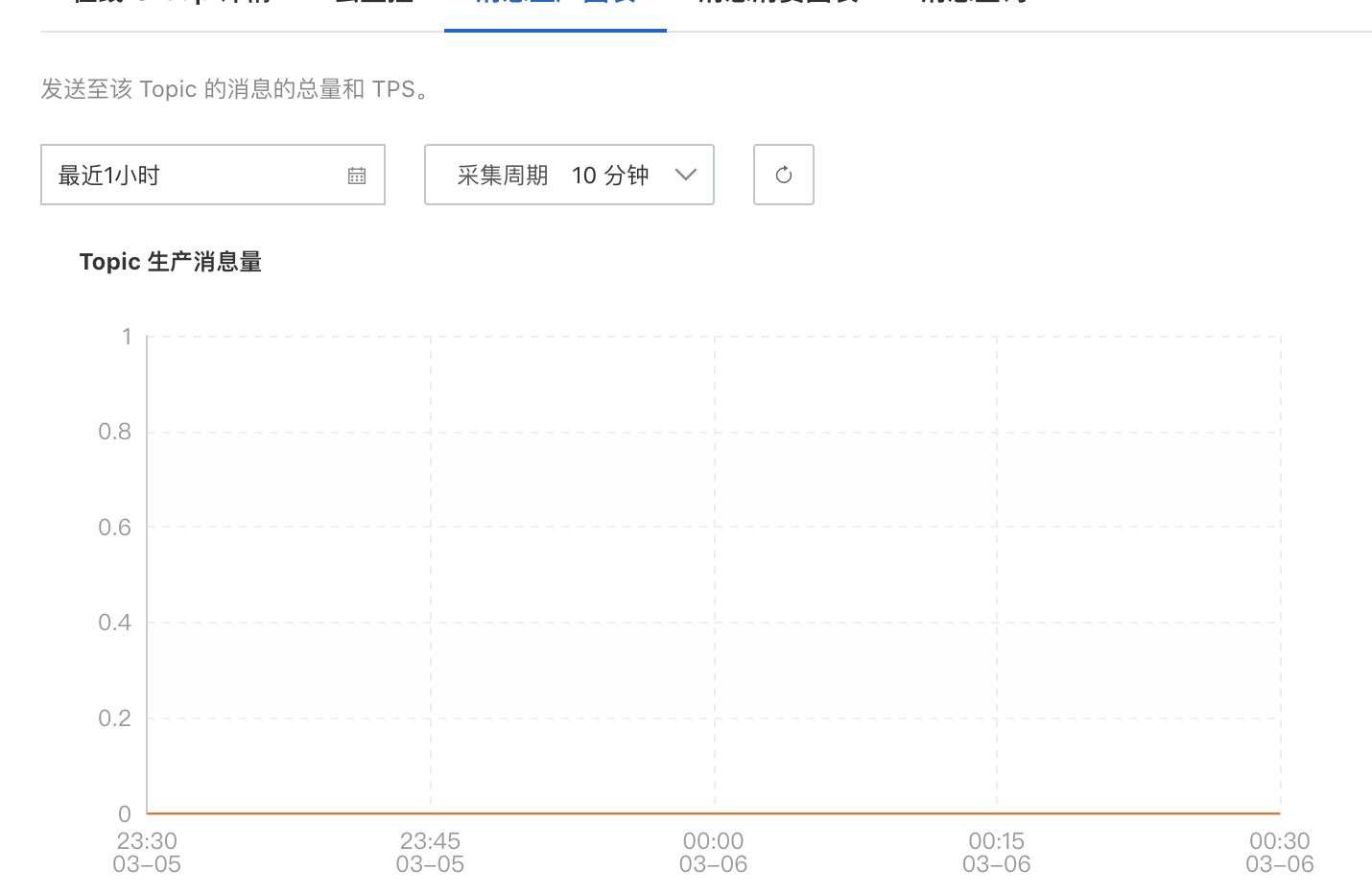
记得我前面说的么,那个物模型的格式和swagger文档语法格式很像,所以我们要按照那样的json格式上报数据才可以,我们就按照哪个精简版本的数据格式上报。
{"properties": [{"identifier": "temperature","dataType": {"type": "int"}}]}
{"method":"thing.event.property.post",//对应物模型的属性上报"params":{"temperature":27//物模型定义的是int这里一定只能是int}}
需要注意的是官网基于物模型通信的案例都是给出的sdk方式,起码我没有找到利用原生mqqt方式物模型使用教程。我也是百度了很久才找到的。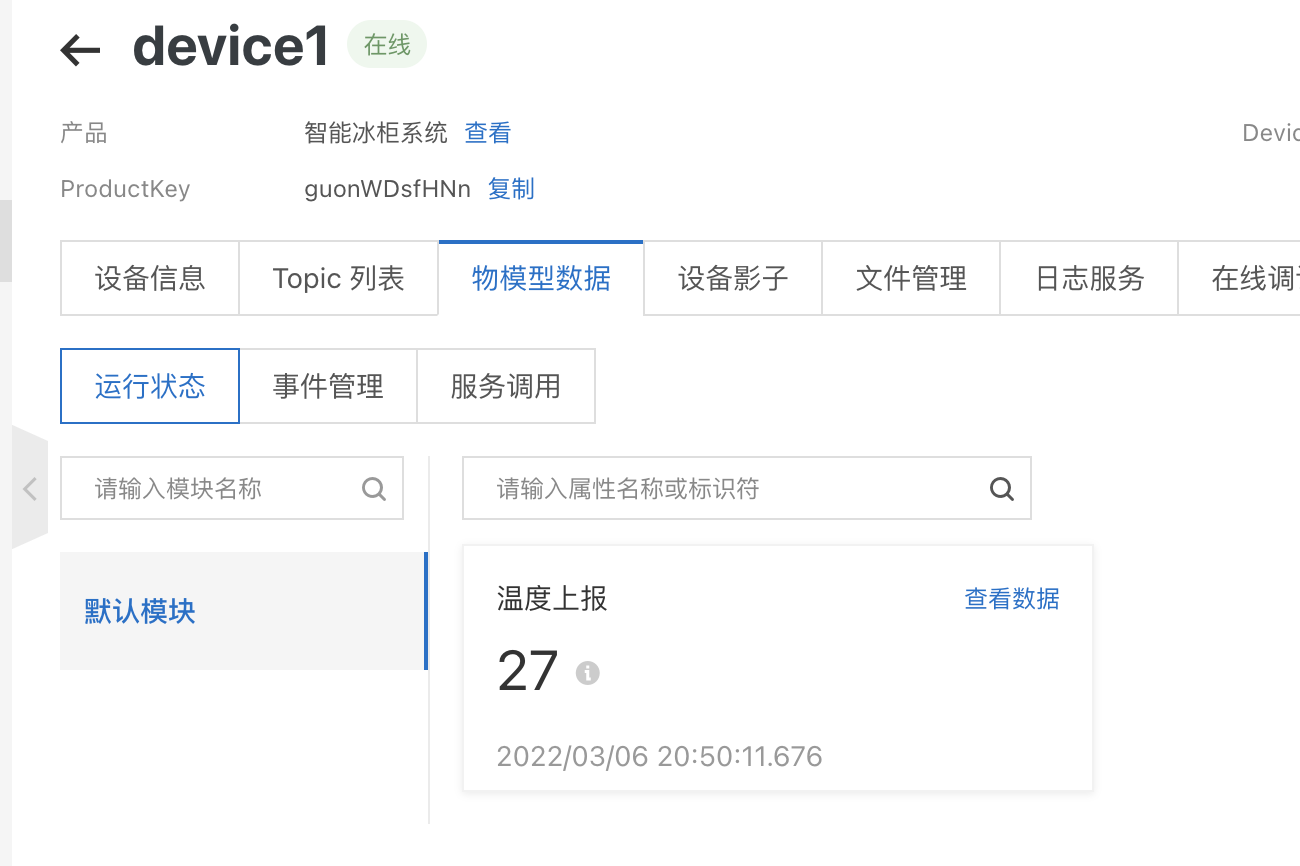
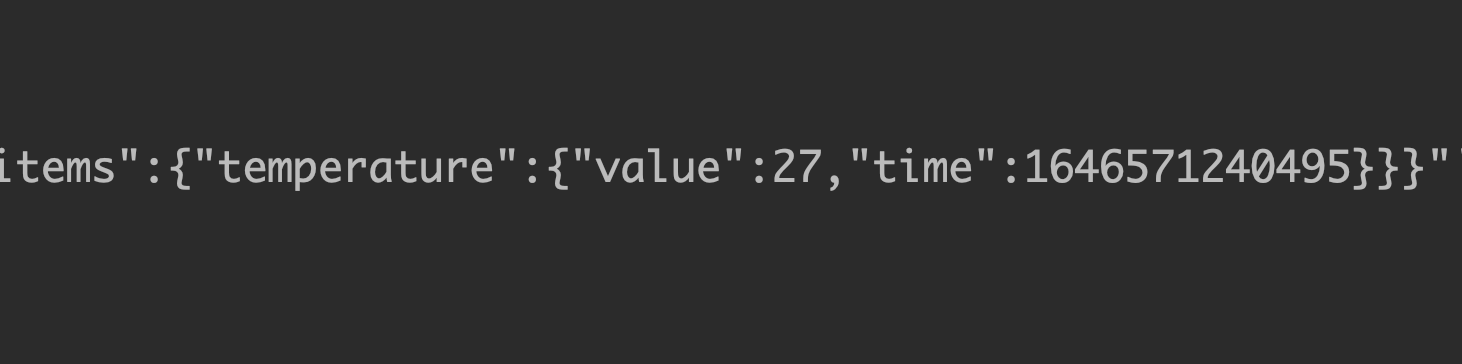
amqp本地客户端也收到了消息
3-功能分类
在整个阿里云物联网体系中“物模型”这个概念被大量使用,我们在创建功能的时候有三个选项: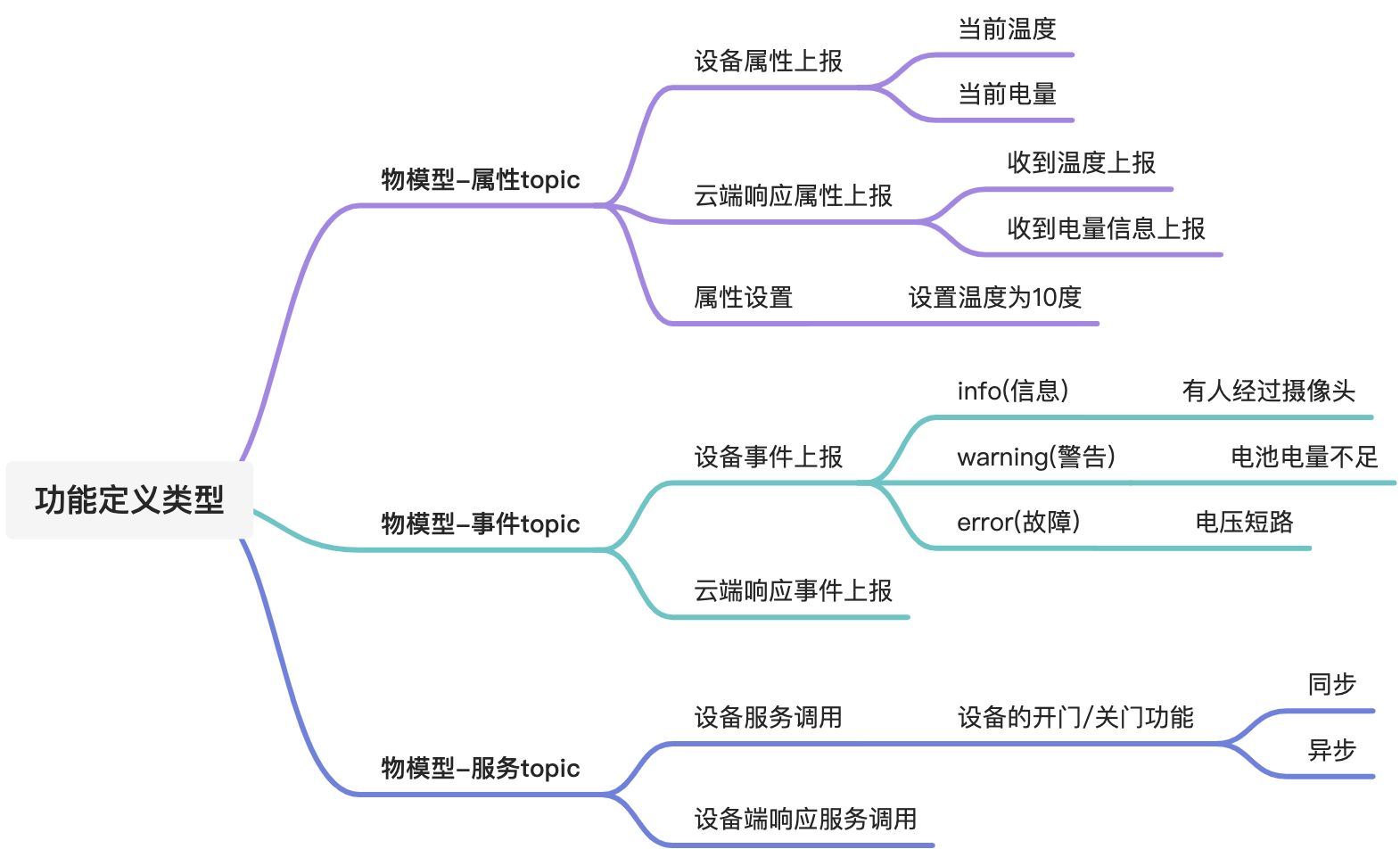
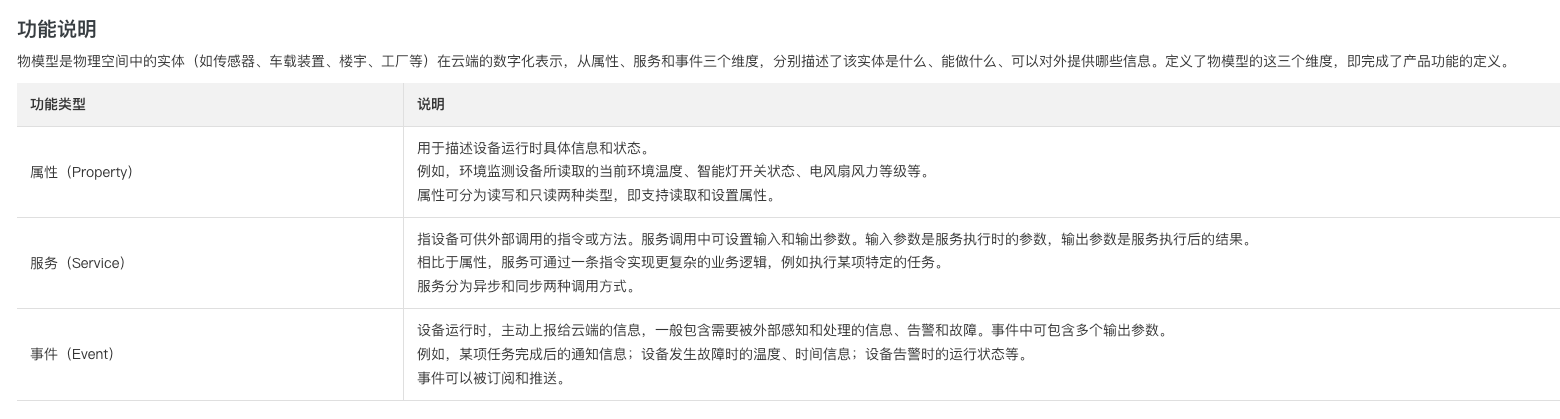
从mqtt的角度叫只有topic发布/订阅的概念,阿里云分类与否对mqtt是没有任何意义的。但是阿里云基于这个分类提供了对应的处理函数是能解决我们的实际开发问题的。比如“服务”这一类型,我完全可以自定义一个topic名字叫“service”,然后通过发布/订阅来完成和设备端的交互。但是阿里云又把服务分为同步和异步,如果我们要实现同步基于mqtt的实现是需要二次封装的,所以我是觉得物模型和功能定义更多的意义是阿里云帮我们在原生的mqtt的基础上二次封装了一个在实际应用场景中的问题解决方案。
那么属性,事件,服务怎么使用,解决了什么问题呢?
https://help.aliyun.com/document_detail/89301.html
https://help.aliyun.com/document_detail/90567.htm?spm=a2c4g.11186623.0.0.78791c80ywd3ZR
3.1-属性
3.1.1-定义属性功能
需求:我要上报当前设备的温度,设备唯一编码,时间三个信息
这里的读写类型我还没有体会到,因为我把它改成只读的情况topic发布/订阅都能通,阿里云iot日志也有两条数据 现在还不知道体现在哪里
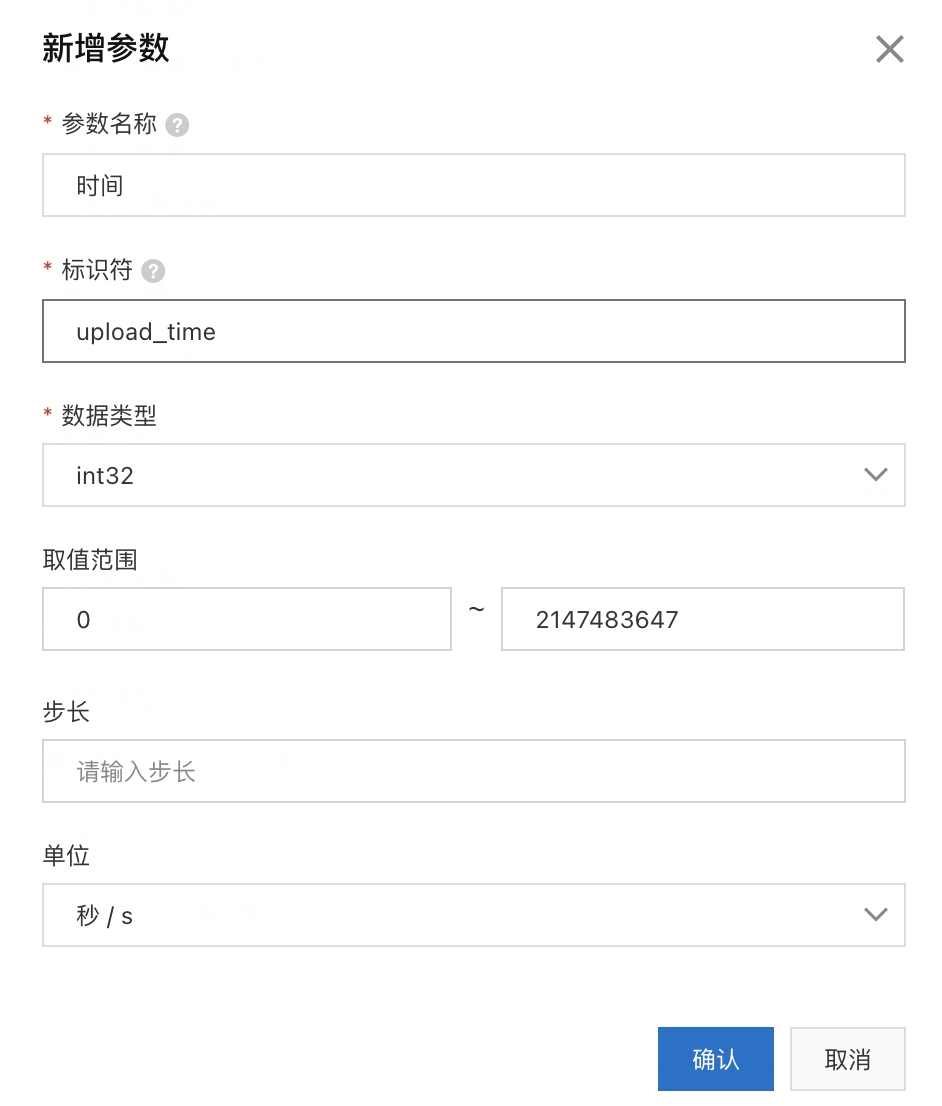

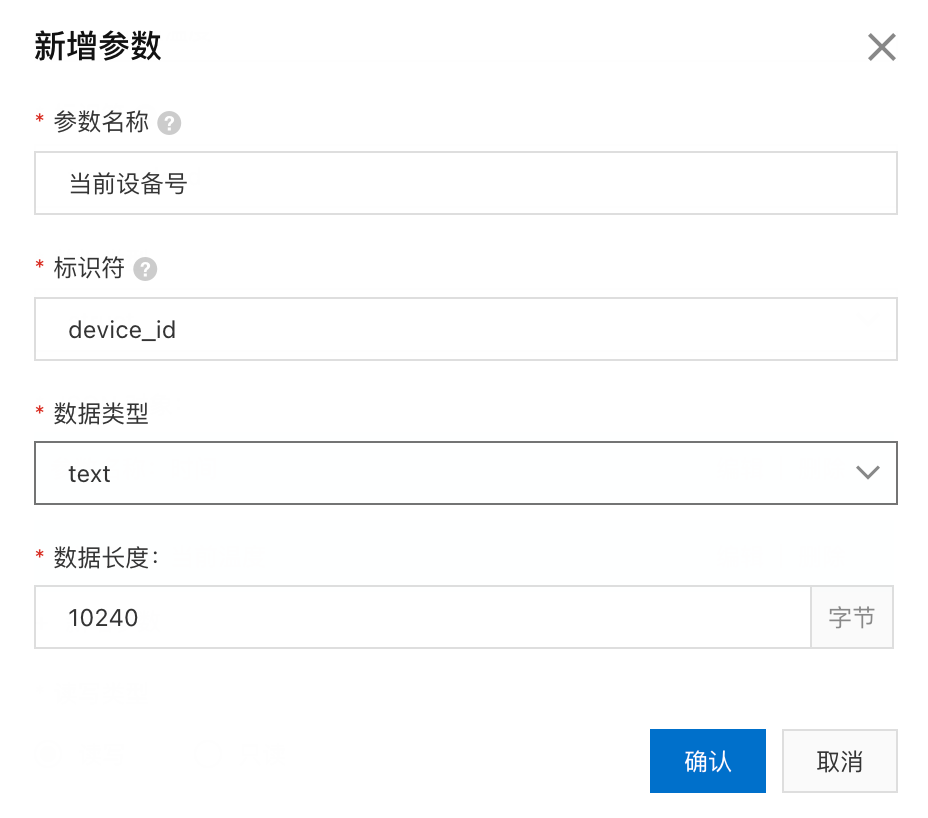
{"properties": [{"identifier": "temperature","dataType": {"type": "int"}},{"identifier": "tmp_upload","dataType": {"type": "struct","specs": [{"identifier": "upload_time","dataType": {"type": "int"}},{"identifier": "now_temp","dataType": {"type": "float"}},{"identifier": "device_id","dataType": {"type": "text"}}]}}]}
3.1.2-设备上报属性
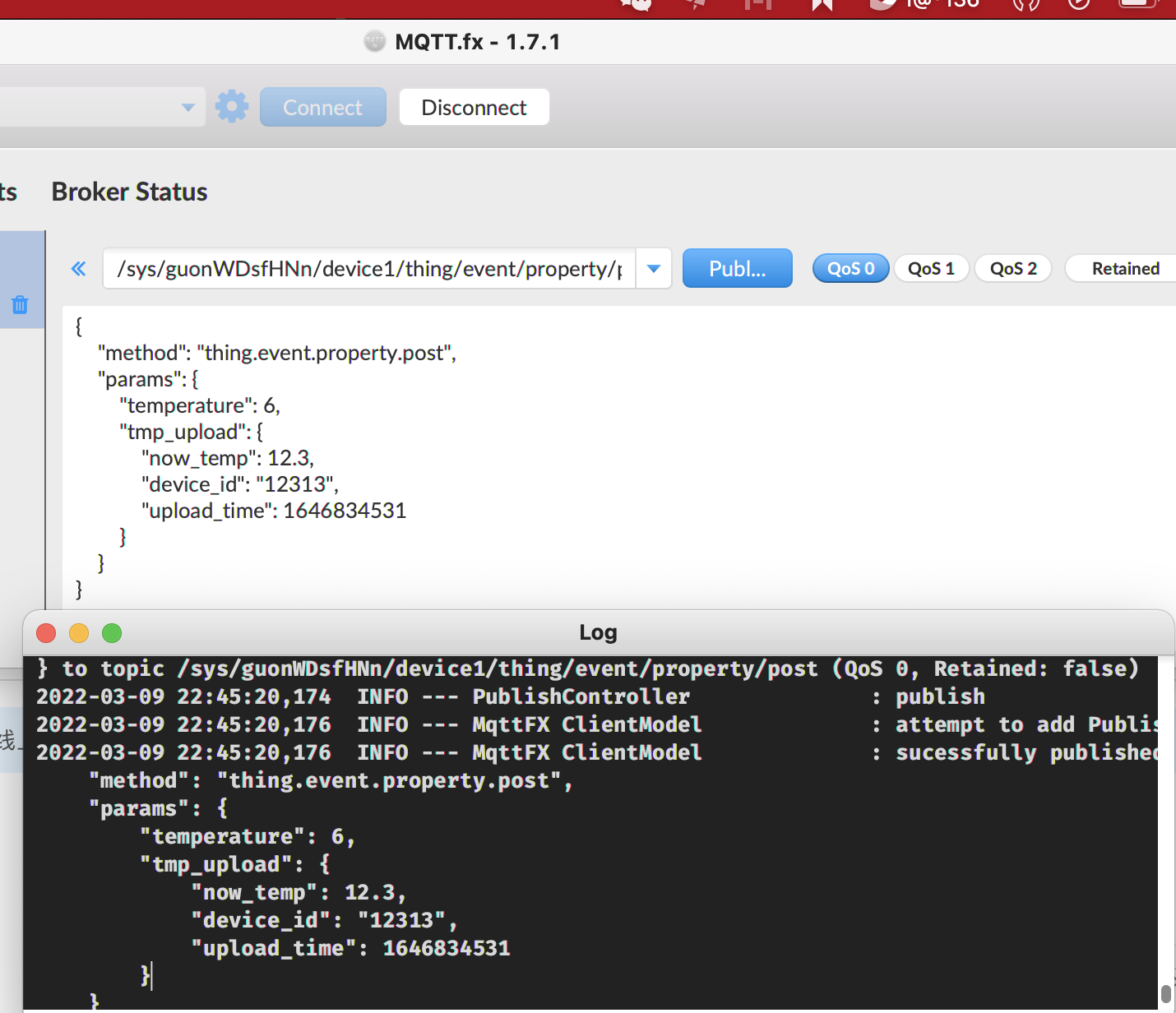
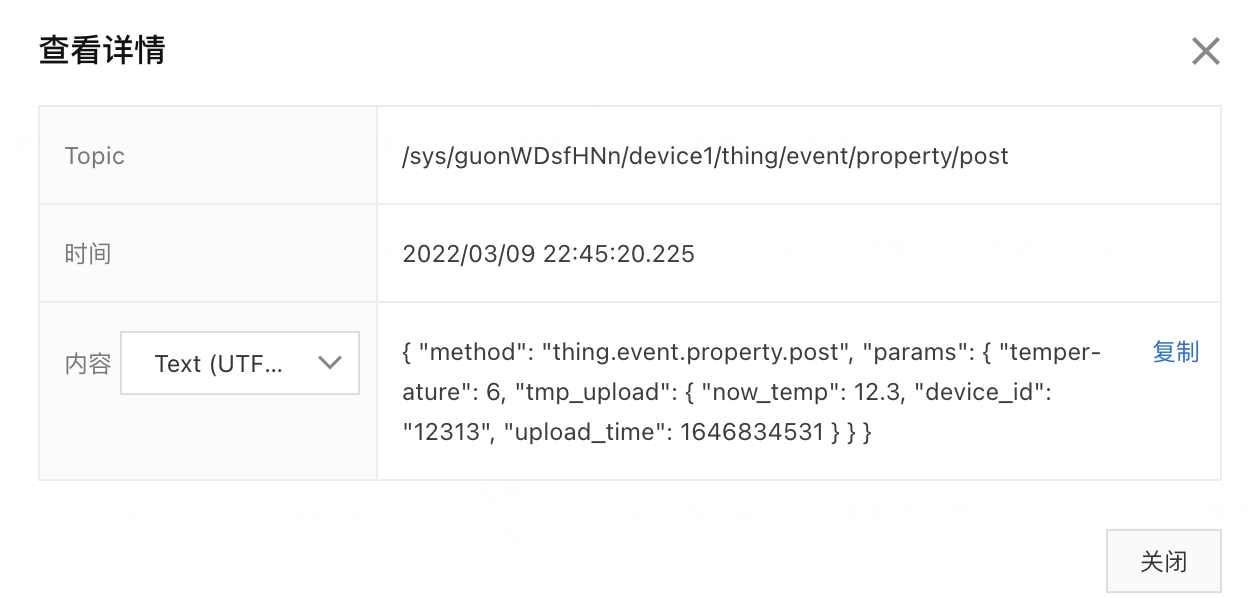
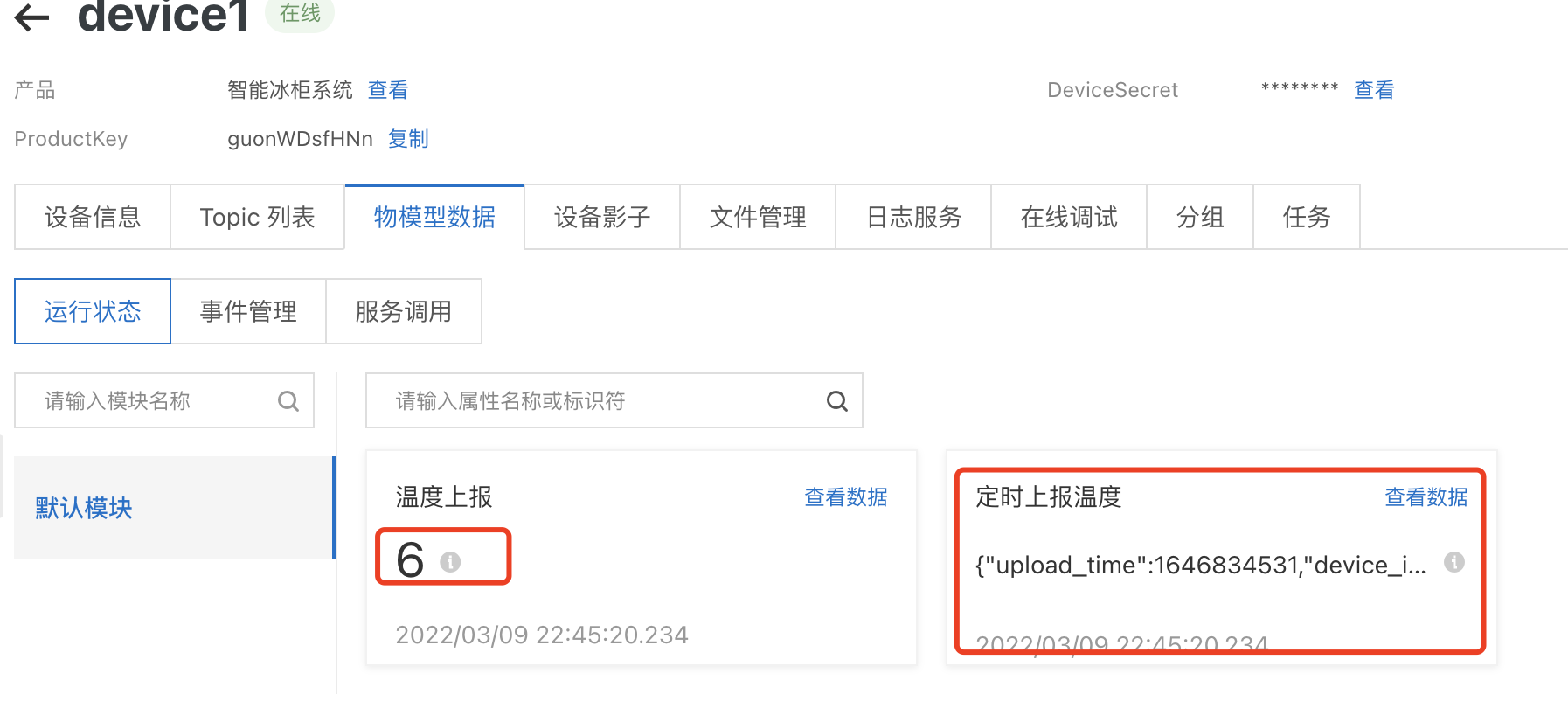
属性上报的topic:/sys/guonWDsfHNn/${deviceName}/thing/event/property/post
{"method": "thing.event.property.post","params": {"temperature": 6,"tmp_upload": {"now_temp": 12.3,"device_id": "12313","upload_time": 1646834531}}}
关于原生方式通过topic上传属性/事件/服务的格式:https://help.aliyun.com/document_detail/89301.html

3.1.3-服务端订阅能拿到的信息
cmd:'MESSAGE'headers:{'destination': '/guonWDsfHNn/device1/thing/event/property/post','generateTime': '1646838223863','message-id': '1501574460157725184','qos': '1','subscription': '1','topic': '/guonWDsfHNn/device1/thing/event/property/post'}original_headers:{'destination': '/guonWDsfHNn/device1/thing/event/property/post','generateTime': '1646838223863','message-id': '1501574460157725184','qos': '1','subscription': '1','topic': '/guonWDsfHNn/device1/thing/event/property/post'}body:{'checkFailedData': {},'deviceName': 'device1','deviceType': 'CustomCategory','gmtCreate': 1646838223861,'iotId': 'Iml0VgmYzbQv1VYueRsWguon07','items': {'temperature': {'time': 1646838223857, 'value': 7},'tmp_upload': {'time': 1646838223857,'value': {'device_id': '12313','now_temp': 12.3,'upload_time': 1646834531}}},'productKey': 'guonWDsfHNn','requestId': 'null'}
3.1.3-云端响应属性上报
实话实说我没有找到云端响应设备上报的规则文档,理论上讲云端下发给不需要过分校验,只需要和嵌入式沟通好协议就行了。
topic:
/sys/guonWDsfHNn/${deviceName}/thing/event/property/post_reply
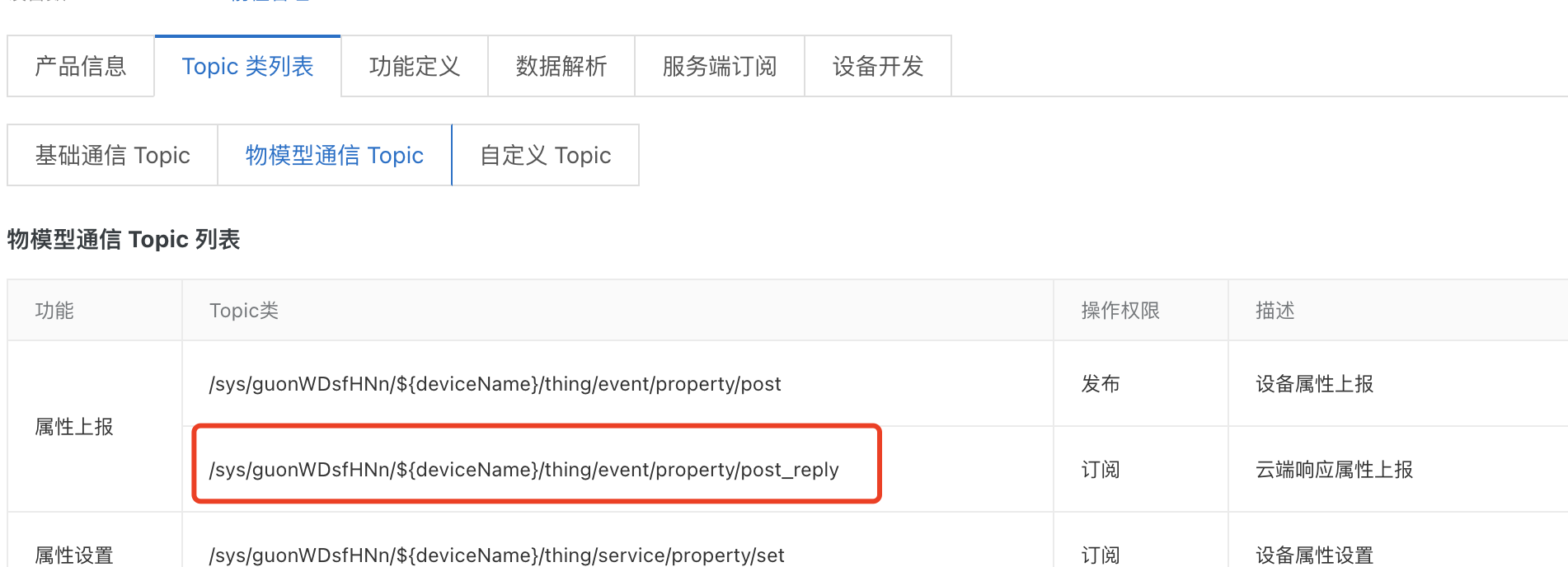
mqtt客户端发布且订阅这个topic,会看到2条消息,右边是发布的消息(业务系统),左边是订阅者(设备)收到的消息。
iot日志:
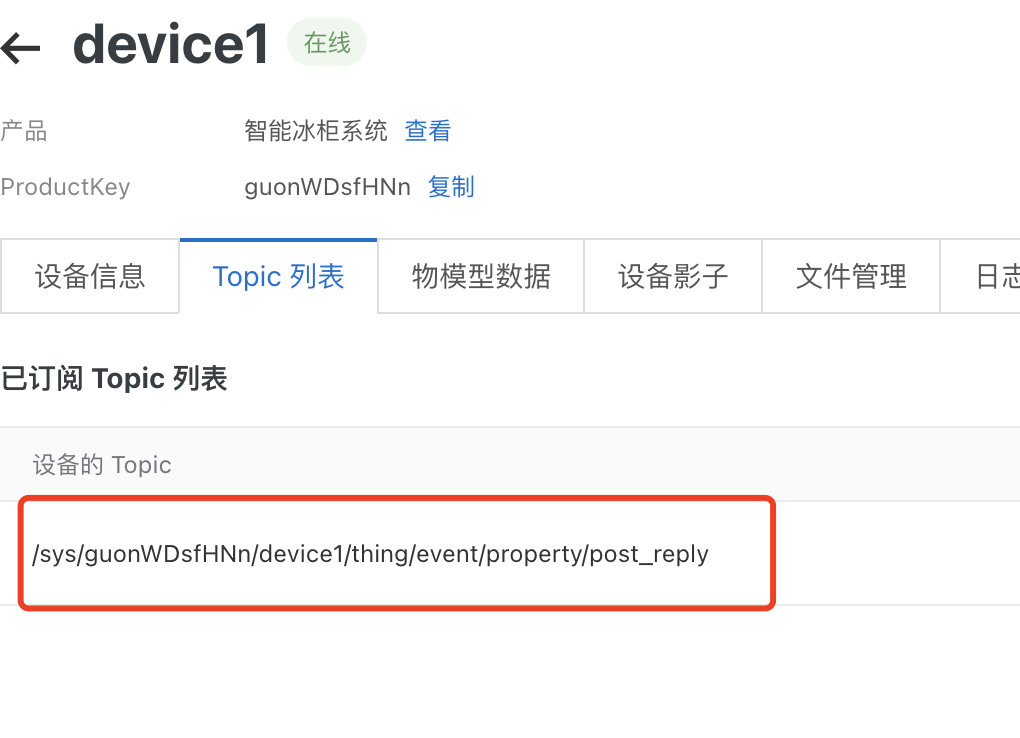
此时设备的订阅的列表中就多了一个topic
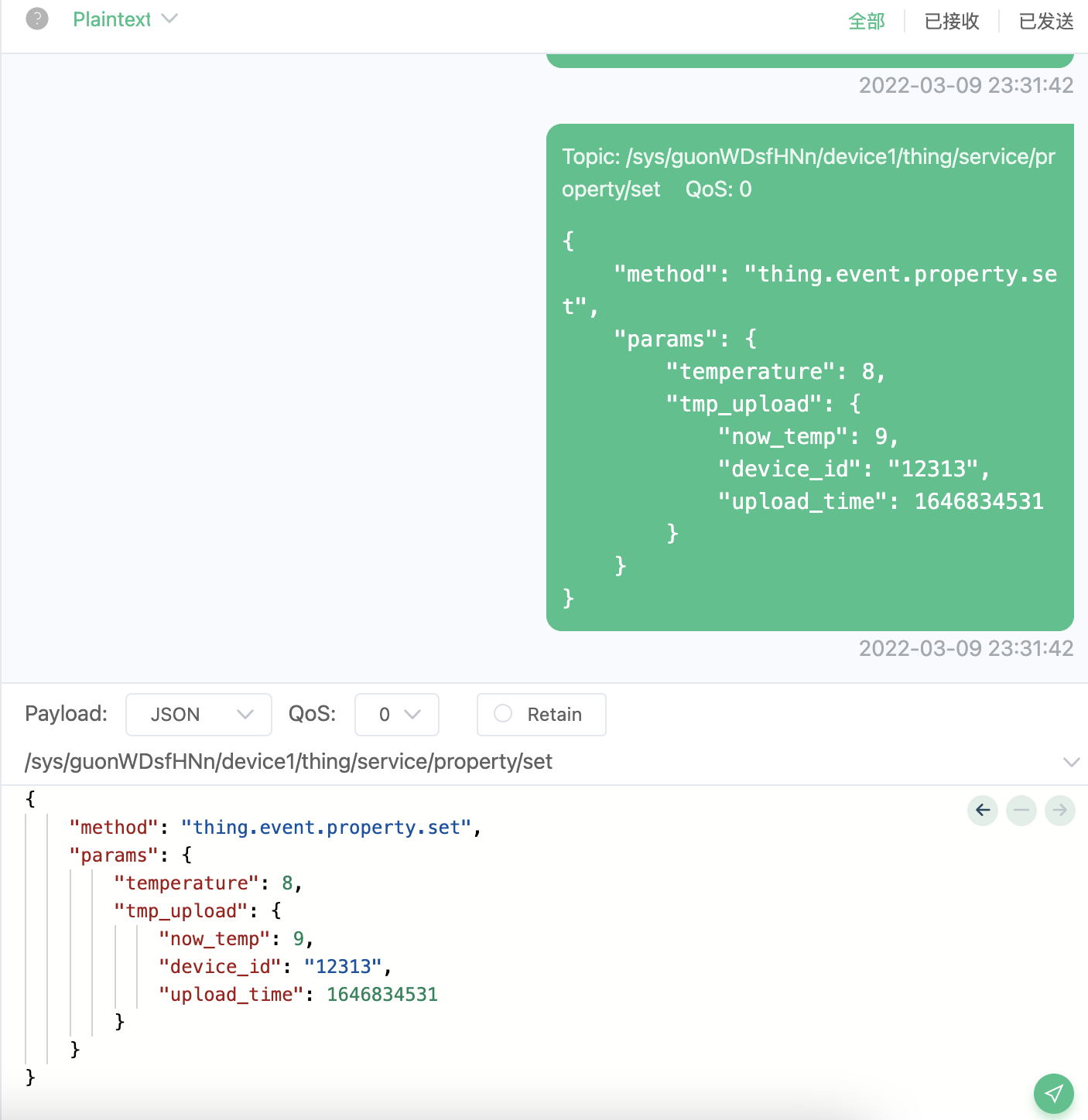
3.1.4-云端属性设置

云端响应的格式:
{"method": "thing.event.property.set","params": {"temperature": 8,"tmp_upload": {"now_temp": 9,"device_id": "12313","upload_time": 1646834531}}}
iot日志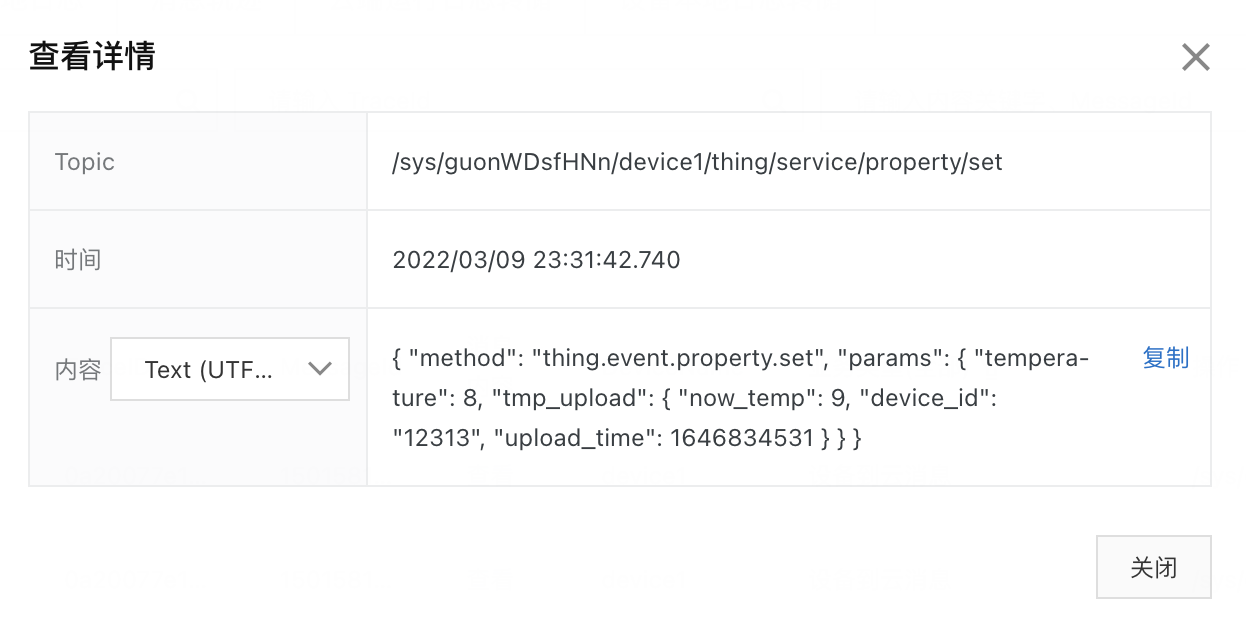
物模型数据: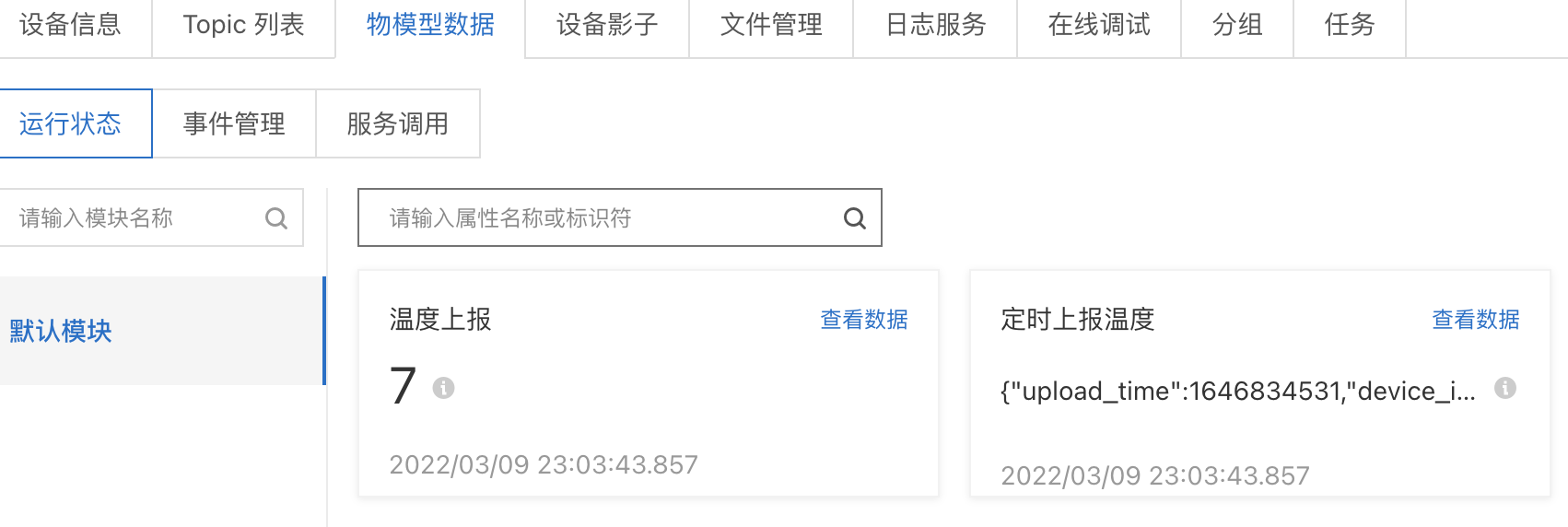
物模型数据是不会变的,因为我们是下发消息响应他的“属性上报”的请求,虽然我的消息内容是关于温度的数据,其实是障眼法。。。。
我就是想看看当前设备的属性会不会变化,所以是不会变的。要等设备吧温度调好了,下一次属性上报(3.1.2)的时候物模型数据才会变化。可想而知这个命令amqp客户端也是没有收到流转的消息的。
我们可以在amqp的监听的设备消息的类型来验证:
能流转到客户端订阅的都是以设备到主动上报内通的消息类型。
3.2-事件
3.2.1-定义事件
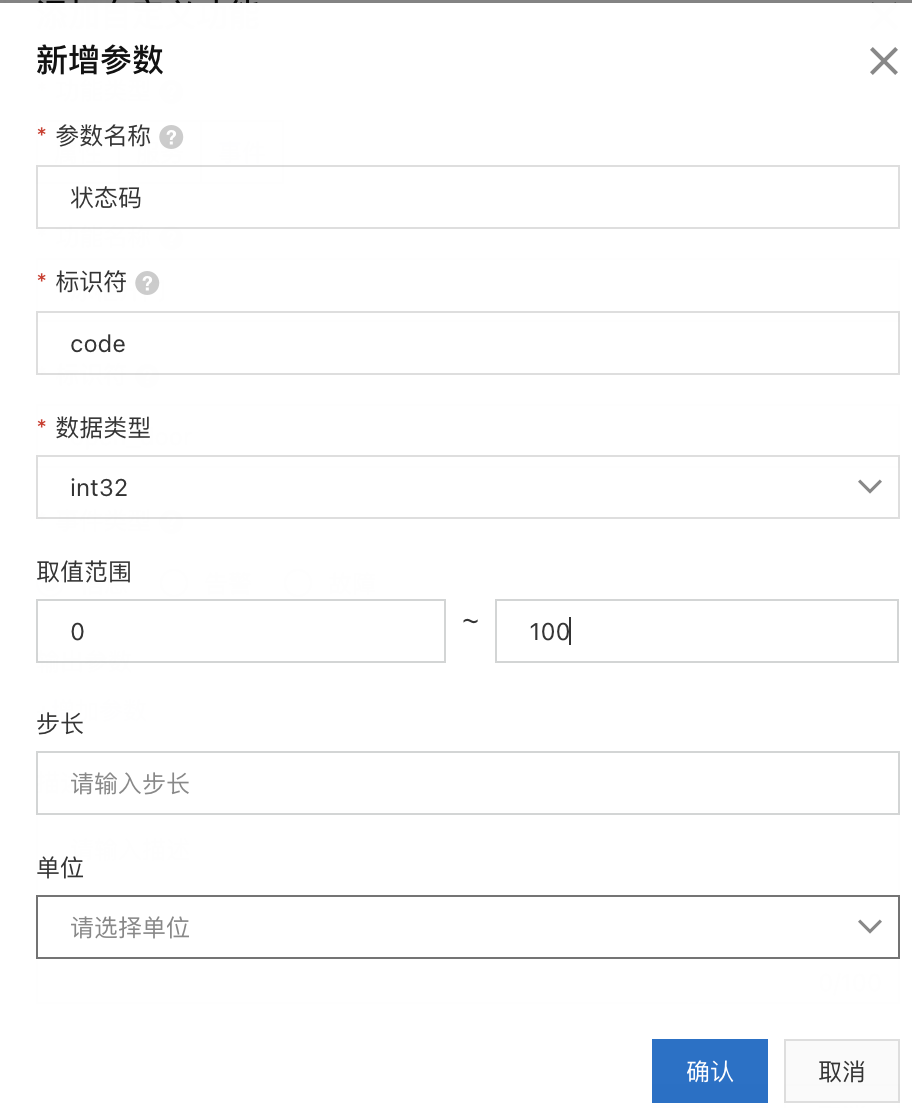
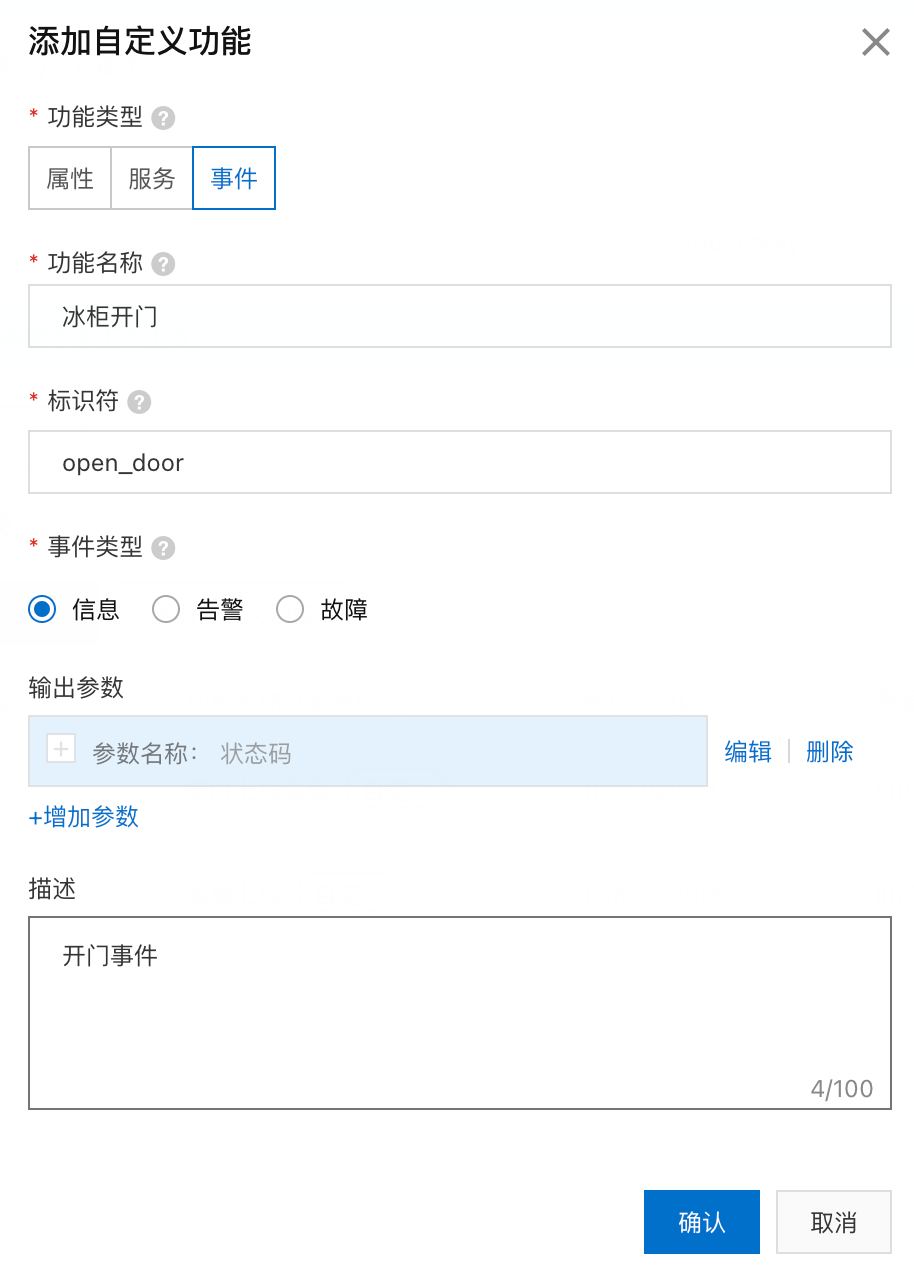
“信息”是设备上报的一般性通知,如完成某项任务等。“告警”和“故障”是设备运行过程中主动上报的突发或异常情况,优先级高。不同的事件类型将用于统计分析。(摘抄阿里云的解释)没有体现就是和平时的日志一样的等级区分而已。
此时产品的精简物模型
{"properties": [{"identifier": "temperature","dataType": {"type": "int"}},{"identifier": "tmp_upload","dataType": {"type": "struct","specs": [{"identifier": "upload_time","dataType": {"type": "int"}},{"identifier": "now_temp","dataType": {"type": "float"}},{"identifier": "device_id","dataType": {"type": "text"}}]}}],//比之前多了event标识"events": [{"outputData": [{"identifier": "code","dataType": {"type": "int"}}],"identifier": "open_door","type": "info"}]}
3.2.2-事件上报
事件上报的topic:
/sys/guonWDsfHNn/${deviceName}/thing/event/${tsl.event.identifier}/post/sys/guonWDsfHNn/device1/thing/event/open_door/post

{"method": "thing.event.open_door.post","params":{"code":1//假设1表示门开了 0表示门关了}}

iot日志:
以前属性上报的时候,这里叫做“设备到云消息”,云端响应属性上报是“云到设备”,属性设置是“设备到云消息” 这里的事件上报是“物模型消息”,实话说不知道怎么分的业务类型
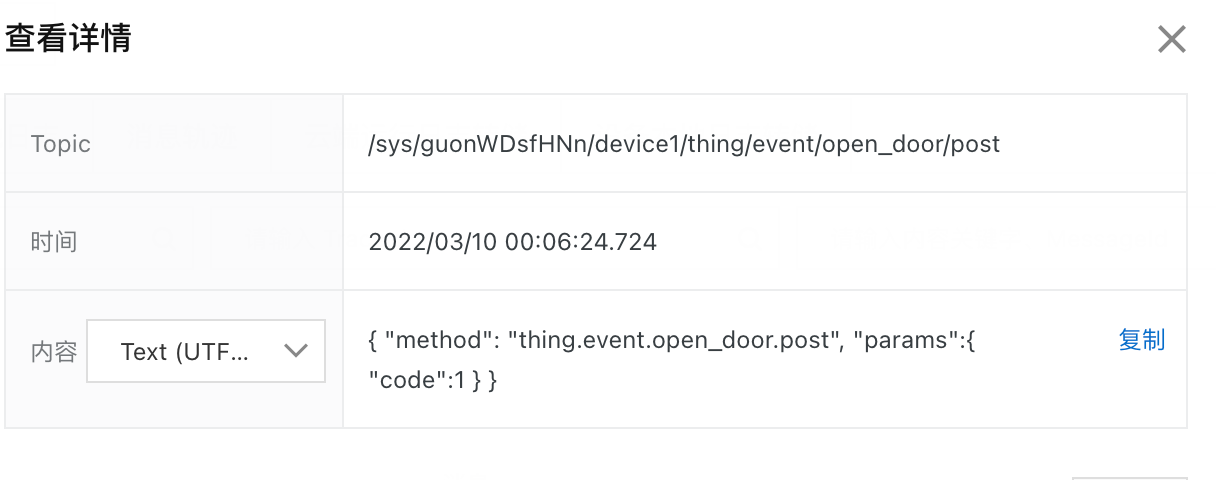
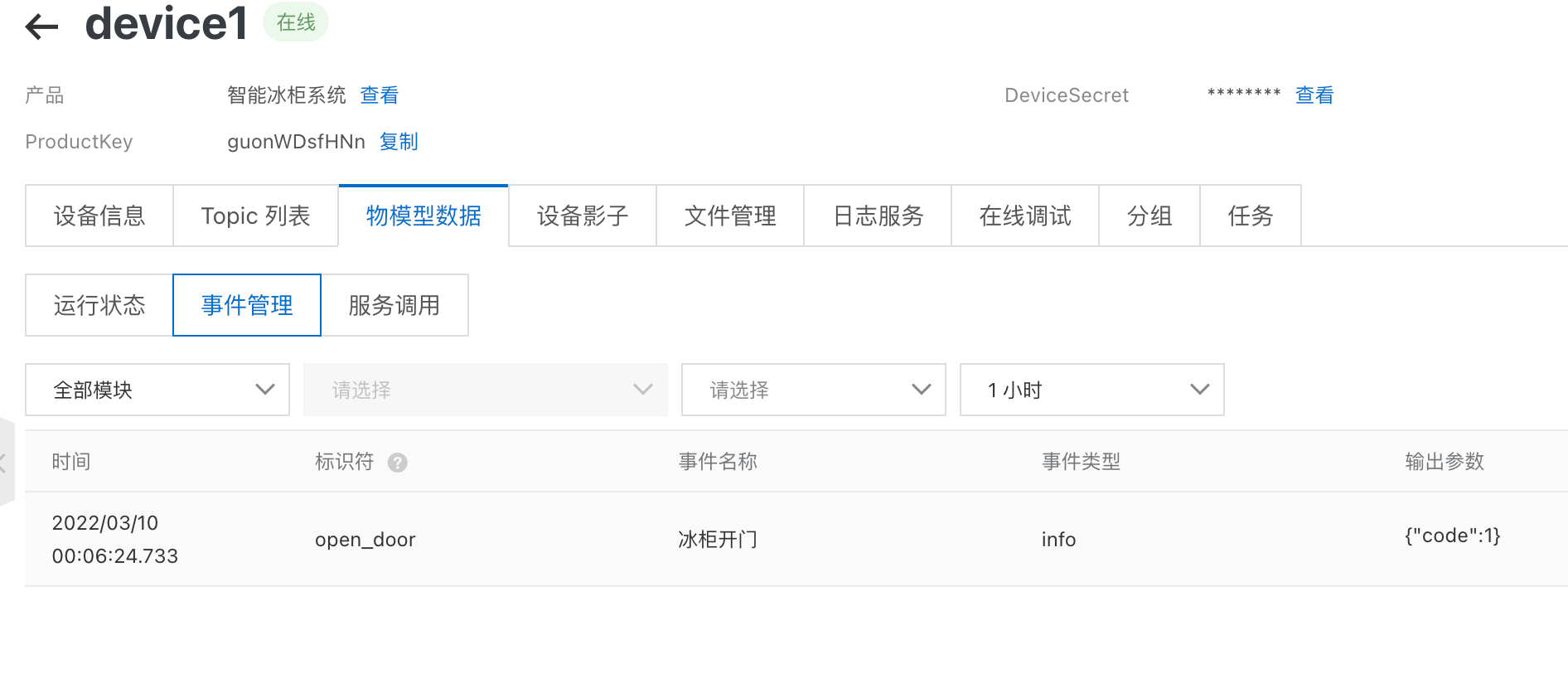
3.2.3-服务端订阅能拿到的信息
cmd:'MESSAGE'headers:{'destination': '/guonWDsfHNn/device1/thing/event/open_door/post','generateTime': '1646841984778','message-id': '1501590234578562048','qos': '1','subscription': '1','topic': '/guonWDsfHNn/device1/thing/event/open_door/post'}original_headers:{'destination': '/guonWDsfHNn/device1/thing/event/open_door/post','generateTime': '1646841984778','message-id': '1501590234578562048','qos': '1','subscription': '1','topic': '/guonWDsfHNn/device1/thing/event/open_door/post'}body:{'checkFailedData': {},'deviceName': 'device1','deviceType': 'CustomCategory','identifier': 'open_door','iotId': 'Iml0VgmYzbQv1VYueRsWguon07','name': '冰柜开门','productKey': 'guonWDsfHNn','requestId': 'null','time': 1646841984733,'type': 'info','value': {'code': 1}}
目前来看和之前属性上报拿到的消息体结构差不多,业务系统只能通过判断topic结构区分属性或者事件,然后根据物模型的内容判断业务,比如这里的code=1表示们开了。
3.2.4-云端响应事件上报
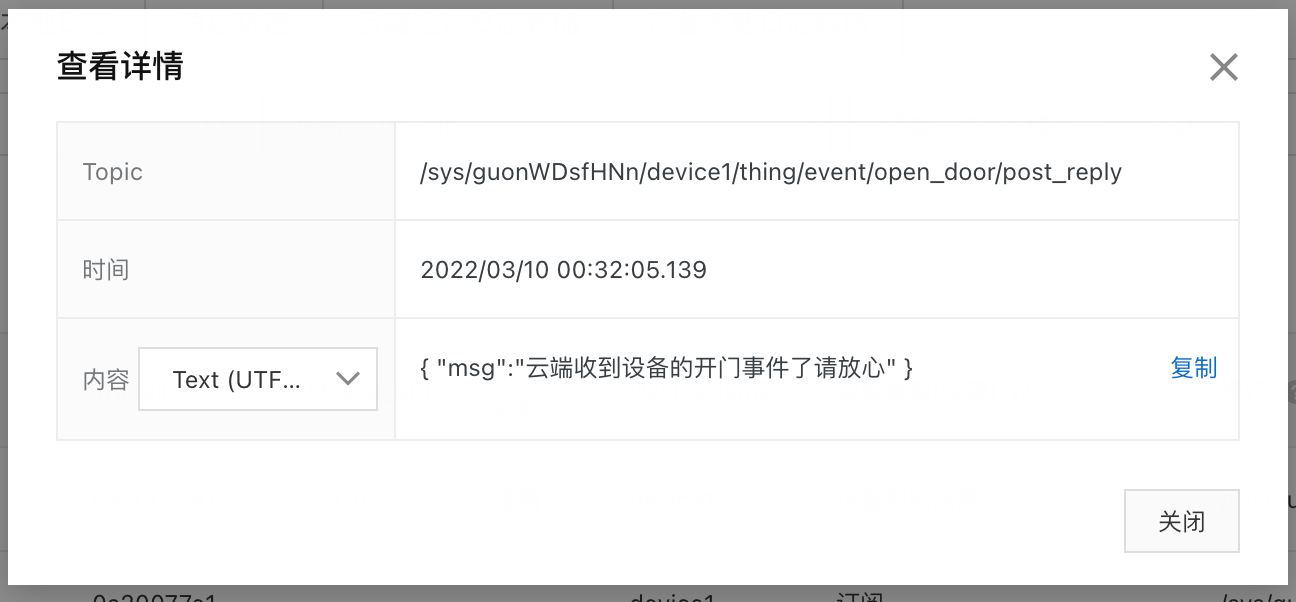
sys/guonWDsfHNn/${deviceName}/thing/event/${tsl.event.identifier}/post_replysys/guonWDsfHNn/device1/thing/event/open_door/post_reply

和之前云端响应属性上报一样,我消息体随笔定义的
iot日志:
明明应该是云到设备啊。。。哎
3.3-服务

3.3.1-定义异步服务
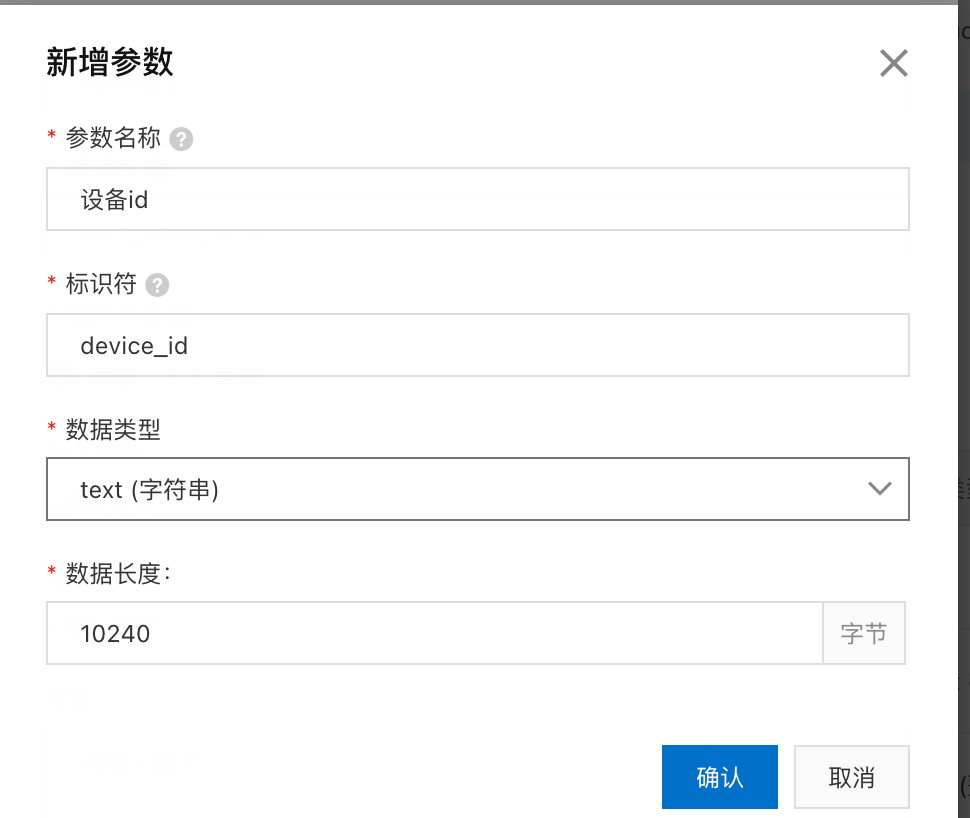
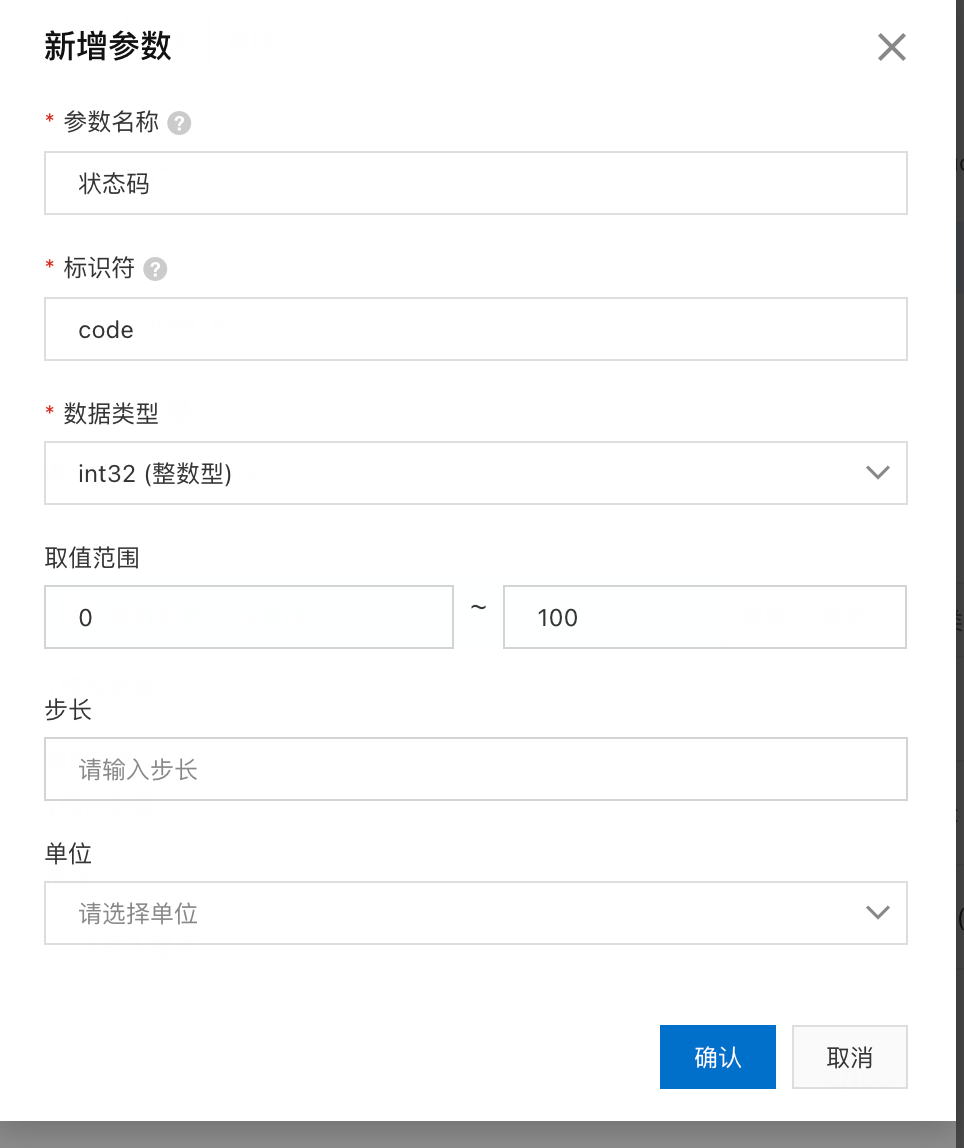
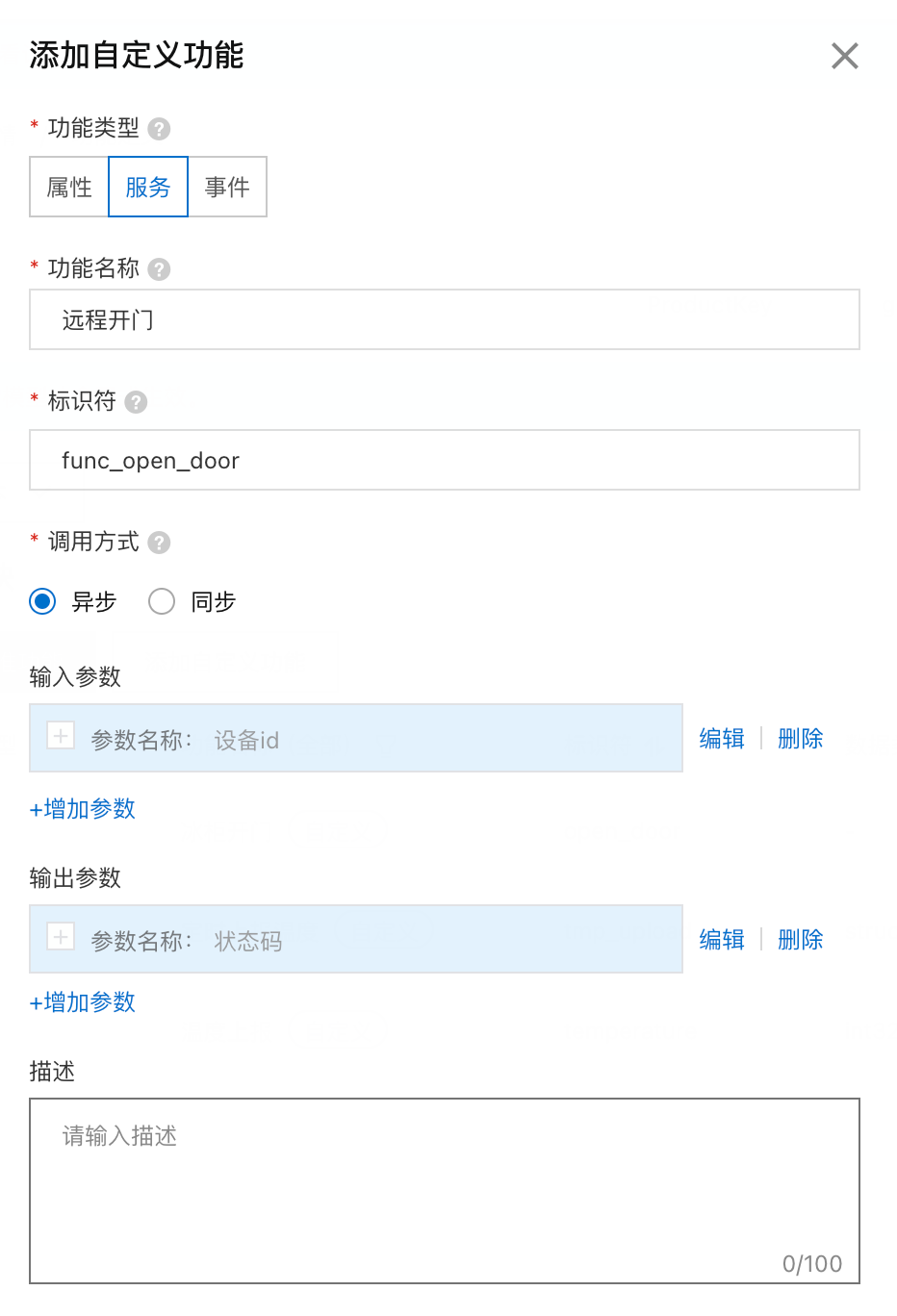

3.3.2-异步服务调用

/sys/guonWDsfHNn/${deviceName}/thing/service/${tsl.service.identifier}/sys/guonWDsfHNn/device1/thing/service/func_open_door_async
{"properties": [{"identifier": "temperature","dataType": {"type": "int"}},{"identifier": "tmp_upload","dataType": {"type": "struct","specs": [{"identifier": "upload_time","dataType": {"type": "int"}},{"identifier": "now_temp","dataType": {"type": "float"}},{"identifier": "device_id","dataType": {"type": "text"}}]}}],"events": [{"outputData": [{"identifier": "code","dataType": {"type": "int"}}],"identifier": "open_door","type": "info"}],//新增的服务"services": [{"outputData": [{"identifier": "code","dataType": {"type": "int"}}],"identifier": "func_open_door_async","inputData": [{"identifier": "device_id","dataType": {"type": "text"}}]}]}
{"method": "thing.service.func_open_door_async","params": {"device_id":"xxxxx"}}
原生topic方式调用服务消息体格式:https://help.aliyun.com/document_detail/89301.html#title-3pt-nfy-jys
需要强调的是:
1-服务调用必须要用api方式作命令下发,和之前的属性服务不一样,你用mqtt客户端模拟的时候虽然能通信但是amqp没法流转,因为对服务来讲是一个完整的功能,它有一个消息id在功能生命周期中,但是这个消息id只能通过api调用。
{"method": "thing.service.func_open_door_async","version": "1.0.0","id":"397241467",//这个消息id必须是调用InvoceThingService返回的才行"params": {"device_id": "device1"}}

2-不管是同步还是异步都是同一个函数:https://help.aliyun.com/document_detail/69584.htm?spm=a2c4g.11186623.0.0.15584ec9Au4Vn7#doc-api-Iot-InvokeThingService
3.3.3-异步服务命令下发
import requestsimport uuidimport datetimeimport hmacimport hashlibimport base64import pprintdef percent_encoding(string):"""满足RFC3986编码的规则函数"""result = ''accepted = [c for c in 'abcdefghijklmnopqrstuvwxyzABCDEFGHIJKLMNOPQRSTUVWXYZ0123456789-._~'.encode('utf-8')]for char in string.encode('utf-8'):result += chr(char) if char in accepted else '%{}'.format(hex(char)[2:]).upper()return resultdef open_door(DeviceName=''):base_url = "https://iot.cn-shenzhen.aliyuncs.com/?" # 创建设备AccessKey_Secret = "ZEZHyWv8hh06qq6uVQbky1ejXR0iBA"params = {# 公共参数"Format": "json", # 返回内容格式为json"Version": "2018-01-20", # 固定值"AccessKeyId": "LTAI5tArgc71UVg8JRTkUar7", # AccessKeyId"SignatureMethod": "HMAC-SHA1", # 签名方式 固定值"SignatureVersion": "1.0", # 签名算法版本 固定值"SignatureNonce": str(uuid.uuid4()).replace("-", ""), # 随机字符串"RegionId": "cn-shenzhen", # 设备所在地域"Timestamp": str(datetime.datetime.utcnow().strftime("%Y-%m-%dT%H:%M:%SZ")), # 当前请求的时间戳 根据请求动态生成# 业务接口的自定义参数"Action": "InvokeThingService","Args": '{"device_id":"device1"}',"Identifier": 'func_open_door_async',#首次期望状态从0开始"IotInstanceId": "iot-040a0aee", # 非必传 iot实例ID"ProductKey": "guonWDsfHNn", # 产品的ProductKey。"DeviceName": DeviceName, # 非必传 为待注册的设备命名,如果不传入该参数,则由系统随机生成设备名称。}pprint.pprint(params)# 1-构造规范化的请求字符串# 参数排序后 ket value需要编码 且用$符号连接src = '&'.join(['%s=%s' % (percent_encoding(k), percent_encoding(v)) for k, v in sorted(params.items())])# 2-准备构造签名字符串string_to_sign = "GET" + "&" + percent_encoding("/") + "&" + percent_encoding(src)# 3-HMAC签名串hmac_string = hmac.new((AccessKey_Secret + "&").encode(),string_to_sign.encode(),hashlib.sha1)# 4-转换base64格式signature = base64.b64encode(hmac_string.digest()).strip()url = base_url + src + "&Signature=" + percent_encoding(signature.decode())res = requests.get(url)pprint.pprint(res.json())return 1if __name__ == "__main__":res = open_door(DeviceName="device1")
{'Code': '','Data':{'MessageId': '2145529832'},'RequestId': '6B2E2C3B-1384-5E07-BB32-7FF67A99B236','Success': True}
这个messageid需要在设备完成功能后通过“设备端响应服务调用”的topic(/sys/guonWDsfHNn/${deviceName}/thing/service/${tsl.service.identifier}_reply)要带上。
3.3.4-设备响应服务端掉用
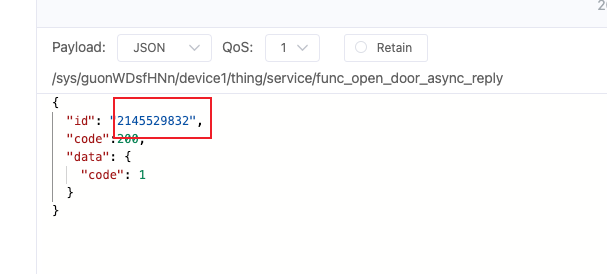
cmd:'MESSAGE'headers:{'destination': '/guonWDsfHNn/device1/thing/downlink/reply/message','generateTime': '1646901780552','message-id': '1501841036232637952','qos': '1','subscription': '1','topic': '/guonWDsfHNn/device1/thing/downlink/reply/message'}original_headers:{'destination': '/guonWDsfHNn/device1/thing/downlink/reply/message','generateTime': '1646901780552','message-id': '1501841036232637952','qos': '1','subscription': '1','topic': '/guonWDsfHNn/device1/thing/downlink/reply/message'}body:{'checkFailedData': {},'code': 200,'data': {'code': 1},'deviceName': 'device1','gmtCreate': 1646901780551,'iotId': 'Iml0VgmYzbQv1VYueRsWguon07','productKey': 'guonWDsfHNn','requestId': '2145529832','source': 'DEVICE','topic': '/sys/guonWDsfHNn/device1/thing/service/func_open_door_async_reply'}
根据返回的:’requestId’: ‘2145529832’,我就可以判断我的异步的服务掉用成功了。
3.3.4-同步命令下发
我先去把这个服务改成同步: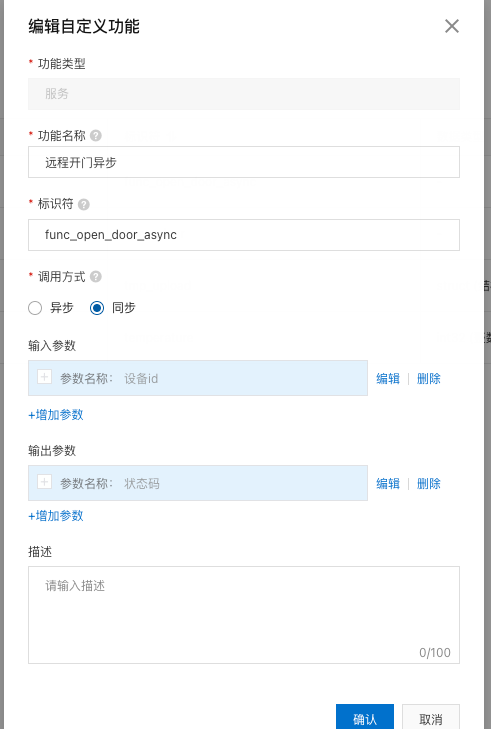
根据文档调用是同一个接口:
https://help.aliyun.com/document_detail/89301.html#title-3pt-nfy-jys(同步服务调用介绍文档)
https://help.aliyun.com/document_detail/69584.htm?spm=a2c4g.11186623.0.0.2773eaefRGTjKT#reference-snk-mrz-wdb(InvokeThingService接口文档)
# 调用阿里云iot api 物模型功能 从云到设备"""因为物模型是阿里云的默认封装的topic,这个属性设置topic刚好是设备只需要订阅的所以我想试试调用物模型属性api设置功能,实际上是不是就是publichttps://help.aliyun.com/document_detail/107582.htm?spm=a2c4g.11186623.0.0.27731c80LFwEPK#reference-z5c-dwd-5gb答案:是的我用mqqt.fx客户端订阅:/sys/guonlFaZtGq/132426114151/thing/service/property/set属性设置这个topic 调用次api 阿里云物联网会给这个topic中发送消息 我的客户端会收到对应的消息于此同时还发现:那些基础通信topic物模型topic只是阿里云帮你总结的topic具体topic中的传递的内容需要在"功能定义"中类型wsagger文档方式编写这个topic的内容参数是什么并且记得需要点击发布。还需要注意这个topic的accessMode是否拥有读写权限"""import requestsimport uuidimport datetimeimport hmacimport hashlibimport base64import pprintoptions = {"ProductKey": "guonlFaZtGq","DeviceName": "iot-fridge-1","DeviceSecret": "f93aa96c371bfd3f8a441c2c2079db97"}def percent_encoding(string):"""满足RFC3986编码的规则函数"""result = ''accepted = [c for c in 'abcdefghijklmnopqrstuvwxyzABCDEFGHIJKLMNOPQRSTUVWXYZ0123456789-._~'.encode('utf-8')]for char in string.encode('utf-8'):result += chr(char) if char in accepted else '%{}'.format(hex(char)[2:]).upper()return resultdef open_door(DeviceName=''):base_url = "https://iot.cn-shenzhen.aliyuncs.com/?" # 创建设备AccessKey_Secret = "ZEZHyWv8hh06qq6uVQbky1ejXR0iBA"params = {# 公共参数"Format": "json", # 返回内容格式为json"Version": "2018-01-20", # 固定值"AccessKeyId": "LTAI5tArgc71UVg8JRTkUar7", # AccessKeyId"SignatureMethod": "HMAC-SHA1", # 签名方式 固定值"SignatureVersion": "1.0", # 签名算法版本 固定值"SignatureNonce": str(uuid.uuid4()).replace("-", ""), # 随机字符串"RegionId": "cn-shenzhen", # 设备所在地域"Timestamp": str(datetime.datetime.utcnow().strftime("%Y-%m-%dT%H:%M:%SZ")), # 当前请求的时间戳 根据请求动态生成# 业务接口的自定义参数"Action": "InvokeThingService","Args": '{"device_id":"device1"}',"Identifier": 'func_open_door_async',#首次期望状态从0开始"IotInstanceId": "iot-040a0aee", # 非必传 iot实例ID"ProductKey": "guonWDsfHNn", # 产品的ProductKey。"DeviceName": DeviceName, # 非必传 为待注册的设备命名,如果不传入该参数,则由系统随机生成设备名称。}pprint.pprint(params)# 1-构造规范化的请求字符串# 参数排序后 ket value需要编码 且用$符号连接src = '&'.join(['%s=%s' % (percent_encoding(k), percent_encoding(v)) for k, v in sorted(params.items())])# 2-准备构造签名字符串string_to_sign = "GET" + "&" + percent_encoding("/") + "&" + percent_encoding(src)# 3-HMAC签名串hmac_string = hmac.new((AccessKey_Secret + "&").encode(),string_to_sign.encode(),hashlib.sha1)# 4-转换base64格式signature = base64.b64encode(hmac_string.digest()).strip()url = base_url + src + "&Signature=" + percent_encoding(signature.decode())res = requests.get(url)pprint.pprint(res.json())return 1if __name__ == "__main__":res = open_door(DeviceName="device1")
因为是同一个接口,这的代码和上面调用异步服务python代码是一样的
{'Code': '','Data': {'MessageId': '444960131'},'RequestId': '21024E89-A475-56B8-8D4D-626A8856F46F',
从实际调用上讲感觉不出来任何同步和异步调用的区别,但是异步调用的返回体的MessageId是可以通过“设备端响应服务调用”的topic上报,被流转到amqp客户端的。
但是同步的情况下比如这里的’MessageId’: ‘444960131’,通过“设备端响应服务调用”的topic上报的时候amqp的客户端是没有任何反应的,因为同步的生命周期已经结束了。
至于同步怎么实现的具体看文档:https://help.aliyun.com/document_detail/90567.htm?spm=a2c4g.11186623.0.0.1558eaefBLtcTu#concept-zlp-gsl-cfb
4-其他
'MESSAGE'{'destination': '/as/mqtt/status/guonWDsfHNn/device1','generateTime': '1646844865245','message-id': '1501602316132812800','qos': '1','subscription': '1','topic': '/as/mqtt/status/guonWDsfHNn/device1'}{'destination': '/as/mqtt/status/guonWDsfHNn/device1','generateTime': '1646844865245','message-id': '1501602316132812800','qos': '1','subscription': '1','topic': '/as/mqtt/status/guonWDsfHNn/device1'}{'clientIp': '119.123.132.232','deviceName': 'device1','iotId': 'Iml0VgmYzbQv1VYueRsWguon07','lastTime': '2022-03-10 00:54:25.233','offlineReasonCode': 1912,'productKey': 'guonWDsfHNn','status': 'offline','time': '2022-03-10 00:54:25.233','utcLastTime': '2022-03-09T16:54:25.233Z','utcTime': '2022-03-09T16:54:25.233Z'}
{'destination': '/as/mqtt/status/guonWDsfHNn/device1','generateTime': '1646844914267','message-id': '1501602521745990144','qos': '1','subscription': '1','topic': '/as/mqtt/status/guonWDsfHNn/device1'}{'destination': '/as/mqtt/status/guonWDsfHNn/device1','generateTime': '1646844914267','message-id': '1501602521745990144','qos': '1','subscription': '1','topic': '/as/mqtt/status/guonWDsfHNn/device1'}{'clientIp': '119.123.132.232','deviceName': 'device1','iotId': 'Iml0VgmYzbQv1VYueRsWguon07','lastTime': '2022-03-10 00:55:14.256','productKey': 'guonWDsfHNn','status': 'online','time': '2022-03-10 00:55:14.256','utcLastTime': '2022-03-09T16:55:14.256Z','utcTime': '2022-03-09T16:55:14.256Z'}

若有收获,就点个赞吧
0 人点赞


