统计某电商网站买家收藏商品数量
现有某电商网站用户对商品的收藏数据,记录了用户收藏的商品id以及收藏日期,名为buyer_favorite1。buyer_favorite1包含:买家id,商品id,收藏日期这三个字段,数据以“\t”分割,样本数据及格式如下:
1.买家id 商品id 收藏日期2.10181 1000481 2010-04-04 16:54:313.20001 1001597 2010-04-07 15:07:524.20001 1001560 2010-04-07 15:08:275.20042 1001368 2010-04-08 08:20:306.20067 1002061 2010-04-08 16:45:337.20056 1003289 2010-04-12 10:50:558.20056 1003290 2010-04-12 11:57:359.20056 1003292 2010-04-12 12:05:2910.20054 1002420 2010-04-14 15:24:1211.20055 1001679 2010-04-14 19:46:0412.20054 1010675 2010-04-14 15:23:5313.20054 1002429 2010-04-14 17:52:4514.20076 1002427 2010-04-14 19:35:3915.20054 1003326 2010-04-20 12:54:4416.20056 1002420 2010-04-15 11:24:4917.20064 1002422 2010-04-15 11:35:5418.20056 1003066 2010-04-15 11:43:0119.20056 1003055 2010-04-15 11:43:0620.20056 1010183 2010-04-15 11:45:2421.20056 1002422 2010-04-15 11:45:4922.20056 1003100 2010-04-15 11:45:5423.20056 1003094 2010-04-15 11:45:5724.20056 1003064 2010-04-15 11:46:0425.20056 1010178 2010-04-15 16:15:2026.20076 1003101 2010-04-15 16:37:2727.20076 1003103 2010-04-15 16:37:0528.20076 1003100 2010-04-15 16:37:1829.20076 1003066 2010-04-15 16:37:3130.20054 1003103 2010-04-15 16:40:1431.20054 1003100 2010-04-15 16:40:16
要求编写MapReduce程序,统计每个买家收藏商品数量,并撰写实验报告。
在 Eclipse 中创建 “MyGoodsCount” MapReduce项目
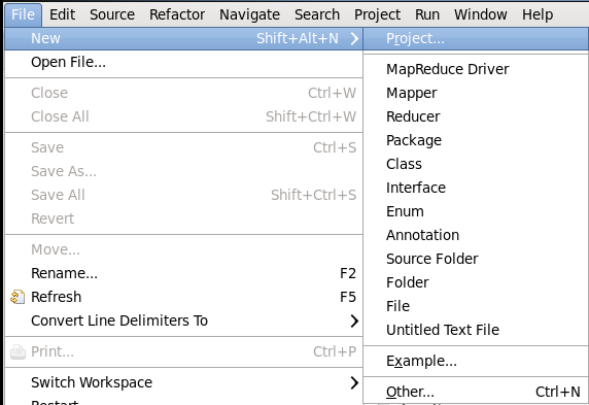
点击 File 菜单,选择 New -> Project…:
选择 Map/Reduce Project,点击 Next:

填写Project name 为 MyGoodsCount
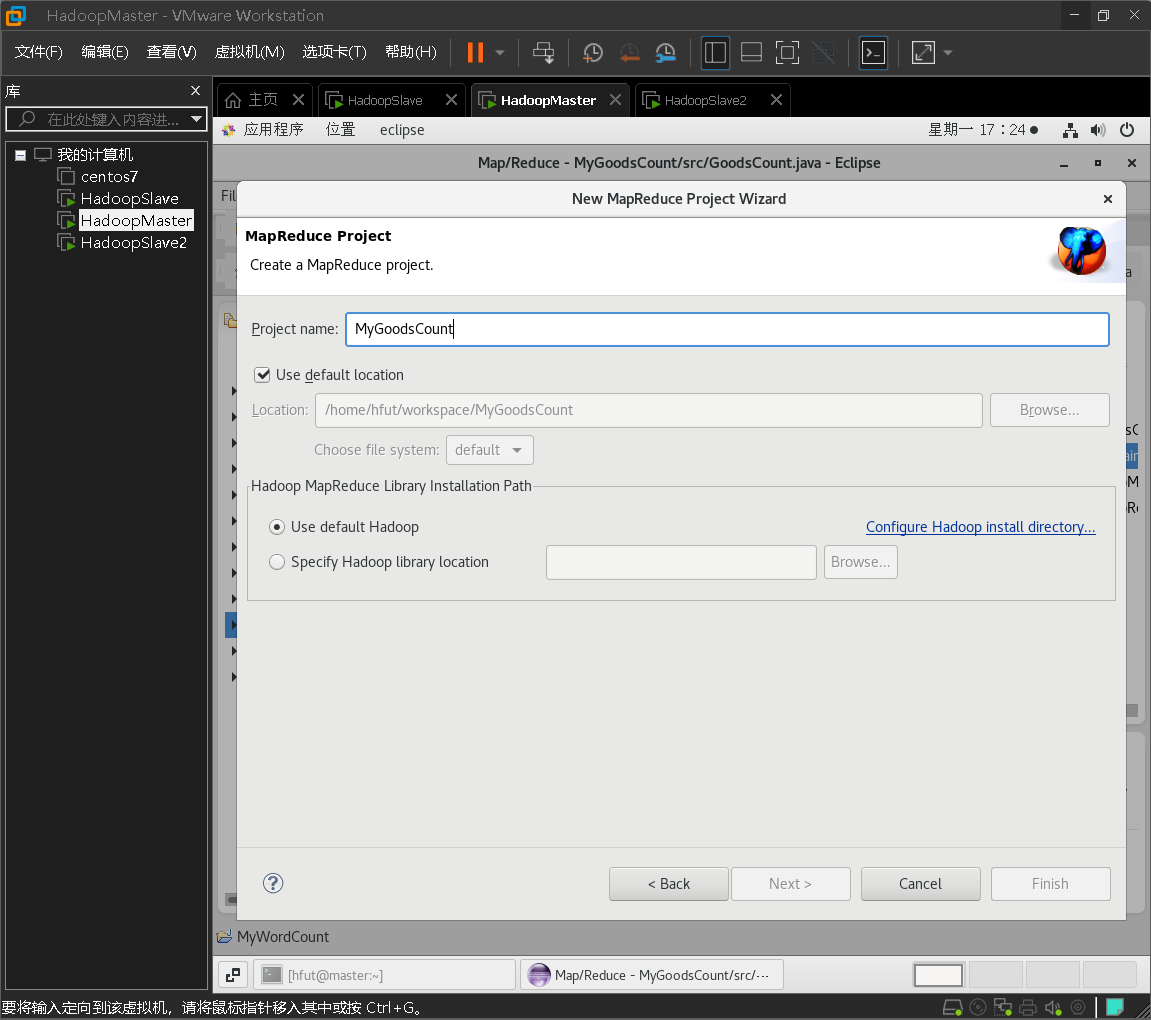
点击“Configure Hadoop install directory…”

点击“Browse”,选择/home/hfut/hadoop-3.2.2


点击界面右下方“OK”按钮
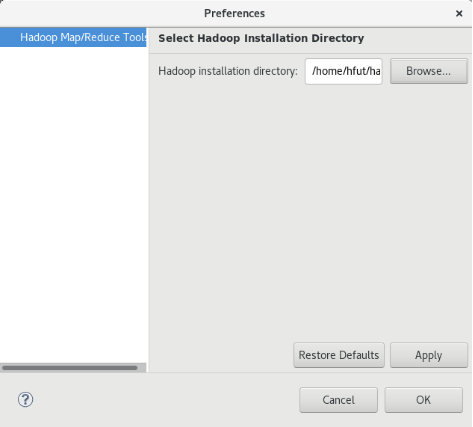
点击界面右下方“OK”按钮
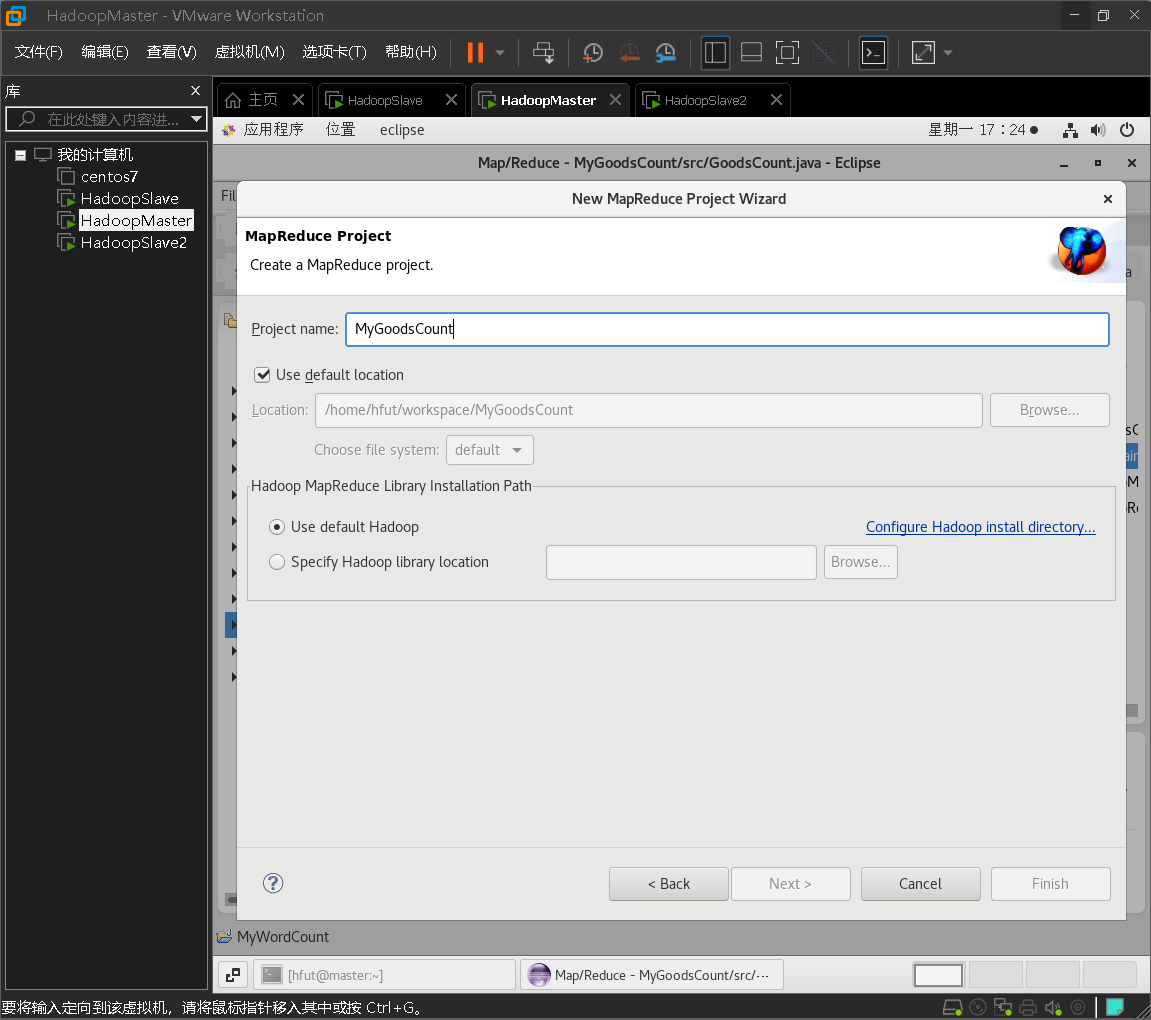
点击Finish创建项目。

右键点击MyGoodsCount 项目,选择New -> Class:

在 Name 处填写 GoodsCount。
将如下 GoodsCount的代码复制到该GoodsCount.java中。
import java.io.IOException;
import java.util.StringTokenizer;
import org.apache.hadoop.fs.Path;
import org.apache.hadoop.conf.Configuration;
import org.apache.hadoop.io.IntWritable;
import org.apache.hadoop.io.Text;
import org.apache.hadoop.mapreduce.Job;
import org.apache.hadoop.mapreduce.Mapper;
import org.apache.hadoop.mapreduce.Reducer;
import org.apache.hadoop.mapreduce.lib.input.FileInputFormat;
import org.apache.hadoop.mapreduce.lib.output.FileOutputFormat;
import org.apache.hadoop.util.GenericOptionsParser;
public class GoodsCount {
    public static void main(String[] args) throws IOException, ClassNotFoundException, InterruptedException {
        Configuration conf = new Configuration();
        String[] otherArgs = (new GenericOptionsParser(conf, args)).getRemainingArgs();
        if(otherArgs.length < 2) {
            System.err.println("Usage: wordcount <in> [<in>...] <out>");
            System.exit(2);
        }
        Job job = Job.getInstance(conf, "shangpingtongji");
        job.setJarByClass(GoodsCount.class);
        job.setMapperClass(doMapper.class);

        job.setReducerClass(doReducer.class);
        job.setOutputKeyClass(Text.class);
        job.setOutputValueClass(IntWritable.class);
        job.setOutputKeyClass(Text.class);//设置输出类型
        job.setOutputValueClass(IntWritable.class);//设置输出类型
         for(int i = 0; i < otherArgs.length - 1; ++i) {
            FileInputFormat.addInputPath(job, new Path(otherArgs[i]));
        }

        FileOutputFormat.setOutputPath(job, new Path(otherArgs[otherArgs.length - 1]));
        System.exit(job.waitForCompletion(true) ? 0 : 1);
    }
   public static class doMapper extends Mapper<Object, Text, Text, IntWritable>{
    //第一个Object表示输入key的类型;第二个Text表示输入value的类型;第三个Text表示输出键的类型;第四个IntWritable表示输出值的类型
        public static final IntWritable one = new IntWritable(1);
        public static Text word = new Text();
        @Override
        protected void map(Object key, Text value, Context context)
                    throws IOException, InterruptedException{
                       //抛出异常
            StringTokenizer tokenizer = new StringTokenizer(value.toString(),"\t");
          //StringTokenizer是Java工具包中的一个类,用于将字符串进行拆分
                word.set(tokenizer.nextToken());
                 //返回当前位置到下一个分隔符之间的字符串
                context.write(word, one);
                 //将word存到容器中,记一个数
        }
    }
    public static class doReducer extends Reducer<Text, IntWritable, Text, IntWritable>{
        //参数同Map一样,依次表示是输入键类型,输入值类型,输出键类型,输出值类型
        private IntWritable result = new IntWritable();
        @Override
        protected void reduce(Text key, Iterable<IntWritable> values, Context context)
            throws IOException, InterruptedException {
                int sum = 0;
                for (IntWritable value : values) {
                    sum += value.get();
                }
                //for循环遍历,将得到的values值累加
                result.set(sum);
                context.write(key, result);
            }
    }
}
将Hadoop配置文件添加到“WordCount” MapReduce项目
将log4j.properties 复制到 MyGoodsCount项目下的 src 文件夹(~/workspace/MyGoodsCount/src)中:
[hfut@master ~]$ cp ~/hadoop-3.2.2/etc/hadoop/log4j.properties ~/workspace/MyGoodsCount/src
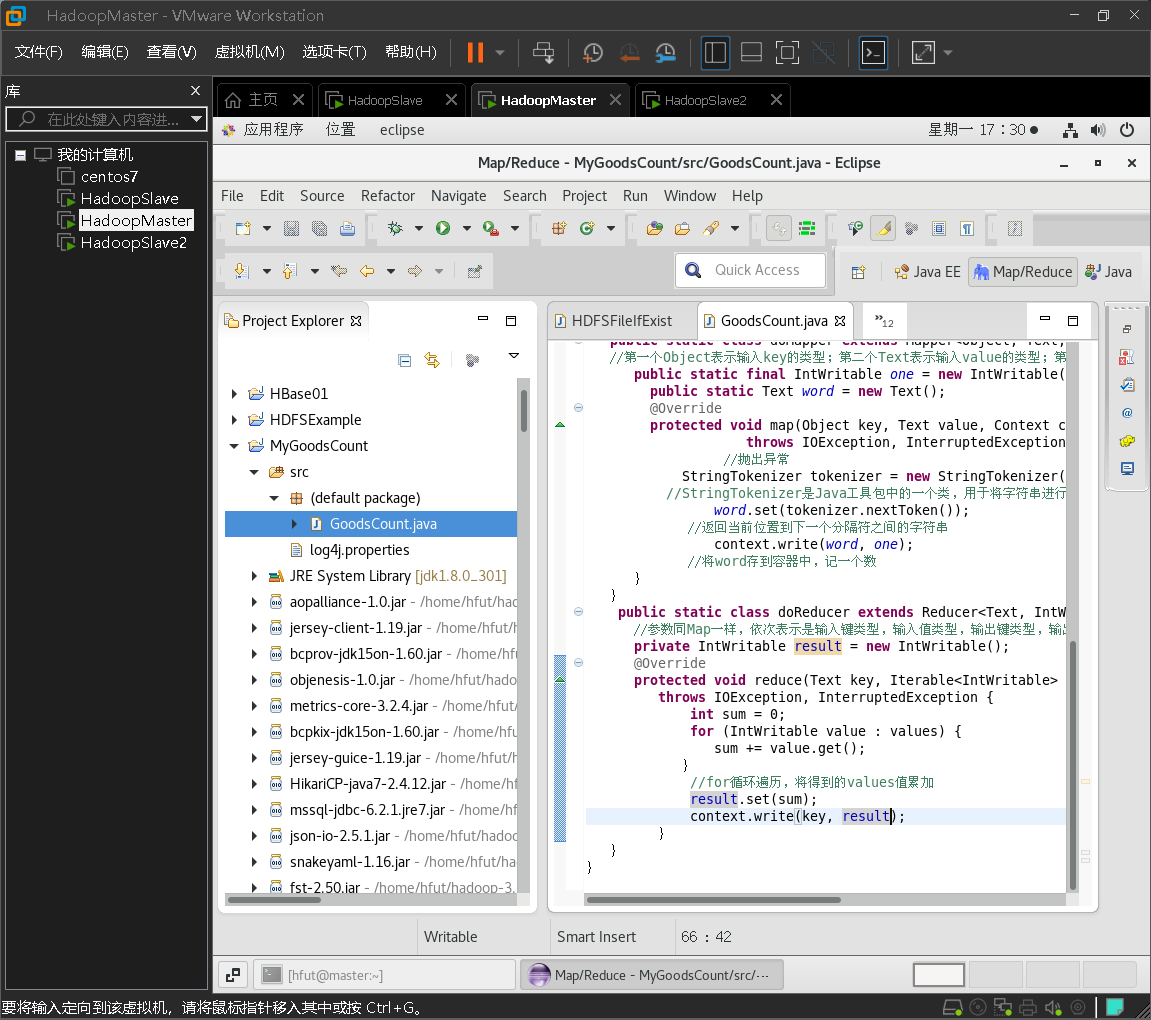
复制完成后,务必右键点击 MyGoodsCount 选择 refresh 进行刷新(不会自动刷新,需要手动刷新),可以看到文件结构如下所示:
创建文件输入输出
首先启动hadoop集群
[hfut@master ~]$ start-all.sh
创建/user/test/input目录
hadoop fs -mkdir -p /user/test/input
查看/user/test/input目录是否创建成功
[hfut@master ~]$ hadoop fs -ls /user/test

文件操作
可以使用如下命令把本地文件系统的“/home/hfut/hive-data/buyer_favorite1”上传到HDFS中的test目录的input目录下,也就是上传到HDFS的“/user/test/input”目录下:
hadoop fs -put /home/hfut/hive-data/buyer_favorite1 /user/test/input
可以使用ls命令查看一下文件是否成功上传到HDFS中,具体如下:
hadoop fs -ls /user/test/input
该命令执行后会显示类似如下的信息:

通过Eclipse运行“MyGoodsCount” MapReduce项目
点击工具栏中的 Run 图标,或者右键点击 Project Explorer 中的 GoodsCount.java,选择 Run As -> Run on Hadoop,就可以运行 MapReduce 程序了。不过由于没有指定参数,运行时会提示 “Usage: wordcount”,需要通过Eclipse设定一下运行参数。
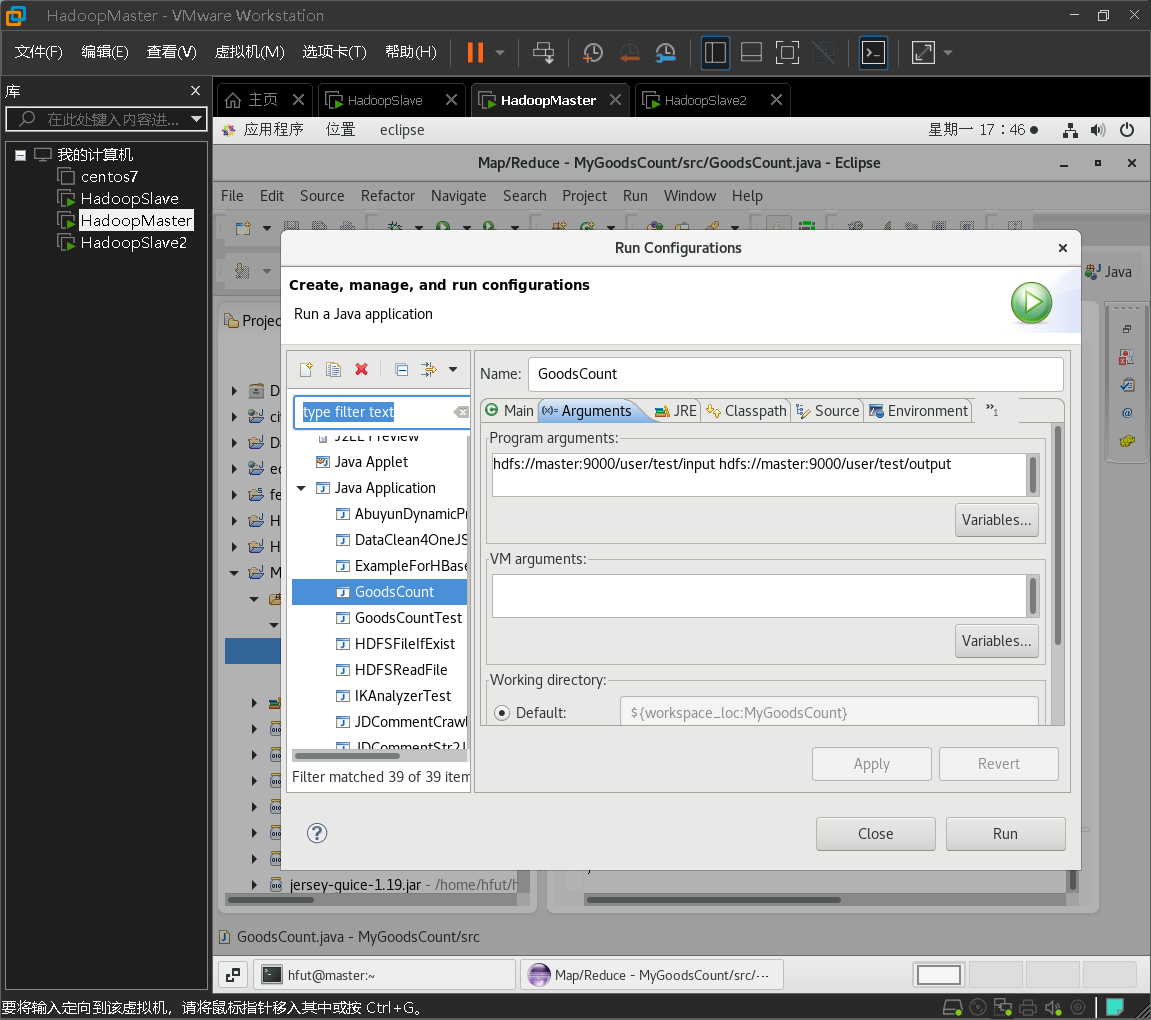
右键点击刚创建的GoodsCount.java,选择 Run As -> Run Configurations,在此处可以设置运行时的相关参数(如果 Java Application 下面没有GoodsCount,那么需要先双击 Java Application)。切换到 “Arguments” 栏,在 Program arguments 处填写 “hdfs://master:9000/user/test/input hdfs://master:9000/user/test/output” 就可以了。
点击Run运行程序,可以看到运行成功的提示。
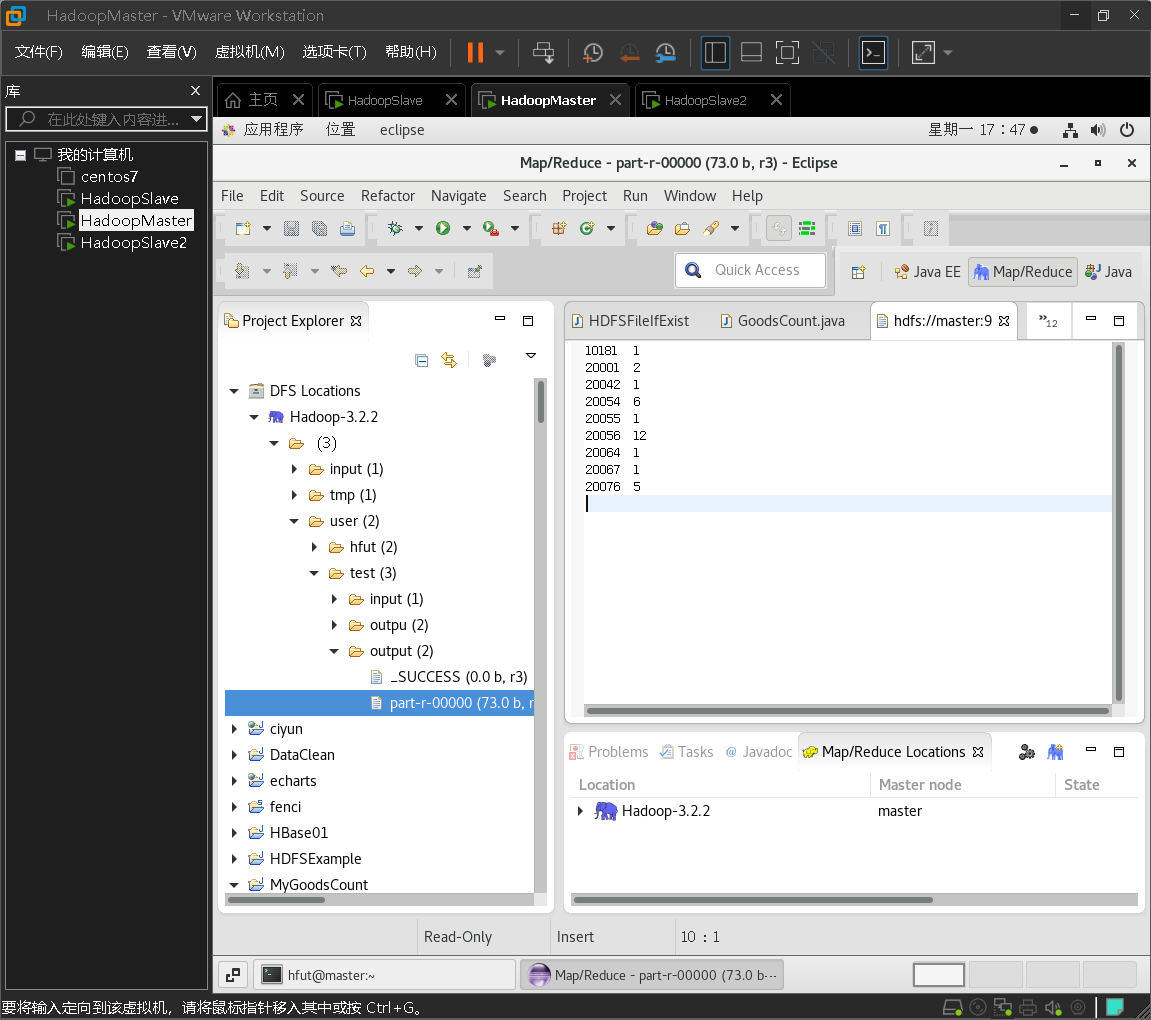
刷新 DFS Location 后也能看到输出的 output 文件夹。双击part-r-00000文件,可以看到程序运行的结果。

若有收获,就点个赞吧
0 人点赞


