编辑代码并按照以下步骤操作
1.assets >base.css 搜索 code: ‘shopify-section-header-hidden’,去掉图片中的code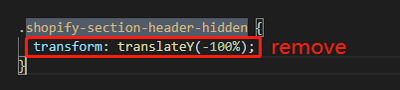
2. Layout > theme.liquid
搜索代码:’{% section ‘announcement-bar’ %}’ or ‘{% section ‘header’ %}’
将代码改成如下
<div id="wapper-header" style="position: sticky;top: 0;z-index: 99;" >{% section 'announcement-bar' %}{% section 'header' %}</div>

Tips: 如有引用请标注源文章地址
关注我的【小红书】,第一时间掌握更新动态
你的鼓励就是我创作的动力!

若有收获,就点个赞吧
0 人点赞


