需求背景
相信做独立站的人都有遇到过这个问题:我们拥有编辑好的FAQ页面,对于一些常见的问题都有了解答,但是顾客往往不会去那个页面看。不同的顾客对售前,售中,售后的问题是反反复复的问,如果回答的不及时,可能会面临顾客流失的风险。现有的shopifyChat已经十分好用了,如果能在shopifyChat和FAQ结合到一起,是不是能够事半功倍呢!除此之外,用户会觉得这个网站做的更加专业,安全性可靠性在无形之中得到了提升。
Tips: shopifyChat 在应用商店的名字为 Shopify Inbox
1. 抛出问题
如何对现有的shopifyChat进行改造
shopifyChat是用ifream的方式进行加载的,点击ifream里面的chat with us按钮之后,然后才开始下一步的操作来进一步的展示我们的聊天界面。如果我们能够fake一个chat with us,然后展示用户关心的faq,如果以上的faq都不能解答用户的问题,那最终我们再显示shopifyChat。整个问询体验会好很多。是不是很棒呢!
2. 如何设置
需要知道两件事
Q: 如何fake一个chat with us按钮
A: 从视觉上和它完全保持一致
Q: 如何触发shopifyChat的加载和控制其显示
A: 使用ifream.contentWindow.documemt, 这个dom就是ifream里面的dom, 对其进行操作就好了
那如何去配置FAQ呢?
目前还没有去管配置这一块,但是它的确是可以配置的,每一项都可以。
包括,外观样式 + 内容自定义等
如有需要可以联系我
代码部分如何实现
- theme.liquid的head标签中引入 jquery, 需要先找到指定版本的jq下载到本地, 然后上传到Asset目录
http://code.jquery.com/jquery-2.1.1.min.js
<script src="{{ 'jquery-2.1.1.min.js' | asset_url }}"></script>
在Section目录中新建livechat_faq.liquid, 核心部分,构造我们需要的页面及内容 ```html
{% schema %} { “name”: “Section name”, “settings”: [] } {% endschema %}
{% stylesheet %}
dummy-chat-button-iframe, #ShopifyChat {
display: none; }
fake_livechat {
height: 68px; width: 150px; position: fixed; bottom: 24px; border: none; z-index: 2147483647; overflow: hidden; right: 24px; }
fake_livechat button {
background-color: #202A36; border-radius: 30px; cursor: pointer; margin-top: 4px; border: none; box-shadow: 0px 0px 5px rgb(0 0 0 / 15%); font-size: 16px; font-weight: 500; height: 50px; padding: 14px 20px; width: auto; max-width: 144px; color: #fff; display: flex; align-items: center; font-family: -apple-system, BlinkMacSystemFont, ‘Segoe UI’, Roboto, Helvetica, Arial, sans-serif, ‘Apple Color Emoji’, ‘Segoe UI Emoji’, ‘Segoe UI Symbol’, sans-serif; letter-spacing: 0; text-transform: none; font-stretch: normal; font-style: normal; line-height: normal; -webkit-font-smoothing: antialiased; }
.livechat-help .livechat-menu { z-index: 9999999999; position: fixed; bottom: 0; right: 0; width: 254px; height: 40px; border: 0; overflow: hidden; background: #fff; display: none; box-shadow: 0 0 7px 0 rgb(0 0 0 / 15%); } ul.faq-list { margin: 0; padding: 0; } .faq-item { list-style: none; } .livechat-help .livechat-menu .livechat__header { height: 40px; margin-bottom: 10px; background: #202a36; }
.livechat-help .livechat-menu .livechatheader .livechatheader-title { padding: 0 25px; line-height: 40px; font-size: 14px; color: #fff }
.livechat-help .livechat-menu .livechatheader .livechatheader-title:after { content: ‘——‘; float: right; width: 12px; overflow: hidden }
.livechat-help .livechat-menu .livechat__body { padding: 0 25px; height: 290px; overflow-y: scroll }
.livechat-help .livechat-menu .livechat__body .faq-item { font-weight: 400 }
.livechat-help .livechat-menu .livechat__body .checked { font-weight: 700 }
.livechat-help .livechat-menu .livechat__body h5 { height: 40px; line-height: 40px; font-size: 16px; color: #4c5253; font-weight: 400; cursor: pointer; margin: 0; }
.livechat-help .livechat-menu .livechat__body h5:after { content: ‘+’; float: right; width: 12px; font-size: 20px; line-height: 40px; overflow: hidden }
.livechat-help .livechat-menu .livechat__body h5.checked:after { content: ‘——‘ }
.livechat-help .livechat-menu .livechat__body dl { margin-left: 20px; display: none }
.livechat-help .livechat-menu .livechat__body dt { cursor: pointer; line-height: 16px; padding: 10px 0; color: #4c5253 }
.livechat-help .livechat-menu .livechat__body dd { margin: 10px 0; line-height: 16px; font-size: 12px; color: #797979; display: none }
.livechat-help .livechat-menu .livechat__body a { color: #202a36; }
.livechat-help .livechat-menu .livechat__footer .notice { margin: 10px 30px 0; font-size: 12px; color: #202a36; padding: 8px 0; border-top: 1px solid #aeaeae }
.livechat-help .livechat-menu .livechat__footer .livechat-btn { margin: 0 50px; height: 40px; line-height: 40px; font-size: 18px; color: #fff; text-align: center; font-weight: 700; background-color: #202a36; cursor: pointer; border-radius: 25px; } .custom-scrollbar { overflow: auto; }
.custom-scrollbar::-webkit-scrollbar { width: 6px; background: #fff; }
.custom-scrollbar::-webkit-scrollbar-track { width: 6px; background: #fff; }
.custom-scrollbar::-webkit-scrollbar-thumb { border-radius: 3px; background: #202a36; }
.custom-scrollbar::-webkit-scrollbar-button { height: 0; background-color: #202a36; } {% endstylesheet %}
{% javascript %} $(document).ready(function() { $(“#fake_livechat”).click(function() {
const windowWidth = $(window).width()const width = windowWidth > 750 ? '368px' : windowWidth + 'px'$("#fake_livechat").hide()$(".livechat-menu").show().animate({width: width,height: "460px"}, "fast")
}) $(“.livechat-menu .livechat__header”).click(function() {
$(this).closest(".livechat-menu").animate({width: "254px",height: "40px"}, "fast", function() {$(this).hide()$("#fake_livechat").show()})
}) $(“.livechat-menu .livechat__body dt”).click(function() {
$(this).toggleClass("checked"),$(this).next("dd").slideToggle()
}) $(“.livechat-menu .livechat__body h5”).click(function() {
$(this).toggleClass("checked"),$(this).next("dl").slideToggle()
}) $(“.livechat-menu .livechat-btn”).click(function() {
$(this).closest(".livechat-menu").hide();if ($('#dummy-chat-button-iframe').length) {$('#dummy-chat-button-iframe')[0].contentWindow.document.querySelector('button').click();const lock = setInterval(function() {var node = $('#ShopifyChat')console.log(1)if (!node.length) {return}clearInterval(lock)node.show()}, 100)}if ($('#ShopifyChat').length) {$('#ShopifyChat').show();}
}) }) {% endjavascript %}
3. 在theme.liquid末尾中引入,faq的section, 不同的主题位置不一样,但是这个不重要,在 body/>之前就可以了。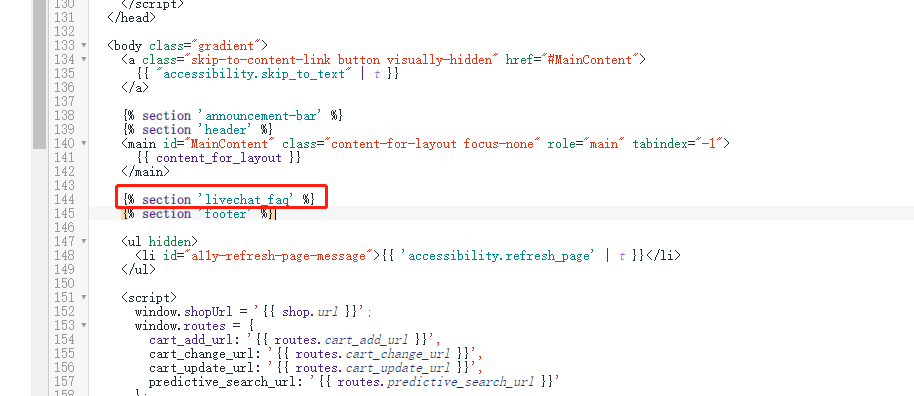```html{% section 'livechat_faq' %}
3. 效果展示
店铺地址: https://asen-practice.myshopify.com/ 密码:test 密码:test
1. fake效果
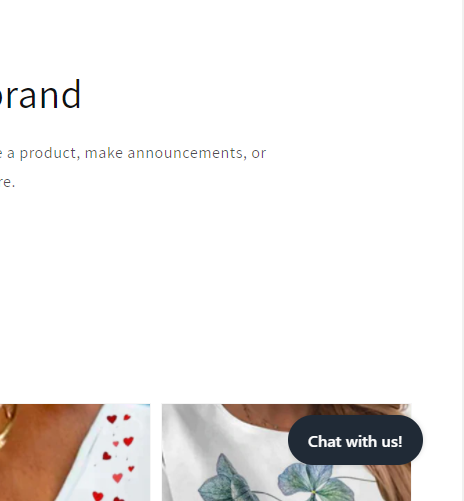
2. 点击fake效果
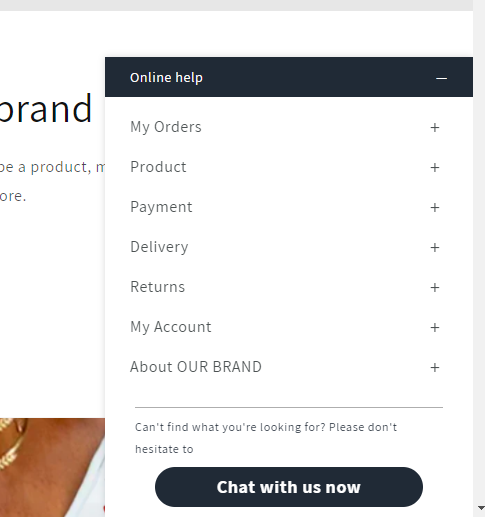
3. 查看细节
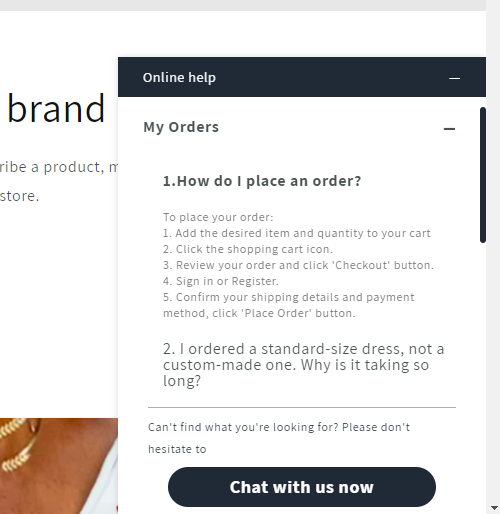
4. 点击chat with us now

Tips: 如有引用请标注源文章地址
关注我的【小红书】,第一时间掌握更新动态
你的鼓励就是我创作的动力!

若有收获,就点个赞吧
0 人点赞


