本文通过配置文件的方式链接数据库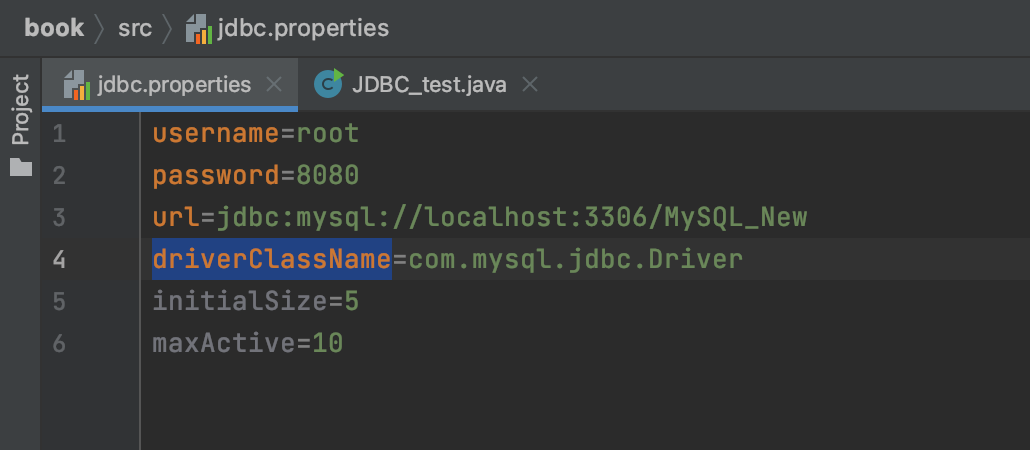
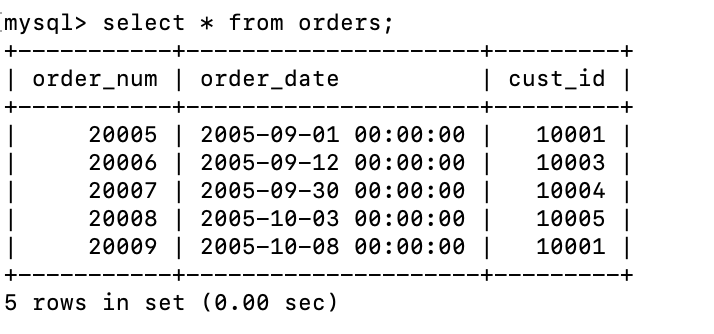
package com.tan;import com.mysql.jdbc.Driver;import java.io.IOException;import java.io.InputStream;import java.sql.*;import java.util.Properties;//JDBC程序示例public class JDBC_test {public static void main(String[] args) throws SQLException, ClassNotFoundException, IOException {//1.加载配置文件InputStream inputStream = JDBC_test.class.getClassLoader().getResourceAsStream("jdbc.properties");Properties properties=new Properties();properties.load(inputStream);//2.读取配置文件String url = properties.getProperty("url");String username = properties.getProperty("username");String password = properties.getProperty("password");String driverClassName = properties.getProperty("driverClassName");//3.加载驱动Class.forName(driverClassName);//4.连接数据库,创建数据库对象Connection connection= DriverManager.getConnection(url,username,password);//5.执行SQL的对象Statement statement=connection.createSatement();//6.用执行SQL的对象来执行SQLString sql = "SELECT * FROM orders";ResultSet resultSet=statement.executeQuery(sql);//executeQuery是执行查询语句,还可以执行增删改查语句//返回的结果是一个链表while (resultSet.next()){System.out.println("order_num"+resultSet.getObject("order_num"));System.out.println("order_date"+resultSet.getObject("order_date"));System.out.println("cust_id"+resultSet.getObject("cust_id"));}//7.释放链接resultSet.close();statement.close();connection.close();}}


若有收获,就点个赞吧
0 人点赞


