使用Statement操作数据表的弊端
- 通过调用Connection对象的createStatement()方法创建Statement对象,该对象用于执行静态的SQL语句,并且返回执行结果。
- Statement接口中定义了如下的方法用于执行SQL:
- 执行更新操作INSERT、UPDATE、DELETE:
int executeUpdate(String sql) throws SQLException;
- 执行查询操作SELECT:
ResultSet executeQuery(String sql) throws SQLException;
- 但是使用Statement操作数据表存在弊端:
- ① 存在拼接SQL操作,非常繁琐。
- ② 存在SQL注入问题。
- SQL注入是利用某些系统没有对用户输入的数据进行充分的检查,而在用户输入数据中注入非法的SQL语句段或命令(如:SELECT user, password FROM user_table WHERE user=’a’ AND password = ‘123 OR ‘1’ = ‘1’) ,从而利用系统的 SQL 引擎完成恶意行为的做法。
- 对于Java而言,要防范SQL注入,只要用PreparedStatement(从Statement扩展而来) 取代Statement就可以了。

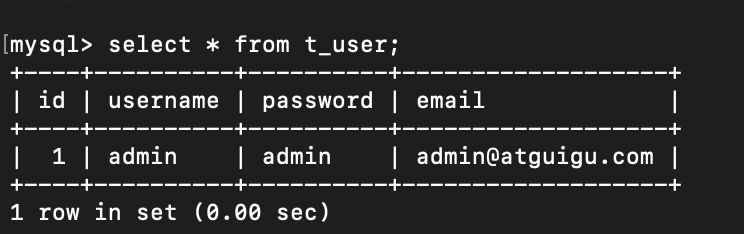
Create
public class JDBC_test1{private void Create(Connection connection) throws SQLException {//预编译SQL语句String SQL = "INSERT INTO t_user(id,username,password,email) values(?,?,?,?)";PreparedStatement preparedStatement = connection.prepareStatement(SQL);//填充占位符preparedStatement.setInt(1,2);preparedStatement.setString(2,"tan");preparedStatement.setString(3,"8080");preparedStatement.setString(4,"@tan.com");preparedStatement.setInt(1,4);preparedStatement.setString(2,"luo");preparedStatement.setString(3,"123456");preparedStatement.setString(4,"@luo.com");//执行操作preparedStatement.execute();//关闭资源if(preparedStatement!=null){preparedStatement.close();}if(connection!=null){connection.close();}}public static void main(String[] args) throws IOException, ClassNotFoundException, SQLException {//加载配置文件InputStream inputStream=JDBC_test1.class.getClassLoader().getResourceAsStream("jdbc.properties");Properties properties=new Properties();properties.load(inputStream);//读取配置文件String url = properties.getProperty("url");String username = properties.getProperty("username");String password = properties.getProperty("password");String driverClassName = properties.getProperty("driverClassName");//加载驱动Class<?> aClass = Class.forName(driverClassName);//获取连接Connection connection= DriverManager.getConnection(url,username,password);//调用方法JDBC_test1 jdbc_test1=new JDBC_test1();jdbc_test1.Create(connection);}}}
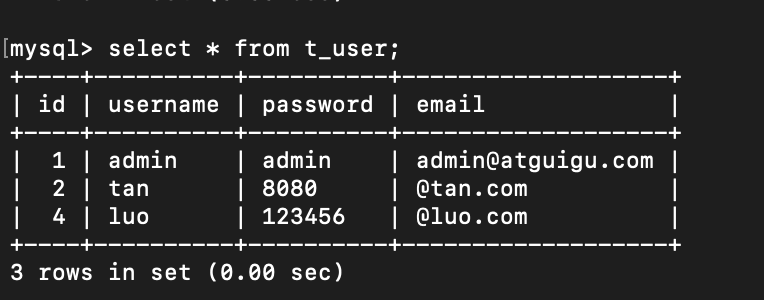
Delete
//删除操作private void Delete(Connection connection) throws SQLException {//预编译SQL语句String SQL ="DELETE FROM t_user WHERE id=1";PreparedStatement preparedStatement = connection.prepareStatement(SQL);//执行preparedStatement.execute();//关闭资源if(preparedStatement!=null){preparedStatement.close();}if(connection!=null){connection.close();}}

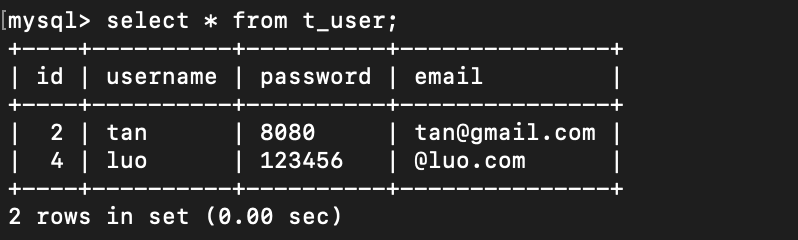
Update
//更新操作private void Update(Connection connection) throws SQLException {//预编译SQL语句String SQL = "UPDATE t_user set email=? WHERE id=?";PreparedStatement preparedStatement=connection.prepareStatement(SQL);//填充占位符preparedStatement.setString(1,"tan@gmail.com");preparedStatement.setInt(2,2);//执行preparedStatement.execute();//关闭资源if(preparedStatement!=null){preparedStatement.close();}if(connection!=null){connection.close();}}
Retrieve
private void Retrieve(Connection connection) throws SQLException {//预编SQL语句String SQL ="SELECT * FROM t_user";PreparedStatement preparedStatement=connection.prepareStatement(SQL);//执行ResultSet resultSet=preparedStatement.executeQuery();while (resultSet.next()){System.out.println("id="+resultSet.getObject("id"));System.out.println("username="+resultSet.getObject("username"));System.out.println("password="+resultSet.getObject("password"));System.out.println("email="+resultSet.getObject("email"));}//关闭资源if(preparedStatement!=null){preparedStatement.close();}if(connection!=null){connection.close();}}


若有收获,就点个赞吧
0 人点赞


