MapReduce是Hadoop的一个分布式计算框架,用于编写批处理应用程序。编写好的程序可以提交到Hadoop集群上用于并行处理大规模的数据集。MapReduce专门用于处理key,value键值对处理。它将作业视为一组key,value,并生成一组key,value作为输出
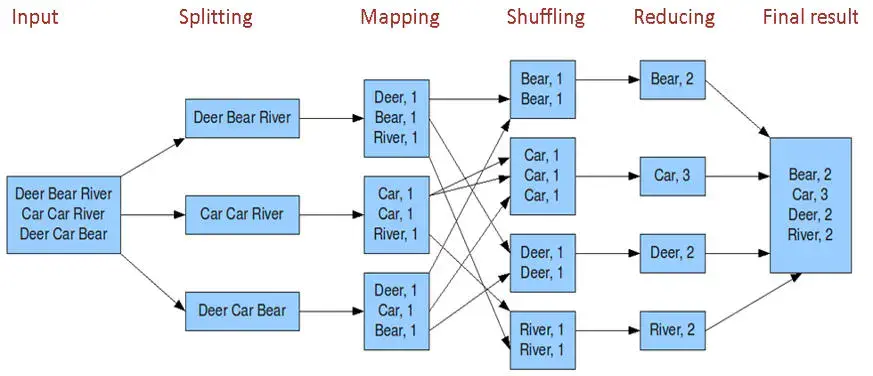
MapReduce编程模型简述
- input:读取文件
- spliting:将文件进行拆分。得到K1行数和V1对应的文本类容。
- mapping: 并行将每一行按照空格进行拆分,拆分得到List(k2,v2),其中k2代表每一个单词,由于是做词频统计,所以V2的值为1代表出现一次
- shuffling:由于Mapping操作可能是在不同的机器上并行处理的。所以需要通过shuffling将相同key值的数据分发到同一个节点上合并。这样才能统计出最终的结果,此时得到K2为每一个单词。List为可迭代集合,v2就是Mapping中的V2。
- Reducing:这里的案例是统计单词出来的总结数,所以reducing对List进行归约求和操作,最终输出。
MapReduce编程模型中splitting和shuffing操作都是由框架实现的,`需要我们自己编程的只有mapping和reducing,这也就是MapReduce这个称呼的来源。InputFormat & RecordReaders
InputFormat将输出文件拆分为多个InputSplit,并由RecordReaders将InputSplit转换为标准的Key,Value键值对,作为map的输出。这一步的意义在于只有先进行逻辑拆分并转为标准的键值对才能为map提供输入以便并行处理。Combiner
combiner是map运算后的可选操作,它实际上是一个本地化的reduce操作,它主要是map计算出中间文件后做一个简单的合并重复key值的操作。
map在遇到一个hadoop的单词时就会记录1.但是这边文章里可能会出现N次,那么map输出文件冗余就会很多。因此在reduce计算前相同的key做一个合并操作,那么需要传输的数据量就很减少。Partitioner
partitioner可以理解成分类器,将map的输出按照key值的不同分别分给对应的reducer,支持自定义实现。wordCount项目案例
创建maven项目 引入pom文件
//因为采用的pom文件 有的jar冲突 所以我采用了maven helper插件移除了这些冲突的依赖项<dependency><groupId>org.apache.hadoop</groupId><artifactId>hadoop-client</artifactId><version>2.7.7</version><exclusions><exclusion><artifactId>jackson-core-asl</artifactId><groupId>org.codehaus.jackson</groupId></exclusion><exclusion><artifactId>jackson-mapper-asl</artifactId><groupId>org.codehaus.jackson</groupId></exclusion><exclusion><artifactId>commons-collections</artifactId><groupId>commons-collections</groupId></exclusion><exclusion><artifactId>commons-logging</artifactId><groupId>commons-logging</groupId></exclusion><exclusion><artifactId>commons-lang</artifactId><groupId>commons-lang</groupId></exclusion><exclusion><artifactId>guava</artifactId><groupId>com.google.guava</groupId></exclusion><exclusion><artifactId>log4j</artifactId><groupId>log4j</groupId></exclusion><exclusion><artifactId>netty</artifactId><groupId>io.netty</groupId></exclusion><exclusion><artifactId>gson</artifactId><groupId>com.google.code.gson</groupId></exclusion></exclusions></dependency>
在hadoop中讲解mapreducer有提到过 我们只需要实现map 和reducer
所以下面给出map和reducer的自定义实现
import org.apache.hadoop.io.IntWritable;import org.apache.hadoop.io.LongWritable;import org.apache.hadoop.io.Text;import org.apache.hadoop.mapreduce.Mapper;import java.io.IOException;public class WordCountMapper extends Mapper<LongWritable, Text, Text, IntWritable> {@Overrideprotected void map(LongWritable key, Text value, Context context) throws IOException,InterruptedException {String[] words = value.toString().split("\t");for (String word : words) {context.write(new Text(word), new IntWritable(1));}}}import org.apache.hadoop.io.IntWritable;import org.apache.hadoop.io.Text;import org.apache.hadoop.mapreduce.Reducer;import java.io.IOException;public class WordReducer extends Reducer <Text, IntWritable, Text, IntWritable> {@Overrideprotected void reduce(Text key, Iterable <IntWritable> values, Context context) throws IOException,InterruptedException {int count = 0;for (IntWritable value : values) {count += value.get();}context.write( key, new IntWritable( count ) );}}import org.apache.hadoop.io.IntWritable;import org.apache.hadoop.io.Text;import org.apache.hadoop.mapreduce.Job;import org.apache.hadoop.mapreduce.lib.input.FileInputFormat;import org.apache.hadoop.mapreduce.lib.output.FileOutputFormat;import java.io.IOException;import java.net.URI;import java.net.URISyntaxException;public class WordCount {private static final String HDFS_URL="hdfs://192.168.80.153:8020";private static final String HADOOP_USER_NAME="root";public static void main(String[] args) throws IOException, ClassNotFoundException, InterruptedException, URISyntaxException {if (args.length<2){System.out.println("Input and output paths are necessary!");return;}// 需要指明 hadoop 用户名,否则在 HDFS 上创建目录时可能会抛出权限不足的异常System.setProperty("HADOOP_USER_NAME", HADOOP_USER_NAME);Configuration configuration = new Configuration();// 指明 HDFS 的地址configuration.set("fs.defaultFS", HDFS_URL);// 创建一个 JobJob job = Job.getInstance(configuration);job.setJarByClass( WordCount.class );// 设置 Mapper 和 Reducerjob.setMapperClass( WordCountMapper.class);job.setReducerClass( WordReducer.class);// 设置 Mapper 输出 key 和 value 的类型job.setMapOutputKeyClass( Text.class);job.setMapOutputValueClass( IntWritable.class);// 设置 Reducer 输出 key 和 value 的类型job.setOutputKeyClass(Text.class);job.setOutputValueClass(IntWritable.class);// 如果输出目录已经存在,则必须先删除,否则重复运行程序时会抛出异常FileSystem fileSystem = FileSystem.get(new URI(HDFS_URL), configuration, HADOOP_USER_NAME);Path outputPath = new Path(args[1]);if (fileSystem.exists(outputPath)) {fileSystem.delete(outputPath, true);}// 设置作业输入文件和输出文件的路径FileInputFormat.setInputPaths(job, new Path(args[0]));FileOutputFormat.setOutputPath(job, outputPath);// 将作业提交到群集并等待它完成,参数设置为 true 代表打印显示对应的进度boolean result = job.waitForCompletion(true);// 关闭之前创建的 fileSystemfileSystem.close();// 根据作业结果,终止当前运行的 Java 虚拟机,退出程序System.exit(result ? 0 : -1);}}
编写完成代码 采用maven 的package 功能打包成jar 提交到服务器
使用 命令进行运行
hadoop jar /usr/local//hdfs-0.0.1-SNAPSHOT.jar \
 com.spring.hdfs.WordCount   \
 /wordcount/input.txt /wordcount/output/wordcount  --wordcount/input.txt 是读取的文件地址 --workcount/output/workcount 是项目运行完成之后保存在hdfs中的地址
—关于HDFS一些操作指令
1. 创建一个文件夹    hdfs dfs -mkdir /myTask
2. 创建多个文件夹    hdfs dfs -mkdir -p /myTask1/input1
3. 上传文件 hdfs dfs -put /opt/wordcount.txt /myTask/input
4. 查看总目录下的文件和文件夹 hdfs dfs -ls /
5. 查看myTask下的文件和文件夹 hdfs dfs -ls /myTask
6. 查看myTask下的wordcount.txt的内容 hdfs dfs -cat /myTask/wordcount.txt
7. 删除总目录下的myTask2文件夹以及里面的文件和文件夹 hdfs dfs -rmr /myTask2
8. 删除myTask下的wordcount.txt hdfs dfs -rmr /myTask/wordcount.txt
9. 下载hdfs中myTask/input/wordcount.txt到本地opt文件夹中 hdfs dfs -get /myTask/input/wordcount.txt /opt

若有收获,就点个赞吧
0 人点赞


