4.1 共享带来的问题
小故事

小男小女(线程)共用算盘(CPU),小南算加法,小女算减法,临时结果写到账本(内存),老王(操作系统)来调度两人使用。小王算到一半暂停(时间片用完),轮到小女使用,小女使用完写会结果。小男被唤醒继续算数,把1写到账本。
小男小女都觉得自己没做错,但笔记本里的结果是 1 而不是 0
Java 的体现
两个线程对初始值为 0 的静态变量一个做自增,一个做自减,各做 5000 次,结果是 0 吗?
@Slf4jpublic class TestShare {static int counter = 0;public static void main(String[] args) throws InterruptedException {Thread t1 = new Thread(() -> {for (int i = 0; i < 5000; i++) {counter++;}}, "t1");Thread t2 = new Thread(() -> {for (int i = 0; i < 5000; i++) {counter--;}}, "t2");t1.start();t2.start();t1.join();t2.join();log.debug("{}",counter);}}
运行结果
09:53:27.002 [main] com.zhr.thread.TestShare - 461
问题分析
以上的结果可能是正数、负数、零。为什么呢?因为 Java 中对静态变量的自增,自减并不是原子操作,要彻底理解,必须从字节码来进行分析
例如对于 i++ 而言(i 为静态变量),实际会产生如下的 JVM 字节码指令:
getstatic i // 获取静态变量i的值iconst_1 // 准备常量1iadd // 自增putstatic i // 将修改后的值存入静态变量i
而对应 i— 也是类似:
getstatic i // 获取静态变量i的值iconst_1 // 准备常量1isub // 自减putstatic i // 将修改后的值存入静态变量i
而 Java 的内存模型如下,完成静态变量的自增,自减需要在主存和工作内存中进行数据交换:
如果是单线程以上 8 行代码是顺序执行(不会交错)没有问题,但多线程下这 8 行代码可能交错运行:
出现负数的情况如下图,若线程12顺序交换则为正数,若一个线程已经执行putstatic ,则结果是0
临界区 Critical Section
- 一个程序运行多个线程本身是没有问题的
- 问题出在多个线程访问共享资源
- 多个线程读共享资源其实也没有问题
- 在多个线程对共享资源读写操作时发生指令交错,就会出现问题
- 一段代码块内如果存在对共享资源的多线程读写操作,称这段代码块为临界区
例如,下面代码中的临界区
static int counter = 0;static void increment() {// 临界区counter++;}static void decrement() {// 临界区counter--;}
竞态条件 Race Condition
多个线程在临界区内执行,由于代码的执行序列不同而导致结果无法预测,称之为发生了竞态条件
4.2 synchronized
* 应用之互斥
为了避免临界区的竞态条件发生,有多种手段可以达到目的。
- 阻塞式的解决方案:synchronized,Lock
- 非阻塞式的解决方案:原子变量
本次课使用阻塞式的解决方案:synchronized,来解决上述问题,即俗称的【对象锁】,它采用互斥的方式让同一
时刻至多只有一个线程能持有【对象锁】,其它线程再想获取这个【对象锁】时就会阻塞住。这样就能保证拥有锁
的线程可以安全的执行临界区内的代码,不用担心线程上下文切换
注意 虽然 java 中互斥和同步都可以采用 synchronized 关键字来完成,但它们还是有区别的:
- 互斥是保证临界区的竞态条件发生,同一时刻只能有一个线程执行临界区代码
- 同步是由于线程执行的先后、顺序不同、需要一个线程等待其它线程运行到某个点
synchronized 语法1
synchronized(对象) // 线程1, 线程2(blocked){临界区}
解决问题
@Slf4jpublic class TestShare1 {static int counter = 0;//static final Object room = new Object();public static void main(String[] args) throws InterruptedException {System.out.println();Thread t1 = new Thread(() -> {for (int i = 0; i < 5000; i++) {synchronized (TestShare1.class){counter++;}}}, "t1");Thread t2 = new Thread(() -> {for (int i = 0; i < 5000; i++) {synchronized (TestShare1.class){counter--;}}}, "t2");t1.start();t2.start();t1.join();t2.join();log.debug("{}",counter);}}
你可以做这样的类比:
synchronized(对象)中的对象,可以想象为一个房间(room),有唯一入口(门)房间只能一次进入一人进行计算,线程 t1,t2 想象成两个人- 当线程 t1 执行到
synchronized(room)时就好比 t1 进入了这个房间,并锁住了门拿走了钥匙,在门内执行count++代码 - 这时候如果 t2 也运行到了
``synchronized(room)时,它发现门被锁住了,只能在门外等待,发生了上下文切换,阻塞住了 - 这中间即使 t1 的 cpu 时间片不幸用完,被踢出了门外(不要错误理解为锁住了对象就能一直执行下去哦),这时门还是锁住的,t1 仍拿着钥匙,t2 线程还在阻塞状态进不来,只有下次轮到 t1 自己再次获得时间片时才能开门进入
- 当 t1 执行完
synchronized{}块内的代码,这时候才会从 obj 房间出来并解开门上的锁,唤醒 t2 线程把钥匙给他。t2 线程这时才可以进入 obj 房间,锁住了门拿上钥匙,执行它的count--代码

思考
synchronized 实际是用对象锁保证了临界区内代码的原子性,临界区内的代码对外是不可分割的,不会被线程切
换所打断。
为了加深理解,请思考下面的问题如果把 synchronized(obj) 放在 for 循环的外面,如何理解?— 原子性
结果正常,相当于整个for循环
如果 t1 synchronized(obj1) 而 t2 synchronized(obj2) 会怎样运作?— 锁对象
结果不正常,不是同一把锁
如果 t1 synchronized(obj) 而 t2 没有加会怎么样?如何理解?— 锁对象
结果不正常,t2能继续访问
面向对象的改进
@Slf4jpublic class TestSynchronized {int value = 0;public void increment() {synchronized (this) {value++;}}public void decrement() {synchronized (this) {value--;}}public int get() {//确保读取到的值不是中间值synchronized (this) {return value;}}public static void main(String[] args) throws InterruptedException {TestSynchronized room = new TestSynchronized();Thread t1 = new Thread(() -> {for (int j = 0; j < 5000; j++) {room.increment();}}, "t1");Thread t2 = new Thread(() -> {for (int j = 0; j < 5000; j++) {room.decrement();}}, "t2");t1.start();t2.start();t1.join();t2.join();log.debug("count: {}", room.get());}}
4.3 方法上的 synchronized
class Test{public synchronized void test() {}}
等价于
class Test{public void test() {synchronized(this) {}}}
class Test{public synchronized static void test() {}}
等价于
class Test{public static void test() {synchronized(Test.class) {}}}
不加 synchronized 的方法
不加 synchronzied 的方法就好比不遵守规则的人,不去老实排队(好比翻窗户进去的)
线程八锁
所谓的“线程八锁”其实就是考察 synchronized 锁住的是哪个对象
/**1* 结果 n1 n2 或者 n2 n1* 竞争同一个对象** @author zhr* @date 2021/1/18 13:55**/@Slf4jpublic class 线程八锁_1 {public static void main(String[] args) {Number number = new Number();new Thread(() -> number.n1()).start();new Thread(() -> number.n2()).start();}}@Slf4jclass Number {public synchronized void n1() {log.info("n1");}public synchronized void n2() {log.info("n2");}}
/**2* 1S 后 n1 n2或者 n2 1S后n1* 竞争同一个对象** @author zhr* @date 2021/1/18 13:55**/@Slf4jpublic class 线程八锁_2 {public static void main(String[] args) {Number2 number = new Number2();new Thread(() -> number.n1()).start();new Thread(() -> number.n2()).start();}}@Slf4jclass Number2 {public synchronized void n1() {try {TimeUnit.SECONDS.sleep(1);} catch (InterruptedException e) {e.printStackTrace();}log.info("n1");}public synchronized void n2() {log.info("n2");}}
/**3* n3 一秒后 n1 n2* n3 n2 一秒后n1* n2 n3 一秒后n1* n3 不参与锁竞争 n1n2 竞争同一个对象** @author zhr* @date 2021/1/18 13:55**/@Slf4jpublic class 线程八锁_3 {public static void main(String[] args) {Number3 number = new Number3();new Thread(() -> number.n1()).start();new Thread(() -> number.n2()).start();new Thread(() -> number.n3()).start();}}@Slf4jclass Number3 {public synchronized void n1() {try {TimeUnit.SECONDS.sleep(1);} catch (InterruptedException e) {e.printStackTrace();}log.info("n1");}public synchronized void n2() {log.info("n2");}public void n3() {log.info("n3");}}
/**4* n2 n1* 两个对象 无竞争** @author zhr* @date 2021/1/18 13:55**/@Slf4jpublic class 线程八锁_4 {public static void main(String[] args) {Number4 number = new Number4();Number4 number1 = new Number4();new Thread(() -> number.n1()).start();new Thread(() -> number1.n2()).start();}}@Slf4jclass Number4 {public synchronized void n1() {try {TimeUnit.SECONDS.sleep(1);} catch (InterruptedException e) {e.printStackTrace();}log.info("n1");}public synchronized void n2() {log.info("n2");}}
/**5* n2 n1* n1 线程的锁是类对象 n2 的锁是number这个对象** @author zhr* @date 2021/1/18 13:55**/@Slf4jpublic class 线程八锁_5 {public static void main(String[] args) {Number5 number = new Number5();new Thread(() -> number.n1()).start();new Thread(() -> number.n2()).start();}}@Slf4jclass Number5 {public static synchronized void n1() {try {TimeUnit.SECONDS.sleep(1);} catch (InterruptedException e) {e.printStackTrace();}log.info("n1");}public synchronized void n2() {log.info("n2");}}
/**6* 1S 后 n1 n2或者 n2 1S后n1* 存在竞争 竞争的是这个类对象** @author zhr* @date 2021/1/18 13:55**/@Slf4jpublic class 线程八锁_6 {public static void main(String[] args) {Number6 number6 = new Number6();new Thread(() -> number6.n1()).start();new Thread(() -> number6.n2()).start();}}@Slf4jclass Number6 {public static synchronized void n1() {try {TimeUnit.SECONDS.sleep(1);} catch (InterruptedException e) {e.printStackTrace();}log.info("n1");}public static synchronized void n2() {log.info("n2");}}
/**7* n2 1S n1* 不存在竞争 n1线程锁是类对象 n2 线程锁是实例number2** @author zhr* @date 2021/1/18 13:55**/@Slf4jpublic class 线程八锁_7 {public static void main(String[] args) {Number7 number1 = new Number7();Number7 number2 = new Number7();new Thread(() -> number1.n1()).start();new Thread(() -> number2.n2()).start();}}@Slf4jclass Number7 {public static synchronized void n1() {try {TimeUnit.SECONDS.sleep(1);} catch (InterruptedException e) {e.printStackTrace();}log.info("n1");}public synchronized void n2() {log.info("n2");}}
/**8* 1s 后12, 或 2 1s后 1* 存在竞争,竞争的是同一个类对象** @author zhr* @date 2021/1/18 13:55**/@Slf4jpublic class 线程八锁_8 {public static void main(String[] args) {Number8 number1 = new Number8();Number8 number2 = new Number8();new Thread(() -> number1.n1()).start();new Thread(() -> number2.n2()).start();}}@Slf4jclass Number8 {public static synchronized void n1() {try {TimeUnit.SECONDS.sleep(1);} catch (InterruptedException e) {e.printStackTrace();}log.info("n1");}public static synchronized void n2() {log.info("n2");}}
4.4 变量的线程安全分析
成员变量和静态变量是否线程安全?
- 如果它们没有共享,则线程安全
如果它们被共享了,根据它们的状态是否能够改变,又分两种情况
局部变量是线程安全的
- 但局部变量引用的对象则未必
- 如果该对象没有逃离方法的作用访问,它是线程安全的
- 如果该对象逃离方法的作用范围,需要考虑线程安全
局部变量线程安全分析
每个线程调用 test1() 方法时局部变量 i,会在每个线程的栈帧内存中被创建多份,因此不存在共享public static void test1() {int i = 10;i++;}
如图public static void test1();descriptor: ()Vflags: ACC_PUBLIC, ACC_STATICCode:stack=1, locals=1, args_size=00: bipush 102: istore_03: iinc 0, 16: returnLineNumberTable:line 5: 0line 6: 3line 7: 6LocalVariableTable:Start Length Slot Name Signature3 4 0 i I

局部变量的引用稍有不同
先看一个成员变量的例子
class ThreadUnsafe {ArrayList<String> list = new ArrayList<>();public void method1(int loopNumber) {for (int i = 0; i < loopNumber; i++) {// { 临界区, 会产生竞态条件method2();method3();// } 临界区}}private void method2() {list.add("1");}private void method3() {list.remove(0);}public static void main(String[] args) {ThreadUnsafe test = new ThreadUnsafe();//创建 2 个线程 每个线程执行 200 次for (int i = 0; i < 2; i++) {new Thread(() -> test.method1(200), "Thread" + i).start();}}}
运行结果,可能正常也可能报错
Exception in thread "Thread1" java.lang.IndexOutOfBoundsException: Index: 0, Size: 0at java.util.ArrayList.rangeCheck(ArrayList.java:657)at java.util.ArrayList.remove(ArrayList.java:496)at com.zhr.thread.ThreadUnsafe.method3(ThreadUnsafe.java:19)at com.zhr.thread.ThreadUnsafe.method1(ThreadUnsafe.java:11)at com.zhr.thread.ThreadUnsafe.lambda$main$0(ThreadUnsafe.java:28)at java.lang.Thread.run(Thread.java:748)
分析:
无论哪个线程中的 method2 引用的都是同一个对象中的 list 成员变量
method3 与 method2 分析相同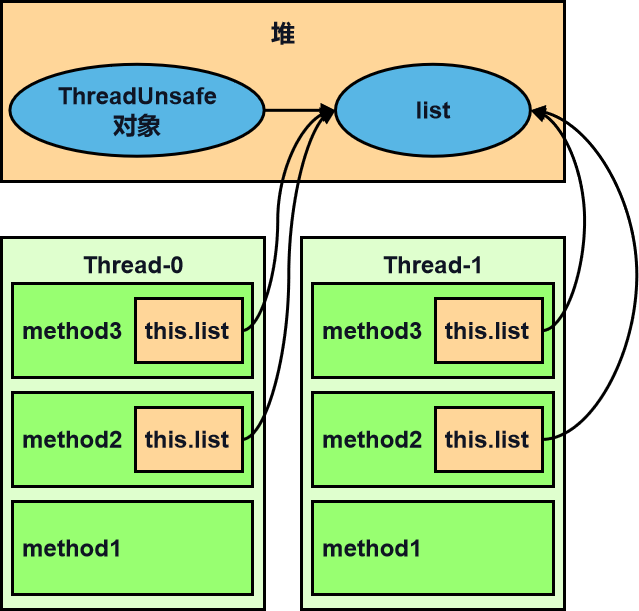
将 list 修改为局部变量那么就不会有上述问题了
class ThreadUnsafe1 {public void method1(int loopNumber) {ArrayList<String> list = new ArrayList<>();for (int i = 0; i < loopNumber; i++) {// { 临界区, 会产生竞态条件method2(list);method3(list);// } 临界区}}private void method2(ArrayList<String> list) {list.add("1");}private void method3(ArrayList<String> list) {list.remove(0);}public static void main(String[] args) {ThreadUnsafe1 test = new ThreadUnsafe1();//创建 2 个线程 每个线程执行 200 次for (int i = 0; i < 2; i++) {new Thread(() -> test.method1(200), "Thread" + i).start();}}}
分析:
list 是局部变量,每个线程调用时会创建其不同实例,没有共享
而 method2 的参数是从 method1 中传递过来的,与 method1 中引用同一个对象
method3 的参数分析与 method2 相同
方法访问修饰符带来的思考,如果把 method2 和 method3 的方法修改为 public 会不会代理线程安全问题?
情况1:有其它线程调用 method2 和 method3
情况2:在 情况1 的基础上,为 ThreadSafe 类添加子类,子类覆盖 method2 或 method3 方法,即
class ThreadSafe {public final void method1(int loopNumber) {ArrayList<String> list = new ArrayList<>();for (int i = 0; i < loopNumber; i++) {method2(list);method3(list);}}public void method2(ArrayList<String> list) {list.add("1");}public void method3(ArrayList<String> list) {list.remove(0);}}class ThreadSafeSubClass extends ThreadSafe {@Overridepublic void method3(ArrayList<String> list) {new Thread(() -> list.remove(0)).start();}}
从这个例子可以看出 private 或 fifinal 提供【安全】的意义所在,请体会开闭原则中的【闭】
常见线程安全类
String
Integer
StringBuffffer
Random
Vector
Hashtable
java.util.concurrent 包下的类
这里说它们是线程安全的是指,多个线程调用它们同一个实例的某个方法时,是线程安全的。也可以理解为
Hashtable table = new Hashtable();new Thread(()-> table.put("key", "value1")).start();new Thread(()-> table.put("key", "value2")).start();
线程安全类方法的组合
它们的每个方法是原子的,但注意它们多个方法的组合不是原子的,见后面分析
分析下面代码是否线程安全?
Hashtable table = new Hashtable();// 线程1,线程2if( table.get("key") == null) {table.put("key", value);}

不可变类线程安全性
String、Integer 等都是不可变类,因为其内部的状态不可以改变,因此它们的方法都是线程安全的
有同学或许有疑问,String 有 replace,substring 等方法【可以】改变值啊,那么这些方法又是如何保证线程安
全的呢?
public class Immutable{private int value = 0;public Immutable(int value){this.value = value;}public int getValue(){return this.value;}}
如果想增加一个增加的方法呢?
public class Immutable{private int value = 0;public Immutable(int value){this.value = value;}public int getValue(){return this.value;}public Immutable add(int v){return new Immutable(this.value + v);}}
实例分析
例1:
//运行在Tomcat容器中,只有一个实例,会被tomcat的多个线程共享使用public class MyServlet extends HttpServlet {// 是否安全? 线程不安全,key,value可以修改,多个线程读写会发生混乱Map<String,Object> map = new HashMap<>();// 是否安全? 线程安全,属性不可修改String S1 = "...";// 是否安全? 线程安全,属性不可修改final String S2 = "...";// 是否安全? 线程不安全,会被共享,属性可修改Date D1 = new Date();// 是否安全? 线程不安全,引用不能变,但是属性可修改final Date D2 = new Date();public void doGet(HttpServletRequest request, HttpServletResponse response) {// 使用上述变量}}
例2:
public class MyServlet extends HttpServlet {// 是否安全? 存在线程安全问题private UserService userService = new UserServiceImpl();public void doGet(HttpServletRequest request, HttpServletResponse response) {userService.update(...);}}public class UserServiceImpl implements UserService {// 记录调用次数 不安全private int count = 0;public void update() {// ...count++;}}
例3:
@Aspect@Component//Spring 容器实例默认是单例,会被多个线程共享,可以换成环绕通知public class MyAspect {// 是否安全? 不安全private long start = 0L;@Before("execution(* *(..))")public void before() {start = System.nanoTime();}@After("execution(* *(..))")public void after() {long end = System.nanoTime();System.out.println("cost time:" + (end-start));}}
例4:
public class MyServlet extends HttpServlet {// 是否安全 是 私有的,不可变private UserService userService = new UserServiceImpl();public void doGet(HttpServletRequest request, HttpServletResponse response) {userService.update(...);}}public class UserServiceImpl implements UserService {// 是否安全 是,无成员变量private UserDao userDao = new UserDaoImpl();public void update() {userDao.update();}}//没有成员变量,线程安全public class UserDaoImpl implements UserDao {public void update() {String sql = "update user set password = ? where username = ?";// 是否安全 安全,局部变量try (Connection conn = DriverManager.getConnection("","","")){// ...} catch (Exception e) {// ...}}}
例5:
public class MyServlet extends HttpServlet {// 是否安全 否private UserService userService = new UserServiceImpl();public void doGet(HttpServletRequest request, HttpServletResponse response) {userService.update(...);}}public class UserServiceImpl implements UserService {// 是否安全 否private UserDao userDao = new UserDaoImpl();public void update() {userDao.update();}}public class UserDaoImpl implements UserDao {// 是否安全 不安全private Connection conn = null;public void update() throws SQLException {String sql = "update user set password = ? where username = ?";conn = DriverManager.getConnection("","","");// ...conn.close();}}
例6:
public class MyServlet extends HttpServlet {// 是否安全private UserService userService = new UserServiceImpl();public void doGet(HttpServletRequest request, HttpServletResponse response) {userService.update(...);}}public class UserServiceImpl implements UserService {public void update() {UserDao userDao = new UserDaoImpl();userDao.update();}}public class UserDaoImpl implements UserDao {// 是否安全 线程安全,但不推荐这种写法private Connection conn = null;public void update() throws SQLException {String sql = "update user set password = ? where username = ?";conn = DriverManager.getConnection("","","");// ...conn.close();}}
例7:
public abstract class Test {public void bar() {// 是否安全 SimpleDateFormat本身不是线程安全的SimpleDateFormat sdf = new SimpleDateFormat("yyyy-MM-dd HH:mm:ss");foo(sdf);}//foo 方法被继承,从而可能被修改造成线程不安全public abstract foo(SimpleDateFormat sdf);public static void main(String[] args) {new Test().bar();}}
其中 foo 的行为是不确定的,可能导致不安全的发生,被称之为外星方法
public void foo(SimpleDateFormat sdf) {String dateStr = "1999-10-11 00:00:00";for (int i = 0; i < 20; i++) {new Thread(() -> {try {sdf.parse(dateStr);} catch (ParseException e) {e.printStackTrace();}}).start();}}
请比较 JDK 中 String 类的实现
String 为什么是final 类的原因之一就是 防止被子类继承后状态被修改,造成线程不安全,体现了闭合原则
例8: 线程不安全
@Slf4jpublic class TestConcurrent {private static Integer i = 0;private final static Object o = 0;public static void main(String[] args) {List<Thread> list = new ArrayList<>();for (int j = 0; j < 2; j++) {Thread thread = new Thread(() -> {for (int k = 0; k < 5000; k++) {synchronized (i) {i++;}}}, "" + j);list.add(thread);}list.stream().forEach(t -> t.start());list.stream().forEach(t -> {try {t.join();} catch (InterruptedException e) {e.printStackTrace();}});log.debug("{}", i);}}
4.5 习题
卖票练习
//模拟卖票public class TestSell {public static void main(String[] args) throws InterruptedException {//模拟多人买票TicketWindow window = new TicketWindow(2000);//卖出的票数统计,线程安全List<Integer> soldAmount = new Vector<>();//买票人数List<Thread> threads = new ArrayList<>();for (int i = 0; i < 5000; i++) {Thread thread = new Thread(() -> {int sell = window.sell(Tools.getTicket());soldAmount.add(sell);});threads.add(thread);thread.start();}//等待所有线程执行完毕for (Thread thread : threads) {thread.join();}System.out.println("余票:" + window.getCount());System.out.println("卖出:" + soldAmount.stream().mapToInt(i -> i).sum());}}//售票窗口class TicketWindow {private int count;public TicketWindow(int count) {this.count = count;}//获取余票数量public int getCount() {return count;}//售票public synchronized int sell(int amount) {if (this.count >= amount) {this.count = this.count - amount;return amount;} else {return 0;}}}
将上述代码打包成可运行jar
<plugin><groupId>org.apache.maven.plugins</groupId><artifactId>maven-shade-plugin</artifactId><version>2.4.1</version><executions><execution><phase>package</phase><goals><goal>shade</goal></goals><configuration><transformers><transformerimplementation="org.apache.maven.plugins.shade.resource.ManifestResourceTransformer"><mainClass>com.zhr.TestSell</mainClass></transformer></transformers></configuration></execution></executions></plugin>
使用windows脚本多次运行
for /L %n in (1,1,10) do java -jar codeforpackage-1.0.0.jar
售票方法不加synchronized关键字,运行结果
F:\DOCUMENTS\IDEAProjects\java-study\codeforpackage\target>java -jar codeforpackage-1.0.0.jar08:20:41.605 [main] INFO com.zhr.TestSell - 余票:008:20:41.620 [main] INFO com.zhr.TestSell - 卖出:2004F:\DOCUMENTS\IDEAProjects\java-study\codeforpackage\target>java -jar codeforpackage-1.0.0.jar08:20:42.641 [main] INFO com.zhr.TestSell - 余票:008:20:42.656 [main] INFO com.zhr.TestSell - 卖出:2002
加synchronized关键字之后则OK
转账练习
public class 转账 {public static void main(String[] args) throws InterruptedException {Account a = new Account(1000);Account b = new Account(1000);Thread thread1 = new Thread(() -> {for (int i = 0; i < 10; i++) {a.transfer(b, Tools.get(100));}}, "aaa");Thread thread2 = new Thread(() -> {for (int i = 0; i < 10; i++) {b.transfer(a, Tools.get(100));}}, "bbb");thread1.start();thread2.start();thread1.join();thread2.join();System.out.println("当前总额:" + (a.getMoney() + b.getMoney()));}}class Account {private int money;public Account(int money) {this.money = money;}public int getMoney() {return money;}public void setMoney(int money) {this.money = money;}public void transfer(Account target, int amount) {//效率低,是一个简单的解决方法synchronized (Account.class) {if (this.money >= amount) {this.setMoney(this.getMoney() - amount);target.setMoney(target.getMoney() + amount);}}}}
4.6 Monitor 概念
Java 对象头
32 位虚拟机
普通对象
| Object Header (64 bits) | |
|---|---|
| Mark Word (32 bits) | Klass Word (32 bits) |
Klass Word 指向对象所从属的class
数组对象
| Object Header (96 bits) | ||
|---|---|---|
| Mark Word(32bits) | Klass Word(32bits) | array length(32bits) |
其中 Mark Word 结构为
| Mark Word (32 bits) | State | ||||
|---|---|---|---|---|---|
| hashcode:25 | age:4 | biased_lock:0 | 01 | Normal | |
| thread:23 | epoch:2 | age:4 | biased_lock:1 | 01 | Biased |
| ptr_to_lock_record:30 | 00 | Lightweight Locked | |||
| ptr_to_heavyweight_monitor:30 | 10 | Heavyweight Locked | |||
| 11 | Marked for GC |
hashcode hash码
age 垃圾回收时的分代年龄
biased_lock 偏向锁 是否启用了偏向锁 0没有启用偏向锁 1 启用了偏向锁
state 加锁状态
thread 偏向锁时的线程ID
epoch 批量重定向和批量撤销时使用
ptr_to_lock_record 指向栈帧中琐记录的指针
ptr_to_heavyweight_monitor 指向monitor对象的指针
64位虚拟机
java 8默认开启指针压缩 关闭前占96bit 关闭后占128bit(关闭,命令 -XX:-UseCompressedOops)
64 位虚拟机 Mark Word
| Mark Word (64 bits) | State | |||||
|---|---|---|---|---|---|---|
| unused:25 | hashcode:31 | unused:1 | age:4 | biased_lock:0 | 01 | Normal |
| thread:54 | epoch:2 | unused:1 | age:4 | biased_lock:1 | 01 | Biased |
| ptr_to_lock_record:62 | 00 | Lightweight Locked | ||||
| ptr_to_heavyweight_monitor:62 | 10 | Heavyweight Locked | ||||
| 11 | Marked for GC |
参考资料 https://stackoverflow.com/questions/26357186/what-is-in-java-object-header
Monitor(锁)原理
Monitor 被翻译为监视器或管程
每个 Java 对象都可以关联一个 Monitor 对象,如果使用 synchronized 给对象上锁(重量级)之后,该对象头的Mark Word 中就被设置指向 Monitor 对象的指针
Monitor 结构如下
刚开始 Monitor 中 Owner 为 null
当 Thread-2 执行 synchronized(obj) 就会将 Monitor 的所有者 Owner 置为 Thread-2,Monitor中只能有一个 Owner
在 Thread-2 上锁的过程中,如果 Thread-3,Thread-4,Thread-5 也来执行 synchronized(obj),就会进入EntryList BLOCKED
Thread-2 执行完同步代码块的内容,然后唤醒 EntryList 中等待的线程来竞争锁,竞争的时是非公平的
图中 WaitSet 中的 Thread-0,Thread-1 是之前获得过锁,但条件不满足进入 WAITING 状态的线程,后面讲wait-notify 时会分析
注意: synchronized 必须是进入同一个对象的 monitor 才有上述的效果 不加 synchronized 的对象不会关联监视器,不遵从以上规则
synchronized原理
static final Object lock = new Object();static int counter = 0;public static void main(String[] args) {synchronized (lock) {counter++;}}
对应字节码
public static void main(java.lang.String[]);descriptor: ([Ljava/lang/String;)Vflags: ACC_PUBLIC, ACC_STATICCode:stack=2, locals=3, args_size=10: getstatic #2 // <- 获取lock引用 (synchronized开始)3: dup // 复制一份4: astore_1 // 复制的lock引用 -> 存储到slot 1 (便于解锁)5: monitorenter // (对应synchronized关键字)将 lock对象 MarkWord 置为 Monitor 指针6: getstatic #3 // Field counter:I // <- i9: iconst_1 // 准备常数 110: iadd // +111: putstatic #3 // Field counter:I // -> i14: aload_1 // <- lock引用(astore_1存储的lock引用)15: monitorexit // 将 lock对象 MarkWord 重置, 唤醒 EntryList16: goto 2419: astore_2 // e -> slot 220: aload_1 // <- lock引用21: monitorexit // 将 lock对象 MarkWord 重置, 唤醒 EntryList22: aload_2 // <- slot 2 (e)23: athrow // <- slot 2 (e)24: returnException table:from to target type6 16 19 any19 22 19 anyLineNumberTable:line 7: 0line 8: 6line 9: 14line 10: 24LocalVariableTable:Start Length Slot Name Signature0 25 0 args [Ljava/lang/String;StackMapTable: number_of_entries = 2frame_type = 255 /* full_frame */offset_delta = 19locals = [ class "[Ljava/lang/String;", class java/lang/Object ]stack = [ class java/lang/Throwable ]frame_type = 250 /* chop */offset_delta = 4
注意 方法级别的 synchronized 不会在字节码指令中有所体现
小故事
故事角色
老王 - JVM
小南 - 线程
小女 - 线程
房间 - 对象
房间门上 - 防盗锁 - Monitor
房间门上 - 小南书包 - 轻量级锁
房间门上 - 刻上小南大名 - 偏向锁
批量重刻名 - 一个类的偏向锁撤销到达 20 阈值
不能刻名字 - 批量撤销该类对象的偏向锁,设置该类不可偏向
小南要使用房间保证计算不被其它人干扰(原子性),最初,他用的是防盗锁,当上下文切换时,锁住门。这样,即使他离开了,别人也进不了门,他的工作就是安全的。
但是,很多情况下没人跟他来竞争房间的使用权。小女是要用房间,但使用的时间上是错开的,小南白天用,小女晚上用。每次上锁太麻烦了,有没有更简单的办法呢?
小南和小女商量了一下,约定不锁门了,而是谁用房间,谁把自己的书包挂在门口,但他们的书包样式都一样,因此每次进门前得翻翻书包,看课本是谁的,如果是自己的,那么就可以进门,这样省的上锁解锁了。万一书包不是自己的,那么就在门外等,并通知对方下次用锁门的方式。
后来,小女回老家了,很长一段时间都不会用这个房间。小南每次还是挂书包,翻书包,虽然比锁门省事了,但仍然觉得麻烦。
于是,小南干脆在门上刻上了自己的名字:【小南专属房间,其它人勿用】,下次来用房间时,只要名字还在,那么说明没人打扰,还是可以安全地使用房间。如果这期间有其它人要用这个房间,那么由使用者将小南刻的名字擦掉,升级为挂书包的方式。
同学们都放假回老家了,小南就膨胀了,在 20 个房间刻上了自己的名字,想进哪个进哪个。后来他自己放假回老家了,这时小女回来了(她也要用这些房间),结果就是得一个个地擦掉小南刻的名字,升级为挂书包的方式。老王觉得这成本有点高,提出了一种批量重刻名的方法,他让小女不用挂书包了,可以直接在门上刻上自己的名字
后来,刻名的现象越来越频繁,老王受不了了:算了,这些房间都不能刻名了,只能挂书包
1. 轻量级锁
轻量级锁的使用场景:如果一个对象虽然有多线程要加锁,但加锁的时间是错开的(也就是没有竞争),那么可以使用轻量级锁来优化。
轻量级锁对使用者是透明的,即语法仍然是 synchronized
假设有两个方法同步块,利用同一个对象加锁
static final Object obj = new Object();public static void method1() {synchronized( obj ) {// 同步块 Amethod2();}}public static void method2() {synchronized( obj ) {// 同步块 B}}
创建锁记录(Lock Record)对象,每个线程的栈帧都会包含一个锁记录的结构,内部可以存储锁定对象的Mark Word
让锁记录中 Object reference 指向锁对象,并尝试用 cas 替换 Object 的 Mark Word,将 Mark Word 的值存入锁记录
如果 cas 替换成功,对象头中存储了 锁记录地址和状态 00 ,表示由该线程给对象加锁,这时图示如下
如果 cas 失败,有两种情况
- 如果是其它线程已经持有了该 Object 的轻量级锁,这时表明有竞争,进入锁膨胀过程
- 如果是自己执行了 synchronized 锁重入,那么再添加一条 Lock Record 作为重入的计数

当退出 synchronized 代码块(解锁时)如果有取值为 null 的锁记录,表示有重入,这时重置锁记录,表示重入计数减一
当退出 synchronized 代码块(解锁时)锁记录的值不为 null,这时使用 cas 将 Mark Word 的值恢复给对象头
- 成功,则解锁成功
失败,说明轻量级锁进行了锁膨胀或已经升级为重量级锁,进入重量级锁解锁流程
2. 锁膨胀
如果在尝试加轻量级锁的过程中,CAS 操作无法成功,这时一种情况就是有其它线程为此对象加上了轻量级锁(有竞争),这时需要进行锁膨胀,将轻量级锁变为重量级锁。
static Object obj = new Object();public static void method1() {synchronized( obj ) {// 同步块}}
当 Thread-1 进行轻量级加锁时,Thread-0 已经对该对象加了轻量级锁

这时 Thread-1 加轻量级锁失败,进入锁膨胀流程即为 Object 对象申请 Monitor 锁,让 Object 指向重量级锁地址
- 然后自己进入 Monitor 的 EntryList BLOCKED

当 Thread-0 退出同步块解锁时,使用 cas 将 Mark Word 的值恢复给对象头,失败。这时会进入重量级解锁流程,即按照 Monitor 地址找到 Monitor 对象,设置 Owner 为 null,唤醒 EntryList 中 BLOCKED 线程
3. 自旋优化
重量级锁竞争的时候,还可以使用自旋来进行优化,如果当前线程自旋成功(即这时候持锁线程已经退出了同步块,释放了锁),这时当前线程就可以避免阻塞。
自旋重试成功的情况
| 线程1(core1上) | 对象Mark | 线程2(core2上) |
|---|---|---|
| - | 10(重量锁) | - |
| 访问同步块,获取monitor | 10(重量锁)量量锁指针 | - |
| 成功(加锁) | 10(重量锁)重量锁指针 | - |
| 执行同步块 | 10(重量锁)重量锁指针 | |
| 执行同步块 | 10(重量锁)重量锁指针 | 访问同步块,获取 monitor |
| 执行同步块 | 10(重量锁)重量锁指针 | 自旋重试 |
| 执行完毕 | 10(重量锁)重量锁指针 | 自旋重试 |
| 成功(解锁) | 01(无锁) | 自旋重试 |
| - | 10(重量锁)重量锁指针 | 成功(加锁) |
| - | 10(重量锁)重量锁指针 | 执行同步块 |
| - | … | … |
自旋重试失败的情况
| 线程1(core1上) | 对象Mark | 线程2(core2上) |
|---|---|---|
| - | 10(重量锁) | - |
| 访问同步块,获取monitor | 10(重量锁)量量锁指针 | - |
| 成功(加锁) | 10(重量锁)重量锁指针 | - |
| 执行同步块 | 10(重量锁)重量锁指针 | |
| 执行同步块 | 10(重量锁)重量锁指针 | 访问同步块,获取 monitor |
| 执行同步块 | 10(重量锁)重量锁指针 | 自旋重试 |
| 执行同步块 | 10(重量锁)重量锁指针 | 自旋重试 |
| 执行同步块 | 10(重量锁)重量锁指针 | 自旋重试 |
| 执行同步块 | 10(重量锁)重量锁指针 | 阻塞 |
| - | … | … |
自旋会占用 CPU 时间,单核 CPU 自旋就是浪费,多核 CPU 自旋才能发挥优势。
在 Java 6 之后自旋锁是自适应的,比如对象刚刚的一次自旋操作成功过,那么认为这次自旋成功的可能性会高,就多自旋几次;反之,就少自旋甚至不自旋,总之,比较智能。
Java 7 之后不能控制是否开启自旋功能
4. 偏向锁
轻量级锁在没有竞争时(就自己这个线程),每次重入仍然需要执行 CAS 操作。
Java 6 中引入了偏向锁来做进一步优化:只有第一次使用 CAS 将线程 ID 设置到对象的 Mark Word 头,之后这个线程发现对象头线程 ID 是自己的就表示没有竞争,不用重新 CAS。以后只要不发生竞争,这个对象就归该线程所有
例如:
static final Object obj = new Object();public static void m1() {synchronized (obj) {// 同步块 Am2();}}public static void m2() {synchronized (obj) {// 同步块 Bm3();}}public static void m3() {synchronized (obj) {// 同步块 C}}


偏向状态
回忆一下对象头格式
| Mark Word (64 bits) | State | |||||
|---|---|---|---|---|---|---|
| unused:25 | hashcode:31 | unused:1 | age:4 | biased_lock:0 | 01 | Normal |
| thread:54 | epoch:2 | unused:1 | age:4 | biased_lock:1 | 01 | Biased |
| ptr_to_lock_record:62 | 00 | Lightweight Locked | ||||
| ptr_to_heavyweight_monitor:62 | 10 | Heavyweight Locked | ||||
| 11 | Marked for GC |
一个对象创建时:
- 如果开启了偏向锁(默认开启),那么对象创建后,markword 值为 0x05 即最后 3 位为 101,这时它的thread、epoch、age 都为 0
- 偏向锁是默认是延迟的,不会在程序启动时立即生效,如果想避免延迟,可以加 VM 参数
-XX:BiasedLockingStartupDelay=0来禁用延迟 - 如果没有开启偏向锁,那么对象创建后,markword 值为 0x01 即最后 3 位为 001,这时它的 hashcode、age 都为 0,第一次用到 hashcode 时才会赋值
1) 测试延迟特性
2) 测试偏向锁
class Dog {}
利用 jol 第三方工具来查看对象头信息(注意这里我扩展了 jol 让它输出更为简洁 ??? 无源码写不出)
<dependency><groupId>org.openjdk.jol</groupId><artifactId>jol-core</artifactId><version>0.10</version></dependency>
/*** 添加虚拟机参数 -XX:BiasedLockingStartupDelay=0* 禁用偏向锁 -XX:-UseBiasedLocking*/public static void main(String[] args) {Dog d = new Dog();ClassLayout classLayout = ClassLayout.parseInstance(d);new Thread(() -> {log.debug("synchronized 前");System.out.println(classLayout.toPrintableSimple(true));log.info(classLayout.toPrintable());synchronized (d) {log.debug("synchronized 中");//log.info(classLayout.toPrintable());// System.out.println(classLayout.toPrintableSimple(true));}log.debug("synchronized 后");//log.info(classLayout.toPrintable());System.out.println(classLayout.toPrintableSimple(true));}, "t1").start();}
输出
11:08:58.117 c.TestBiased [t1] - synchronized 前00000000 00000000 00000000 00000000 00000000 00000000 00000000 0000010111:08:58.121 c.TestBiased [t1] - synchronized 中00000000 00000000 00000000 00000000 00011111 11101011 11010000 0000010111:08:58.121 c.TestBiased [t1] - synchronized 后00000000 00000000 00000000 00000000 00011111 11101011 11010000 00000101
注意 处于偏向锁的对象解锁后,线程 id 仍存储于对象头中 优先偏向锁,然后轻量级锁,最后重量级锁
3)测试禁用
在上面测试代码运行时在添加 VM 参数 -XX:-UseBiasedLocking 禁用偏向锁
输出
11:13:10.018 c.TestBiased [t1] - synchronized 前00000000 00000000 00000000 00000000 00000000 00000000 00000000 0000000111:13:10.021 c.TestBiased [t1] - synchronized 中00000000 00000000 00000000 00000000 00100000 00010100 11110011 1000100011:13:10.021 c.TestBiased [t1] - synchronized 后00000000 00000000 00000000 00000000 00000000 00000000 00000000 00000001
4) 测试 hashCode
正常状态对象一开始是没有 hashCode 的,第一次调用才生成
撤销 - 调用对象 hashCode
调用了对象的 hashCode,但偏向锁的对象 MarkWord 中存储的是线程 id,如果调用 hashCode 会导致偏向锁被撤销
轻量级锁会在锁记录中记录 hashCode
重量级锁会在 Monitor 中记录 hashCode
偏向状态markword最多可以存储偏向线程ID再想存31位的hashcode已经没有位置,导致 调用 hashCode 会导致偏向锁被撤销
在调用 hashCode 后使用偏向锁,记得去掉 -XX:-UseBiasedLocking
输出
11:22:10.386 c.TestBiased [main] - 调用 hashCode:177853501511:22:10.391 c.TestBiased [t1] - synchronized 前00000000 00000000 00000000 01101010 00000010 01001010 01100111 0000000111:22:10.393 c.TestBiased [t1] - synchronized 中00000000 00000000 00000000 00000000 00100000 11000011 11110011 0110100011:22:10.393 c.TestBiased [t1] - synchronized 后00000000 00000000 00000000 01101010 00000010 01001010 01100111 00000001
撤销 - 其它线程使用对象
当有其它线程使用偏向锁对象时,会将偏向锁升级为轻量级锁
@Slf4jpublic class TestBais3 {private static void test2() throws InterruptedException {Dog d = new Dog();Thread t1 = new Thread(() -> {synchronized (d) {log.debug(ClassLayout.parseInstance(d).toPrintableSimple(true));}synchronized (TestBais3.class) {TestBais3.class.notify();}// 如果不用 wait/notify 使用 join 必须打开下面的注释// 因为:t1 线程不能结束,否则底层线程可能被 jvm 重用作为 t2 线程,底层线程 id 是一样的/*try {System.in.read();} catch (IOException e) {e.printStackTrace();}*/}, "t1");t1.start();Thread t2 = new Thread(() -> {synchronized (TestBais3.class) {try {TestBais3.class.wait();} catch (InterruptedException e) {e.printStackTrace();}}log.debug(ClassLayout.parseInstance(d).toPrintableSimple(true));synchronized (d) {log.debug(ClassLayout.parseInstance(d).toPrintableSimple(true));}log.debug(ClassLayout.parseInstance(d).toPrintableSimple(true));}, "t2");t2.start();}}
输出
[t1] - 00000000 00000000 00000000 00000000 00011111 01000001 00010000 00000101[t2] - 00000000 00000000 00000000 00000000 00011111 01000001 00010000 00000101[t2] - 00000000 00000000 00000000 00000000 00011111 10110101 11110000 01000000[t2] - 00000000 00000000 00000000 00000000 00000000 00000000 00000000 00000001
撤销 - 调用 wait/notify
wait/notify 针对于重量级锁 所以会撤销偏向锁
public static void main(String[] args) throws InterruptedException {Dog d = new Dog();Thread t1 = new Thread(() -> {log.debug(ClassLayout.parseInstance(d).toPrintableSimple(true));synchronized (d) {log.debug(ClassLayout.parseInstance(d).toPrintableSimple(true));try {d.wait();} catch (InterruptedException e) {e.printStackTrace();}log.debug(ClassLayout.parseInstance(d).toPrintableSimple(true));}}, "t1");t1.start();new Thread(() -> {try {Thread.sleep(6000);} catch (InterruptedException e) {e.printStackTrace();}synchronized (d) {log.debug("notify");d.notify();}}, "t2").start();}
输出
[t1] - 00000000 00000000 00000000 00000000 00000000 00000000 00000000 00000101[t1] - 00000000 00000000 00000000 00000000 00011111 10110011 11111000 00000101[t2] - notify[t1] - 00000000 00000000 00000000 00000000 00011100 11010100 00001101 11001010
批量重偏向
如果对象虽然被多个线程访问,但没有竞争,这时偏向了线程 T1 的对象仍有机会重新偏向 T2,重偏向会重置对象
的 Thread ID
当撤销偏向锁阈值超过 20 次后,jvm 会这样觉得,我是不是偏向错了呢,于是会在给这些对象加锁时重新偏向至
加锁线程
private static void test3() throws InterruptedException {Vector<Dog> list = new Vector<>();Thread t1 = new Thread(() -> {for (int i = 0; i < 30; i++) {Dog d = new Dog();list.add(d);synchronized (d) {log.debug(i + "\t" + ClassLayout.parseInstance(d).toPrintableSimple(true));}}synchronized (list) {list.notify();}}, "t1");t1.start();Thread t2 = new Thread(() -> {synchronized (list) {try {list.wait();} catch (InterruptedException e) {e.printStackTrace();}}log.debug("===============> ");for (int i = 0; i < 30; i++) {Dog d = list.get(i);log.debug(i + "\t" + ClassLayout.parseInstance(d).toPrintableSimple(true));synchronized (d) {log.debug(i + "\t" + ClassLayout.parseInstance(d).toPrintableSimple(true));}log.debug(i + "\t" + ClassLayout.parseInstance(d).toPrintableSimple(true));}}, "t2");t2.start();}
输出
[t1] - 0 00000000 00000000 00000000 00000000 00011111 11110011 11100000 00000101[t1] - 1 00000000 00000000 00000000 00000000 00011111 11110011 11100000 00000101[t1] - 2 00000000 00000000 00000000 00000000 00011111 11110011 11100000 00000101[t1] - 3 00000000 00000000 00000000 00000000 00011111 11110011 11100000 00000101[t1] - 4 00000000 00000000 00000000 00000000 00011111 11110011 11100000 00000101[t1] - 5 00000000 00000000 00000000 00000000 00011111 11110011 11100000 00000101[t1] - 6 00000000 00000000 00000000 00000000 00011111 11110011 11100000 00000101[t1] - 7 00000000 00000000 00000000 00000000 00011111 11110011 11100000 00000101[t1] - 8 00000000 00000000 00000000 00000000 00011111 11110011 11100000 00000101[t1] - 9 00000000 00000000 00000000 00000000 00011111 11110011 11100000 00000101[t1] - 10 00000000 00000000 00000000 00000000 00011111 11110011 11100000 00000101[t1] - 11 00000000 00000000 00000000 00000000 00011111 11110011 11100000 00000101[t1] - 12 00000000 00000000 00000000 00000000 00011111 11110011 11100000 00000101[t1] - 13 00000000 00000000 00000000 00000000 00011111 11110011 11100000 00000101[t1] - 14 00000000 00000000 00000000 00000000 00011111 11110011 11100000 00000101[t1] - 15 00000000 00000000 00000000 00000000 00011111 11110011 11100000 00000101[t1] - 16 00000000 00000000 00000000 00000000 00011111 11110011 11100000 00000101[t1] - 17 00000000 00000000 00000000 00000000 00011111 11110011 11100000 00000101[t1] - 18 00000000 00000000 00000000 00000000 00011111 11110011 11100000 00000101[t1] - 19 00000000 00000000 00000000 00000000 00011111 11110011 11100000 00000101[t1] - 20 00000000 00000000 00000000 00000000 00011111 11110011 11100000 00000101[t1] - 21 00000000 00000000 00000000 00000000 00011111 11110011 11100000 00000101[t1] - 22 00000000 00000000 00000000 00000000 00011111 11110011 11100000 00000101[t1] - 23 00000000 00000000 00000000 00000000 00011111 11110011 11100000 00000101[t1] - 24 00000000 00000000 00000000 00000000 00011111 11110011 11100000 00000101[t1] - 25 00000000 00000000 00000000 00000000 00011111 11110011 11100000 00000101[t1] - 26 00000000 00000000 00000000 00000000 00011111 11110011 11100000 00000101[t1] - 27 00000000 00000000 00000000 00000000 00011111 11110011 11100000 00000101[t1] - 28 00000000 00000000 00000000 00000000 00011111 11110011 11100000 00000101[t1] - 29 00000000 00000000 00000000 00000000 00011111 11110011 11100000 00000101[t2] - ===============>[t2] - 0 00000000 00000000 00000000 00000000 00011111 11110011 11100000 00000101[t2] - 0 00000000 00000000 00000000 00000000 00100000 01011000 11110111 00000000[t2] - 0 00000000 00000000 00000000 00000000 00000000 00000000 00000000 00000001[t2] - 1 00000000 00000000 00000000 00000000 00011111 11110011 11100000 00000101[t2] - 1 00000000 00000000 00000000 00000000 00100000 01011000 11110111 00000000[t2] - 1 00000000 00000000 00000000 00000000 00000000 00000000 00000000 00000001[t2] - 2 00000000 00000000 00000000 00000000 00011111 11110011 11100000 00000101[t2] - 2 00000000 00000000 00000000 00000000 00100000 01011000 11110111 00000000[t2] - 2 00000000 00000000 00000000 00000000 00000000 00000000 00000000 00000001[t2] - 3 00000000 00000000 00000000 00000000 00011111 11110011 11100000 00000101[t2] - 3 00000000 00000000 00000000 00000000 00100000 01011000 11110111 00000000[t2] - 3 00000000 00000000 00000000 00000000 00000000 00000000 00000000 00000001[t2] - 4 00000000 00000000 00000000 00000000 00011111 11110011 11100000 00000101[t2] - 4 00000000 00000000 00000000 00000000 00100000 01011000 11110111 00000000[t2] - 4 00000000 00000000 00000000 00000000 00000000 00000000 00000000 00000001[t2] - 5 00000000 00000000 00000000 00000000 00011111 11110011 11100000 00000101[t2] - 5 00000000 00000000 00000000 00000000 00100000 01011000 11110111 00000000[t2] - 5 00000000 00000000 00000000 00000000 00000000 00000000 00000000 00000001[t2] - 6 00000000 00000000 00000000 00000000 00011111 11110011 11100000 00000101[t2] - 6 00000000 00000000 00000000 00000000 00100000 01011000 11110111 00000000[t2] - 6 00000000 00000000 00000000 00000000 00000000 00000000 00000000 00000001[t2] - 7 00000000 00000000 00000000 00000000 00011111 11110011 11100000 00000101[t2] - 7 00000000 00000000 00000000 00000000 00100000 01011000 11110111 00000000[t2] - 7 00000000 00000000 00000000 00000000 00000000 00000000 00000000 00000001[t2] - 8 00000000 00000000 00000000 00000000 00011111 11110011 11100000 00000101[t2] - 8 00000000 00000000 00000000 00000000 00100000 01011000 11110111 00000000[t2] - 8 00000000 00000000 00000000 00000000 00000000 00000000 00000000 00000001[t2] - 9 00000000 00000000 00000000 00000000 00011111 11110011 11100000 00000101[t2] - 9 00000000 00000000 00000000 00000000 00100000 01011000 11110111 00000000[t2] - 9 00000000 00000000 00000000 00000000 00000000 00000000 00000000 00000001[t2] - 10 00000000 00000000 00000000 00000000 00011111 11110011 11100000 00000101[t2] - 10 00000000 00000000 00000000 00000000 00100000 01011000 11110111 00000000[t2] - 10 00000000 00000000 00000000 00000000 00000000 00000000 00000000 00000001[t2] - 11 00000000 00000000 00000000 00000000 00011111 11110011 11100000 00000101[t2] - 11 00000000 00000000 00000000 00000000 00100000 01011000 11110111 00000000[t2] - 11 00000000 00000000 00000000 00000000 00000000 00000000 00000000 00000001[t2] - 12 00000000 00000000 00000000 00000000 00011111 11110011 11100000 00000101[t2] - 12 00000000 00000000 00000000 00000000 00100000 01011000 11110111 00000000[t2] - 12 00000000 00000000 00000000 00000000 00000000 00000000 00000000 00000001[t2] - 13 00000000 00000000 00000000 00000000 00011111 11110011 11100000 00000101[t2] - 13 00000000 00000000 00000000 00000000 00100000 01011000 11110111 00000000[t2] - 13 00000000 00000000 00000000 00000000 00000000 00000000 00000000 00000001[t2] - 14 00000000 00000000 00000000 00000000 00011111 11110011 11100000 00000101[t2] - 14 00000000 00000000 00000000 00000000 00100000 01011000 11110111 00000000[t2] - 14 00000000 00000000 00000000 00000000 00000000 00000000 00000000 00000001[t2] - 15 00000000 00000000 00000000 00000000 00011111 11110011 11100000 00000101[t2] - 15 00000000 00000000 00000000 00000000 00100000 01011000 11110111 00000000[t2] - 15 00000000 00000000 00000000 00000000 00000000 00000000 00000000 00000001[t2] - 16 00000000 00000000 00000000 00000000 00011111 11110011 11100000 00000101[t2] - 16 00000000 00000000 00000000 00000000 00100000 01011000 11110111 00000000[t2] - 16 00000000 00000000 00000000 00000000 00000000 00000000 00000000 00000001[t2] - 17 00000000 00000000 00000000 00000000 00011111 11110011 11100000 00000101[t2] - 17 00000000 00000000 00000000 00000000 00100000 01011000 11110111 00000000[t2] - 17 00000000 00000000 00000000 00000000 00000000 00000000 00000000 00000001[t2] - 18 00000000 00000000 00000000 00000000 00011111 11110011 11100000 00000101[t2] - 18 00000000 00000000 00000000 00000000 00100000 01011000 11110111 00000000[t2] - 18 00000000 00000000 00000000 00000000 00000000 00000000 00000000 00000001[t2] - 19 00000000 00000000 00000000 00000000 00011111 11110011 11100000 00000101[t2] - 19 00000000 00000000 00000000 00000000 00011111 11110011 11110001 00000101[t2] - 19 00000000 00000000 00000000 00000000 00011111 11110011 11110001 00000101[t2] - 20 00000000 00000000 00000000 00000000 00011111 11110011 11100000 00000101[t2] - 20 00000000 00000000 00000000 00000000 00011111 11110011 11110001 00000101[t2] - 20 00000000 00000000 00000000 00000000 00011111 11110011 11110001 00000101[t2] - 21 00000000 00000000 00000000 00000000 00011111 11110011 11100000 00000101[t2] - 21 00000000 00000000 00000000 00000000 00011111 11110011 11110001 00000101[t2] - 21 00000000 00000000 00000000 00000000 00011111 11110011 11110001 00000101[t2] - 22 00000000 00000000 00000000 00000000 00011111 11110011 11100000 00000101[t2] - 22 00000000 00000000 00000000 00000000 00011111 11110011 11110001 00000101[t2] - 22 00000000 00000000 00000000 00000000 00011111 11110011 11110001 00000101[t2] - 23 00000000 00000000 00000000 00000000 00011111 11110011 11100000 00000101[t2] - 23 00000000 00000000 00000000 00000000 00011111 11110011 11110001 00000101[t2] - 23 00000000 00000000 00000000 00000000 00011111 11110011 11110001 00000101[t2] - 24 00000000 00000000 00000000 00000000 00011111 11110011 11100000 00000101[t2] - 24 00000000 00000000 00000000 00000000 00011111 11110011 11110001 00000101[t2] - 24 00000000 00000000 00000000 00000000 00011111 11110011 11110001 00000101[t2] - 25 00000000 00000000 00000000 00000000 00011111 11110011 11100000 00000101[t2] - 25 00000000 00000000 00000000 00000000 00011111 11110011 11110001 00000101[t2] - 25 00000000 00000000 00000000 00000000 00011111 11110011 11110001 00000101[t2] - 26 00000000 00000000 00000000 00000000 00011111 11110011 11100000 00000101[t2] - 26 00000000 00000000 00000000 00000000 00011111 11110011 11110001 00000101[t2] - 26 00000000 00000000 00000000 00000000 00011111 11110011 11110001 00000101[t2] - 27 00000000 00000000 00000000 00000000 00011111 11110011 11100000 00000101[t2] - 27 00000000 00000000 00000000 00000000 00011111 11110011 11110001 00000101[t2] - 27 00000000 00000000 00000000 00000000 00011111 11110011 11110001 00000101[t2] - 28 00000000 00000000 00000000 00000000 00011111 11110011 11100000 00000101[t2] - 28 00000000 00000000 00000000 00000000 00011111 11110011 11110001 00000101[t2] - 28 00000000 00000000 00000000 00000000 00011111 11110011 11110001 00000101[t2] - 29 00000000 00000000 00000000 00000000 00011111 11110011 11100000 00000101[t2] - 29 00000000 00000000 00000000 00000000 00011111 11110011 11110001 00000101[t2] - 29 00000000 00000000 00000000 00000000 00011111 11110011 11110001 00000101
批量撤销
当撤销偏向锁阈值超过 40 次后,jvm 会这样觉得,自己确实偏向错了,根本就不该偏向。于是整个类的所有对象
都会变为不可偏向的,新建的对象也是不可偏向的
static Thread t1, t2, t3;private static void test4() throws InterruptedException {Vector<Dog> list = new Vector<>();int loopNumber = 39;t1 = new Thread(() -> {for (int i = 0; i < loopNumber; i++) {Dog d = new Dog();list.add(d);synchronized (d) {log.debug(i + "\t" + ClassLayout.parseInstance(d).toPrintableSimple(true));}}LockSupport.unpark(t2);}, "t1");t1.start();t2 = new Thread(() -> {LockSupport.park();log.debug("===============> ");for (int i = 0; i < loopNumber; i++) {Dog d = list.get(i);log.debug(i + "\t" + ClassLayout.parseInstance(d).toPrintableSimple(true));synchronized (d) {log.debug(i + "\t" + ClassLayout.parseInstance(d).toPrintableSimple(true));}log.debug(i + "\t" + ClassLayout.parseInstance(d).toPrintableSimple(true));}LockSupport.unpark(t3);}, "t2");t2.start();t3 = new Thread(() -> {LockSupport.park();log.debug("===============> ");for (int i = 0; i < loopNumber; i++) {Dog d = list.get(i);log.debug(i + "\t" + ClassLayout.parseInstance(d).toPrintableSimple(true));synchronized (d) {log.debug(i + "\t" + ClassLayout.parseInstance(d).toPrintableSimple(true));}log.debug(i + "\t" + ClassLayout.parseInstance(d).toPrintableSimple(true));}}, "t3");t3.start();t3.join();log.debug(ClassLayout.parseInstance(new Dog()).toPrintableSimple(true));}
参考资料 https://github.com/farmerjohngit/myblog/issues/12 https://www.cnblogs.com/LemonFive/p/11246086.html https://www.cnblogs.com/LemonFive/p/11248248.html 偏向锁论文
5. 锁消除
锁消除
@Fork(1)@BenchmarkMode(Mode.AverageTime)@Warmup(iterations = 3)@Measurement(iterations = 5)@OutputTimeUnit(TimeUnit.NANOSECONDS)public class MyBenchmark {static int x = 0;@Benchmarkpublic void a() throws Exception {x++;}@Benchmark//两种结果非常接近//JIT 编译器对局部变量进行优化 把synchronized关键字去掉,进行锁消除优化//使用 -XX:-EliminateLocks 禁用该优化则会产生较大性能差异public void b() throws Exception {Object o = new Object();synchronized (o) {x++;}}}
java -jar benchmarks.jarBenchmark Mode Samples Score Score error Unitsc.i.MyBenchmark.a avgt 5 1.542 0.056 ns/opc.i.MyBenchmark.b avgt 5 1.518 0.091 ns/opjava -XX:-EliminateLocks -jar benchmarks.jarBenchmark Mode Samples Score Score error Unitsc.i.MyBenchmark.a avgt 5 1.507 0.108 ns/opc.i.MyBenchmark.b avgt 5 16.976 1.572 ns/op
锁粗化
对相同对象多次加锁,导致线程发生多次重入,可以使用锁粗化方式来优化,这不同于之前讲的细分锁的粒度。
4.7 wait notify
小故事 - 为什么需要 wait
由于条件不满足,小南不能继续进行计算
但小南如果一直占用着锁,其它人就得一直阻塞,效率太低
于是老王单开了一间休息室(调用 wait 方法),让小南到休息室(WaitSet)等着去了,但这时锁释放开,其它人可以由老王随机安排进屋
直到小M将烟送来,大叫一声 [ 你的烟到了 ] (调用 notify 方法)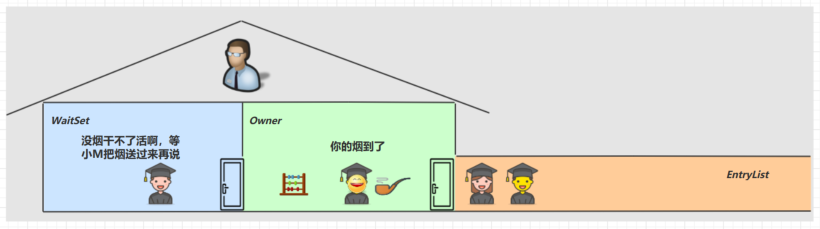
小南于是可以离开休息室,重新进入竞争锁的队列
wait notify 原理
Owner 线程发现条件不满足,调用 wait 方法,即可进入 WaitSet 变为 WAITING 状态
BLOCKED 和 WAITING 的线程都处于阻塞状态,不占用 CPU 时间片
BLOCKED 线程会在 Owner 线程释放锁时唤醒
WAITING 线程会在 Owner 线程调用 notify 或 notifyAll 时唤醒,但唤醒后并不意味者立刻获得锁,仍需进入EntryList 重新竞争
API 介绍
obj.wait() 方法让进入 object 监视器的线程释放对象的锁,进入 WaitSet 等待区,从而让其他线程就机会获取对象的锁。无限制等待,直到notify 为止obj.wait(long n) 有时限的等待, 到 n 毫秒后结束等待,或是被 notifyobj.notify() 在 object 上正在 waitSet 等待的线程中挑一个唤醒obj.notifyAll() 让 object 上正在 waitSet 等待的线程全部唤醒
它们都是线程之间进行协作的手段,都属于 Object 对象的方法。必须获得此对象的锁,才能调用这几个方法
@Slf4jpublic class TestWaitNotify {final static Object obj = new Object();public static void main(String[] args) throws InterruptedException {new Thread(() -> {synchronized (obj) {log.debug("执行....");try {obj.wait(); // 让线程在obj上一直等待下去} catch (InterruptedException e) {e.printStackTrace();}log.debug("其它代码....");}}).start();new Thread(() -> {synchronized (obj) {log.debug("执行....");try {obj.wait(); // 让线程在obj上一直等待下去} catch (InterruptedException e) {e.printStackTrace();}log.debug("其它代码....");}}).start();// 主线程两秒后执行TimeUnit.SECONDS.sleep(2);log.debug("唤醒 obj 上其它线程");synchronized (obj) {//obj.notify(); // 唤醒obj上一个线程obj.notifyAll(); // 唤醒obj上所有等待线程}}}
notify 的一种结果(程序没有停止运行)
16:11:33.196 [Thread-0] DEBUG com.zhr.thread.TestWaitNotify - 执行....16:11:33.201 [Thread-1] DEBUG com.zhr.thread.TestWaitNotify - 执行....16:11:35.193 [main] DEBUG com.zhr.thread.TestWaitNotify - 唤醒 obj 上其它线程16:11:35.193 [Thread-0] DEBUG com.zhr.thread.TestWaitNotify - 其它代码....
notifyAll 的一种结果
16:01:21.711 [Thread-0] DEBUG com.zhr.thread.TestWaitNotify - 执行....16:01:21.716 [Thread-1] DEBUG com.zhr.thread.TestWaitNotify - 执行....16:01:23.712 [main] DEBUG com.zhr.thread.TestWaitNotify - 唤醒 obj 上其它线程16:01:23.727 [Thread-1] DEBUG com.zhr.thread.TestWaitNotify - 其它代码....16:01:23.728 [Thread-0] DEBUG com.zhr.thread.TestWaitNotify - 其它代码....
4.8 wait notify 的正确姿势
sleep(long n) 和 wait(long n) 的区别
1) sleep 是 Thread 方法,而 wait 是 Object 的方法
2) sleep 不需要强制和 synchronized 配合使用,但 wait 需要和 synchronized 一起用
3) sleep 在睡眠的同时,不会释放对象锁的,但 wait 在等待的时候会释放对象锁
4) 它们状态 TIMED_WAITING
step 1
@Slf4jpublic class Test1 {static final Object room = new Object();static boolean hasCigarette = false;static boolean hasTakeout = false;public static void main(String[] args) {for (int i = 0; i < 5; i++) {new Thread(() -> {synchronized (room) {log.debug("可以开始干活了");}}, "其它人").start();}new Thread(() -> {synchronized (room) {log.debug("有烟没?[{}]", hasCigarette);if (!hasCigarette) {log.debug("没烟,先歇会!");sleep(2);}log.debug("有烟没?[{}]", hasCigarette);if (hasCigarette) {log.debug("可以开始干活了");}}}, "小南").start();sleep(1);new Thread(() -> {// 这里能不能加 synchronized (room)?hasCigarette = true;log.debug("烟到了噢!");}, "送烟的").start();}}
运行结果
16:46:18.650 [其它人] DEBUG com.zhr.thread.waitnotify.Test1 - 可以开始干活了16:46:18.657 [小南] DEBUG com.zhr.thread.waitnotify.Test1 - 有烟没?[false]16:46:18.660 [小南] DEBUG com.zhr.thread.waitnotify.Test1 - 没烟,先歇会!16:46:19.643 [送烟的] DEBUG com.zhr.thread.waitnotify.Test1 - 烟到了噢!16:46:20.664 [小南] DEBUG com.zhr.thread.waitnotify.Test1 - 有烟没?[true]16:46:20.667 [小南] DEBUG com.zhr.thread.waitnotify.Test1 - 可以开始干活了16:46:20.667 [其它人] DEBUG com.zhr.thread.waitnotify.Test1 - 可以开始干活了16:46:20.667 [其它人] DEBUG com.zhr.thread.waitnotify.Test1 - 可以开始干活了16:46:20.668 [其它人] DEBUG com.zhr.thread.waitnotify.Test1 - 可以开始干活了16:46:20.670 [其它人] DEBUG com.zhr.thread.waitnotify.Test1 - 可以开始干活了
其它干活的线程,都要一直阻塞,效率太低
小南线程必须睡足 2s 后才能醒来,就算烟提前送到,也无法立刻醒来
加了 synchronized (room) 后,就好比小南在里面反锁了门睡觉,烟根本没法送进门,main 没加synchronized 就好像 main 线程是翻窗户进来的
解决方法,使用 wait - notify 机制
step 2
@Slf4jpublic class Test2 {static final Object room = new Object();static boolean hasCigarette = false;static boolean hasTakeout = false;public static void main(String[] args) {new Thread(() -> {synchronized (room) {log.debug("有烟没?[{}]", hasCigarette);if (!hasCigarette) {log.debug("没烟,先歇会!");try {room.wait(2000);} catch (InterruptedException e) {e.printStackTrace();}}log.debug("有烟没?[{}]", hasCigarette);if (hasCigarette) {log.debug("可以开始干活了");}}}, "小南").start();for (int i = 0; i < 5; i++) {new Thread(() -> {synchronized (room) {log.debug("可以开始干活了");}}, "其它人").start();}sleep(1);new Thread(() -> {synchronized (room) {hasCigarette = true;log.debug("烟到了噢!");room.notify();}}, "送烟的").start();}}
输出
16:55:49.519 [小南] DEBUG com.zhr.thread.waitnotify.Test2 - 有烟没?[false]16:55:49.527 [小南] DEBUG com.zhr.thread.waitnotify.Test2 - 没烟,先歇会!16:55:49.527 [其它人] DEBUG com.zhr.thread.waitnotify.Test2 - 可以开始干活了16:55:49.528 [其它人] DEBUG com.zhr.thread.waitnotify.Test2 - 可以开始干活了16:55:49.528 [其它人] DEBUG com.zhr.thread.waitnotify.Test2 - 可以开始干活了16:55:49.528 [其它人] DEBUG com.zhr.thread.waitnotify.Test2 - 可以开始干活了16:55:49.528 [其它人] DEBUG com.zhr.thread.waitnotify.Test2 - 可以开始干活了16:55:50.518 [送烟的] DEBUG com.zhr.thread.waitnotify.Test2 - 烟到了噢!16:55:50.518 [小南] DEBUG com.zhr.thread.waitnotify.Test2 - 有烟没?[true]16:55:50.518 [小南] DEBUG com.zhr.thread.waitnotify.Test2 - 可以开始干活了
解决了其它干活的线程阻塞的问题
但如果有其它线程也在等待条件呢?
step 3
@Slf4jpublic class Test3 {static final Object room = new Object();static boolean hasCigarette = false;static boolean hasTakeout = false;public static void main(String[] args) {new Thread(() -> {synchronized (room) {log.debug("有烟没?[{}]", hasCigarette);if (!hasCigarette) {log.debug("没烟,先歇会!");try {room.wait();} catch (InterruptedException e) {e.printStackTrace();}}log.debug("有烟没?[{}]", hasCigarette);if (hasCigarette) {log.debug("可以开始干活了");} else {log.debug("没干成活...");}}}, "小南").start();new Thread(() -> {synchronized (room) {Thread thread = Thread.currentThread();log.debug("外卖送到没?[{}]", hasTakeout);if (!hasTakeout) {log.debug("没外卖,先歇会!");try {room.wait();} catch (InterruptedException e) {e.printStackTrace();}}log.debug("外卖送到没?[{}]", hasTakeout);if (hasTakeout) {log.debug("可以开始干活了");} else {log.debug("没干成活...");}}}, "小女").start();sleep(1);new Thread(() -> {synchronized (room) {hasTakeout = true;log.debug("外卖到了噢!");room.notify();}}, "送外卖的").start();}}
输出
08:32:02.534 [小南] DEBUG com.zhr.thread.waitnotify.Test3 - 有烟没?[false]08:32:02.539 [小南] DEBUG com.zhr.thread.waitnotify.Test3 - 没烟,先歇会!08:32:02.539 [小女] DEBUG com.zhr.thread.waitnotify.Test3 - 外卖送到没?[false]08:32:02.539 [小女] DEBUG com.zhr.thread.waitnotify.Test3 - 没外卖,先歇会!08:32:03.534 [送外卖的] DEBUG com.zhr.thread.waitnotify.Test3 - 外卖到了噢!08:32:03.535 [小南] DEBUG com.zhr.thread.waitnotify.Test3 - 有烟没?[false]08:32:03.535 [小南] DEBUG com.zhr.thread.waitnotify.Test3 - 没干成活...
notify 只能随机唤醒一个 WaitSet 中的线程,这时如果有其它线程也在等待,那么就可能唤醒不了正确的线程,称之为【虚假唤醒】
解决方法,改为 notifyAll
step 4
new Thread(() -> {synchronized (room) {hasTakeout = true;log.debug("外卖到了噢!");room.notifyAll();}}, "送外卖的").start();
输出
08:35:32.178 [小南] DEBUG com.zhr.thread.waitnotify.Test4 - 有烟没?[false]08:35:32.184 [小南] DEBUG com.zhr.thread.waitnotify.Test4 - 没烟,先歇会!08:35:32.184 [小女] DEBUG com.zhr.thread.waitnotify.Test4 - 外卖送到没?[false]08:35:32.184 [小女] DEBUG com.zhr.thread.waitnotify.Test4 - 没外卖,先歇会!08:35:33.179 [送外卖的] DEBUG com.zhr.thread.waitnotify.Test4 - 外卖到了噢!08:35:33.179 [小女] DEBUG com.zhr.thread.waitnotify.Test4 - 外卖送到没?[true]08:35:33.179 [小女] DEBUG com.zhr.thread.waitnotify.Test4 - 可以开始干活了08:35:33.179 [小南] DEBUG com.zhr.thread.waitnotify.Test4 - 有烟没?[false]08:35:33.179 [小南] DEBUG com.zhr.thread.waitnotify.Test4 - 没干成活...
用 notifyAll 仅解决某个线程的唤醒问题,但使用 if + wait 判断仅有一次机会,一旦条件不成立,就没有重新判断的机会了
解决方法,用 while + wait,当条件不成立,再次 wait
step 5
将 if 改为 while
while (!hasCigarette) {log.debug("没烟,先歇会!");try {room.wait();} catch (InterruptedException e) {e.printStackTrace();}}
输出 (小南进入等待,不会立即退出,这样等到条件满足,可以继续运行)
13:38:18.285 [小南] DEBUG com.zhr.thread.waitnotify.Test5 - 有烟没?[false]13:38:18.302 [小南] DEBUG com.zhr.thread.waitnotify.Test5 - 没烟,先歇会!13:38:18.302 [小女] DEBUG com.zhr.thread.waitnotify.Test5 - 外卖送到没?[false]13:38:18.302 [小女] DEBUG com.zhr.thread.waitnotify.Test5 - 没外卖,先歇会!13:38:19.297 [送外卖的] DEBUG com.zhr.thread.waitnotify.Test5 - 外卖到了噢!13:38:19.297 [小女] DEBUG com.zhr.thread.waitnotify.Test5 - 外卖送到没?[true]13:38:19.297 [小女] DEBUG com.zhr.thread.waitnotify.Test5 - 可以开始干活了13:38:19.298 [小南] DEBUG com.zhr.thread.waitnotify.Test5 - 没烟,先歇会!
总结
synchronized(lock) {while(条件不成立) {lock.wait();}// 干活}//另一个线程synchronized(lock) {lock.notifyAll();}
* 模式之保护性暂停(Guarded Suspension)
1. 定义
即 Guarded Suspension,用在一个线程等待另一个线程的执行结果
要点
- 有一个结果需要从一个线程传递到另一个线程,让他们关联同一个 GuardedObject
- 如果有结果不断从一个线程到另一个线程那么可以使用消息队列(见生产者/消费者)
- JDK 中,join 的实现、Future 的实现,采用的就是此模式
- 因为要等待另一方的结果,因此归类到同步模式

2. 实现
public class GuardedObject {private Object response;private final Object lock = new Object();public Object get() {synchronized (lock) {// 条件不满足则等待while (response == null) {try {lock.wait();} catch (InterruptedException e) {e.printStackTrace();}}return response;}}public void complete(Object response) {synchronized (lock) {// 条件满足,通知等待线程this.response = response;lock.notifyAll();}}}
* 应用
一个线程等待另一个线程的执行结果
public static void main(String[] args) {GuardedObject guardedObject = new GuardedObject();new Thread(() -> {// 子线程执行下载List<String> response = download();log.debug("download complete...");guardedObject.complete(response);}).start();log.debug("waiting...");// 主线程阻塞等待Object response = guardedObject.get();log.debug("get response: [{}] lines", ((List<String>) response).size());}public static List<String> download() {List<String> data = new ArrayList<>();try {TimeUnit.SECONDS.sleep(3);} catch (InterruptedException e) {e.printStackTrace();}return data;}
运行结果
14:31:32.643 [main] DEBUG com.zhr.thread.guarded.GuardedObject - waiting...14:31:35.641 [Thread-0] DEBUG com.zhr.thread.guarded.GuardedObject - download complete...14:31:35.641 [main] DEBUG com.zhr.thread.guarded.GuardedObject - get response: [0] lines
3. 带超时版 GuardedObject
如果要控制超时时间呢
@Slf4jpublic class GuardedObjectV2 {private Object response;private final Object lock = new Object();public Object get(long millis) {synchronized (lock) {// 1) 记录最初时间long begin = System.currentTimeMillis();// 2) 已经经历的时间long timePassed = 0;while (response == null) {// 4) 假设 millis 是 1000,结果在 400 时唤醒了,那么还有 600 要等long waitTime = millis - timePassed;log.debug("waitTime: {}", waitTime);if (waitTime <= 0) {log.debug("break...");break;}try {lock.wait(waitTime);} catch (InterruptedException e) {e.printStackTrace();}// 3) 如果提前被唤醒,这时已经经历的时间假设为 400timePassed = System.currentTimeMillis() - begin;log.debug("timePassed: {}, object is null {}",timePassed, response == null);}return response;}}public void complete(Object response) {synchronized (lock) {// 条件满足,通知等待线程this.response = response;log.debug("notify...");lock.notifyAll();}}public static void main(String[] args) {GuardedObjectV2 v2 = new GuardedObjectV2();new Thread(() -> {sleep(1);v2.complete(null);sleep(1);v2.complete(Arrays.asList("a", "b", "c"));}).start();Object response = v2.get(2500);if (response != null) {log.debug("get response: [{}] lines", ((List<String>) response).size());} else {log.debug("can't get response");}}}
运行结果
15:51:34.585 [main] DEBUG com.zhr.thread.guarded.GuardedObjectV2 - waitTime: 250015:51:35.586 [Thread-0] DEBUG com.zhr.thread.guarded.GuardedObjectV2 - notify...15:51:35.586 [main] DEBUG com.zhr.thread.guarded.GuardedObjectV2 - timePassed: 1005, object is null true15:51:35.586 [main] DEBUG com.zhr.thread.guarded.GuardedObjectV2 - waitTime: 149515:51:36.588 [Thread-0] DEBUG com.zhr.thread.guarded.GuardedObjectV2 - notify...15:51:36.589 [main] DEBUG com.zhr.thread.guarded.GuardedObjectV2 - timePassed: 2008, object is null false15:51:36.589 [main] DEBUG com.zhr.thread.guarded.GuardedObjectV2 - get response: [3] lines
等待超时
Object response = v2.get(1500);
运行结果
15:52:28.774 [main] DEBUG com.zhr.thread.guarded.GuardedObjectV2 - waitTime: 150015:52:29.774 [Thread-0] DEBUG com.zhr.thread.guarded.GuardedObjectV2 - notify...15:52:29.774 [main] DEBUG com.zhr.thread.guarded.GuardedObjectV2 - timePassed: 1004, object is null true15:52:29.774 [main] DEBUG com.zhr.thread.guarded.GuardedObjectV2 - waitTime: 49615:52:30.270 [main] DEBUG com.zhr.thread.guarded.GuardedObjectV2 - timePassed: 1500, object is null true15:52:30.270 [main] DEBUG com.zhr.thread.guarded.GuardedObjectV2 - waitTime: 015:52:30.270 [main] DEBUG com.zhr.thread.guarded.GuardedObjectV2 - break...15:52:30.270 [main] DEBUG com.zhr.thread.guarded.GuardedObjectV2 - can't get response15:52:30.774 [Thread-0] DEBUG com.zhr.thread.guarded.GuardedObjectV2 - notify...
join 原理
是调用者轮询检查线程 alive 状态
t1.join();
等价于下面的代码
synchronized (t1) {// 调用者线程进入 t1 的 waitSet 等待, 直到 t1 运行结束while (t1.isAlive()) {t1.wait(0);}}
注意 join 体现的是【保护性暂停】模式,请参考之
jdk中join 的源码
public final synchronized void join(long millis)throws InterruptedException {long base = System.currentTimeMillis();long now = 0;if (millis < 0) {throw new IllegalArgumentException("timeout value is negative");}if (millis == 0) {while (isAlive()) {wait(0);}} else {while (isAlive()) {long delay = millis - now;if (delay <= 0) {break;}wait(delay);now = System.currentTimeMillis() - base;}}}
4. 多任务版 GuardedObject
图中 Futures 就好比居民楼一层的信箱(每个信箱有房间编号),左侧的 t0,t2,t4 就好比等待邮件的居民,右侧的 t1,t3,t5 就好比邮递员
如果需要在多个类之间使用 GuardedObject 对象,作为参数传递不是很方便,因此设计一个用来解耦的中间类,这样不仅能够解耦【结果等待者】和【结果生产者】,还能够同时支持多个任务的管理
GuardedObject 对象
@Slf4jpublic class GuardedObjectV3 {private Object response;private final Object lock = new Object();/*** 新增 id 用来标识 Guarded Object*/private int id;public GuardedObjectV3(int id) {this.id = id;}public int getId() {return id;}public Object get(long millis) {synchronized (lock) {// 1) 记录最初时间long begin = System.currentTimeMillis();// 2) 已经经历的时间long timePassed = 0;while (response == null) {// 4) 假设 millis 是 1000,结果在 400 时唤醒了,那么还有 600 要等long waitTime = millis - timePassed;//log.debug("waitTime: {}", waitTime);if (waitTime <= 0) {//log.debug("break...");break;}try {lock.wait(waitTime);} catch (InterruptedException e) {e.printStackTrace();}// 3) 如果提前被唤醒,这时已经经历的时间假设为 400timePassed = System.currentTimeMillis() - begin;//log.debug("timePassed: {}, object is null {}", timePassed, response == null);}return response;}}public void complete(Object response) {synchronized (lock) {// 条件满足,通知等待线程this.response = response;//log.debug("notify...");lock.notifyAll();}}}
中间解耦类
@Slf4jpublic class MailBoxes {private static Map<Integer, GuardedObjectV3> boxes = new Hashtable<>();private static int id = 1;/*** 产生唯一ID** @return 唯一ID*/private static synchronized int generateId() {return id++;}public static GuardedObjectV3 getGuardedObject(int id) {return boxes.remove(id);}public static GuardedObjectV3 createGuardedObject() {GuardedObjectV3 object = new GuardedObjectV3(generateId());boxes.put(object.getId(), object);return object;}public static Set<Integer> getIds() {return boxes.keySet();}}
业务相关类
@Slf4jpublic class People extends Thread {@Overridepublic void run() {//收信GuardedObjectV3 guardedObject = MailBoxes.createGuardedObject();log.info("开始收Id为{}的邮件", guardedObject.getId());Object mail = guardedObject.get(5000);log.info("收到Id为{}的邮件,内容是{}", guardedObject.getId(), mail);}}
@Slf4jpublic class Postman extends Thread {private int id;private String mail;public Postman(int id, String mail) {this.id = id;this.mail = mail;}@Overridepublic void run() {GuardedObjectV3 guardedObject = MailBoxes.getGuardedObject(id);log.info("送信开始id{}内容{}", id, mail);guardedObject.complete(mail);}}
测试类
public class Test {public static void main(String[] args) throws InterruptedException {for (int i = 0; i < 3; i++) {new People().start();}TimeUnit.SECONDS.sleep(1);for (Integer id : MailBoxes.getIds()) {new Postman(id, "Hello " + id).start();}}}
某次运行结果
19:41:12.736 [Thread-0] INFO com.zhr.thread.guarded.multitask.People - 开始收Id为3的邮件19:41:13.731 [Thread-3] INFO com.zhr.thread.guarded.multitask.Postman - 送信开始id3内容Hello 319:41:13.731 [Thread-5] INFO com.zhr.thread.guarded.multitask.Postman - 送信开始id1内容Hello 119:41:13.731 [Thread-4] INFO com.zhr.thread.guarded.multitask.Postman - 送信开始id2内容Hello 219:41:13.731 [Thread-1] INFO com.zhr.thread.guarded.multitask.People - 收到Id为1的邮件,内容是Hello 119:41:13.731 [Thread-2] INFO com.zhr.thread.guarded.multitask.People - 收到Id为2的邮件,内容是Hello 219:41:13.732 [Thread-0] INFO com.zhr.thread.guarded.multitask.People - 收到Id为3的邮件,内容是Hello 3
* 模式之生产者消费者
1. 定义
要点
- 与前面的保护性暂停中的 GuardObject 不同,不需要产生结果和消费结果的线程一一对应
- 消费队列可以用来平衡生产和消费的线程资源
- 生产者仅负责产生结果数据,不关心数据该如何处理,而消费者专心处理结果数据
- 消息队列是有容量限制的,满时不会再加入数据,空时不会再消耗数据
- JDK 中各种阻塞队列,采用的就是这种模式

消息类
/*** 自定义消息类 - 线程安全*/public final class Message {/*** 消息ID*/private int id;/*** 消息内容*/private Object data;public Message(int id, Object data) {this.id = id;this.data = data;}public int getId() {return id;}public Object getData() {return data;}@Overridepublic String toString() {return "Message{" +"id=" + id +", data=" + data +'}';}}
消息队列类(线程间通讯)
/*** 消息队列,线程之间进行通讯*/@Slf4jpublic class MessageQueue {/*** 消息*/private LinkedList<Message> list = new LinkedList<>();/*** 队列大小*/private int capacity = 0;public MessageQueue(int capacity) {this.capacity = capacity;}/*** 添加消息*/public void put(Message message) {synchronized (list) {while (list.size() == capacity) {try {log.info("消息队列已满,生产者等待...");list.wait();} catch (InterruptedException e) {e.printStackTrace();}}log.info("消息队列不满,生产者继续生产");list.addLast(message);list.notifyAll();}}/*** 获取消息*/public Message take() {synchronized (list) {while (list.isEmpty()) {try {log.info("消息队列为空,消费者进入等待...");list.wait();} catch (InterruptedException e) {e.printStackTrace();}}log.info("消息队列中有消息,消费者继续消费");Message message = list.removeFirst();list.notifyAll();return message;}}}
测试类
public class Test {public static void main(String[] args) {MessageQueue messageQueue = new MessageQueue(2);for (int i = 0; i < 3; i++) {int j = i;new Thread(() -> messageQueue.put(new Message(j, "消息" + j)), "生产者" + i).start();}new Thread(() -> {while (true) {try {TimeUnit.SECONDS.sleep(1);} catch (InterruptedException e) {e.printStackTrace();}Message take = messageQueue.take();}}, "消费者").start();}}
运行结果
20:31:14.136 [生产者0] INFO com.zhr.thread.guarded.providerandcustomer.MessageQueue - 消息队列不满,生产者继续生产20:31:14.139 [生产者2] INFO com.zhr.thread.guarded.providerandcustomer.MessageQueue - 消息队列不满,生产者继续生产20:31:14.139 [生产者1] INFO com.zhr.thread.guarded.providerandcustomer.MessageQueue - 消息队列已满,生产者等待...20:31:15.134 [消费者] INFO com.zhr.thread.guarded.providerandcustomer.MessageQueue - 消息队列中有消息,消费者继续消费20:31:15.134 [生产者1] INFO com.zhr.thread.guarded.providerandcustomer.MessageQueue - 消息队列不满,生产者继续生产20:31:16.138 [消费者] INFO com.zhr.thread.guarded.providerandcustomer.MessageQueue - 消息队列中有消息,消费者继续消费20:31:17.139 [消费者] INFO com.zhr.thread.guarded.providerandcustomer.MessageQueue - 消息队列中有消息,消费者继续消费20:31:18.139 [消费者] INFO com.zhr.thread.guarded.providerandcustomer.MessageQueue - 消息队列为空,消费者进入等待...
4.9 Park & Unpark
基本使用
它们是 LockSupport 类中的方法
// 暂停当前线程LockSupport.park();// 恢复某个线程的运行LockSupport.unpark(暂停线程对象)
先 park 再 unpark
@Slf4jpublic class Test {public static void main(String[] args) {Thread t1 = new Thread(() -> {log.debug("start...");sleep(1);log.debug("park...");LockSupport.park();log.debug("resume...");}, "t1");t1.start();sleep(2);log.debug("unpark...");LockSupport.unpark(t1);}}
运行结果
20:42:02.579 [t1] DEBUG com.zhr.thread.parkunpark.Test - start...20:42:03.586 [t1] DEBUG com.zhr.thread.parkunpark.Test - park...20:42:04.582 [main] DEBUG com.zhr.thread.parkunpark.Test - unpark...20:42:04.582 [t1] DEBUG com.zhr.thread.parkunpark.Test - resume...
先 unpark 再 park
@Slf4jpublic class Test {public static void main(String[] args) {Thread t1 = new Thread(() -> {log.debug("start...");sleep(3);log.debug("park...");LockSupport.park();log.debug("resume...");}, "t1");t1.start();sleep(1);log.debug("unpark...");LockSupport.unpark(t1);}}
运行结果
20:43:53.825 [t1] DEBUG com.zhr.thread.parkunpark.Test - start...20:43:54.824 [main] DEBUG com.zhr.thread.parkunpark.Test - unpark...20:43:56.831 [t1] DEBUG com.zhr.thread.parkunpark.Test - park...20:43:56.831 [t1] DEBUG com.zhr.thread.parkunpark.Test - resume...
特点
与 Object 的 wait & notify 相比
- wait,notify 和 notifyAll 必须配合 Object Monitor 一起使用,而 park,unpark 不必
- park & unpark 是以线程为单位来【阻塞】和【唤醒】线程,而 notify 只能随机唤醒一个等待线程,notifyAll是唤醒所有等待线程,就不那么【精确】
park & unpark 可以先 unpark,而 wait & notify 不能先 notify
park unpark 原理
每个线程都有自己的一个 Parker 对象,由三部分组成
_counter,_cond和_mutex打个比喻线程就像一个旅人,Parker 就像他随身携带的背包,条件变量就好比背包中的帐篷。_counter 就好比背包中的备用干粮(0 为耗尽,1 为充足)
- 调用 park 就是要看需不需要停下来歇息
- 如果备用干粮耗尽,那么钻进帐篷歇息
- 如果备用干粮充足,那么不需停留,继续前进
- 调用 unpark,就好比令干粮充足
- 如果这时线程还在帐篷,就唤醒让他继续前进
- 如果这时线程还在运行,那么下次他调用 park 时,仅是消耗掉备用干粮,不需停留继续前进
- 因为背包空间有限,多次调用 unpark 仅会补充一份备用干粮

- 当前线程调用 Unsafe.park() 方法
2. 检查 _counter ,本情况为 0,这时,获得 _mutex 互斥锁
3. 线程进入 _cond 条件变量阻塞
4. 设置 _counter = 0

1. 调用 Unsafe.unpark(Thread_0) 方法,设置 _counter 为 1
2. 唤醒 _cond 条件变量中的 Thread_0
3. Thread_0 恢复运行
4. 设置 _counter 为 0
1. 调用 Unsafe.unpark(Thread_0) 方法,设置 _counter 为 1
2. 当前线程调用 Unsafe.park() 方法
3. 检查 _counter ,本情况为 1,这时线程无需阻塞,继续运行
4. 设置 _counter 为 0
4.10 重新理解线程状态转换

情况 1 NEW —> RUNNABLE
当调用t.start() 方法时,由 NEW —> RUNNABLE
情况 2 RUNNABLE <—> WAITING
t线程用 synchronized(obj) 获取了对象锁后
- 调用 obj.wait() 方法时,t 线程从 RUNNABLE —> WAITING
调用 obj.notify() , obj.notifyAll() , t.interrupt() 时
- 竞争锁成功,t 线程从 WAITING —> RUNNABLE
竞争锁失败,t 线程从 WAITING —> BLOCKED
@Slf4jpublic class TestWaitNotify1 {final static Object obj = new Object();public static void main(String[] args) {new Thread(() -> {synchronized (obj) {log.debug("执行....");try {obj.wait();} catch (InterruptedException e) {e.printStackTrace();}log.debug("其它代码...."); // 断点}}, "t1").start();new Thread(() -> {synchronized (obj) {log.debug("执行....");try {obj.wait();} catch (InterruptedException e) {e.printStackTrace();}log.debug("其它代码...."); // 断点}}, "t2").start();sleep(1);log.debug("唤醒 obj 上其它线程");synchronized (obj) {obj.notifyAll(); // 唤醒obj上所有等待线程 断点}}}
情况 3 RUNNABLE <—> WAITING
当前线程调用 t.join() 方法时,当前线程从 RUNNABLE —> WAITING
注意是当前线程在t 线程对象的监视器上等待
t 线程运行结束,或调用了当前线程的 interrupt() 时,当前线程从 WAITING —> RUNNABLE情况 4 RUNNABLE <—> WAITING
当前线程调用 LockSupport.park() 方法会让当前线程从 RUNNABLE —> WAITING
调用 LockSupport.unpark(目标线程) 或调用了线程 的 interrupt() ,会让目标线程从 WAITING —>RUNNABLE情况 5 RUNNABLE <—> TIMED_WAITING
t 线程用 synchronized(obj) 获取了对象锁后
调用 obj.wait(long n) 方法时,t 线程从 RUNNABLE —> TIMED_WAITING
t 线程等待时间超过了 n 毫秒,或调用 obj.notify() , obj.notifyAll() , t.interrupt() 时
- 竞争锁成功,t 线程从 TIMED_WAITING —> RUNNABLE
竞争锁失败,t 线程从 TIMED_WAITING —> BLOCKED
情况 6 RUNNABLE <—> TIMED_WAITING
当前线程调用 t.join(long n) 方法时,当前线程从 RUNNABLE —> TIMED_WAITING
注意是当前线程在t 线程对象的监视器上等待
当前线程等待时间超过了 n 毫秒,或t 线程运行结束,或调用了当前线程的 interrupt() 时,当前线程从
TIMED_WAITING —> RUNNABLE情况 7 RUNNABLE <—> TIMED_WAITING
当前线程调用 Thread.sleep(long n) ,当前线程从 RUNNABLE —> TIMED_WAITING
当前线程等待时间超过了 n 毫秒,当前线程从 TIMED_WAITING —> RUNNABLE情况 8 RUNNABLE <—> TIMED_WAITING
当前线程调用 LockSupport.parkNanos(long nanos) 或 LockSupport.parkUntil(long millis) 时,当前线程从 RUNNABLE —> TIMED_WAITING
调用 LockSupport.unpark(目标线程) 或调用了线程 的 interrupt() ,或是等待超时,会让目标线程从TIMED_WAITING—> RUNNABLE情况 9 RUNNABLE <—> BLOCKED
t 线程用 synchronized(obj) 获取了对象锁时如果竞争失败,从 RUNNABLE —> BLOCKED
持 obj 锁线程的同步代码块执行完毕,会唤醒该对象上所有 BLOCKED 的线程重新竞争,如果其中 t 线程竞争成功,从 BLOCKED —> RUNNABLE ,其它失败的线程仍然 BLOCKED情况 10 RUNNABLE <—> TERMINATED
当前线程所有代码运行完毕,进入 TERMINATED4.11 多把锁
多把不相干的锁
一间大屋子有两个功能:睡觉、学习,互不相干。
现在小南要学习,小女要睡觉,但如果只用一间屋子(一个对象锁)的话,那么并发度很低
解决方法是准备多个房间(多个对象锁)
例如@Slf4jpublic class BigRoom1 {public void work() {synchronized (this) {log.debug("working 2 小时");sleep(2);}}public void study() {synchronized (this) {log.debug("study 1 小时");sleep(1);}}}
执行
BigRoom1 bigRoom = new BigRoom1();new Thread(() -> bigRoom.study(), "小南").start();new Thread(() -> bigRoom.work(), "小女").start();
某次运行结果
08:40:56.427 [小南] DEBUG com.zhr.thread.multilock.BigRoom1 - study 1 小时08:40:57.433 [小女] DEBUG com.zhr.thread.multilock.BigRoom1 - working 2 小时
改进
@Slf4jpublic class BigRoom2 {private final Object studyRoom = new Object();private final Object workRoom = new Object();public void work() {synchronized (workRoom) {log.debug("working 2 小时");sleep(2);}}public void study() {synchronized (studyRoom) {log.debug("study 1 小时");sleep(1);}}public static void main(String[] args) {BigRoom2 bigRoom = new BigRoom2();new Thread(() -> bigRoom.study(), "小南").start();new Thread(() -> bigRoom.work(), "小女").start();}}
某次执行结果
08:42:28.664 [小女] DEBUG com.zhr.thread.multilock.BigRoom2 - working 2 小时08:42:28.651 [小南] DEBUG com.zhr.thread.multilock.BigRoom2 - study 1 小时
将锁的粒度细分
好处,是可以增强并发度
- 坏处,如果一个线程需要同时获得多把锁,就容易发生死锁
4.12 活跃性
死锁
有这样的情况:一个线程需要同时获取多把锁,这时就容易发生死锁
t1 线程 获得 A对象 锁,接下来想获取 B对象 的锁 t2 线程 获得 B对象 锁,接下来想获取 A对象 的锁 例:
Object A = new Object();Object B = new Object();Thread t1 = new Thread(() -> {synchronized (A) {log.debug("lock A");sleep(1);synchronized (B) {log.debug("lock B");log.debug("操作...");}}}, "t1");Thread t2 = new Thread(() -> {synchronized (B) {log.debug("lock B");sleep(0.5);synchronized (A) {log.debug("lock A");log.debug("操作...");}}}, "t2");t1.start();t2.start();
定位死锁
使用jstack定位
使用 jps 定位进程 id,再用 jstack 定位死锁
jps139205908 JConsole21260 Jps6764 TestDeadLock
...Java stack information for the threads listed above:==================================================="t2":at com.zhr.thread.deadlock.TestDeadLock.lambda$main$1(TestDeadLock.java:27)- waiting to lock <0x00000000d7d85ca0> (a java.lang.Object)- locked <0x00000000d7d85cb0> (a java.lang.Object)at com.zhr.thread.deadlock.TestDeadLock$$Lambda$2/410424423.run(Unknown Source)at java.lang.Thread.run(Thread.java:748)"t1":at com.zhr.thread.deadlock.TestDeadLock.lambda$main$0(TestDeadLock.java:17)- waiting to lock <0x00000000d7d85cb0> (a java.lang.Object)- locked <0x00000000d7d85ca0> (a java.lang.Object)at com.zhr.thread.deadlock.TestDeadLock$$Lambda$1/1030870354.run(Unknown Source)at java.lang.Thread.run(Thread.java:748)Found 1 deadlock....
使用 jconsole工具
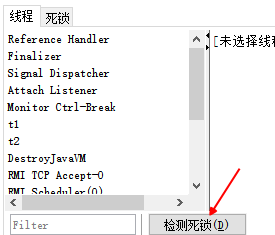

避免死锁要注意加锁顺序
另外如果由于某个线程进入了死循环,导致其它线程一直等待,对于这种情况 linux 下可以通过 top 先定位到
CPU 占用高的 Java 进程,再利用 top -Hp 进程id 来定位是哪个线程,最后再用 jstack 排查
哲学家就餐问题
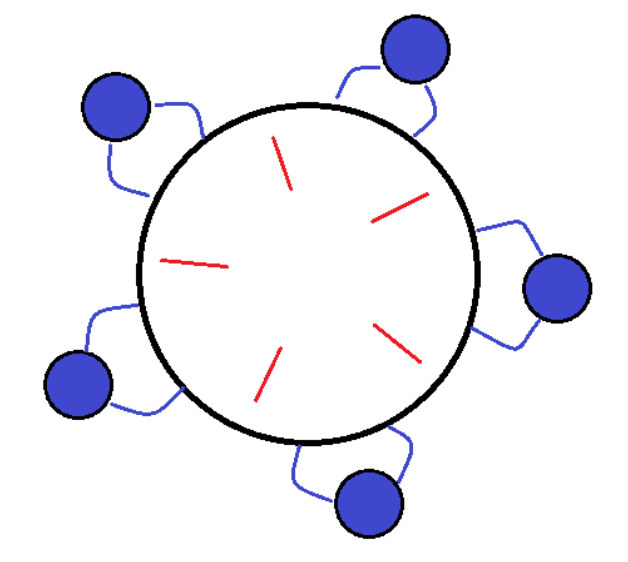
有五位哲学家,围坐在圆桌旁。
- 他们只做两件事,思考和吃饭,思考一会吃口饭,吃完饭后接着思考。
- 吃饭时要用两根筷子吃,桌上共有 5 根筷子,每位哲学家左右手边各有一根筷子。
- 如果筷子被身边的人拿着,自己就得等待
筷子类
class Chopstick {String name;public Chopstick(String name) {this.name = name;}@Overridepublic String toString() {return "筷子{" + name + '}';}}
哲学家类
@Slf4jclass Philosopher extends Thread {Chopstick left;Chopstick right;public Philosopher(String name, Chopstick left, Chopstick right) {super(name);this.left = left;this.right = right;}private void eat() {log.debug("eating...");Utils.sleep(1);}@Overridepublic void run() {while (true) {// 获得左手筷子synchronized (left) {// 获得右手筷子synchronized (right) {// 吃饭eat();}// 放下右手筷子}// 放下左手筷子}}}
就餐
Chopstick c1 = new Chopstick("1");Chopstick c2 = new Chopstick("2");Chopstick c3 = new Chopstick("3");Chopstick c4 = new Chopstick("4");Chopstick c5 = new Chopstick("5");new Philosopher("老子", c1, c2).start();new Philosopher("孔子", c2, c3).start();new Philosopher("庄子", c3, c4).start();new Philosopher("孟子", c4, c5).start();new Philosopher("朱熹", c5, c1).start();
运行结果
09:45:10.896 [老子] DEBUG com.zhr.thread.eat.Philosopher - eating...09:45:10.896 [庄子] DEBUG com.zhr.thread.eat.Philosopher - eating...09:45:11.904 [庄子] DEBUG com.zhr.thread.eat.Philosopher - eating...09:45:12.912 [孟子] DEBUG com.zhr.thread.eat.Philosopher - eating...09:45:13.944 [老子] DEBUG com.zhr.thread.eat.Philosopher - eating...09:45:14.944 [朱熹] DEBUG com.zhr.thread.eat.Philosopher - eating...09:45:15.945 [荀子] DEBUG com.zhr.thread.eat.Philosopher - eating...09:45:16.946 [庄子] DEBUG com.zhr.thread.eat.Philosopher - eating...09:45:17.946 [庄子] DEBUG com.zhr.thread.eat.Philosopher - eating...09:45:18.946 [孟子] DEBUG com.zhr.thread.eat.Philosopher - eating...
jconsole 分析
名称: 朱熹
状态: com.zhr.thread.eat.Chopstick@78860217上的BLOCKED, 拥有者: 老子
总阻止数: 3, 总等待数: 1

堆栈跟踪:
com.zhr.thread.eat.Philosopher.run(Philosopher.java:30)
   - 已锁定 com.zhr.thread.eat.Chopstick@383ed11f

========================================================
名称: 老子
状态: com.zhr.thread.eat.Chopstick@1026466d上的BLOCKED, 拥有者: 孟子
总阻止数: 7, 总等待数: 2

堆栈跟踪:
com.zhr.thread.eat.Philosopher.run(Philosopher.java:30)
   - 已锁定 com.zhr.thread.eat.Chopstick@78860217

========================================================
名称: 孟子
状态: com.zhr.thread.eat.Chopstick@611422a8上的BLOCKED, 拥有者: 庄子
总阻止数: 5, 总等待数: 2

堆栈跟踪:
com.zhr.thread.eat.Philosopher.run(Philosopher.java:30)
   - 已锁定 com.zhr.thread.eat.Chopstick@1026466d

========================================================
名称: 庄子
状态: com.zhr.thread.eat.Chopstick@1a64076a上的BLOCKED, 拥有者: 荀子
总阻止数: 15, 总等待数: 4

堆栈跟踪:
com.zhr.thread.eat.Philosopher.run(Philosopher.java:30)
   - 已锁定 com.zhr.thread.eat.Chopstick@611422a8

========================================================
名称: 荀子
状态: com.zhr.thread.eat.Chopstick@383ed11f上的BLOCKED, 拥有者: 朱熹
总阻止数: 4, 总等待数: 1

堆栈跟踪:
com.zhr.thread.eat.Philosopher.run(Philosopher.java:30)
   - 已锁定 com.zhr.thread.eat.Chopstick@1a64076a
这种线程没有按预期结束,执行不下去的情况,归类为【活跃性】问题,除了死锁以外,还有活锁和饥饿者两种情况
活锁
活锁出现在两个线程互相改变对方的结束条件,最后谁也无法结束,例如
@Slf4j
public class TestLiveLock {
    static volatile int count = 10;
    static final Object lock = new Object();

    public static void main(String[] args) {
        new Thread(() -> {
            // 期望减到 0 退出循环
            while (count > 0) {
                sleep(2);
                count--;
                log.debug("count: {}", count);
            }
        }, "t1").start();
        new Thread(() -> {
            // 期望超过 20 退出循环
            while (count < 20) {
                sleep(2);
                count++;
                log.debug("count: {}", count);
            }
        }, "t2").start();
    }
}
饥饿
很多教程中把饥饿定义为,一个线程由于优先级太低,始终得不到 CPU 调度执行,也不能够结束,饥饿的情况不
易演示,讲读写锁时会涉及饥饿问题
下面我讲一下我遇到的一个线程饥饿的例子,先来看看使用顺序加锁的方式解决之前的死锁问题

4.13 ReentrantLock
相对于 synchronized 它具备如下特点
- 可中断
- 可以设置超时时间
- 可以设置为公平锁
- 支持多个条件变量
- 与 synchronized 一样,都支持可重入
基本语法
// 获取锁
reentrantLock.lock();
try {
    // 临界区
} finally {
    // 释放锁
    reentrantLock.unlock();
}
可重入
可重入是指同一个线程如果首次获得了这把锁,那么因为它是这把锁的拥有者,因此有权利再次获取这把锁。如果是不可重入锁,那么第二次获得锁时,自己也会被锁挡住
@Slf4j
public class Test1 {
    static ReentrantLock lock = new ReentrantLock();

    public static void main(String[] args) {
        method1();
    }

    public static void method1() {
        lock.lock();
        try {
            log.debug("execute method1");
            method2();
        } finally {
            lock.unlock();
        }
    }

    public static void method2() {
        lock.lock();
        try {
            log.debug("execute method2");
            method3();
        } finally {
            lock.unlock();
        }
    }

    public static void method3() {
        lock.lock();
        try {
            log.debug("execute method3");
        } finally {
            lock.unlock();
        }
    }
}
运行结果
10:41:49.313 [main] DEBUG com.zhr.thread.reentrantlock.Test1 - execute method1
10:41:55.928 [main] DEBUG com.zhr.thread.reentrantlock.Test1 - execute method2
10:42:00.800 [main] DEBUG com.zhr.thread.reentrantlock.Test1 - execute method3
可打断
示例
@Slf4j
public class Test2 {
    public static void main(String[] args) {
        ReentrantLock lock = new ReentrantLock();
        Thread t1 = new Thread(() -> {
            try {
                log.info("尝试获取锁");
                lock.lockInterruptibly();
            } catch (InterruptedException e) {
                log.debug("等锁的过程中被打断" + e.toString());
                return;
            }

            try {
                log.info("获得了锁");
            } finally {
                lock.unlock();
            }

        }, "t1");

        lock.lock();
        log.info("main获得了锁");

        t1.start();
        try {
            sleep(1);
            t1.interrupt();
            log.info("进行打断");
        } finally {
            lock.unlock();
        }
    }
}
运行结果
10:56:53.149 [main] INFO com.zhr.thread.reentrantlock.Test2 - main获得了锁
10:56:53.158 [t1] INFO com.zhr.thread.reentrantlock.Test2 - 尝试获取锁
10:56:54.157 [main] INFO com.zhr.thread.reentrantlock.Test2 - 进行打断
10:56:54.157 [t1] DEBUG com.zhr.thread.reentrantlock.Test2 - 等锁的过程中被打断java.lang.InterruptedException
注意如果是不可中断模式,那么即使使用了 interrupt 也不会让等待中断
锁超时
立刻失败
@Slf4j
public class Test3 {
    public static void main(String[] args) {
        ReentrantLock lock = new ReentrantLock();
        Thread t1 = new Thread(() -> {
            log.info("尝试获取锁");
            if (!lock.tryLock()) {
                log.info("获取锁失败");

                return;
            }

            try {
                log.info("获取到锁");
            } finally {
                lock.unlock();
            }
        }, "t1");

        try {
            log.info("获取锁");
            lock.lock();
            t1.start();
        } finally {
            //lock.unlock();
        }
    }
}
运行结果
11:11:50.326 [main] INFO com.zhr.thread.reentrantlock.Test3 - 获取锁
11:11:50.332 [t1] INFO com.zhr.thread.reentrantlock.Test3 - 尝试获取锁
11:11:50.333 [t1] INFO com.zhr.thread.reentrantlock.Test3 - 获取锁失败
超时失败
@Slf4j
public class Test4 {
    public static void main(String[] args) {
        ReentrantLock lock = new ReentrantLock();
        Thread t1 = new Thread(() -> {
            log.info("尝试获取锁");
            try {
                if (!lock.tryLock(3000, TimeUnit.MILLISECONDS)) {
                    log.info("等待后,获取锁失败");
                    return;
                }
            } catch (InterruptedException e) {
                e.printStackTrace();
                log.info("获取锁失败");
                return;
            }
            try {
                log.info("获取到锁");
            } finally {
                lock.unlock();
            }
        }, "t1");

        try {
            log.info("获取锁");
            lock.lock();
            t1.start();
            sleep(4);
        } finally {
            lock.unlock();
        }
    }
}
运行结果
13:24:55.963 [main] INFO com.zhr.thread.reentrantlock.Test4 - 获取锁
13:24:55.968 [t1] INFO com.zhr.thread.reentrantlock.Test4 - 尝试获取锁
13:24:58.973 [t1] INFO com.zhr.thread.reentrantlock.Test4 - 等待后,获取锁失败
使用 tryLock 解决哲学家就餐问题
class Chopstick extends ReentrantLock {
    String name;

    public Chopstick(String name) {
        this.name = name;
    }

    @Override
    public String toString() {
        return "筷子{" + name + '}';
    }
}
@Slf4j
class Philosopher extends Thread {
    Chopstick left;
    Chopstick right;

    public Philosopher(String name, Chopstick left, Chopstick right) {
        super(name);
        this.left = left;
        this.right = right;
    }

    private void eat() {
        log.debug("eating...");
        Utils.sleep(1);
    }

    @Override
    public void run() {
        while (true) {
            // 获得左手筷子
            if (left.tryLock()) {
                try {
                    // 获得右手筷子
                    if (right.tryLock()) {
                        try {
                            // 吃饭
                            eat();
                        } finally {
                            right.unlock();
                        }
                    }
                    // 放下右手筷子
                } finally {
                    left.unlock();
                }
            }
            // 放下左手筷子
        }
    }
}
公平锁
ReentrantLock 默认是不公平的
@Slf4j
public class TestFair {
    public static void main(String[] args) throws InterruptedException {
        ReentrantLock lock = new ReentrantLock(false);
        lock.lock();
        for (int i = 0; i < 500; i++) {
            new Thread(() -> {
                lock.lock();
                try {
                    log.info(Thread.currentThread().getName() + " running...");
                } finally {
                    lock.unlock();
                }
            }, "t" + i).start();
        }
        // 1s 之后去争抢锁
        Thread.sleep(1000);
        new Thread(() -> {
            log.info(Thread.currentThread().getName() + " start...");
            lock.lock();
            try {
                log.info(Thread.currentThread().getName() + " running...");
            } finally {
                lock.unlock();
            }
        }, "强行插入").start();
        lock.unlock();
    }
}
强行插入,有机会在中间输出
注意:该实验不一定总能复现
运行结果
13:37:43.992 [t1] INFO com.zhr.thread.reentrantlock.TestFair - t1 running...
13:37:43.992 [强行插入] INFO com.zhr.thread.reentrantlock.TestFair - 强行插入 start...
13:37:43.997 [强行插入] INFO com.zhr.thread.reentrantlock.TestFair - 强行插入 running...
13:37:43.998 [t0] INFO com.zhr.thread.reentrantlock.TestFair - t0 running...
13:37:43.998 [t2] INFO com.zhr.thread.reentrantlock.TestFair - t2 running...
改为公平锁后
ReentrantLock lock = new ReentrantLock(true);
强行插入,总是在最后输出
13:43:21.292 [t455] INFO com.zhr.thread.reentrantlock.TestFair - t455 running...
13:43:21.292 [t454] INFO com.zhr.thread.reentrantlock.TestFair - t454 running...
13:43:21.292 [t453] INFO com.zhr.thread.reentrantlock.TestFair - t453 running...
13:43:21.292 [强行插入] INFO com.zhr.thread.reentrantlock.TestFair - 强行插入 running...
公平锁一般没有必要,会降低并发度,后面分析原理时会讲解
条件变量(Condition)
synchronized 中也有条件变量,就是我们讲原理时那个 waitSet 休息室,当条件不满足时进入 waitSet 等待ReentrantLock 的条件变量比 synchronized 强大之处在于,它是支持多个条件变量的,这就好比
- synchronized 是那些不满足条件的线程都在一间休息室等消息
- 而 ReentrantLock 支持多间休息室,有专门等烟的休息室、专门等早餐的休息室、唤醒时也是按休息室来唤醒
使用要点:
- await 前需要获得锁
- await 执行后,会释放锁,进入 conditionObject 等待
- await 的线程被唤醒(或打断、或超时)取重新竞争 lock 锁
- 竞争 lock 锁成功后,从 await 后继续执行
例子:
@Slf4j
public class Test6 {
    static final ReentrantLock room = new ReentrantLock();
    static boolean hasCigarette = false;
    static boolean hasTakeout = false;
    static Condition cigaretteCondition = room.newCondition();
    static Condition takeoutCondition = room.newCondition();


    public static void main(String[] args) {
        new Thread(() -> {
            room.lock();
            try {
                log.debug("有烟没?[{}]", hasCigarette);
                while (!hasCigarette) {
                    log.debug("没烟,先歇会!");
                    try {
                        cigaretteCondition.await();
                    } catch (InterruptedException e) {
                        e.printStackTrace();
                    }
                }
                log.debug("可以开始干活了");
            } finally {
                room.unlock();
            }
        }, "小南").start();
        new Thread(() -> {
            room.lock();
            try {
                log.debug("外卖送到没?[{}]", hasTakeout);
                if (!hasTakeout) {
                    log.debug("没外卖,先歇会!");
                    try {
                        takeoutCondition.await();
                    } catch (InterruptedException e) {
                        e.printStackTrace();
                    }
                }
                log.debug("可以开始干活了");
            } finally {
                room.unlock();
            }
        }, "小女").start();
        sleep(1);
        new Thread(() -> {
            room.lock();
            try {
                hasTakeout = true;
                log.debug("外卖到了噢!");
                takeoutCondition.signal();
            } finally {
                room.unlock();
            }
        }, "送外卖的").start();
        sleep(1);
        new Thread(() -> {
            room.lock();
            try {
                hasCigarette = true;
                log.debug("烟到了噢!");
                cigaretteCondition.signal();
            } finally {
                room.unlock();
            }
        }, "买烟的").start();
    }
}
运行结果
14:13:57.652 [小南] DEBUG com.zhr.thread.reentrantlock.Test6 - 有烟没?[false]
14:13:57.658 [小南] DEBUG com.zhr.thread.reentrantlock.Test6 - 没烟,先歇会!
14:13:57.659 [小女] DEBUG com.zhr.thread.reentrantlock.Test6 - 外卖送到没?[false]
14:13:57.659 [小女] DEBUG com.zhr.thread.reentrantlock.Test6 - 没外卖,先歇会!
14:13:58.651 [送外卖的] DEBUG com.zhr.thread.reentrantlock.Test6 - 外卖到了噢!
14:13:58.651 [小女] DEBUG com.zhr.thread.reentrantlock.Test6 - 可以开始干活了
14:13:59.653 [买烟的] DEBUG com.zhr.thread.reentrantlock.Test6 - 烟到了噢!
14:13:59.654 [小南] DEBUG com.zhr.thread.reentrantlock.Test6 - 可以开始干活了
同步模式之顺序控制
1. 固定运行顺序
1.1 wait notify 版
/**
 * T1 线程输出1  T2 线程输出2
 * 必须先输出1 再输出2
 */
@Slf4j
public class Test1 {
    private static Object lock = new Object();
    private static boolean t1Runed = false;

    public static void main(String[] args) {
        Thread t1 = new Thread(() -> {
            synchronized (lock) {
                log.info("1");
                t1Runed=true;
                lock.notify();
            }
        }, "t1");
        Thread t2 = new Thread(() -> {
            synchronized (lock) {
                while (!t1Runed) {
                    try {
                        lock.wait();
                    } catch (InterruptedException e) {
                        e.printStackTrace();
                    }
                }
                log.info("2");
            }
        }, "t2");

        t2.start();
        t1.start();
    }
}
运行结果
14:37:40.323 [t1] INFO com.zhr.thread.sequencecontrol.Test1 - 1
14:37:40.327 [t2] INFO com.zhr.thread.sequencecontrol.Test1 - 2
1.2 ReentrantLock 版
/**
 * T1 线程输出1  T2 线程输出2
 * 必须先输出1 再输出2
 */
@Slf4j
public class Test2 {
    private static ReentrantLock lock = new ReentrantLock();
    private static Condition condition = lock.newCondition();
    private static boolean t1Runed = false;

    public static void main(String[] args) {
        Thread t1 = new Thread(() -> {
            lock.lock();
            try {
                log.info("1");
                t1Runed = true;
                condition.signal();
            } finally {
                lock.unlock();
            }
        }, "t1");
        Thread t2 = new Thread(() -> {
            lock.lock();
            try {
                while (!t1Runed) {
                    try {
                        condition.await();
                    } catch (InterruptedException e) {
                        e.printStackTrace();
                    }
                }
                log.info("2");
            } finally {
                lock.unlock();
            }
        }, "t2");

        t1.start();
        t2.start();
    }
}
1.3 Park Unpark 版
可以看到,实现上很麻烦:
首先,需要保证先 wait 再 notify,否则 wait 线程永远得不到唤醒。因此使用了『运行标记』来判断该不该wait
第二,如果有些干扰线程错误地 notify 了 wait 线程,条件不满足时还要重新等待,使用了 while 循环来解决此问题
最后,唤醒对象上的 wait 线程需要使用 notifyAll,因为『同步对象』上的等待线程可能不止一个可以使用 LockSupport 类的 park 和 unpark 来简化上面的题目:
/**
 * T1 线程输出1  T2 线程输出2
 * 必须先输出1 再输出2
 */
@Slf4j
public class Test3 {
    public static void main(String[] args) {
        Thread t2 = new Thread(() -> {
            LockSupport.park();
            log.info("2");
        }, "t2");
        Thread t1 = new Thread(() -> {
            log.info("1");
            LockSupport.unpark(t2);
        }, "t1");

        t1.start();
        t2.start();
    }
}
park 和 unpark 方法比较灵活,他俩谁先调用,谁后调用无所谓。并且是以线程为单位进行『暂停』和『恢复』,
不需要『同步对象』和『运行标记』
2. 交替输出
线程 1 输出 a 5 次,线程 2 输出 b 5 次,线程 3 输出 c 5 次。现在要求输出 abcabcabcabcabc 怎么实现
2.1 wait notify 版
public class Test4 {
    public static void main(String[] args) {
        WaitNotify waitNotify = new WaitNotify(1, 5);
        new Thread(() -> waitNotify.print("a", 1, 2), "t1").start();
        new Thread(() -> waitNotify.print("b", 2, 3), "t2").start();
        new Thread(() -> waitNotify.print("c", 3, 1), "t3").start();
    }
}

class WaitNotify {
    private int currentFlag;
    private final int loopNumber;

    public WaitNotify(int currentFlag, int loopNumber) {
        this.currentFlag = currentFlag;
        this.loopNumber = loopNumber;
    }

    public void print(String str, int waitFlag, int nextFlag) {
        for (int i = 0; i < loopNumber; i++) {
            synchronized (this) {
                while (currentFlag != waitFlag) {
                    try {
                        wait();
                    } catch (InterruptedException e) {
                        e.printStackTrace();
                    }
                }
                System.out.print(str);
                currentFlag = nextFlag;
                notifyAll();
            }
        }
    }
}
运行结果
abcabcabcabcabc
2.2 Lock 条件变量版
public class Test5 {
    public static void main(String[] args) {
        AwaitSignal waitNotify = new AwaitSignal(5);
        Condition a = waitNotify.newCondition();
        Condition b = waitNotify.newCondition();
        Condition c = waitNotify.newCondition();
        new Thread(() -> waitNotify.print("a", a, b)).start();
        new Thread(() -> waitNotify.print("b", b, c)).start();
        new Thread(() -> waitNotify.print("c", c, a)).start();
        sleep(1);
        waitNotify.lock();
        try {
            a.signal();
        } finally {
            waitNotify.unlock();
        }
    }
}

class AwaitSignal extends ReentrantLock {
    private final int loopNumber;

    public AwaitSignal(int loopNumber) {
        this.loopNumber = loopNumber;
    }

    public void print(String str, Condition current, Condition next) {
        for (int i = 0; i < loopNumber; i++) {
            lock();
            try {
                current.await();
                System.out.print(str);
                next.signal();
            } catch (InterruptedException e) {
                e.printStackTrace();
            } finally {
                unlock();
            }
        }
    }
}
abcabcabcabcabc
注意 该实现没有考虑 a,b,c 线程都就绪再开始
2.3 Park Unpark 版
public class Test6 {
    private static Thread t1;
    private static Thread t2;
    private static Thread t3;

    public static void main(String[] args) {
        ParkUnPark parkUnPark = new ParkUnPark(5);
        t1 = new Thread(() -> parkUnPark.print("a", t2));
        t2 = new Thread(() -> parkUnPark.print("b", t3));
        t3 = new Thread(() -> parkUnPark.print("c", t1));

        t1.start();
        t2.start();
        t3.start();
        LockSupport.unpark(t1);
    }
}

class ParkUnPark {
    private int loopNumber;

    public ParkUnPark(int loopNumber) {
        this.loopNumber = loopNumber;
    }

    public void print(String str, Thread next) {
        for (int i = 0; i < loopNumber; i++) {
            LockSupport.park();
            System.out.print(str);
            LockSupport.unpark(next);
        }
    }
}
本章小结
本章我们需要重点掌握的是
- 分析多线程访问共享资源时,哪些代码片段属于临界区
- 使用 synchronized 互斥解决临界区的线程安全问题
- 掌握 synchronized 锁对象语法
- 掌握 synchronzied 加载成员方法和静态方法语法
- 掌握 wait/notify 同步方法
- 使用 lock 互斥解决临界区的线程安全问题
- 掌握 lock 的使用细节:可打断、锁超时、公平锁、条件变量
- 学会分析变量的线程安全性、掌握常见线程安全类的使用
- 了解线程活跃性问题:死锁、活锁、饥饿
- 应用方面
- 互斥:使用 synchronized 或 Lock 达到共享资源互斥效果
- 同步:使用 wait/notify 或 Lock 的条件变量来达到线程间通信效果
- 原理方面
- monitor、synchronized 、wait/notify 原理
- synchronized 进阶原理
- park & unpark 原理
- 模式方面
- 同步模式之保护性暂停
- 异步模式之生产者消费者
- 同步模式之顺序控制

若有收获,就点个赞吧
0 人点赞


