daemon: 完成service所提供的服务称为daemon. 例如at服务与atd daemon.
daemon与服务
早期System V版本的init管理操作中daemon的主要分类
使用initd daemon去运行系统所需要的服务.
服务的启动,关闭与查看方式
启动: /etc/init.d/daemon start
关闭: /etc/init.d/daemon stop
重启: /etc/init.d/daemon restart
状态: /etc/init.d/daemon status
服务启动的分类
根据服务是独立启动或被一个总管程序管理被分为两大类:
- 独立启动模式( stand alone ) : 服务独立启动, 常驻内存, 执行时反应速度快.
- 超级守护进程( super daemon ) : 由特殊的xinted或inted两个总管程序提供socket对应或端口对应的管理. 用户需要时启动, 不需要则结束.
服务的依赖性问题
服务的启动可能需要某些依赖
运行级别的分类
OS可以运行在不同的运行级别上, 对不同的级别init可以启动不同的service.
运行级别: 0, 1(单人维护模式), 2, 3(纯命令行模式), 4, 5(图形界面), 6
启动的daemon在/etc/rc.d/rc[0-6]/SXXdaemon, 其中S为启动该服务, XX为数字(启动的顺序). 这些daemon实际为/etc/rc.d/init.d/daemon的软链接文件.
Systemd管理下为KXXdaemon
制定运行级别默认启动的服务
查看所有daemon的启动状态: chkconfig
默认启动: chkconfig daemon on
默认不启动 : chkconfig daemon off
查看默认启动与否: chkconfig —list daemon
运行级别的切换
init [0-6]
systemd使用的unit分类
比较System V的init开启启动服务的优点:
- 并行处理所有服务,加速开机 : System V采用串行启动daemon, 由于多核架构的采用可以实现并行启动服务.
- 要求则响应的on-demand启动: 仅有一个systemd服务+systemctl管理; systemd常驻内存.
- 服务依赖的自我检查
- 依daemon功能分类: System V分为stand alone和super daemon两种类型. systemd中每个服务对应一个服务单元(unit), unit归类到不同的服务类型(type), 存在service, socket, target, path, snapshot, timer多种类型.
- 多个daemons集合成群组: 类似System V的运行级别, systemd中多个daemons可以集合为一个target.
- 兼容旧有的init服务脚本: 旧的init启动脚本可以通过systemd来管理, 但有些地方不适用
- 运行级别只有1,3,5可以对应systemd的target类型
- systemctl不像/etc/init.d/daemon可以自定义参数
- 当服务手动启动时systemctl无法检测
- systemd启动时无法与管理员通过标准输入传入信息.
systemd的配置文件目录
- /usr/lib/systemd/system/ : 每个服务的主要启动脚本
- /run/systemd/system/ : 系统执行过程中产生的服务脚本, 脚本的优先级比/usr/lib/systemd/system/高
- /etc/systemd/system/ : 管理员根据主机系统需要建立的执行脚本, 有点类似运行级别, 运行级别比/run/systemd/system高(这些目录下的文件实际都是链接文件/usr/lib/systemd/system)
类型分类:
| 扩展名 | 功能 |
|---|---|
| .service | 提供系统服务 |
| .socket | 内部程序数据交换的socket服务, 主要是IPC(Inter-process communication)的传输信息socket文件功能. |
| .target | unit的集合 |
| .mount,.automount | 文件挂载相关的服务 |
| .path | 检测特定文件或目录类型, 例如打印服务需要检测打印队列来启动打印功能需要.path服务的支持 |
| .timer | 循环执行的服务 |
systemctl管理服务
systemctl管理单一服务(service unit)的启动/开机启动与查看状态
语法:
systemctl [command] [unit]
command :
- start : 立刻启动unit
- stop : 立刻关闭unit
- restart : 立刻重新启动unit
- reload : 不关闭unit的情况下, 重新加载配置文件
- enable : 开机启动unit
- disable : 开机不启动unit
- status : unit状态
- is-active : 目前有没有在运行中
- is-enable : 是否设置开机自启动
service状态:
- active(running) : 正在运行
- active(exited) : 仅执行一次就正常结束的服务.
- active(waiting) : 正在运行当中, 不过处于等待其它的事件发生才能继续执行
- inactive : 没有运行
daemon的状态:
- enabled : 开机自启动
- disabled : 开机不会启动
- static : daemon不可自己enable, 可能被其它enabled的服务唤醒
- mask : daemon无法启动, 需要使用systemctl unmask改回默认状态
systemctl 查看系统上所有服务
语法:
systemctl [command] [--type=TYPE] [--all]
command:
- list-units : 根据unit显示目前启动的unit, 加上—all列出没有启动的
- list-unit-files: 根据/usr/lib/systemd/system/显示所有的文件列表
—type : unit类型
systemctl === systemctl list-units
- unit : 项目名称
- load : 开机时是否被加载
- active: 目前的状态
- description : 描述
systemctl管理不同的操作环境(target unit)
systemctl list-units —type=target —all
主要的target:
- graphical.target : 图形化界面
- multi-user.target : 纯命令行格式
- resce.target : 当无法使用root登录时, 可以使用临时的系统登录环境取得root权限
- emergency.target : 紧急模式, 在无法使用root和rescue.target可以采用该模式
- shutdown.target : 关机
- getty.target : 可设置tty相关操作.
systemctl [command] [unit.target]
command:
- get-default : 取得目前的target
- set-default : 设置target为默认的操作模式
- isolate : 切换到后面的模式
常用的切换操作模式的命令
- systemctl poweroff 系统关机
- systemctl reboot 重新开机
- systemctl suspend 进入挂起模式
- systemctl hibernate 进入休眠模式
- systemctl rescue 强制进入恢复模式
- systemctl emergency 强制进入紧急恢复模式
suspend: 挂起会将系统的状态数据保存到内存中,关闭大部分硬件. hibernate: 休眠模式将系统状态保存到硬盘中.
systemctl分析各服务的依赖性
systemctl list-dependencies [unit] [--reverse]
—reverse反向追踪谁在使用该unit
搭配systemctl get-default
systemd运行过程相关目录
- /usr/lib/systemd/system
- /run/systemd/system
- /etc/systemd/system
- /etc/sysconfig/* : 服务将初始化选项写入该目录, 网络设置/etc/sysconfig/network-scripts
- /var/lib/ : 产生数据的服务将数据写入该处
- /run/ : daemon的缓存,包括lock文件和PID文件
查看socket文件的位置: systemctl list-sockets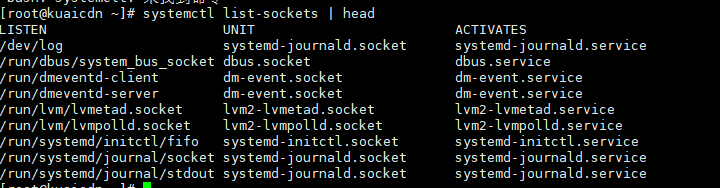
网络服务与端口
/etc/services查看服务与端口对应的关系
关闭网络服务
查看网络服务
netstat -ntlpu
查看服务对应的daemon
systemctl list-units —all | grep rpcbind
关闭对应daemon
systemctl stop rpcbind.service
systemctl stop rpcbind.socket
systemctl stop rpcbind.target
systemctl disable rpcbind.service rpcbind.socket rpcbind.target
systemctl关于service类型的配置文件
设置相应服务的启动环境
修改service可以修改哪些文件?
- /usr/lib/systemd/system/daemon : 官方发布默认的配置文件(不建议修改)
- /etc/systemd/system/sshd.service.d/custom.conf 累加配置到/usr/lib/systemd/system/daemon中
- /etc/systemd/system/sshd.service.wants/* : 此目录内的文件为链接, 启动原来服务后最好再加上该目录内的文件对应的服务
- /etc/systemd/system/sshd.service.requires/* : 链接文件, 启动服务前需要运行的服务
systemctl配置文件
cat /usr/lib/systemd/system/sshd.service
[Unit]
Description=OpenSSH server daemon
Documentation=man:sshd(8) man:sshd_config(5)
After=network.target sshd-keygen.service
Wants=sshd-keygen.service

[Service]
Type=notify
EnvironmentFile=/etc/sysconfig/sshd
ExecStart=/usr/sbin/sshd -D $OPTIONS
ExecReload=/bin/kill -HUP $MAINPID
KillMode=process
Restart=on-failure
RestartSec=42s

[Install]
WantedBy=multi-user.target
[Unit] : unit说明和依赖deamon的设置
| 设置参数 | 说明 |
|---|---|
| Description | 该服务介绍. systemctl list-units打印的内容 |
| After | 指定该服务启动前需要的服务. 非必要 |
| Wants | 该服务启动后启动的服务,非必要 |
[Service], [Socket], [Timer], [Mount], [Path]: 针对不同类型的unit, 主要规范服务启动的脚本, 环境配置文件名, 重新启动的方式.
| EnvironmentFile | 启动脚本的环境配置文件 |
|---|---|
| ExecStart | 实际执行daemon的命令或脚本程序.ExecStartPre和ExecStartPost设置执行daemon之前和之后的服务. ExecStart仅接收[命令 参数 参数…]的格式, 不接受<, >, >>, |, &等特殊符号, 不过Type=oneshot是特例 |
| ExecReload | systemctl reload |
| KillMode | process, control-group和none. process表示daemon终止时只会终止主进程; control-group表示终止主进程产生的control-group进程; none 不关闭进程. |
| Restart | 1表示daemon终止后重启该服务. |
| RestartSec | 隔多少秒重新启动 |
[install]
| WantedBy | unit依附的target unit |
|---|---|

若有收获,就点个赞吧
0 人点赞


