yum
yum : YellowDog updater Modified, 基于rpm包的管理器, 从指定服务器上安装rpm软件并能够安装依赖, 并且可以缓存到本地.
工作原理
yum服务器与yum客户端
yum服务器:
yum客户端: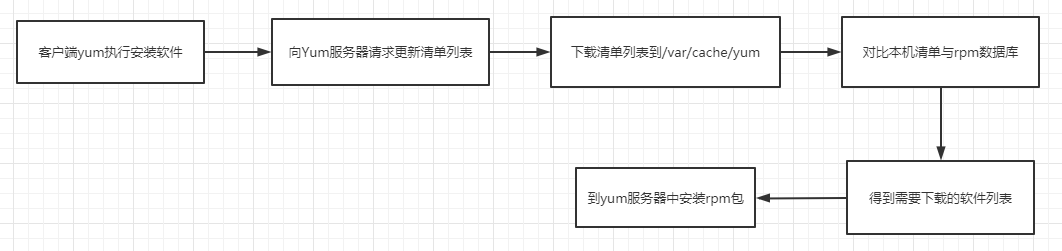
tree /var/cache/yum
/var/cache/yum/└── x86_64└── 7├── base│?? ├── 6d0c3a488c282fe537794b5946b01e28c7f44db79097bb06826e1c0c88bad5ef-primary.sqlite.bz2│?? ├── a4e2b46586aa556c3b6f814dad5b16db5a669984d66b68e873586cd7c7253301-c7-x86_64-comps.xml.gz│?? ├── cachecookie│?? ├── gen│?? │?? └── primary_db.sqlite│?? ├── packages│?? └── repomd.xml├── base-debuginfo│?? ├── gen│?? └── packages├── base-source│?? ├── gen│?? └── packages├── C7.0.1406-base│?? ├── gen│?? └── packages├── C7.0.1406-centosplus│?? ├── gen│?? └── packages├── C7.0.1406-extras│?? ├── gen│?? └── packages├── C7.0.1406-fasttrack│?? ├── gen│?? └── packages
常用命令
语法:
yum [options] command [package...]
yum install -y package : 安装软件
yum install -y procps --enablerepo=CentOS-Base #指定镜像仓库安装yum repolist all : 查看yum server使用的yum仓库
- yum clean : yum更新时需要清除本地缓存
- yum clean all 删除已下载的软件包和headers
- yum clean packages 删除软件包
- yum clean headers 删除headers
- 查询操作
- yum search 关键字 : 查找相关包
- yum info 软件名 : 查看包的概要信息
- yum list : 列出yum服务器上已有软件
- yum list search : 查出符合查询条件的软件(全名)
- yum list updates : 查找yum server可供本机升级的软件
- yum provides 文件 : 查询该软件生成的文件
- yum check-updates : 检测可升级的包
- 安装升级
- yum install/update 软件名称 [-y]
- 删除
- yum remove [package_name]
- 软件组
- yum grouplist
- 系统升级
- yum -y update 升级所有的, 恢复出厂设置
- yum -y upgrade 不更改软件配置
- yum makecache 安装时将软件包进行缓存, 就不需要从网络下载
- yum repolist
- yum repolist all
- yum repolist enabled 查看可使用的仓库
- yum list
- yum list all
- yum list all httpd* 查看以httpd命名开头的包
- yum list [ installed | available | updates | extras | obsoletes | recent] : 已安装 | 可用 | 可更新 | 额外 | 被废弃 | 新添加
- yum list all
- 包组管理可组合成包组, 安装卸载可以同时进行
- yum grouplist
- yum groupinfo “包组名” : 查看包组信息
- yum y groupinstall “包组”
- groupupdate
- groupremove
- yum history
- yum makecache [fast]
- 为当前弃用的yum源下载元数据
- fast: 更新yum源为最新版
- yum groups : 3.4.2版本后, 收集所有运行在组上的子命令
- yum group install : 安装组中的所有指定的包. group_package_types 指定安装包的类型.
配置文件
/etc/yum.conf
[main]
cachedir=/var/cache/yum/$basearch/$releasever #缓存目录
keepcache=0    #下载完是否保存缓存
debuglevel=2
logfile=/var/log/yum.log #日志文件
exactarch=1 # 下载的rpm包是否需要与平台匹配
obsoletes=1
gpgcheck=1
plugins=1
installonly_limit=5
bugtracker_url=http://bugs.centos.org/set_project.php?project_id=23&ref=http://bugs.centos.org/bug_report_page.php?category=yum
distroverpkg=centos-release


#  This is the default, if you make this bigger yum won't see if the metadata
# is newer on the remote and so you'll "gain" the bandwidth of not having to
# download the new metadata and "pay" for it by yum not having correct
# information.
#  It is esp. important, to have correct metadata, for distributions like
# Fedora which don't keep old packages around. If you don't like this checking
# interupting your command line usage, it's much better to have something
# manually check the metadata once an hour (yum-updatesd will do this).
# metadata_expire=90m

# PUT YOUR REPOS HERE OR IN separate files named file.repo
# in /etc/yum.repos.d
yum 源
yum源配置
yum源: 软件rpm包仓库
目录: /etc/yum.repos.d
/etc/yum.repos.d/
├── Centos-7.repo
└── docker-ce.repo
配置文件:
# CentOS-Base.repo
#
# The mirror system uses the connecting IP address of the client and the
# update status of each mirror to pick mirrors that are updated to and
# geographically close to the client.  You should use this for CentOS updates
# unless you are manually picking other mirrors.
#
# If the mirrorlist= does not work for you, as a fall back you can try the
# remarked out baseurl= line instead.
#
#

[base]
name=CentOS-$releasever - Base - mirrors.aliyun.com
failovermethod=priority
baseurl=http://mirrors.aliyun.com/centos/$releasever/os/$basearch/
        http://mirrors.aliyuncs.com/centos/$releasever/os/$basearch/
        http://mirrors.cloud.aliyuncs.com/centos/$releasever/os/$basearch/
gpgcheck=1
gpgkey=http://mirrors.aliyun.com/centos/RPM-GPG-KEY-CentOS-7

#released updates
[updates]
name=CentOS-$releasever - Updates - mirrors.aliyun.com
failovermethod=priority
baseurl=http://mirrors.aliyun.com/centos/$releasever/updates/$basearch/
        http://mirrors.aliyuncs.com/centos/$releasever/updates/$basearch/
        http://mirrors.cloud.aliyuncs.com/centos/$releasever/updates/$basearch/
gpgcheck=1
gpgkey=http://mirrors.aliyun.com/centos/RPM-GPG-KEY-CentOS-7

#additional packages that may be useful
[extras]
name=CentOS-$releasever - Extras - mirrors.aliyun.com
failovermethod=priority
baseurl=http://mirrors.aliyun.com/centos/$releasever/extras/$basearch/
        http://mirrors.aliyuncs.com/centos/$releasever/extras/$basearch/
        http://mirrors.cloud.aliyuncs.com/centos/$releasever/extras/$basearch/
gpgcheck=1
gpgkey=http://mirrors.aliyun.com/centos/RPM-GPG-KEY-CentOS-7

#additional packages that extend functionality of existing packages
[centosplus]
name=CentOS-$releasever - Plus - mirrors.aliyun.com
failovermethod=priority
baseurl=http://mirrors.aliyun.com/centos/$releasever/centosplus/$basearch/
        http://mirrors.aliyuncs.com/centos/$releasever/centosplus/$basearch/
        http://mirrors.cloud.aliyuncs.com/centos/$releasever/centosplus/$basearch/
gpgcheck=1
enabled=0 #是否启用yum源
gpgkey=http://mirrors.aliyun.com/centos/RPM-GPG-KEY-CentOS-7

#contrib - packages by Centos Users
[contrib]
name=CentOS-$releasever - Contrib - mirrors.aliyun.com
failovermethod=priority
baseurl=http://mirrors.aliyun.com/centos/$releasever/contrib/$basearch/ #固定容器地址
        http://mirrors.aliyuncs.com/centos/$releasever/contrib/$basearch/
        http://mirrors.cloud.aliyuncs.com/centos/$releasever/contrib/$basearch/
gpgcheck=1    #检查yum源,使用数字证书
enabled=0
gpgkey=http://mirrors.aliyun.com/centos/RPM-GPG-KEY-CentOS-7 #数字证书位置
$releaseserver : 发行版本号
$basearch : 系统基础架构
[base] : 容器名称
enabled
mirrorlist : 容器使用的镜像站点
baseurl : 固定容器地址
gpgcheck
gpgkey
epel源
扩展yum源
安装epel源:
yum install -y epel-release
安装yum源
yum源地址:
清华yum源地址: https://mirrors.tuna.tsinghua.edu.cn/centos/7/atomic/x86_64/repo/
阿里yum源: http://mirrors.aliyun.com/repo/
docker中安装Yum源并更新:
apt update -y
apt install yum -y
apt install wget -y
#配置yum源
wget -O /etc/yum.repos.d/CentOS-Base.repo 清华yum源
yum repolist enabled
安装ps命令出现的错误:
yum install -y procps  #出现GPGkey出问题, 修改repo文件中gpgkey=0
yum install -y procps --enablerepo=CentOS-Base
yum扩展包
yum-config-manager
管理yum管理器的配置和选项,切换启用的yum源,添加使用yum源.
语法:
yum-config-manager [options] [section...]
options:
- —add-repo : 添加yum源
- —setopt : 设置yum配置
常用命令:
yum-config-manager #查看所有yum源配置
yum-config-manager --add-repo=ADDREPO #添加yum源
yum-config-manager main foo bar # 显示main, foo, bar等repo源的配置
yum-config-manager --enable foo bar #启用repos源foo, bar
yum-config-manager --setpot=installonly_limit=5 --save  #修改全局配置
yum-config-manager --setopt=foo.skip_if_unvailable=1 --save #修改foo源的配置(无论foo是否启用都生效)
yum-config-manager --setopt=\*.skip_if_unavailable=1 --save foo bar #修改指定源的配置
yum-config-manager --setopt=\*.skip_if_unavailable=1 --save #修改源状态为enabled的配置
yum-config-manager --setopt=\*.skip_if_unabailable=1 --save \* #修改所有源的配置
rpm
RPM Package Manager
常用语法:
- rpm -i package_file

若有收获,就点个赞吧
0 人点赞


