Series
基本介绍
- Series是一种类似于一维数组的对象,由一组数据(各种Numpy数据类型)以及一组与之对应的索引(数据标签)组成
由数据和索引组成,索引(index)在左,数据(values)在右,索引是自动创建的
创建Series
语法格式:pandas.Series( data, index, dtype, name, copy)
- 参数说明
- data:一组数据(ndarray类型)
- index:索引标签,如果不指定,默认从0开始
- dtype:数据类型,默认会自己判断
- name:设置名称
- copy:拷贝数据,默认为False
通过列表创建
```python var1 = pd.Series(range(100, 103), name=’hhhh’) print(var1.head(2)) ‘’’ 0 100 1 101 Name: hhhh, dtype: int64 ‘’’ print(var1[0]) # 100 print(var1.index) # RangeIndex(start=0, stop=3, step=1) print(var1.values) # [100 101 102]
var2 = pd.Series([‘Alan’, ‘Bob’, ‘Cindy’], index=[‘x’, ‘y’, ‘z’]) print(var2) ‘’’ x Alan y Bob z Cindy dtype: object ‘’’ print(var2[‘x’]) # Alan
<a name="rcV9o"></a>#### 通过字典创建```pythonvar1 = pd.Series({'x': "Google", 'y': "Runoob", 'z': "Wiki"})print(var1)'''x Googley Runoobz Wikidtype: object'''---------------------------------------------------------var2 = pd.Series({'x': "Google", 'y': "Runoob", 'z': "Wiki"}, index=['x', 'z'])print(var2)'''x Googlez Wikidtype: object'''
DataFrame
基本介绍
DataFrame是一个表格型的数据结构,它含有一组有序的列,每列可以是不同类型的值。DataFrame既有行索引也有列索引,它可以看做是由Series组成的字典(共用同一个索引),数据是以二维结构存放的
创建DataFrame
- 语法格式:pandas.DataFrame( data, index, columns, dtype, copy)
- 参数说明
data = [[‘Google’], [‘Runoob’, 12], [‘Wiki’, 13]] print(pd.DataFrame(data, columns=[‘Site’, ‘Age’], dtype=float))
按行创建,没有对应部分的数据为NaN
‘’’ Site Age 0 Google NaN 1 Runoob 12.0 2 Wiki 13.0 ‘’’
<a name="spm7c"></a>#### 通过字典创建```pythondata = [{'a': 1, 'b': 2}, {'a': 5, 'b': 10, 'c': 20}]print(pd.DataFrame(data))# 按行创建,没有对应部分的数据为NaN'''a b c0 1 2 NaN1 5 10 20.0'''
通过ndarray创建
按列创建,每列的长度必须相同
data = {'calories': [420, 380, 390],'duration': [50, 40, 45]}print(pd.DataFrame(data, index=['day1', 'day2', 'day3']))'''calories durationday1 420 50day2 380 40day3 390 45'''---------------------------------------------------------data = {'A': 1,'B': pd.Timestamp('20220709'),'C': pd.Series(1, index=list(range(4)), dtype='float32'),'D': np.array([1, 2, 3, 4], dtype='int32'),'E': ["Python", "Java", "C++", "C"],'F': 'program'}print(pd.DataFrame(data))'''A B C D E F0 1 2022-07-09 1.0 1 Python program1 1 2022-07-09 1.0 2 Java program2 1 2022-07-09 1.0 3 C++ program3 1 2022-07-09 1.0 4 C program'''
关于整列的简单操作
data = {'calories': [420, 380, 390],'duration': [50, 40, 45]}df = pd.DataFrame(data, index=['day1', 'day2', 'day3'])print(df)'''calories durationday1 420 50day2 380 40day3 390 45'''---------------------------------------------------------# 操作一:通过列索引获取整列数据print(df['calories']) # 等价于print(df.calories)'''day1 420day2 380day3 390Name: calories, dtype: int64'''print(type(df['calories'])) # <class 'pandas.core.series.Series'>---------------------------------------------------------# 操作二:增加整列数据df['A'] = df['calories'] + 100print(df)'''calories duration Aday1 420 50 520day2 380 40 480day3 390 45 490'''---------------------------------------------------------# 操作三:删除整列del(df['A'])print(df)'''calories durationday1 420 50day2 380 40day3 390 45'''
索引
基本介绍
- 首先需要明确的是:Series和DataFrame中的索引都是Index对象

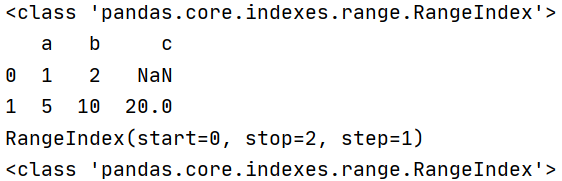
- 索引对象不可变,保证了数据的安全
- 常见的索引类型
ser = pd.Series(range(5), index=[‘a’, ‘b’, ‘c’, ‘d’, ‘e’]) print(ser) ‘’’ a 0 b 1 c 2 d 3 e 4 dtype: int64
‘’’
方式一:行索引
print(ser[0]) # 0,可以使用ser.iloc[0]
print(ser[‘a’]) # 0,可以使用ser.loc[‘a’]
方式二:切片索引
print(ser[1:3]) # 可以使用ser.iloc[1:3] ‘’’ b 1 c 2 dtype: int64 ‘’’ print(ser[‘b’:’d’]) # 可以使用ser.loc[‘b’:’d’] ‘’’ b 1 c 2 d 3 dtype: int64
‘’’
方式三:不连续索引
print(ser[[0, 2, 4]]) # 可以使用ser.iloc[[0, 2, 4]] ‘’’ a 0 c 2 e 4 dtype: int64 ‘’’ print(ser[[‘a’, ‘e’]]) # 可以使用ser.loc[[‘a’, ‘e’]] ‘’’ a 0 e 4 dtype: int64
‘’’
方式四:布尔索引
print(ser > 2) ‘’’ a False b False c False d True e True dtype: bool ‘’’ print(ser[ser > 2]) ‘’’ d 3 e 4 dtype: int64 ‘’’
<a name="qiPHd"></a>### DataFrame的索引操作注意:loc是基于标签名的索引,iloc是基于索引编号的索引```pythonimport pandas as pdimport numpy as npdf = pd.DataFrame(np.arange(12).reshape(3, 4), index=['a', 'b', 'c'], columns=['A', 'B', 'C', 'D'])print(df)'''A B C Da 0 1 2 3b 4 5 6 7c 8 9 10 11'''---------------------------------------------------------# 方式一:列索引,没有行索引print(df['A']) # 不能使用df[0]'''a 0b 4c 8Name: A, dtype: int32'''print(type(df['A'])) # <class 'pandas.core.series.Series'>--------------------print(df[['A']]) # 不能使用df[[0]]'''Aa 0b 4c 8'''print(type(df[['A']])) # <class 'pandas.core.frame.DataFrame'>---------------------------------------------------------# 方式二:切片索引,只能用于行索引,不能用于列索引print(df['a':'a']) # # df['a':'a']等价于df[0:1]'''A B C Da 0 1 2 3'''--------------------print(df['a':'b']) # df['a':'b']等价于df[0:2]'''A B C Da 0 1 2 3b 4 5 6 7'''print(type(df['a':'b'])) # <class 'pandas.core.frame.DataFrame'>---------------------------------------------------------# 方式三:不连续索引,只能用于列索引,不能用于行索引print(df[['A', 'C']]) # 不能使用df[[0, 2]]#'''A Ca 0 2b 4 6c 8 10'''print(type(df[['A', 'C']])) # <class 'pandas.core.frame.DataFrame'>
loc和iloc的高级使用
对于DataFrame,loc和iloc是等价的,因此以iloc为例
import pandas as pdimport numpy as npdf = pd.DataFrame(np.arange(12).reshape(3, 4), index=['a', 'b', 'c'], columns=['A', 'B', 'C', 'D'])print(df)'''A B C Da 0 1 2 3b 4 5 6 7c 8 9 10 11'''print(df.iloc[[0, 1], 0:3])'''A B Ca 0 1 2b 4 5 6'''print(df.iloc[0:2, 0:3])'''A B Ca 0 1 2b 4 5 6'''print(df.iloc[[0, 2]])'''A B C Da 0 1 2 3c 8 9 10 11'''print(df.iloc[:, 0:1])'''Aa 0b 4c 8'''print(df.iloc[:, 0])'''a 0b 4c 8Name: A, dtype: int32'''print(df.iloc[0])'''A 0B 1C 2D 3Name: a, dtype: int32'''print(df.iloc[0, 0:2])'''A 0B 1Name: a, dtype: int32'''
对齐运算
Series的对齐运算
import pandas as pdimport numpy as nps1 = pd.Series(range(0, 3), index=range(3))s2 = pd.Series(range(10, 15), index=range(5))print(s1)'''0 01 12 2dtype: int64'''print(s2)'''0 101 112 123 134 14dtype: int64'''print(s1 + s2)'''0 10.01 12.02 14.03 NaN4 NaNdtype: float64'''print(s1.add(s2, fill_value=0))'''0 10.01 12.02 14.03 13.04 14.0dtype: float64'''
DataFrame的对齐运算
import pandas as pdimport numpy as npdf1 = pd.DataFrame(np.ones((2, 2)), columns=['a', 'b'])df2 = pd.DataFrame(np.ones((3, 3)), columns=['a', 'b', 'c'])print(df1)'''a b0 1.0 1.01 1.0 1.0'''print(df2)'''a b c0 1.0 1.0 1.01 1.0 1.0 1.02 1.0 1.0 1.0'''print(df1 + df2)'''a b c0 2.0 2.0 NaN1 2.0 2.0 NaN2 NaN NaN NaN'''print(df1.add(df2, fill_value=0))'''a b c0 2.0 2.0 1.01 2.0 2.0 1.02 1.0 1.0 1.0'''
使用函数
对于Series的操作和DataFrame基本类似,所以以DataFrame为例
可直接使用numpy的函数
import pandas as pdimport numpy as npdf = pd.DataFrame(np.random.randn(2, 3) - 1)print(df)'''0 1 20 -1.249877 1.732052 -2.4386501 -1.240503 -0.739373 -1.734294'''print(np.abs(df))'''0 1 20 1.249877 1.732052 2.4386501 1.240503 0.739373 1.734294'''
通过apply将函数应用到行或列上
import pandas as pdimport numpy as npdf = pd.DataFrame(np.random.randn(2, 3) - 1)print(df)'''0 1 20 -0.961372 -1.083071 -0.9507091 0.259989 1.168447 0.265873'''print(df.apply(lambda x: x.max())) # 默认是轴0,即自上而下'''0 0.2599891 1.1684472 0.265873dtype: float64'''print(df.apply(lambda x: x.max(), axis=1)) # 指定为轴1,即自左而右'''0 -0.9507091 1.168447dtype: float64'''
通过applymap将函数应用到每个数据上
import pandas as pdimport numpy as npdf = pd.DataFrame(np.random.randn(2, 3) - 1)print(df)'''0 1 20 -0.171078 -0.951804 -2.5612371 -0.944916 -2.440723 -1.218804'''print(df.applymap(lambda x: '%.2f' % x))'''0 1 20 -0.17 -0.95 -2.561 -0.94 -2.44 -1.22'''print(df.applymap(lambda x: np.abs(x)))'''0 1 20 0.171078 0.951804 2.5612371 0.944916 2.440723 1.218804'''
排序操作
按索引进行排序
通过函数sort_index(),默认使用升序、按轴0进行排序,ascending=False为降序排序
import pandas as pdimport numpy as npdf = pd.DataFrame(np.random.randn(3, 3),index=np.random.randint(3, size=3),columns=np.random.randint(3, size=3))print(df)'''1 2 02 0.497309 -2.689734 -0.6534410 1.245357 -0.563550 0.0570722 -0.954434 -1.055197 -0.875219'''print(df.sort_index())'''1 2 00 1.245357 -0.563550 0.0570722 0.497309 -2.689734 -0.6534412 -0.954434 -1.055197 -0.875219'''print(df.sort_index(axis=1, ascending=False))'''2 1 02 -2.689734 0.497309 -0.6534410 -0.563550 1.245357 0.0570722 -1.055197 -0.954434 -0.875219'''
按值进行排序
通过函数sort_values(),需要通过by指定轴的名字;默认是按轴0进行排序,可以通过axis=1指定按轴1进行排序;默认是升序排序,可以通过ascending=False指定降序排序
import pandas as pdimport numpy as npdf = pd.DataFrame(np.random.randn(3, 3), columns=['A', 'B', 'C'])print(df)'''A B C0 -0.042903 -0.862099 1.2530661 0.372508 0.492648 -0.4163082 0.222194 -1.288317 -0.340111'''print(df.sort_values(by='A'))'''A B C0 -0.042903 -0.862099 1.2530662 0.222194 -1.288317 -0.3401111 0.372508 0.492648 -0.416308'''print(df.sort_values(by=2, axis=1, ascending=False))'''A C B0 -0.042903 1.253066 -0.8620991 0.372508 -0.416308 0.4926482 0.222194 -0.340111 -1.288317'''
处理缺失数据
- is_null():判断是否为NaN
- dropna(axis=0):丢弃包含NaN的行或列
- fillna(num):用num替换其中的NaN ```python import pandas as pd import numpy as np
df = pd.DataFrame([np.random.randn(3), [1, 2, np.nan], [np.nan, 4, np.nan]])
print(df) ‘’’ 0 1 2 0 -1.628242 -0.226639 1.508853 1 1.000000 2.000000 NaN 2 NaN 4.000000 NaN ‘’’
print(df.isnull()) ‘’’ 0 1 2 0 False False False 1 False False True 2 True False True ‘’’
print(df.dropna()) ‘’’ 0 1 2 0 -1.628242 -0.226639 1.508853 ‘’’
print(df.dropna(axis=1)) ‘’’ 1 0 -0.226639 1 2.000000 2 4.000000 ‘’’
print(df.fillna(100)) ‘’’ 0 1 2 0 -1.628242 -0.226639 1.508853 1 1.000000 2.000000 100.000000 2 100.000000 4.000000 100.000000 ‘’’ ```

若有收获,就点个赞吧
0 人点赞


