

13.2、Mybatis缓存?
13.3、一级缓存:
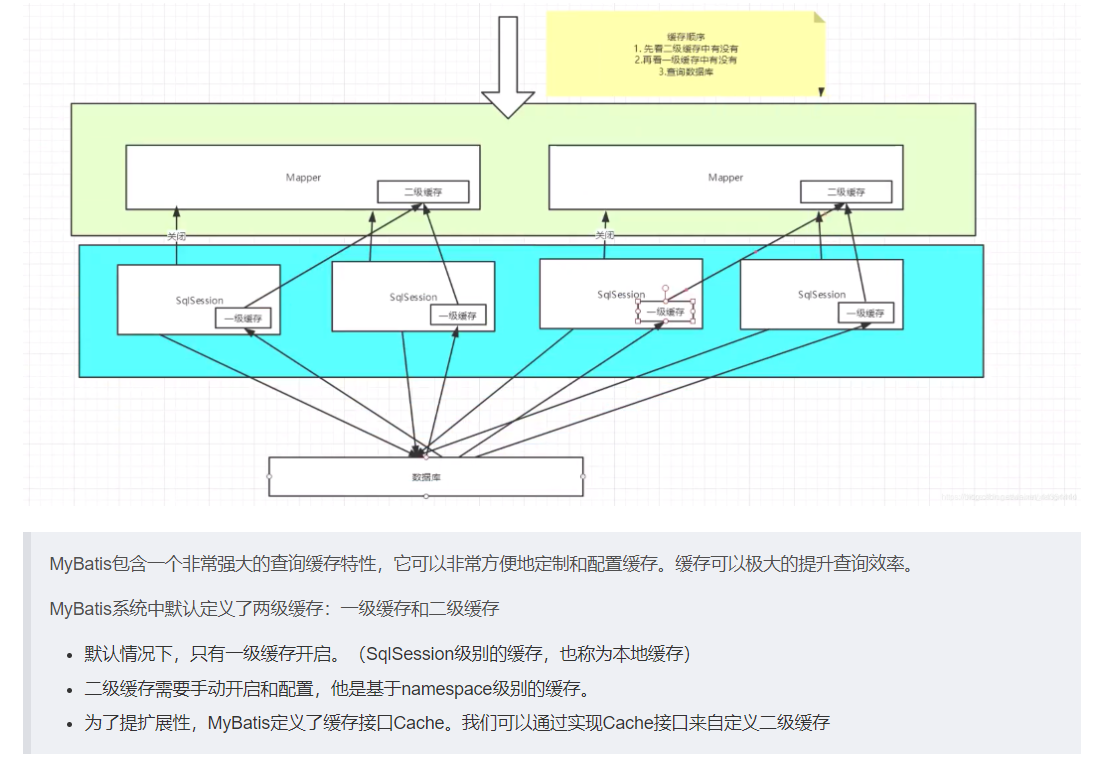
一级缓存也叫本地缓存:SqlSession
含义: 缓存是一种数据和处理中心的一个中间件,从缓存查询可以提高效率,可以最大程度使用性能。
为什么使用缓存?
减少和数据库的交互次数,减少系统开销,提高系统效率
什么样的数据使用缓存?
经常查询并且不容易发生改变的数据。
1 . 与数据库同义词会话期间查询到的数据会放在本地缓存中。
2 . 以后如果需要获取相同的数据,直接从缓存中拿,没有必要再去查询数据;
测试步骤:
1 . 开启日志!
2 . 测试在一个Session中查询两次相同的记录
3 . 查看日志输出
缓存失效的情况:
1 . 查询不同的东西
2 . 增删改操作,可能会改变原来的数据,所以必定会刷新缓存!
3 . 查询不同的Mapper.xml 手动清理缓存!
4 . sqlsession.clearCache(); //手动清理缓存
ps:一级缓存默认是开启的,只在一次SqlSession中有效,也就是拿到连接到关闭连接这个区间段!
``` 一级缓存就是一个Map。
13.4、二级缓存:
二级缓存也叫全局缓存,一级缓存作用域太低了,所以诞生了二级缓存
基于namespace级别的缓存,一个名称空间,对应一个二级缓存;
ps:使用二级缓存属性类需要实现Serializable序列化接口(可用来保存对象的状态),可在它的映射文件中配置
工作机制 :
一个会话查询一条数据,这个数据就会被放在当前会话的一级缓存中;
如果当前会话关闭了,这个会话对应的一级缓存就没了;但是我们想要的是,会话关闭了,一级缓存中的数据会被保存到二级缓存中;
新的会话查询信息,就可以从二级缓存中获取内容;
不同的mapper查出的数据会放在自己对应的缓存(map)中;

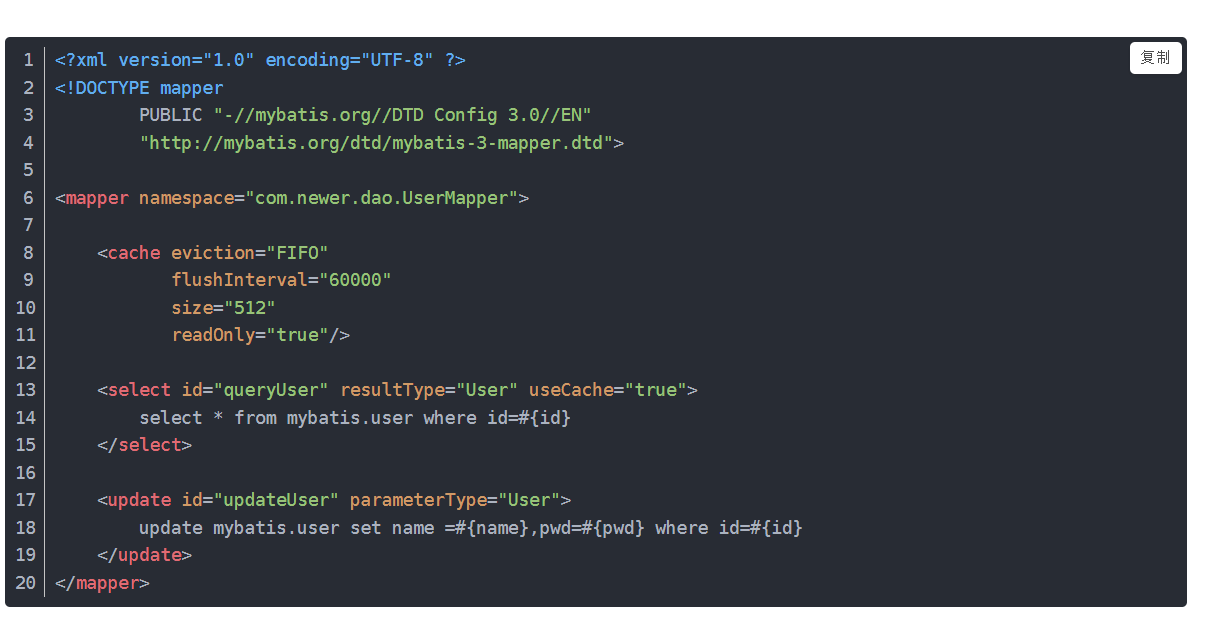 ps:
ps:
- 只要开启了二级缓存,在同一个Mapper下就有效- 所有的数据都会先放在一级缓存中;- 只有当会话提交,或者关闭的时候,才会提交到二级缓存中!
eviction 配置缓存策略
- LRU – 最近最少使用:移除最长时间不被使用的对象。- FIFO – 先进先出:按对象进入缓存的顺序来移除它们。- SOFT – 软引用:基于垃圾回收器状态和软引用规则移除对象。- WEAK – 弱引用:更积极地基于垃圾收集器状态和弱引用规则移除对象。
flushInterval 刷新间隔
size 缓存可用空间
readOnly 只读 会返回相同实例(因为这些实例是不可修改的)
readOnly 查询出来的实例是可以修改的,但是如果为false两个实例不相同。
13.5、#{}和${}的区别是什么?
1 . #{}是预编译处理,${}是字符串替换。
2 . Mybatis在处理#{}时,会将sql中的#{}替换为?号,调用 PreparedStatement 的 set 方法来赋值;
3 . Mybatis在处理时 , 就 是 把 {}时,就是把时,就是把{}替换成变量的值。
4 . 使用#{}可以有效的防止SQL注入,提高系统安全性。
13.6、Mybatis是否支持延迟加载?如果支持,它的实现原理是什么?
1 . Mybatis仅支持association关联对象和collection关联集合对象的延迟 加载,association指的就是一对一,collection指的就是一对多查询。在 Mybatis配置文件中,可以配置是否启用延迟加载
lazyLoadingEnabled=true|false 。
2 . 它的原理是,使用CGLIB创建目标对象的代理对象,当调用目标方法 时,进入拦截器方法,比如调用a.getB().getName(),拦截器invoke() 方法发现a.getB()是null值,那么就会单独发送事先保存好的查询关联B 对象的sql,把B查询上来,然后调用a.setB(b),于是a的对象b属 性就有值了,接着完成a.getB().getName()方法的调用。这就是延迟 加载的基本原理。
Mybatis第一阶段:
Mybatis文档;链接:
- Mybatis官方文档 : http://www.mybatis.org/mybatis-3/zh/index.html
- GitHub : https://github.com/mybatis/mybatis-3
Mybatis包依赖:
```xmlorg.mybatis mybatis 3.5.2 mysql mysql-connector-java 5.1.47
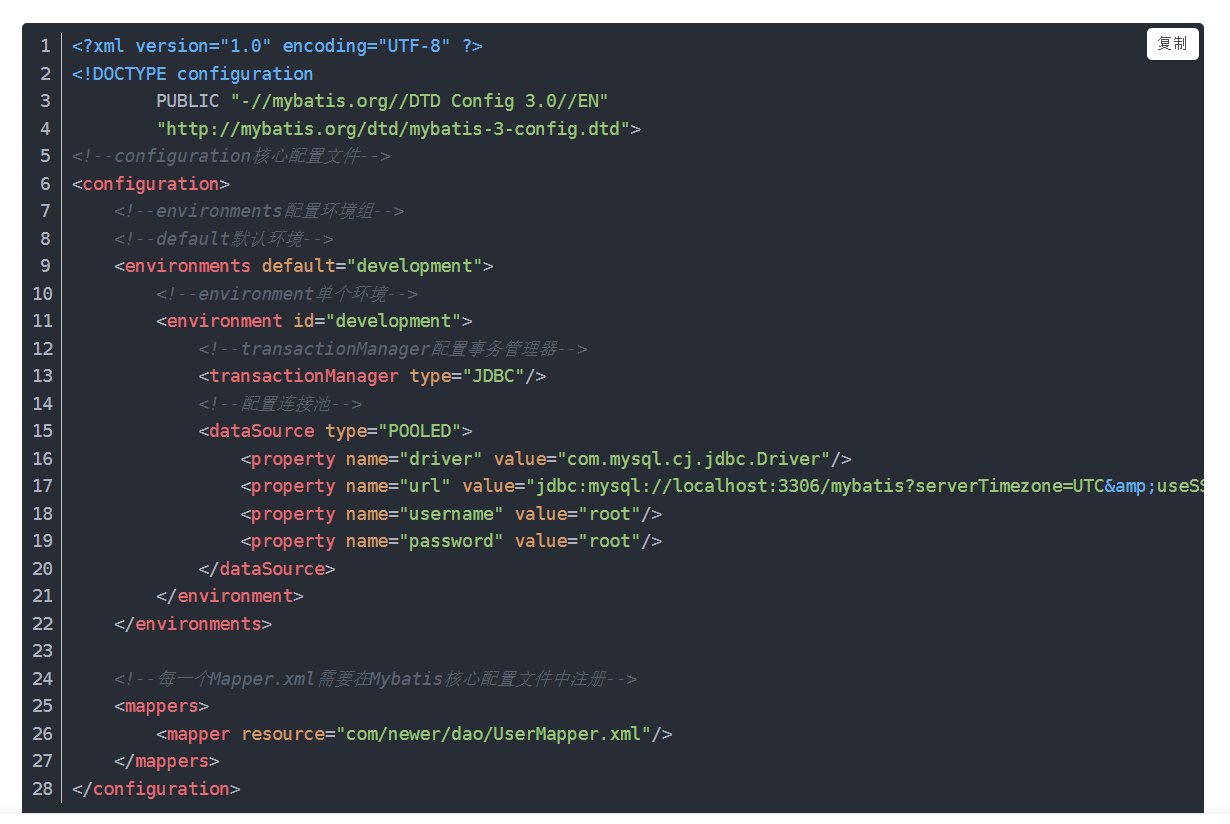
<a name="1N3jB"></a>### MyBatis核心配置文件:```xml<?xml version="1.0" encoding="UTF-8" ?><!DOCTYPE configurationPUBLIC "-//mybatis.org//DTD Config 3.0//EN""http://mybatis.org/dtd/mybatis-3-config.dtd"><configuration><environments default="development"><environment id="development">//配置事务<transactionManager type="JDBC"/>//数据库链接数据<dataSource type="POOLED"><property name="driver" value="com.mysql.jdbc.Driver"/><property name="url" value="jdbc:mysql://localhost:3306/mybatis?serverTimezone=GMT&useSSL=true&useUnicode=true&characterEncoding=utf8"/><property name="username" value="root"/><property name="password" value="123456"/></dataSource></environment></environments>//对应xml文件位置<mappers><mapper resource="com/kuang/dao/userMapper.xml"/></mappers></configuration>
MybatisJava代码获取sqlsession对象:
public class MybatisUtils {private static SqlSessionFactory sqlSessionFactory;static {try {//MyBatis对应配置文件String resource = "mybatis-config.xml";//加载配置文件InputStream inputStream = Resources.getResourceAsStream(resource);//创建sqlsessionFactory对象sqlSessionFactory = new SqlSessionFactoryBuilder().build(inputStream);} catch (IOException e) {e.printStackTrace();}}//获取SqlSession连接public static SqlSession getSession(){return sqlSessionFactory.openSession();}}
编写Mapper.xml配置文件:
<?xml version="1.0" encoding="UTF-8" ?>
<!DOCTYPE mapper
        PUBLIC "-//mybatis.org//DTD Mapper 3.0//EN"
        "http://mybatis.org/dtd/mybatis-3-mapper.dtd">
/*namespace 对应dao层mapper接口*/
<mapper namespace="com.kuang.dao.UserMapper">
  /*id:代表mapper接口方法名*/
  <select id="selectUser" resultType="com.kuang.pojo.User">
    select * from user
  </select>
</mapper>
MyBatis第二阶段 CRUD操作及配置解析:
select查询:
<select id="selectUserById" resultType="com.kuang.pojo.User">
  select * from user where id = #{id}
</select>
ps(@Param用法):
1、在接口方法的参数前加 @Param属性
2、Sql语句编写的时候,直接取@Param中设置的值即可,不需要单独设置参数类型
万能的Map:
User selectUserByNP2(Map<String,Object> map);//Map的 key 为 sql中取的值即可,没有顺序要求!
insert添加:
<insert id="addUser" parameterType="com.kuang.pojo.User">
     insert into user (id,name,pwd) values (#{id},#{name},#{pwd})
</insert>
update修改:
<update id="updateUser" parameterType="com.kuang.pojo.User">
    update user set name=#{name},pwd=#{pwd} where id = #{id}
</update>
delete删除:
<delete id="deleteUser" parameterType="int">
    delete from user where id = #{id}
</delete>
CRUD总结:
1.所有的增删改操作都需要提交事务!
2.接口所有的普通参数,尽量都写上@Param参数,尤其是多个参数时,必须写上!
3.有时候根据业务的需求,可以考虑使用map传递参数!
4.为了规范操作,在SQL的配置文件中,我们尽量将Parameter参数和resultType都写上!
Mybatis配置解析核心配置文件:
configuration(配置)
properties(属性)
settings(设置)
typeAliases(类型别名)
typeHandlers(类型处理器)
objectFactory(对象工厂)
plugins(插件)
environments(环境配置)
        environment(环境变量)
            transactionManager(事务管理器)
            dataSource(数据源)
databaseIdProvider(数据库厂商标识)
mappers(映射器)
<!-- 注意元素节点的顺序!顺序不对会报错 -->
typeAliases优化:
<!--配置别名,注意顺序-->
<typeAliases>
    <typeAlias type="com.kuang.pojo.User" alias="User"/>
</typeAliases>
作用域(Scope)和生命周期:

作用域理解:
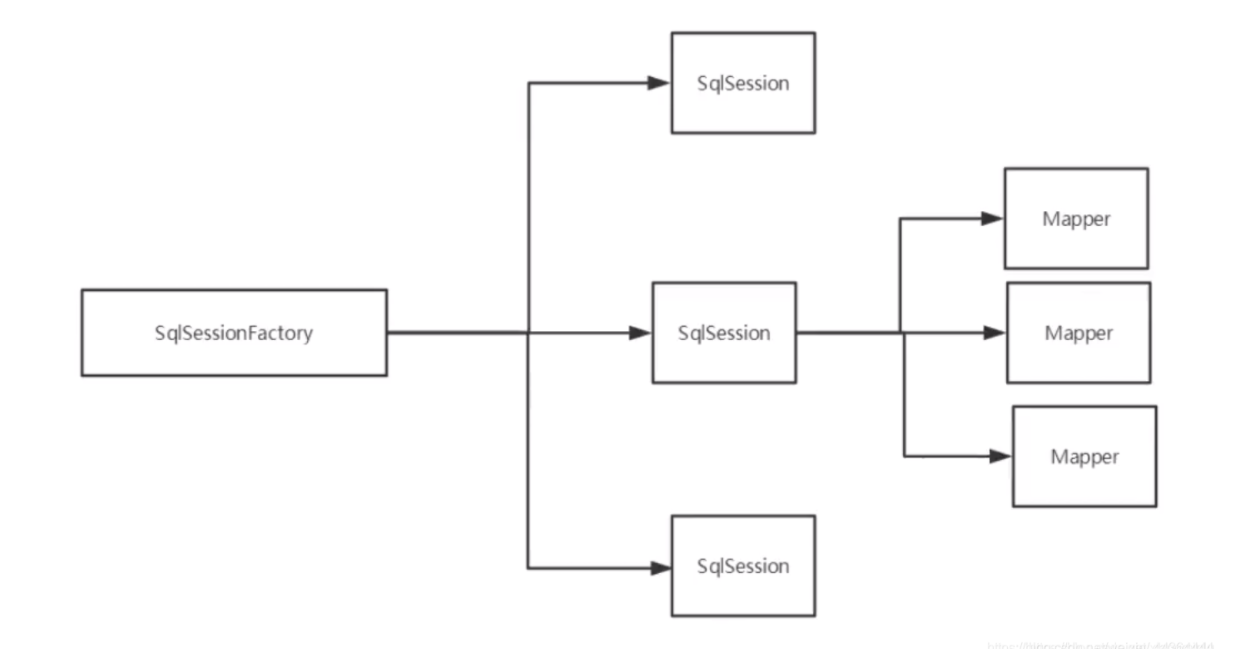
1.SqlSessionFactoryBuilder 的作用在于创建 SqlSessionFactory,创建成功后,SqlSessionFactoryBuilder 就失去了作用,所以它只能存在于创建 SqlSessionFactory 的方法中,而不要让其长期存在。因此 SqlSessionFactoryBuilder 实例的最佳作用域是方法作用域(也就是局部方法变量)。
2.SqlSessionFactory 可以被认为是一个数据库连接池,它的作用是创建 SqlSession 接口对象。因为 MyBatis 的本质就是 Java 对数据库的操作,所以 SqlSessionFactory 的生命周期存在于整个 MyBatis 的应用之中,所以一旦创建了 SqlSessionFactory,就要长期保存它,直至不再使用 MyBatis 应用,所以可以认为 SqlSessionFactory 的生命周期就等同于 MyBatis 的应用周期。
3.由于 SqlSessionFactory 是一个对数据库的连接池,所以它占据着数据库的连接资源。如果创建多个 SqlSessionFactory,那么就存在多个数据库连接池,这样不利于对数据库资源的控制,也会导致数据库连接资源被消耗光,出现系统宕机等情况,所以尽量避免发生这样的情况。
4.因此在一般的应用中我们往往希望 SqlSessionFactory 作为一个单例,让它在应用中被共享。所以说 SqlSessionFactory 的最佳作用域是应用作用域。
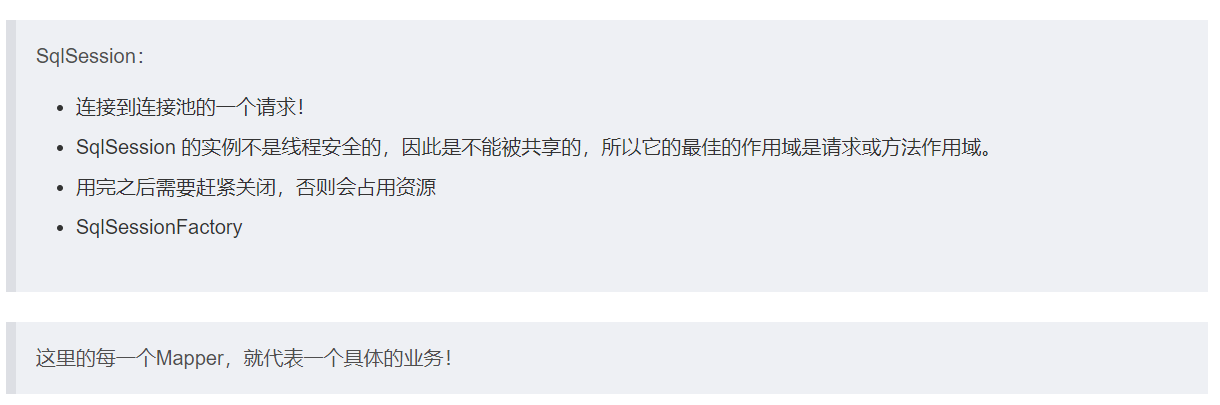
5.如果说 SqlSessionFactory 相当于数据库连接池,那么 SqlSession 就相当于一个数据库连接(Connection 对象),你可以在一个事务里面执行多条 SQL,然后通过它的 commit、rollback 等方法,提交或者回滚事务。所以它应该存活在一个业务请求中,处理完整个请求后,应该关闭这条连接,让它归还给 SqlSessionFactory,否则数据库资源就很快被耗费精光,系统就会瘫痪,所以用 try…catch…finally… 语句来保证其正确关闭。
6.所以 SqlSession 的最佳的作用域是请求或方法作用域。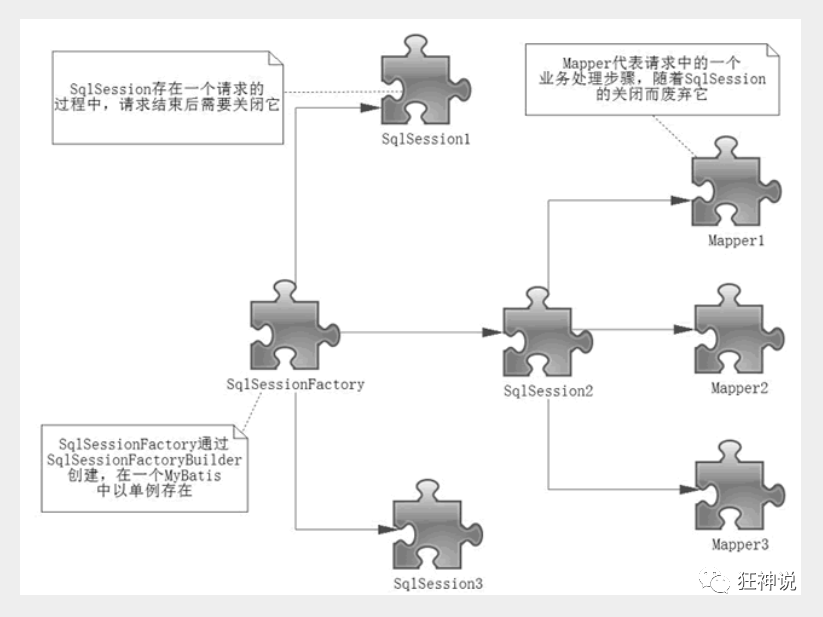
Mybatis自动映射(ResultMap):
1、返回值类型为resultMap
//resultMap:对应映射resultMap id名
<select id="selectUserById" resultMap="UserMap">
    select id , name , pwd from user where id = #{id}
</select>
2、编写resultMap,实现手动映射!
<resultMap id="UserMap" type="User">
    <!-- id为主键 -->
    <id column="id" property="id"/>
    <!-- column是数据库表的列名 , property是对应实体类的属性名 -->
    <result column="name" property="name"/>
    <result column="pwd" property="password"/>
</resultMap>
Mybatis日志:
Log4j:
使用步骤:
1、导入log4j的包
<dependency>
    <groupId>log4j</groupId>
    <artifactId>log4j</artifactId>
    <version>1.2.17</version>
</dependency>
2、配置文件编写(properties)
#将等级为DEBUG的日志信息输出到console和file这两个目的地,console和file的定义在下面的代码
log4j.rootLogger=DEBUG,console,file

#控制台输出的相关设置
log4j.appender.console = org.apache.log4j.ConsoleAppender
log4j.appender.console.Target = System.out
log4j.appender.console.Threshold=DEBUG
log4j.appender.console.layout = org.apache.log4j.PatternLayout
log4j.appender.console.layout.ConversionPattern=[%c]-%m%n

#文件输出的相关设置
log4j.appender.file = org.apache.log4j.RollingFileAppender
log4j.appender.file.File=./log/kuang.log
log4j.appender.file.MaxFileSize=10mb
log4j.appender.file.Threshold=DEBUG
log4j.appender.file.layout=org.apache.log4j.PatternLayout
log4j.appender.file.layout.ConversionPattern=[%p][%d{yy-MM-dd}][%c]%m%n

#日志输出级别
log4j.logger.org.mybatis=DEBUG
log4j.logger.java.sql=DEBUG
log4j.logger.java.sql.Statement=DEBUG
log4j.logger.java.sql.ResultSet=DEBUG
log4j.logger.java.sql.PreparedStatement=DEBUG
3、setting设置日志实现
<settings>
    <setting name="logImpl" value="LOG4J"/>
</settings>
4、在程序中使用Log4j进行输出!
//注意导包:org.apache.log4j.Logger
static Logger logger = Logger.getLogger(MyTest.class);

@Test
public void selectUser() {
    logger.info("info:进入selectUser方法");
    logger.debug("debug:进入selectUser方法");
    logger.error("error: 进入selectUser方法");
    SqlSession session = MybatisUtils.getSession();
    UserMapper mapper = session.getMapper(UserMapper.class);
    List<User> users = mapper.selectUser();
    for (User user: users){
        System.out.println(user);
    }
    session.close();
}
Mybatis pageHelper分页插件:
第一步(导入依赖):
  <!--分页插件-->
        <dependency>
            <groupId>com.github.pagehelper</groupId>
            <artifactId>pagehelper</artifactId>
            <version>5.2.0</version>
        </dependency>
第二步(配置文件):
<!--    MYBATIS插件配置-->
    <plugins>
        <plugin interceptor="com.github.pagehelper.PageInterceptor">
            <!-- 表示使用分页插件-->
            <property name="helperDialect" value="mysql"/>
            <property name="supportMethodsArguments" value="true"/>
            <!-- 表示当前页码长度为0的时候不进行分页-->
            <property name="pageSizeZero" value="true"/>
            <property name="rowBoundsWithCount" value="true"/>
        </plugin>
    </plugins>
第三步(Java使用):
         //分页第一步  调用分页之前开启分页
        PageHelper.startPage(1,5);
        List<UserEx> userExes = mapper.selectUserMoneyPage();
        for (UserEx userEx : userExes) {
            System.out.println("userEx = " + userEx);
        }
        //分页第二部,队拿到的数据进行处理1
        PageInfo<UserEx> userExPageInfo = new PageInfo<UserEx>(userExes);

        for (UserEx userEx : userExPageInfo.getList()) {
            System.out.println("userEx = " + userEx);
        }
Mbatis动态SQL:
if:
当满足test条件时,才会将<if>标签内的SQL语句拼接上去
<!-- 示例 -->
<select id="find" resultType="student" parameterType="student">
        SELECT * FROM student WHERE age >= 18
        <if test="name != null and name != ''">
            AND name like '%${name}%'
        </if>
</select>
choose:
choose 和 when 类似于java中的switch,只会选中满足条件的一个
<!-- choose 和 when , otherwise 是配套标签
类似于java中的switch,只会选中满足条件的一个
-->
<select id="findActiveBlogLike"
     resultType="Blog">
  SELECT * FROM BLOG WHERE state = ‘ACTIVE’
  <choose>
    <when test="title != null">
      AND title like #{title}
    </when>
    <when test="author != null and author.name != null">
      AND author_name like #{author.name}
    </when>
    <otherwise>
      AND featured = 1
    </otherwise>
  </choose>
</select>
where:
where 标签只会在至少有一个子元素返回了SQL语句时,才会向SQL语句中添加WHERE,并且如果WHERE之后是以AND或OR开头,会自动将其删掉
<select id="findActiveBlogLike"
     resultType="Blog">
  SELECT * FROM BLOG
  <where>
    <if test="state != null">
         state = #{state}
    </if>
    <if test="title != null">
        AND title like #{title}
    </if>
    <if test="author != null and author.name != null">
        AND author_name like #{author.name}
    </if>
  </where>
</select>
set:
在至少有一个子元素返回了SQL语句时,才会向SQL语句中添加SET,并且如果SET之后是以,开头的话,会自动将其删掉<set>标签相当于如下的<trim>标签
<trim prefix="SET" prefixOverrides=",">
   ...
</trim>
foreach:
用来做迭代拼接的,通常会与SQL语句中的IN查询条件结合使用,注意,到parameterType为List(链表)或者Array(数组),后面在引用时,参数名必须为list或者array。如在foreach标签中,collection属性则为需要迭代的集合,由于入参是个List,所以参数名必须为list
<select id="batchFind" resultType="student" parameterType="list">
        SELECT * FROM student WHERE id in
        <foreach collection="list" item="item" open="(" separator="," close=")">
          #{item}
        </foreach>
</select>
注解1:
//    @SelectProvider(type="类名.class")  会去调用方法  方法返回值必须是一个String  sql语句
    @SelectProvider(type = UserProvider.class,method = "selectUser")
    List<User> selectUserbyAttr(@Param("uId") Integer uId,@Param("uName") String uName);


    /**
     * 内部类
     */
    class UserProvider{
        /**
         * 自定义方法
         * @return
         */
        public String selectUser(Map<String,Object> map){
            String  sql = "SELECT * FROM `users` where 1=1 ";
            if(map.get("uId") !=null){
                sql+= " and u_id = #{uId} ";
            }
            if(map.get("uName") != null && "".equals(map.get("uName"))){
                sql+= " and u_name = #{uName} ";
            }

            System.out.println("sql = " + sql);
            return sql;
        }
    }

    @Select({"<script>",
            "SELECT * FROM `users`",
            "<where>",
                "<if test='uId != null'>",
                    "and u_id = #{uId}",
                "</if>",
                "<if test='uName != null'>",
                "and u_name = #{uName}",
                "</if>",
            "</where>",
            "</script>"


    })
    List<User> selectUserbyAttr2(@Param("uId") Integer uId,@Param("uName") String uName);
注解2:
    //查询所有用户
    @Select("select * from users")
    @Results(id ="userMap",value = {
            @Result(property = "uId",column = "u_id"),
            @Result(property = "uName",column = "u_name"),
            @Result(property = "uPass",column = "u_pass")
    })
//    @ResultMap("userMap")
    List<User> selectAllUsers();
注解3(一对一查询):
<select id="selectMoneyAndUser" resultMap="getMoney">
    SELECT * FROM `money`
</select>
<resultMap id="getMoney" type="Money">
    <!--property和bean类字段对应-->
    <!--column 和user表相关联的字段-->
    <!--javaType bean类的字段类型-->
    <!--select 使用哪个查询语句-->
    <association property="user" column="m_user_id" javaType="User" select="selectUser"/>
</resultMap>
<select id="selectUser" resultType="User">
    select * from users where u_id = #{m_user_id}
</select>
注解4(一对多查询):
<resultMap id="getMoney" type="User">
    <id column="u_id" property="uId"/>
    <result column="u_name" property="uName"/>
    <result column="u_pass" property="uPass"/>
    <!--property和bean属性名对应-->
    <collection property="moneyList" javaType="List" ofType="Money">
        <id column="m_id" property="mId"/>
        <result column="m_user_id" property="mUserId"/>
        <result column="m_money" property="mMoney"/>
        <result column="m_type" property="mType"/>
    </collection>
</resultMap>
<select id="selectUserAndMoney" resultMap="getMoney">
    SELECT * FROM `users`,`money` WHERE `u_id`= `m_user_id`
</select>
xml动态sql:
 <select id="selectNews" parameterType="news" resultType="News">
        SELECT * FROM `news`
        <where>
            <if test="nTitle != null and nTitle!=''">
                `n_title` like CONCAT('%',#{nTitle},'%')
            </if>
            <if test="nContent != null and nContent!=''">
                and  `n_content` like CONCAT( '%', #{nContent},'%')
            </if>
            <if test="nAuthor != null and nAuthor!=''">
                and  `n_author` like CONCAT('%', #{nAuthor},'%')
            </if>
        </where>


    </select>
    <select id="selectNewsChoose" parameterType="news" resultType="news">
        <include refid="sqls"></include>
        <where>
            <choose>
                <when test="nTitle !=null">

                    and n_title like CONCAT("%",#{nTitle},"%")
                </when>
                <when test="nContent !=null">
                    and n_content like CONCAT("%",#{nContent},"%")
                </when>
                <otherwise>
                    and n_author like CONCAT("%",#{nAuthor},"%")
                </otherwise>
            </choose>
        </where>


    </select>

    <update id="updateNews" parameterType="news">
        update news
        <set>
            <if test="nTitle != null and nTitle!=''">
                `n_title`=#{nTitle},
            </if>
            <if test="nContent != null and nContent!=''">
               `n_content`= #{nContent},
            </if>
            <if test="nAuthor != null and nAuthor!=''">
                 `n_author`=#{nAuthor}
            </if>

        </set>
        where
        n_id = #{nId}

    </update>

若有收获,就点个赞吧
0 人点赞


