- 安装Edge版本的docker for mac,设置cn的registry mirrors。
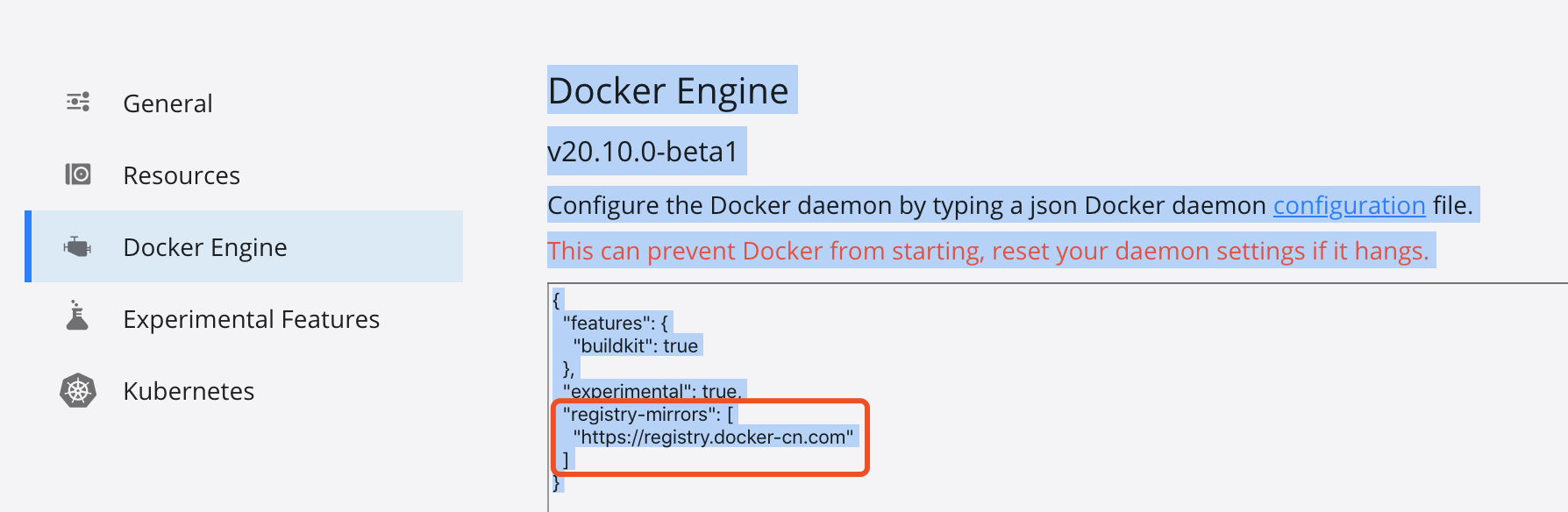
- 不能直接enable kubernetes,否则会一直卡在kubernetes is starting.
(1)git clone https://github.com/maguowei/k8s-docker-for-mac.git
(2)cd k8s-docker-for-mac/
(3) ./load_images.sh 同时要打开这docker desktop
- 然后在docker的preferences里enable kubernetes

然后就可以使用kubernetes的各种命令了
$ kubectl get namespaces$ kubectl get posts --namespace kube-system
可以安装kubernetes-dashboard服务方便查看
官方git仓库:https://github.com/kubernetes/dashboard
# 直接执行或者把这个yaml文件下载到本地$ kubectl apply -f https://raw.githubusercontent.com/kubernetes/dashboard/v2.0.4/aio/deploy/recommended.yaml# 查看部署的容器与服$ kubectl get deployments -A$ kubectl get services -A# API server监听在本地的8001端口上$ kubectl proxy
然后即可在以上地址访问dashboard
http://localhost:8001/api/v1/namespaces/kubernetes-dashboard/services/https:kubernetes-dashboard:/proxy/
此时会要求输入token。
- 创建user以登陆dashboard
参考链接
https://github.com/kubernetes/dashboard/blob/master/docs/user/access-control/creating-sample-user.md
(1) 创建一个service account
cat <<EOF | kubectl apply -f -apiVersion: v1kind: ServiceAccountmetadata:name: admin-usernamespace: kubernetes-dashboardEOF
(2) 创建ClusterRoleBinding
cat <<EOF | kubectl apply -f -apiVersion: rbac.authorization.k8s.io/v1kind: ClusterRoleBindingmetadata:name: admin-userroleRef:apiGroup: rbac.authorization.k8s.iokind: ClusterRolename: cluster-adminsubjects:- kind: ServiceAccountname: admin-usernamespace: kubernetes-dashboardEOF
(3) 获取Bearer Token
kubectl -n kubernetes-dashboard describe secret $(kubectl -n kubernetes-dashboard get secret | grep admin-user | awk '{print $1}')

(4) 把这个token拷贝到dashboard就可以登陆了

若有收获,就点个赞吧
0 人点赞


