参考链接
https://blog.51cto.com/wzlinux/1836997
https://blog.51cto.com/11093860/2161809
1. 关闭ldap server机器上的防火墙
systemctl stop firewalld.service #停止防火墙服务systemctl disable firewalld.service #禁用防火墙开机启动服务
在ldap client机器上telnet server机器的389端口
下图表示成功

2. 安装OpenLDAP客户端软件包
yum install nss-pam-ldapd openldap-clients openldap -y
3. 配置/etc/openldap/ldap.conf
vim /etc/openldap/ldap.conf

4. 配置/etc/pam_ldap.conf
vim /etc/pam_ldap.conf
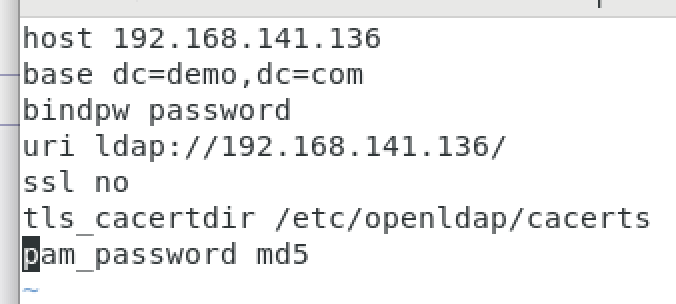
5. 配置/etc/nslcd.conf
vim /etc/nslcd.conf


6. 修改system-auth 认证文件
vim /etc/pam.d/system-auth---------------------------------------------------------------auth sufficient pam_ldap.so use_first_passaccount required pam_unix.so broken_shadowaccount [default=bad success=ok user_unknown=ignore] pam_ldap.sopassword sufficient pam_ldap.so use_authtoksession optional pam_ldap.sosession optional pam_mkhomedir.so skel=/etc/skel/ umask=0022
7. 修改nsswitch.conf 配置文件
vim /etc/nsswitch.conf---------------------------------------------------------------passwd: files ldapshadow: files ldapgroup: files ldapnetgroup: files ldapautomount: files ldap
8. 修改/etc/sysconfig/authconfig 认证文件
vim /etc/sysconfig/authconfig---------------------------------------------------------------USELDAP=yesUSELDAPAUTH=yesUSELOCAUTHORIZE=yesUSESHADOW=yes
9. 修改sshd_config
vim /etc/ssh/sshd_config---------------------------------------------------------------UsePAM yes
10. 加载nslce进程
systemctl restart nslcdsystemctl restart sshd
11. 验证
ldapsearch -H ldap://192.168.141.136 -x -b "uid=chenxin,ou=People,dc=demo,dc=com"

id chenxin


若有收获,就点个赞吧
0 人点赞


