03 HBase高级特性
一、HBase Java API
Hbase是用Java语言编写的
HBaseAdmin类
- 管理表
- org.apache.hadoop.hbase.client
- 可以执行管理员任务
- 使用Connection.getAdmin()方法获取管理员的实例
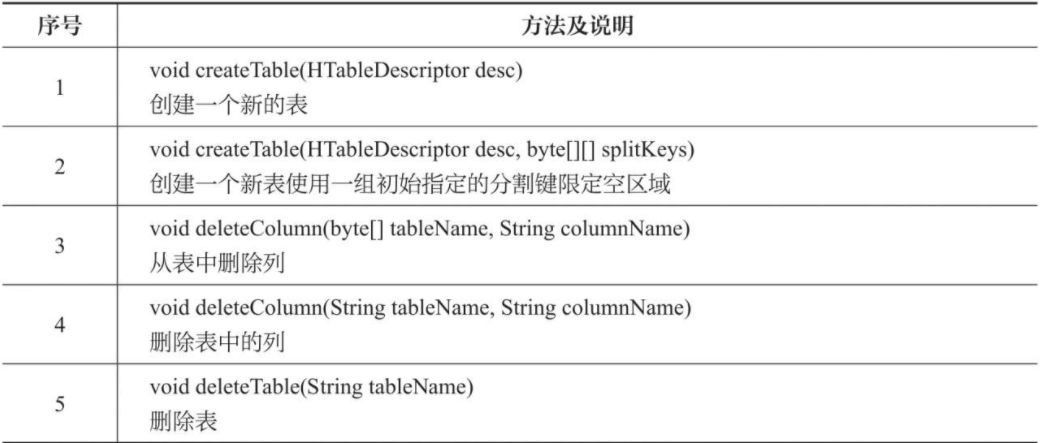
- Descriptor类
这个类包含一个HBase的表结构信息

HBaseConfiguration类
添加HBase的配置到配置文件。这个类属于org.apache.hadoop.hbase包。
HTable类
HTable是HBase表中HBase的内部类,用于实现单个HBase表进行通信。这个类属于org.apache.hadoop.hbase.client类。


- Put类
此类用于为单个行执行Put操作。它属于org.apache.hadoop.hbase.client包

- Get类
此类用于对单行执行get操作。这个类属于org.apache.hadoop.hbase.client包


- Delete类
这个类用于对单行执行删除操作。要删除整行,实例化一个Delete对象用于删除行。这个类属于org.apache.hadoop.hbase.client包

- Result类
这个类是用来获取Get或扫描查询的单行结果

二、HBase Java API示例
创建项目
导入
/usr/local/hbase/lib下所有jar包完整代码 ```java package com.hbaseapi;
import java.io.IOException;
import org.apache.hadoop.conf.Configuration; import org.apache.hadoop.hbase.HBaseConfiguration; import org.apache.hadoop.hbase.HColumnDescriptor; import org.apache.hadoop.hbase.HTableDescriptor; import org.apache.hadoop.hbase.client.*; import org.apache.hadoop.hbase.util.Bytes;
public class HBaseJavaClient {
/*** hbase操作必备* @return*/private static Configuration getConfiguration() {// 获得HBase配置Configuration conf = HBaseConfiguration.create();// 连接HBaseconf.set("hbase.rootdir", "hdfs://hadoop0:9000/hbase");// 使用eclipse时必须添加这个,否则无法定位conf.set("hbase.zookeeper.quorum", "hadoop0");return conf;}/*** 创建一张表* @param tableName* @param columnFamily* @throws IOException*/public static void create(String tableName, String columnFamily) throws IOException {// 获取HBase的管理权HBaseAdmin admin = new HBaseAdmin(getConfiguration());if (admin.tableExists(tableName)) {System.out.println("table exists!");} else {// 创建Table描述器HTableDescriptor tableDesc = new HTableDescriptor(tableName);// 创建列描述器HColumnDescriptor hcd = new HColumnDescriptor(columnFamily);// 添加列族tableDesc.addFamily(hcd);// 建表admin.createTable(tableDesc);System.out.println("create table success!");}}/*** 添加数据* @param tableName* @param row* @param columnFamily* @param column* @param data* @throws IOException*/public static void put(String tableName, String row, String columnFamily, String column, String data)throws IOException {// 连接表HTable table = new HTable(getConfiguration(), tableName);// 将 数据封装成一个 put对象// 参数表示行键Put p1 = new Put(Bytes.toBytes(row));// 列族/列簇 列名 值// p1.add(family, qualifier, value);p1.add(Bytes.toBytes(columnFamily), Bytes.toBytes(column), Bytes.toBytes(data));// 添加数据table.put(p1);System.out.println("put'" + row + "'," + columnFamily + ":" + column + "','" + data + "'");}/*** 查询数据* @param tableName* @param row* @param family* @param qualifier* @throws IOException*/public static void get(String tableName, String row, String family, String qualifier) throws IOException {// 连接表HTable table = new HTable(getConfiguration(), tableName);// 参数表示行键Get get = new Get(Bytes.toBytes(row));// 查询数据Result result = table.get(get);// 获取值byte[] bs = result.getValue(family.getBytes(), qualifier.getBytes());System.out.println("Get: " + new String(bs));}/*** 显示所有数据* @param tableName* @throws IOException*/public static void scan(String tableName) throws IOException {// 连接表HTable table = new HTable(getConfiguration(), tableName);// 创建扫描器Scan scan = new Scan();/** 进行扫描 扫描返回的结果不止一条*/ResultScanner scanner = table.getScanner(scan);for (Result result : scanner) {byte[] value = result.getValue("apics".getBytes(), "newc".getBytes());if (value != null)System.out.println(new String(value));System.out.println("Scan: " + result);}}/*** 删除表* @param tableName* @throws IOException*/public static void delete(String tableName) throws IOException {// 获取管理权HBaseAdmin admin = new HBaseAdmin(getConfiguration());// 判断表是否存在if (admin.tableExists(tableName)) {try {// 删除前需要先进行disable表admin.disableTable(tableName);// 删除表admin.deleteTable(tableName);} catch (IOException e) {e.printStackTrace();System.out.println("Delete " + tableName + " 失败");}}System.out.println("Delete " + tableName + " 成功");}/**** @param args* @throws Exception*/public static void main(String[] args) throws Exception {create("apitable", "apics");put("apitable", "NewUser", "apics", "newc", "Jerry");get("apitable", "NewUser", "apics", "newc");scan("apitable");delete("apitable");}
}
4.运行> 可配置log4j对日志进行处理> ```properties### log4j.properties ######\u8BBE\u7F6E 设置 ###log4j.rootLogger = info,stdout###\u8F93\u51FA\u4FE1\u606F\u5230\u63A7\u5236\u53F0 输出信息到控制台###log4j.appender.stdout = org.apache.log4j.ConsoleAppenderlog4j.appender.stdout.Target = System.outlog4j.appender.stdout.layout = org.apache.log4j.PatternLayoutlog4j.appender.stdout.layout.ConversionPattern = [%-5p] %d{yyyy-MM-dd HH:mm:ss,SSS} method:%l%n%m%n

若有收获,就点个赞吧
0 人点赞


