MapReduce综合实例
1. 数据去重
Ⅰ 描述
对数据文件中的数据进行去重。
数据文件中的每行都是一个数据。
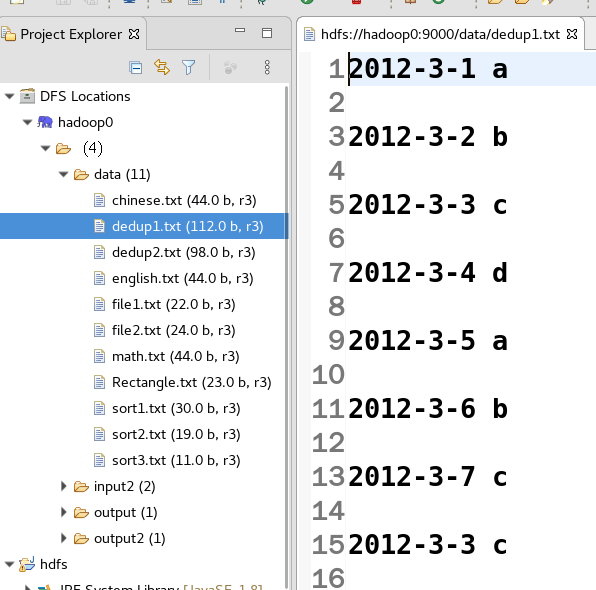
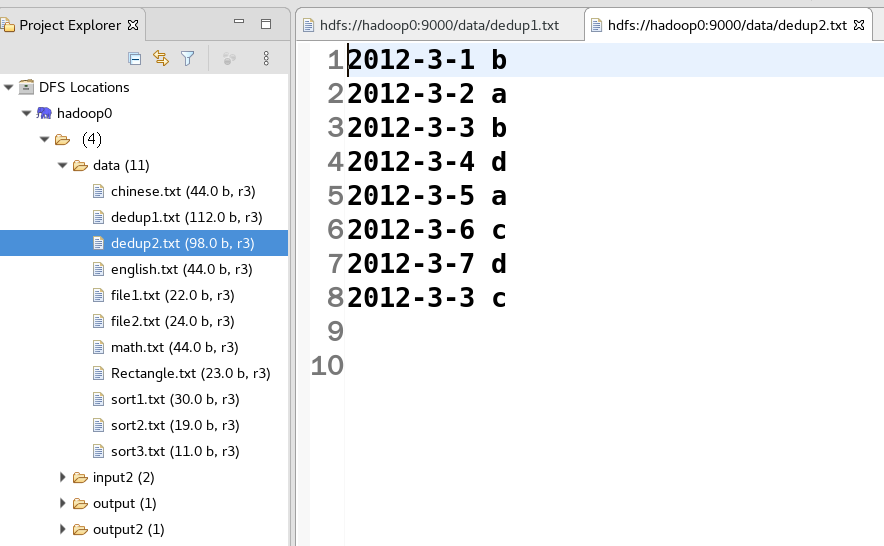
数据源:dedup1.txt&dedup2.txt
dedup1.txt的内容
dedup2.txt的内容
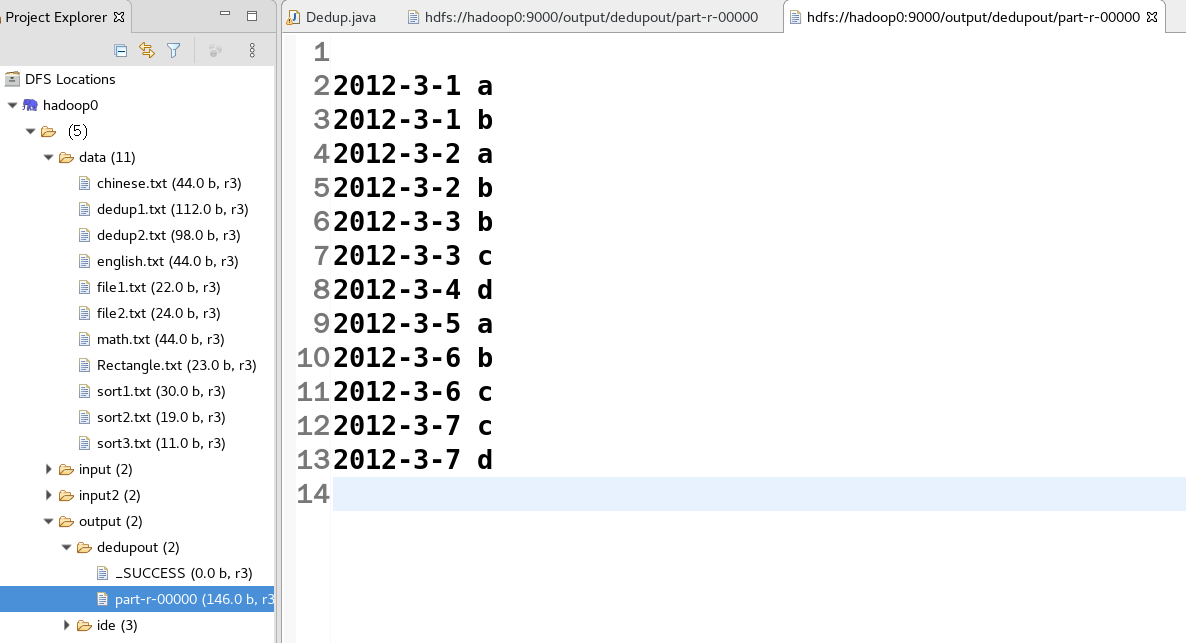
预想样本输出格式
Ⅱ 设计思路
数据去重的最终目标是让原始数据中出现次数超过一次的数据在输出文件中只出现一次。我们自然而然会想到将同一个数据的所有记录都交给一台Reduce机器,无论这个数据出现多少次,只要在最终结果中输出一次即可。具体就是Reduce的输入应该以数据作为key,而对value-list则没有要求。
当Reduce接收到一个
在MapReduce流程中,Map的输出
继续反推,Map输出数据的key为数据,而在这个实例中每个数据代表输入文件中的一行内容,所以Map阶段要完成的任务就是在采用Hadoop默认的作业输入方式之后,将value设置为key,并直接输出(输出中的value任意)。Map中的结果经过Shuffle过程之后交给Reduce。Reduce阶段不会管每个key有多少个value,它直接将输入的key复制为输出的key,并输出即可(输出中的value被设置成空)。
Ⅲ 程序代码
package com.etc;import java.io.IOException;import org.apache.hadoop.conf.Configuration;import org.apache.hadoop.fs.Path;import org.apache.hadoop.io.Text;import org.apache.hadoop.mapreduce.Job;import org.apache.hadoop.mapreduce.Mapper;import org.apache.hadoop.mapreduce.Reducer;import org.apache.hadoop.mapreduce.lib.input.FileInputFormat;import org.apache.hadoop.mapreduce.lib.output.FileOutputFormat;import org.apache.hadoop.util.GenericOptionsParser;public class Dedup {/*** map将输入中的value复制到输出数据的key上,并直接输出** @author root**/public static class Map extends Mapper<Object, Text, Text, Text> {// 每行数据private static Text line = new Text();// 实现map函数public void map(Object key, Text value, Context context) throws IOException, InterruptedException {line = value;context.write(line, new Text(""));}}/*** reduce将输入中的key复制到输出数据的key上,并直接输出** @author root**/public static class Reduce extends Reducer<Text, Text, Text, Text> {// 实现reduce函数public void reduce(Text key, Iterable<Text> values, Context context) throws IOException, InterruptedException {context.write(key, new Text(""));}}public static void main(String[] args) throws Exception {Configuration conf = new Configuration();// 这句话很关键conf.set("mapred.job.tracker", "hadoop0:9001");String[] ioArgs = new String[] { "hdfs://hadoop0:9000/input", "hdfs://hadoop0:9000/output/dedupout" };String[] otherArgs = new GenericOptionsParser(conf, ioArgs).getRemainingArgs();if (otherArgs.length != 2) {System.err.println("出错了!!!");System.exit(2);}Job job = new Job(conf, "Dedup");job.setJarByClass(Dedup.class);// 设置Map、Combine和Reduce处理类job.setMapperClass(Map.class);job.setCombinerClass(Reduce.class);job.setReducerClass(Reduce.class);// 设置输出类型job.setOutputKeyClass(Text.class);job.setOutputValueClass(Text.class);// 设置输入和输出目录FileInputFormat.addInputPath(job, new Path(otherArgs[0]));FileOutputFormat.setOutputPath(job, new Path(otherArgs[1]));System.exit(job.waitForCompletion(true) ? 0 : 1);}}
2. 数据排序
Ⅰ 实例描述
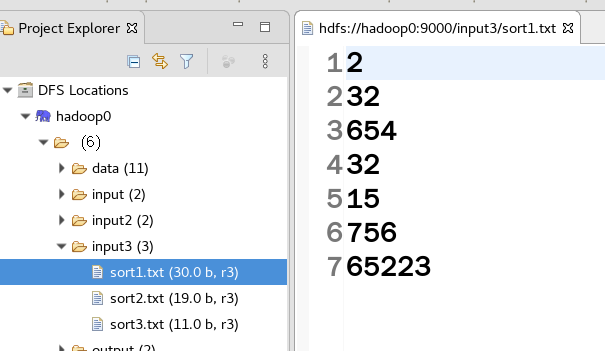
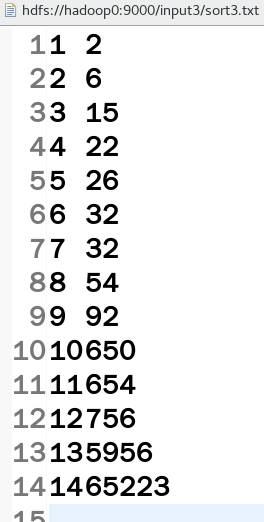
“数据排序”是许多实际任务执行时要完成的第一项工作,比如学生成绩评比、数据索引建立等。这个实例与数据去重类似,都是先对原始数据进行初步处理,为进一步的数据操作打好基础。下面进入此实验。对输入文件中的数据进行排序。输入文件中的每行内容均为一个数字,即一个数据。要求在输出中每行有两个间隔的数字,第一个代表原始数据在原始数据集中的位次,第二个代表原始数据。下面的sort1.txt、sort2.txt、sort3.txt均为上传至HDFS文件系统的/input3目录下的文件。
sort1.txt、sort2.txt、sort3.txt的内容
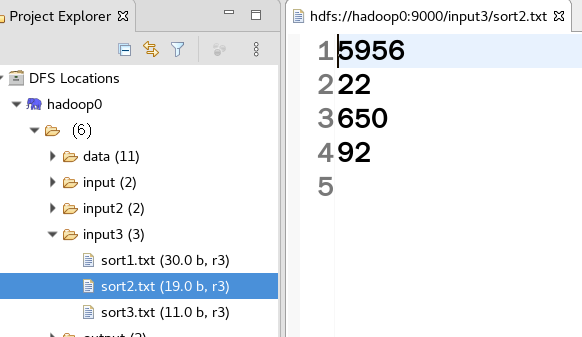
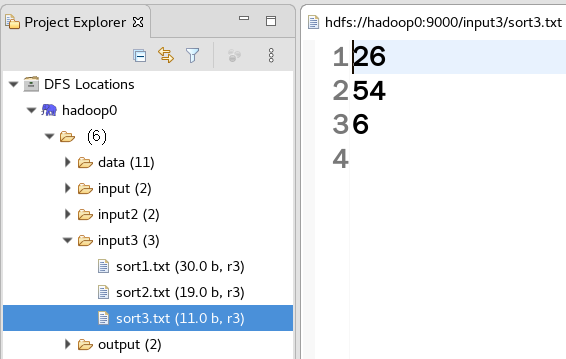
预想样本输出格式为“位次数字”
Ⅱ 设计思路
此实验仅仅要求对输入数据进行排序,熟悉MapReduce过程的读者很快会想到在MapReduce过程中就有排序,是否可以利用这个默认的排序,而不需要自己再实现具体的排序呢?答案是肯定的。
但是在使用之前首先需要了解它的默认排序规则。它是按照key值进行排序的,如果key是封装为int的IntWritable类型,那么MapReduce按照数字大小对key排序;如果key是封装为String的Text类型,那么MapReduce按照字典顺序对字符串排序。
了解了这个细节,就知道应该使用封装为int的IntWritable型数据结构了。也就是在Map中将读入的数据转化成IntWritable型,然后作为key值输出(value任意)。Reduce拿到
Ⅲ 程序代码
package com.etc;

import java.io.IOException;
import org.apache.hadoop.conf.Configuration;
import org.apache.hadoop.fs.Path;
import org.apache.hadoop.io.IntWritable;
import org.apache.hadoop.io.Text;
import org.apache.hadoop.mapreduce.Job;
import org.apache.hadoop.mapreduce.Mapper;
import org.apache.hadoop.mapreduce.Reducer;
import org.apache.hadoop.mapreduce.lib.input.FileInputFormat;
import org.apache.hadoop.mapreduce.lib.output.FileOutputFormat;
import org.apache.hadoop.util.GenericOptionsParser;

public class Sort {
    /**
     * map将输入中的value化成IntWritable类型,作为输出的key
     *
     * @author root
     *
     */
    public static class Map extends Mapper<Object, Text, IntWritable, IntWritable> {
        private static IntWritable data = new IntWritable();

        // 实现map函数
        public void map(Object key, Text value, Context context) throws IOException, InterruptedException {
            String line = value.toString();
            data.set(Integer.parseInt(line));
            context.write(data, new IntWritable(1));
        }
    }

    /**
     * reduce将输入中的key复制到输出数据的key上, 然后根据输入的value-list中元素的个数决定key的输出次数
     * 用全局linenum来代表key的位次
     *
     * @author root
     *
     */
    public static class Reduce extends Reducer<IntWritable, IntWritable, IntWritable, IntWritable> {
        private static IntWritable linenum = new IntWritable(1);
        // 实现reduce函数
        public void reduce(IntWritable key, Iterable<IntWritable> values, Context context)
                throws IOException, InterruptedException {
            for (IntWritable val : values) {
                context.write(linenum, key);
                linenum = new IntWritable(linenum.get() + 1);
            }
        }
    }

    public static void main(String[] args) throws Exception {
        Configuration conf = new Configuration();
        conf.set("mapred.job.tracker", "hadoop0:9001");
        String[] ioArgs = new String[] { "hdfs://hadoop0:9000/input3", "hdfs://hadoop0:9000/output/sortout" };
        String[] otherArgs = new GenericOptionsParser(conf, ioArgs).getRemainingArgs();
        if (otherArgs.length != 2) {
            System.err.println("Usage: Data Sort <in> <out>");
            System.exit(2);
        }
        Job job = new Job(conf, "Data Sort");
        job.setJarByClass(Sort.class);
        // 设置Map和Reduce处理类
        job.setMapperClass(Map.class);
        job.setReducerClass(Reduce.class);
        // 设置输出类型
        job.setOutputKeyClass(IntWritable.class);
        job.setOutputValueClass(IntWritable.class);
        // 设置输入和输出目录
        FileInputFormat.addInputPath(job, new Path(otherArgs[0]));
        FileOutputFormat.setOutputPath(job, new Path(otherArgs[1]));
        System.exit(job.waitForCompletion(true) ? 0 : 1);
    }
}
3. 求学生平均成绩
实现一个计算学生语文、数学、英语三科平均成绩的例子。
Ⅰ 实例描述
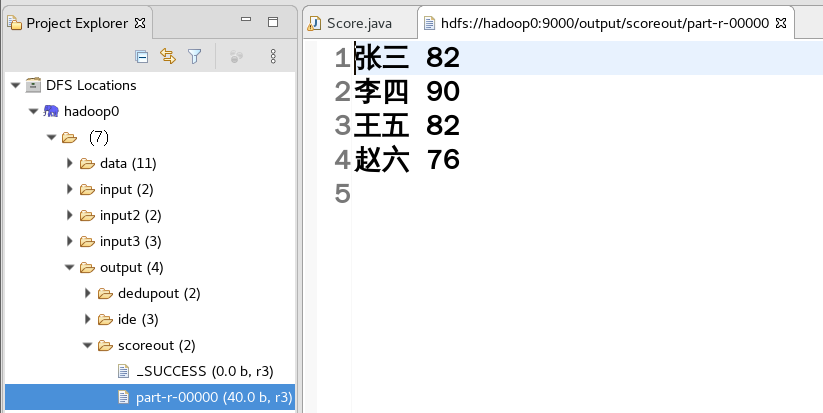
对输入文件中的数据进行计算求学生平均成绩。输入文件中的每行内容均为一名学生的姓名和他相应的成绩,如果有多门学科,则每门学科为一个文件。要求在输出中每行有两个间隔的数据,第一个代表学生的姓名,第二个代表其平均成绩。下面的math.txt、Chinese.txt、English.txt均为上传至HDFS文件系统的/input/score目录下的文件。
样本输入math.txt、Chinese.txt、English.txt的内容
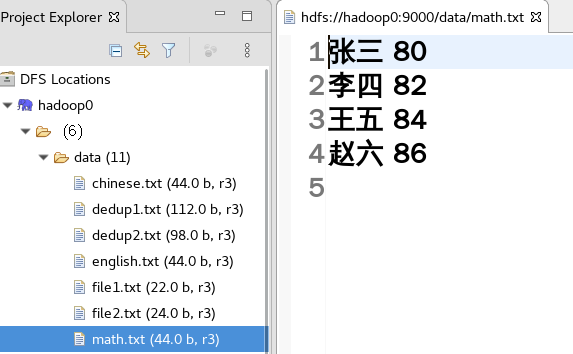
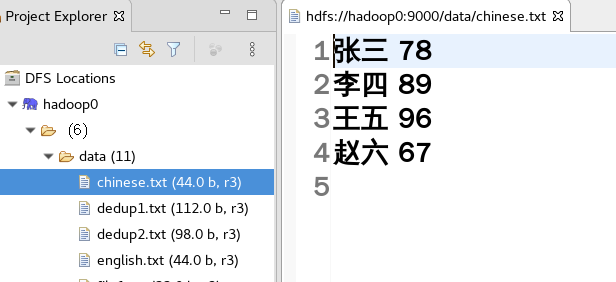
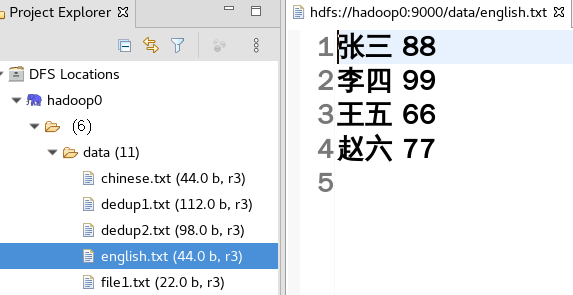
预想样本输出格式为“姓名 平均成绩”
Ⅱ 设计思路
重温一下开发MapReduce程序的流程。程序包括Map部分和Reduce部分两部分的内容,分别实现了Map和Reduce的功能。
Map处理的是一个纯文本文件,文件中的每一行表示一名学生的姓名和他相应一科的成绩。Mapper处理的数据是由InputFormat分解过的数据集,其中InputFormat的作用是将数据集切割成小数据集InputSplit,每一个InputSlit将由一个Mapper负责处理。此外,InputFormat中还提供了一个RecordReader的实现,并将一个InputSplit解析成
InputFormat的默认值是TextInputFormat,它针对文本文件,按行将文本切割成InputSlit,并用LineRecordReader将InputSplit解析成
Map的结果会通过partitioon分发到Reducer,Reducer完成Reduce操作后,将以格式OutputFormat输出。
Mapper最终处理的结果对
Ⅲ 程序代码
package com.etc;

import java.io.IOException;
import java.util.Iterator;
import java.util.StringTokenizer;
import org.apache.hadoop.conf.Configuration;
import org.apache.hadoop.fs.Path;
import org.apache.hadoop.io.IntWritable;
import org.apache.hadoop.io.LongWritable;
import org.apache.hadoop.io.Text;
import org.apache.hadoop.mapreduce.Job;
import org.apache.hadoop.mapreduce.Mapper;
import org.apache.hadoop.mapreduce.Reducer;
import org.apache.hadoop.mapreduce.lib.input.FileInputFormat;
import org.apache.hadoop.mapreduce.lib.input.TextInputFormat;
import org.apache.hadoop.mapreduce.lib.output.FileOutputFormat;
import org.apache.hadoop.mapreduce.lib.output.TextOutputFormat;
import org.apache.hadoop.util.GenericOptionsParser;

public class Score {
    public static class Map extends Mapper<LongWritable, Text, Text, IntWritable> {

        // 实现map函数
        public void map(LongWritable key, Text value, Context context) throws IOException, InterruptedException {
            // 将输入的纯文本文件的数据转化成String
            String line = value.toString();
            // 将输入的数据首先按行进行分割
            StringTokenizer tokenizerArticle = new StringTokenizer(line, "\n");
            // 分别对每一行进行处理
            while (tokenizerArticle.hasMoreElements()) {
                // 每行按空格划分
                StringTokenizer tokenizerLine = new StringTokenizer(tokenizerArticle.nextToken());
                String strName = tokenizerLine.nextToken();// 学生姓名部分
                String strScore = tokenizerLine.nextToken();// 成绩部分
                Text name = new Text(strName);
                int scoreInt = Integer.parseInt(strScore);
                // 输出姓名和成绩
                context.write(name, new IntWritable(scoreInt));
            }
        }
    }

    public static class Reduce extends Reducer<Text, IntWritable, Text, IntWritable> {
        // 实现reduce函数
        public void reduce(Text key, Iterable<IntWritable> values, Context context)
                throws IOException, InterruptedException {
            int sum = 0;
            int count = 0;
            Iterator<IntWritable> iterator = values.iterator();

            while (iterator.hasNext()) {
                sum += iterator.next().get();// 计算总分
                count++;// 统计总的科目数
            }
            int average = (int) sum / count;// 计算平均成绩
            context.write(key, new IntWritable(average));
        }
    }

    public static void main(String[] args) throws Exception {
        Configuration conf = new Configuration();
        conf.set("mapred.job.tracker", "hadoop0:9001");
        String[] ioArgs = new String[] { "hdfs://hadoop0:9000/score/*", "hdfs://hadoop0:9000/output/scoreout" };

        String[] otherArgs = new GenericOptionsParser(conf, ioArgs).getRemainingArgs();

        if (otherArgs.length != 2) {
            System.err.println("Usage: Score Average <in> <out>");
            System.exit(2);
        }
        Job job = new Job(conf, "Score Average");
        job.setJarByClass(Score.class);
        // 设置Map、Combine和Reduce处理类
        job.setMapperClass(Map.class);
        job.setCombinerClass(Reduce.class);
        job.setReducerClass(Reduce.class);
        // 设置输出类型
        job.setOutputKeyClass(Text.class);
        job.setOutputValueClass(IntWritable.class);
        // 将输入的数据集分割成小数据块splites,提供一个RecordReder的实现
        job.setInputFormatClass(TextInputFormat.class);
        // 提供一个RecordWriter的实现,负责数据输出
        job.setOutputFormatClass(TextOutputFormat.class);
        // 设置输入和输出目录
        FileInputFormat.addInputPath(job, new Path(otherArgs[0]));
        FileOutputFormat.setOutputPath(job, new Path(otherArgs[1]));
        System.exit(job.waitForCompletion(true) ? 0 : 1);
    }
}
4. WordCount高级示例
我们对WordCount入门示例进行改造,在原有的单词计数功能上再添加一项功能:按词频降序排列,即出现次数多的单词排前面,出现次数少的单词排后面。
为了实现按词频降序排序,需要在已经完成的单词计数功能上加入两个步骤,一是交换key-value,二是实现降序。因为单词计数的初步输出的key-value键值对是“单词 次数”,如“hello 2”,我们需要将其交换成“次数 单词”,如“2hello”,然后MapReduce便会自动按新的key,即“次数”进行排序。
要交换key-value,只需调用系统内置的InverseMapper类即可。
sortJob.setMapperClass(InverseMapper.class);
要实现降序则比较麻烦,因为MapReduce默认自动按新的key,即“次数”进行升序排序,次数是IntWritable类型,我们需要重新定义IntWritableDecreaseingComparator类,继承自IntWritable.Comparator,重写其中的compare比较函数,将比较结果取负数即可实现降序效果。
/**
 * 实现降序
 */
private static class IntWritableDecreaseingComparator extends IntWritable.Comparator {
    @Override
    public int compare(WritableComparable a, WritableComparable b) {
        // 比较结果取负数即可降序            return -super.compare(a, b);
    }
    @Override
    public int compare(byte[] b1, int s1, int l1, byte[] b2, int s2, int l2) {
        return -super.compare(b1, s1, l1, b2, s2, l2);
    }
}
此外,还需要驱动程序中更换成自定义的比较器。
// Hadoop默认对IntWritable按升序排序,重写IntWritable.Comparator类实现降序
sortJob.setSortComparatorClass(IntWritableDecreaseingComparator.class);
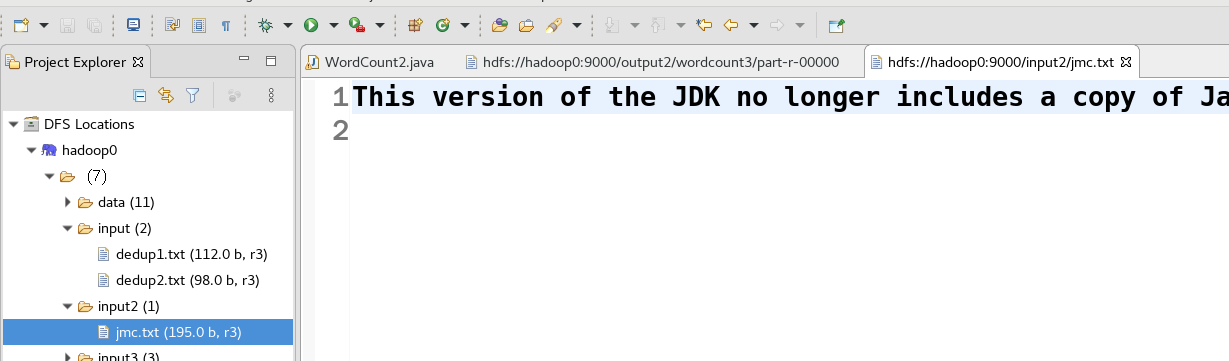
传入文件jmc.txt
Ⅰ 程序代码
package com.etc;

import java.io.IOException;
import java.util.StringTokenizer;
import org.apache.hadoop.conf.Configuration;

import org.apache.hadoop.fs.Path;
import org.apache.hadoop.io.IntWritable;
import org.apache.hadoop.io.Text;
import org.apache.hadoop.io.WritableComparable;
import org.apache.hadoop.mapreduce.Job;
import org.apache.hadoop.mapreduce.Mapper;

import org.apache.hadoop.mapreduce.Reducer;
import org.apache.hadoop.mapreduce.lib.input.FileInputFormat;
import org.apache.hadoop.mapreduce.lib.input.SequenceFileInputFormat;

import org.apache.hadoop.mapreduce.lib.map.InverseMapper;
import org.apache.hadoop.mapreduce.lib.output.FileOutputFormat;
import org.apache.hadoop.mapreduce.lib.output.SequenceFileOutputFormat;
import org.apache.hadoop.mapreduce.lib.output.TextOutputFormat;

public class WordCount2 {

    public static class TokenizerMapper extends Mapper<Object, Text, Text, IntWritable> {
        public void map(Object key, Text value, Context context) throws IOException, InterruptedException {
            System.out.println(key);
            Text keyOut;
            IntWritable valueOut = new IntWritable(1);
            StringTokenizer token = new StringTokenizer(value.toString());
            while (token.hasMoreTokens()) {
                keyOut = new Text(token.nextToken());
                context.write(keyOut, valueOut);
            }
        }
    }

    public static class IntSumReducer extends Reducer<Text, IntWritable, Text, IntWritable> {
        private IntWritable result = new IntWritable();

        public void reduce(Text key, Iterable<IntWritable> values, Context context)
                throws IOException, InterruptedException {
            int sum = 0;
            for (IntWritable val : values) {
                sum += val.get();
            }
            result.set(sum);
            context.write(key, result);
        }
    }

    /**
     * 实现降序
     */
    private static class IntWritableDecreaseingComparator extends IntWritable.Comparator {
        @Override
        public int compare(WritableComparable a, WritableComparable b) {
            // 比较结果取负数即可降序
            return -super.compare(a, b);
        }

        @Override
        public int compare(byte[] b1, int s1, int l1, byte[] b2, int s2, int l2) {
            return -super.compare(b1, s1, l1, b2, s2, l2);
        }
    }

    public static void main(String[] args) throws Exception {
        Configuration conf = new Configuration();
        // 定义一个临时目录
        Path tempDir = new Path("hdfs://hadoop0:9000/output2/wordcount1");
        try {
            Job job = new Job(conf, "word count ");
            job.setJarByClass(WordCount2.class);
            job.setMapperClass(TokenizerMapper.class);
            job.setCombinerClass(IntSumReducer.class);
            job.setReducerClass(IntSumReducer.class);
            // 自定义分区
            job.setNumReduceTasks(2);
            // 指定输出类型
            job.setOutputKeyClass(Text.class);
            job.setOutputValueClass(IntWritable.class);
            // 指定统计作业输出格式,和排序作业的输入格式应对应
            job.setOutputFormatClass(SequenceFileOutputFormat.class);
            // 指定待统计文件目录
            FileInputFormat.addInputPath(job, new Path("hdfs://hadoop0:9000/input2"));
            // 先将词频统计作业的输出结果写到临时目录中,下一个排序作业以临时目录为输入目录
            FileOutputFormat.setOutputPath(job, tempDir);
            if (job.waitForCompletion(true)) {
                Job sortJob = new Job(conf, "sort");
                sortJob.setJarByClass(WordCount2.class);
                // 指定临时目录作为排序作业的输入
                FileInputFormat.addInputPath(sortJob, tempDir);
                sortJob.setInputFormatClass(SequenceFileInputFormat.class);
                // 由Hadoop库提供,作用是实现map()后的数据对key和value交换
                sortJob.setMapperClass(InverseMapper.class);
                // 将Reducer的个数限定为1,最终输出的结果文件就是一个
                sortJob.setNumReduceTasks(1);
                // 最终输出目录,如果存在请先删除再运行
                FileOutputFormat.setOutputPath(sortJob, new Path("hdfs://hadoop0:9000/output2/wordcount2"));
                sortJob.setOutputKeyClass(IntWritable.class);
                sortJob.setOutputValueClass(Text.class);
                sortJob.setOutputFormatClass(TextOutputFormat.class);
                // Hadoop默认对IntWritable按升序排序,重写IntWritable.Comparator类实现降序
                sortJob.setSortComparatorClass(IntWritableDecreaseingComparator.class);
                if (sortJob.waitForCompletion(true)) {
                    System.out.println("ok");
                }
            }
        } catch (Exception ex) {
            ex.printStackTrace();
        }
    }
}
Ⅱ 运行结果
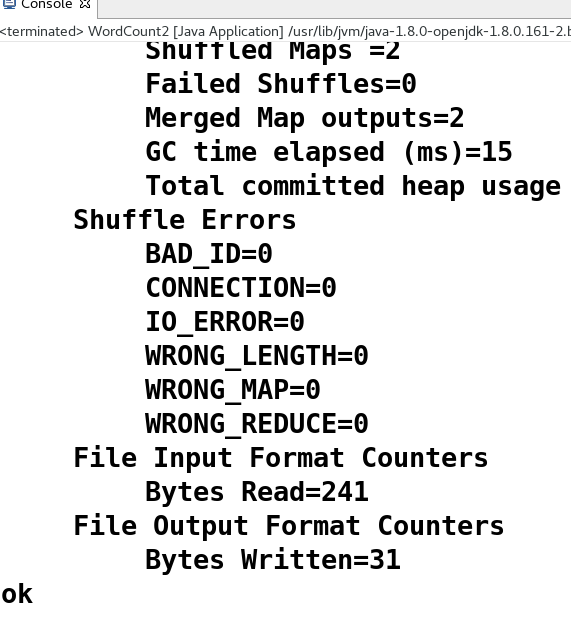
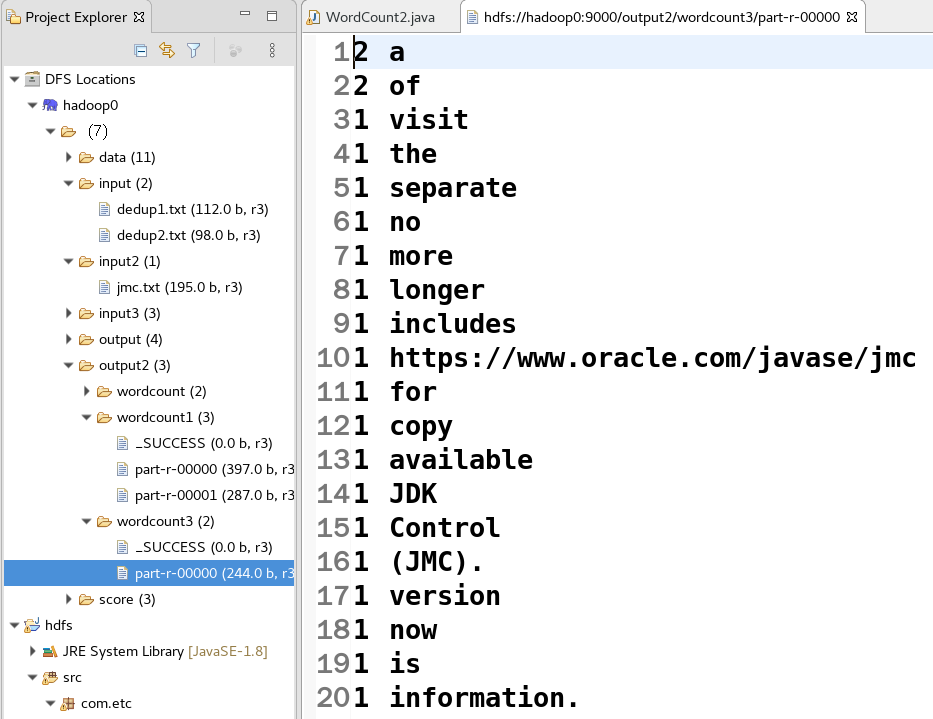

若有收获,就点个赞吧
0 人点赞


