1. Xpath简介
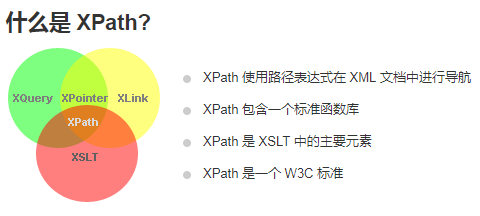
XPath,全称 XML Path Language,即 XML 路径语言,它是一门在XML文档中查找信息的语言。XPath 最初设计是用来搜寻XML文档的,但是它同样适用于 HTML 文档的搜索。。
2. Xpath基础知识
2.1 节点
在 XPath 中,有七种类型的节点:元素、属性、文本、命名空间、处理指令、注释以及文档(根)节点。XML 文档是被作为节点树来对待的。树的根被称为文档节点或者根节点。
<?xml version="1.0" encoding="UTF-8"?><bookstore><book><title lang="en">Harry Potter</title><author>J K. Rowling</author><year>2005</year><price>29.99</price></book></bookstore>
上面的XML文档中的节点例子:
lang=”en” (属性节点)
节点之间的关系:
- 父节点(Parent);
- 子节点(Children);
- 同胞(Sibling):拥有相同的父节点;
- 先辈(Ancestor):父,父的父。。。;
- 后代:子,子的子。。。
2.2 Xpath语法
语法以下述XML文档为例:
<?xml version="1.0" encoding="UTF-8"?>

<bookstore>

<book>
  <title lang="eng">Harry Potter</title>
  <price>29.99</price>
</book>

<book>
  <title lang="eng">Learning XML</title>
  <price>39.95</price>
</book>

</bookstore>
Xpath使用 路径表达式 在XML文档中选取节点。
| 表达式 | 描述 |
|---|---|
| nodename | 选取此节点的所有子节点。 |
| / | 从根节点选取。 |
| // | 从匹配选择的当前节点选择文档中的节点,而不考虑它们的位置。 |
| . | 选取当前节点。 |
| .. | 选取当前节点的父节点。 |
| @ | 选取属性。 |
| 路径表达式 | 结果 |
|---|---|
| bookstore | 选取 bookstore 元素的所有子节点。 |
| /bookstore | 选取根元素 bookstore。 注释:假如路径起始于正斜杠( / ),则此路径始终代表到某元素的绝对路径! |
| bookstore/book | 选取属于 bookstore 的子元素的所有 book 元素。 |
| //book | 选取所有 book 子元素,而不管它们在文档中的位置。 |
| bookstore//book | 选择属于 bookstore 元素的后代的所有 book 元素,而不管它们位于 bookstore 之下的什么位置。 |
| //@lang | 选取名为 lang 的所有属性。 |
Xpath使用 谓语(Predicates)来查找某个特定节点或包含某个指定值的节点。
| 路径表达式 | 结果 |
|---|---|
| /bookstore/book[1] | 选取属于 bookstore 子元素的第一个 book 元素。 |
| /bookstore/book[last()] | 选取属于 bookstore 子元素的最后一个 book 元素。 |
| /bookstore/book[last()-1] | 选取属于 bookstore 子元素的倒数第二个 book 元素。 |
| /bookstore/book[position()<3] | 选取最前面的两个属于 bookstore 元素的子元素的 book 元素。 |
| //title[@lang] | 选取所有拥有名为 lang 的属性的 title 元素。 |
| //title[@lang=’eng’] | 选取所有 title 元素,且这些元素拥有值为 eng 的 lang 属性。 |
| /bookstore/book[price>35.00] | 选取 bookstore 元素的所有 book 元素,且其中的 price 元素的值须大于 35.00。 |
| /bookstore/book[price>35.00]/title | 选取 bookstore 元素中的 book 元素的所有 title 元素,且其中的 price 元素的值须大于 35.00。 |
Xpath使用 通配符 进行未知节点的选取
| 路径表达式 | 结果 |
|---|---|
| * | 匹配任何元素节点。 |
| @* | 匹配任何属性节点。 |
| node() | 匹配任何类型的节点。 |
| 路径表达式 | 结果 |
|---|---|
| /bookstore/* | 选取 bookstore 元素的所有子元素。 |
| //* | 选取文档中的所有元素。 |
| //title[@*] | 选取所有带有属性的 title 元素。 |
Xpath使用 | 进行若干路径选取
| 路径表达式 | 结果 |
|---|---|
| //book/title | //book/price | 选取 book 元素的所有 title 和 price 元素。 |
| //title | //price | 选取文档中的所有 title 和 price 元素。 |
| /bookstore/book/title | //price | 选取属于 bookstore 元素的 book 元素的所有 title 元素,以及文档中所有的 price 元素。 |
2.3 Xpath轴(Axes)
2.4 Xpath运算符
| 运算符 | 描述 | 实例 | 返回值 |
|---|---|---|---|
| | | 计算两个节点集 | //book | //cd | 返回所有拥有 book 和 cd 元素的节点集 |
| + | 加法 | 6 + 4 | 10 |
| - | 减法 | 6 - 4 | 2 |
| * | 乘法 | 6 * 4 | 24 |
| div | 除法 | 8 div 4 | 2 |
| = | 等于 | price=9.80 | 如果 price 是 9.80,则返回 true。 如果 price 是 9.90,则返回 false。 |
| != | 不等于 | price!=9.80 | 如果 price 是 9.90,则返回 true。 如果 price 是 9.80,则返回 false。 |
| < | 小于 | price<9.80 | 如果 price 是 9.00,则返回 true。 如果 price 是 9.90,则返回 false。 |
| <= | 小于或等于 | price<=9.80 | 如果 price 是 9.00,则返回 true。 如果 price 是 9.90,则返回 false。 |
| > | 大于 | price>9.80 | 如果 price 是 9.90,则返回 true。 如果 price 是 9.80,则返回 false。 |
| >= | 大于或等于 | price>=9.80 | 如果 price 是 9.90,则返回 true。 如果 price 是 9.70,则返回 false。 |
| or | 或 | price=9.80 or price=9.70 | 如果 price 是 9.80,则返回 true。 如果 price 是 9.50,则返回 false。 |
| and | 与 | price>9.00 and price<9.90 | 如果 price 是 9.80,则返回 true。 如果 price 是 8.50,则返回 false。 |
| mod | 计算除法的余数 | 5 mod 2 | 1 |
3. Xpath 与 Python的结合使用
LXML Doc
from lxml import etree

text = '''
<div>
    <ul>
         <li class="item-0"><a href="https://ask.hellobi.com/link1.html">first item</a></li>
         <li class="item-1"><a href="https://ask.hellobi.com/link2.html">second item</a></li>
         <li class="item-inactive"><a href="https://ask.hellobi.com/link3.html">third item</a></li>
         <li class="item-1"><a href="https://ask.hellobi.com/link4.html">fourth item</a></li>
         <li class="item-0"><a href="https://ask.hellobi.com/link5.html">fifth item</a>
     </ul>
 </div>
'''
html = etree.HTML(text)
result = etree.tostring(html)
print(result.decode('utf-8'))
3.1 lxml包下的etree模块的方法:
3.1.1 lxml.etree.HTML()
HTML(text, parser=None, *, base_url=None)
HTML(text, parser=None, base_url=None)
Parses an HTML document from a string constant. Returns the root
node (or the result returned by a parser target). This function
can be used to embed “HTML literals” in Python code.
To override the parser with a different HTMLParser you can pass it to
the parser keyword argument.
The base_url keyword argument allows to set the original base URL of
the document to support relative Paths when looking up external entities
(DTD, XInclude, …).
etree.HTML 方法将返回一个 lxml.etree._Element 类对象(Doc Object)。
3.1.2 lxml.etree.tostring()
tostring(element_or_tree, encoding=None, method=”xml”,
xmldeclaration=None, pretty_print=False, with_tail=True,
standalone=None, doctype=None,
exclusive=False, with_comments=True, inclusive_ns_prefixes=None)
** _Serialize_ _an element to an encoded string representation of its XML
tree.
Defaults to ASCII encoding without XML declaration**. This
behaviour can be configured with the keyword arguments ‘encoding’
(string) and ‘xml_declaration’ (bool). Note that changing the
encoding to a non UTF-8 compatible encoding will enable a
declaration by default.
etree.tostring方法能够将一个 _Element对象转化为一个 bytes 类型的串,补充确实部分节点,编码方式可指定,default为ASCII。
decode(self, /, encoding=’utf-8’, errors=’strict’)
Decode the bytes using the codec registered for encoding.
最后使用bytes的decode方法,将bytes类型的字节串转化为字符串。
重点 -- etree.tostring 方法
以文件abc.txt为例:
<div>
    <ul>
         <li class="item-0"><a href="https://ask.hellobi.com/link1.html">哈哈</a></li>
     </ul>
 </div>
etree.tostring 方法有两个参数 encoding 及 xml_declaration
Defaults to ASCII encoding without XML declaration
一般情况下,需要指定encoding,否则将按照ASCII编码进行编码
以下分为4种情况进行试验:
- default: 使用默认参数
- 只指定
encoding参数 - 只指定
xml_declaration参数 - 指定
encoding及xml_declaration参数
试验结果如下:
html = etree.parse('abc.txt')
In [197]: print(etree.tostring(html).decode())
<div>
<ul>
<li class="item-0"><a href="https://ask.hellobi.com/link1.html">哈哈</a></li>
</ul>
</div>
In [198]: print(etree.tostring(html, encoding='utf-8').decode())
<div>
<ul>
<li class="item-0"><a href="https://ask.hellobi.com/link1.html">哈哈</a></li>
</ul>
</div>
In [199]: print(etree.tostring(html,xml_declaration=True).decode())
<?xml version='1.0' encoding='ASCII'?>
<div>
<ul>
<li class="item-0"><a href="https://ask.hellobi.com/link1.html">哈哈</a></li>
</ul>
</div>
In [200]: print(etree.tostring(html,encoding='utf-8', xml_declaration=True).decode())
<?xml version='1.0' encoding='utf-8'?>
<div>
<ul>
<li class="item-0"><a href="https://ask.hellobi.com/link1.html">哈哈</a></li>
</ul>
</div>
结论:
- 如果要进行处理的xml含有超出ASCII字符范围,则需要指定encoding编码方式
- xml_declaration=True将明确显示xml版本,编码等信息
3.1.3 lxml.etree.parse()
html = etree.parse('./test.html', etree.HTMLParser())
result = html.xpath('//*')
print(result)
parse(source, parser=None, base_url=None)
Return an ElementTree object loaded with source elements. If no parser is provided as second argument, the default parser is used.
The source can be any of the following:
- a file name/path
- a file object
- a file-like object
- a URL using the HTTP or FTP protocol
重点 -- etree.parse 方法的 parser 参数:
parser参数可以指定以不同的方式进行 parse
已知的两种parse方式为:
- etree.HTMLParser()
- etree.XMLParser()
仍然以上述abc.txt为例
In [209]: html_parser_html = etree.parse('abc.txt', etree.HTMLParser())
In [210]: html_parser_xml = etree.parse('abc.txt', etree.XMLParser())
In [211]: print(etree.tostring(html_parser_html, encoding='utf-8').decode())
<!DOCTYPE html PUBLIC "-//W3C//DTD HTML 4.0 Transitional//EN" "http://www.w3.org/TR/REC-html40/loose.dtd">
<html><body><div>
<ul>
<li class="item-0"><a href="https://ask.hellobi.com/link1.html">åå</a></li>
</ul>
</div>
</body></html>
In [212]: print(etree.tostring(html_parser_xml, encoding='utf-8').decode())
<div>
<ul>
<li class="item-0"><a href="https://ask.hellobi.com/link1.html">哈哈</a></li>
</ul>
</div>
当使用 etree.HTMLParser时,若不指定encoding参数,则无法正确解析
html_parser_html = etree.parse('abc.txt', etree.HTMLParser(encoding='utf-8'))
In [218]: print(etree.tostring(html_parser_html, encoding='utf-8', xml_declaration=True).decode())
<?xml version='1.0' encoding='utf-8'?>
<!DOCTYPE html PUBLIC "-//W3C//DTD HTML 4.0 Transitional//EN" "http://www.w3.org/TR/REC-html40/loose.dtd">
<html><body><div>
    <ul>
         <li class="item-0"><a href="https://ask.hellobi.com/link1.html">哈哈</a></li>
     </ul>
 </div>
</body></html>
结论:当使用parser时,尽量指定encoding
3.1.4 lxml.etree. element/element_tree’s xpath()
xpath是lxml.etree._ElementTree 及 lxml.etree._Element的方法
xpath(self, _path, namespaces=None, extensions=None, smart_strings=True, **_variables)
Evaluate an xpath expression using the element as context node.
lxml.etree._Element.xpath 返回的是一个列表,元素类型为 lxml.etree._Element。
html = etree.parse('abc.txt', etree.HTMLParser(encoding='utf-8'))
3.1.4.1 子节点:
result = html.xpath('//li/a')  #所有li节点的直接子节点a

result = html.xpath('//ul//a') #所有ul节点的所有子孙节点a 的element列表
3.1.4.2 父节点:
result = html.xpath('//a[@href="https://ask.hellobi.com/link4.html"]/../@class')
#所有属性href为"https://ask.hellobi.com/link4.html"的a节点的父节点的class属性 的列表
3.1.4.3 属性匹配节点:
result = html.xpath('//li[@class="item-0"]')
#所有属性class为“item-0”的li节点 的element列表
3.1.4.4 文本获取:
XPath 中的 text() 方法可以获取节点中的文本
#所有li节点下直接子节点a的文本 列表
result = html.xpath('//li[@class="item-0"]/a/text()')

#所有li节点下所有子孙的本文  列表 -- 可能会包含一些不期望的换行符等符号,但却是完整的
result = html.xpath('//li[@class="item-0"]//text()')
3.1.4.5 节点属性获取:
@
#所有li节点直接子节点a的href属性  的列表
result = html.xpath('//li/a/@href')
在这里我们通过 @href 即可获取节点的 href 属性,注意此处和属性匹配的方法不同,属性匹配是中括号加属性名和值来限定某个属性,如 [@href=”https://ask.hellobi.com/link1.html“],而此处的 @href 指的是获取节点的某个属性,二者需要做好区分。
3.1.4.6 属性多值匹配
text = ‘’’
如果想获取所有 class属性包含”li” 的li节点,再使用之前的方法将无法生效,此时需要借助 contains(属性名,属性值) 方法。
result = html.xpath('//li[contains(@class, "li")]/a/text()')
3.1.4.6 多属性匹配
xpath的运算符 or , and
3.1.4.7 节点轴选择
语法: ……/轴::节点选择器…
from lxml import etree

text = '''
<div>
    <ul>
         <li class="item-0"><a href="https://ask.hellobi.com/link1.html"><span>first item</span></a></li>
         <li class="item-1"><a href="https://ask.hellobi.com/link2.html">second item</a></li>
         <li class="item-inactive"><a href="https://ask.hellobi.com/link3.html">third item</a></li>
         <li class="item-1"><a href="https://ask.hellobi.com/link4.html">fourth item</a></li>
         <li class="item-0"><a href="https://ask.hellobi.com/link5.html">fifth item</a>
     </ul>
 </div>
'''
html = etree.HTML(text)

#获取所有祖先节点
result = html.xpath('//li[1]/ancestor::*')
print(result)

#获取div祖先节点
result = html.xpath('//li[1]/ancestor::div')
print(result)

#获取所有属性值
result = html.xpath('//li[1]/attribute::*')
print(result)

#获取所有直接子节点a,且href属性值被限定
result = html.xpath('//li[1]/child::a[@href="https://ask.hellobi.com/link1.html"]')
print(result)

#获取所有子孙节点,且节点被限定为‘span‘
result = html.xpath('//li[1]/descendant::span')
print(result)

#获取当前节点之后的所有节点,且限定为location为2的那个节点
result = html.xpath('//li[1]/following::*[2]')
print(result)

#获取当前节点之后的所有同级节点
result = html.xpath('//li[1]/following-sibling::*')
print(result)
3.2 lxml包下的html模块的方法
from lxml import html
3.2.1 lxml.html.HtmlElement 类
It is based on lxml’s HTML parser, but provides a special Element API for HTML elements, just for dealing with HTML.
继承关系:class HtmlElement(lxml.etree.ElementBase, HtmlMixin)
3.2.2 基础功能类
生成 lxml.html.HtmlElement 对象的方法:
单个 HTML标签 字符串
fragmentfromstring(html, create_parent=False, base_url=None, parser=None, kw)
Parses a _single HTML element**; it is an error if there is more than one element, or if anything but whitespace precedes or follows the element.多个 HTML标签 字符串
fragments_fromstring(html, no_leading_text=False, base_url=None, parser=None, **kw)
Parses several HTML elements, returning a list of elements.一整个字符串
fromstring(html, base_url=None, parser=None, **kw)
Parse the html, returning a single element/document.
生成 tree 对象的方法:
parse(filenameor_url, parser=None, base_url=None, kw)
Parse a filename, URL, or file-like object into an _HTML document
tree**.
Note: this returns a tree, not an element. Use
parse(...).getroot() to get the document root.
此方法要求输入 本地文本 或 本地html
根据method(html,xml,text),生成对应类型的串
tostring(doc, pretty_print=False, include_meta_content_type=False, encoding=None, method=’html’, with_tail=True, doctype=None)
Return an HTML string representation of the document.
此方法要求输入 element 对象
如果encoding参数未指定为’unicode’,则反回 bytes 类型串,否则返回 str 类型串
实例举例:
>>> from lxml import html
>>> root = html.fragment_fromstring('<p>Hello<br>world!</p>')

>>> html.tostring(root)
b'<p>Hello<br>world!</p>'
>>> html.tostring(root, method='html')
b'<p>Hello<br>world!</p>'

>>> html.tostring(root, method='xml')
b'<p>Hello<br/>world!</p>'

>>> html.tostring(root, method='text')
b'Helloworld!'

>>> html.tostring(root, method='text', encoding='unicode')
'Helloworld!'

>>> root = html.fragment_fromstring('<div><p>Hello<br>world!</p>TAIL</div>')
>>> html.tostring(root[0], method='text', encoding='unicode')
'Helloworld!TAIL'

>>> html.tostring(root[0], method='text', encoding='unicode', with_tail=False)
'Helloworld!'

>>> doc = html.document_fromstring('<p>Hello<br>world!</p>')
>>> html.tostring(doc, method='html', encoding='unicode')
'<html><body><p>Hello<br>world!</p></body></html>'

>>> print(html.tostring(doc, method='html', encoding='unicode',
...          doctype='<!DOCTYPE HTML PUBLIC "-//W3C//DTD HTML 4.01//EN"'
...                  ' "http://www.w3.org/TR/html4/strict.dtd">'))
<!DOCTYPE HTML PUBLIC "-//W3C//DTD HTML 4.01//EN" "http://www.w3.org/TR/html4/strict.dtd">
<html><body><p>Hello<br>world!</p></body></html>

若有收获,就点个赞吧
0 人点赞


