本次实战设备模型为项目模板中“空气盒子”,在标准功能中新增“当前温度”、“当前湿度”为设备属性,故障上报为设备事件,如下图所示: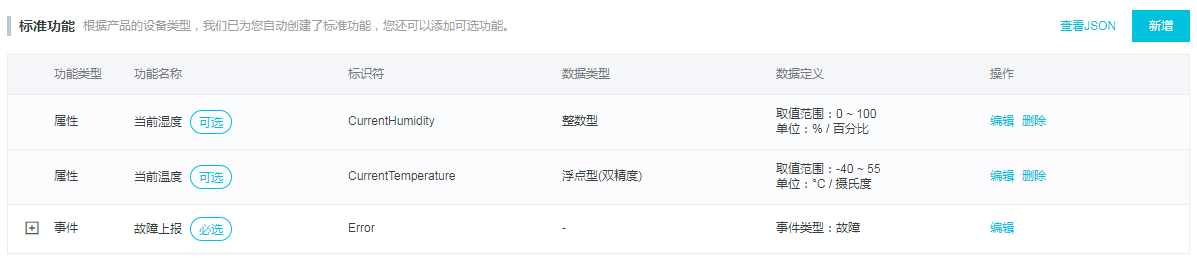
项目创建过程不再赘述。
node.js文件如下:
const aliyunIot = require('aliyun-iot-device-sdk');const device = aliyunIot.device({productKey: "xxxxxxxxx", //填写模型下测试设备三元组deviceName: "xxxxxxxxx",deviceSecret: "xxxxxxxxxxxx"});//进行与平台连接,并执行连接后的业务循环device.on('connect', () => {console.log('connect succesfully!');const interval = setInterval(() => {//生成随机温度t和湿度h,Math.random()生成0-1之间随机数const t = Math.floor((Math.random() -0.5)*5+20);const h = Math.floor((Math.random() -0.5)*10+70);console.log(`Post current temperature: ${t}`);console.log(`Post current humidity: ${h}`);device.postProps({CurrentTemperature: t,CurrentHumidity: h});// 以下代码实现事件上报// console.log('Report filterChange event');// device.postEvent('Error', {// ErrorCode: 0// });}, 5000);});device.on('error', (err) => {console.log(err);});
文件通过require将aliyun-iot-device-sdk导入进之后,进行设备参数初始化,得到device实例对象,通过device.on()进行平台连接,在连接成功()=>{····}回调函数中进行业务逻辑处理,本demo例程使用Math.random()方法随机生成的温湿度数据,通过device.postProps()方法进行5秒钟的属性周期上报。示例代码中注释了事件上报功能,通过device.postEvent()进行事件上报。
将设备三元组内容更换为设备模型下真实设备,在终端中执行node index.js开始运行Node.js SDK脚本程序,在终端中将会打印设备属性上报消息。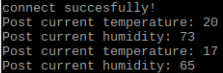
至此,我们通过Node.js SDK模拟传感器数据完成了“空气盒子”的数据上报,树莓派在Node.js环境下支持调用GPIO外接各类传感器,开发者可以使用Node.js SDK读取真实传感器温湿度数据,完成数据采集上报。

若有收获,就点个赞吧
0 人点赞


