安装步骤:
Step1:创建相关文件夹
/usr/local/docker/oracle
Step2:编写 docker-compose.yml
touch docker-compose.ymlvim docker-compose.yml
version: '3.1'services:master:image: registry.cn-hangzhou.aliyuncs.com/helowin/oracle_11gcontainer_name: oracleprivileged: trueports:- 1521:1521
Step3:docker-compose 启动
docker-compose up -d
Step4:进入容器,进行相关配置
docker exec -it oracle bash
cd /home/oracle # 进入到 oracle 用户目录source .bash_profile # 加载 oracle 环境变量$PATH # 查看 oracle 环境变量是否生效sqlplus / as sysdba # 连接 oracle 数据库alter user system identified by oracle; # 修改 DBA 账号的密码为 oraclealter user sys identified by oracle; # 修改 DBA 账号的密码为 oraclealter profile default limit password_life_time unlimited; # 设置密码为永不过期create user test identified by oracle; # 创建一个 test 用户,密码 oracleselect * from dba_users t where t.username = 'TEST'; # 查询用户是否创建成功grant connect, resource to test; # 给用户授予连接和数据权限
Step5:使用 Navicat 进行连接测试
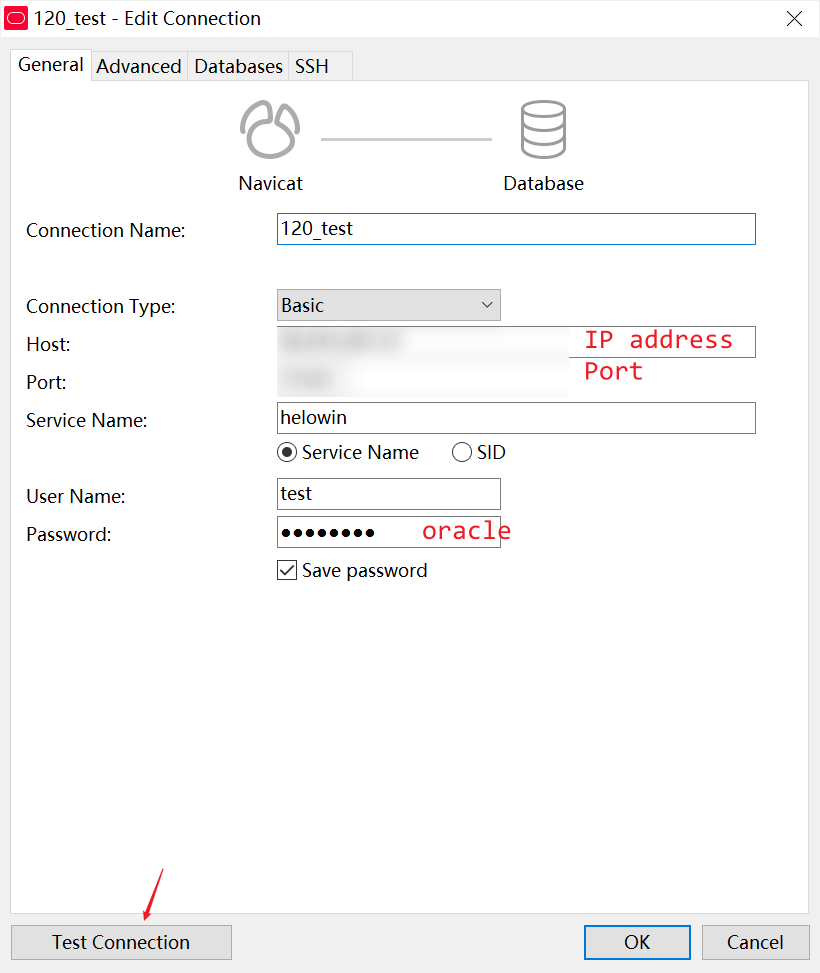
数据持久化配置
通过查看容器内的目录文件结构可以发现,helowin 的实例安装在:
/home/oracle/app/oracle/oradata/helowin 目录下
Step1:拷贝数据到宿主机,并修改 owner
docker cp oracle:/home/oracle/app/oracle/oradata/helowin /usr/local/docker/oracle/helowincd /usr/local/docker/oraclechown -R 500.500 ./helowin # 500 500 是容器内 oracle 组合用户的 id
Step2:关闭容器,修改配置文件并重启:
#关闭容器docker-compose down
Step3:docker-compose.yml 配置文件添加数据卷映射
version: '3.1'services:master:image: registry.cn-hangzhou.aliyuncs.com/helowin/oracle_11gcontainer_name: oracleprivileged: trueports:- 1521:1521volumes:- ./helowin:/home/oracle/app/oracle/oradata/helowin
Step4:重启容器,查看日志
docker-compose up -ddocker logs -f oracle/home/oracle/app/oracle/product/11.2.0/dbhome_2Processing Database instance "helowin": log file /home/oracle/app/oracle/product/11.2.0/dbhome_2/startup.logRedo Buffers 7360512 bytesORA-00214: control file '/home/oracle/app/oracle/oradata/helowin/control01.ctl'version 851 inconsistent with file'/home/oracle/app/oracle/flash_recovery_area/helowin/control02.ctl' version 841SQL> Disconnected from Oracle Database 11g Enterprise Edition Release 11.2.0.1.0 - 64bit ProductionWith the Partitioning, OLAP, Data Mining and Real Application Testing options/home/oracle/app/oracle/product/11.2.0/dbhome_2/bin/dbstart: Database instance "helowin" warm started.tail: unrecognized file system type 0x794c7630 for `/home/oracle/app/oracle/product/11.2.0/dbhome_2/startup.log'. Reverting to polling.
ORA-00214 据说这个错误是由于 oracle 为了数据安全,添加的版本验证
Step5:进入容器解决错误
docker exec -it oracle bashcd /home/oracle # 进入到 oracle 用户目录source .bash_profile # 加载 oracle 环境变量(每次进入容器都要加载配置文件)# 删除新生成的版本控制文件,将数据卷中的版本控制文件复制为新生成的版本控制文件rm -rf /home/oracle/app/oracle/flash_recovery_area/helowin/control02.ctlcp /home/oracle/app/oracle/oradata/helowin/control01.ctl /home/oracle/app/oracle/flash_recovery_area/helowin/control02.ctlsqlplus / as sysdba # 以 dba 身份连接 oracle 数据库shutdown immediate # 关闭数据库实例(这里会报错,不用管)startup # 启动实例
导入 DMP 文件
0. 进入容器内的 sqlplus 控制台
docker exec -it oracle bashcd /home/oracle # 进入到 oracle 用户目录source .bash_profile # 加载 oracle 环境变量(每次进入容器都要加载配置文件)sqlplus / as sysdba # 以 dba 身份连接 oracle 数据库
1. 创建临时表空间
SQL> create temporary tablespace user_temp tempfile'\usr\oracle\oracledata\user_temp.dbf' size 50mautoextend on next 50m maxsize 2048m extent management local;
2. 创建表空间
SQL> create tablespace user_data logging datafile'\usr\oracle\oracledata\user_data.dbf' size 50mautoextend on next 50m maxsize 2048m extent management local;
3. 分配表空间(上面已经创建了 test 用户)
SQL> alter user test default tablespace other_data temporary tablespace other_temp;
4. 创建用户并分配表空间(可选)
SQL> create user user identified by passworddefault tablespace user_datatemporary tablespace user_temp;
5. 重命名表空间(可选)
SQL> alter tablespace user_data rename to new_user_data;
6. 创建目录并授权
# 创建目录 object_name=dump_dirSQL> create or replace directory dump_dir as '/usr/oracle/dump/dir';# 授权读写给 test 用户SQL> grant read,write on directory dump_dir to test;# 退出 sqlplus 后,创建目录$ mkdir /usr/oracle/dump/dir# 如果没有创建权限 切换到 root 用户 密码:helowin$ su root# 修改备份目录的属主和属组$ chown -R oracle:oinstall /usr/oracle/dump/dir
7. 导入 dump 文件
从宿主机拷贝到容器内:
$ docker cp you_dmp_file.dmp oracle: /usr/oracle/dump/dir
进入容器内,执行 impdp 命令:
docker exec -it oracle bashcd /home/oracle # 进入到 oracle 用户目录source .bash_profile # 加载 oracle 环境变量(每次进入容器都要加载配置文件)impdp test/oracle directory="dump_dir" dumpfile="backup.DMP" logfile="backup.log" remap_schema=hefei120:test FULL=y;
如果备份文件的用户名 schema 和 新建的不一致需要加上类似参数: remap_schema=hefei120:test
**
查看导出的日志:
[oracle@0a7dd0018e31 dir]$ cat backup.log;;;Import: Release 11.2.0.1.0 - Production on Wed Dec 30 11:43:17 2020Copyright (c) 1982, 2009, Oracle and/or its affiliates. All rights reserved.;;;Connected to: Oracle Database 11g Enterprise Edition Release 11.2.0.1.0 - 64bit ProductionWith the Partitioning, OLAP, Data Mining and Real Application Testing optionsMaster table "TEST"."SYS_IMPORT_FULL_01" successfully loaded/unloadedStarting "TEST"."SYS_IMPORT_FULL_01": test/******** directory=dump_dir dumpfile=backup.DMP logfile=backup.log remap_schema=hefei120:test FULL=yProcessing object type SCHEMA_EXPORT/USERORA-39083: Object type USER failed to create with error:ORA-31625: Schema SYSTEM is needed to import this object, but is unaccessibleORA-01031: insufficient privilegesFailing sql is:CREATE USER "TEST" IDENTIFIED BY VALUES 'S:4E2A77DFC12972DE4D77C7B0DE8AF5391BEEF9137ADF87629C53F7E1BCED;2DC36959CD4C0E6C' DEFAULT TABLESPACE "USERS" TEMPORARY TABLESPACE "TEMP"Processing object type SCHEMA_EXPORT/SYSTEM_GRANTORA-39083: Object type SYSTEM_GRANT failed to create with error:ORA-31625: Schema SYSTEM is needed to import this object, but is unaccessibleORA-01031: insufficient privilegesFailing sql is:GRANT UNLIMITED TABLESPACE TO "TEST"Processing object type SCHEMA_EXPORT/ROLE_GRANTORA-39083: Object type ROLE_GRANT failed to create with error:ORA-31625: Schema SYSTEM is needed to import this object, but is unaccessibleORA-01031: insufficient privilegesFailing sql is:GRANT "CONNECT" TO "TEST"ORA-39083: Object type ROLE_GRANT failed to create with error:ORA-31625: Schema SYSTEM is needed to import this object, but is unaccessibleORA-01031: insufficient privilegesFailing sql is:GRANT "RESOURCE" TO "TEST"ORA-39083: Object type ROLE_GRANT failed to create with error:ORA-31625: Schema SYSTEM is needed to import this object, but is unaccessibleORA-01031: insufficient privilegesFailing sql is:GRANT "DBA" TO "TEST"Processing object type SCHEMA_EXPORT/DEFAULT_ROLEORA-39083: Object type DEFAULT_ROLE failed to create with error:ORA-31625: Schema SYSTEM is needed to import this object, but is unaccessibleORA-01031: insufficient privilegesFailing sql is:ALTER USER "TEST" DEFAULT ROLE ALLProcessing object type SCHEMA_EXPORT/PRE_SCHEMA/PROCACT_SCHEMAProcessing object type SCHEMA_EXPORT/TABLE/TABLEProcessing object type SCHEMA_EXPORT/TABLE/TABLE_DATA. . imported "TEST"."T_INVOICE_DETAIL" 103.9 MB 1142634 rows. . imported "TEST"."T_INVOICE" 78.16 MB 215434 rows. . imported "TEST"."T_AKDATA" 51.18 MB 255316 rows. . imported "TEST"."T_CONTRAST_RESULT" 13.95 MB 109734 rows. . imported "TEST"."T_INVOICE_PRINT" 1.834 MB 7350 rows. . imported "TEST"."T_SYS_LOG" 1.759 MB 15386 rows. . imported "TEST"."T_INVOICE_BALANCES_USER" 424.2 KB 1188 rows. . imported "TEST"."T_INVOICE_BALANCES" 213.7 KB 637 rows. . imported "TEST"."T_INVOICE_PRINT_JIAOXIAO" 220.8 KB 974 rows. . imported "TEST"."T_SYS_USER" 55.36 KB 184 rows. . imported "TEST"."T_CONTRAST" 11.26 KB 35 rows. . imported "TEST"."T_INVOICE_HUIKU" 7.429 KB 20 rows. . imported "TEST"."T_INVOICE_ITEM" 8.945 KB 41 rows. . imported "TEST"."T_INVOICE_TOTAL_BALANCES" 15.81 KB 36 rows. . imported "TEST"."T_SYS_CODENAME" 11.34 KB 20 rows. . imported "TEST"."T_SYS_CODE_VAL" 13.00 KB 55 rows. . imported "TEST"."T_SYS_DEPT" 26.44 KB 26 rows. . imported "TEST"."T_SYS_DEPT_ADMIN" 9.5 KB 6 rows. . imported "TEST"."T_SYS_PROGRAM" 19.54 KB 91 rows. . imported "TEST"."T_SYS_ROLE" 9.570 KB 9 rows. . imported "TEST"."T_SYS_ROLE_PROGRAM" 19.92 KB 298 rows. . imported "TEST"."T_SYS_USER_ATTR" 10.28 KB 12 rows. . imported "TEST"."T_SYS_USER_ORG" 5.898 KB 1 rows. . imported "TEST"."T_SYS_USER_ROLE" 24.03 KB 181 rows. . imported "TEST"."T_SYS_USER_SHORTCUT" 6.304 KB 1 rows. . imported "TEST"."T_SYS_USER_VAL" 7.031 KB 16 rows. . imported "TEST"."T_CONTRAST_RESULTTEMP" 0 KB 0 rows. . imported "TEST"."T_INVOICE_CAR" 0 KB 0 rows. . imported "TEST"."T_INVOICE_STRET" 0 KB 0 rows. . imported "TEST"."T_INVOICE_THEDAY" 0 KB 0 rows. . imported "TEST"."T_SYS_AREA" 0 KB 0 rows. . imported "TEST"."T_SYS_FILE" 0 KB 0 rows. . imported "TEST"."T_SYS_FILE_TYPE" 0 KB 0 rowsProcessing object type SCHEMA_EXPORT/TABLE/INDEX/INDEXProcessing object type SCHEMA_EXPORT/TABLE/CONSTRAINT/CONSTRAINTProcessing object type SCHEMA_EXPORT/TABLE/INDEX/STATISTICS/INDEX_STATISTICSProcessing object type SCHEMA_EXPORT/TABLE/COMMENTProcessing object type SCHEMA_EXPORT/TABLE/CONSTRAINT/REF_CONSTRAINTProcessing object type SCHEMA_EXPORT/TABLE/STATISTICS/TABLE_STATISTICSJob "TEST"."SYS_IMPORT_FULL_01" completed with 6 error(s) at 11:43:37[oracle@0a7dd0018e31 dir]$
8. Navicat 查看导入结果
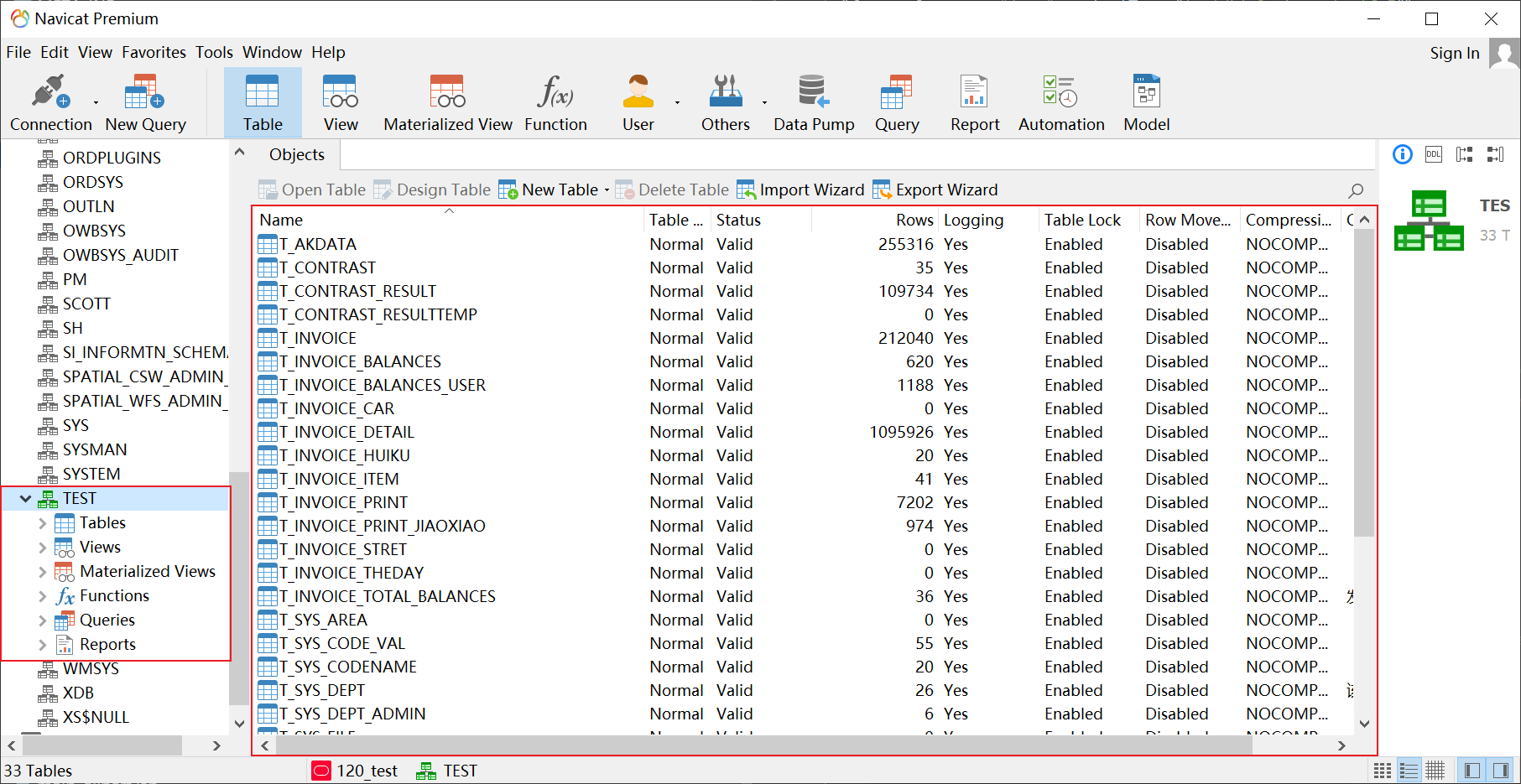
参考文档:
核心安装流程参考:
备份文件导入参考:
错误信息处理:

若有收获,就点个赞吧
0 人点赞


