What is Cypher? 什么是 Cypher
cypher n. 密码,暗号
Cypher is a graph query language that is used to query the Neo4j Database. Just like you use SQL to query a MySQL database, you would use Cypher to query the Neo4j Database.
Cypher 是一种图查询语言,用于查询 Neo4j 数据库。就像使用 SQL 查询 MySQL 数据库一样,您也可以使用Cypher 查询Neo4j数据库。
A simple cypher query can look something like this
一个简单的 cypher 查询示例:
Match (m:Movie) where m.released > 2000 RETURN m limit 5
Nodes and Relationships 节点和关系
Nodes and Relationships are the basic building blocks of a graph database.
节点和关系是图数据库的基本结构。
Nodes 节点
Nodes represent entities. A node in graph database is similar to a row in a relational database. In the picture below we can see 2 kinds of nodes - Person and Movie. In writing a cypher query, a node is enclosed between a parenthesis — like (p:Person) where p is a variable and Person is the type of node it is referring to.
节点代表实体。图数据库中的节点类似于关系数据库中的行。在下面的图片中,我们可以看到2种节点 Person 和 Movie 。在编写 cypher 查询时,节点被括在圆括号中 - 类似 (p:Person) p 是一个变量并且 Person 是它所代表的节点类型。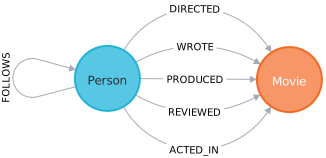
Relationship 关系
Two nodes can be connected with a relationship. In the above image ACTED_IN, REVIEWED, PRODUCED, WROTE and DIRECTED are all relationships connecting the corresponding types of nodes.
In writing a cypher query, relationships are enclosed in square brackets - like [w:WORKS_FOR] where w is a variable and WORKS_FOR is the type of relationship it is referring to.
Two nodes can be connected with more than one relationships.
两个节点可以通过关系连接。在上图中 ACTED_IN , 综述 , 产生 , 写 和 定向是连接相应类型节点的所有关系。
在编写密码查询时,关系用方括号括起来 [w:WORKS_FOR] 哪里 w 是一个变量并且 WORKS_FOR是它所指的关系类型。两个节点可以与多个关系连接。
_MATCH (p:Person)-[d:DIRECTED]-(m:Movie) where m.released > 2010 RETURN p,d,m_
Hint: You can click on the query above to populate it in the editor.
Expected Result: The above query will return all Person nodes who directed a movie that was released after 2010.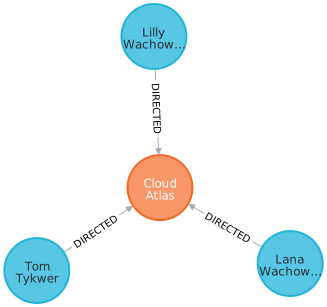
Labels 标签
Labels is a name or identifer of a Node or a Relationship. In the image below Movie and Person are Node labels and ACTED_IN, REVIEWED, etc are Relationship labels.
标签是节点或关系的名称或标识符。在下图中 Movie 和 Person 是节点标签,ACTED_IN,REVIEWED 等是关系标签。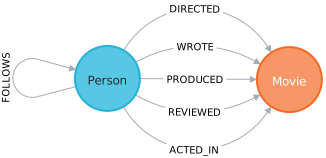
In writing a cypher query, Labels are prefixed with a colon - like :Person or :ACTED_IN. You can assign the node label to a variable by prefixing the syntax with the variable name. Like (p:Person) means p variable denoted Person labeled nodes.
在编写 cypher 查询时,标签以冒号作为前缀,比如 :Person 或者 :ACTED_IN。
可以通过在冒号前加上变量名称来将节点标签分配给变量。
比如 (p:Person) 表示 p 变量 指代 Person 标记的节点。类似面向对象中变量和类的关系。
Labels are used when you want to perform operations only on a specific types of Nodes. Like
_MATCH (p:Person) RETURN p limit 20_
will return only Person Nodes (limiting to 20 items) while
_MATCH (n) RETURN n limit 20_
will return all kinds of nodes (limiting to 20 items).
Properties 属性
Properties are name-value pairs that are used to add attributes to nodes and relationships.
属性是用于向节点和关系添加属性的键值对。为了查询并返回节点的指定属性可以这么写:
To return specific properties of a node you can write -MATCH (m:Movie) return m.title, m.released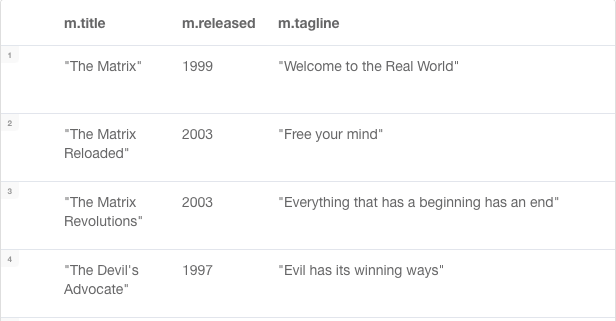
Expected Result - This will return Movie nodes but with only the title and released properties.
Create a Node 创建一个节点
Create clause can be used to create a new node or a relationship.
Create 语句可用于创建新节点或关系。_Create (p:Person {name: 'John Doe'}) RETURN p_
The above statement will create a new Person node with property name having value John Doe.
上述语句将创建一个新的具有 name 属性 ‘John Doe’ 的 Person 节点。
Finding Nodes with Match and Where Clause
Match clause is used to find nodes that match a particular pattern.
This is the primary way of getting data from a Neo4j database.
Match 语句用于查找与特定模式匹配的节点。这是从Neo4j数据库获取数据的主要方式。
In most cases, a Match is used along with certain conditions to narrow down the result.
在大多数情况下,Match 用于配合特定条件缩小结果范围。_Match (p:Person {name: 'Tom Hanks'}) RETURN p_
This is one way of doing it. Although you can only do basic string match based filtering this way (without using WHERE clause).
这是一种方法。尽管您只能以这种方式进行基于基本字符串匹配的过滤 (不使用 WHERE 语句)。
Another way would be to use a WHERE clause which allows for more complex filtering including >, <, Starts With, Ends With, etc_MATCH (p:Person) where p.name = "Tom Hanks" RETURN p_
Both of the above queries will return the same results.
You can read more about Where clause and list of all filters here -
https://neo4j.com/docs/cypher-manual/4.1/clauses/where/
Merge Clause 合并语句
The Merge clause is used to either
- match the existing nodes and bind them or
- create new node(s) and bind them
It is a combination of Match and Create and additionally allows to specify additional actions if the data was matched or created.
Merge 用于
- 匹配现有节点并绑定它们或
- 创建新节点并绑定它们
它是 Match 和 Create 的结合,此外,如果数据匹配或创建,还允许指定其他操作。
_MERGE (p:Person {name: 'John Doe'}) ON MATCH SET p.lastLoggedInAt = timestamp() ON CREATE SET p.createdAt = timestamp() Return p_
The above statement will create the Person node if it does not exist. If the node already exists, then it will set the property lastLoggedInAt to the current timestamp. If node did not exist and was newly created instead, then it will set the createdAt property to the current timestamp.
如果人员节点不存在,则上述语句将创建该节点。如果节点已经存在,则它将设置属性 lastLoggedInAt = 当前时间戳。如果节点不存在并且是新创建的,则它将设置 createdAt = 当前时间戳。
Create a Relationship 创建关系
A Relationship connects 2 nodes.
关系连接2个节点。
_MATCH (p:Person), (m:Movie) WHERE p.name = "Tom Hanks" and m.title = "Cloud Atlas" CREATE (p)-[w:WATCHED]->(m) RETURN type(w)_
The above statement will create a relationship :WATCHED between the existing Person and Movie nodes and return the type of relationship (i.e WATCHED).
上述语句将创建一个 :WATCHED 关系 在 Peron 和 Movie节点之间并返回关系的类型 (即 WATCHED)。
Relationship Types 关系类型
In Neo4j, there can be 2 kinds of relationships - incoming and outgoing.
在Neo4j中,有两种关系- incoming 和 outgoing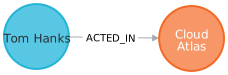
In the above picture, the Tom Hanks node is said to have an outgoing relationship while Forrest Gump node is said to have an incoming relationship.
Relationships always have a direction. However, you only have to pay attention to the direction where it is useful.
To denote an outgoing or an incoming relationship in cypher, we use → or ←.
在上图中,Tom Hanks 节点 被称为具有 outgoing 关系,而 Cloud Atlas 节点被称为具有 incoming 关系。
关系总是有方向的。然而,你只需要注意它有用的方向。
为了表示 cypher 中的传出或传入关系,我们使用 → 或 ← 。
Example -_MATCH (p:Person)-[r:ACTED_IN]->(m:Movie) RETURN p,r,m_
In the above query Person has an outgoing relationship and movie has an incoming relationship.
Although, in the case of the movies dataset, the direction of the relationship is not that important and even without denoting the direction in the query, it will return the same result.
在上述查询中,Person 具有传出关系,而 Movie 具有传入关系。
尽管在电影数据集的情况下,关系的方向并不那么重要,即使在查询中没有指示方向,它也会返回相同的结果。
So the query -_MATCH (p:Person)-[r:ACTED_IN]-(m:Movie) RETURN p,r,m_
will return the same result as the above one.
Clean up 清理
When you’re done experimenting, you can remove the movie data set.
完成实验后,您可以删除电影数据集。
Note:
- Nodes can’t be deleted if relationships exist
- Delete both nodes and relationships together
注意:
- 如果存在关系,则无法删除节点
- 一起删除节点和关系
Delete all Movie and Person nodes, and their relationships
删除所有 Movie 和 Person 节点及其关系_MATCH (n) DETACH DELETE n_
Prove that the Movie Graph is gone
确认删除结果:_MATCH (n) RETURN n_
复杂查询示例
多跳查询示例:
查询和 Person Kevin Bacon 有4跳内关系的节点和关系_MATCH (bacon:Person {name:"Kevin Bacon"})-[*0..4]-(hollywood) RETURN DISTINCT hollywood_
最短路径查询示例:
查询 Kevin Bacon 和 Meg Ryan 之间的最短路径
_MATCH p=shortestPath( (bacon:Person {name:"Kevin Bacon"})-[*]-(meg:Person {name:"Meg Ryan"}) ) RETURN p_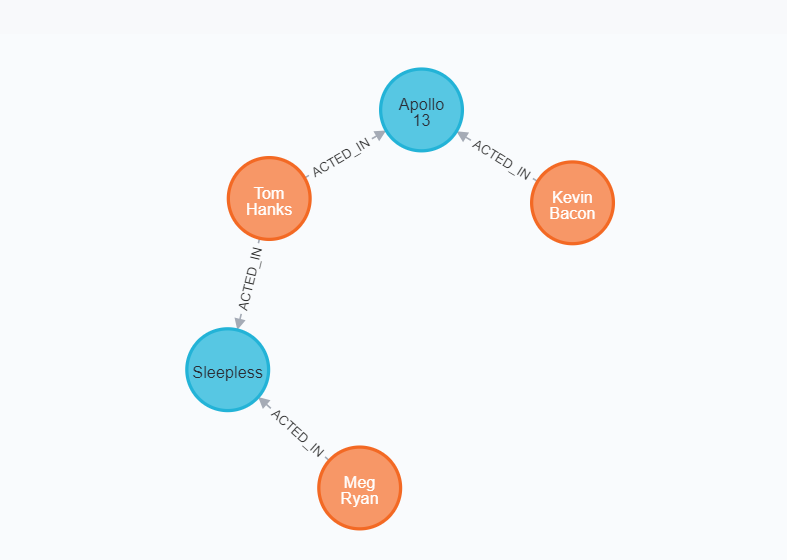
Extend Tom Hanks co-actors, to find co-co-actors who haven’t worked with Tom Hanks…
扩展汤姆·汉克斯的合作演员,找到没有和汤姆·汉克斯合作过的合作演员。。。
MATCH (tom:Person {name:"Tom Hanks"})-[:ACTED_IN]->(m)<-[:ACTED_IN]-(coActors),
  (coActors)-[:ACTED_IN]->(m2)<-[:ACTED_IN]-(cocoActors)
WHERE NOT (tom)-[:ACTED_IN]->()<-[:ACTED_IN]-(cocoActors) AND tom <> cocoActors
RETURN cocoActors.name AS Recommended, count(*) AS Strength ORDER BY Strength DESC
Find someone to introduce Tom Hanks to Tom Cruise
找人介绍汤姆·汉克斯 给 汤姆·克鲁斯
MATCH (tom:Person {name:"Tom Hanks"})-[:ACTED_IN]->(m)<-[:ACTED_IN]-(coActors),
  (coActors)-[:ACTED_IN]->(m2)<-[:ACTED_IN]-(cruise:Person {name:"Tom Cruise"})
RETURN tom, m, coActors, m2, cruise

若有收获,就点个赞吧
0 人点赞


