第四章 面向对象(中)
原文:https://shimo.im/docs/DhhTyxtgwdpjVd39/ 《第四章 面向对象(中)》
面向对象特征之三:多态性
向下转型的使用
- Person 类
public class Person {String name;int age;public void eat(){System.out.println("人,吃饭");}public void walk(){System.out.println("人,走路");}}
- Man 类
public class Man extends Person{

    boolean isSmoking;

    public void earnMoney(){
        System.out.println("男人负责工作养家");
    }

    public void eat() {
        System.out.println("男人多吃肉,长肌肉");
    }

    public void walk() {
        System.out.println("男人霸气的走路");
    }
}
- Woman 类
public class Woman extends Person{

    boolean isBeauty;

    public void goShopping(){
        System.out.println("女人喜欢购物");
    }

    public void eat(){
        System.out.println("女人少吃,为了减肥。");
    }

    public void walk(){
        System.out.println("女人,窈窕的走路。");
    }
}
- PersonTest 类
/*
* 面向对象之三:多态性
*
* 1.理解多态性:可以理解为一个事物的多种态性。
* 2.何为多态性:
* 对象的多态性:父类的引用指向子类的对象(或子类的对象赋值给父类的引用)
*
* 3.多态的使用:虚拟方法调用
* 有了对象多态性以后,我们在编译期,只能调用父类声明的方法,但在执行期实际执行的是子类重写父类的方法
* 简称:编译时,看左边;运行时,看右边。
*
* 若编译时类型和运行时类型不一致,就出现了对象的多态性(Polymorphism)
* 多态情况下,
* “看左边”:看的是父类的引用(父类中不具备子类特有的方法)
* “看右边”:看的是子类的对象(实际运行的是子类重写父类的方法)
*
* 4.多态性的使用前提:
* ① 类的继承关系
* ② 方法的重写
* 5.对象的多态性:只适用于方法,不适用于属性(编译和运行都看左边)
*/
public class PersonTest {
public static void main(String[] args) {
Person p1 = new Person();
p1.eat();
Man man = new Man();
man.eat();
man.age = 25;
man.earnMoney();
// ************************************
System.out.println("************************");
// 对象的多态性,父类的引用指向子类的对象
Person p2 = new Man();
// Person p3 = new Woman();
// 多态的使用:当调用子父类同名同参数方法时,实际调用的是子类重写父类的方法---虚拟方法调用
p2.eat();
p2.walk();
// p2.earnMoney();
System.out.println("**************************");
// 不能调用子类所特有的方法、属性,编译时,p2是Person类型,
// p2.earnMoney();
p2.name = "Tom";
// p2.isSmoking = true;
// 有了对象的多态性以后,内存中实际上是加载了子类特有的属性和方法,但是由于变量声明为父类类型,导致
// 编译时,只能调用父类中声明的属性和方法。子类的属性和方法不能调用。
// 如何才能调用子类所特有的属性和方法?
// 使用强制类型转换符,也可称为:向下转型
Man m1 = (Man) p2;
m1.earnMoney();
m1.isSmoking = true;
// 使用强转时,可能出现ClassCastException异常
// Woman w1 = (Woman)p2;
// w1.goShopping();
/*
* instanceof关键字的使用
*
* a instanceof A:判断对象a是否是类A的实例。如果,返回true,如果不是,返回false;
*
* 使用情境:为了避免在向下转型时出现ClassCastException异常,我们在进行向下转型之前,先进行
* instanceof的判断,一旦返回true,就进行向下转型。如果返回false,不进行向下转型。
*
* 如果a instanceof A返回true,则a instanceof B也返回true。 其中类B是类A的父类。
*
*/
if (p2 instanceof Woman) {
Woman w1 = (Woman) p2;
w1.goShopping();
System.out.println("**********Woman*********");
}
if (p2 instanceof Man) {
Man m2 = (Man) p2;
m2.earnMoney();
System.out.println("*********Man************");
}
if (p2 instanceof Person) {
System.out.println("***********Person************");
}
if (p2 instanceof Object) {
System.out.println("***********object************");
}
//向下转型的常见问题
//练习
//问题1:编译时通过,运行时不通过
//举例一
// Person p3 = new Woman();
// Man m3 = (Man)p3;
//举例二
Person p4 = new Person();
Man m4 = (Man)p4;
//问题二:编译通过,运行时也通过
Object obj = new Woman();
Person p = (Person)obj;
//问题三:编译不通过
// Man m5 = new woman();
// String str = new Date();
// Object o = new Date();
// String str1 = (String)o;
}
}

多态性的练习
- 练习1
/*
* 练习:子类继承父类
*
* 1.若子类重写了父类方法,就意味着子类里定义的方法彻底覆盖了父类里的同名方法,
* 系统将不可能把父类里的方法转移到子类中。
*
* 2.对于实例变量则不存在这样的现象,即使子类里定义了与父类完全相同的实例变量,
* 这个实例变量依然不可能覆盖父类中定义的实例变量
*
*/
public class FieldMethodTest {
public static void main(String[] args){
Sub s= new Sub();
System.out.println(s.count); //20
s.display();//20
Base b = s;
//==:对于引用数据类型来讲,比较的是两个引用数据类型变量的地址值是否一样。
System.out.println(b == s); //true
System.out.println(b.count); //10
b.display();
}
}
class Base {
int count= 10;
public void display() {
System.out.println(this.count);
}
}
class Sub extends Base {
int count= 20;
public void display() {
System.out.println(this.count);
}
}
- 练习2
/*
 * 建立InstanceTest 类,在类中定义方法method(Person e);
 *
 * 在method中:
 * (1)根据e的类型调用相应类的getInfo()方法。
 * (2)根据e的类型执行:
 *         如果e为Person类的对象,输出:“a person”;
 *         如果e为Student类的对象,输出:“a student”“a person ”
 *         如果e为Graduate类的对象,输出:“a graduated student”
 *         “a student” “a person”
 *
 */
class Person {
    protected String name = "person";
    protected int age = 50;


    public String getInfo() {
        return "Name: " + name + "\n" + "age: " + age;
    }
}

class Student extends Person {
    protected String school = "pku";

    public String getInfo() {
        return "Name: " + name + "\nage: " + age + "\nschool: " + school;
    }
}

class Graduate extends Student {
    public String major = "IT";

    public String getInfo() {
        return "Name: " + name + "\nage: " + age + "\nschool: " + school + "\nmajor:" + major;
    }
}


public class InstanceTest{

    public static void main(String[] args) {
        //虚拟方法调用
        InstanceTest test = new InstanceTest();
        test.method(new Student());

    }

    public void method(Person e){
        String info = e.getInfo();
        System.out.println(info);

        //方法一
        if(e instanceof Graduate){
            System.out.println("a graduated student");
            System.out.println("a student");
            System.out.println("a person");
        }else if(e instanceof Student){
            System.out.println("a student");
            System.out.println("a person");
        }else{
            System.out.println("a person");
        }

        //方法二
        if(e instanceof Graduate){
            System.out.println("a graduated student");
        }
        if(e instanceof Student){
            System.out.println("a student");
        }
        if(e instanceof Person){
            System.out.println("a person");
        }
    }
}
- 练习3
- GeometricObject类
/*
 * 定义三个类,父类GeometricObject代表几何形状,子类Circle代表圆形,MyRectangle代表矩形。
 */
public class GeometricObject {
    protected String color;
    protected double weight;
    public String getColor() {
        return color;
    }
    public void setColor(String color) {
        this.color = color;
    }
    public double getWeight() {
        return weight;
    }
    public void setWeight(double weight) {
        this.weight = weight;
    }
    public GeometricObject(String color, double weight) {
        super();
        this.color = color;
        this.weight = weight;
    }

    public double findArea(){
        return 0.0;
    }
}
- Circle类
public class Circle extends GeometricObject {

    private double radius;

    public Circle(double weight,String color, double radius) {
        super(color,weight);
        this.radius = radius;
    }

    public double getRadius() {
        return radius;
    }

    public void setRadius(double radius) {
        this.radius = radius;
    }

    @Override
    public double findArea() {
        return 3.14 * radius * radius;
    }
}
- MyRectangle类
public class MyRectangle extends GeometricObject {

    private double width;
    private double height;

    public MyRectangle(double width, double height,String color,double weight) {
        super(color, weight);
        this.height = height;
        this.width = width;
    }

    public double getWidth() {
        return width;
    }

    public void setWidth(double width) {
        this.width = width;
    }

    public double getHeight() {
        return height;
    }

    public void setHeight(double height) {
        this.height = height;
    }

    @Override
    public double findArea() {
        return width * height;
    }
}
- GeometricTest类
/*
 * 定义一个测试类GeometricTest,编写equalsArea方法测试两个对象的面积是否相等(注意方法的参数类型,利用动态绑定技术),
 * 编写displayGeometricObject方法显示对象的面积(注意方法的参数类型,利用动态绑定技术)。
 *
 */
public class GeometricTest {

    public static void main(String[] args) {
        GeometricTest test = new GeometricTest();

        Circle c1 = new Circle(2.3,"white",1.0);
        test.displayGeometricObject(c1);

        Circle c2 = new Circle(3.3,"white",1.0);
        test.displayGeometricObject(c2);

        boolean isEqual = test.equalsArea(c1, c2);
        System.out.println("面积是否相等: " + isEqual);

        MyRectangle rect = new MyRectangle(2.1, 3.4,"red",1.0);
        test.displayGeometricObject(rect);
    }

    public void displayGeometricObject(GeometricObject o){
        System.out.println("面积为: " + o.findArea());
    }

    //测试两个对象的面积是否相等
    public boolean equalsArea(GeometricObject o1,GeometricObject o2){
        return o1.findArea() == o2.findArea();
    }
}
- 练习4
/*
 * 面试题:多态是编译时行为还是运行时行为?如何证明?
 *
 * 证明见如下:
 */
import java.util.Random;

class Animal  {

    protected void eat() {
        System.out.println("animal eat food");
    }
}

class Cat  extends Animal  {

    protected void eat() {
        System.out.println("cat eat fish");
    }
}

class Dog  extends Animal  {

    public void eat() {
        System.out.println("Dog eat bone");
    }
}

class Sheep  extends Animal  {

    public void eat() {
        System.out.println("Sheep eat grass");

    }

}

public class InterviewTest {

    public static Animal  getInstance(int key) {
        switch (key) {
        case 0:
            return new Cat ();
        case 1:
            return new Dog ();
        default:
            return new Sheep ();
        }

    }

    public static void main(String[] args) {
        int key = new Random().nextInt(3);

        System.out.println(key);

        Animal  animal = getInstance(key);

        animal.eat();

    }
}
- 面试题拓展
/* 考查多态的笔试题目:
 * 面试题:多态是编译时行为还是运行时行为?如何证明?
 *
 * 拓展问题
 */
public class InterviewTest1 {

    public static void main(String[] args) {
        Base base = new Sub();
        base.add(1, 2, 3);

//        Sub s = (Sub)base;
//        s.add(1,2,3);
    }
}

class Base {
    public void add(int a, int... arr) {
        System.out.println("base");
    }
}

class Sub extends Base {

    public void add(int a, int[] arr) {
        System.out.println("sub_1");
    }

//    public void add(int a, int b, int c) {
//        System.out.println("sub_2");
//    }

}
Object 类的使用
/*
 * java.lang.Object类
 * 1.Object类是所有Java类的根父类;
 * 2.如果在类的声明中未使用extends关键字指明其父类,则默认父类为java.lang.Object类
 * 3.Object类中的功能(属性、方法)就具有通用性。
 * 属性:无
 * 方法:equals() / toString() / getClass() / hashCode() / clone() /finalize()
 *      wait() 、notify()、notifyAll()
 *
 * 4.Object类只声明了一个空参的构造器。
 *
 * 面试题:
 * final、finally、finalize的区别?
 *
 */
public class ObjectTest {

    public static void main(String[] args) {

    }
}

class Order{

}
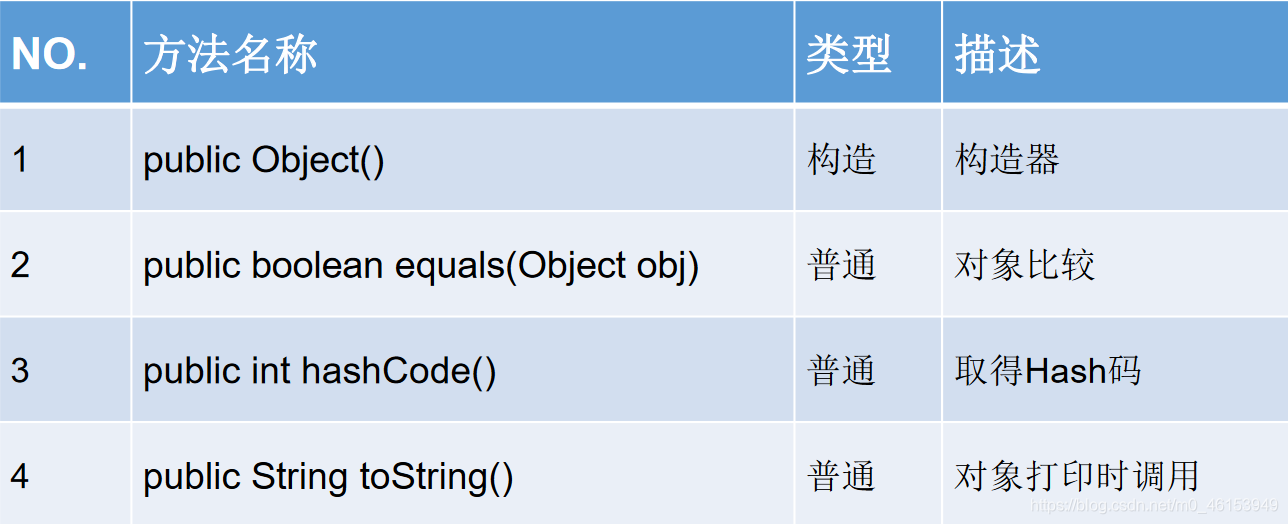
Object类中的主要结构
==操作符与equals方法
import java.sql.Date;

/*
 * 面试题: ==和equals的区别
 *
 * 一、回顾==的使用
 * == : 运算符
 * 1.可以使用在基本数据类型变量和引用数据类型变量中
 * 2.如果比较的是基本数据类型变量:比较两个变量保存的数据是否相等。(不一定类型要相同)
 *        如果比较的是引用数据类型变量:比较两个对象的地址值是否相同,即两个引用是否指向同一个对象实体
 *  补充: == 符号使用时,必须保证符号左右两边的变量类型一致。
 *
 * 二、equals()方法的使用
 * 1.是一个方法,而非运算符
 * 2.只能适用于引用数据类型。
 * 3.Object类中equals()的定义:
 *         public boolean equals(Object obj){
 *             return (this == obj);
 *         }
 * 说明:Object类中定义的equals()和==的作用是相同的,比较两个对象的地址值是否相同,即两个引用是否指向同一个对象实体。
 *
 * 4.像String、Date、File、包装类等都重写了Object类中的equals()方法.
 *      两个引用的地址是否相同,而是比较两个对象的“实体内容”是否相同。
 *
 * 5.通常情况下,我们自定义的类如果使用equals()的话,也通常是比较两个对象的"实体内容"是否相同。那么,我们
 *        就需要对Object类中的equals()进行重写。
 *
 * 重写的原则:比较两个对象的实体内容是否相同。
 *
 */
public class EqualsTest {
    public static void main(String[] args) {

        //基本数据类型
        int i = 10;
        int j = 10;
        double d = 10.0;
        System.out.println(i == j);    //true
        System.out.println(i == d); //true

//        boolean b =true;
//        System.out.println(i == b);

        char c = 10;
        System.out.println(i == c); //true

        char c1 = 'A';
        char c2 = 65;
        System.out.println(c1 == c2); //true

        //引用数据类型
        Customer cust1 = new Customer("Tom" ,21);
        Customer cust2 = new Customer("Tom" ,21);
        System.out.println(cust1 == cust2); //false

        String str1 = new String("BAT");
        String str2 = new String("BAT");
        System.out.println(str1 == str2); //false
        System.out.println("*************************");
        System.out.println(cust1.equals(cust2));    //false
        System.out.println(str1.equals(str2));    //true

        Date date1 = new Date(23432525324L);
        Date date2 = new Date(23432525324L);
        System.out.println(date1.equals(date2));    //true
    }
}
- Customer类
public class Customer {

    private String name;
    private int age;
    public String getName() {
        return name;
    }
    public void setName(String name) {
        this.name = name;
    }
    public int getAge() {
        return age;
    }
    public void setAge(int age) {
        this.age = age;
    }
    public Customer() {
        super();
    }
    public Customer(String name, int age) {
        super();
        this.name = name;
        this.age = age;
    }


    //自动生成的equals()
    @Override
    public boolean equals(Object obj) {
        if (this == obj)
            return true;
        if (obj == null)
            return false;
        if (getClass() != obj.getClass())
            return false;
        Customer other = (Customer) obj;
        if (age != other.age)
            return false;
        if (name == null) {
            if (other.name != null)
                return false;
        } else if (!name.equals(other.name))
            return false;
        return true;
    }

    //重写原则,比较两个对象的实体内容(即name和age)是否相同
    //手动实现equals()的重写
//    @Override
//    public boolean equals(Object obj) {
//
////        System.out.println("Customer equals()....");
//        if(this == obj){
//            return true;
//        }
//
//        if(obj instanceof Customer){
//            Customer cust = (Customer)obj;
//            //比较两个对象的属性是否都相同
////            if(this.age == cust.age && this.name.equals(cust.name)){
////                return true;
////            }else{
////                return false;
////            }
//
//            //或
//            return this.age == cust.age && this.name.equals(cust.name);
//        }
//
//        return false;
//    }

}
重写equals()方法的原则
- 对称性:如果x.equals(y)返回是“true”,那么y.equals(x)也应该返回是“true”。
- 自反性:x.equals(x)必须返回是“true”。
- 传递性:如果x.equals(y)返回是“true”,而且y.equals(z)返回是“true”,那么z.equals(x)也应该返回是“true”。
- 一致性:如果x.equals(y)返回是“true”,只要x和y内容一直不变,不管你重复x.equals(y)多少次,返回都是“true”。
- 任何情况下,x.equals(null),永远返回是“false”;x.equals(和x不同类型的对象)永远返回是“false”。
    int it = 65;
    float fl= 65.0f;
    System.out.println("65和65.0f是否相等?" + (it == fl)); //true
    char ch1 = 'A';
    char ch2 = 12;
    System.out.println("65和'A'是否相等?" + (it == ch1));//true
    System.out.println("12和ch2是否相等?" + (12 == ch2));//true
    String str1 = new String("hello");
    String str2 = new String("hello");
    System.out.println("str1和str2是否相等?"+ (str1 == str2));//false
    System.out.println("str1是否equals str2?"+(str1.equals(str2)));//true
    System.out.println("hello" == new java.util.Date()); //编译不通过
- 练习一
/*
 * .编写Order类,有int型的orderId,String型的orderName,
 * 相应的getter()和setter()方法,两个参数的构造器,重写父类的equals()方法:public booleanequals(Object obj),
 * 并判断测试类中创建的两个对象是否相等。
 *
 *
 */
public class OrderTest {
    public static void main(String[] args) {
        Order order1 = new Order(1001,"AA");
        Order order2 = new Order(1001,"BB");

        System.out.println(order1.equals(order2));    //false

        Order order3 = new Order(1001,"BB");
        System.out.println(order2.equals(order3)); //true
    }
}

class Order{
    private int orderId;
    private String orderName;
    public int getOrderId() {
        return orderId;
    }
    public void setOrderId(int orderId) {
        this.orderId = orderId;
    }
    public String getOrderName() {
        return orderName;
    }
    public void setOrderName(String orderName) {
        this.orderName = orderName;
    }
    public Order(int orderId, String orderName) {
        super();
        this.orderId = orderId;
        this.orderName = orderName;
    }
    public boolean equals(Object obj){
        if(this == obj){
            return true;
        }
        if(obj instanceof Order){
            Order order = (Order)obj;
            //正确的
            return this.orderId == order.orderId && this.orderName.equals(order.orderName);
            //错误的
//            return this.orderId == order.orderId && this.orderName == order.orderName;
        }
        return false;
    }
}
- 练习二
/*
 * 请根据以下代码自行定义能满足需要的MyDate类,在MyDate类中覆盖equals方法,
 * 使其判断当两个MyDate类型对象的年月日都相同时,结果为true,否则为false。
 * public boolean equals(Object o)
 */
public class MyDateTest {
    public static void main(String[] args) {
        MyDate m1= new MyDate(14, 3, 1976);
        MyDate m2= new MyDate(14, 3, 1976);
        if(m1== m2) {
            System.out.println("m1==m2");
        } else{
            System.out.println("m1!=m2"); // m1 != m2
        }

        if(m1.equals(m2)) {
            System.out.println("m1 is equal to m2");// m1 is equal to m2
        } else{
            System.out.println("m1 is not equal to m2");
        }
    }
}

class MyDate{
    private int day;
    private int month;
    private int year;

    public MyDate(int day, int month, int year) {
        super();
        this.day = day;
        this.month = month;
        this.year = year;
    }

    public int getDay() {
        return day;
    }

    public void setDay(int day) {
        this.day = day;
    }

    public int getMonth() {
        return month;
    }


    public void setMonth(int month) {
        this.month = month;
    }

    public int getYear() {
        return year;
    }

    public void setYear(int year) {
        this.year = year;
    }

    @Override
    public boolean equals(Object obj) {
        if(this == obj){
            return true;
        }
        if(obj instanceof MyDate){
            MyDate myDate = (MyDate)obj;
            return this.day == myDate.day && this.month == myDate.month &&
                    this.year == myDate.year;
        }
        return false;
    }

//    @Override
//    public boolean equals(Object obj) {
//        if (this == obj)
//            return true;
//        if (obj == null)
//            return false;
//        if (getClass() != obj.getClass())
//            return false;
//        MyDate other = (MyDate) obj;
//        if (day != other.day)
//            return false;
//        if (month != other.month)
//            return false;
//        if (year != other.year)
//            return false;
//        return true;
//    }

}
toString的使用
public class Customer {

    private String name;
    private int age;
    public String getName() {
        return name;
    }
    public void setName(String name) {
        this.name = name;
    }
    public int getAge() {
        return age;
    }
    public void setAge(int age) {
        this.age = age;
    }
    public Customer() {
        super();
    }
    public Customer(String name, int age) {
        super();
        this.name = name;
        this.age = age;
    }

    //自动生成的equals()
    @Override
    public boolean equals(Object obj) {
        if (this == obj)
            return true;
        if (obj == null)
            return false;
        if (getClass() != obj.getClass())
            return false;
        Customer other = (Customer) obj;
        if (age != other.age)
            return false;
        if (name == null) {
            if (other.name != null)
                return false;
        } else if (!name.equals(other.name))
            return false;
        return true;
    }

    //重写原则,比较两个对象的实体内容(即name和age)是否相同
    //手动实现equals()的重写
//    @Override
//    public boolean equals(Object obj) {
//
////        System.out.println("Customer equals()....");
//        if(this == obj){
//            return true;
//        }
//
//        if(obj instanceof Customer){
//            Customer cust = (Customer)obj;
//            //比较两个对象的属性是否都相同
////            if(this.age == cust.age && this.name.equals(cust.name)){
////                return true;
////            }else{
////                return false;
////            }
//
//            //或
//            return this.age == cust.age && this.name.equals(cust.name);
//        }
//
//        return false;
//    }

    //手动实现
//    @Override
//    public String toString() {
//        return "Customer[name = " + name + ",age = " + age + "]";
//    }

    //自动实现
    @Override
    public String toString() {
        return "Customer [name=" + name + ", age=" + age + "]";
    }

}
- ToStringTest类
import java.util.Date;
/*
 * Object类中toString()的使用
 *
 * 1.当我们输出一个引用对象时,实际上就是调用当前对象的toString()
 * 2.Object类中toString的定义方法
 *     public String toString() {
 *      return getClass().getName() + "@" + Integer.toHexString(hashCode());
 *  }
 *
 * 3.像String、Date、File、包装类等都重写了Object类中的toString()方法。
 *      使得在调用toString()时,返回"实体内容"信息.
 *
 * 4.自定义类如果重写toString()方法,当调用此方法时,返回对象的"实体内容".
 */
public class ToStringTest {
    public static void main(String[] args) {

        Customer cust1 = new Customer("Tom" ,21);
        System.out.println(cust1.toString());    //github4.Customer@15db9742
        System.out.println(cust1);     //github4.Customer@15db9742 ---> Customer[name = Tom,age = 21]

        String str = new String("MM");
        System.out.println(str);

        Date date = new Date(45362348664663L);
        System.out.println(date.toString());    //Wed Jun 24 12:24:24 CST 3407

    }
}
- 练习
- GeometricObject类
public class GeometricObject {
    protected  String  color;
    protected  double  weight;

    public GeometricObject() {
        super();
        this.color = "white";
        this.weight = 1.0;
    }

    public GeometricObject(String color, double weight) {
        super();
        this.color = color;
        this.weight = weight;
    }

    public String getColor() {
        return color;
    }

    public void setColor(String color) {
        this.color = color;
    }

    public double getWeight() {
        return weight;
    }

    public void setWeight(double weight) {
        this.weight = weight;
    }
}
- Circle类
public class Circle extends GeometricObject{
    private double radius;

    public Circle() {    //初始化对象的color属性为“white”,weight属性为1.0,radius属性为1.0。
        super();    //super自带,不需再写
//        this.color = "white";
//        this.weight = 1.0;
        this.radius = 1.0;
    }

    //初始化对象的color属性为“white”,weight属性为1.0,radius根据参数构造器确定。
    public Circle(double radius) {
        super();    //super自带,不需再写
//        this.color = "white";
//        this.weight = 1.0;
        this.radius = radius;
    }

    public Circle(double radius,String color,double weight) {
        super(color,weight);
        this.radius = radius;
    }

    public double getRadius() {
        return radius;
    }

    public void setRadius(double radius) {
        this.radius = radius;
    }

    //计算圆的面积
    public double findArea(){
        return Math.PI * radius * radius;
    }

    @Override    //重写equals方法,比较两个圆的半径是否相等,如相等,返回true。
    public boolean equals(Object obj) {
        if(this == obj){
            return true;
        }

        if(obj instanceof Circle){
            Circle c = (Circle)obj;
            return this.radius == c.radius;
        }

        return false;
    }

    @Override
    public String toString() {    //重写toString方法,输出圆的半径。
        return "Circle [radius=" + radius + "]";
    }

}
- 测试类
/*
 * 写一个测试类,创建两个Circle对象,判断其颜色是否相等;
 * 利用equals方法判断其半径是否相等;利用toString()方法输出其半径。
 *
 */
public class CircleTest {
    public static void main(String[] args) {

        Circle circle1 = new Circle(2.3);
        Circle circle2 = new Circle(3.3,"white",2.0);

        System.out.println("颜色是否相等: " + circle1.getColor().equals(circle2.color));

        System.out.println("半径是否相等: " + circle1.equals(circle2));

        System.out.println(circle1);
        System.out.println(circle2.toString());
    }
}
包装类(Wrapper)的使用
单元测试方法的使用
import java.util.Date;
import org.junit.Test;
/*
 * java中的JUnit单元测试
 *
 * 步骤:
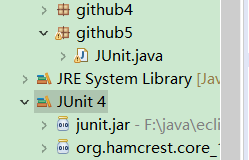
 * 1.选中当前项目工程 --》 右键:build path --》 add libraries --》 JUnit 4 --》 下一步
 * 2.创建一个Java类进行单元测试。
 *      此时的Java类要求:①此类是公共的 ②此类提供一个公共的无参构造器
 * 3.此类中声明单元测试方法。
 *   此时的单元测试方法:方法的权限是public,没有返回值,没有形参。
 *
 * 4.此单元测试方法上需要声明注解:@Test并在单元测试类中调用:import org.junit.Test;
 * 5.声明好单元测试方法以后,就可以在方法体内测试代码。
 * 6.写好代码后,左键双击单元测试方法名:右键 --》 run as --》 JUnit Test
 *
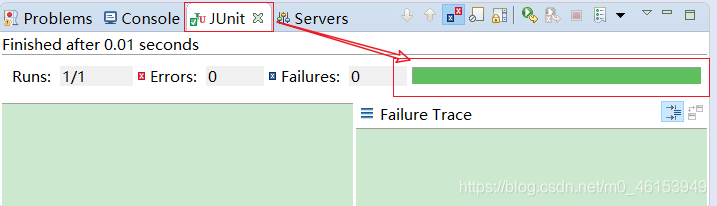
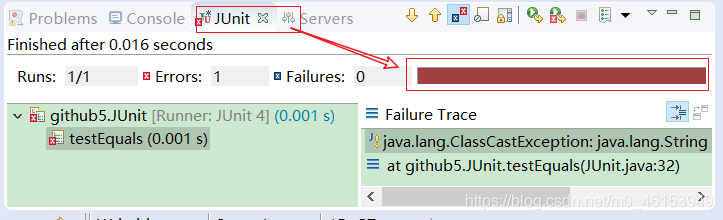
 * 说明:如果执行结果无错误,则显示是一个绿色进度条,反之,错误即为红色进度条。
 */
public class JUnit {

    int num = 10;

    //第一个单元测试方法
    @Test
    public void testEquals(){
        String s1 = "MM";
        String s2 = "MM";
        System.out.println(s1.equals(s2));

        //ClassCastException的异常
//        Object obj = new String("GG");
//        Date date = (Date)obj;

        System.out.println(num);
        show();
    }

    public void show(){
        num = 20;
        System.out.println("show()...");
    }

    //第二个单元测试方法
    @Test
    public void testToString(){
        String s2 = "MM";
        System.out.println(s2.toString());
    }
}
包装类的使用
/*
 * 包装类的使用
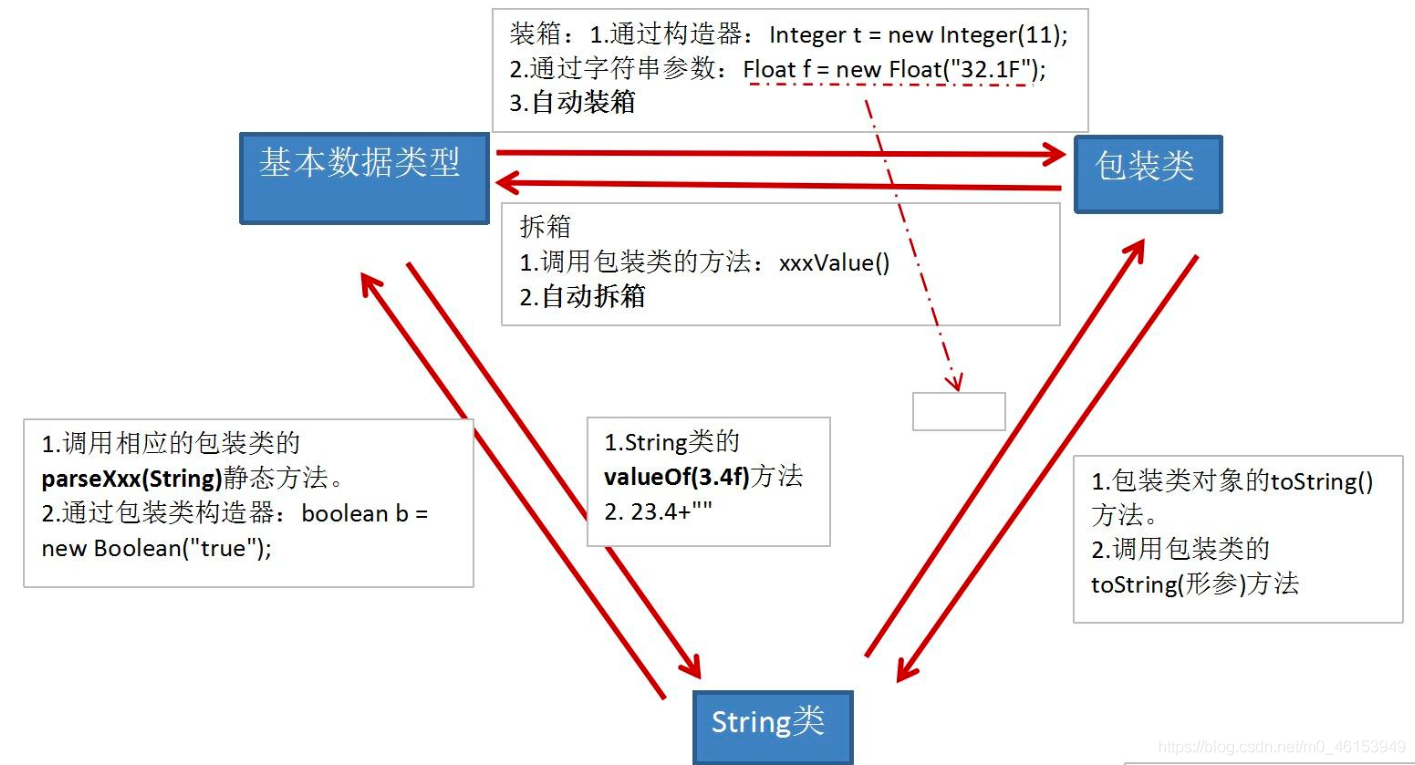
 * 1.java提供了8种基本数据类型对应的包装类,使得基本数据类型的变量具有类的特征
 *         基本数据类型        包装类
 *         byte            Byte
 *         short            Short
 *         int             Integer
 *         long            Long
 *         float            Float
 *         double            Double
 *         boolean            Boolean
 *         char            Character
 * 注意:其中Byte、Short、Integer、Long、Float、Double的父类是:Number
 * /
包装类与基本数据类型相互转换
import org.junit.Test;
/*
 * 2.基本数据类型、包装类、String三者之间的相互转换。
 *
 */
public class WrapperTest {

    //String类型---> 基本数据类型、包装类,调用包装类的parseXxx()
    @Test
    public void test5(){
        String str1 = "123";
//        String str1 = "123a";

        //错误的情况,可能会报错
//        int num1 = (int)str1;
//        Integer in1 = (Integer)str1;

        int num2 = Integer.parseInt(str1);
        System.out.println(num2 + 1);    //124

        String str2 = "true";
        Boolean b1 = Boolean.parseBoolean(str2);
        System.out.println(b1);    //true

    }

    //基本数据类型、包装类---》String类型,调用String重载的valueOf(Xxx xxx)
    @Test
    public void test4(){
        int num1 = 10;
        //方式1:连接运算
        String str1 = num1 + "";
        //方式2:调用String的valueOf(Xxx xxx)
        float f1 = 12.3f;
        String str2 = String.valueOf(f1); //"12.3"

        Double d1 = new Double(12.4);
        String str3 = String.valueOf(d1);
        System.out.println(str2);
        System.out.println(str3);    //"12.4"

    }

    /*
     * JDK 5.0 新特性:自动装箱与自动拆箱
     */
    @Test
    public void test3(){
//        int num1 = 10;
//        //基本数据类型 --》 包装类的对象
//        method(num1);    //Object obj = num1

        //自动装箱:基本数据类型 --》 包装类
        int num2 = 10;
        Integer in1 = num2;//自动装箱

        boolean b1 = true;
        Boolean b2 = b1;//自动装箱

        //自动拆箱:包装类 --》 基本数据类型
        System.out.println(in1.toString());

        int num3 = in1;

    }

    public void method(Object obj){
        System.out.println(obj);
    }

    //包装类 --》 基本数据类型:调用包装类的xxxValue()
    @Test
    public void test2() {
        Integer in1 = new Integer(12);
        int i1 = in1.intValue();
        System.out.println(i1 + 1);

        Float f1 = new Float(12.3f);
        float f2 = f1.floatValue();
        System.out.println(f2 + 1);
    }

    //基本数据类型--》包装类,调用包装类的构造器
    @Test
    public void test1() {
        int num1 = 10;
//        System.out.println(num1.toString());

        Integer in1 = new Integer(num1);
        System.out.println(in1.toString());

        Integer in2 = new Integer("123");
        System.out.println(in2.toString());

        //报异常
//        Integer in3 = new Integer("123abc");
//        System.out.println(in3.toString());

        Float f1 = new Float(12.3f);
        Float f2 = new Float("12.3");
        System.out.println(f1);
        System.out.println(f2);

        Boolean b1 = new Boolean(true);
        Boolean b2 = new Boolean("true");

        Boolean b3 = new Boolean("true123");
        System.out.println(b3); //false

        Order order = new Order();
        System.out.println(order.isMale); //false
        System.out.println(order.isFemale); //null

    }
}

class Order{

    boolean isMale;
    Boolean isFemale;
}
练习
- 面试题
import org.junit.Test;
/*
 * 如下两个题目输出结果相同吗?各是什么:
 *         Object o1= true? new Integer(1) : new Double(2.0);
 *         System.out.println(o1);//
 *
 *         Object o2;
 *         if(true)
 *             o2 = new Integer(1);
 *        else
 *            o2 = new Double(2.0);
 *        System.out.println(o2);//
 *
 */
public class InterViewTest {

    @Test
    public void test(){
        Object o1= true? new Integer(1) : new Double(2.0);
        System.out.println(o1);// 1.0
    }

    @Test
    public void test2(){
        Object o2;
        if(true)
            o2 = new Integer(1);
        else
            o2 = new Double(2.0);
        System.out.println(o2);// 1
    }

    @Test
    public void method1() {
        Integer i = new Integer(1);
        Integer j = new Integer(1);
        System.out.println(i == j); //false

        //Integer内部定义了一个IntegerCache结构,IntegerCache中定义Integer[]
        //保存了从-128-127范围的整数。如果我们使用自动装箱的方式,给Integer赋值的范围在其中时,
        //可以直接使用数组中的元素,不用再去new了。目的,提高效率。

        Integer m = 1;
        Integer n = 1;
        System.out.println(m == n);//true

        Integer x = 128;//相当于new了一个Integer对象
        Integer y = 128;//相当于new了一个Integer对象
        System.out.println(x == y);//false

    }
}
- 编程题
import java.util.Scanner;
import java.util.Vector;
/*
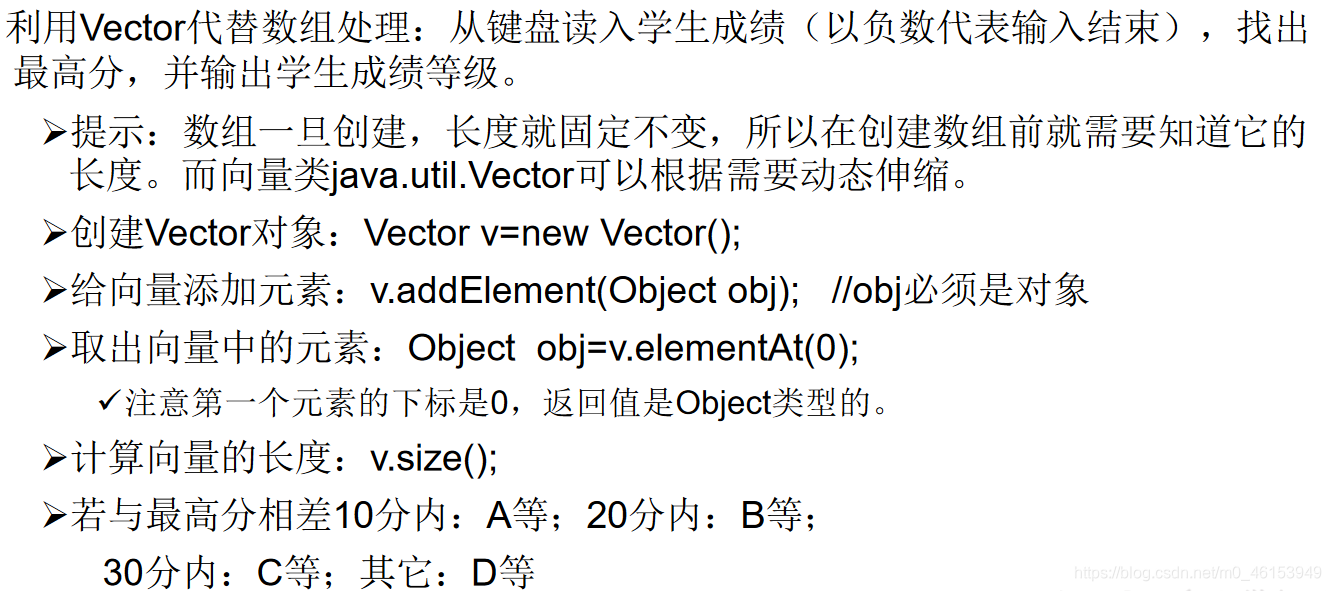
* 利用Vector代替数组处理:从键盘读入学生成绩(以负数代表输入结束),
* 找出最高分,并输出学生成绩等级。
*
* 提示:数组一旦创建,长度就固定不变,所以在创建数组前就需要知道它的长度。
* 而向量类java.util.Vector可以根据需要动态伸缩。
*
* 创建Vector对象:Vector v=new Vector();
* 给向量添加元素:v.addElement(Object obj); //obj必须是对象
* 取出向量中的元素:Object obj=v.elementAt(0);
* 注意第一个元素的下标是0,返回值是Object类型的。
* 计算向量的长度:v.size();
* 若与最高分相差
* 10分内:A等;
* 20分内:B等;
* 30分内:C等;
* 其它:D等
*
*/
public class VectorTest {
public static void main(String[] args) {
// 1.实例化Scanner,用于从键盘获取学生成绩
Scanner scan = new Scanner(System.in);
// 2.创建Vector对象:Vector v=new Vector();相当于原来的数组
Vector v = new Vector();
// 3.通过for(;;)或while(true)方式,给Vector中添加数组
int maxScore = 0;
for (;;) {
System.out.println("请输入学生成绩(以负数代表输入结束)");
int score = scan.nextInt();
// 3.2 当输入是负数时,跳出循环
if (score < 0) {
break;
}
if (score > 100) {
System.out.println("输入的数据非法,请重新输入");
continue;
}
// 3.1 添加操作::v.addElement(Object obj)
// jdk5.0之前:
// Integer inScore = new Integer(score);
// v.addElement(inScore);//多态
// jdk5.0之后:
v.addElement(score);// 自动装箱
// 4.获取学生成绩的最大值
if (maxScore < score) {
maxScore = score;
}
}
// 5.遍历Vector,得到每个学生的成绩,并与最大成绩比较,得到每个学生的等级。
char level;
for (int i = 0; i < v.size(); i++) {
Object obj = v.elementAt(i);
// jdk 5.0之前:
// Integer inScore = (Integer)obj;
// int score = inScore.intValue();
// jdk 5.0之后:
int score = (int) obj;
if (maxScore - score <= 10) {
level = 'A';
} else if (maxScore - score <= 20) {
level = 'B';
} else if (maxScore - score <= 30) {
level = 'C';
} else {
level = 'D';
}
System.out.println("student-" + i + " score is " + score + ",level is " + level);
}
}
}
整个Java全栈系列都是笔者自己敲的笔记。写作不易,如果可以,点个赞呗!✌

若有收获,就点个赞吧
0 人点赞


