安装部署
集群规划
| linux102 | linux103 | linux104 |
|---|---|---|
| ZK | ZK | ZK |
| kafka | kafka | kafka |
集群部署
配置文件
# cd /opt/module/kafka/config# vim server.properties# Licensed to the Apache Software Foundation (ASF) under one or more# contributor license agreements. See the NOTICE file distributed with# this work for additional information regarding copyright ownership.# The ASF licenses this file to You under the Apache License, Version 2.0# (the "License"); you may not use this file except in compliance with# the License. You may obtain a copy of the License at## http://www.apache.org/licenses/LICENSE-2.0## Unless required by applicable law or agreed to in writing, software# distributed under the License is distributed on an "AS IS" BASIS,# WITHOUT WARRANTIES OR CONDITIONS OF ANY KIND, either express or implied.# See the License for the specific language governing permissions and# limitations under the License.# see kafka.server.KafkaConfig for additional details and defaults############################# Server Basics ############################## The id of the broker. This must be set to a unique integer for each broker.# broker的全局唯一编号,不能重复,只能是数字。broker.id=0############################# Socket Server Settings ############################## The address the socket server listens on. It will get the value returned from# java.net.InetAddress.getCanonicalHostName() if not configured.# FORMAT:# listeners = listener_name://host_name:port# EXAMPLE:# listeners = PLAINTEXT://your.host.name:9092#listeners=PLAINTEXT://:9092# Hostname and port the broker will advertise to producers and consumers. If not set,# it uses the value for "listeners" if configured. Otherwise, it will use the value# returned from java.net.InetAddress.getCanonicalHostName().#advertised.listeners=PLAINTEXT://your.host.name:9092# Maps listener names to security protocols, the default is for them to be the same. See the config documentation for more details#listener.security.protocol.map=PLAINTEXT:PLAINTEXT,SSL:SSL,SASL_PLAINTEXT:SASL_PLAINTEXT,SASL_SSL:SASL_SSL# The number of threads that the server uses for receiving requests from the network and sending responses to the network# 处理网络请求的线程数量num.network.threads=3# The number of threads that the server uses for processing requests, which may include disk I/O# 用来处理磁盘IO的线程数量num.io.threads=8# The send buffer (SO_SNDBUF) used by the socket server# 发送套接字的缓冲区大小socket.send.buffer.bytes=102400# The receive buffer (SO_RCVBUF) used by the socket server# 接收套接字的缓冲区大小socket.receive.buffer.bytes=102400# The maximum size of a request that the socket server will accept (protection against OOM)# 请求套接字的缓冲区大小socket.request.max.bytes=104857600############################# Log Basics ############################## A comma separated list of directories under which to store log files# kafka运行日志(数据)存放的路径,路径不需要提前创建,kafka自动帮你创建,可以配置多个磁盘路径,路径与路径之间可以用“,”分割log.dirs=/opt/module/kafka/datas# The default number of log partitions per topic. More partitions allow greater# parallelism for consumption, but this will also result in more files across# the brokers.# topic在当前broker上的分区个数num.partitions=1# The number of threads per data directory to be used for log recovery at startup and flushing at shutdown.# This value is recommended to be increased for installations with data dirs located in RAID array.# 用来恢复和清理data下数据的线程数量num.recovery.threads.per.data.dir=1############################# Internal Topic Settings ############################## The replication factor for the group metadata internal topics "__consumer_offsets" and "__transaction_state"# For anything other than development testing, a value greater than 1 is recommended to ensure availability such as 3.# 每个topic创建时的副本数,默认是一个副本offsets.topic.replication.factor=1transaction.state.log.replication.factor=1transaction.state.log.min.isr=1############################# Log Flush Policy ############################## Messages are immediately written to the filesystem but by default we only fsync() to sync# the OS cache lazily. The following configurations control the flush of data to disk.# There are a few important trade-offs here:# 1. Durability: Unflushed data may be lost if you are not using replication.# 2. Latency: Very large flush intervals may lead to latency spikes when the flush does occur as there will be a lot of data to flush.# 3. Throughput: The flush is generally the most expensive operation, and a small flush interval may lead to excessive seeks.# The settings below allow one to configure the flush policy to flush data after a period of time or# every N messages (or both). This can be done globally and overridden on a per-topic basis.# The number of messages to accept before forcing a flush of data to disk#log.flush.interval.messages=10000# The maximum amount of time a message can sit in a log before we force a flush#log.flush.interval.ms=1000############################# Log Retention Policy ############################## The following configurations control the disposal of log segments. The policy can# be set to delete segments after a period of time, or after a given size has accumulated.# A segment will be deleted whenever *either* of these criteria are met. Deletion always happens# from the end of the log.# The minimum age of a log file to be eligible for deletion due to age# segment文件保留的最长时间,超时将被删除log.retention.hours=168# A size-based retention policy for logs. Segments are pruned from the log unless the remaining# segments drop below log.retention.bytes. Functions independently of log.retention.hours.#log.retention.bytes=1073741824# The maximum size of a log segment file. When this size is reached a new log segment will be created.# 每个segment文件的大小,默认最大为1Glog.segment.bytes=1073741824# The interval at which log segments are checked to see if they can be deleted according# to the retention policies# 检查过期数据的时间,默认5分钟检查一次是否数据过期log.retention.check.interval.ms=300000############################# Zookeeper ############################## Zookeeper connection string (see zookeeper docs for details).# This is a comma separated host:port pairs, each corresponding to a zk# server. e.g. "127.0.0.1:3000,127.0.0.1:3001,127.0.0.1:3002".# You can also append an optional chroot string to the urls to specify the# root directory for all kafka znodes.# 配置连接Zookeeper集群地址(在ZK根目录下创建/kafka,方便管理)zookeeper.connect=linux102:2181,linux103:2181,linux104:2181/kafka# Timeout in ms for connecting to zookeeperzookeeper.connection.timeout.ms=18000############################# Group Coordinator Settings ############################## The following configuration specifies the time, in milliseconds, that the GroupCoordinator will delay the initial consumer rebalance.# The rebalance will be further delayed by the value of group.initial.rebalance.delay.ms as new members join the group, up to a maximum of max.poll.interval.ms.# The default value for this is 3 seconds.# We override this to 0 here as it makes for a better out-of-the-box experience for development and testing.# However, in production environments the default value of 3 seconds is more suitable as this will help to avoid unnecessary, and potentially expensive, rebalances during application startup.group.initial.rebalance.delay.ms=0
环境变量
# sudo vim /etc/profile.d/my_env.sh

# KAFKA_HOME
export KAFKA_HOME=/opt/module/kafka
export PATH=$PATH:$KAFKA_HOME/bin

source /etc/profile
启动集群(手动操作)
myzk.sh start # 启动ZK

# 在linux102, linux103, linux104 启动集群
cd /opt/module/kafka
bin/kafka-server-start.sh -daemon config/server.properties

# 在linux102, linux103, linux104 关闭集群
cd /opt/module/kafka
bin/kafka-server-stop.sh
集群启停脚本
# mykf

#!/bin/bash

case $1 in
"start") {
    for i in linux102 linux103 linux104
    do
        echo "------------------- 启动 $i Kafka -------------------"
        ssh $i "/opt/module/kafka/bin/kafka-server-start.sh -daemon /opt/module/kafka/config/server.properties"
    done
};;
"stop") {
    for i in linux102 linux103 linux104
    do
        echo "------------------- 停止 $i Kafka -------------------"
        ssh $i "/opt/module/kafka/bin/kafka-server-stop.sh"
    done
};;
esac
注意:停止Kafka集群时,一定要等Kafka所有节点进程全部停止后再停止Zookeeper集群。因为Zookeeper集群当中记录着Kafka集群相关信息,Zookeeper集群一旦先停止,Kafka集群就没办法再获取停止进程的信息,只能手动杀死Kafka进程了。
Kafka命令行操作
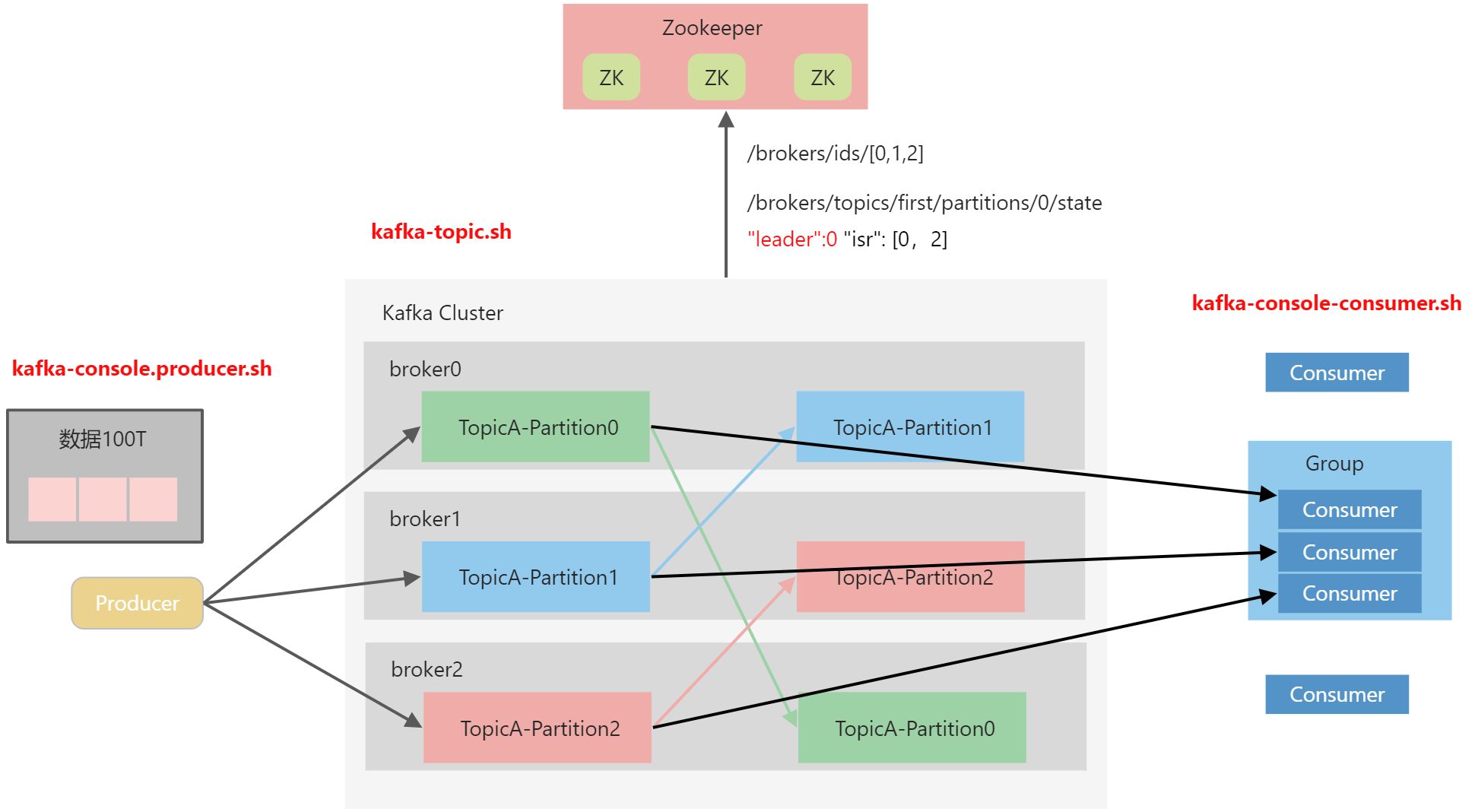
主题命令行操作
查看操作主题命令参数
[linux@linux102 kafka]$ bin/kafka-topics.sh
Create, delete, describe, or change a topic.
Option                                   Description
------                                   -----------
--alter                                  Alter the number of partitions,
                                           replica assignment, and/or
                                           configuration for the topic.
--at-min-isr-partitions                  if set when describing topics, only
                                           show partitions whose isr count is
                                           equal to the configured minimum.
--bootstrap-server <String: server to    REQUIRED: The Kafka server to connect
  connect to>                              to.
--command-config <String: command        Property file containing configs to be
  config property file>                    passed to Admin Client. This is used
                                           only with --bootstrap-server option
                                           for describing and altering broker
                                           configs.
--config <String: name=value>            A topic configuration override for the
                                           topic being created or altered. The
                                           following is a list of valid
                                           configurations:
                                             cleanup.policy
                                             compression.type
                                             delete.retention.ms
                                             file.delete.delay.ms
                                             flush.messages
                                             flush.ms
                                             follower.replication.throttled.
                                           replicas
                                             index.interval.bytes
                                             leader.replication.throttled.replicas
                                             local.retention.bytes
                                             local.retention.ms
                                             max.compaction.lag.ms
                                             max.message.bytes
                                             message.downconversion.enable
                                             message.format.version
                                             message.timestamp.difference.max.ms
                                             message.timestamp.type
                                             min.cleanable.dirty.ratio
                                             min.compaction.lag.ms
                                             min.insync.replicas
                                             preallocate
                                             remote.storage.enable
                                             retention.bytes
                                             retention.ms
                                             segment.bytes
                                             segment.index.bytes
                                             segment.jitter.ms
                                             segment.ms
                                             unclean.leader.election.enable
                                         See the Kafka documentation for full
                                           details on the topic configs. It is
                                           supported only in combination with --
                                           create if --bootstrap-server option
                                           is used (the kafka-configs CLI
                                           supports altering topic configs with
                                           a --bootstrap-server option).
--create                                 Create a new topic.
--delete                                 Delete a topic
--delete-config <String: name>           A topic configuration override to be
                                           removed for an existing topic (see
                                           the list of configurations under the
                                           --config option). Not supported with
                                           the --bootstrap-server option.
--describe                               List details for the given topics.
--disable-rack-aware                     Disable rack aware replica assignment
--exclude-internal                       exclude internal topics when running
                                           list or describe command. The
                                           internal topics will be listed by
                                           default
--help                                   Print usage information.
--if-exists                              if set when altering or deleting or
                                           describing topics, the action will
                                           only execute if the topic exists.
--if-not-exists                          if set when creating topics, the
                                           action will only execute if the
                                           topic does not already exist.
--list                                   List all available topics.
--partitions <Integer: # of partitions>  The number of partitions for the topic
                                           being created or altered (WARNING:
                                           If partitions are increased for a
                                           topic that has a key, the partition
                                           logic or ordering of the messages
                                           will be affected). If not supplied
                                           for create, defaults to the cluster
                                           default.
--replica-assignment <String:            A list of manual partition-to-broker
  broker_id_for_part1_replica1 :           assignments for the topic being
  broker_id_for_part1_replica2 ,           created or altered.
  broker_id_for_part2_replica1 :
  broker_id_for_part2_replica2 , ...>
--replication-factor <Integer:           The replication factor for each
  replication factor>                      partition in the topic being
                                           created. If not supplied, defaults
                                           to the cluster default.
--topic <String: topic>                  The topic to create, alter, describe
                                           or delete. It also accepts a regular
                                           expression, except for --create
                                           option. Put topic name in double
                                           quotes and use the '\' prefix to
                                           escape regular expression symbols; e.
                                           g. "test\.topic".
--topics-with-overrides                  if set when describing topics, only
                                           show topics that have overridden
                                           configs
--unavailable-partitions                 if set when describing topics, only
                                           show partitions whose leader is not
                                           available
--under-min-isr-partitions               if set when describing topics, only
                                           show partitions whose isr count is
                                           less than the configured minimum.
--under-replicated-partitions            if set when describing topics, only
                                           show under replicated partitions
--version                                Display Kafka version.
| 参数 | 描述 |
|---|---|
--bootstrap-server <String: server toconnect to> |
连接的Kafka Broker主机名称和端口号 |
--topic <String: topic> |
操作的topic名称 |
--create |
创建主题 |
--delete |
删除主题 |
--alter |
修改主题 |
--list |
查看所有主题 |
--describe |
查看主题详细描述 |
--partitions <Integer:# of partitions> |
设置分区数 |
--replication-factor <Integer: replacation factor> |
设置分区副本 |
--config <String: name=value> |
更新系统默认的配置 |
查看当前服务器中的所有topic
[linux@linux102 kafka]$ bin/kafka-topics.sh --bootstrap-server linux102:9092,linux103:9092 --list
创建first topic
[linux@linux102 kafka]$ bin/kafka-topics.sh --bootstrap-server linux102:9092,linux103:9092 --create --partitions 1 --replication-factor 3 --topic first
选项说明:
--topic定义topic名--replication-factor定义副本数--partitions定义分区数
查看first主题的详情
[linux@linux102 kafka]$ bin/kafka-topics.sh --bootstrap-server linux102:9092,linux103:9092 --topic first --describe
Topic: first    TopicId: qSCttxHeRAuIZHCVk-c0lw    PartitionCount: 1    ReplicationFactor: 3    Configs: segment.bytes=1073741824
    Topic: first    Partition: 0    Leader: 1    Replicas: 1,2,0    Isr: 1,2,0
修改分区数(注意:分区数只能增加,不能减少)
[linux@linux102 kafka]$ bin/kafka-topics.sh --bootstrap-server linux102:9092,linux103:9092 --topic first --alter --partitions 3
再次查看first主题的详情
[linux@linux102 kafka]$ bin/kafka-topics.sh --bootstrap-server linux102:9092,linux103:9092 --topic first --describe
Topic: first    TopicId: qSCttxHeRAuIZHCVk-c0lw    PartitionCount: 3    ReplicationFactor: 3    Configs: segment.bytes=1073741824
    Topic: first    Partition: 0    Leader: 1    Replicas: 1,2,0    Isr: 1,2,0
    Topic: first    Partition: 1    Leader: 2    Replicas: 2,1,0    Isr: 2,1,0
    Topic: first    Partition: 2    Leader: 0    Replicas: 0,2,1    Isr: 0,2,1
删除topic
[linux@linux102 kafka]$ bin/kafka-topics.sh --bootstrap-server linux102:9092,linux103:9092 --topic first --delete
生产者命令行操作
查看操作生产者命令参数
[linux@linux102 kafka]$ bin/kafka-console-producer.sh
Missing required option(s) [bootstrap-server]
Option                                   Description
------                                   -----------
--batch-size <Integer: size>             Number of messages to send in a single
                                           batch if they are not being sent
                                           synchronously. (default: 200)
--bootstrap-server <String: server to    REQUIRED unless --broker-list
  connect to>                              (deprecated) is specified. The server
                                           (s) to connect to. The broker list
                                           string in the form HOST1:PORT1,HOST2:
                                           PORT2.
--broker-list <String: broker-list>      DEPRECATED, use --bootstrap-server
                                           instead; ignored if --bootstrap-
                                           server is specified.  The broker
                                           list string in the form HOST1:PORT1,
                                           HOST2:PORT2.
--compression-codec [String:             The compression codec: either 'none',
  compression-codec]                       'gzip', 'snappy', 'lz4', or 'zstd'.
                                           If specified without value, then it
                                           defaults to 'gzip'
--help                                   Print usage information.
--line-reader <String: reader_class>     The class name of the class to use for
                                           reading lines from standard in. By
                                           default each line is read as a
                                           separate message. (default: kafka.
                                           tools.
                                           ConsoleProducer$LineMessageReader)
--max-block-ms <Long: max block on       The max time that the producer will
  send>                                    block for during a send request
                                           (default: 60000)
--max-memory-bytes <Long: total memory   The total memory used by the producer
  in bytes>                                to buffer records waiting to be sent
                                           to the server. (default: 33554432)
--max-partition-memory-bytes <Long:      The buffer size allocated for a
  memory in bytes per partition>           partition. When records are received
                                           which are smaller than this size the
                                           producer will attempt to
                                           optimistically group them together
                                           until this size is reached.
                                           (default: 16384)
--message-send-max-retries <Integer>     Brokers can fail receiving the message
                                           for multiple reasons, and being
                                           unavailable transiently is just one
                                           of them. This property specifies the
                                           number of retries before the
                                           producer give up and drop this
                                           message. (default: 3)
--metadata-expiry-ms <Long: metadata     The period of time in milliseconds
  expiration interval>                     after which we force a refresh of
                                           metadata even if we haven't seen any
                                           leadership changes. (default: 300000)
--producer-property <String:             A mechanism to pass user-defined
  producer_prop>                           properties in the form key=value to
                                           the producer.
--producer.config <String: config file>  Producer config properties file. Note
                                           that [producer-property] takes
                                           precedence over this config.
--property <String: prop>                A mechanism to pass user-defined
                                           properties in the form key=value to
                                           the message reader. This allows
                                           custom configuration for a user-
                                           defined message reader. Default
                                           properties include:
                                             parse.key=true|false
                                             key.separator=<key.separator>
                                             ignore.error=true|false
--request-required-acks <String:         The required acks of the producer
  request required acks>                   requests (default: 1)
--request-timeout-ms <Integer: request   The ack timeout of the producer
  timeout ms>                              requests. Value must be non-negative
                                           and non-zero (default: 1500)
--retry-backoff-ms <Integer>             Before each retry, the producer
                                           refreshes the metadata of relevant
                                           topics. Since leader election takes
                                           a bit of time, this property
                                           specifies the amount of time that
                                           the producer waits before refreshing
                                           the metadata. (default: 100)
--socket-buffer-size <Integer: size>     The size of the tcp RECV size.
                                           (default: 102400)
--sync                                   If set message send requests to the
                                           brokers are synchronously, one at a
                                           time as they arrive.
--timeout <Integer: timeout_ms>          If set and the producer is running in
                                           asynchronous mode, this gives the
                                           maximum amount of time a message
                                           will queue awaiting sufficient batch
                                           size. The value is given in ms.
                                           (default: 1000)
--topic <String: topic>                  REQUIRED: The topic id to produce
                                           messages to.
--version                                Display Kafka version.
| 参数 | 描述 |
|---|---|
--bootstrap-server <String:server toconnect to> |
连接的Kafka Broker主机名称和端口号 |
--topic <String: topic> |
操作的topic名称 |
发送消息
[linux@linux102 kafka]$ bin/kafka-console-producer.sh --bootstrap-server linux102:9092 --topic first
>hello world
>linux
消费者命令行操作
查看操作消费者命令参数
[linux@linux102 kafka]$ bin/kafka-console-consumer.sh
This tool helps to read data from Kafka topics and outputs it to standard output.
Option                                   Description
------                                   -----------
--bootstrap-server <String: server to    REQUIRED: The server(s) to connect to.
  connect to>
--consumer-property <String:             A mechanism to pass user-defined
  consumer_prop>                           properties in the form key=value to
                                           the consumer.
--consumer.config <String: config file>  Consumer config properties file. Note
                                           that [consumer-property] takes
                                           precedence over this config.
--enable-systest-events                  Log lifecycle events of the consumer
                                           in addition to logging consumed
                                           messages. (This is specific for
                                           system tests.)
--formatter <String: class>              The name of a class to use for
                                           formatting kafka messages for
                                           display. (default: kafka.tools.
                                           DefaultMessageFormatter)
--from-beginning                         If the consumer does not already have
                                           an established offset to consume
                                           from, start with the earliest
                                           message present in the log rather
                                           than the latest message.
--group <String: consumer group id>      The consumer group id of the consumer.
--help                                   Print usage information.
--include <String: Java regex (String)>  Regular expression specifying list of
                                           topics to include for consumption.
--isolation-level <String>               Set to read_committed in order to
                                           filter out transactional messages
                                           which are not committed. Set to
                                           read_uncommitted to read all
                                           messages. (default: read_uncommitted)
--key-deserializer <String:
  deserializer for key>
--max-messages <Integer: num_messages>   The maximum number of messages to
                                           consume before exiting. If not set,
                                           consumption is continual.
--offset <String: consume offset>        The offset to consume from (a non-
                                           negative number), or 'earliest'
                                           which means from beginning, or
                                           'latest' which means from end
                                           (default: latest)
--partition <Integer: partition>         The partition to consume from.
                                           Consumption starts from the end of
                                           the partition unless '--offset' is
                                           specified.
--property <String: prop>                The properties to initialize the
                                           message formatter. Default
                                           properties include:
                                          print.timestamp=true|false
                                          print.key=true|false
                                          print.offset=true|false
                                          print.partition=true|false
                                          print.headers=true|false
                                          print.value=true|false
                                          key.separator=<key.separator>
                                          line.separator=<line.separator>
                                          headers.separator=<line.separator>
                                          null.literal=<null.literal>
                                          key.deserializer=<key.deserializer>
                                          value.deserializer=<value.
                                           deserializer>
                                          header.deserializer=<header.
                                           deserializer>
                                         Users can also pass in customized
                                           properties for their formatter; more
                                           specifically, users can pass in
                                           properties keyed with 'key.
                                           deserializer.', 'value.
                                           deserializer.' and 'headers.
                                           deserializer.' prefixes to configure
                                           their deserializers.
--skip-message-on-error                  If there is an error when processing a
                                           message, skip it instead of halt.
--timeout-ms <Integer: timeout_ms>       If specified, exit if no message is
                                           available for consumption for the
                                           specified interval.
--topic <String: topic>                  The topic to consume on.
--value-deserializer <String:
  deserializer for values>
--version                                Display Kafka version.
--whitelist <String: Java regex          DEPRECATED, use --include instead;
  (String)>                                ignored if --include specified.
                                           Regular expression specifying list
                                           of topics to include for consumption.
| 参数 | 描述 |
|---|---|
--bootstrap-server <String:server toconnect to> |
连接的kafka Broker主机名称和端口号 |
--topic <String: topic> |
操作的topic名称 |
--from-beginning |
从头开始消费 |
--group <String: consumer group id> |
指定消费者组名称 |
消费消息
消费first主题中的数据
[linux@linux102 kafka]$ bin/kafka-console-consumer.sh --bootstrap-server linux102:9092 --topic first
把主题中所有的数据都读取出来(包括历史数据)
[linux@linux102 kafka]$ bin/kafka-console-consumer.sh --bootstrap-server linux102:9092 --topic first --from-beginning

若有收获,就点个赞吧
0 人点赞


