FROM debian:bullseye-slim# add our user and group first to make sure their IDs get assigned consistently, regardless of whatever dependencies get addedRUN groupadd -r -g 999 redis && useradd -r -g redis -u 999 redis# grab gosu for easy step-down from root# https://github.com/tianon/gosu/releasesENV GOSU_VERSION 1.14RUN set -eux; \savedAptMark="$(apt-mark showmanual)"; \apt-get update; \apt-get install -y --no-install-recommends ca-certificates dirmngr gnupg wget; \rm -rf /var/lib/apt/lists/*; \dpkgArch="$(dpkg --print-architecture | awk -F- '{ print $NF }')"; \wget -O /usr/local/bin/gosu "https://github.com/tianon/gosu/releases/download/$GOSU_VERSION/gosu-$dpkgArch"; \wget -O /usr/local/bin/gosu.asc "https://github.com/tianon/gosu/releases/download/$GOSU_VERSION/gosu-$dpkgArch.asc"; \export GNUPGHOME="$(mktemp -d)"; \gpg --batch --keyserver hkps://keys.openpgp.org --recv-keys B42F6819007F00F88E364FD4036A9C25BF357DD4; \gpg --batch --verify /usr/local/bin/gosu.asc /usr/local/bin/gosu; \gpgconf --kill all; \rm -rf "$GNUPGHOME" /usr/local/bin/gosu.asc; \apt-mark auto '.*' > /dev/null; \[ -z "$savedAptMark" ] || apt-mark manual $savedAptMark > /dev/null; \apt-get purge -y --auto-remove -o APT::AutoRemove::RecommendsImportant=false; \chmod +x /usr/local/bin/gosu; \gosu --version; \gosu nobody trueENV REDIS_VERSION 7.0-rc3ENV REDIS_DOWNLOAD_URL https://github.com/redis/redis/archive/7.0-rc3.tar.gzENV REDIS_DOWNLOAD_SHA a3775c84e2c57d78b8dbef539db4340f69d9af35ebfea7bba5ca528509338975RUN set -eux; \\savedAptMark="$(apt-mark showmanual)"; \apt-get update; \apt-get install -y --no-install-recommends \ca-certificates \wget \\dpkg-dev \gcc \libc6-dev \libssl-dev \make \; \rm -rf /var/lib/apt/lists/*; \\wget -O redis.tar.gz "$REDIS_DOWNLOAD_URL"; \echo "$REDIS_DOWNLOAD_SHA *redis.tar.gz" | sha256sum -c -; \mkdir -p /usr/src/redis; \tar -xzf redis.tar.gz -C /usr/src/redis --strip-components=1; \rm redis.tar.gz; \\# disable Redis protected mode [1] as it is unnecessary in context of Docker# (ports are not automatically exposed when running inside Docker, but rather explicitly by specifying -p / -P)# [1]: https://github.com/redis/redis/commit/edd4d555df57dc84265fdfb4ef59a4678832f6dagrep -E '^ *createBoolConfig[(]"protected-mode",.*, *1 *,.*[)],$' /usr/src/redis/src/config.c; \sed -ri 's!^( *createBoolConfig[(]"protected-mode",.*, *)1( *,.*[)],)$!\10\2!' /usr/src/redis/src/config.c; \grep -E '^ *createBoolConfig[(]"protected-mode",.*, *0 *,.*[)],$' /usr/src/redis/src/config.c; \# for future reference, we modify this directly in the source instead of just supplying a default configuration flag because apparently "if you specify any argument to redis-server, [it assumes] you are going to specify everything"# see also https://github.com/docker-library/redis/issues/4#issuecomment-50780840# (more exactly, this makes sure the default behavior of "save on SIGTERM" stays functional by default)\# https://github.com/jemalloc/jemalloc/issues/467 -- we need to patch the "./configure" for the bundled jemalloc to match how Debian compiles, for compatibility# (also, we do cross-builds, so we need to embed the appropriate "--build=xxx" values to that "./configure" invocation)gnuArch="$(dpkg-architecture --query DEB_BUILD_GNU_TYPE)"; \extraJemallocConfigureFlags="--build=$gnuArch"; \# https://salsa.debian.org/debian/jemalloc/-/blob/c0a88c37a551be7d12e4863435365c9a6a51525f/debian/rules#L8-23dpkgArch="$(dpkg --print-architecture)"; \case "${dpkgArch##*-}" in \amd64 | i386 | x32) extraJemallocConfigureFlags="$extraJemallocConfigureFlags --with-lg-page=12" ;; \*) extraJemallocConfigureFlags="$extraJemallocConfigureFlags --with-lg-page=16" ;; \esac; \extraJemallocConfigureFlags="$extraJemallocConfigureFlags --with-lg-hugepage=21"; \grep -F 'cd jemalloc && ./configure ' /usr/src/redis/deps/Makefile; \sed -ri 's!cd jemalloc && ./configure !&'"$extraJemallocConfigureFlags"' !' /usr/src/redis/deps/Makefile; \grep -F "cd jemalloc && ./configure $extraJemallocConfigureFlags " /usr/src/redis/deps/Makefile; \\export BUILD_TLS=yes; \make -C /usr/src/redis -j "$(nproc)" all; \make -C /usr/src/redis install; \\# TODO https://github.com/redis/redis/pull/3494 (deduplicate "redis-server" copies)serverMd5="$(md5sum /usr/local/bin/redis-server | cut -d' ' -f1)"; export serverMd5; \find /usr/local/bin/redis* -maxdepth 0 \-type f -not -name redis-server \-exec sh -eux -c ' \md5="$(md5sum "$1" | cut -d" " -f1)"; \test "$md5" = "$serverMd5"; \' -- '{}' ';' \-exec ln -svfT 'redis-server' '{}' ';' \; \\rm -r /usr/src/redis; \\apt-mark auto '.*' > /dev/null; \[ -z "$savedAptMark" ] || apt-mark manual $savedAptMark > /dev/null; \find /usr/local -type f -executable -exec ldd '{}' ';' \| awk '/=>/ { print $(NF-1) }' \| sort -u \| xargs -r dpkg-query --search \| cut -d: -f1 \| sort -u \| xargs -r apt-mark manual \; \apt-get purge -y --auto-remove -o APT::AutoRemove::RecommendsImportant=false; \\redis-cli --version; \redis-server --versionRUN mkdir /data && chown redis:redis /dataVOLUME /dataWORKDIR /dataCOPY docker-entrypoint.sh /usr/local/bin/ENTRYPOINT ["docker-entrypoint.sh"]EXPOSE 6379CMD ["redis-server"]
指令图: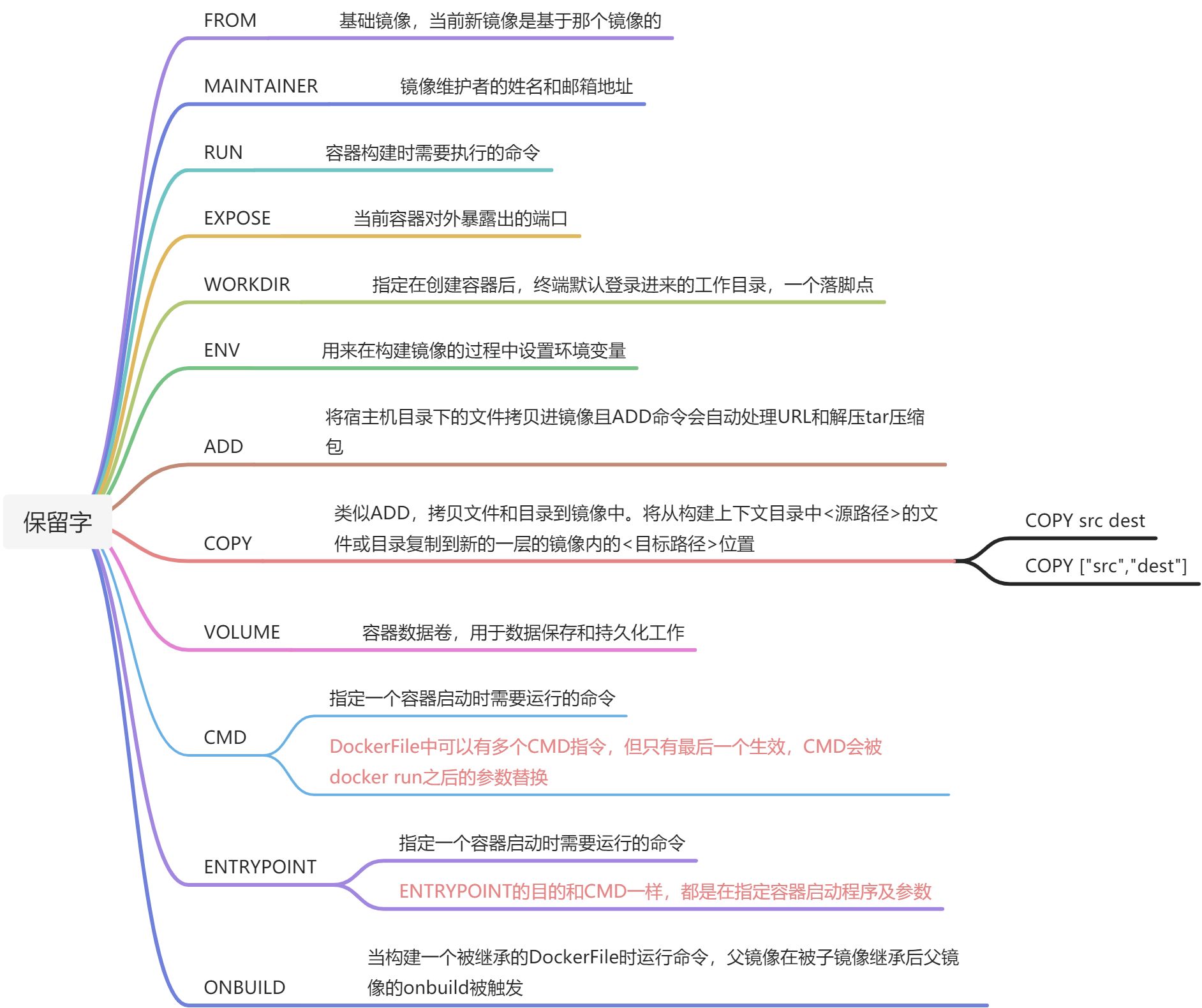
解释补充:
ENV:
ENV MY_PATH /usr/mytest
这个环境变量可以在后续的任何RUN指令 中使用,这就如同在命令的前面指定了环境变量前缀一样
也可以在其他指令中直接使用这些环境变量,比如:WORKDIR $MY_PATH
CMD:
CMD指令的格式和RUN相似,也是两种格式
shell格式:CMD <命令>
exec格式:CMD [“可执行文件”,”参数1”,”参数2”…] 必须使用双引号
参数列表格式:CMD [“参数1”,”参数2”…]。在指定了ENTRYPOINT指令后,用CMD指定具体的参数。
CMD会被docker run的参数覆盖,ENTRYPOINT不会被覆盖而是被追加

若有收获,就点个赞吧
0 人点赞


