配置文件目录结构
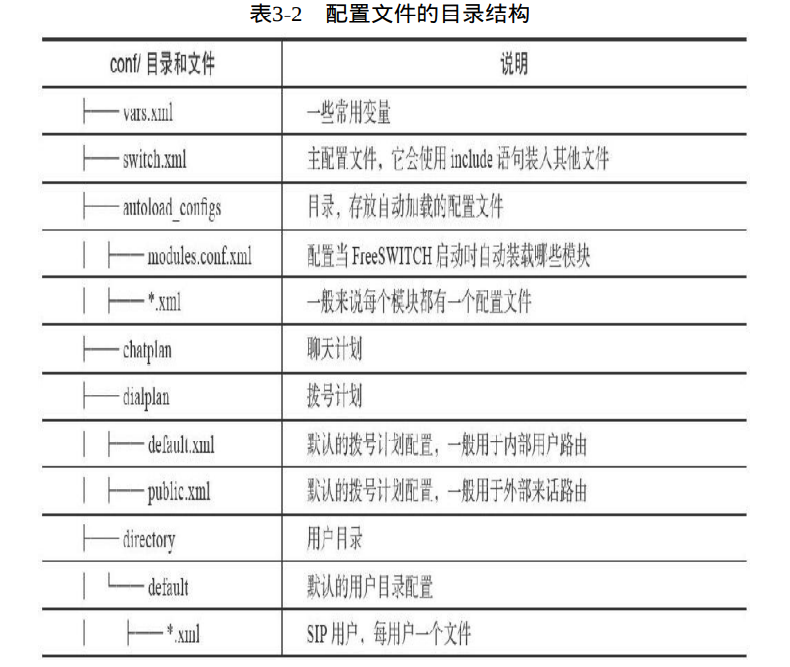
| conf/目录和文件 | 说明 |
|---|---|
| |-vars.xml | 一些常用变量 |
| |-switch.xml | 主配置文件,使include语句装入其他文件 |
| |-autoload_configs | 目录,存放自动加载的配置文件 |
| | |-modules.conf.xml | 配置当FreeSWITCH启动时自动装在哪些模块 |
| | |-*.xml | 一般来说每个模块都有一个配置文件 |
| |-chatplan | 聊天计划 |
| |-dialplan | 拨号计划 |
| | |-default.xml | 默认的拨号计划配置,一般用于内部用户路由 |
| | |-public.xml | 默认的拨号计划配置,一般用于外部用户路由 |
| |-directory | 用户目录 |
| | |-default | 默认用户没目录配置 |
| | | |-*.xml | SIP每用户一个文件 |
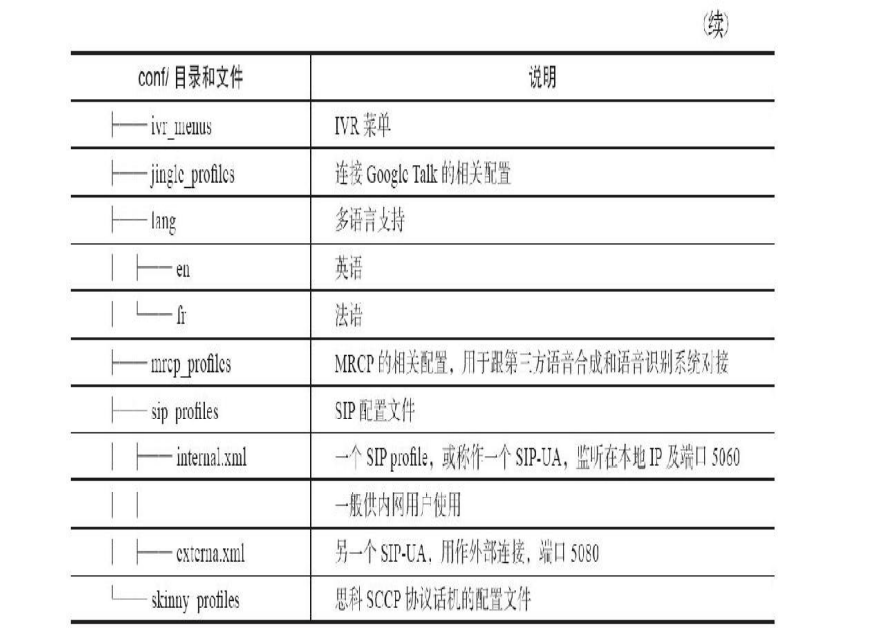
| |-ivr_menus | IVR菜单 |
| |-jinglc_profilcs | 连接Goolc Talk的相关配置 |
| |-lang | 多语言支持 |
| | |-en | 英语 |
| | |-fr | 法语 |
| |-mrcp_profilcs | MRCP的相关配置,用于跟第三方语音合成和语音识别系统对接 |
| |-sip profiles | SIP配置文件 |
| | |-internal.xml | SIP profile,SIP-UA,监听在本地IP及端口5060 |
| | |- | 一般供内网用户使用 |
| | |-external.xml | SIP-UA,用作外部连接,端口5080 |
| |-skinny profiles | 思科SCCP协议滑稽的配置文件 |
2020-11-26 09:12:25.385814 [WARNING] sofia_reg.c:2874 Can't find user [1234@192.168.2.200] from 192.168.2.14You must define a domain called '192.168.2.200' in your directory and add a user with the id="1234" attributeand you must configure your device to use the proper domain in it's authentication credentials.
freeswitch完整xml文档
configuration 配置
dialplan 拨号计划
chatplan 聊天计划
directory 用户目录
phrase 分词
vars.xml
vars.xml主要通过X-PRE-PROCESS指令定义了一些全局变量, 如
#将domain设置为local_ip_v4 ,$$为全局变量 ,$为临时变量<X-PRE-PROCESS cmd="set" data="domain=$${local_ip_v4}"/><X-PRE-PROCESS cmd="set" data="domain_name=$${domain}"/><X-PRE-PROCESS cmd="set" data="hold_music=local_stream://moh"/><X-PRE-PROCESS cmd="set" data="use_profile=internal"/>
系统自动变量
可通过global_getvar命令API查看变量的值
global_getvar sound_prefixglobal_getvar local_ip_v4

实际上params和variables可以出现在user节点 中,也可以出现在group或domain中。当它们有重复时,优先级顺序由 高到低依次为user、group、domain。
diaplan完整结构
<?xml version="1.0"?>#文件<document type="freeswitch/xml">#段<section name="dialplan" description="Regex/XML Dialplan">#上下文<context name="default">#扩展--路由表中的表项<extension name="Test Extension"></extension></context></section></document>condition--测试条件 action--动作
第196页
2020-11-26 12:37:34.900610 [INFO] mod_dialplan_xml.c:637 Processing 1000 <1000>->1234 in context defaultDialplan: sofia/internal/1000@192.168.2.200 parsing [default->unloop] continue=falseDialplan: sofia/internal/1000@192.168.2.200 Regex (PASS) [unloop] ${unroll_loops}(true) =~ /^true$/ break=on-falseDialplan: sofia/internal/1000@192.168.2.200 Regex (FAIL) [unloop] ${sip_looped_call}() =~ /^true$/ break=on-falseDialplan: sofia/internal/1000@192.168.2.200 parsing [default->Echo Test] continue=falseDialplan: sofia/internal/1000@192.168.2.200 Regex (PASS) [Echo Test] destination_number(1234) =~ // break=on-falseDialplan: sofia/internal/1000@192.168.2.200 Action answer()Dialplan: sofia/internal/1000@192.168.2.200 Action echo()
遇到Dialplan的问题,按F8键打开详 细的Debug级别的日志,尝试打一个电话,并从Log中绿色的行开始看 起[7]
正则表达式
| 例子 | 说明 |
|---|---|
| ^1234$ | ^匹配字符串开头,$匹配字符串结尾,严格匹配1234 |
| ^1234|5678 | 匹配1234或者5678 |
| ^123[0-9]$ | []表示匹配其中的任一一个字符串, -表示一个区间0-9 |
| ^123\d$ | 同上\d等于[0-9] |
| ^123\d+$ | +表示匹配1个或多个它前面的字符,前面是\d所以等于1个或多个数字,至少4位数的数字串 |
| ^123\d*$ | *匹配0个或多个前面的字符 |
| ^123 | 匹配任何以123开头的数字串 |
| ^1234$ | 匹配任何以123结尾的数字串 |
| ^123\d{5}$ | {5}精确匹配5位,匹配以123开头的所有8位电话号码 |
| ^123(\d-)$ | ()在匹配中不起作用,对匹配结果有作用,匹配除123之外的数字 |
| . | 匹配任意一个字符 |
| Info variable(变量) Name | Channel Var Name | 说明 |
|---|---|---|
| Channel-State | state | 当前Channel状态 |
| Channel-State-Number | state_number | 当前Channel状态整数值 |
| Channel-Name | channel_name | Channel名称 |
| Unique-ID | uuid | Channel的UUID |
| Call-Direction | direction | 呼叫方向,Inbound或Outbound |
| Answer-State | state | 应答状态 |
| Channel-Read-Codec-Name | read_codec | 读Codec |
| Channel-Read-Codec-Rate | read_rate | 读采样率 |
| Channel-Write-Codec-Name | write_codec | 写Codec |
| Channel-Write-Codec-Rate | write_reate | 写采样率 |
| Caller-Username | username | 用户名 |
| Caller-Dialplan | dialplan | 使用的dialplan |
| Caller-Caller-ID-Name | caller_id_name | 主叫名称 |
| Caller-Caller-ID-Number | caller_id_number | 主叫号码 |
| Caller-ANI | ani | 主叫ANI |
| Caller-ANI-II | anii | 主叫ANIII |
| Caller-Network-Addr | network_addr | 主叫IP |
| Caller-Destination-Number | destination_number | 被叫号码 |
| Caller-Unique-ID | uuid | Channel UUID |
| Caller-Source | source | 呼叫来源 |
| Caller-Context | context | Diaplan Context |
| Caller-RDNIS | rdnis | 原被叫号码 |
| Caller-Channel-Name | channel name | Channel名称 |
| Caller-Profile-Index | profile index | profile index |
| Caller-Channel-Created-Time | create_time | 创建时间 |
| Caller-Channel-Answered-Time | answerd_time | 应答时间 |
| Caller-Channel-Hangup-Time | hangup_time | 挂机时间 |
| Caller-Channel-Transfer-Time | transfer_time | 转移时间 |
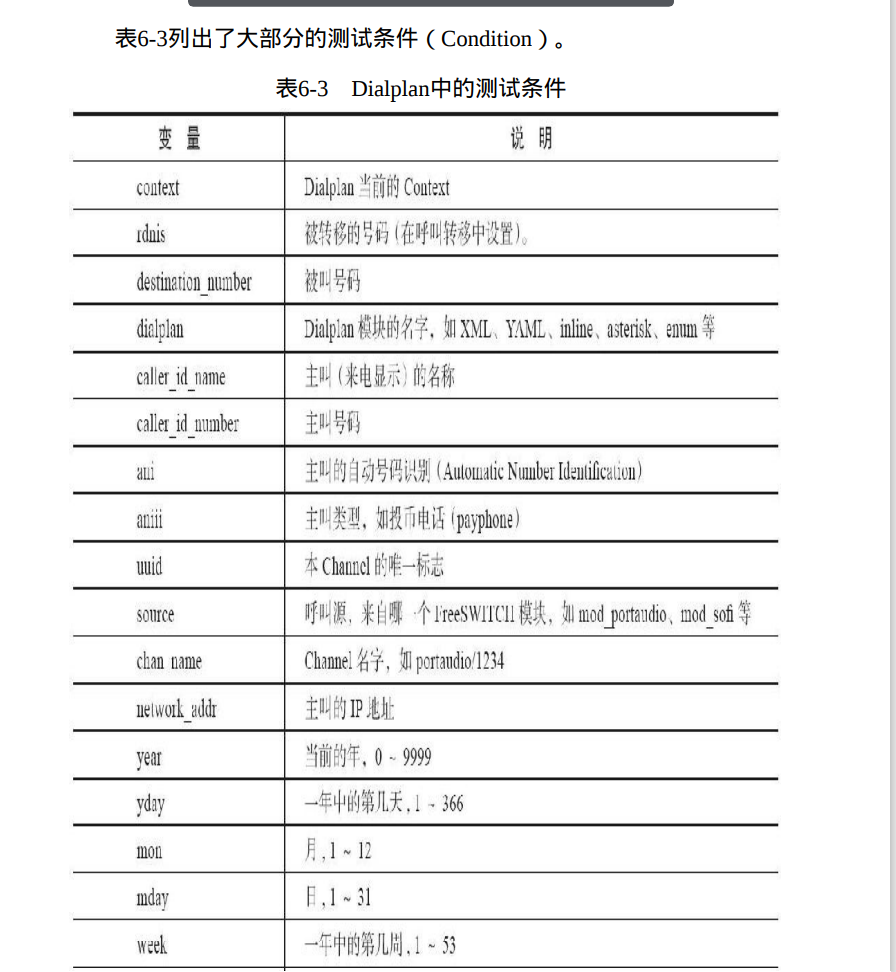
测试条件
| 变量 | 说明 |
|---|---|
| context | Dialplan当前Context |
| rdnis | 转移的号码(在呼叫转移中设置) |
| destination_number | 被叫号码 |
| dialplan | Dialplan模块的名字XML,YAML,inline,asterisk,enum等 |
| caller_id_name | 主叫(来电显示)的名称 |
| caller_id_number | 主叫号码 |
| ani | 主叫的自动号码识别(Automatic Number Identification) |
| aniii | 主叫类型,如投币电话(payphone) |
| uuid | channel的唯一标示 |
| source | 呼叫源,来自哪个FreeSWItCH模块 |
| chan_name | Channel名字 |
| network_addr | 主叫的IP地址 |
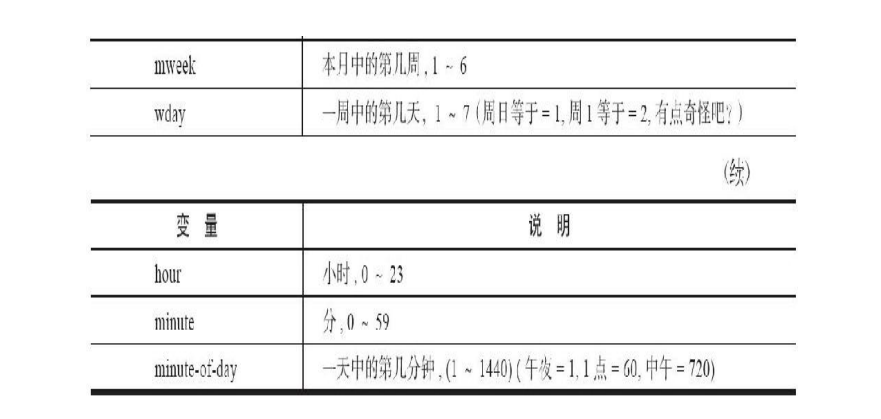
| year | 当前的年,0-9999 |
| yday | 一年中的第几天,1-366 |
| mon | 月 |
| mday | 日 |
| week | 一年中的第几周 |
| mweek | 本月第几周 |
| wday | 一周中的第几天 |
| hour | 小时 |
| minute | 分 |
| minute-of-day | 一天第几分钟 |
break有以下几个值
on-false 匹配失败停止,默认匹配 但 继 续 处 理 其 他 的 extension if if
on-true 成功停止,不成功继续 -if els if
always 不管是否匹配都停止
never 不管是否匹配都继续
反动作”(Anti-Action) if else
但有些情况下,Dialplan中会有多个extension满足匹配规则,而我 们 希 望 所 有 对 应 的 Action 都 能 得 到 执 行 , 这 时 我 们 就 要 使 用 continue=”true”参数了。
在Action上增加了一个inline属性
满足这样条件的App有: check_acl 、 eval 、 event 、 export 、 enum 、 log 、 presence 、 set 、 set_global、lcr、set_profile_var、set_user、sleep、unset、nibblebill、 verbose_events、cidlookup、curl、easyroute、odbc_query。
关于set和export的区别我们在第5章已经讲过了。这里再重复一 次:set是将变量设置到当前的Channel上,即a-leg。而export则除具备 set的功能外,也将变量设置到b-leg上。当然,这时b-leg还不存在。所 以在这里它对该Channel的影响与set其实是一样的。因此,使用set完全 是多余的。但是除此之外,export还设置了一个特殊的变量,叫 export_vars,它的值是dialed_extension。所以,实际上面的第二行就等 价于下面的两行
6.4常用Dialplan App
1.set 设置一个通道变量
<action application="set" data="my_var=123456"/>
2.echo 回声
<action application="echo"/>
3.info 在日志中打印全部通道变量
<action application="info"/>
4.answer
<action application="echo"/>
5.bridge 负责桥接令一条腿
<action application="bridge" data="user/1000"/>
6.playback 给Channel放音
<action application="playback" data="/tmp/test.wav"/>
7.sleep
<action application="sleep" data="1000"/>
8.ring_ready 回180消息
<action application="ring_ready" data="1000"/>
9.pre_answer回183消息
<action application="ring_ready" data="1000"/><action application="playback" data="/tmp/music.wav"/>
10.read实现播放声音并且顶戴接收DTMF按键
min:最少收号位数。
·max:最大收号位数。
·sound file:要播放的声音文件。
·variable name:收到用户按键后存到哪个变量里。
·timeout:等待每一位的输入超时毫秒数。
·terminators:收号小于min位时,按该键可以提前结束,通常 是“#”。
11.play_and_get_digits yuread类似比read更高级
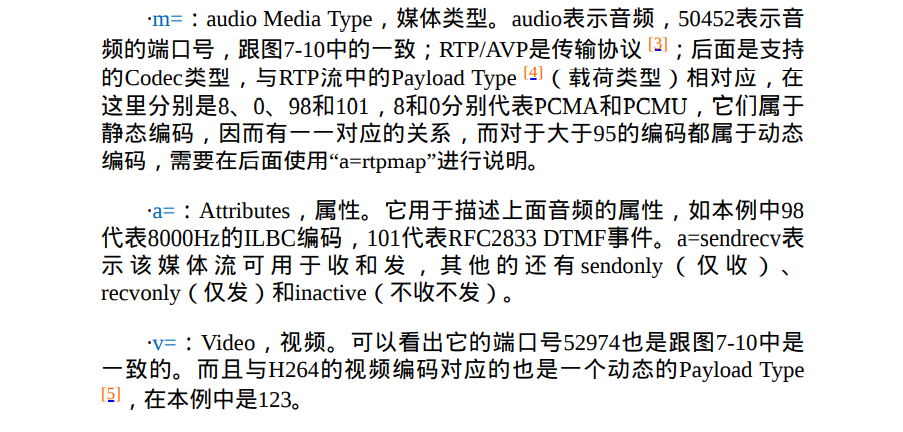
SDP部分
13.3.2DID
号码1000就是一个DID。

若有收获,就点个赞吧
0 人点赞


