1/ Zookeeper下载:
下载链接:http://mirror.bit.edu.cn/apache/zookeeper/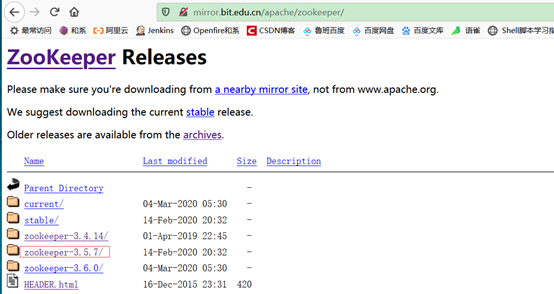

注意:不一定选择最新的,图中红圈含 bin的压缩包,是可以直接在linux | Windous中解压使用的包, 不含bin的包是Zookeeper的源码,可以导入idea中运行,源码解读,没有标准src,开始容易搞错。以zookeeper-3.5.6-1-bin.tar.gz为例。
2/ 上传到linux系统中/opt目录下
3/ 解压:
[root@localhost opt]# tar -zxvf zookeeper—bin.tar.gz
4/ 进入/opt/ zookeeper-3.5.6-1/conf目录下修改配置文件:
[root@localhost opt]# cd zookeeper-3.5.6-1/conf/
[root@localhost conf]# ls
configuration.xsl log4j.properties zoo_sample.cfg
5/ 拷贝zoo_samle.cfg为zoo.cfg
[root@localhost conf]# cp zoo_sample.cfg zoo.cfg
[root@localhost conf]# mv zoo_sample.cfg sample_zoo.cfg
[root@localhost conf]# ls
configuration.xsl log4j.properties zoo.cfg sample_zoo.cfg
6/ 编辑zoo.cfg
[root@localhost conf]# vim zoo.cfg
a/#### 单机模式:不做集群, 内容如下(data目录修改为自己的目录)
###The number of milliseconds of each tick
tickTime=2000
###The number of ticks that the initial
###synchronization phase can take
initLimit=10
###The number of ticks that can pass between
###sending a request and getting an acknowledgement
syncLimit=5
###the directory where the snapshot is stored.
dataDir=/opt/zookeeper-3.5.6-1/data
dataLogDir=/opt/zookeeper-3.5.6-1/log
###the port at which the clients will connect
clientPort=2181
b/#### 集群模式:内容如下(data目录修改为自己的目录)
The number of milliseconds of each tick
tickTime=2000
The number of ticks that the initial
synchronization phase can take
initLimit=10
The number of ticks that can pass between
sending a request and getting an acknowledgement
syncLimit=5
the directory where the snapshot is stored.
dataDir=/opt/zookeeper-3.5.6-1/data
dataLogDir=/opt/zookeeper-3.5.6-1/log
the port at which the clients will connect
clientPort=2181
server.0=192.168.3.231:2888:3888
server.1=192.168.3.232:2888:3888
server.2=192.168.3.233:2888:3888
集群:做zookeeper集群时,需要修改ip为231/232/233服务器上的zoo.cfg配置文件,均如上。
C/#### 伪集群模式:在一台服务器上搭建集群,内容如下(data目录修改为自己的目录)
zookeeper-3.5.6-1-2 配置zoo.cfg:
####The number of milliseconds of each tick
tickTime=2000
####The number of ticks that the initial
####synchronization phase can take
initLimit=10
####The number of ticks that can pass between
####sending a request and getting an acknowledgement
syncLimit=5
####the directory where the snapshot is stored.
dataDir=/opt/zookeeper-3.5.6-1-1/data
dataLogDir=/opt/zookeeper-3.5.6-1-1/log
####the port at which the clients will connect
clientPort=2181
server.0=192.168.3.231:2881:3881
server.1=192.168.3.231:2882:3882
server.2=192.168.3.231:2883:3883
伪集群:在一台服务器上搭建伪集群时,需要注意上面红色端口号及zookeeper路径。zookeeper-3.5.6-1-1 配置zoo.cfg如上。
zookeeper-3.5.6-1-2 配置zoo.cfg:
###The number of milliseconds of each tick
tickTime=2000
###The number of ticks that the initial
###synchronization phase can take
initLimit=10
#The number of ticks that can pass between
###sending a request and getting an acknowledgement
syncLimit=5
###the directory where the snapshot is stored.
dataDir=/opt/zookeeper-3.5.6-1-2/data
dataLogDir=/opt/zookeeper-3.5.6-1-2/log
###the port at which the clients will connect
clientPort=2182
server.0=192.168.3.231:2881:3881
server.1=192.168.3.231:2882:3882
server.2=192.168.3.231:2883:3883
zookeeper-3.5.6-1-3 配置zoo.cfg
# The number of milliseconds of each tick
tickTime=2000
#The number of ticks that the initial
#synchronization phase can take
initLimit=10
#The number of ticks that can pass between
#sending a request and getting an acknowledgement
syncLimit=5
#the directory where the snapshot is stored.
dataDir=/opt/zookeeper-3.5.6-1-3/data
dataLogDir=/opt/zookeeper-3.5.6-1-3/log
#the port at which the clients will connect
clientPort=2183
server.0=192.168.3.231:2881:3881
server.1=192.168.3.231:2882:3882
server.2=192.168.3.231:2883:3883
#server.id=host:port1:port2
#| | | | |— port2选举leader所使用的端口
#| | | |— port1:follower和leader交换消息所使用的端口
#| | |—host:该zk进程所在的IP地址
#| |—id:为一个数字,表示zk进程的id,这个id也是dataDir目录下myid文件的内容, 内容只能为1 - 255之间的数字,这个数字亦即上面介绍server.id中的id,表示zk进程的id
#|
7/ 运行配置的作用
initLimit :ZooKeeper集群模式下包含多个zk进程,其中一个进程为leader,余下的进程为follower。 当follower最初与leader建立连接时,它们之间会传输相当多的数据,尤其是follower的数据落后leader很多。initLimit配置follower与leader之间建立连接后进行同步的最长时间。
syncLimit :配置follower和leader之间发送消息,请求和应答的最大时间长度。
tickTime :tickTime则是上述两个超时配置的基本单位,例如对于initLimit,其配置值为5,说明其超时时间为 2000ms * 5 = 10秒。
dataLogDir :dataLogDir指定的路径是事务日志保存路径
dataDir :dataDir指定的路径是快照保存路径,当没有指定dataLogDir路径时,事务日志也会保存在该目录下
8/ 创建zookeeper 的data 和logs文件夹,并在data目录下创建myid文件(zoo.cfg中dataDir目录下):
[root@localhost zookeeper-3.5.6-1-1]# mkdir data logs
[root@localhost zookeeper-3.5.6-1-1]# cd data
[root@localhost data]#vim myid
myid指明自己的id,对应上面zoo.cfg中server.后的数字,第一台的内容为1,第二台的内容为2,内容如下
9/ 启动:
[root@localhost /]# cd /opt/zookeeper-3.5.6-1-1/bin
[root@localhost bin]# ./zkServer.sh start
JMX enabled by default
Using config: /root/zookeeper-3.3.6/bin/../conf/zoo.cfg
Starting zookeeper … STARTED
10/ 查看zookeeper
[root@localhost bin]# ps -aux | grep ‘zookeeper’ #查看进程
netstat -anp|grep 2181 #查看zookeeper的端口号命令
bin/zkServer.sh stop #zookeeper 的停止命令
bin/zkServer.sh status #zookeeper 的状态查看命令
11/ 测试:用的伪集群方式,如果是单机模式mode则是Mode:standalone。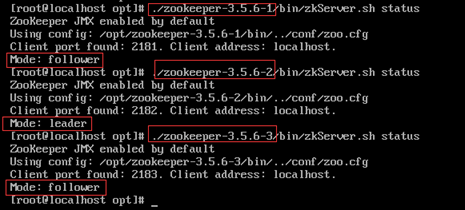
至此,zookeeper 服务搭建完成。

若有收获,就点个赞吧
0 人点赞


