CKA考题
- etcd3 snapshot
2. 部署 ingress-controller,然后配ingress规则,然后用curl验证
3. 对已存在的 master + nodes 做TLS认证 部署
4. rollout and rollout undo
5. kubectl top
6. job parallel & completion
7. 设置网络规则,操作networkpolicy资源(要pod selector, 然后ingress rule 里面再加ns selectore和pod selectore)
8. pod, service, daemonset, pv
9. 解决node not ready
10. 通过kubelet配置自动启动jenkins pod
11. kubectl get pv —sort-by=metadata.name
12. 配service和pod并且让你用nslook查询
13. taint a node,驱逐所有的pod
14. secret 挂env,挂file
15. volume 创建redis cache file强制非永久emptyDir: {}
16. envar
17. 部署 control plane + minion (提供了证书和etcd2)
18. 解决svc无法访问到的问题
19. 启动单container的pod,叫使用redis+nginx(这个题我没太明白它的意思)
20.设置一个nginx static pod
21.troubleshooting 集群健康 controller-manager 不健康 去master
22.init container 编辑一个给定的yaml文件,为其中添加init container 并使POD running
23.在一个POD内起4个指定容器:nginx+memcache+redis+conusl
24.扩容一个deployment到7个副本,方法不限
25.创建一个指定deployment
26.创建一个SVC 并使用Type Nodepoint,并验证访问
27.创建PV 1G 类型:hostpath
约考14:15,15:40才开始答题,开启分享之后巨卡无比,题目显示不来、环境连不上等等。
考试可以google,github,不可以打开浏览器之外的程序,全程开启摄像头、共享桌面。
k8s 1.8.2
etcd v3
考题解法:
1. etcd3 snapshot
https://kubernetes.io/docs/tasks/administer-cluster/configure-upgrade-etcd/
ETCDCTLAPI=3 etcdctl snapshot save snapshotdb
**# verify the snapshot_ETCDCTL_API=3 etcdctl —write-out=table snapshot status snapshotdb
备注:etcd默认用api v2
这题要用给定的证书去访问,加上如下参数
—cacert=/etc/kubernetes/ssl/ca.pem \ —cert=/etc/etcd/ssl/etcd.pem \
—key=/etc/etcd/ssl/etcd-key.pem \
2. 部署 ingress-controller,然后配ingress规则,然后用curl验证
https://github.com/kubernetes/ingress-nginx/blob/master/deploy/README.md
启动Ingress Controller
Mandatory commands
curl https://raw.githubusercontent.com/kubernetes/ingress-nginx/master/deploy/namespace.yaml \ | kubectl apply -f -curl https://raw.githubusercontent.com/kubernetes/ingress-nginx/master/deploy/default-backend.yaml \ | kubectl apply -f -curl https://raw.githubusercontent.com/kubernetes/ingress-nginx/master/deploy/configmap.yaml \ | kubectl apply -f -curl https://raw.githubusercontent.com/kubernetes/ingress-nginx/master/deploy/tcp-services-configmap.yaml \ | kubectl apply -f -curl https://raw.githubusercontent.com/kubernetes/ingress-nginx/master/deploy/udp-services-configmap.yaml \ | kubectl apply -f -
Install with RBAC roles
Please check the RBAC document.
curl https://raw.githubusercontent.com/kubernetes/ingress-nginx/master/deploy/rbac.yaml \ | kubectl apply -f -curl https://raw.githubusercontent.com/kubernetes/ingress-nginx/master/deploy/with-rbac.yaml \ | kubectl apply -f -
Baremetal
Using NodePort:
curl https://raw.githubusercontent.com/kubernetes/ingress-nginx/master/deploy/provider/baremetal/service-nodeport.yaml \ | kubectl apply -f -
Verify installation
To check if the ingress controller pods have started, run the following command:
kubectl get pods —all-namespaces -l app=ingress-nginx —watch
root@k1:~/yaml/ingress/test# kubectl -n ingress-nginx get svc default-http-backend
NAME TYPE CLUSTER-IP EXTERNAL-IP PORT(S) AGE
default-http-backend ClusterIP 10.98.244.49
default backend:10.98.244.49
检查后端:
/healthz that returns 200
/ that returns 404
root@k1:~/yaml/ingress/test# curl http://10.98.244.49:80/healthz -I
HTTP/1.1 200 OK
Date: Tue, 21 Nov 2017 03:23:11 GMT
Content-Length: 2
Content-Type: text/plain; charset=utf-8
root@k1:~/yaml/ingress/test# curl http://10.98.244.49:80/ -I
HTTP/1.1 404 Not Found
Date: Tue, 21 Nov 2017 03:23:05 GMT
Content-Length: 21
Content-Type: text/plain; charset=utf-8
Ingress使用nodeport做为前端流量入口
root@k1:~/yaml/ingress/test# kubectl get svc ingress-nginx -n ingress-nginx
NAME TYPE CLUSTER-IP EXTERNAL-IP PORT(S) AGE
ingress-nginx NodePort 10.111.34.111
root@k1:~/yaml/ingress/test# cat test.yaml
apiVersion: extensions/v1beta1
kind: Ingress
metadata:
name: test-ingress
annotations:
ingress.kubernetes.io/rewrite-target: /
spec:
rules:
- host: foo.bar.com
http:
paths:
- path: /
backend:
serviceName: nginx
servicePort: 80
启动后端应用:
root@k1:~# cat nginx.yaml
apiVersion: apps/v1beta2 # for versions before 1.8.0 use apps/v1beta1
kind: Deployment
metadata:
name: nginx-deployment
labels:
app: nginx
spec:
replicas: 1
selector:
matchLabels:
app: nginx
template:
metadata:
labels:
app: nginx
spec:
containers:
- name: nginx
image: nginx:1.7.9
ports:
- containerPort: 80
—-
apiVersion: v1
kind: Service
metadata:
name: nginx
labels:
app: nginx
spec:
ports:
- name: nginx
port: 80
selector:
app: nginx
验证:
root@k1:~# curl —resolve foo.bar.com:32477:192.168.89.84 http://foo.bar.com:32477/ -I
HTTP/1.1 200 OK
Server: nginx/1.13.6
Date: Tue, 21 Nov 2017 03:33:23 GMT
Content-Type: text/html
Content-Length: 612
Connection: keep-alive
Vary: Accept-Encoding
Last-Modified: Tue, 23 Dec 2014 16:25:09 GMT
ETag: “54999765-264”
Accept-Ranges: bytes
当删掉ingress之后:
root@k1:~/yaml/ingress/test# kubectl -n ingress-nginx delete -f test.yaml
ingress “test-ingress2” deleted
访问资源不存在:
root@k1:~t# curl —resolve foo.bar.com:32477:192.168.89.84 http://foo.bar.com:32477/ -I
HTTP/1.1 404 Not Found
Server: nginx/1.13.6
Date: Tue, 21 Nov 2017 03:35:48 GMT
Content-Type: text/plain; charset=utf-8
Content-Length: 21
Connection: keep-alive
Vary: Accept-Encoding
Strict-Transport-Security: max-age=15724800; includeSubDomains;
3. 对已存在的 master + nodes 做TLS认证 部署
4. rollout and rollout undo
rolling-update 只能对rc做
Perform a rolling update of the given ReplicationController.
kubectl rolling-update frontend-v1 frontend-v2 {—image=image:v2 | -f frontend.yaml}
rollout 可在如下资源里做:
deployments
daemonsets
* statefulsets
创建deployment时使用—record参数可以在rollout显示操作记录
root@k1:~/yaml/rolling-update# kubectl rollout history deployment/my-nginx
deployments “my-nginx”
REVISION CHANGE-CAUSE
5
6
7 kubectl apply —filename=nginx-v1.yaml —record=true
8 kubectl edit deployment my-nginx
undo 回退上一次rollout
kubectl rollout undo deployment/nginx-deployment
回退到某次rollout
kubectl rollout undo deployment/nginx-deployment —to-revision=2
rollout undo遇到的bug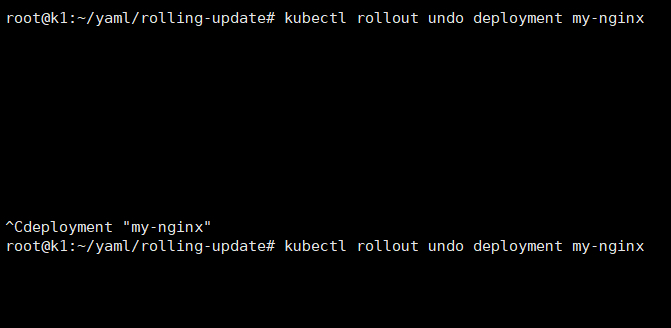
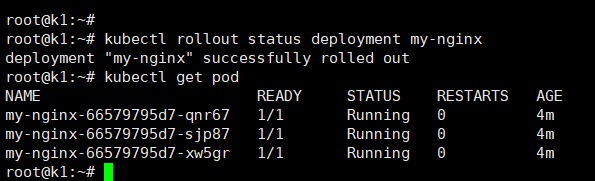
Rolling Update Deployment
.spec.strategy.rollingUpdate.maxUnavailable=
maximum number of Pods that can be unavailable during the update process.
.spec.strategy.rollingUpdate.maxSurge=
maximum number of Pods that can be created over the desired number of Pods.
git clone https://github.com/kubernetes/heapster
kubectl create -f deploy/kube-config/influxdb/ kubectl create -f deploy/kube-config/rbac/heapster-rbac.yaml
kubectl top pod -n kube-system
kubectl top pods —all-namespaces | grep -iv name | awk ‘{print $2”\t”$3}’| sort -r -n -k 2
6. job parallel & completion
root@k1:~/yaml/job# cat job.yaml
apiVersion: batch/v1
kind: Job
metadata:
labels:
name: busybox
name: busybox
spec:
completions: 8
parallelism: 2
template:
metadata:
name: busybox
spec:
containers:
- name: busybox
image: busybox
command: [“sleep”,”3”]
restartPolicy: Never
关键参数在
completions: 8
parallelism: 2
7. 设置网络规则,操作networkpolicy资源(要pod selector, 然后ingress rule 里面再加ns selectore和pod selectore)
v1.8**
{} 代表所有都包括
https://kubernetes.io/docs/concepts/services-networking/network-policies/#isolated-and-non-isolated-pods
https://github.com/ahmetb/kubernetes-networkpolicy-tutorial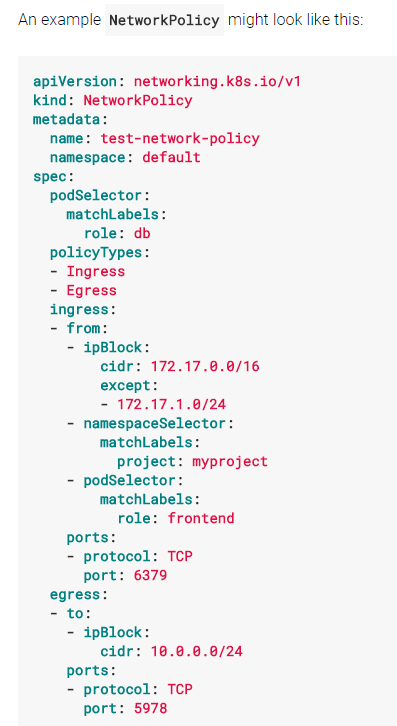
v1.6
- 在生效之前,必须先配置annotation来阻止所有的请求;
- podSelector.matchLablesl:定义了该规则对哪些pod(destination)有效;
- ingress:指定了允许带标签“access=true” 的pod访问这些服务;
kind: NamespaceapiVersion: v1metadata: annotations: net.beta.kubernetes.io/network-policy: | {“ingress”: {“isolation”: “DefaultDeny”}}
8. pod, service, daemonset, pv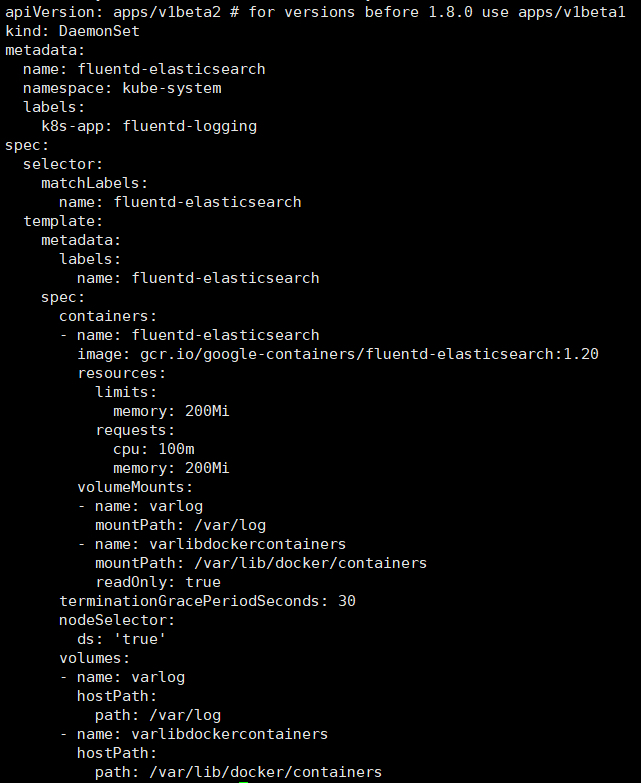
9. 解决node not ready
kubelet没有启动,直接systemctl restart 就OK了
kube
systemctl start kubelet.service
10. 通过kubelet配置自动启动jenkins pod
cat /etc/systemd/system/kubelet.service.d/10-kubeadm.conf
#Environment=”KUBELET_SYSTEM_PODS_ARGS=—pod-manifest-path=/etc/kubernetes/manifests —allow-privileged=true”
Environment=”KUBELET_SYSTEM_PODS_ARGS=—pod-manifest-path=/etc/kubelet.d —allow-privileged=true”
11. kubectl get pv —sort-by=metadata.name
按规则排序,必须用kubectl —sort-by
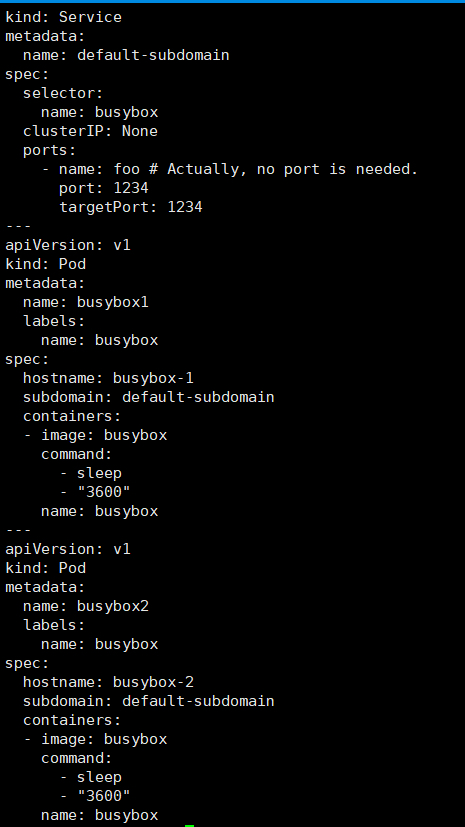
12. 配service和pod并且让你用nslook查询
这题验证有点坑,自己起个busybox验证即可
13. taint a node,驱逐所有的pod
kubectl get pod -o wide —show-all
kubectl taint no k5 k1=v1:NoExecute
14. secret
kubectl create secret generic test-db-secret —from-literal=username=testuser —from-literal=password=12345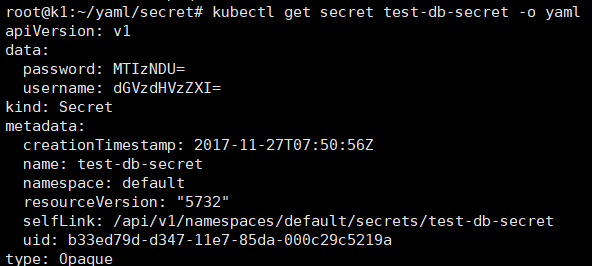
root@k1:~/yaml/secret# cat sec.yaml
apiVersion: v1
kind: Pod
metadata:
name: secret-env-pod
spec:
containers:
- name: mycontainer
image: nginx:1.7.9
env:
- name: SECRET_USERNAME
valueFrom:
secretKeyRef:
name: test-db-secret
key: username
- name: SECRET_PASSWORD
valueFrom:
secretKeyRef:
name: test-db-secret
key: password
volumeMounts:
- name: foo
mountPath: /foo
- name: foo2
mountPath: /foo2
volumes:
- name: foo
secret:
secretName: test-db-secret
items:
- key: username
path: my-group/my-username
mode: 511
- name: foo2
secret:
secretName: test-db-secret
restartPolicy: Never
通过env、key、file 挂载secret
15. volume
root@k1:~/yaml/volume# cat pod-redis.yaml
apiVersion: v1
kind: Pod
metadata:
name: nginx-volume
spec:
containers:
- name: nginx-volume
image: nginx:1.7.9
volumeMounts:
- name: nginx-volume-storage
mountPath: /data/nginx-volume
- name: all-in-one
mountPath: /data/all-in-one
volumes:
- name: nginx-volume-storage
emptyDir: {}
- name: all-in-one
projected:
sources:
- secret:
name: test-db-secret
- configMap:
name: config1
与pod同在的空路径、all-in-one的多source挂载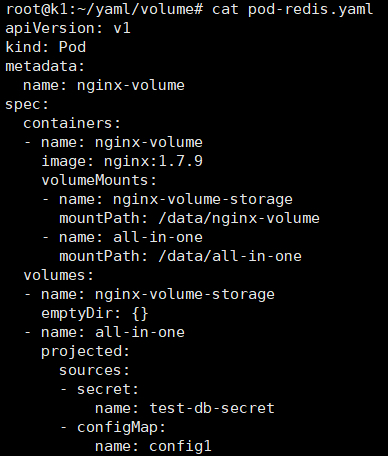
当类型相同时,pvc会自动inding到pv
16. envar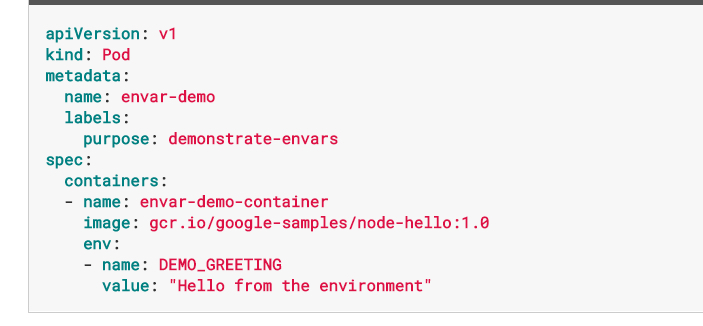
17. 部署 control plane + minion (提供了证书和etcd2)
这题weight 8%,题干有点长,没时间解了
18. 解决svc无法访问到的问题
这个没注意,看pod状态,集群状态,
service troubleshooting步骤:
https://kubernetes.io/docs/tasks/debug-application-cluster/debug-service/
19. 启动单container的pod,叫使用redis+nginx(这个题我没太明白它的意思)
一个POD内起多个指定容器,这题4分,应该不复杂
20.设置一个nginx static pod
这题kubelet没有指定—pod-manifest-path=/etc/kubernetes/manifests
目标路径已经存在,需要去kubelet.service 添加—pod-manifest-path=/etc/kubernetes/manifests参数
21.troubleshooting 集群健康 controller-manager 不健康
kubectl get cs
发现controller-manager不健康了,
ssh bk8s-master-0
systemctl status kube-controller-manager
systemctl start kube-controller-manager
systemctl enable kube-controller-manager 题目要求操作永久有效
22.init container 编辑一个给定的yaml文件,为其中添加init container 并使POD running
该deployment中已有一个容器,加入了liveness probe,探测某个文件是否存在
在yaml中加入init container,挂载卷并创建被探测文件
23.在一个POD内起4个指定容器:nginx+memcache+redis+conusl
Deployment名字和镜像要用题目指定的
24.扩容一个deployment到7个副本,方法不限
kubectl edit
25.创建一个指定deployment
注意名字和镜像
26.创建一个SVC 使用Nodepoint,并验证访问
这题我卡了一下,宿主机为AWS主机有好多IP

若有收获,就点个赞吧
0 人点赞


