1、Docker版本
Docker在17.03版本前叫Docker Engine,版本号范围为0.1.0~1.13.1
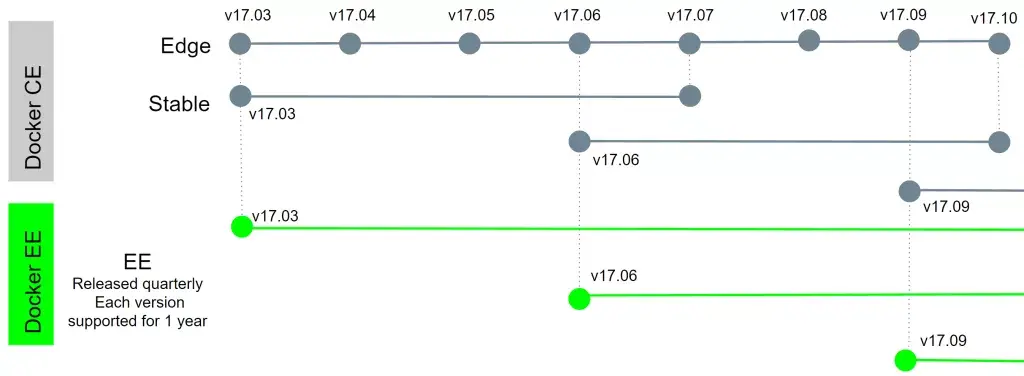
17.03之后分为Docker CE(社区版)和Docker EE(企业版),并采用基于时间的版本号方案。
Docker CE/EE每个季度发布一个季度版本,也就是说每年会发布 4 个季度版本, 17.03, 17.06, 17.09, 17.12 就是 2017 年的 4 个季度版本的版本号, 同时 Docker CE 每个月还会发布一个 EDGE 版本,比如 17.04, 17.05, 17.07, 17.08, 17.10, 17.11.
2、Docker安装
2.1、设置镜像源
[root@localhost yum.repos.d]# /etc/yum.repos.d/[root@localhost yum.repos.d]# wget https://mirrors.tuna.tsinghua.edu.cn/docker-ce/linux/centos/docker-ce.repo# 默认docker镜像源为docker.com,更改为国内镜像源[root@localhost yum.repos.d]# sed -i -e 's#https://download.docker.com#https://mirrors.tuna.tsinghua.edu.cn/docker-ce#g' /etc/yum.repos.d/docker-ce.repo
2.2、安装
[root@localhost yum.repos.d]# yum install docker-ce
2.3、配置文件说明
docker-ce默认配置文件为/etc/docker/daemon.json,此文件默认不存在需创建。
2.3.1、修改Docker镜像源
docker默认镜像源为dockerhub,修改为国内镜像源,主要有以下三家
docker cn
阿里云镜像站
中国科技大学镜像站
# vim /etc/docker/daemon.json{"registry-mirrors": ["http://hub-mirror.c.163.com"]}
2.4、启动docker服务
[root@localhost yum.repos.d]# systemctl start docker.service
3、docker 命令介绍
- docker命令支持两种模式,一种为新的按照分类管理方式,一种为兼容之前的独立命令方式
3.1、分类管理方式
[root@localhost yum.repos.d]# docker --helpUsage: docker [OPTIONS] COMMANDManagement Commands: # 新的分类管理方式builder Manage buildsconfig Manage Docker configscontainer Manage containerscontext Manage contextsengine Manage the docker engineimage Manage imagesnetwork Manage networksnode Manage Swarm nodesplugin Manage pluginssecret Manage Docker secretsservice Manage servicesstack Manage Docker stacksswarm Manage Swarmsystem Manage Dockertrust Manage trust on Docker imagesvolume Manage volumes
3.2、独立命令模式
Commands: # 老的支持方式attach Attach local standard input, output, and error streams to a running containerbuild Build an image from a Dockerfilecommit Create a new image from a container's changescp Copy files/folders between a container and the local filesystemcreate Create a new containerdeploy Deploy a new stack or update an existing stack
3.3、查看docker版本
[root@localhost yum.repos.d]# docker versionClient: Docker Engine - CommunityVersion: 19.03.1API version: 1.40Go version: go1.12.5Git commit: 74b1e89Built: Thu Jul 25 21:21:07 2019OS/Arch: linux/amd64Experimental: false
3.4、常用命令
docker search: 从docker hub搜索镜像docker pull:从镜像仓库下载image镜像docker images: 列出image镜像docker create: 创建一个新的容器docker satrt: 启动一个停止状态的容器docker run:运行一个新的容器docker attach:docker ps: 显示容器列表docker logs:查看容器日志docker restart:重启容器dockerr stop:停止一个容器docker kill:kill容器docker rm:删除容器
4、示例
4.1、搜索容器
[root@localhost yum.repos.d]# docker search nginxNAME DESCRIPTION STARS OFFICIAL AUTOMATEDnginx Official build of Nginx. 11931 [OK]jwilder/nginx-proxy Automated Nginx reverse proxy for docker con… 1651 [OK]
4.2、下载镜像
[root@localhost yum.repos.d]# docker pull redis:latestlatest: Pulling from library/redis1ab2bdfe9778: Downloading966bc436cc8b: Download completec1b01f4f76d9: Download complete8a9a85c968a2: Download complete8e4f9890211f: Download complete93e8c2071125: Download completelatest: Pulling from library/redis1ab2bdfe9778: Pull complete966bc436cc8b: Pull completec1b01f4f76d9: Pull complete8a9a85c968a2: Pull complete8e4f9890211f: Pull complete93e8c2071125: Pull completeDigest: sha256:9755880356c4ced4ff7745bafe620f0b63dd17747caedba72504ef7bac882089Status: Downloaded newer image for redis:latestdocker.io/library/redis:latest
4.3、查看本地docker镜像
[root@localhost yum.repos.d]# docker imagesREPOSITORY TAG IMAGE ID CREATED SIZEnginx stable-alpine 8587e8f26fc1 2 weeks ago 21.2MBredis latest f7302e4ab3a8 3 weeks ago 98.2MB[root@localhost yum.repos.d]#[root@localhost yum.repos.d]#[root@localhost yum.repos.d]#[root@localhost yum.repos.d]# docker image lsREPOSITORY TAG IMAGE ID CREATED SIZEnginx stable-alpine 8587e8f26fc1 2 weeks ago 21.2MBredis latest f7302e4ab3a8 3 weeks ago 98.2MB
4.4、创建容器
# 通过-it创建busybox容器[root@localhost yum.repos.d]# docker run --name b1 -it busybox:latestUnable to find image 'busybox:latest' locallylatest: Pulling from library/busybox7c9d20b9b6cd: Pull completeDigest: sha256:fe301db49df08c384001ed752dff6d52b4305a73a7f608f21528048e8a08b51eStatus: Downloaded newer image for busybox:latest# 通过-d创建nginx容器并后台启动[root@localhost ~]# docker run --name nginxserver1 -d nginx:stable-alpineb588101f59095e9c57e36e367ac85a67f1597a22321851c4a860a7d083ccc28f
4.4.1、-it和-d的区别
- -it 表示启动容器时启动一个伪终端进程,此进程PID为1,启动后容器不会退出。
- -d 表示后台启动服务,如果容器中没有PID为1的进程启动,则使用-d运行后容器会自动退出。
4.5、查看本地容器列表
# docker ps查看运行状态的容器[root@localhost ~]# docker psCONTAINER ID IMAGE COMMAND CREATED STATUS PORTS NAMES1669d617b6b2 busybox:latest "sh" 4 minutes ago Up 4 minutes b1# docker ps -a查看所有状态的容器[root@localhost ~]# docker ps -aCONTAINER ID IMAGE COMMAND CREATED STATUS PORTS NAMES1669d617b6b2 busybox:latest "sh" 5 minutes ago Exited (130) 2 seconds ago b18e0295137493 nginx:stable-alpine "nginx -g 'daemon of…" 8 minutes ago Exited (0) 6 minutes ago nginxser1

若有收获,就点个赞吧
0 人点赞


