1、集群组件问题
1.1、DashBoard无法启用
Ceph从Luminous开始,Ceph 提供了原生的Dashboard功能,通过Dashboard可以获取Ceph集群的各种基本状态信息。 Dashboard为mgr的模块,默认为未启用状态,nautilus版需要安装ceph-mgr-dashboard,可以在mgr节点上通过下面命令启用。
]$ ceph mgr module enable dashboard
如果报错:
Error ENOENT: all mgr daemons do not support module 'dashboard', pass --force to force enablement
则说明没有安装ceph-mgr-dashboard,可在mgr节点安装
]$ sudo yum -y install ceph-mgr-dashboard
安装后可能还是会报错,原因是安装依赖包前就初始化好了mgr节点,mgr没有将dashboard模块加载,可以停掉mgr服务,重新使用ceph-deploy安装mgr
]$ systemctl stop ceph-mgr@ceph-mon1# 在deploy节点执行]$ ceph-deploy mgr create ceph-mon1
1.2、Ceph提示1 daemons have recently crashed
原因是最近有一个多多个守护进程崩溃或有组件宕机过。管理员尚未对崩溃进行确认存档。
查看报错信息
]$ ceph crash ls-newID ENTITY NEW2021-08-26_05:14:54.060769Z_06a614cc-e005-4ce7-abb7-92e57bc8e106 osd.3 *
查看具体报错ID信息
ceph crash info 2021-08-26_05:14:54.060769Z_06a614cc-e005-4ce7-abb7-92e57bc8e106{"os_version_id": "7","utsname_machine": "x86_64","entity_name": "osd.3","io_error": true,....
确认后清除报错信息
]$ ceph crash archive-all1.3、集群提示health_warn clock skew detected on mon
造成集群状态health_warn:clock skew detected on mon节点的原因有两个,一个是mon节点上ntp服务器未启动,另一个是ceph设置的mon的时间偏差阈值比较小。Ceph默认允许时间偏差的阈值为2s,超过2s就会出现上面的报错。、
添加时间同步crontab
*/1 * * * * /usr/sbin/ntpdate 10.10.2.98修改Ceph配置中时间偏差的阈值
]$ vi ceph.conf
# 在global下添加
mon clock drift allowed = 2
mon clock drift warn backoff = 30
将配置同步到所有mon节点
]$ ceph-deploy --overwrite-conf config push ceph-mon{1..3}重启mon服务
]$ systemctl restart ceph-mon.target2、OSD异常
2.1、误删OSD
在一次清理故障磁盘osd.3时,误操作从cursh map中删除了osd.6
]$ ceph osd crush rm osd.6
removed item id 6 name 'osd.6' from crush map
此时通过ceph osd tree可以看到osd.6虽然是up状态,但不属于任何节点
ceph osd tree
ID CLASS WEIGHT  TYPE NAME          STATUS REWEIGHT PRI-AFF
-1       3.29305 root default
-3       1.38307     host ceph-mon1
0   hdd 0.27299         osd.0          up  1.00000 1.00000
1   hdd 0.27299         osd.1          up  1.00000 1.00000
2   hdd 0.27299         osd.2          up  1.00000 1.00000
12   hdd 0.29109         osd.12         up  1.00000 1.00000
-5       0.81898     host ceph-mon2
4   hdd 0.27299         osd.4          up  1.00000 1.00000
5   hdd 0.27299         osd.5          up  1.00000 1.00000
7   hdd 0.27299         osd.7          up  1.00000 1.00000
-7       1.09099     host ceph-mon3
8   hdd 0.27299         osd.8          up  1.00000 1.00000
9   hdd 0.27299         osd.9          up  1.00000 1.00000
10   hdd 0.27299         osd.10         up  1.00000 1.00000
11   hdd 0.27299         osd.11         up  1.00000 1.00000
6             0 osd.6                  up  1.00000 1.00000
将osd.6重新加回集群
]$ ceph osd crush add 6 0.27299 host=ceph-mon2   # 0.27299为osd权重,可以通过osd tree查看
add item id 6 name 'osd.6' weight 0.27299 at location {host=ceph-mon2} to crush map
2.2、ceph不显示ssd磁盘
在ceph集群中添加ssd磁盘后,osd显示为hdd,这是因为crush class仅有hdd,创建ssd类型,并修改即可。
]$ ceph osd crush class ls
[
  "hdd"
]
创建ssd类型
$ ceph osd crush class create ssd
created class ssd with id 1 to crush map
]$ ceph osd crush class ls
[
  "ssd",
  "hdd"
]
移除原有的hdd分类
]$ ceph osd crush rm-device-class osd.{0..8}设置为ssd类型
]$ ceph osd crush set-device-class ssd osd.{0..8}查看osd类型
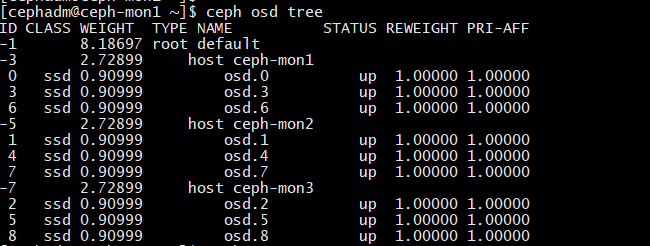
3、MDS异常
3.1、报错clients failing to respond to cache pressure

若有收获,就点个赞吧
0 人点赞


