- MySQL 5.7_MHA 集群部署手册
- 1、MHA介绍
- 2、MHA集群架构
- 3、部署MHA集群
- 4、故障模拟
MySQL 5.7_MHA 集群部署手册
1、MHA介绍
MHA(Master High Availability)目前在MySQL高可用方面是一个相对成熟的解决方案,它由日本DeNA公司youshimaton(现就职于Facebook公司)开发,是一套优秀的作为MySQL高可用性环境下故障切换和主从提升的高可用软件。在MySQL故障切换过程中,MHA能做到在0~30秒之内自动完成数据库的故障切换操作,并且在进行故障切换的过程中,MHA能在最大程度上保证数据的一致性,以达到真正意义上的高可用。
2、MHA集群架构
2.1、架构图
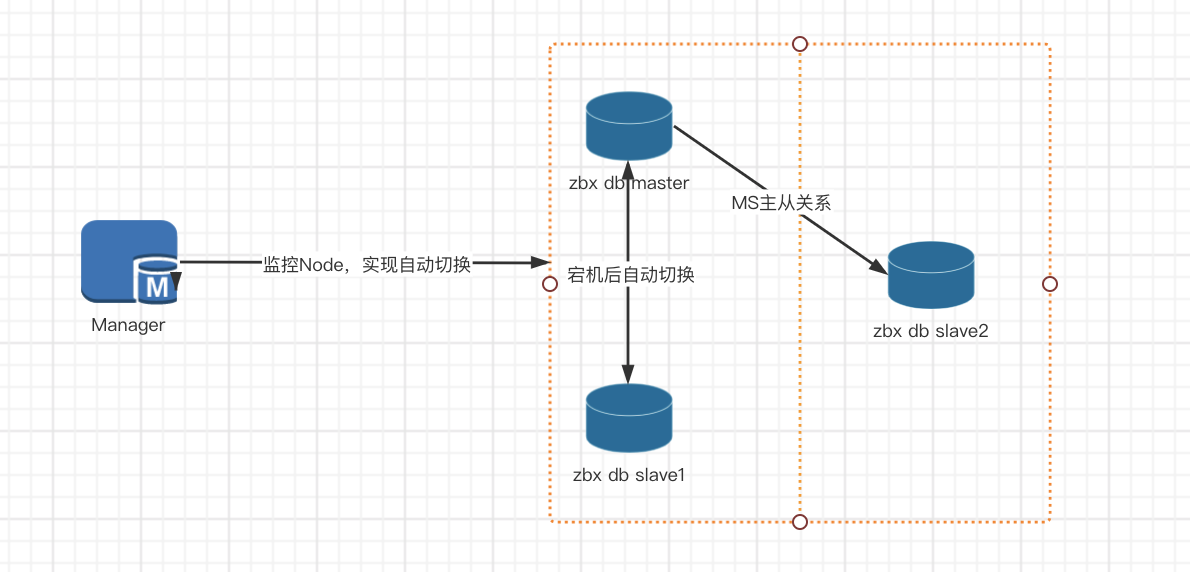
2.2、MHA集群组件介绍
| 组件缩写 | 组件名称 | 备注 |
|---|---|---|
| MHA_manager | MHA Manager | MHA管理节点 |
| MHA_node | MHA Node | MHA 数据节点 |
| DB_Master | MySQL Database MASTER Node | 数据库主节点 |
| DB_Slave | MySQL Database Slave Nod | 数据库从节点 |
3、部署MHA集群
3.1、集群角色说明
| 工作项 | 注意项 | |
|---|---|---|
| MHA集群部署环境前置要求 | 架构规划 | 确定集群规模,服务器数量和配置。 |
| 硬件 | 注意跨机架和跨机房上架服务器,至少db机器要跨机架。只兼容x86 | |
| 网络 | 所有机器可以互相访问,如果有lvs的机器要在同一网段内。物理网卡建议是万兆网卡。 | |
| 操作系统 | 推荐使用CentOS7分支(redhat),建议使用centos7.9 | |
| 存储(文件系统) | 推荐使用ssd盘或者nvme做数据库的数据盘,文件系统建议用xfs。 | |
| yum/apt源 | 所有服务器需配置好对应系统的yum/apt源。 | |
| NTP服务 | 部署NTP服务器,所有服务器连接NTP服务器,使用北京时间(UTC+08:00),保证服务器间的时间误差不超过3秒。 | |
| 挂载NAS(可选) | 如需使用NAS作为冷备存储,请将NAS在对应机器上先挂载好。 | |
| 部署 | 部署规划 | 详细IP及部署模块规划列表。 |
3.2、集群基础环境建议
3.2.1、硬件建议
| 组件 | 机器数 | 机器配置(CPU/内存/磁盘) | 备注 |
|---|---|---|---|
| MHA_Manager | 1 | 2C/4G/200G | 管理节点 |
| MHA Node | 3 | 16C/64G/1000G | Node节点和DB节点复用 |
| DB | 3 | 16C/64G/1000G | Node节点和DB节点复用 |
共计4台机器,建议3台物理台机器(或者高配虚拟机),管理节点虚拟机
3.2.2、操作系统要求
| 项目 | 说明 |
|---|---|
| CentOS | CentOS Linux release 7.9 |
| Glibc | glibc-2.17 |
3.2.3、部署规划
一个最小化部署(测试环境)的规划样例如下:
| 10.211.55.101 | 10.211.55.102 | 10.211.55.103 | 10.211.55.100 | |
|---|---|---|---|---|
| MHA_Manager | Y | |||
| MHA Node | Y | Y | Y | Y |
| DB | Y | Y | Y |
3.3、系统环境修改(所有节点)
- 关闭防火墙
systemctl stop firewalldsystemctl disable firewalld
- 关闭selinux
sed -i 's/enforcing/disabled/' /etc/selinux/config # 永久setenfore 0 # 临时
- 挂载数据盘
数据目录建议使用单独硬盘,需要对硬盘进行格式化并挂载,格式化整个磁盘,然后直接把整个磁盘挂载到/data/ 目录。
umount /data/
ls /dev/nvme*
mkfs.xfs -f /dev/nvme0n1
mount /dev/nvme0n1 /data/
df -Th
- 修改主机名(可选)
hostnamectl set-hostname zabbixdb001
hostnamectl set-hostname zabbixdb002
hostnamectl set-hostname zabbixdb003
- 修改profile
echo $LANG
echo "PS1='tty:[\e[1;36m\l\e[0m] jobs:[\e[1;36m\j\e[0m] cwd:[\e[1;36m\w\e[0m]\n\`date +%H:%M\` [\u@\`hostname\`]$ '">>/etc/bashrc
grep 'ulimit -HSn 100000' /etc/profile || echo 'ulimit -HSn 100000' >>/etc/profile

source /etc/profile
- 关闭postfix服务
systemctl disable postfix
- 依赖环境安装
yum -y install openssh net-tools sysstat ntpdate numactl tree strace dstat wget lrzsz libaio glibc gcc gcc-c++ libstdc++-devel
ldd --version
# 注:要求Linux系统的glibc版本要比2.12新,可以使用ldd --version查看glibc版本。
- 配置时间同步
ln -sf /usr/share/zoneinfo/Asia/Shanghai /etc/localtime

vi /etc/crontab
*/20 * * * * root ntpdate -s ntp.aliyun.com
- 关闭numa(INTEL机器建议关闭numa)
vim /etc/default/grub
GRUB_CMDLINE_LINUX 最后添加 numa=off
# 编译配置文件,然后重启机器
grub2-mkconfig -o /etc/grub2.cfg
3.4、数据库节点安装(所有节点)
3.4.1、安装包下载
wget https://cdn.mysql.com/archives/mysql-5.7/mysql-5.7.33-linux-glibc2.12-x86_64.tar.gz
3.4.2、卸载冲突包
rpm  -qa | grep mysql | xargs rpm -e
rpm  -qa | grep mariadb | xargs rpm -e
3.4.3、创建my.cnf
每个DB节点的server-id必须修改为不一样
innodb_buffer_pool_size建议设置为物理内存的75%
vim /etc/my.cnf

[client]
port    = 3306
socket  = /data/mysql/mysql3306/mysql.sock

[mysql]
prompt="\\u@\\h:\\p [\\d]>"
#pager="less -i -n -S"
#tee=/opt/mysql/query.log
no-auto-rehash


[mysqld]
user    = mysql
port    = 3306
basedir = /usr/local/mysql
datadir = /data/mysql/mysql3306/data
tmpdir = /data/mysql/mysql3306/tmp

socket  = /data/mysql/mysql3306/mysql.sock
pid-file = mysql3306.pid

character-set-server = utf8mb4
lower_case_table_names =1
explicit_defaults_for_timestamp=1
skip_name_resolve = 1

open_files_limit    = 65535
back_log = 1024
max_connections = 1024
max_connect_errors = 1000000


#timeout
interactive_timeout = 300
wait_timeout = 300

#log_slow
log-output=file
slow_query_log = 1
slow_query_log_file = slow.log
log-error = error.log
long_query_time = 1
log_queries_not_using_indexes =1
log_throttle_queries_not_using_indexes = 60
min_examined_row_limit = 100

log_slow_admin_statements = 1
log_slow_slave_statements = 1

#binlog
server-id = 2106171636  # 修改id
binlog_format = row
binlog_checksum = 1
log-bin = /data/mysql/mysql3306/logs/mysql-bin
#设置0 高性能
sync_binlog = 0
binlog_cache_size = 4M
max_binlog_cache_size = 2G
max_binlog_size = 1G
expire_logs_days = 7
master_info_repository = TABLE
relay_log_info_repository = TABLE

#GTID
gtid_mode = off
#enforce_gtid_consistency = 1
log_slave_updates
#slave-rows-search-algorithms = 'INDEX_SCAN,HASH_SCAN'

#procedure
log_bin_trust_function_creators=1

#relay log
skip_slave_start = 1
#max_relay_log_size = 512M
#relay_log_purge = 1
relay_log_recovery = 1
relay-log=/data/mysql/mysql3306/logs/relay-bin
relay-log-index=/data/mysql/mysql3306/logs/relay-bin.index
log_slave_updates
relay_log_info_repository = TABLE
#relay_log = /data/mysql/mysql3306/log/relay-bin
relay_log_purge=off

#buffers & cache
table_open_cache = 4096
table_definition_cache = 1024
#table_open_cache_instances = 64

sort_buffer_size = 4M
join_buffer_size = 4M
thread_cache_size = 200
thread_stack = 192K
max_heap_table_size = 32M
tmp_table_size = 32M
key_buffer_size = 2M
read_buffer_size = 2M
read_rnd_buffer_size = 8M
bulk_insert_buffer_size = 32M
max_allowed_packet = 32M


#innodb_thread_concurrency 设置1.5倍*CPU核数
innodb_thread_concurrency = 16
#innodb_sync_spin_loops = 100
#innodb_spin_wait_delay = 30

#transaction_isolation = REPEATABLE-READ
transaction_isolation = READ-COMMITTED
#innodb_additional_mem_pool_size = 16M

#设置物理内存的75%
innodb_buffer_pool_size = 2048M

innodb_buffer_pool_instances = 16
innodb_buffer_pool_load_at_startup = 1
innodb_buffer_pool_dump_at_shutdown = 1
innodb_data_file_path = ibdata1:2G:autoextend

#数据安全要求高设置1
innodb_flush_log_at_trx_commit = 2
innodb_log_buffer_size = 64M
innodb_log_file_size = 2G
innodb_log_files_in_group = 2
#innodb_max_undo_log_size = 1G
#innodb_undo_directory = undolog
#innodb_undo_tablespaces = 8

# 根据您的服务器IOPS能力适当调整
# 一般配普通SSD盘的话,可以调整到 10000 - 20000
# 配置高端PCIe SSD卡的话,则可以调整的更高,比如 50000 - 80000
innodb_io_capacity = 10000
innodb_io_capacity_max = 20000

innodb_flush_sync = 0
innodb_flush_neighbors = 0
innodb_write_io_threads = 8
innodb_read_io_threads = 8
innodb_purge_threads = 4
innodb_page_cleaners = 4
innodb_open_files = 65535
innodb_max_dirty_pages_pct = 70
innodb_flush_method = O_DIRECT
innodb_lru_scan_depth = 1024
#innodb_checksum_algorithm = crc32
innodb_lock_wait_timeout = 10
innodb_rollback_on_timeout = 1
innodb_print_all_deadlocks = 1
innodb_file_per_table = 1
#innodb_online_alter_log_max_size = 4G
internal_tmp_disk_storage_engine = InnoDB
innodb_stats_on_metadata = 0

# some var for MySQL 5.7
innodb_checksums = 1
#innodb_file_format = Barracuda
#innodb_file_format_max = Barracuda
query_cache_size = 0
query_cache_type = 0
query_cache_limit = 256K
query_cache_min_res_unit = 512
innodb_undo_logs = 64

innodb_status_file = 1
# 注意: 开启 innodb_status_output & innodb_status_output_locks 后, 可能会导致log-error文件增长较快
innodb_status_output = 0
innodb_status_output_locks = 0

#performance_schema
performance_schema = 1
performance_schema_instrument = '%=on'

#innodb monitor
innodb_monitor_enable="module_innodb"
innodb_monitor_enable="module_server"
innodb_monitor_enable="module_dml"
innodb_monitor_enable="module_ddl"
innodb_monitor_enable="module_trx"
innodb_monitor_enable="module_os"
innodb_monitor_enable="module_purge"
innodb_monitor_enable="module_log"
innodb_monitor_enable="module_lock"
innodb_monitor_enable="module_buffer"
innodb_monitor_enable="module_index"
innodb_monitor_enable="module_ibuf_system"
innodb_monitor_enable="module_buffer_page"
innodb_monitor_enable="module_adaptive_hash"

#myisam
myisam_sort_buffer_size = 128M
myisam_max_sort_file_size = 2G
myisam_repair_threads = 1

[mysqldump]
quick
max_allowed_packet = 32M
3.4.4、安装mysql
如果首次初始化mysql失败,则需删除/usr/local/mysql和/data/mysql目录,重新执行3.4.4步骤。否者文件生成不完整会导致mysql服务启动失败。
$ useradd mysql -s /bin/nologin
$ mkdir /opt/mysql
$ mv mysql-5.7.33-linux-glibc2.12-x86_64.tar.gz /opt/mysql/
$ cd /opt/mysql/;tar -zxvf mysql-5.7.33-linux-glibc2.12-x86_64.tar.gz
$ chown -R mysql.mysql /opt/mysql/*

$ ln -s /opt/mysql/mysql-5.7.33-linux-glibc2.12-x86_64 /usr/local/mysql
$ chown -R mysql.mysql /usr/local/mysql
$ mkdir -p /data/mysql/mysql3306/{data,logs,tmp}
$ chown -R mysql.mysql /data/mysql/mysql3306
$ cd /usr/local/mysql/
#查看有没有依赖包缺失
ldd bin/mysqld
# 初始化mysql
/usr/local/mysql/bin/mysqld --defaults-file=/etc/my.cnf --initialize --user=mysql

# 启动MySQL
/usr/local/mysql/bin/mysqld --defaults-file=/etc/my.cnf &

# 检查mysql 进程是否存在
ps -ef |grep mysqld

# 配置mysql环境变量
$ vi  /etc/profile
export PATH=$PATH:/usr/local/mysql/bin
$ source  /etc/profile

# 获取MySQL 初次登录密码并修改
sudo grep 'temporary password' /data/mysql/mysql3306/data/error.log
mysql -uroot -p
ALTER USER 'root'@'localhost' IDENTIFIED BY 'root_pwd2021!';
FLUSH PRIVILEGES;
3.4.5、安全配置
# 1) Drop the anonymous account.
DELETE FROM mysql.user WHERE User='';

# 2) Force the root user to change the password on first connect.
UPDATE mysql.user SET Password_expired='Y' WHERE User='root';

# 3) remove remote accounts
DELETE FROM mysql.user WHERE Host <> 'localhost';

# 4) Drop the test database
DROP DATABASE IF EXISTS test;
DELETE FROM mysql.db WHERE Db='test' OR Db='test\\_%';
FLUSH PRIVILEGES;
3.5、安装Percona tool工具(所有节点)
Percona Toolkit简称pt工具—PT-Tools,是Percona公司开发用于管理MySQL的工具,功能包括检查主从复制的数据一致性、检查重复索引、定位IO占用高的表文件、在线DDL等。
# 下载:
wget https://downloads.percona.com/downloads/percona-toolkit/3.3.1/binary/redhat/7/x86_64/percona-toolkit-3.3.1-1.el7.x86_64.rpm
wget https://downloads.percona.com/downloads/Percona-XtraBackup-2.4/Percona-XtraBackup-2.4.22/binary/redhat/7/x86_64/percona-xtrabackup-24-2.4.22-1.el7.x86_64.rpm

# 安装:
yum localinstall -y percona-toolkit-3.3.1-1.el7.x86_64.rpm
yum localinstall -y percona-xtrabackup-24-2.4.22-1.el7.x86_64.rpm

# 检查安装:
[root@mysql01]$ rpm -qa | grep -i percona
percona-xtrabackup-24-2.4.22-1.el7.x86_64
percona-toolkit-3.3.1-1.el7.x86_64
3.6、MySQL主从同步复制配置
按照前面步骤,分别安装3个节点的数据库,并启动mysql。
注意:
- binlog-do-db 和 replicate-ignore-db 设置必须相同。 MHA 在启动时候会检测过滤规则,如果过滤规则不同,MHA 不启动监控和故障转移。
- 确保三台DB的配置文件中server-id都不一样。
3.6.1、重启数据库实例(所有节点)
#关闭
mysqladmin -uroot -p'root_pwd2021!'  shutdown
#启动
/usr/local/mysql/bin/mysqld --defaults-file=/etc/my.cnf &
3.6.2、创建复制用户(所有节点)
> CREATE USER 'repl'@'10.211.55.%' IDENTIFIED BY 'repl_pwd2021!';
> GRANT replication slave,replication client  ON *.* TO 'repl'@'10.211.55.%';
> flush privileges;
3.6.3、登录数据库,reset master,reset slave all
该步骤仅限新实例,老实例慎重操作,会清理同步信息和日志
root@localhost:mysql.sock [(none)]>reset master;
Query OK, 0 rows affected (0.00 sec)

root@localhost:mysql.sock [(none)]>reset slave all;
Query OK, 0 rows affected (0.00 sec)

root@localhost:mysql.sock [(none)]>show master logs;
+------------------+-----------+
| Log_name         | File_size |
+------------------+-----------+
| mysql-bin.000001 |       154 |
+------------------+-----------+
1 row in set (0.00 sec)
3.6.4、检测主库binlog信息(主节点)
查看 Master-Server , binlog File 文件名称和 Position值位置 并且记下来
root@localhost:mysql.sock [(none)]>show master status;
+------------------+----------+--------------+------------------+-------------------+
| File             | Position | Binlog_Do_DB | Binlog_Ignore_DB | Executed_Gtid_Set |
+------------------+----------+--------------+------------------+-------------------+
| mysql-bin.000001 |      154 |              |                  |                   |
+------------------+----------+--------------+------------------+-------------------+
1 row in set (0.00 sec)
3.6.5、从库配置同步(从节点)
要设置从库与主库进行通信,进行复制,使用必要的连接信息配置从库在从库上执行以下语句,将选项值替换为与系统相关的实际值。
# 参数格式,请勿执行:
mysql> CHANGE MASTER TO
    ->     MASTER_HOST='master_host_name',
    ->     MASTER_USER='replication_user_name',
    ->     MASTER_PASSWORD='replication_password',
    ->     MASTER_LOG_FILE='recorded_log_file_name',
    ->     MASTER_LOG_POS=recorded_log_position;

# 示例配置复制命令
CHANGE MASTER TO MASTER_HOST='10.211.55.101', MASTER_USER='repl', MASTER_PASSWORD='repl_pwd2021!', MASTER_LOG_FILE='mysql-bin.000001', MASTER_LOG_POS=154;
3.6.6、启动从服务器复制线程(从节点)
mysql> START SLAVE;
Query OK, 0 rows affected (0.00 sec)
查看复制状态
mysql>  show slave status\G
*************************** 1. row ***************************
               Slave_IO_State: Waiting for master to send event
                  Master_Host: 10.211.55.101
                  Master_User: replication
                  Master_Port: 3306
                Connect_Retry: 60
              Master_Log_File: mysql-bin.000001
          Read_Master_Log_Pos: 629
               Relay_Log_File: master2-relay-bin.000003
                Relay_Log_Pos: 320
        Relay_Master_Log_File: mysql-bin.000001
             Slave_IO_Running: Yes
            Slave_SQL_Running: Yes
......
- 检查主从复制通信状态,必须都是 Yes。
Slave_IO_State #从站的当前状态
Slave_IO_Running: Yes #读取主程序二进制日志的I/O线程是否正在运行
Slave_SQL_Running: Yes #执行读取主服务器中二进制日志事件的SQL线程是否正在运行。与I/O线程一样
Seconds_Behind_Master #是否为0,0就是已经同步了.
3.6.7、测试主从同步
在主库插入几条数据,看从库是否能同步。
3.7、MHA安装
3.7.1、下载安装包
wget https://github-releases.githubusercontent.com/2093258/993094a0-2de4-11e8-9c8a-f5a050f404a9?X-Amz-Algorithm=AWS4-HMAC-SHA256&X-Amz-Credential=AKIAIWNJYAX4CSVEH53A%2F20210617%2Fus-east-1%2Fs3%2Faws4_request&X-Amz-Date=20210617T155232Z&X-Amz-Expires=300&X-Amz-Signature=94d993bb8de9f4f222b24ab12866c1180053651e78e4d64eadb693db857cc76c&X-Amz-SignedHeaders=host&actor_id=0&key_id=0&repo_id=2093258&response-content-disposition=attachment%3B%20filename%3Dmha4mysql-node-0.58-0.el7.centos.noarch.rpm&response-content-type=application%2Foctet-stream

wget https://github-releases.githubusercontent.com/2093236/f7852fb6-2de4-11e8-8326-424ead621d0f?X-Amz-Algorithm=AWS4-HMAC-SHA256&X-Amz-Credential=AKIAIWNJYAX4CSVEH53A%2F20210617%2Fus-east-1%2Fs3%2Faws4_request&X-Amz-Date=20210617T155201Z&X-Amz-Expires=300&X-Amz-Signature=1e493f0246b951a299c219644426e50ed00c42c2b97da59c2708d4e11ffa6357&X-Amz-SignedHeaders=host&actor_id=0&key_id=0&repo_id=2093236&response-content-disposition=attachment%3B%20filename%3Dmha4mysql-manager-0.58-0.el7.centos.noarch.rpm&response-content-type=application%2Foctet-stream
3.7.2、配置SSH互信
所有机器(DB机器和管理节点)都要配置SSH互信,如果MHA_Manager和数据库节点复用,也需要配置自己的SSH互信。
# 步骤1:修改10.211.55.100的sshd配置:
cp /etc/ssh/sshd_config /etc/ssh/sshd_config_bak

vi /etc/ssh/sshd_config
# 添加以下三项配置:
PubkeyAuthentication yes
RSAAuthentication yes
AuthorizedKeysFile .ssh/authorized_keys
# 步骤二:重启sshd:
systemctl restart sshd
# 步骤三:生成公钥:
ssh-keygen -t rsa
# 步骤四:copy公钥文件
ssh-copy-id -i /root/.ssh/id_rsa.pub 10.211.55.101
ssh-copy-id -i /root/.ssh/id_rsa.pub 10.211.55.102
ssh-copy-id -i /root/.ssh/id_rsa.pub 10.211.55.103
# 步骤五:验证无需需要密码即可登录进10.211.55.101
ssh 110.211.55.101

# 其余三台进行同样操作。
3.7.3、安装MHA Node(所有节点)
$ yum install perl-DBD-MySQL -y
$ yum localinstall mha4mysql-node-0.58-0.el7.centos.noarch.rpm -y
3.7.4、安装manager(MHA_Manager管理节点)
$ yum install epel-release -y
$ yum -y install perl-DBD-MySQL perl-Config-Tiny perl-Log-Dispatch perl-Parallel-ForkManager perl-Time-HiRes

$ yum localinstall mha4mysql-manager-0.58-0.el7.centos.noarch.rpm -y
3.7.5、配置MHA脚本文件
Node 节点安装完成后会在/usr/local/bin(或者/usr/bin)目录下生成以下脚本文件:
-r-xr-xr-x 1 root root 15498 Apr 20 10:05 apply_diff_relay_logs
-r-xr-xr-x 1 root root  4807 Apr 20 10:05 filter_mysqlbinlog
-r-xr-xr-x 1 root root  7401 Apr 20 10:05 purge_relay_logs
-r-xr-xr-x 1 root root  7263 Apr 20 10:05 save_binary_logs
Node工具包(这些工具通常由MHA Manager的脚本触发,无需人为操作)主要包括以下几个工具:
| save_binary_logs | 保存和复制master的二进制日志 |
|---|---|
| apply_diff_relay_logs | 识别差异的中继日志事件并将其差异的事件应用于其他的slave |
| filter_mysqlbinlog | 去除不必要的ROLLBACK事件(MHA已不再使用这个工具) |
| purge_relay_logs | 清除中继日志(不会阻塞SQL线程) |
Manager 管理节点安装完成后会在/usr/local/bin(/usr/bin/)目录下面生成以下脚本文件,前面已经说过这些脚本的作用,这里不再重复。
-r-xr-xr-x 1 root root 15498 Apr 20 10:58 apply_diff_relay_logs
-r-xr-xr-x 1 root root  4807 Apr 20 10:58 filter_mysqlbinlog
-r-xr-xr-x 1 root root  1995 Apr 20 11:33 masterha_check_repl
-r-xr-xr-x 1 root root  1779 Apr 20 11:33 masterha_check_ssh
-r-xr-xr-x 1 root root  1865 Apr 20 11:33 masterha_check_status
-r-xr-xr-x 1 root root  3201 Apr 20 11:33 masterha_conf_host
-r-xr-xr-x 1 root root  2517 Apr 20 11:33 masterha_manager
-r-xr-xr-x 1 root root  2165 Apr 20 11:33 masterha_master_monitor
-r-xr-xr-x 1 root root  2373 Apr 20 11:33 masterha_master_switch
-r-xr-xr-x 1 root root  3749 Apr 20 11:33 masterha_secondary_check
-r-xr-xr-x 1 root root  1739 Apr 20 11:33 masterha_stop
-r-xr-xr-x 1 root root  7401 Apr 20 10:58 purge_relay_logs
-r-xr-xr-x 1 root root  7263 Apr 20 10:58 save_binary_logs
3.7.6、修改从库my.cnf配置
设置从库只读模式
# 在my.cnf中[mysqld]下
read_only=1
relay_log_purge=off
log_bin=log_bin
# 如果没有则需添加这些参数

# 从库登录数据库执行以下sql
set global read_only=1;
set global relay_log_purge=0;
show global variables like "read_only";
3.8、配置MHA
3.8.1、Manage节点创建MHA工作目录
并且创建相关配置文件(在软件包解压后的目录里面有样例配置文件)。
mkdir -p /etc/masterha
mkdir -p /home/mha/masterha/zabbix_mha
# 登录master数据库创建监控用户(在master上执行)
grant all privileges on *.* to 'mhamonitor'@'10.211.55.%' identified  by 'mha_pwd2021!';
flush  privileges;
3.8.2、创建配置文件app_zabbix.cnf
$ vim /etc/masterha/app_zabbix.cnf
[server default]
# working directory on the manager
manager_workdir=/home/mha/masterha/app_zabbix
manager_log=/home/mha/masterha/app_zabbix/manager.log
master_binlog_dir=/data/mysql/mysql3306/logs
remote_workdir=/tmp

# mysql root user and password
user=mhamonitor
password=mha_pwd2021!

# MHA ping interval
ping_interval=5

# repl user and password
repl_user=repl
repl_password=repl_pwd2021!

## scripts to support MHA functions
#report_script="/usr/bin/send_report"
#master_ip_failover_script= "/usr/bin/master_ip_failover"
#master_ip_online_change_script= "/usr/bin/master_ip_online_change"
#shutdown_script="/usr/bin/power_manager"
master_ip_failover_script="/usr/bin/master_ip_failover"
master_ip_online_change_script="/usr/bin/master_ip_online_change"

[server1]
hostname=10.211.55.101  # db主节点ip
port=3306
ssh_user=root
ssh_port=22
candidate_master=1
check_repl_delay=0

[server2]
hostname=10.211.55.102  # db从节点ip
port=3306
ssh_user=root
ssh_port=22
candidate_master=1
check_repl_delay=0


[server3]
hostname=10.211.55.103  # db从节点ip
port=3306
ssh_user=root
ssh_port=22
ignore_fail=1
no_master=1
check_repl_delay=0
3.8.3、配置Manager节点相关脚本
3.8.3.1、master_ip_failover脚本
vim /usr/bin/master_ip_failover
#!/usr/bin/env perl

#  Copyright (C) 2011 DeNA Co.,Ltd.
#
#  This program is free software; you can redistribute it and/or modify
#  it under the terms of the GNU General Public License as published by
#  the Free Software Foundation; either version 2 of the License, or
#  (at your option) any later version.
#
#  This program is distributed in the hope that it will be useful,
#  but WITHOUT ANY WARRANTY; without even the implied warranty of
#  MERCHANTABILITY or FITNESS FOR A PARTICULAR PURPOSE.  See the
#  GNU General Public License for more details.
#
#  You should have received a copy of the GNU General Public License
#   along with this program; if not, write to the Free Software
#  Foundation, Inc.,
#  51 Franklin Street, Fifth Floor, Boston, MA  02110-1301  USA

## Note: This is a sample script and is not complete. Modify the script based on your environment.

use strict;
use warnings FATAL => 'all';

use Getopt::Long;
use MHA::DBHelper;
my (
  $command,        $ssh_user,         $orig_master_host,
  $orig_master_ip, $orig_master_port, $new_master_host,
  $new_master_ip,  $new_master_port,  $new_master_user,
  $new_master_password
);

my $vip = '192.168.0.196';
my $key = "1";
#my $ssh_start_vip = "/sbin/ifconfig eth0:$key $vip/24";
#my $ssh_stop_vip = "/sbin/ifconfig eth0:$key down";
#my $ssh_send_garp = "/sbin/arping -U $vip -I eth0 -c 1";
my $ssh_start_vip = "/sbin/ifconfig ";
my $ssh_stop_vip = "/sbin/ifconfig ";
my $ssh_send_garp = "/sbin/ifconfig ";

GetOptions(
  'command=s'             => \$command,
  'ssh_user=s'            => \$ssh_user,
  'orig_master_host=s'    => \$orig_master_host,
  'orig_master_ip=s'      => \$orig_master_ip,
  'orig_master_port=i'    => \$orig_master_port,
  'new_master_host=s'     => \$new_master_host,
  'new_master_ip=s'       => \$new_master_ip,
  'new_master_port=i'     => \$new_master_port,
  'new_master_user=s'     => \$new_master_user,
  'new_master_password=s' => \$new_master_password,
);

exit &main();

sub main {
  if ( $command eq "stop" || $command eq "stopssh" ) {

    # $orig_master_host, $orig_master_ip, $orig_master_port are passed.
    # If you manage master ip address at global catalog database,
    # invalidate orig_master_ip here.
    my $exit_code = 1;
    eval {
      print "Disabling the VIP an old master: $orig_master_host \n";
      &stop_vip();
      $exit_code = 0;
    };
    if ($@) {
      warn "Got Error: $@\n";
      exit $exit_code;
    }
    exit $exit_code;
  }
  elsif ( $command eq "start" ) {

    # all arguments are passed.
    # If you manage master ip address at global catalog database,
    # activate new_master_ip here.
    # You can also grant write access (create user, set read_only=0, etc) here.
    my $exit_code = 10;
    eval {

      my $new_master_handler = new MHA::DBHelper();

      # args: hostname, port, user, password, raise_error_or_not
      $new_master_handler->connect( $new_master_ip, $new_master_port,
        $new_master_user, $new_master_password, 1 );

      ## Set read_only=0 on the new master
      $new_master_handler->disable_log_bin_local();
      print "Set read_only=0 on the new master.\n";
      $new_master_handler->disable_read_only();

      ## Creating an app user on the new master
      # print "Creating app user on the new master..\n";
      # FIXME_xxx_create_user( $new_master_handler->{dbh} );
      $new_master_handler->enable_log_bin_local();
      $new_master_handler->disconnect();

      print "Enabling the VIP $vip on the new master: $new_master_host \n";
      &start_vip();
      $exit_code = 0;
    };
    if ($@) {
      warn $@;

      # If you want to continue failover, exit 10.
      exit $exit_code;
    }
    exit $exit_code;
  }
  elsif ( $command eq "status" ) {

    # do nothing
    exit 0;
  }
  else {
    &usage();
    exit 1;
  }
}

sub start_vip(){
    `ssh $ssh_user\@$new_master_host \" $ssh_start_vip \"`;
    `ssh $ssh_user\@$new_master_host \" $ssh_send_garp \"`;
}

sub stop_vip(){
    return 0  unless  ($ssh_user);
    `ssh $ssh_user\@$orig_master_host \" $ssh_stop_vip \"`;
}

sub usage {
  print
"Usage: master_ip_failover --command=start|stop|stopssh|status --orig_master_host=host --orig_master_ip=ip --orig_master_port=port --new_master_host=host --new_master_ip=ip --new_master_port=port\n";
}
3.8.3.2、master_ip_online_change脚本
vim /usr/bin/master_ip_online_change
#!/usr/bin/env perl

#  Copyright (C) 2011 DeNA Co.,Ltd.
#
#  This program is free software; you can redistribute it and/or modify
#  it under the terms of the GNU General Public License as published by
#  the Free Software Foundation; either version 2 of the License, or
#  (at your option) any later version.
#
#  This program is distributed in the hope that it will be useful,
#  but WITHOUT ANY WARRANTY; without even the implied warranty of
#  MERCHANTABILITY or FITNESS FOR A PARTICULAR PURPOSE.  See the
#  GNU General Public License for more details.
#
#  You should have received a copy of the GNU General Public License
#   along with this program; if not, write to the Free Software
#  Foundation, Inc.,
#  51 Franklin Street, Fifth Floor, Boston, MA  02110-1301  USA

## Note: This is a sample script and is not complete. Modify the script based on your environment.

use strict;
use warnings FATAL => 'all';

use Getopt::Long;
use MHA::DBHelper;
use MHA::NodeUtil;
use Time::HiRes qw( sleep gettimeofday tv_interval );
use Data::Dumper;

my $_tstart;
my $_running_interval = 0.1;

my $vip = '192.168.0.196';
my $key = "1";
#my $ssh_start_vip = "/sbin/ifconfig eth0:$key $vip/24";
#my $ssh_stop_vip = "/sbin/ifconfig eth0:$key down";
#my $ssh_send_garp = "/sbin/arping -U $vip -I eth0 -c 1";

my $ssh_start_vip = "/sbin/ifconfig ";
my $ssh_stop_vip = "/sbin/ifconfig ";
my $ssh_send_garp = "/sbin/ifconfig ";

my (
  $command,              $orig_master_is_new_slave, $orig_master_host,
  $orig_master_ip,       $orig_master_port,         $orig_master_user,
  $orig_master_password, $orig_master_ssh_user,     $new_master_host,
  $new_master_ip,        $new_master_port,          $new_master_user,
  $new_master_password,  $new_master_ssh_user,
);
GetOptions(
  'command=s'                => \$command,
  'orig_master_is_new_slave' => \$orig_master_is_new_slave,
  'orig_master_host=s'       => \$orig_master_host,
  'orig_master_ip=s'         => \$orig_master_ip,
  'orig_master_port=i'       => \$orig_master_port,
  'orig_master_user=s'       => \$orig_master_user,
  'orig_master_password=s'   => \$orig_master_password,
  'orig_master_ssh_user=s'   => \$orig_master_ssh_user,
  'new_master_host=s'        => \$new_master_host,
  'new_master_ip=s'          => \$new_master_ip,
  'new_master_port=i'        => \$new_master_port,
  'new_master_user=s'        => \$new_master_user,
  'new_master_password=s'    => \$new_master_password,
  'new_master_ssh_user=s'    => \$new_master_ssh_user,
);

exit &main();

sub start_vip(){
    `ssh $new_master_ssh_user\@$new_master_host \" $ssh_start_vip \"`;
    `ssh $new_master_ssh_user\@$new_master_host \" $ssh_send_garp \"`;
}

sub stop_vip(){
    `ssh $orig_master_ssh_user\@$orig_master_host \" $ssh_stop_vip \"`;
}


sub current_time_us {
  my ( $sec, $microsec ) = gettimeofday();
  my $curdate = localtime($sec);
  return $curdate . " " . sprintf( "%06d", $microsec );
}

sub sleep_until {
  my $elapsed = tv_interval($_tstart);
  if ( $_running_interval > $elapsed ) {
    sleep( $_running_interval - $elapsed );
  }
}

sub get_threads_util {
  my $dbh                    = shift;
  my $my_connection_id       = shift;
  my $running_time_threshold = shift;
  my $type                   = shift;
  $running_time_threshold = 0 unless ($running_time_threshold);
  $type                   = 0 unless ($type);
  my @threads;

  my $sth = $dbh->prepare("SHOW PROCESSLIST");
  $sth->execute();

  while ( my $ref = $sth->fetchrow_hashref() ) {
    my $id         = $ref->{Id};
    my $user       = $ref->{User};
    my $host       = $ref->{Host};
    my $command    = $ref->{Command};
    my $state      = $ref->{State};
    my $query_time = $ref->{Time};
    my $info       = $ref->{Info};
    $info =~ s/^\s*(.*?)\s*$/$1/ if defined($info);
    next if ( $my_connection_id == $id );
    next if ( defined($query_time) && $query_time < $running_time_threshold );
    next if ( defined($command)    && $command eq "Binlog Dump" );
    next if ( defined($user)       && $user eq "system user" );
    next
      if ( defined($command)
      && $command eq "Sleep"
      && defined($query_time)
      && $query_time >= 1 );

    if ( $type >= 1 ) {
      next if ( defined($command) && $command eq "Sleep" );
      next if ( defined($command) && $command eq "Connect" );
    }

    if ( $type >= 2 ) {
      next if ( defined($info) && $info =~ m/^select/i );
      next if ( defined($info) && $info =~ m/^show/i );
    }

    push @threads, $ref;
  }
  return @threads;
}

sub main {
  if ( $command eq "stop" ) {
    ## Gracefully killing connections on the current master
    # 1. Set read_only= 1 on the new master
    # 2. DROP USER so that no app user can establish new connections
    # 3. Set read_only= 1 on the current master
    # 4. Kill current queries
    # * Any database access failure will result in script die.
    my $exit_code = 1;
    eval {
      ## Setting read_only=1 on the new master (to avoid accident)
      my $new_master_handler = new MHA::DBHelper();

      # args: hostname, port, user, password, raise_error(die_on_error)_or_not
      $new_master_handler->connect( $new_master_ip, $new_master_port,
        $new_master_user, $new_master_password, 1 );
      print current_time_us() . " Set read_only on the new master.. ";
      $new_master_handler->enable_read_only();
      if ( $new_master_handler->is_read_only() ) {
        print "ok.\n";
      }
      else {
        die "Failed!\n";
      }
      $new_master_handler->disconnect();

      # Connecting to the orig master, die if any database error happens
      my $orig_master_handler = new MHA::DBHelper();
      $orig_master_handler->connect( $orig_master_ip, $orig_master_port,
        $orig_master_user, $orig_master_password, 1 );

      ## Drop application user so that nobody can connect. Disabling per-session binlog beforehand
      $orig_master_handler->disable_log_bin_local();
      # print current_time_us() . " Drpping app user on the orig master..\n";
      #drop_app_user($orig_master_handler);

      ## Waiting for N * 100 milliseconds so that current connections can exit
      my $time_until_read_only = 15;
      $_tstart = [gettimeofday];
      my @threads = get_threads_util( $orig_master_handler->{dbh},
        $orig_master_handler->{connection_id} );
      while ( $time_until_read_only > 0 && $#threads >= 0 ) {
        if ( $time_until_read_only % 5 == 0 ) {
          printf
"%s Waiting all running %d threads are disconnected.. (max %d milliseconds)\n",
            current_time_us(), $#threads + 1, $time_until_read_only * 100;
          if ( $#threads < 5 ) {
            print Data::Dumper->new( [$_] )->Indent(0)->Terse(1)->Dump . "\n"
              foreach (@threads);
          }
        }
        sleep_until();
        $_tstart = [gettimeofday];
        $time_until_read_only--;
        @threads = get_threads_util( $orig_master_handler->{dbh},
          $orig_master_handler->{connection_id} );
      }

      ## Setting read_only=1 on the current master so that nobody(except SUPER) can write
      print current_time_us() . " Set read_only=1 on the orig master.. ";
      $orig_master_handler->enable_read_only();
      if ( $orig_master_handler->is_read_only() ) {
        print "ok.\n";
      }
      else {
        die "Failed!\n";
      }

      ## Waiting for M * 100 milliseconds so that current update queries can complete
      my $time_until_kill_threads = 5;
      @threads = get_threads_util( $orig_master_handler->{dbh},
        $orig_master_handler->{connection_id} );
      while ( $time_until_kill_threads > 0 && $#threads >= 0 ) {
        if ( $time_until_kill_threads % 5 == 0 ) {
          printf
"%s Waiting all running %d queries are disconnected.. (max %d milliseconds)\n",
            current_time_us(), $#threads + 1, $time_until_kill_threads * 100;
          if ( $#threads < 5 ) {
            print Data::Dumper->new( [$_] )->Indent(0)->Terse(1)->Dump . "\n"
              foreach (@threads);
          }
        }
        sleep_until();
        $_tstart = [gettimeofday];
        $time_until_kill_threads--;
        @threads = get_threads_util( $orig_master_handler->{dbh},
          $orig_master_handler->{connection_id} );
      }

      ## Terminating all threads
      print current_time_us() . " Killing all application threads..\n";
      $orig_master_handler->kill_threads(@threads) if ( $#threads >= 0 );
      print current_time_us() . " done.\n";
      $orig_master_handler->enable_log_bin_local();
      $orig_master_handler->disconnect();

      ## Droping the VIP
      print "Disabling the VIP an old master: $orig_master_host \n";
      &stop_vip();

      ## After finishing the script, MHA executes FLUSH TABLES WITH READ LOCK
      $exit_code = 0;
    };
    if ($@) {
      warn "Got Error: $@\n";
      exit $exit_code;
    }
    exit $exit_code;
  }
  elsif ( $command eq "start" ) {
    ## Activating master ip on the new master
    # 1. Create app user with write privileges
    # 2. Moving backup script if needed
    # 3. Register new master's ip to the catalog database

# We don't return error even though activating updatable accounts/ip failed so that we don't interrupt slaves' recovery.
# If exit code is 0 or 10, MHA does not abort
    my $exit_code = 10;
    eval {
      my $new_master_handler = new MHA::DBHelper();

      # args: hostname, port, user, password, raise_error_or_not
      $new_master_handler->connect( $new_master_ip, $new_master_port,
        $new_master_user, $new_master_password, 1 );

      ## Set read_only=0 on the new master
      $new_master_handler->disable_log_bin_local();
      print current_time_us() . " Set read_only=0 on the new master.\n";
      $new_master_handler->disable_read_only();

      ## Creating an app user on the new master
      #print current_time_us() . " Creating app user on the new master..\n";
      # create_app_user($new_master_handler);
      print "Enabling the VIP $vip on the new master: $new_master_host \n";
      &start_vip();
      $new_master_handler->enable_log_bin_local();
      $new_master_handler->disconnect();

      ## Update master ip on the catalog database, etc
      $exit_code = 0;
    };
    if ($@) {
      warn "Got Error: $@\n";
      exit $exit_code;
    }
    exit $exit_code;
  }
  elsif ( $command eq "status" ) {

    # do nothing
    exit 0;
  }
  else {
    &usage();
    exit 1;
  }
}

sub usage {
  print
"Usage: master_ip_online_change --command=start|stop|status --orig_master_host=host --orig_master_ip=ip --orig_master_port=port --new_master_host=host --new_master_ip=ip --new_master_port=port\n";
  die;
}
3.8.3.3、power_manager脚本
vim /usr/bin/power_manager
#!/usr/bin/env perl

#  Copyright (C) 2011 DeNA Co.,Ltd.
#
#  This program is free software; you can redistribute it and/or modify
#  it under the terms of the GNU General Public License as published by
#  the Free Software Foundation; either version 2 of the License, or
#  (at your option) any later version.
#
#  This program is distributed in the hope that it will be useful,
#  but WITHOUT ANY WARRANTY; without even the implied warranty of
#  MERCHANTABILITY or FITNESS FOR A PARTICULAR PURPOSE.  See the
#  GNU General Public License for more details.
#
#  You should have received a copy of the GNU General Public License
#   along with this program; if not, write to the Free Software
#  Foundation, Inc.,
#  51 Franklin Street, Fifth Floor, Boston, MA  02110-1301  USA

## Note: This is a sample script and is not complete. Modify the script based on your environment.

use strict;
use warnings FATAL => 'all';

use Getopt::Long;
use Pod::Usage;
use Net::Telnet;
use MHA::ManagerConst;
use MHA::ManagerUtil;

my $SSH_STOP_OK           = 10;
my $COMMAND_NOT_SUPPORTED = 20;
my $ILO_ADMIN             = 'Administrator';
my $DRAC_ADMIN            = 'root';
my $PASSWORD              = 'xxx';
my $max_retries           = 10;

exit &main();

sub get_power_status_drac_internal {
  my $telnet = shift;
  my $prompt = shift;
  $telnet->print("racadm serveraction powerstatus");
  ($_) = $telnet->waitfor($prompt);
  my $power_state = "void";
  my @cmd_out     = split /\n/;

  # discard command sent to DRAC
  $_ = shift @cmd_out;

  #strip ansi control chars
  s/\e\[(([0-9]+;)*[0-9]+)*[ABCDfHJKmsu]//g;
  s/^.*\x0D//;
  foreach (@cmd_out) {
    s/^\s+//g;
    s/\s+$//g;
    if (m/^Server power status: (\w+)/) {
      $power_state = lc($1);
      last;
    }
  }
  return $power_state;
}

sub power_off_drac_internal {
  my $telnet = shift;
  my $prompt = shift;
  $telnet->print("racadm serveraction powerdown");
  $telnet->waitfor($prompt);
}

sub power_on_drac_internal {
  my $telnet = shift;
  my $prompt = shift;
  $telnet->print("racadm serveraction powerup");
  $telnet->waitfor($prompt);
}

sub login_drac_internal {
  my $drac_addr = shift;
  my $prompt    = '/admin1|\$/';
  my $telnet    = new Net::Telnet(
    Timeout => 10,
    Prompt  => $prompt,
  );
  $telnet->open($drac_addr);
  $telnet->waitfor('/login/i');
  $telnet->print($DRAC_ADMIN);
  $telnet->waitfor('/password/i');
  $telnet->print($PASSWORD);
  $telnet->waitfor($prompt);

  return ( $telnet, $prompt );
}

sub power_off_drac {
  my $drac_addr    = shift;
  my $power_status = "void";
  local $@;
  eval {
    my ( $telnet, $prompt ) = login_drac_internal($drac_addr);
    power_off_drac_internal( $telnet, $prompt );
    $power_status = get_power_status_drac_internal( $telnet, $prompt );
    $telnet->close;
  };
  if ($@) {
    warn $@;
  }
  return $power_status;
}

sub power_on_drac {
  my $drac_addr    = shift;
  my $power_status = "void";
  local $@;
  eval {
    my ( $telnet, $prompt ) = login_drac_internal($drac_addr);
    power_on_drac_internal( $telnet, $prompt );
    $power_status = get_power_status_drac_internal( $telnet, $prompt );
    $telnet->close;
  };
  if ($@) {
    warn $@;
  }
  return $power_status;
}

sub power_status_drac {
  my $drac_addr    = shift;
  my $power_status = "void";
  local $@;
  eval {
    my ( $telnet, $prompt ) = login_drac_internal($drac_addr);
    $power_status = get_power_status_drac_internal( $telnet, $prompt );
    $telnet->close;
  };
  if ($@) {
    warn $@;
  }
  return $power_status;
}

sub power_status_ilo {
  my $ilo_addr     = shift;
  my $power_status = "void";
  local $@;
  eval {
    my $ipmi_out =
`ipmitool -H $ilo_addr -U $ILO_ADMIN -P $PASSWORD -I lanplus  power status`;
    die
"Failed to get power status from ipmitool. Maybe you need to upgrade ILO firmware version.\n"
      if ($?);
    chomp($ipmi_out);
    if ( $ipmi_out =~ m/^Chassis Power is (\w+)/ ) {
      $power_status = lc($1);
    }
  };
  if ($@) {
    warn $@;
  }
  return $power_status;
}

sub power_on_ilo {
  my $ilo_addr     = shift;
  my $power_status = "void";
  local $@;
  eval {
    $power_status = power_status_ilo($ilo_addr);
    if ( $power_status ne "off" ) {
      die "Power from ipmitool is already on.\n" if ( $power_status eq "on" );
      return $power_status;
    }
    `ipmitool -H $ilo_addr -U $ILO_ADMIN -P $PASSWORD -I lanplus  power on`;
    $power_status = power_status_ilo($ilo_addr);
  };
  if ($@) {
    warn $@;
  }
  return $power_status;
}

sub power_off_ilo {
  my $ilo_addr     = shift;
  my $power_status = "void";
  local $@;
  eval {
    $power_status = power_status_ilo($ilo_addr);
    if ( $power_status ne "on" ) {
      die "Power from ipmitool is already off.\n" if ( $power_status eq "off" );
      return $power_status;
    }
    `ipmitool -H $ilo_addr -U $ILO_ADMIN -P $PASSWORD -I lanplus  power off`;
    $power_status = power_status_ilo($ilo_addr);
  };
  if ($@) {
    warn $@;
  }
  return $power_status;
}

sub get_power_status {
  my ( $admin_addr, $server_type ) = @_;
  my $power_status = "void";
  if ( $server_type eq "ilo" ) {
    $power_status = power_status_ilo($admin_addr);
  }
  elsif ( $server_type eq "drac" ) {
    $power_status = power_status_drac($admin_addr);
  }
  return $power_status;
}

sub stop {
  my ( $real_host, $admin_addr, $server_type ) = @_;

  my $power_status = "void";
  if ( $server_type eq "ilo" ) {
    $power_status = power_off_ilo($admin_addr);
  }
  elsif ( $server_type eq "drac" ) {
    $power_status = power_off_drac($admin_addr);
  }

  if ( $power_status eq "off" ) {
    print "Power of $real_host was successfully turned off.\n";
    return 0;
  }
  elsif ( $power_status ne "on" ) {
    return $COMMAND_NOT_SUPPORTED;
  }

  my $retry_count = 0;
  while ( $retry_count < $max_retries ) {
    $power_status = get_power_status( $admin_addr, $server_type );
    last if ( $power_status eq "off" );
    print
"Waiting until power status becomes 'off'. Current status is $power_status ...\n";
    sleep 3;
    $retry_count++;
  }

  if ( $power_status eq "off" ) {
    print "Power of $real_host was successfully turned off.\n";
    return 0;
  }
  else {
    print
      "Power of $real_host was not turned off. Check the host for detail.\n";
    return 1;
  }
}

sub stopssh {
  my ( $ssh_user, $real_host, $real_ip, $pid_file ) = @_;
  my $ssh_user_host = $ssh_user . '@';
  if ($real_ip) {
    $ssh_user_host .= $real_ip;
  }
  else {
    $ssh_user_host .= $real_host;
  }

  my $command;
  my ( $high_ret, $low_ret );
  if ($pid_file) {
    $command =
"\"if [ ! -e $pid_file ]; then exit 1; fi; pid=\\\`cat $pid_file\\\`; rm -f $pid_file; kill -9 \\\$pid; a=\\\`ps ax | grep $pid_file | grep -v grep | wc | awk {'print \\\$1'}\\\`; if [ \"a\\\$a\" = \"a0\" ]; then exit 10; fi; sleep 1; a=\\\`ps ax | grep $pid_file | grep -v grep | wc | awk {'print \\\$1'}\\\`; if [ \"a\\\$a\" = \"a0\" ]; then exit 10; else exit 1; fi\"";
    ( $high_ret, $low_ret ) = MHA::ManagerUtil::exec_system(
      "ssh $ssh_user_host $MHA::ManagerConst::SSH_OPT_CHECK $command");
    if ( $high_ret == $SSH_STOP_OK && $low_ret == 0 ) {
      print "ssh reachable. mysqld stopped. power off not needed.\n";
      return $high_ret;
    }
    print "Killing mysqld instance based on $pid_file failed.\n";
  }

  print "Killing all mysqld instances on $real_host..\n";
  $command =
"\"killall -9 mysqld mysqld_safe; a=\\\`pidof mysqld\\\`; if [ \\\"a\\\$a\\\" = \\\"a\\\" ]; then exit 10; fi; sleep 1; a=\\\`pidof mysqld\\\`; if [ \\\"a\\\$a\\\" = \\\"a\\\" ]; then exit 10; else exit 1; fi\"";
  ( $high_ret, $low_ret ) = MHA::ManagerUtil::exec_system(
    "ssh $ssh_user_host $MHA::ManagerConst::SSH_OPT_CHECK $command");
  if ( $high_ret == $SSH_STOP_OK && $low_ret == 0 ) {
    print "ssh reachable. mysqld stopped. power off not needed.\n";
    return $high_ret;
  }
  else {
    print
      "ssh NOT reachable. Power off needed (rc1=$high_ret, rc2=$low_ret).\n";
    return 1;
  }
}

sub start {
  my ( $real_host, $admin_addr, $server_type ) = @_;

  my $power_status = "void";
  if ( $server_type eq "ilo" ) {
    $power_status = power_on_ilo($admin_addr);
  }
  elsif ( $server_type eq "drac" ) {
    $power_status = power_on_drac($admin_addr);
  }
  if ( $power_status eq "on" ) {
    print "Power of $real_host was successfully turned on.\n";
    return 0;
  }
  elsif ( $power_status ne "off" ) {
    return $COMMAND_NOT_SUPPORTED;
  }

  my $retry_count = 0;

  while ( $power_status ne "on" && $retry_count < $max_retries ) {
    $power_status = get_power_status( $admin_addr, $server_type );
    last if ( $power_status eq "on" );
    print
"Waiting until power status becomes 'on'. Current status is $power_status ...\n";
    sleep 3;
    $retry_count++;
  }

  if ( $power_status eq "on" ) {
    print "Power of $real_host was successfully turned on.\n";
    return 0;
  }
  else {
    print "Power of $real_host was not turned on. Check the host for detail.\n";
    return 1;
  }
}

sub status {
  my ( $real_host, $admin_addr, $server_type ) = @_;
  my $power_status = get_power_status( $admin_addr, $server_type );
  print "Current power status on $real_host : $power_status\n";
  if ( $power_status eq "on" ) {
    return 0;
  }
  elsif ( $power_status eq "off" ) {
    return 0;
  }
  else {
    return $COMMAND_NOT_SUPPORTED;
  }
}

# If ssh is reachable and mysqld process does not exist, exit with 2 and
# do not power off. If ssh is not reachable, do power off and exit with 0
# if successful. Otherwise exit with 1.
sub main {

  my ( $command, $ssh_user, $host, $ip, $port, $pid_file, $help );
  GetOptions(
    'command=s'  => \$command,
    'ssh_user=s' => \$ssh_user,
    'host=s'     => \$host,
    'ip=s'       => \$ip,
    'port=i'     => \$port,
    'pid_file=s' => \$pid_file,
    'help'       => \$help,
  );

  if ($help) {
    pod2usage(0);
  }

  pod2usage(1) unless ($command);

  my $rc            = 1;
  my $ssh_stop_fail = 0;

  if ( $command eq "stopssh" || $command eq "stopssh2" ) {
    pod2usage(1) unless ($ssh_user);
    pod2usage(1) unless ($host);
    $rc = stopssh( $ssh_user, $host, $ip, $pid_file );
    if ( $rc == $SSH_STOP_OK ) {
      exit $rc;
    }
    else {
      exit 1 if ( $command eq "stopssh2" );
      $ssh_stop_fail = 1;
    }
  }

  # Get server type (ilo/drac, etc) and administrative IP address.
  my ( $admin_addr, $server_type ) = FIXME_xxx( $host, $ip );
  if ( $command eq "start" ) {
    $rc = start( $host, $admin_addr, $server_type );
  }
  elsif ( $command eq "stop" || $ssh_stop_fail ) {
    $rc = stop( $host, $admin_addr, $server_type );
  }
  elsif ( $command eq "status" ) {
    $rc = status( $host, $admin_addr, $server_type );
  }
  else {
    pod2usage(1);
  }

  # Do other way to stop host
  if ( $rc == $COMMAND_NOT_SUPPORTED ) {
    $rc = FIXME_xxx( $command, $host, $ip );
  }

  if ( $rc == 0 ) {
    exit 0;
  }
  else {
    exit 1;
  }
}

#############################################################################

=head1 NAME

Main purpose of this command is node fencing so that split brain never happens.

=head1 SYNOPSIS

# power off

power_manager --command=stop --host=master_server

# killing mysqld and mysqld_safe at first. If not successful, forcing power off

power_manager --command=stopssh --host=master_server --ssh_user=root

# killing mysqld and mysqld_safe. If not successful, just exit.

power_manager --command=stopssh2 --host=master_server --ssh_user=root

# killing mysqld with specified pid file. This is useful when you run multiple MySQL instances and want to stop only specified instance

power_manager --command=stopssh --host=master_server --ssh_user=root --pid_file=/var/lib/mysql/mysqld.pid

# power on

power_manager --command=start --host=master_server

# checking power status

power_manager --command=status --host=master_server
3.8.3.4、sned_report脚本
vim /usr/bin/send_report
#!/usr/bin/perl

#  Copyright (C) 2011 DeNA Co.,Ltd.
#
#  This program is free software; you can redistribute it and/or modify
#  it under the terms of the GNU General Public License as published by
#  the Free Software Foundation; either version 2 of the License, or
#  (at your option) any later version.
#
#  This program is distributed in the hope that it will be useful,
#  but WITHOUT ANY WARRANTY; without even the implied warranty of
#  MERCHANTABILITY or FITNESS FOR A PARTICULAR PURPOSE.  See the
#  GNU General Public License for more details.
#
#  You should have received a copy of the GNU General Public License
#   along with this program; if not, write to the Free Software
#  Foundation, Inc.,
#  51 Franklin Street, Fifth Floor, Boston, MA  02110-1301  USA

## Note: This is a sample script and is not complete. Modify the script based on your environment.

use strict;
use warnings FATAL => 'all';

use Getopt::Long;

#new_master_host and new_slave_hosts are set only when recovering master succeeded
my ( $dead_master_host, $new_master_host, $new_slave_hosts, $subject, $body );
GetOptions(
  'orig_master_host=s' => \$dead_master_host,
  'new_master_host=s'  => \$new_master_host,
  'new_slave_hosts=s'  => \$new_slave_hosts,
  'subject=s'          => \$subject,
  'body=s'             => \$body,
);

# Do whatever you want here

exit 0;
3.8.3.5、添加执行权限
chmod +x /usr/bin/master_ip_failover
chmod +x /usr/bin/master_ip_online_change
chmod +x /usr/bin/power_manager
chmod +x /usr/bin/send_report
3.8.4、设置定期清理relay脚本(两台slave服务器)
$ mkdir  -p /root/shell
$ vi /root/shell/purge_relay_log.sh
#!/bin/bash
dbuser=root
dbhost=localhost
dbpasswd=root_pwd2021!
dbsocket='/data/mysql/mysql3306/mysql.sock'
port=3306
log_dir='/data/mysql/mysql3306/logs'
work_dir='/data/mysql/mysql3306/data/'
purge='/usr/bin/purge_relay_logs'

if [ ! -d $log_dir ]
then
   mkdir $log_dir -p
fi

$purge --user=$dbuser  --host=$dbhost --password=$dbpasswd --socket=$dbsocket --disable_relay_log_purge --port=$port --workdir=$work_dir >> $log_dir/purge_relay_logs.log 2>&1

$ chmod 755 /root/shell/purge_relay_log.sh

# 添加到crontab定期执行
vi /etc/crontab
0 4 * * * /bin/bash  /root/shell/purge_relay_log.sh
3.8.5、所有DB机器配置mysql软链:
ln -s /usr/local/mysql/bin/mysqlbinlog /usr/local/bin/mysqlbinlog
ln -s /usr/local/mysql/bin/mysql /usr/local/bin/mysql
3.8.6、执行互信验证
masterha_check_ssh --conf=/etc/masterha/app_zabbix.cnf

# 看到所有节点:
Fri Jun 18 13:28:49 2021 - [info] All SSH connection tests passed successfully.
# 检测通过
3.8.7、检查mysql集群主从复制是否正常
masterha_check_repl --conf=/etc/masterha/app_zabbix.cnf

# 结果:MySQL Replication Health is OK.
# 表示检查通过
3.8.8、启动manager
nohup masterha_manager --ignore_last_failover --conf=/etc/masterha/app_zabbix.cnf  &

# 备注:
#启动前检查
masterha_check_ssh  --conf=/etc/masterha/app_zabbix.cnf
masterha_check_repl --conf=/etc/masterha/app_zabbix.cnf
# 启动前建议清除之前的failover 日志:
rm -f /home/mha/masterha/app1/saved_master_binlog_from*
3.8.9、其他操作
#查看启动状态
masterha_check_status --conf=/etc/masterha/app_zabbix.cnf

#启动日志:
tail -f /home/mha/masterha/app_zabbix/manager.log

# 手动关闭manager 节点:
masterha_stop --conf=/etc/masterha/app_zabbix.cnf

#关闭DB
mysqladmin -uroot -p'root_pwd2021!'  shutdown
#启动DB
/usr/local/mysql/bin/mysqld --defaults-file=/etc/my.cnf &
4、故障模拟
4.1、验证MHA主从自动切换
通过模拟主节点宕机,验证是否触发主从自动切换。
- 模拟主服务器宕机
$ systemctl stop mysqld
或
$ ps -ef |grep mysql | grep -v grep | awk '{print $2}' |xargs kill -9
- 观察MHA Manger日志,查看切换过程
----- Failover Report -----

app_zabbix: MySQL Master failover 10.211.55.101(10.211.55.101:3306) to 10.211.55.102(10.211.55.102:3306) succeeded
......
Master failover to 10.211.55.102(10.211.55.102:3306) completed successfully.
- Mysql-slave2节点查看主从状态
root@localhost:mysql.sock [zbxtest]>show slave status\G
No connection. Trying to reconnect...
Connection id:    27
Current database: zbxtest

*************************** 1. row ***************************
               Slave_IO_State: Waiting for master to send event
                  Master_Host: 10.211.55.102
                  Master_User: repl
                  Master_Port: 3306
                Connect_Retry: 60
              Master_Log_File: mysql-bin.000002
          Read_Master_Log_Pos: 613
               Relay_Log_File: relay-bin.000002
                Relay_Log_Pos: 779
        Relay_Master_Log_File: mysql-bin.000002
             Slave_IO_Running: Yes
            Slave_SQL_Running: Yes
- Mysql-Master(主从切换后的主节点)插入数据,验证主从同步
root@localhost:mysql.sock [zbxtest]>create table test (id INT, value varchar(40));
Query OK, 0 rows affected (0.02 sec)

root@localhost:mysql.sock [zbxtest]>insert into test values(3,'test');
Query OK, 1 row affected (0.04 sec)
- Mysql-slave2节点查看数据是否同步
root@localhost:mysql.sock [zbxtest]>select * from test;
+------+-------+
| id   | value |
+------+-------+
|    3 | test  |
+------+-------+
4.2、将故障节点重新加入MHA
- 启动mysql服务
$ systemctl start mysqld
或
/usr/local/mysql/bin/mysqld --defaults-file=/etc/my.cnf &
- 从mangae.log中找到新master 日志的起始位置,以便老的master修复后重新加入MHA集群
$ cd /home/mha/masterha/app_zabbix
$ more manager.log |grep  -i change
Fri Jun 18 14:04:21 2021 - [info]  All other slaves should start replication from here. Statement should be: CHANGE MASTER TO MASTER_HOST='192.168.137.138', MASTER_PORT=3306, MASTER_LOG_FILE='mysql-bin.000003', MASTER_LOG_POS=1712, MASTER_USER='repl', MASTER_PASSWORD='xxx';
- 登录故障数据库,设置为只读模式
root@localhost:mysql.sock [zbxtest]>set global read_only=1;
Query OK, 0 rows affected (0.01 sec)

root@localhost:mysql.sock [zbxtest]>set global relay_log_purge=0;
Query OK, 0 rows affected (0.00 sec)

root@localhost:mysql.sock [zbxtest]>stop slave ;
- stop slave,配置主从复制
root@localhost:mysql.sock [zbxtest]>CHANGE MASTER TO MASTER_HOST='192.168.137.138', MASTER_PORT=3306, MASTER_LOG_FILE='mysql-bin.000003', MASTER_LOG_POS=1712, MASTER_USER='repl', MASTER_PASSWORD='repl_pwd2021!';
Connection id:    6
Current database: zbxtest
- 启动主从复制
root@localhost:mysql.sock [zbxtest]>start slave;
Query OK, 0 rows affected (0.01 sec)

root@localhost:mysql.sock [zbxtest]>show slave status\G
*************************** 1. row ***************************
               Slave_IO_State: Waiting for master to send event
                  Master_Host: 10.211.55.102
                  Master_User: repl
                  Master_Port: 3306
                Connect_Retry: 60
              Master_Log_File: mysql-bin.000002
          Read_Master_Log_Pos: 613
               Relay_Log_File: relay-bin.000004
                Relay_Log_Pos: 826
        Relay_Master_Log_File: mysql-bin.000002
             Slave_IO_Running: Yes
            Slave_SQL_Running: Yes
- 验证数据是否同步
root@localhost:mysql.sock [zbxtest]>select * from test;
+------+-------+
| id   | value |
+------+-------+
|    3 | test  |
+------+-------+
1 row in set (0.00 sec)
4.3、管理节点重新启动mha
# 启动前建议清除之前的failover 日志:
rm -f /home/mha/masterha/app_zabbix/saved_master_binlog_from*
rm -f /home/mha/masterha/app_zabbix/app_zabbix.failover.complete
rm -f /home/mha/masterha/app_zabbix/manager.log

#启动前检查
masterha_check_ssh  --conf=/etc/masterha/app_zabbix.cnf
masterha_check_repl --conf=/etc/masterha/app_zabbix.cnf

#启动
nohup masterha_manager --ignore_last_failover --conf=/etc/masterha/app_zabbix.cnf  &


#查看启动状态
masterha_check_status --conf=/etc/masterha/app_zabbix.cnf

若有收获,就点个赞吧
0 人点赞


