1、准备
import $ from 'jquery';console.log($);
<!DOCTYPE html><html lang="en"><head><meta charset="UTF-8"><meta name="viewport" content="width=device-width, initial-scale=1.0"><title>webpack</title></head><body><h1 id="title">hello html</h1><script src="https://cdn.bootcss.com/jquery/1.12.4/jquery.min.js"></script></body></html>
2、webpack.config.js
const { resolve } = require('path');
const HtmlWebpackPlugin = require('html-webpack-plugin');

module.exports = {
  entry: './src/js/index.js',
  output: {
    filename: 'js/built.js',
    path: resolve(__dirname, 'build')
  },
  plugins: [
    new HtmlWebpackPlugin({
      template: './src/index.html'
    })
  ],
  mode: 'production',
  externals: {
    // 拒绝jQuery被打包进来
    jquery: 'jQuery'
  }
};
3、结果
如果htm引入jquery,不需要打包引入时的情况,可以使用external拒绝打包进来。
1、如果引入进来
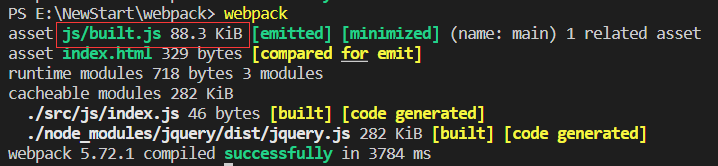
2、拒绝引入

文件只有351bytes,引入则有88k。

若有收获,就点个赞吧
0 人点赞


