不经常更新的第三方库,比如 react,lodash,我们希望能和自己的代码分离开,如何处理?
1、准备
import $ from 'jquery';console.log($);
<!DOCTYPE html><html lang="en"><head><meta charset="UTF-8"><meta name="viewport" content="width=device-width, initial-scale=1.0"><title>webpack</title></head><body><h1 id="title">hello html</h1></body></html>
2、webpack.dll.js
/*使用dll技术,对某些库(第三方库:jquery、react、vue...)进行单独打包当你运行 webpack 时,默认查找 webpack.config.js 配置文件需求:需要运行 webpack.dll.js 文件--> webpack --config webpack.dll.js*/const { resolve } = require('path');const webpack = require('webpack');module.exports = {entry: {// 最终打包生成的[name] --> jquery// ['jquery'] --> 要打包的库是jqueryjquery: ['jquery'],},output: {filename: '[name].js',path: resolve(__dirname, 'dll'),library: '[name]_[hash]' // 打包的库里面向外暴露出去的内容叫什么名字},plugins: [// 打包生成一个 manifest.json --> 提供和jquery映射new webpack.DllPlugin({name: '[name]_[hash]', // 映射库的暴露的内容名称path: resolve(__dirname, 'dll/manifest.json') // 输出文件路径})],mode: 'production'};
1、结果


2、webpack.config.js
const { resolve } = require('path');const HtmlWebpackPlugin = require('html-webpack-plugin');const webpack = require('webpack');const AddAssetHtmlWebpackPlugin = require('add-asset-html-webpack-plugin');module.exports = {entry: './src/index.js',output: {filename: 'built.js',path: resolve(__dirname, 'build')},plugins: [new HtmlWebpackPlugin({template: './src/index.html'}),// 告诉webpack哪些库不参与打包,同时使用时的名称也得变~new webpack.DllReferencePlugin({manifest: resolve(__dirname, 'dll/manifest.json')}),// 将某个文件打包输出去,并在html中自动引入该资源new AddAssetHtmlWebpackPlugin({filepath: resolve(__dirname, 'dll/jquery.js')})],mode: 'production'};
1、结果

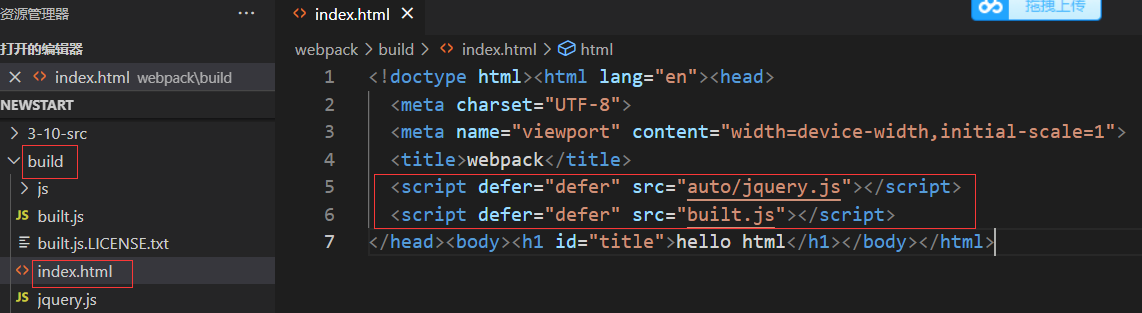
3、优化
当 DLL 需要更新的时候,比如 react 升级了,或者加入新的第三方库,都需要手动像下面这样编译一次 webpack —config webpack.dll.config.js。
每次打包的时候,只需要运行 webpack —config webpack.config.js
const { resolve } = require('path');const HtmlWebpackPlugin = require('html-webpack-plugin');const DllLinkPlugin = require('dll-link-webpack-plugin')const AddAssetHtmlWebpackPlugin = require('add-asset-html-webpack-plugin');module.exports = {entry: './src/index.js',output: {filename: 'built.js',path: resolve(__dirname, 'build')},plugins: [new HtmlWebpackPlugin({template: './src/index.html'}),new DllLinkPlugin({config: require('./webpack.dll.js')}),new AddAssetHtmlWebpackPlugin({filepath: resolve(__dirname, 'dll/jquery.js')})],mode: 'production'};
1、结果


若有收获,就点个赞吧
0 人点赞


