依赖
<!-- https://mvnrepository.com/artifact/org.apache.flink/flink-java --><dependency><groupId>org.apache.flink</groupId><artifactId>flink-java</artifactId><version>1.15.0</version></dependency><!-- https://mvnrepository.com/artifact/org.apache.flink/flink-clients --><dependency><groupId>org.apache.flink</groupId><artifactId>flink-clients</artifactId><version>1.15.0</version></dependency><!-- https://mvnrepository.com/artifact/org.apache.flink/flink-streaming-java --><dependency><groupId>org.apache.flink</groupId><artifactId>flink-streaming-java</artifactId><version>1.15.0</version></dependency><!-- https://mvnrepository.com/artifact/commons-io/commons-io --><dependency><groupId>commons-io</groupId><artifactId>commons-io</artifactId><version>2.11.0</version></dependency><!-- https://mvnrepository.com/artifact/mysql/mysql-connector-java --><dependency><groupId>mysql</groupId><artifactId>mysql-connector-java</artifactId><version>8.0.29</version></dependency><dependency><groupId>com.alibaba</groupId><artifactId>fastjson</artifactId><version>1.2.73</version></dependency>
批处理
hello wordhello countabc 123212 abchello scalahello java
import org.apache.flink.api.common.functions.FlatMapFunction;import org.apache.flink.api.java.DataSet;import org.apache.flink.api.java.ExecutionEnvironment;import org.apache.flink.api.java.tuple.Tuple2;import org.apache.flink.util.Collector;/*** 单词统计(批数据处理)*/public class WordCount {public static void main(String[] args) throws Exception {// 输入路径和出入路径通过参数传入,约定第一个参数为输入路径,第二个参数为输出路径String inPath = "/Users/xiajiandong/Desktop/abc.txt";//文件先不要创建String outPath = "/Users/xjd/Desktop/study/java/simpleproject/src/main/resources/res.txt";deleteIfExists(new File(outPath));// 获取Flink批处理执行环境ExecutionEnvironment executionEnvironment = ExecutionEnvironment.getExecutionEnvironment();// 获取文件中内容DataSet<String> text = executionEnvironment.readTextFile(inPath);// 对数据进行处理, flatMap每行元素做一个操作DataSet<Tuple2<String, Integer>> dataSet = text.flatMap(new LineSplitter()).groupBy(0) //按照第一个位置的word分组.sum(1); //按照第二个位置上的数据求和//控制台打印dataSet.print();dataSet.writeAsCsv(outPath, "\n", "").setParallelism(1);// 触发执行程序executionEnvironment.execute("wordcount batch process");}//FlatMapFunction里面的 String就是每行的输入类型, Tuple2就是map 输出类型static class LineSplitter implements FlatMapFunction<String, Tuple2<String, Integer>> {@Overridepublic void flatMap(String line, Collector<Tuple2<String, Integer>> collector) throws Exception {//把文本打散为一个个单词for (String word : line.split(" ")) { //hello world => (hello, 1), (world, 1)collector.collect(new Tuple2<>(word, 1));}}}/*** 删除文件或文件夹*/public static void deleteIfExists(File file) throws IOException {if (file.exists()) {if (file.isFile()) {if (!file.delete()) {throw new IOException("Delete file failure,path:" + file.getAbsolutePath());}} else {File[] files = file.listFiles();if (files != null && files.length > 0) {for (File temp : files) {deleteIfExists(temp);}}if (!file.delete()) {throw new IOException("Delete file failure,path:" + file.getAbsolutePath());}}}}}
流处理
nc模拟, 要先创建这个
# 连接到本地的7777端口, 然后不断的发数据➜ nc -lk 7777hellohigeworldhihiwordhellohello
import org.apache.flink.api.common.functions.FlatMapFunction;import org.apache.flink.api.java.tuple.Tuple2;import org.apache.flink.streaming.api.datastream.DataStreamSource;import org.apache.flink.streaming.api.datastream.SingleOutputStreamOperator;import org.apache.flink.streaming.api.environment.StreamExecutionEnvironment;import org.apache.flink.util.Collector;public class WordCountStream {public static void main(String[] args) throws Exception {StreamExecutionEnvironment env = StreamExecutionEnvironment.getExecutionEnvironment();//获取流式数据DataStreamSource<String> dataStreamSource = env.socketTextStream("127.0.0.1", 7777);SingleOutputStreamOperator<Tuple2<String, Integer>> wordAndOne = dataStreamSource.flatMap(new FlatMapFunction<String, Tuple2<String, Integer>>() {@Overridepublic void flatMap(String s, Collector<Tuple2<String, Integer>> collector) throws Exception {for (String word : s.split(" ")) {collector.collect(Tuple2.of(word, 1));}}});//key用第一个字段SingleOutputStreamOperator<Tuple2<String, Integer>> result = wordAndOne.keyBy(0).sum(1);//打印到控制台result.print();env.execute("wordcount stream process");}}
输出, 前面编号是并行执行的线程编号
5> (world,1)3> (hello,1)1> (scala,1)3> (hello,2)3> (hello,3)2> (java,1)3> (hello,4)5> (world,2)
设置并行度
可以设置并行度
// 环境那设置env.setParallelism(8);
参数外部提取
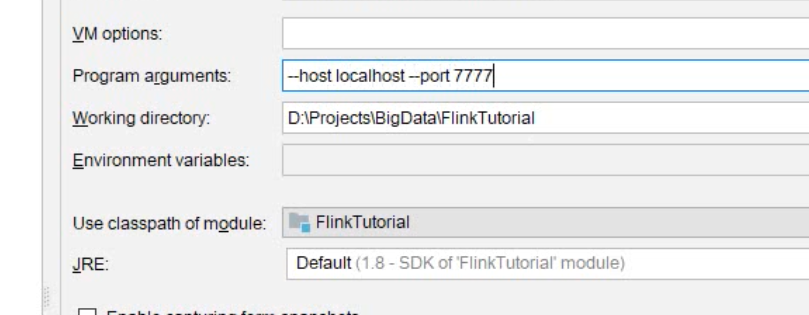
// 用parameter tool工具从程序启动参数中提取配置项ParameterTool parameterTool = ParameterTool.fromArgs(args);String host = parameterTool.get("host");int port = parameterTool.getInt("port");//获取流式数据DataStreamSource<String> dataStreamSource = env.socketTextStream(host, port);

若有收获,就点个赞吧
0 人点赞


