这是我参与8月更文挑战的第4天,活动详情查看:8月更文挑战
前言
这一篇我们带来的是关于组件基础使用的最后一块,内容投影和Vue中的插槽很类似,在组件封装的时候非常有用,我们一起来体验一下。
正文
1. 投影一块内容
容器组件这样写
<div>编号1<ng-content></ng-content></div>
业务组件这样用
<app-page-container>未指定投影位置的内容会被投影到无select属性的区域</app-page-container>
2. 投影多块内容/组件
容器组件这样写
- 使用标签锁定投影位置
- 使用class锁定投影位置
- 用自定义组件名称锁定投影位置
- 使用自定义属性锁定投影位置
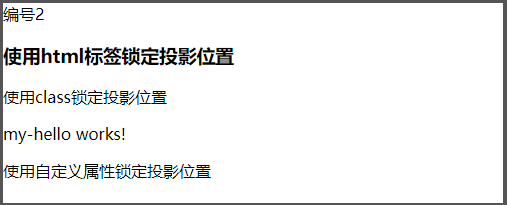
<div>编号2<ng-content select="h3"></ng-content><ng-content select=".my-class"></ng-content><ng-content select="app-my-hello"></ng-content><ng-content select="[content]"></ng-content></div>
业务组件这样用
<app-page-container><h3>使用标签锁定投影位置</h3><div class="my-class">使用class锁定投影位置</div><app-my-hello>使用自定义组件名称锁定投影位置</app-my-hello><div content>使用自定义属性锁定投影位置</div></app-page-container>
演示
3. 投影子元素
使用
ng-container来包裹子元素,减少不必要的dom层,类似vue中的template
容器组件这样写
<div>编号4<ng-content select="question"></ng-content></div>
业务组件这样写
<app-page-container><ng-container ngProjectAs="question"><p>内容投影酷吗?</p><p>内容投影酷吗?</p><p>内容投影酷吗?</p><p>内容投影酷吗?</p></ng-container></app-page-container>
4. 有条件的内容投影
中文网的描述:
- 如果你的组件需要有条件地渲染内容或多次渲染内容,则应配置该组件以接受一个 ng-template 元素,其中包含要有条件渲染的内容。
- 在这种情况下,不建议使用 ng-content 元素,因为只要组件的使用者提供了内容,即使该组件从未定义 ng-content 元素或该 ng-content 元素位于 ngIf 语句的内部,该内容也总会被初始化。
- 使用 ng-template 元素,你可以让组件根据你想要的任何条件显式渲染内容,并可以进行多次渲染。在显式渲染 ng-template 元素之前,Angular 不会初始化该元素的内容。
使用
**ng-container**定义我们的投影区块- 使用
ngTemplateOutlet指令来渲染ng-template元素。 - 通过内置的动态指令
*ngIf来控制是否渲染投影。<div>编号3<ng-content select="[button]"></ng-content><p *ngIf="expanded"><ng-container [ngTemplateOutlet]="content.templateRef"> </ng-container></p></div>
- 使用
在业务组件中我们使用
**ng-template**来包裹我们的实际元素。my-hello组件只在ngOnInit()做日志输出来观察打印情况。
<app-page-container><div button><button appToggle>切换</button></div><ng-template appContent><app-my-hello>有条件的内容投影~</app-my-hello></ng-template></app-page-container>
- 现在你会发现页面并没有像前面那么顺利的正常渲染,因为我们的逻辑还没有串通,我们继续。创建一个指令,并在NgModule中注册,一定要注册才能用哦~
指令需要注册哦~
import { Directive, TemplateRef } from '@angular/core';@Directive({selector: '[appContent]',})export class ContentDirective {constructor(public templateRef: TemplateRef<unknown>) {}}
- 我们再定义一个指令来控制组件中显示/隐藏的标识
指令需要注册哦~
@Directive({selector: '[appToggle]',})export class ToggleDirective {@HostListener('click') toggle() {this.app.expanded = !this.app.expanded;}constructor(public app: PageContainerComponent) {}}
在我们的容器组件中申明刚才定义的内容指令,页面目前不报错咯~ ```typescript export class PageContainerComponent implements OnInit {
expanded: boolean = false;
@ContentChild(ContentDirective) content!: ContentDirective;
}
6. **通过日志可以看到我们在切换容器组件的**`**expanded**`**标识时,只有开启状态**`**my-hello**`**组件才会初始化,下面的这个**`**ngIf**`**虽然在页面看不到渲染的内容,但组件实实在在被初始化过了。**```typescript<div *ngIf="false"><ng-content *ngIf="false" select="app-my-hello"></ng-content></div>
5. @ContentChild & @ContentChildren
使用这两个装饰器来对被投影的组件进行操作
- 使用注解在业务组件中定义被投影的组件 ```html @ContentChild(HelloWorldComp) helloComp: HelloWorldComp;
@ContentChildren(HelloWorldComp)
helloComps: QueryList
2. 在`ngAfterContentInit()`钩子执行后对被投影组件进行操作<a name="QFdCs"></a>#### 6. @ViewChild & @ViewChildren> 使用这两个装饰器来对指接子组件进行操作1. **使用注解在业务组件中定义子组件**```html@ViewChild(HelloWorldComp)helloComp: HelloWorldComp;@ViewChildren(HelloWorldComp)helloComps QueryList<HelloWorldComp>;
- 在
**ngAfterViewInit()**钩子执行后对直接子组件进行操作
结语
关于组件的使用我们就先写到这里了,文笔功底有限,加油了~,下一篇打算写写自定义指令的使用。

若有收获,就点个赞吧
0 人点赞


