官方文档:Flume User Guide
Architecture
Data flow model
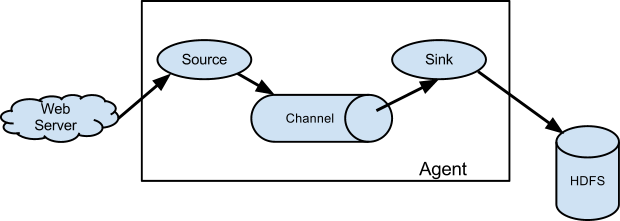
Reliability
事件通过Source摄取成功会存入Channel,通过Sink消费完才会从Channel中移除。这就是Flume在投递消息时提供的端到端的可靠性。
Recoverability
Channel支持持久化,当Flume因故障重启后,未被消费的事件可以恢复至Channel。
Terms
Source:事件源。
Channel:Source到Sink的事件管道,缓存事件。
Sink:事件目的地。
Agent:定义Source、Channel、Sink以及他们之间的关系,Source的事件写入哪个Channel,Sink从哪个Channel消费事件。
Channel Selector:定义Source的事件写入Channel的规则,是同时写入多个Channel,还是根据事件的Header信息选择Channel。
Sink Processor:把多个Sink组成一个组,定义Sink组从Channel消费事件的规则,是负载均衡,还是根据事件的Header信息选择Channel。
Interceptor:拦截事件,修改事件。
Configuration Filter:读取密码信息。
Topology Design
- enumerate all sources and destinations (terminal sinks) for your data.
- whether to introduce intermediate aggregation tiers or event routing.
- how much hardware and networking capacity is needed. A good starting point is to think about the maximum throughput you’ll have in each tier of the topology, both in terms of events per second and bytes per second.
Flume、Logstash、FileBeat对比
参看:https://www.stackshare.io/stackups/apache-flume-vs-filebeat#integrations
Flume源于大数据,有面向大数据的Sink,Logstash、FileBeat源于Elasticsearch。在Source端都可以用。
Flume TailDir Source Demo
源码和功能
源码:https://github.com/jxwnhj0717/hello-flume
功能:通过TailDir Source读取日志文件,一条日志为一个Flume Event,通过File Roll Sink输出Event的Header和文本内容。
调试过程
- docker-compose.yml的环境变量FLUME_AGENT_NAME需要配置成flume.conf定义的flume agent名称
flume agent name错误,会提示:No configuration found for this host。阅读源码AbstractConfigurationProvider,可以得知就是从flume配置文件中查找Agent名称。 - docker-compose.yml的环境变量JAVA_OPTS不生效
测试Flume Monitor需要增加JAVA_OPTS。调试这个问题花了我1-2个小时,没找到原因,最后解决方法是在flume-env.sh中配置JAVA_OPTS。 - 不使用Docker,直接在Linux安装Flume调试会更快
因为要调试Flume,所以使用Docker之后,还是要熟悉Flume的配置,并且要知道如何通过Docker的API传递这些配置,反而让过程变复杂。
TailDir Source如何记录文件读取位置
基本流程
- 读取日志文件,将一条条的日志记录封装成Event。
- 将Event批量写入Channel,写入成功后修改文件读取位置,写入失败则等待一段时间后重试。
- 定时将文件读取位置写入文件系统。
- TailDir Source退出时将文件读取位置写入文件系统。
源码分析
// 周期性调用process方法,检查文件是否追加日志class TaildirSource {public Status process() {for (long inode : existingInodes) {TailFile tf = reader.getTailFiles().get(inode);tailFileProcess(tf, true);}}}// 关键步骤1和2class TaildirSource {private boolean tailFileProcess(TailFile tf, boolean backoffWithoutNL) {while (true) {reader.setCurrentFile(tf);// 读取日志文件,将一条条的日志记录封装成EventList<Event> events = reader.readEvents(batchSize, backoffWithoutNL);try {// 将Event批量写入ChannelgetChannelProcessor().processEventBatch(events);// 写入成功后修改文件读取位置reader.commit();} catch (ChannelException ex) {// 写入失败则等待一段时间后重试TimeUnit.MILLISECONDS.sleep(retryInterval);}if (condition...) {return true or false;}}}}// reader.commit()细节,写入成功后修改文件读取位置class ReliableTaildirEventReader {public void commit() throws IOException {if (!committed && currentFile != null) {long pos = currentFile.getLineReadPos();currentFile.setPos(pos);currentFile.setLastUpdated(updateTime);committed = true;}}}// 关键步骤3:定时将文件读取位置写入文件系统class TaildirSource {public synchronized void start() {// writePosInitDelay默认为5秒,writePosInterval默认为3秒positionWriter.scheduleWithFixedDelay(new PositionWriterRunnable(),writePosInitDelay, writePosInterval, TimeUnit.MILLISECONDS);}}class PositionWriterRunnable implements Runnable {@Overridepublic void run() {writePosition();}}private void writePosition() {// positionFilePath默认为~/.flume/taildir_position.jsonFile file = new File(positionFilePath);FileWriter writer = new FileWriter(file);// 以Json格式写入文件系统String json = toPosInfoJson();writer.write(json);}// 关键步骤4:TailDir Source退出时将文件读取位置写入文件系统class TaildirSource {@Overridepublic synchronized void stop() {writePosition();}}
结论
定时持久化文件读取位置的机制,在Flume程序异常停止后,存在日志重复投递的问题,下游需要保证幂等写。
源文件名+源文件所在主机+文件偏移位置可以作为一条记录得唯一ID。

若有收获,就点个赞吧
0 人点赞


