思维导图
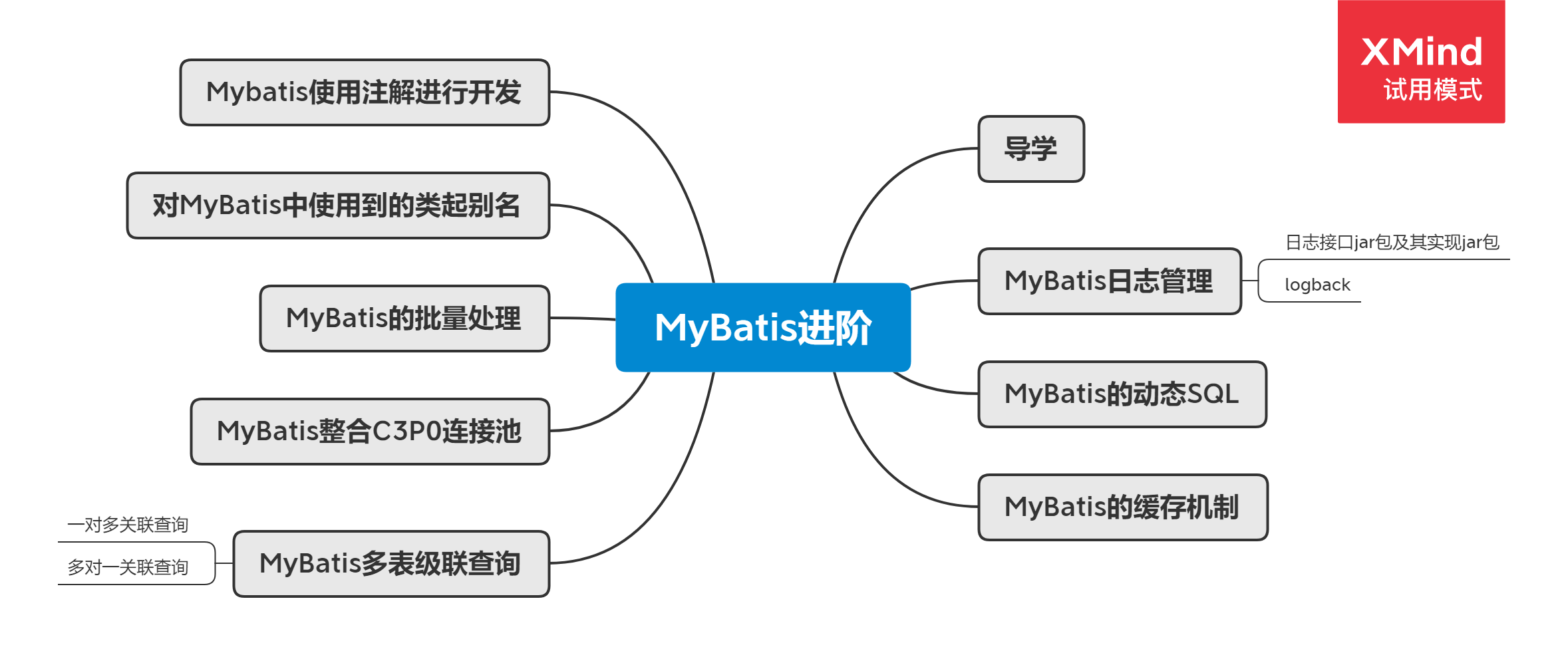
导学
在之前的学习中,我们使用MyBatis进行了数据的CRUD操作,而且还学习了它里面一些开发小技巧。那么在本节课程中,我们将要学习MyBatis的一些高级特性。
MyBatis日志管理
日志接口jar包及其实现jar包
什么是日志?这个问题其实很简单,日志是对生活和工作的记录。
那么MyBatis的日志,实际上就是对MyBatis工作的记录,就如同飞机的黑匣子会记录飞机飞行产生的一切数据一样。我们可以使用MyBatis的日志,来记录和分析,应用程序使用过程中对数据库的操作及其影响,也是我们诊断问题和理解系统活动的重要依据。
通常日志是记录和保存在日志文件中的,同学们其实也接触过日志,就是我们在Tomcat使用过程中控制台所显示的那些内容。
其实,在Java中也可以通过第三方的日志的接口模块创建日志记录和文件,再由不同的jar包实现对应的接口模块,比如常用的有Comms-Logging=>log4j和SLF4J=>logback等。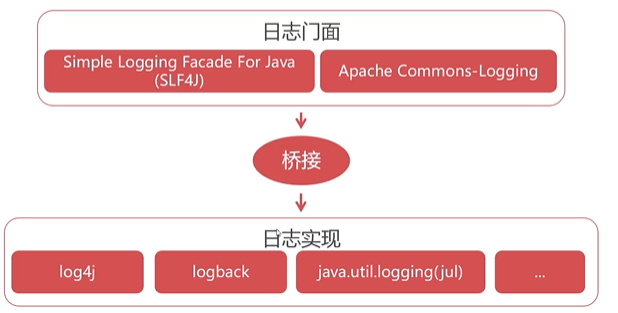
从目前的趋势来看,越来越多的开源项目从Commons-Logging加Log4j转向了SLF4J加logback。我们在使用日志记录的时候,需要注意项目中使用的是Commons-Logging还是SLF4J,虽然切换日志实现不会造成什么影响。比如SLF4J还是Commons-Logging,都可以使用logBack作为日志实现,但是它们的接口方法的定义还是不同的。
logback
早期的Java项目中,基本都是使用的log4j。但是,在本教程中我们将针对logback做着重的讲解。
因为log4j和logback是近亲,这两个日志管理实现都是由一个人开发的。英文log4j虽然经过多次更新迭代,仍然有些问题积重难返,所以作者另起炉灶开发了另一款日志管理实现logback,而且logback的性能要好的多。在MyBatis底层可以通过SLF4J支持logback!
代码实现:
- pom.xml增加依赖
<dependency><groupId>ch.qos.logback</groupId><artifactId>logback-classic</artifactId><version>1.2.3</version></dependency>

其实此时,如果我们运行测试类中方法,就会发现在控制台中就会打印日志信息了。
2. 对日志管理进行自定义设置
在resources目录下新增logback.xml文件。注意,必须叫这个名字!<?xml version="1.0" encoding="UTF-8" ?> <configuration> <!-- 指定在控制台中输出日志 --> <!-- name属性可以随意,如果要在控制台输出,一般称之为console --> <!-- class属性指定何处打印输出 --> <appender name="console" class="ch.qos.logback.core.ConsoleAppender"> <!-- 编码节点 --> <encoder> <!-- %d{HH:mm:ss.SSS}:输出时间格式,精确到毫秒 [%thread]:当前操作的线程 %-5level:以5个字符右对齐以及级别 %logger{36}:具体哪个类的日志(只显示36个字符) %msg:日志信息 %n:换行 这些表达式在logback官网上都有详细说明 --> <pattern>%d{HH:mm:ss.SSS} [%thread] %-5level %logger{36} - %msg%n</pattern> </encoder> </appender> <!-- 日志输出级别(优先级高到低): error: 错误 - 系统的故障日志 warn: 警告 - 存在风险或使用不当的日志 info: 一般性消息 debug: 程序内部用于调试信息 trace: 程序运行的跟踪信息 下方root标签表示日志的最低输出级别为debug,即debug级别以下的信息不进行输出 --> <root level="debug"> <appender-ref ref="console"></appender-ref> </root> </configuration>MyBatis的动态SQL
在我们使用SQL语句时,有的时候参数是不固定的。比如用户可以指定多个检索条件,也可能单独只指定一个检索条件。在这个时候,我们无法确定条件参数的数量,只能使用动态SQL完成。在实际的开发中,动态SQL的使用非常普遍。动态SQL是指根据参数数据动态组织SQL的技术,它有些类似于对SQL执行拼接。
可以使用<where>标签和<if>组合使用,或是单独使用<if>标签来实现动态SQL。
<select id="dynamicSQL" parameterType="java.util.Map" resultType="com.dodoke.mybatis.entity.Goods">
select * from t_goods
<!-- 不需要写where关键字,只需要利用where标签智能判断and是否要添加 -->
<where>
<!-- 针对map中的key进行判断对应的value值是否为null和空 -->
<if test="categoryId != null and categoryId!=''">
and category_id = #{categoryId}
</if>
<if test="currentPrice != null and categoryId!=''">
and current_price < #{currentPrice}
</if>
</where>
</select>
/**
 * 动态SQL语句
 * @throws Exception
 */
@Test
public void testDynamicSQL() throws Exception {
    SqlSession session = null;
    try{
        session = MyBatisUtils.openSqlSession();
        Map param = new HashMap();
        param.put("categoryId", 44);
        param.put("currentPrice", 500);
        //查询条件
        List<Goods> list = session.selectList("com.dodoke.mybatis.resources.mappers.GoodsMapper.delete.dynamicSQL", param);
        for(Goods g:list){
            System.out.println(g.getTitle() + ":" +
                    g.getCategoryId()  + ":" + g.getCurrentPrice());

        }
    }catch (Exception e){
        throw e;
    }finally {
        MyBatisUtils.closeSqlSession(session);
    }
}
MyBatis的缓存机制
在一个项目中,查询数据库中的操作算是一个非常常用的操作,但是有些数据会被经常性的查询,而每一次都去数据库中查询这些重复的数据,会很消耗数据库的资源,同时使得查询效率也很低。
而 MyBatis 中就通过缓存技术来解决这样的问题,也就是说:将一些经常查询,并且不经常改变的,以及数据的正确对最后的结果影响不大的数据,放置在一个缓存容器中,当用户再次查询这些数据的时候,就不必再去数据库中查询,直接在缓存中提取就可以了。
注:缓存可以简单理解为存在于内存中的临时数据
在MyBatis中,存在一级缓存和二级缓存,一级缓存的效果,可以体现为同一个sqlSession对象操作同一条SQL时,只要参数相同就不会再去进行数据库查询,一级缓存默认开启。二级缓存需要手动开启。
关于如何使用二级缓存,可以参考如下文章,这里不再赘述,各位同学自由补充。
参考文档:
https://zhuanlan.zhihu.com/p/106258135
MyBatis多表级联查询
MyBatis多表级联查询和之前学习的MyBatis多表关联查询不一样。
- 多表关联查询:两个表通过主外键在一条SQL中完成所有数据的提取。
- 多表级联查询:通过一个对象来获取与它关联的另外一个对象,执行的SQL语句分为多条。
确定对象之间的关系是双向的:
双向的一对多,应该变成多对多,在进行数据库设计的时候需要单独抽象出一张中间表来!!!
一对多关联查询
案例:要求查询某件商品的详细信息
- 新建实体类 ``` package com.dodoke.mybatis.entity;
public class GoodsDetail { private Integer gdId; private Integer goodsId; private String gdPicUrl; private Integer gdOrder;
public Integer getGdId() {
    return gdId;
}

public void setGdId(Integer gdId) {
    this.gdId = gdId;
}

public Integer getGoodsId() {
    return goodsId;
}

public void setGoodsId(Integer goodsId) {
    this.goodsId = goodsId;
}

public String getGdPicUrl() {
    return gdPicUrl;
}

public void setGdPicUrl(String gdPicUrl) {
    this.gdPicUrl = gdPicUrl;
}

public Integer getGdOrder() {
    return gdOrder;
}

public void setGdOrder(Integer gdOrder) {
    this.gdOrder = gdOrder;
}
}
2. 新建mapper xml文件 `GoodsDetailMapper.xml`
<?xml version=”1.0” encoding=”UTF-8”?> <!DOCTYPE mapper PUBLIC “-//mybatis.org//DTD Mapper 3.0//EN” “http://mybatis.org/dtd/mybatis-3-mapper.dtd">
3. 修改Goods类,为体现一对多的关系,新增一个属性
/**
数据库t_goods表对应映射的实体类 */ public class Goods { private Integer goodsId;//商品编号 private String title;//标题 private String subTitle;//子标题 private Float originalCost;//原始价格 private Float currentPrice;//当前价格 private Float discount;//折扣率 private Integer isFreeDelivery;//是否包邮 ,1-包邮 0-不包邮 private Integer categoryId;//分类编号 private List
goodsDetails; public List
getGoodsDetails() { return goodsDetails;}
public void setGoodsDetails(List
goodsDetails) { this.goodsDetails = goodsDetails;}
public Integer getGoodsId() {
return goodsId;}
public void setGoodsId(Integer goodsId) {
this.goodsId = goodsId;}
public String getTitle() {
return title;}
public void setTitle(String title) {
this.title = title;}
public String getSubTitle() {
return subTitle;}
public void setSubTitle(String subTitle) {
this.subTitle = subTitle;}
public Float getOriginalCost() {
return originalCost;}
public void setOriginalCost(Float originalCost) {
this.originalCost = originalCost;}
public Float getCurrentPrice() {
return currentPrice;}
public void setCurrentPrice(Float currentPrice) {
this.currentPrice = currentPrice;}
public Float getDiscount() {
return discount;}
public void setDiscount(Float discount) {
this.discount = discount;}
public Integer getIsFreeDelivery() {
return isFreeDelivery;}
public void setIsFreeDelivery(Integer isFreeDelivery) {
this.isFreeDelivery = isFreeDelivery;}
public Integer getCategoryId() {
return categoryId;}
public void setCategoryId(Integer categoryId) {
this.categoryId = categoryId;} } ```
利用resultMap实现一对多映射,GoodsMapper.xml
<!--
 resultMap可用于说明一对多或者多对一的映射逻辑
 id 是resultMap属性引用的标志
 type 指向One的实体(Goods)
-->
<resultMap id="rmGoods1" type="com.dodoke.mybatis.entity.Goods">
 <!-- 映射goods对象的主键到goods_id字段 -->
 <id column="goods_id" property="goodsId"></id>
 <!--
     collection的含义是,在
     select * from t_goods limit 0,10 得到结果后,对所有Goods对象遍历得到goods_id字段值,
     并代入到goodsDetail命名空间的findByGoodsId的SQL中执行查询,
     将得到的"商品详情"集合赋值给goodsDetails List对象.
 -->
 <collection property="goodsDetails" select="goodsDetail.selectByGoodsId"
             column="goods_id"/>
</resultMap>
<select id="selectOneToMany" resultMap="rmGoods1">
 select * from t_goods limit 0,10
</select>
编写测试方法
/**
* 一对多对象关联查询
* @throws Exception
*/
@Test
public void testOneToMany() throws Exception {
 SqlSession session = null;
 try {
     session = MyBatisUtils.openSqlSession();
     List<Goods> list = session.selectList("com.dodoke.mybatis.resources.mappers.GoodsMapper.selectOneToMany");
     for(Goods goods:list) {
         System.out.println(goods.getTitle() + ":" + goods.getGoodsDetails().size());
     }
 } catch (Exception e) {
     throw e;
 } finally {
     MyBatisUtils.closeSqlSession(session);
 }
}
多对一关联查询
当多对一的时候,只需要在多的一方实体类中,持有一的一方的实体!
即: ``` package com.dodoke.mybatis.entity;
public class GoodsDetail { private Integer gdId; private Integer goodsId; private String gdPicUrl; private Integer gdOrder; private Goods goods;//添加goods类属性
public Integer getGdId() {
    return gdId;
}

public void setGdId(Integer gdId) {
    this.gdId = gdId;
}

public Integer getGoodsId() {
    return goodsId;
}

public void setGoodsId(Integer goodsId) {
    this.goodsId = goodsId;
}

public String getGdPicUrl() {
    return gdPicUrl;
}

public void setGdPicUrl(String gdPicUrl) {
    this.gdPicUrl = gdPicUrl;
}

public Integer getGdOrder() {
    return gdOrder;
}

public void setGdOrder(Integer gdOrder) {
    this.gdOrder = gdOrder;
}

public Goods getGoods() {
    return goods;
}

public void setGoods(Goods goods) {
    this.goods = goods;
}
}
修改GoodsDetailMapper.xml
<?xml version=”1.0” encoding=”UTF-8”?> <!DOCTYPE mapper PUBLIC “-//mybatis.org//DTD Mapper 3.0//EN” “http://mybatis.org/dtd/mybatis-3-mapper.dtd">
<resultMap id="rmGoodsDetail" type="com.dodoke.mybatis.entity.GoodsDetail">
    <!-- 除了id,只有其它的属性符合驼峰命名规则就不需要填写大量的result标签 -->
    <id column="gd_id" property="gdId"/>
    <!-- 因为在下方使用了goods属性,导致goods_id没有对goodsId进行正确赋值,所以需要进行手动赋值 -->
    <result column="goods_id" property="goodsId"/>
    <!-- 该标签表示从多的一方关联到一的一方 -->
    <association property="goods" select="com.dodoke.mybatis.resources.mappers.GoodsMapper.selectById" column="goods_id"></association>
</resultMap>
<select id="selectManyToOne" resultMap="rmGoodsDetail">
    select * from t_goods_detail limit 0,20
</select>
<a name="b4a820dd"></a>
## MyBatis整合C3P0连接池
在之前的课程中,我们就使用过连接池。而且在mybatis-config.xml文件中也设置了使用数据库连接池,但是这个数据库连接池是使用的MyBatis自带的数据库连接池。我们希望使用更好的数据库连接池,可以采用C3P0连接池替换掉自带连接池。<br />pom.xml中添加依赖
新增一个C3P0DataSourceFactory扩展类
package com.dodoke.mybatis.datasources;
import com.mchange.v2.c3p0.ComboPooledDataSource; import org.apache.ibatis.datasource.unpooled.UnpooledDataSourceFactory;
/**
- C3P0与MyBatis兼容使用的数据源工厂类
继承UnpooledDataSourceFactory类实现C3P0的迁入工作。 */ public class C3P0DataSourceFactory extends UnpooledDataSourceFactory {
public C3P0DataSourceFactory(){
 //指UnpooledDataSourceFactory类的数据源由C3P0提供
 this.dataSource = new ComboPooledDataSource();
} }
修改mybatis-config.xml,type改成指向新增的类:C3P0DataSourceFactory<br />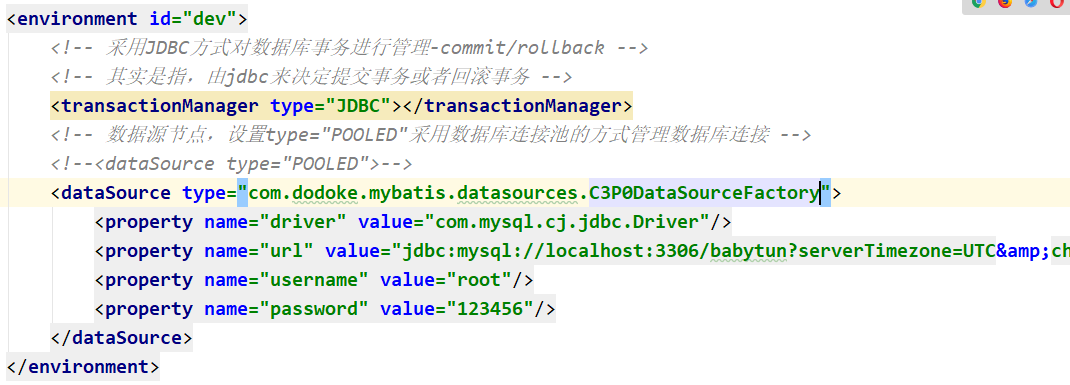<br />修改C3P0属性值<a name="26405795"></a> ## MyBatis的批量处理 MyBatis的批量处理实际上就是通过循环实现SQL的批量执行INSERT INTO t_goods(title, sub_title, original_cost, current_price, discount, is_free_delivery, category_id) VALUES (#{item.title},#{item.subTitle}, #{item.originalCost}, #{item.currentPrice}, #{item.discount}, #{item.isFreeDelivery}, #{item.categoryId})DELETE FROM t_goods WHERE goods_id in #{item}```
- collection=”list”代表迭代的数据源从哪来,一般情况下书写list,指代从外侧传来的List集合,这个名字是mybatis强制要求不能随意修改
- item=”item” 循环中的迭代遍历
- indx=”index” 循环的索引,当前是第几次循环
- separator=”,” 分割器,生成文本时((“a”,”a1”,”a2”),(“b”,”b1”,”b2”),…),每个记录用逗号分割
批量删除中传入的list中包含的是每一个要删除的数据的编号,foreach标签中要加入open=”(“ close=”)”
/**
   * 批量插入测试
   * @throws Exception
   */
  @Test
  public void testBatchInsert() throws Exception {
      SqlSession session = null;
      try {
          long st = new Date().getTime();
          session = MyBatisUtils.openSqlSession();
          List list = new ArrayList();
          for (int i = 0; i < 10000; i++) {
              Goods goods = new Goods();
              goods.setTitle("测试商品");
              goods.setSubTitle("测试子标题");
              goods.setOriginalCost(200f);
              goods.setCurrentPrice(100f);
              goods.setDiscount(0.5f);
              goods.setIsFreeDelivery(1);
              goods.setCategoryId(43);
              //insert()方法返回值代表本次成功插入的记录总数

              list.add(goods);
          }
          session.insert("goods.batchInsert", list);
          session.commit();//提交事务数据
          long et = new Date().getTime();
          System.out.println("执行时间:" + (et - st) + "毫秒");
//            System.out.println(goods.getGoodsId());
      } catch (Exception e) {
          if (session != null) {
              session.rollback();//回滚事务
          }
          throw e;
      } finally {
          MyBatisUtils.closeSqlSession(session);
      }
  }

  /**
   * 10000次数据插入对比测试用例
   * @throws Exception
   */
  @Test
  public void testInsert1() throws Exception {
      SqlSession session = null;
      try{
          long st = new Date().getTime();
          session = MyBatisUtils.openSqlSession();
          List list = new ArrayList();
          for(int i = 0 ; i < 10000 ; i++) {
              Goods goods = new Goods();
              goods.setTitle("测试商品");
              goods.setSubTitle("测试子标题");
              goods.setOriginalCost(200f);
              goods.setCurrentPrice(100f);
              goods.setDiscount(0.5f);
              goods.setIsFreeDelivery(1);
              goods.setCategoryId(43);
              //insert()方法返回值代表本次成功插入的记录总数

              session.insert("goods.insert" , goods);
          }

          session.commit();//提交事务数据
          long et = new Date().getTime();
          System.out.println("执行时间:" + (et-st) + "毫秒");
//            System.out.println(goods.getGoodsId());
      }catch (Exception e){
          if(session != null){
              session.rollback();//回滚事务
          }
          throw e;
      }finally {
          MyBatisUtils.closeSqlSession(session);
      }
  }

  /**
   * 批量删除测试
   * @throws Exception
   */
  @Test
  public void testBatchDelete() throws Exception {
      SqlSession session = null;
      try {
          long st = new Date().getTime();
          session = MyBatisUtils.openSqlSession();
          List list = new ArrayList();
          list.add(1920);
          list.add(1921);
          list.add(1922);
          session.delete("goods.batchDelete", list);
          session.commit();//提交事务数据
          long et = new Date().getTime();
          System.out.println("执行时间:" + (et - st) + "毫秒");
//            System.out.println(goods.getGoodsId());
      } catch (Exception e) {
          if (session != null) {
              session.rollback();//回滚事务
          }
          throw e;
      } finally {
          MyBatisUtils.closeSqlSession(session);
      }
  }
批量插入数据的局限,需要通过压力测试来调整
- 无法获得插入的数据id
- 批量生成的SQL太长,可能会被服务器拒绝。
对MyBatis中使用到的类起别名
之前,我们在 mapper xml 文件中的引用实体类时,需要写上实体类的全类名(包名+类名),每次都写这么一长串内容挺麻烦的,而我们希望能够采用一种简写的形式。比如写成这种形式就挺舒服的。
可以在mybatis-config.xml标签中添加<select id="selectAll" resultType="_Goods"> select * from t_goods order by goods_id desc limit 10 </select>typeAliases,注意添加位置。 ```
```
<a name="3125da1b"></a>
## Mybatis使用注解进行开发
对于Mybatis而言,它提供了一种使用注解的开发方式,这种开发方式与使用xml进行开发比较,它更适合使用在一些小型敏捷的项目中。<br />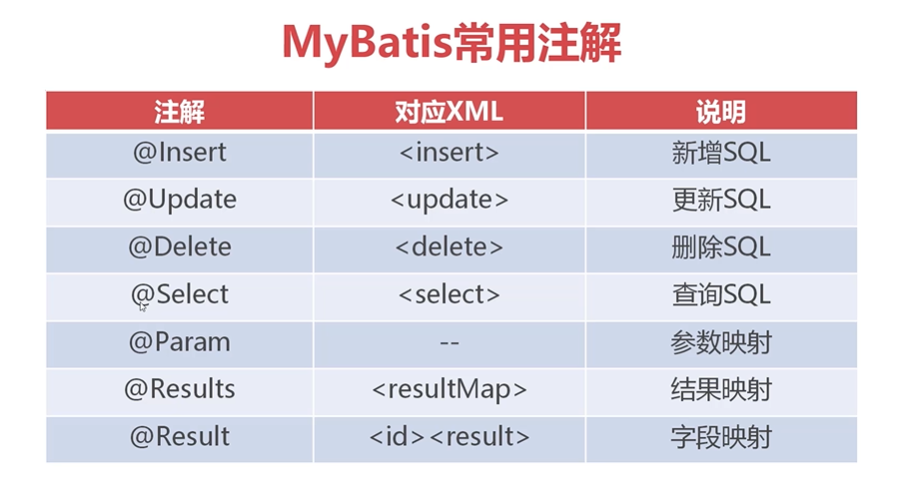<br />在之前的项目基础上新建一个项目:(pom.xml中依赖不变,工具类不变,logback自定义文件不变)<br />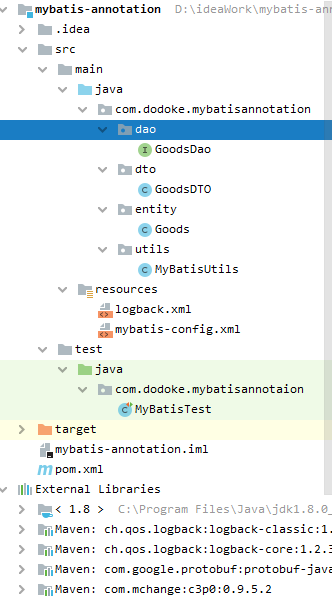<br />**mybatis-config.xml**
<?xml version=”1.0” encoding=”utf-8” ?> <!DOCTYPE configuration PUBLIC “-//mybatis.org//DTD Config 3.0//EN” “http://mybatis.org/dtd/mybatis-3-config.dtd">
<environments default="dev">
<environment id="dev">
<transactionManager type="JDBC"></transactionManager>
<!-- 数据源节点,设置type="POOLED"采用数据库连接池的方式管理数据库连接 -->
<dataSource type="POOLED">
<property name="driver" value="com.mysql.cj.jdbc.Driver"/>
<property name="url" value="jdbc:mysql://localhost:3306/babytun?serverTimezone=UTC&characterEncoding=UTF-8"/>
<property name="username" value="root"/>
<property name="password" value="123456"/>
</dataSource>
</environment>
</environments>
<mappers>
<!-- mybatis如果使用注解开发,需要将接口当做mapper xml 进行注册-->
<!--<mapper class="com.dodoke.mybatisannotation.dao.GoodsDao"/>-->
<!-- 可以通过package标签将该包中接口全部注册 -->
<package name="com.dodoke.mybatisannotation.dao"/>
</mappers>
**实体类**
public class Goods { private Integer goodsId;//商品编号 private String title;//标题 private String subTitle;//子标题 private Float originalCost;//原始价格 private Float currentPrice;//当前价格 private Float discount;//折扣率 private Integer isFreeDelivery;//是否包邮 ,1-包邮 0-不包邮 private Integer categoryId;//分类编号
public Integer getGoodsId() {
    return goodsId;
}

public void setGoodsId(Integer goodsId) {
    this.goodsId = goodsId;
}

public String getTitle() {
    return title;
}

public void setTitle(String title) {
    this.title = title;
}

public String getSubTitle() {
    return subTitle;
}

public void setSubTitle(String subTitle) {
    this.subTitle = subTitle;
}

public Float getOriginalCost() {
    return originalCost;
}

public void setOriginalCost(Float originalCost) {
    this.originalCost = originalCost;
}

public Float getCurrentPrice() {
    return currentPrice;
}

public void setCurrentPrice(Float currentPrice) {
    this.currentPrice = currentPrice;
}

public Float getDiscount() {
    return discount;
}

public void setDiscount(Float discount) {
    this.discount = discount;
}

public Integer getIsFreeDelivery() {
    return isFreeDelivery;
}

public void setIsFreeDelivery(Integer isFreeDelivery) {
    this.isFreeDelivery = isFreeDelivery;
}

public Integer getCategoryId() {
    return categoryId;
}

public void setCategoryId(Integer categoryId) {
    this.categoryId = categoryId;
}

@Override
public String toString() {
    return "Goods{" +
            "goodsId=" + goodsId +
            ", title='" + title + '\'' +
            ", subTitle='" + subTitle + '\'' +
            ", originalCost=" + originalCost +
            ", currentPrice=" + currentPrice +
            ", discount=" + discount +
            ", isFreeDelivery=" + isFreeDelivery +
            ", categoryId=" + categoryId +
            '}';
}
}
**数据传输类**
package com.dodoke.mybatisannotation.dto;
public class GoodsDTO { private int goodsId; private String title; private String subTitle;
public int getGoodsId() {
    return goodsId;
}

public void setGoodsId(int goodsId) {
    this.goodsId = goodsId;
}

public String getTitle() {
    return title;
}

public void setTitle(String title) {
    this.title = title;
}

public String getSubTitle() {
    return subTitle;
}

public void setSubTitle(String subTitle) {
    this.subTitle = subTitle;
}

@Override
public String toString() {
    return "GoodsDTO{" +
            "goodsId=" + goodsId +
            ", title='" + title + '\'' +
            ", subTitle='" + subTitle + '\'' +
            '}';
}
}
**接口注解开发-接口**
package com.dodoke.mybatisannotation.dao;
import com.dodoke.mybatisannotation.dto.GoodsDTO; import com.dodoke.mybatisannotation.entity.Goods; import org.apache.ibatis.annotations.*;
import java.util.List; import java.util.Map;
/**
该接口用操作数据库 / public interface GoodsDao { @Select(“select from t_goods where current_price between #{min} and #{max} order by current_price limit 0,#{limt}”) public List
selectByPriceRange(@Param(“min”) Float min, @Param(“max”) Float max, @Param(“limt”) Integer limt); /**
- 对于注解开发来说,新增和删除,以及修改方法的返回值都要是int类型
- @param goods
@return */ @Insert(“INSERT INTO t_goods(title, sub_title, original_cost, current_price, discount, is_free_delivery, category_id) VALUES (#{title} , #{subTitle} , #{originalCost}, #{currentPrice}, #{discount}, #{isFreeDelivery}, #{categoryId})”) @SelectKey(statement = “select last_insert_id()” ,before=false,keyProperty = “goodsId” ,resultType = Integer.class) public int insert(Goods goods);
@Select(“ select * from t_goods order by goods_id desc limit 10”) //如果没有设置驼峰命令转换或者要设置数据转换类,或者多对一,一对多的时候,可以利用results注解 @Results({
 //设置id=true,明确指示id属性
 @Result(column = "goods_id",property = "goodsId" , id=true),
 @Result(column = "title",property = "title" ),
 @Result(column = "sub_title",property = "subTitle" ),
}) public List
selectLimit(); } ```

若有收获,就点个赞吧
0 人点赞


