pod 状态
kubectl explain pod.status.phase
Pending 挂起
pod 已被 k8s 系统接受,但有一个或多个容器镜像尚未创建
等待时间包括调度 pod 的时间和通过网络下载镜像的时间
Running 运行中
该 pod 已经绑定到一个节点上, pod中的所有容器都已被创建
至少有一个容器正在运行,或正处于启动或重启状态
Succeeded 成功
pod 中的所有容器都被成功终止,且不会再重启
Failed 失败
pod 中的所有容器都被终止,至少有一个容器是因为失败而终止(非 0 退出或是被系统终止)
Unknown 未知
因某些原因无法取得 pod 状态
通常是因为与 pod 所在主机通信失败
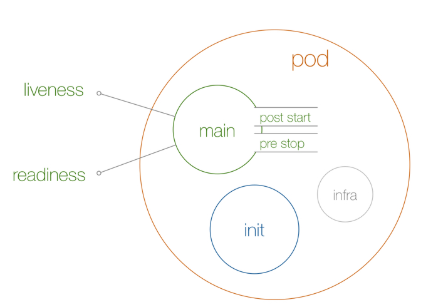
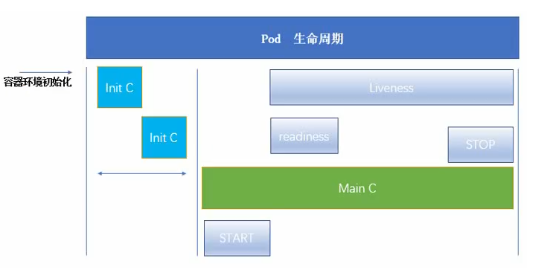
运行流程图


apiVersion: v1
kind: Pod
metadata:
name: all-life
spec:
nodeName: node02
volumes:
- name: timing
hostPath:
path: /tmp/loap
initContainers:
- name: init
image: 20.0.0.7:8099/ops/busybox:1.33.0
command: [‘sh’, ‘-c’, ‘echo $(date +%H-%M-%S): INIT >> /loap/timing’]
volumeMounts:
- mountPath: /loap
name: timing
containers:
- name: main
image: 20.0.0.7:8099/ops/busybox:1.33.0
command: [‘sh’, ‘-c’, ‘echo $(date +%H-%M-%S): main START >> /loap/timing; sleep 30; echo $(date +%H-%M-%S): main END >> /loap/timing’]
volumeMounts:
- mountPath: /loap
name: timing
livenessProbe:
exec:
command: [‘sh’, ‘-c’, ‘echo $(date +%H-%M-%S): LIVENESS >> /loap/timing’]
readinessProbe:
exec:
command: [‘sh’, ‘-c’, ‘echo $(date +%H-%M-%S): READINESS >> /loap/timing’]
lifecycle:
postStart:
exec:
command: [‘sh’, ‘-c’, ‘echo $(date +%H-%M-%S): POST-START >> /loap/timing’]
preStop:
exec:
command: [‘sh’, ‘-c’, ‘echo $(date +%H-%M-%S): PRE-STOP >> /loap/timing’]
CRI CNI CSI 顺序
pause容器
cri 沙箱容器的运行时环境
cni 沙箱容器网络
csi 调用存储系统进行数据挂载
应用容器
cri 之后应用以上的 cni csi
初始化容器
- 先于应用容器启动
- 按照顺序在网络和数据卷初始化之后启动(pause容器准备完毕)
- 每个 init 容器必须在下一个 init 容器启动之前成功退出(串行执行)
- init容器失败,k8s会不断重启该 pod ,直到 init 容器成功为止,如果 pod 的 restartPolicy 为 Never 就不会重启
- 所有 init 容器没有成功之前, pod 不会是 Ready 状态,不会在 svc 的 endpoints 中
- pod重启,所有 init 容器 重新执行
- kubectl edit pod 只能修改 init容器的 image字段,等于重启 pod
kubectl explain pod.spec.initContainers
spec:containers:- image: 20.0.0.7:8099/nginx/alpine:1.21.3name: init-pod-nginx- image: 20.0.0.7:8099/tomcat/tomcat:8.5.41-jre8-alpinename: init-pod-tomcatinitContainers:- name: init-pod-init2image: 20.0.0.7:8099/centos/centos:7.4-basecommand: ["/bin/sh","-c","sleep 10"]- name: init-pod-init1image: 20.0.0.7:8099/nginx/alpine:1.21.3command: ["/bin/sh","-c","sleep 20"]
临时容器(暂不用)
kubectl explain pod.spec.ephemeralContainers
钩子
kubectl explain pod.spec.containers.lifecycle.postStart
kubectl explain pod.spec.containers.lifecycle.preStop
两种
PostStart
在容器创建后立即执行,并不能保证钩子将在容器 ENTRYPOINT 之前运行,因为没有参数传递给处理程序。
主要用于资源部署、环境准备等。不过需要注意的是如果钩子花费太长时间以至于不能运行或者挂起,容器将不能达到 running 状态
PreStop
这个钩子在容器终止之前立即被调用。它是阻塞的,意味着它是同步的,所以它必须在删除容器的调用发出之前完成。主要用于优雅关闭应用程序、通知其他系统等。如果钩子在执行期间挂起,Pod 阶段将停留在 running 状态并且永不会达到 failed 状态
delete pod 才会触发 pre-stop,如果 pod 自主 down 不会触发
处理动作
exec
用于执行一段特定的命令,要注意的是该命令消耗的资源会被计入容器
httpGet
tcpSocket
示例
start-stop-pod.yml
apiVersion: v1
kind: Pod
metadata:
name: start-stop-pod
spec:
containers:
- name: start-stop-pod-c1
image: registry.cn-beijing.aliyuncs.com/exer/nginx:1.14-alpine
lifecycle:
postStart:
exec:
command: [“/bin/sh”,”-c”,”echo postStart > /tmp/start.log”]
preStop:
exec:
command: [“/bin/sh”,”-c”,”echo preStop > /tmp/stop.log”]
<br />containers:<br />- image: centos:7.4<br /> name: life-pod<br /> command:<br /> - sleep<br /> - "30"<br /> lifecycle:<br /> postStart:<br /> httpGet:<br /> host: xxx<br /> port: 80<br /> path: /aaa<br /> preStop:<br /> httpGet:<br /> host: xxx<br /> port: 80<br /> path: /bbb
容器探针
由 kubelet 对容器执行的定期诊断
要执行诊断,kubelet 既可以在容器内执行代码,也可以发出一个网络请求
分类
starupProbe 启动探针
kubectl explain pod.spec.containers.startupProbe
指示容器中的应用是否已经启动
启动探针所有其他探针都会被 禁用,直到此探针成功为止
如果启动探测失败,kubelet 将杀死容器,而容器依其 重启策略进行重启
不提供启动探测默认状态为 Success
livenessProbe 存活探针
kubectl explain pod.spec.containers.livenessProbe
指示容器是否正在运行
存活态探测失败, kubelet 会杀死容器, 并且容器将根据其重启策略决定未来
不提供存活探针默认状态为 Success
readinessProbe 就绪探针
kubectl explain pod.spec.containers.readinessProbe
指示容器是否准备好为请求提供服务
就绪态探测失败, 端点控制器将从与 Pod 匹配的所有服务的端点列表中删除该 Pod 的 IP 地址。 初始延迟之前的就绪态的状态值默认为 Failure
不提供就绪态探针默认状态为 Success
通用属性
exec
用于执行一段特定的命令,要注意的是该命令消耗的资源会被计入容器
命令退出返回码为 0 认为诊断成功
httpGet
对容器上的特定的端点执行 HTTP 请求
响应码大于等于 200 小于 400 认为诊断成功
tcpSocket
对指定端口上的容器 ip 进行 tcp 检查
端口打开认为诊断成功
initialDelaySeconds
periodSeconds
timeoutSeconds
failureThreshold
探测成功后,最少连续探测失败多少次才被认定为失败
默认3,最小为 1
successThreshold
探测失败后,最少连续探测成功多少次才被认定为成功
默认是 1,如果是 liveness 则必须是 1。最小值是 1
结果
成功
失败
未知
诊断失败,不采取任何行动
示例
liveness-exec
containers:
- name: probe-pod-c7
  image: centos:7.4
  command:
  - /bin/sh
  - -c
  - touch /aaa ; sleep 30 ; rm -f /aaa ; sleep 600
  livenessProbe:
    exec:
      command:
      - cat
      - /aaa
    initialDelaySeconds: 5
    periodSeconds: 5
nginx-probe-httpGet
apiVersion: v1
kind: Pod
metadata:
  name: nginx-probe-pod
spec:

  volumes:
  - name: webroot
    hostPath:
      path: /aaa
      type: DirectoryOrCreate
  nodeName: node01

  containers:
  - name: nginx-probe-pod-c7
    image: 20.0.0.7:8099/nginx/alpine:1.21.3
    volumeMounts:
    - name: webroot
      mountPath: /usr/share/nginx/html

    livenessProbe:
      httpGet:
        port: 80
        path: /live
      initialDelaySeconds: 5
      periodSeconds: 3

    startupProbe:
      httpGet:
        port: 80
        path: /startup
      initialDelaySeconds: 5
      periodSeconds: 3
      successThreshold: 1
      failureThreshold: 2

    readinessProbe:
      httpGet:
        port: 80
        path: /ready
      initialDelaySeconds: 5
      periodSeconds: 3
      successThreshold: 2
      failureThreshold: 2
pod 删除
K8S 提供两种信息通知:
1> 默认:K8S 通知 node 执行docker stop命令,docker 会先向容器中 PID 为 1 的进程发送系统信号SIGTERM,然后等待容器中的应用程序终止执行,如果等待时间达到设定的超时时间,或者默认超时时间(30s),会继续发送SIGKILL的系统信号强行 kill 掉进程
2> 使用 Pod 生命周期(利用PreStop回调函数),它在发送终止信号之前执行
默认所有的优雅退出时间都在30秒内
kubectl delete 命令支持 —grace-period=
强制删除一个 pod 是从集群状态还有 etcd 里立刻删除这个 pod,只是当 Pod 被强制删除时, APIServer 不会等待来自 Pod 所在节点上的 kubelet 的确认信息:pod 已经被终止。在 API 里 pod 会被立刻删除,在节点上, pods 被设置成立刻终止后,在强行杀掉前还会有一个很小的宽限期

若有收获,就点个赞吧
0 人点赞


