Prometheus的数据抓取使用Pull模型,因而必须要事先知道各Target的位置,然后才能从相应的Exporter或Instrumentation中抓取数据,对于小型的系统环境来说,通过static_configs指定各Target位置信息便能解决问题,这也是最简单的配置方法。
但对于中大型的系统环境或具有较强动态性的云计算环境来说,静态配置显然难以适用,因此Prometheus为此专门设计了一组服务发现机制,以便于能够基于服务注册中心(服务总线)自动发现、检测、分类可被监控的各Target,以及更新发生了变动的Target。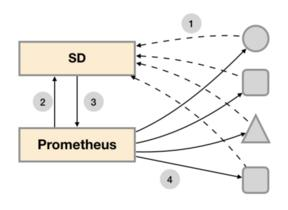
1. 基于文件的服务发现
基于文件的服务发现是仅仅略优于静态配置的服务发现方式,但是它不依赖于任何平台或第三方服务,因而也是最为简单和通用的实现方式。Prometheus Server会定期从指定的文件中加载Target信息,文件可使用 JSON和YAML格式,它含有定义的Target列表,以及可选的标签信息。这些文件可由另一个系统生成,例如Puppet、Ansible、Saltstack等配置管理系统,也可以由脚本基于CMDB定期查询生成。
1.1 创建 targets 文件
# 创建 targets 目录mkdir /usr/local/prometheus/targets/# 编写 prometheus-server target 文件vim prometheus-server.yaml- targets:- 10.0.0.230:9090labels:app: prometheusjob: prometheus# 编写node-exporter target 文件vim node-exporter.yaml- targets:- 10.0.0.230:9100- 10.0.0.231:9100labels:app: node-exporterjob: node
1.2 修改 prometheus.yml 文件
配置动态服务发现targets,定义在配置文件的job-name字段中。
vim /usr/local/prometheus/prometheus.yml......scrape_configs:# The job name is added as a label `job=<job_name>` to any timeseries scraped from this config.# metrics_path defaults to '/metrics'# scheme defaults to 'http'.- job_name: "prometheus"file_sd_configs: # 使用服务发现文件方式添加target- files:- targets/prometheus-server.yaml # 相对prometheus安装路径的target文件路径refresh_interval: 2m # 每隔2分钟重新加载一次配置文件- job_name: "nodes"file_sd_configs:- files:- targets/node*.yaml # 支持*匹配refresh_interval: 2m
2. 基于DNS的动态发现
2.1 添加 DNS SRV 记录
[root@centos7 named]#cat wuvikr.local.zone$TTL 1D@ IN SOA master wuvikr.qq.com ( 1 3600 10M 7D 1D )NS mastermaster A 10.0.0.73_test01._tcp SRV 0 1 9100 test.wuvikr.local.test01 A 10.0.0.71test02 A 10.0.0.72
2.2 修改 prometheus.yml 文件
2.2.1 基于 SRV 记录发现(默认)
- job_name: "dns-SRV-nodes"dns_sd_configs:- names:- _test01._tcp.wuvikr.local
2.2.2 基于 A 记录发现
- job_name: 'dns-A-nodes'dns_sd_configs:- names: ['test02.wuvikr.local']type: Aport: 9100
3. 基于K8S Service 的服务发现
在Kubernetes集群部署的Prometheus,目前比较流行的是基于Operator来部署,不仅简单方便,它在服务发现这一环节还提供了一种新的解决方案。
在 prometheus-operator 中,定义了一个新的Kubernetes资源对象servicemonitors,这个资源对象的作用是依据标签选择器去匹配对应命名空间下的service和port,匹配到之后就会根据事先定义好的模板,自动为监控对象生成一套监控配置并加载到Prometheus中去。另外,servicemonitors还支持对监控对象的label进行修改和替换。
下面是一个简单的servicemonitors的yaml文件模板:
apiVersion: monitoring.coreos.com/v1kind: ServiceMonitormetadata:name: etcd-k8snamespace: monitoringlabels:app: etcd-k8sspec:jobLabel: appendpoints:- interval: 30sport: etcd-port # 对应 Service.spec.ports.namescheme: httpstlsConfig:caFile: /etc/prometheus/secrets/etcd-ssl/etcd-ca.pem # 证书路径,prometheus pod 里的路径certFile: /etc/prometheus/secrets/etcd-ssl/etcd.pemkeyFile: /etc/prometheus/secrets/etcd-ssl/etcd-key.peminsecureSkipVerify: true # 关闭证书校验,证书serverName和etcd中签发的证书可能不匹配,添加此行后将不再对服务端的证书进行校验selector:matchLabels:app: etcd-k8s # 和scv的lables保持一致namespaceSelector:matchNames:- kube-system # 和svc所在namespace保持一致

若有收获,就点个赞吧
0 人点赞


