这几天一直在研究对象如何进行选中的实现,下文提供了非常好的一个思路。
聊聊canvas的元素选中 - 知乎
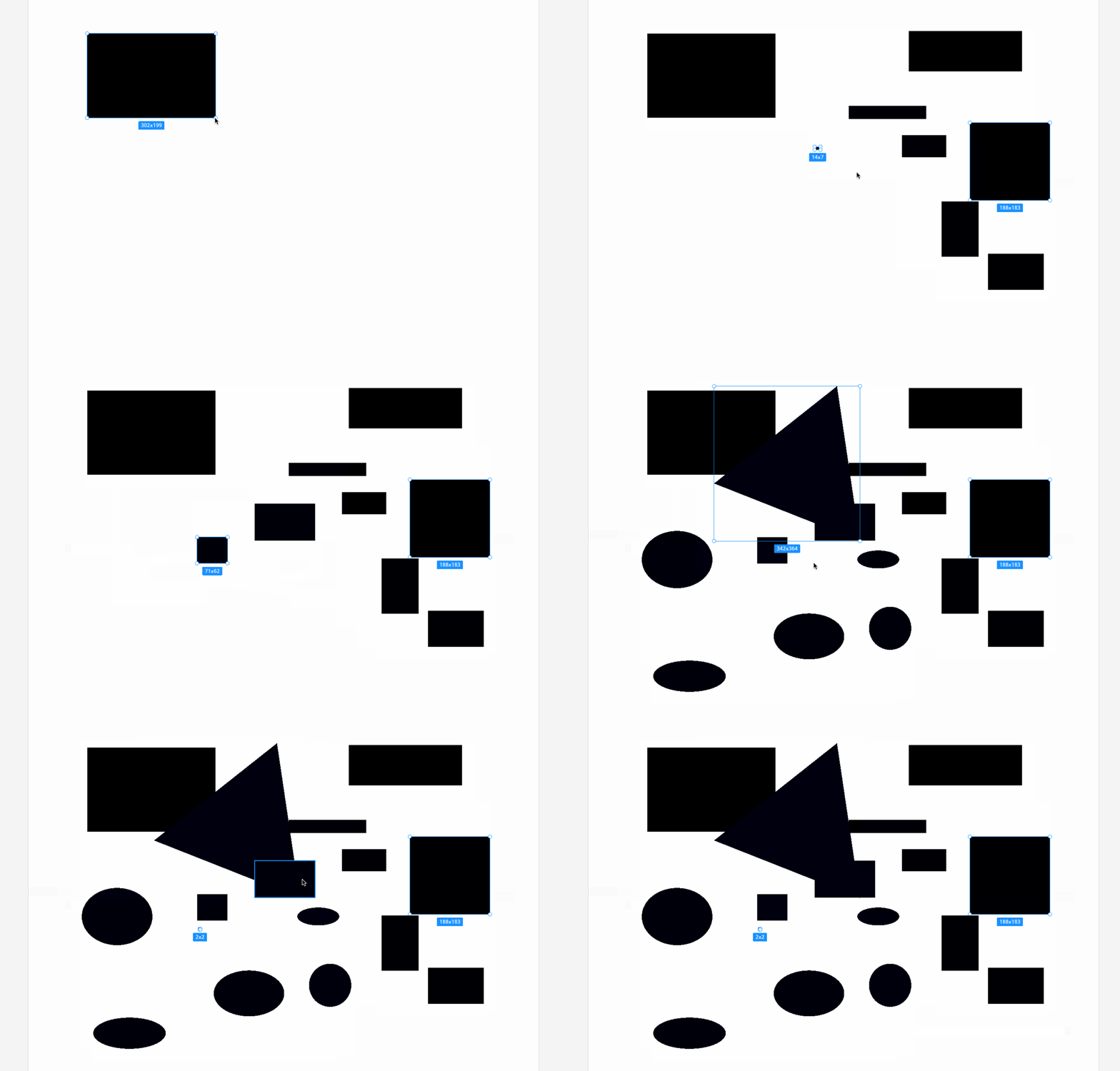
但是一直苦于不知道如何进行这部分的实现。后来灵光一闪似乎明白了如何实现。
第一步:索引转 style
makeMaskStyleByIndex = (index: number) => {return this.makePathStyle({ type: 'fill', color: indexToHex(index) });};// indexToHex 方法export const indexToHex = (index: number): string => {let str = index.toString(16);if (str.length > 6) {throw Error('index is too large...');}if (str.length < 6) {const prefix = 6 - str.length;for (let i = 0; i < prefix; i++) {str = '0' + str;}}return '#' + str;};
第二步:生成对象
switch (layer.class) {
  case 'polygon':
    const path = davinci.getPathByPoints((layer as Polygon).points);

    layer.setFrame(path.getBounds());
    const polygonStyle = davinci.makeMaskStyleByIndex(i);
    davinci.drawPath(path, polygonStyle);

    break;
  case 'rectangle':
    const rectangleStyle = davinci.makeMaskStyleByIndex(i);
    davinci.drawRect(layer.frame, rectangleStyle);

    break;
  case 'ellipse':
    const ellipseStyle = davinci.makeMaskStyleByIndex(i);
    davinci.drawOval(layer.frame, ellipseStyle);
}
这样我们就有了 MaskStyle 的画布对象
第三步:添加 hover 态指针识别
{
  onPointerOver: e => {
    console.log('selectionPointerOver');

    window.davinci.pointer.isOver = true;
    window.davinci.pointer.x = e.offsetX;
    window.davinci.pointer.y = e.offsetY;
  },
  onPointerLeave: () => {
    console.log('selectionPointerLeave');
    window.davinci.pointer.isOver = false;
  },
  onPointerMove: e => {
    if (isPressed && x && y) {
      // console.log('selectionPointerMoved');

      const width = Math.abs(e.offsetX - x);
      const height = Math.abs(e.offsetY - y);

      window.davinci.selectionFrame = Davinci.makeRectByXYWH(x, y, width, height);
    } else {
      window.davinci.pointer.x = e.offsetX;
      window.davinci.pointer.y = e.offsetY;
    }
  }
}
第四步:添加选择判断
/**
 * 判断是否进行了选择
 */
const { isOver, y, x } = pointer;
if (isOver) {
  const rgba = canvas.readPixels(x, y, 1, 1);
  const color = Color.rgb(rgba);

  const index = davinci.getIndexFromMaskColor(color.hex());

  // 获取选中对象
  const layer = layers[index];
  if (layer && layer.id !== addingObjectId) {
    davinci.drawHoverBounds(layer.class, layer);
  }
}
这里需要对不同的对象分别做一些绘制方法判断,绘制都统一到drawHoverBounds 里了
第五步:绘制 HoverBounds
/**
 * 绘制 Hover 态的 BoundingBox
 */
drawHoverBounds = (type: ShapeClassType, layer: AnyLayer) => {
  const { preference } = window.davinci;

  const { hoverBorderWidth, hoverBorderColor } = preference.selectConfig;

  const style = this.makePathStyle({
    type: 'border',
    color: hoverBorderColor,
    borderWidth: hoverBorderWidth,
  });
  switch (type) {
    case 'ellipse':
      this.drawOval((layer as Ellipse).frame, style);
      break;
    case 'polygon':
      const path = this.getPathByPoints((layer as Polygon).points);

      this.drawPath(path, style);

      break;
    case 'rectangle':
      this.drawRect((layer as Rectangle).frame, style);
  }
};
最终效果

若有收获,就点个赞吧
0 人点赞


