从平时应用中引出
实际应用
渲染价格组件,价格中的每个数字都是由svg图片构成。如21.9,就是由三个2,1,“.”构成
export default {name: 'ViewPrice',// 函数式组件: 无状态,无this上下文functional: true,props: {price: {type: String,default: '1'}},render(h, context) {let strArr = context.props.price.split('');let renderChildren = function() {let arr = [];strArr.forEach(item => {let t = item === '.' ? 'fg' : item;arr.push(h('img', { attrs: { src: require(`../../assets/img/number${t}.svg`) } }));});return arr;};return h('div', { class: 'view-price' }, renderChildren());}};
render函数介绍
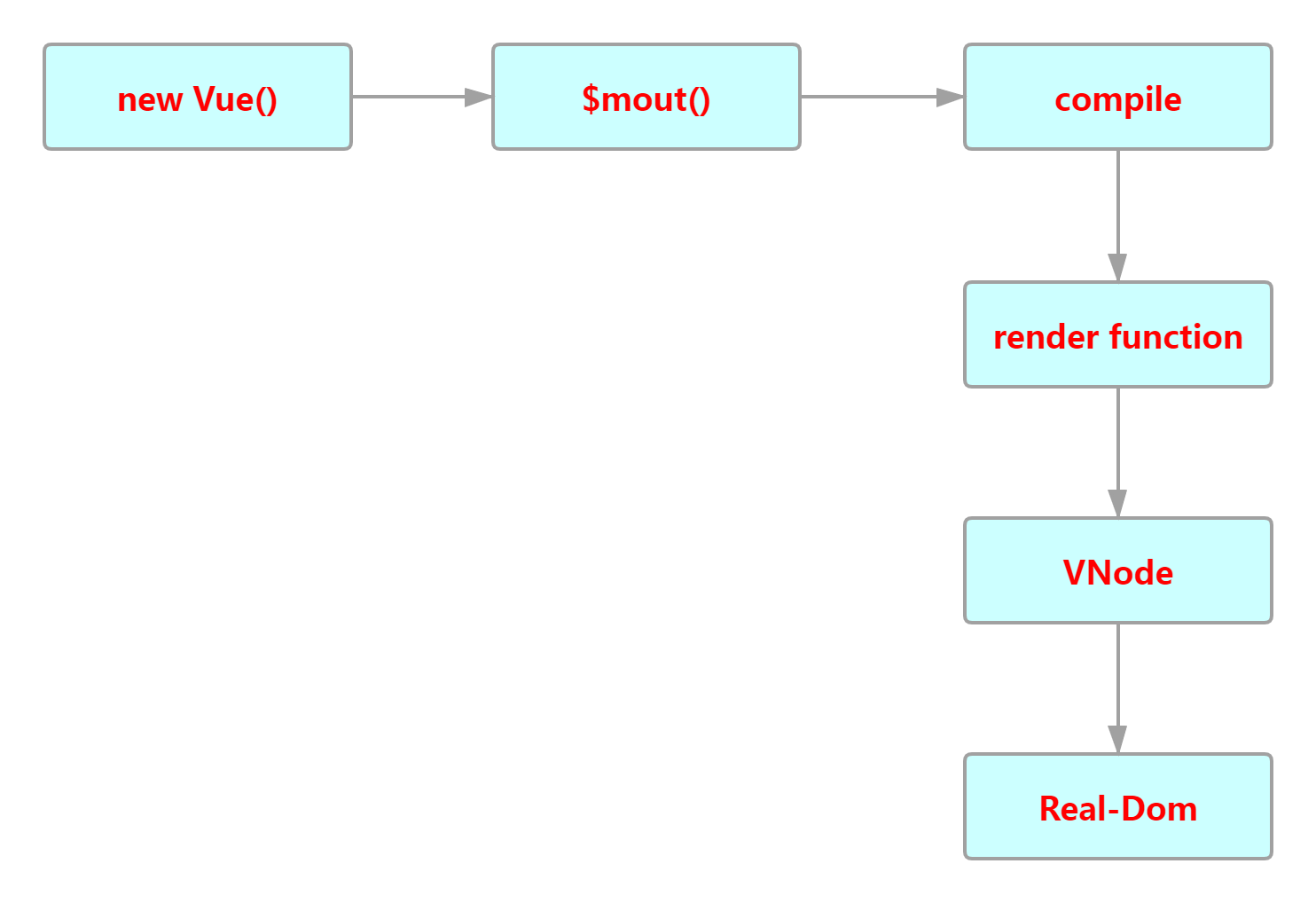
render函数的作用是Vue触发生成VNode节点集合的函数
VNode集合是真实DOM的一个对象映射,通过VNode集合来生成真实的DOM结构。
我们知道Vue 推荐在绝大多数情况下使用HTML创建模板。
但是在某些场景下,我们需要使用JavaScript来实现比模板实现更加灵活和更有效率。在这些场景中,我们可以使用render函数,render函数更接近Vue编译器,减少解析模板的时间,提升效率。
使用介绍
绑定事件、添加样式、添加属性等等
new Vue({el: '#app',data() {return {clickCount: 0,}},methods: {onClick() {this.clickCount += 1;}},render(createElement) {const button = createElement('button', {on: {click: this.onClick},attrs: {class: ""}}, 'Click me');const counter = createElement('span', ['Number of clicks:',this.clickCount]);return createElement('div', [button, counter])}});
createElement(常用h来简写)
这个是用来创建元素的方法。
// @returns {VNode}createElement(// {String | Object | Function}// 一个 HTML 标签名、组件选项对象,或者// resolve 了上述任何一种的一个 async 函数。必填项。'div',// {Object}// 一个与模板中属性对应的数据对象。可选。{// (详情见下一节)},// {String | Array}// 子级虚拟节点 (VNodes),由 `createElement()` 构建而成,// 也可以使用字符串来生成“文本虚拟节点”。可选。['先写一些文字',createElement('h1', '一则头条'),createElement(MyComponent, {props: {someProp: 'foobar'}})])
数据对象
用来给元素添加属性,事件和子元素等。下面是官方给全面数据。
{// 与 `v-bind:class` 的 API 相同,// 接受一个字符串、对象或字符串和对象组成的数组'class': {foo: true,bar: false},// 与 `v-bind:style` 的 API 相同,// 接受一个字符串、对象,或对象组成的数组style: {color: 'red',fontSize: '14px'},// 普通的 HTML attributeattrs: {id: 'foo'},// 组件 propprops: {myProp: 'bar'},// DOM 属性domProps: {innerHTML: 'baz'},// 事件监听器在 `on` 属性内,// 但不再支持如 `v-on:keyup.enter` 这样的修饰器。// 需要在处理函数中手动检查 keyCode。on: {click: this.clickHandler},// 仅用于组件,用于监听原生事件,而不是组件内部使用// `vm.$emit` 触发的事件。nativeOn: {click: this.nativeClickHandler},// 自定义指令。注意,你无法对 `binding` 中的 `oldValue`// 赋值,因为 Vue 已经自动为你进行了同步。directives: [{name: 'my-custom-directive',value: '2',expression: '1 + 1',arg: 'foo',modifiers: {bar: true}}],// 作用域插槽的格式为// { name: props => VNode | Array<VNode> }scopedSlots: {default: props => createElement('span', props.text)},// 如果组件是其它组件的子组件,需为插槽指定名称slot: 'name-of-slot',// 其它特殊顶层属性key: 'myKey',ref: 'myRef',// 如果你在渲染函数中给多个元素都应用了相同的 ref 名,// 那么 `$refs.myRef` 会变成一个数组。refInFor: true}
约束
所有Vnode节点都是唯一的。想要重复渲染组件,需要使用工厂函数循环生产。
// 重复同一个组件render: function (h) {let component = h('div',{class: "hello"}, 'hello world!')return h('div', [// 错误 - 重复的 VNodecomponent, component])}
应该使用工厂函数来循环生成。
render: function (h) {return h('div',Array.apply(null, { length: 20 }).map(function () {return h('p', 'hello')}))}
应用场景
场景1:某些场景下需要使用js编程来实现,相比模板更加灵活更加有效率。
- 需要比较复杂的条件判断来渲染不同组件的情况下
- 需要高度自定义化支持的功能
- 其他
示例1
- 官方示例 ```javascript
Vue.component(‘anchored-heading’, { render: function (createElement) { return createElement( ‘h’ + this.level, // 标签名称 this.$slots.default // 子节点数组 ) }, props: { level: { type: Number, required: true } } })
- **使用render函数渲染**```javascriptrender: function (createElement) {return createElement('h' + this.level, // 标签名称this.$slots.default // 子节点数组)},props: {level: {type: Number,required: true}}
示例2
通过将h函数作为参数创建自义定功能
定义组件
<script>export default {name: 'HelloWorld',props: {msg: String,callback: {type: Function,require: true}},render(h) {// 通过把h函数作为参数生成更加灵活的子元素let children = this.callback.call(null,h);return h('div', {}, [h('h2', {class: 'red'}, '组件第一个元素是红色'),children])}}</script>
在父组件中使用
<template><div class="home"><HelloWorld msg="Welcome to Your Vue.js App" :callback="viewChildren"/></div></template><script>// @ is an alias to /srcimport HelloWorld from '@/components/HelloWorld.vue'export default {name: 'Home',components: {HelloWorld},methods: {// 利用h函数来实现模板里面功能viewChildren(h) {console.log(this);// 这里使用h函数渲染组件// 充分利用h函数强大功能return h('h1', {class: 'green'}, '通过传入生成的子元素是绿色的')}}}</script>
场景2:使用JSX语法糖
写了很多 render 函可能会觉得写起来非常痛苦。这时候使用JSX语法糖,再利用babel插件将JSX转化为Javascript代码。
将 h 作为 createElement 的别名是 Vue 生态系统中的一个通用惯例,实际上也是 JSX 所要求的。
new Vue({el: '#demo',render(h) {return <h2> hello world! </h2>;}})
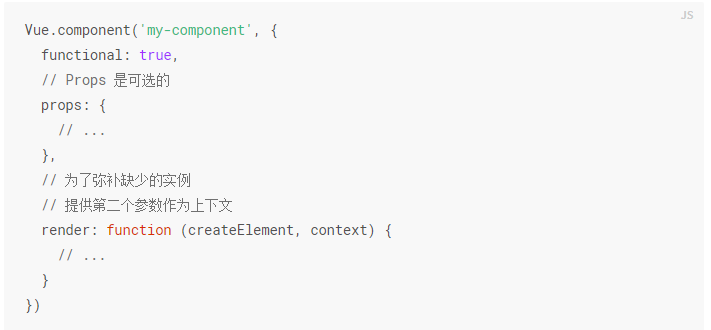
场景3:函数式组件
函数式组件的特点:
- 无状态
- 无生命周期
- 无上下文
优势
渲染开销低
基本原理
Vue实例化一个基本流程
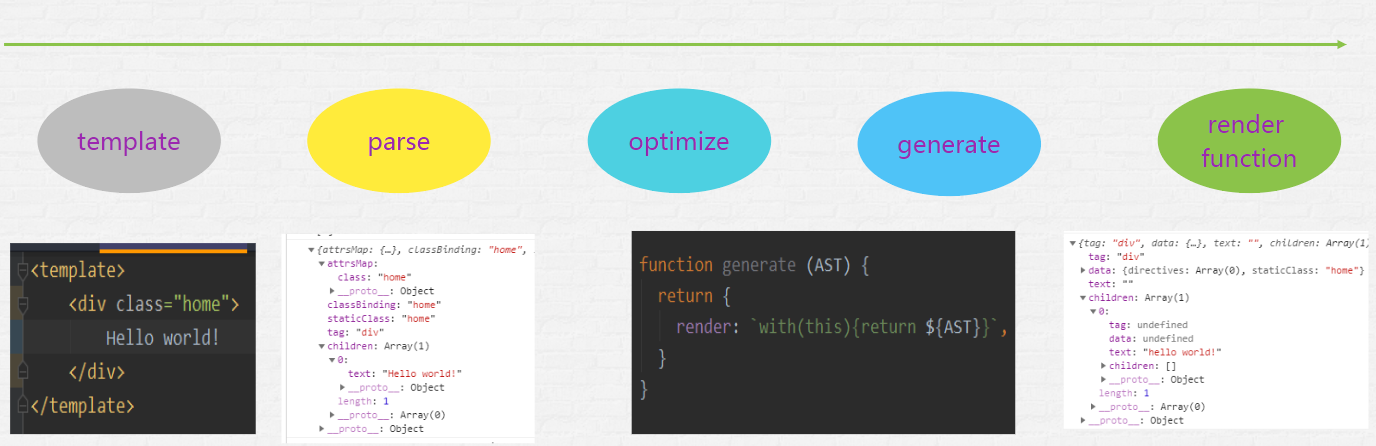
Compile过程
获取到template模板,经过parse生成抽象语法书,然后再进行一定的优化,接着生成Render函数,最后render函数生成VNode集合。
Render函数基本原理

参考资料

若有收获,就点个赞吧
0 人点赞


