在APP应用商店版本不断地迭代,技术实现方案也在不断地演进。视觉组件逐渐的稳定了,为了便于后续快速迭代和团队其他成员能够快速入手,另外其他H5项目也可能也需要用到类似应用商店的上组件,因此将应用商店用到组件全部抽离封装成独立组件库。
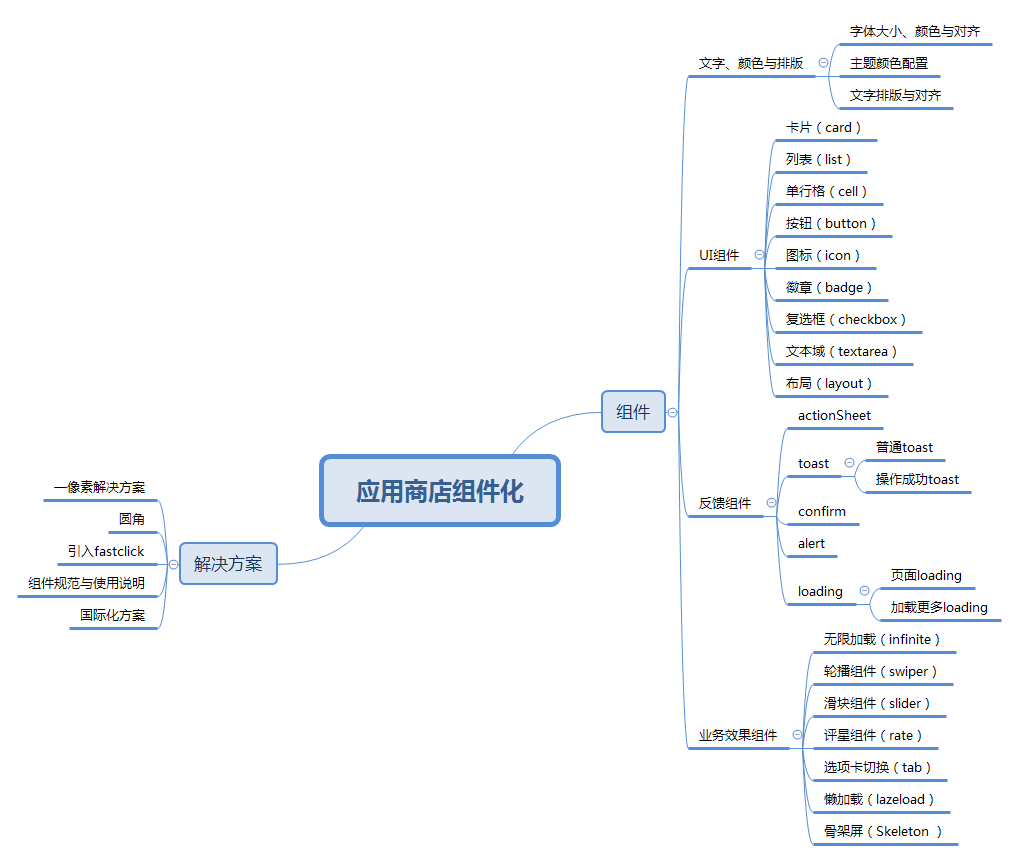
组件库实现
创建项目
我们使用vue-cli3创建了一个项目。
vue create store-component;
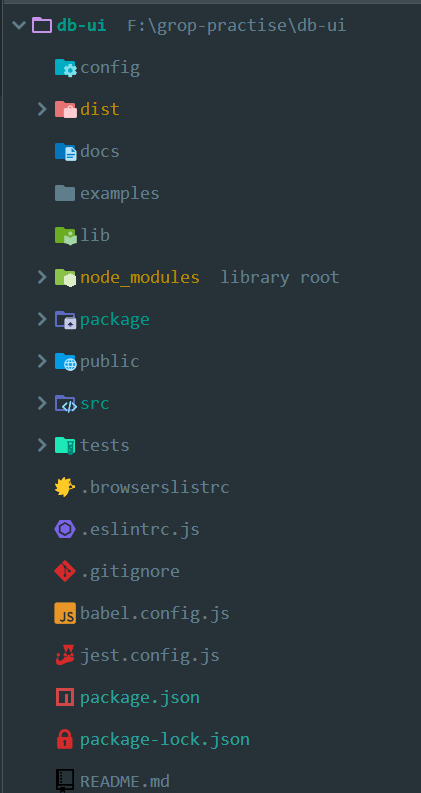
设计目录
- docs目录: 用来存放文档
- examples: 存放示例
- package: 存放组件
- test:业务组件
- src:用来本地开发测试
构造统一引入组件库入口
// 导入button组件import Button from './Button'// 组件列表const components = [Button]// 定义 install 方法,接收 Vue 作为参数。如果使用 use 注册插件,那么所有的组件都会被注册const install = function (Vue) {// 判断是否安装if (install.installed) return// 遍历注册全局组件components.map(component => Vue.component(component.name, component))}// 判断是否是直接引入文件if (typeof window !== 'undefined' && window.Vue) {install(window.Vue)}// 单个导出export {Button}// 整体导出export default {// 导出的对象必须具有 install,才能被 Vue.use() 方法安装install,}
编写单个组件
import ArchButton from './src/index.vue';ArchButton.install = function(Vue) {Vue.component(ArchButton.name, ArchButton);};export default ArchButton;
组件使用
import Vue from 'vue';// 在自己项目中使用import {Button} from '../package/index.js';Vue.use(Button);
组件发布至NPM
作为一个组件库,我们必须按照npm的发包规则来编写我们的package.json, 我们先来解决组件库打包的问题,首先我们需要让脚手架编译我们的组件代码,并输出到指定目录下,我们按照发包规范一般会输出到lib目录下,代码如下:
module.exports = {"scripts": {"serve": "vue-cli-service serve","build": "vue-cli-service build","lib": "vue-cli-service build --target lib --name dbui --dest lib packages/index.js"}}
2、文档说明
文档则使用Vuepress以md文档形式来生成,最后输出至docs目录下
3、demo示例
demo演示则单独以一个项目的形式开发生成。
4、参考资料

若有收获,就点个赞吧
0 人点赞


