DCE 提供 ZooKeeper-5.21.3 的容器化的安装,其用于维护配置信息、命名、提供分布式同步和提供组服务的集中式服务,所有这些类型的服务都以某种形式或其他形式被分布式应用程序使用。如果想使用外部存储,请先安装可用的存储方式,例如K8s的支持的nfs、glusterfs和cephfs方式等。也可以使用DCE提供的存储组件longhorn。
建议安装ZooKeeper的时候,使用外部存储,避免redis容器重启后数据丢失。要求
- Kubernetes 1.12+
- 支持可用的PV (非必需)
选择和查看组件
1. 选择 ZooKeeper 组件
登录DCE,选择应用商店目录,找到【deepexi/zookeeper】组件。
2. 查看组件信息&部署
进入组件会显示组件的详情,里面会展示描述和配置文件。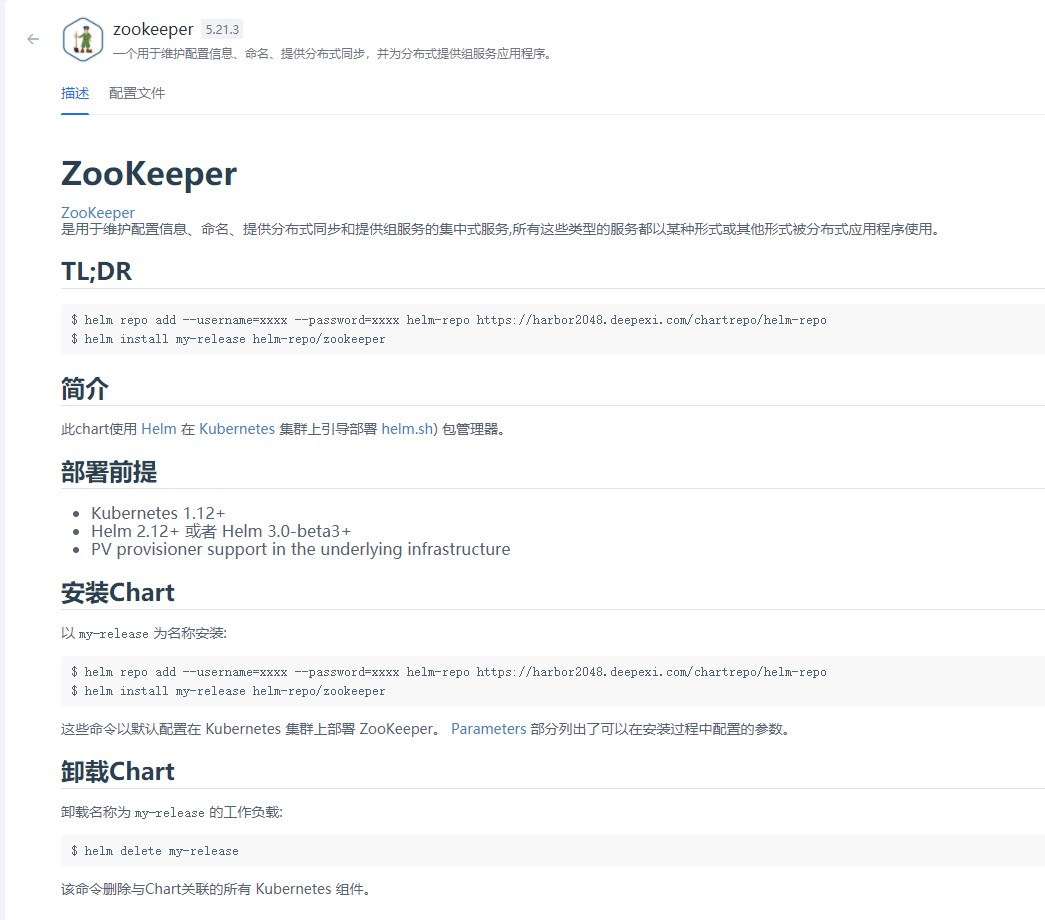
可以切换到配置文件,查看组件默认配置信息和切换配置文件查看信息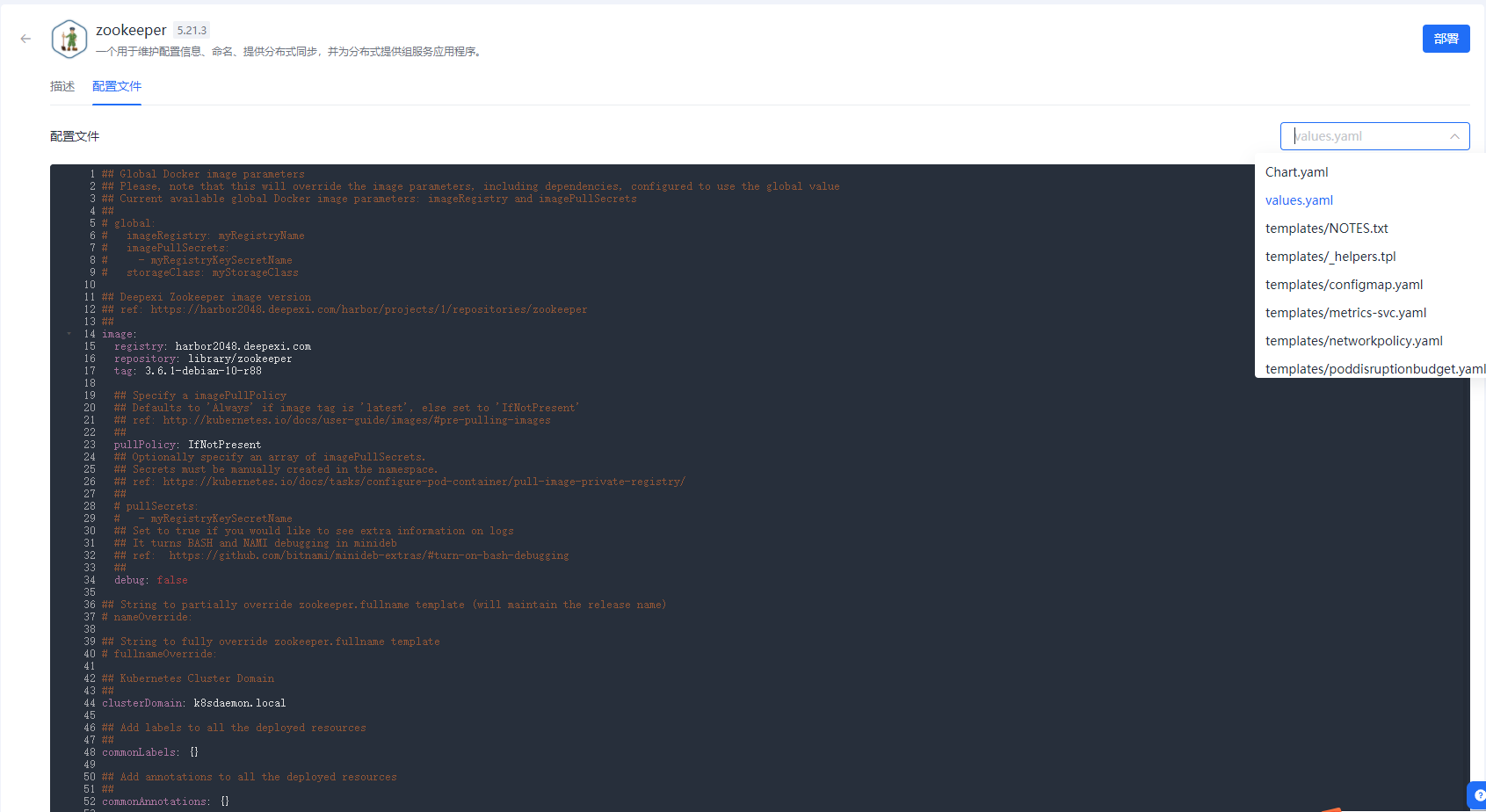
部署
1. 填写基本信息
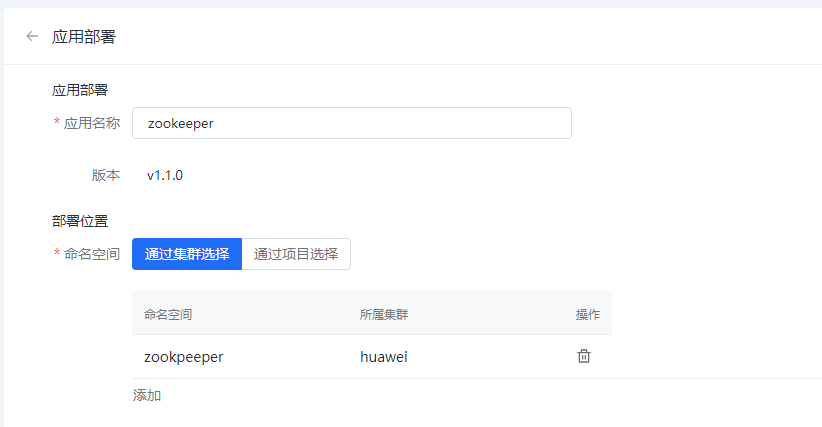
应用名称和命名空间根据自己实际需求进行选择即可,建议部署到单独的一个命名空间。命名空间有两种方式选择。
- 一种是通过集群选择,这种适合集成成员安装
- 一种是通过项目选择,这种适合项目成员安装
点击添加,弹出选择命名空间窗口,相同的命名空间只能选择一个。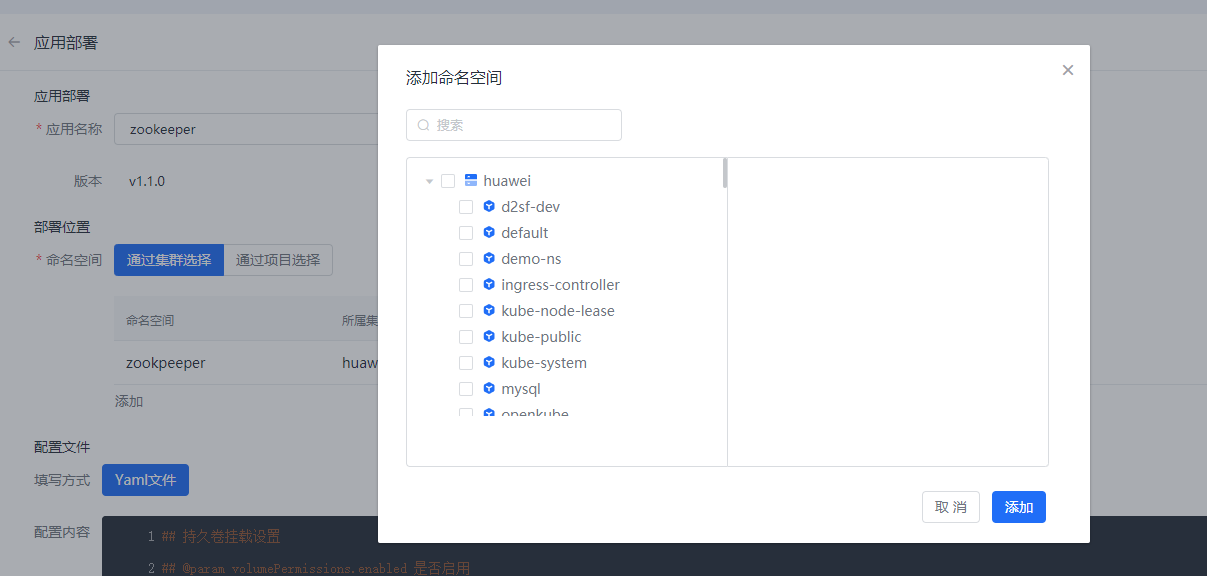
2、配置外部存储(可选)
需要数据持久化,可在全局变量中设置统一的可用的存储类
##全局参数设置## @param global.storageClass 存储卷名称,不设置此值会导致Pod重启后信息丢失global:storageClass: myStorageClass
3、客户端与服务端通讯设置
## Zookeeper 服务器之间或客户端与服务器之间维持心跳的时间间隔,也就是每个 tickTime 时间就会发送一个心跳
## 单位:ms
##
tickTime: 2000

## 集群中的follower服务器(F)与leader服务器(L)之间初始连接时能容忍的最多心跳数
##
initLimit: 10

## 集群中的follower服务器与leader服务器之间请求和应答之间能容忍的最多心跳数
##
syncLimit: 5

## 单个客户端与单台服务器之间的连接数的限制,默认是60,如果设置为0,那么表明不作任何限制。
##
maxClientCnxns: 60

## 客户端连接超时时间
##
maxSessionTimeout: 40000
4、配置验证参数
zookeeper服务用户登录信息,根据自己实际情况填写相应的信息,也可使用全局参数设置
## 访问zookeeper服务用户认证
## @param auth.enabled 是否开启用户验证
## @param auth.clientUser 客户端用户名
## @param auth.clientPassword 客户端密码
## @param auth.serverUsers 服务端用户组
## @param auth.serverPasswords 服务端密码组
##
auth:
  enabled: false
  clientUser:
  clientPassword:
  serverUsers:
  serverPasswords:
## reids用户登录信息
## @param auth.password 用户登录redis密码
auth:
  password: "123456"
5、服务配置
针对服务的详细配置及说明可参考 https://www.yuque.com/d-openkube/usgxn6/utcitw
## 服务设置
## @param service.type 服务类型
## @param service.port 服务端口
## @param service.followerPort 从端口
## @param service.electionPort 服务选举端口
## @param service.publishNotReadyAddresses 设置为 true,则表示 DNS 实现必须发布与服务相关联的端点子集的 notReadyAddresses。
##                                         设置此字段的主要用例是使用StatefulSet的无头服务来传播其Pod的SRV记录,而不考虑它们是否准备就绪,以便于同行发现。
##
service:
  type: ClusterIP
  port: 2181
  followerPort: 2888
  electionPort: 3888
  publishNotReadyAddresses: true
6、其他部署(可选)
还支持nodeSelector、podSecurityContext、containerSecurityContext和updateStrategy等参数配置,具体可查看下文的参数配置说明。
7、确认部署
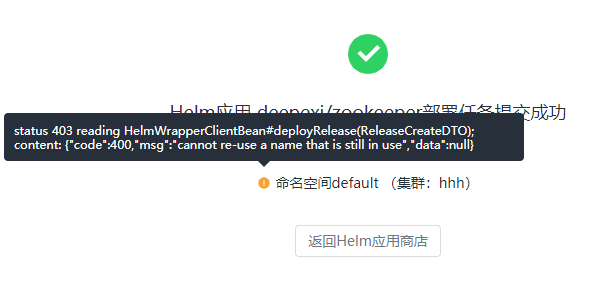
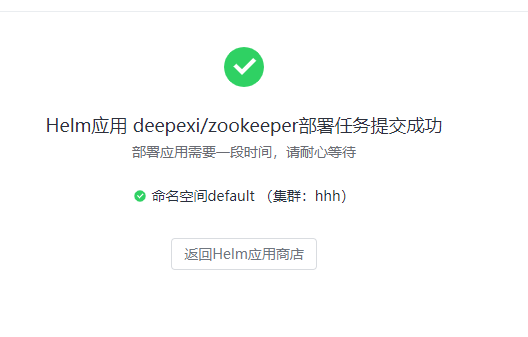
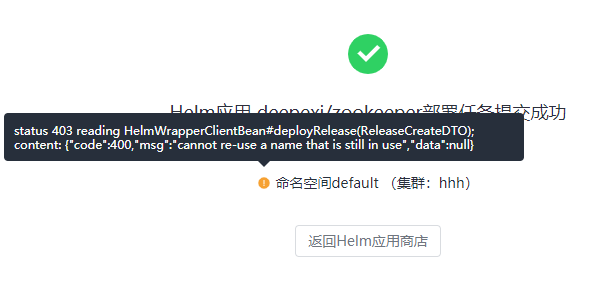
点击确定,即可提交部署请求,跳转到成功页面,如安装失败可将鼠标移动到图标  上查看详细信息
部署失败排查
1、权限不足
当提示用户权限不足时可到对应的集群上进入 [成员权限] - [集群成员] 查看当前用户的权限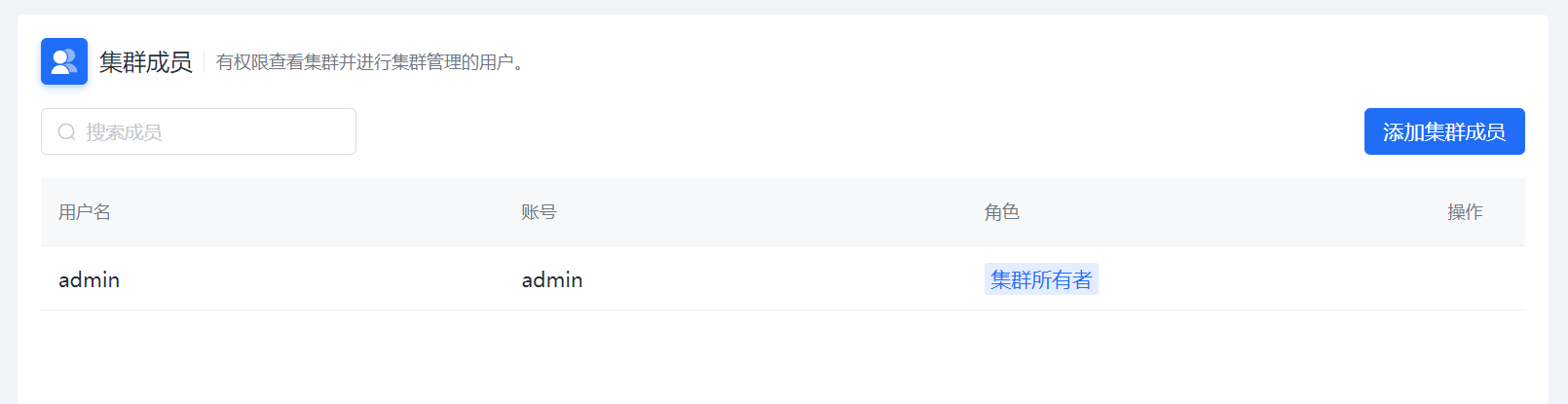
2、其他问题
参数详情
全局参数
| 参数名 | 描述 | 默认值 |
|---|---|---|
| global.imageRegistry | 全局 Docker 镜像注册表 | nil |
| global.imagePullSecrets | 数组类型的全局Docker注册秘钥 | [] (不向已部署的 pod 添加图像拉取秘钥) |
| global.storageClass | 用于动态配置的全局存储类 | nil |
公共参数
| 参数名 | 描述 | 默认值 |
|---|---|---|
| nameOverride | 部分覆盖zookeeper.fullname的字符串 | nil |
| fullnameOverride | String to fully override zookeeper.fullname | nil |
| clusterDomain | 完全覆盖zookeeper.fullname的字符串 | k8sdaemon.local |
| commonLabels | 添加到所有已部署对象的标签 | {} |
| commonAnnotations | 添加到所有已部署对象的注释 | {} |
| schedulerName | Kubernetes pod 调度器注册表 | nil (使用默认调度程序) |
Zookeeper chart 参数
| 参数名 | 描述 | 默认值 |
|---|---|---|
| image.registry | ZooKeeper 镜像仓库 | harbor2048.deepexi.com |
| image.repository | ZooKeeper 镜像名称 | library/zookeeper |
| image.tag | ZooKeeper 镜像标签 | {TAG_NAME} |
| image.pullPolicy | ZooKeeper 镜像拉取策略 | IfNotPresent |
| image.pullSecrets | 将 docker-registry 名称指定为数组 | [] (does not add image pull secrets to deployed pods) |
| image.debug | 指定是否应设置调试值 | false |
| tickTime | ZooKeeper 用于心跳的基本时间单位(以毫秒为单位) | 2000 |
| initLimit | Time the ZooKeeper servers in quorum have to connect to a leader | 10 |
| syncLimit | 服务器与领导者的过时程度 | 5 |
| maxClientCnxns | 单个客户端可能与单个成员建立的并发连接数 | 60 |
| maxSessionTimeout | 服务器将允许客户端协商的最大会话超时(以毫秒为单位) | 40000 |
| autopurge.snapRetainCount | 自动清除的保留快照数 | 3 |
| autopurge.purgeInterval | 必须触发清除任务的时间间隔(以小时为单位) | 0 |
| fourlwCommandsWhitelist | 要使用的逗号分隔的四个字母单词命令列表 | srvr, mntr,ruok |
| listenOnAllIPs | 允许 Zookeeper 在所有可用 IP 地址上侦听来自其对等方的连接. | false |
| allowAnonymousLogin | 允许接受来自未经身份验证的用户的连接 | yes |
| auth.existingSecret | 使用现有的秘密(忽略以前的密码) | nil |
| auth.enabled | 启用 ZooKeeper 身份验证 | false |
| auth.clientUser | 将使用 ZooKeeper 客户端进行身份验证的用户 | nil |
| auth.clientPassword | 将使用 ZooKeeper 客户端进行身份验证的密码 | nil |
| auth.serverUsers | 要创建的用户列表 | nil |
| auth.serverPasswords | 创建时分配给用户的密码列表 | nil |
| heapSize | Java 堆选项(Xmx 和 XM)的大小(以 MB 为单位) | [] |
| logLevel | ZooKeeper 服务器的日志级别 | ERROR |
| jvmFlags | ZooKeeper 进程的默认 JVMFLAGS | nil |
| config | 使用自定义 zoo.conf 文件配置 ZooKeeper | nil |
| dataLogDir | 数据日志目录 | “” |
有状态负载参数
| 参数名 | 描述 | 默认值 |
|---|---|---|
| replicaCount | ZooKeeper 节点数 | 1 |
| updateStrategy | statefulset 的更新策略 | RollingUpdate |
| rollingUpdatePartition | Partition update strategy | nil |
| podManagementPolicy | 分区更新策略 | Parallel |
| podLabels | ZooKeeper pod 标签 | {} (作为模板评估) |
| podAnnotations | ZooKeeper Pod 注解 | {} (作为模板评估) |
| affinity | Pod 分配的亲和力 | {} (e作为模板评估) |
| nodeSelector | Pod 分配的节点标签 | {} (作为模板评估) |
| tolerations | Pod 分配的容忍度 | [] (作为模板评估) |
| priorityClassName | ZooKeeper pod 要使用的现有优先级类的名称 | “” |
| securityContext.enabled | 启用安全上下文(ZooKeeper master pod) | true |
| securityContext.fsGroup | 容器组 ID(ZooKeeper 主 pod) | 1001 |
| securityContext.runAsUser | 容器的用户 ID(ZooKeeper 主 pod) | 1001 |
| resources | CPU/内存资源请求/限制 | Memory: 256Mi, CPU: 250m |
| livenessProbe | ZooKeeper 的 Liveness 探针配置 | Check values.yaml file |
| readinessProbe | ZooKeeper 的就绪探针配置 | Check values.yaml file |
| extraVolumes | 额外的卷 | nil |
| extraVolumeMounts | 挂载额外的卷 | nil |
| podDisruptionBudget.maxUnavailable | 同时关闭的最大 Pod 数 | 1 |
对外暴露参数
| 参数名 | 描述 | 默认值 |
|---|---|---|
| service.type | Kubernetes 服务类型 | ClusterIP |
| service.port | ZooKeeper 端口 | 2181 |
| service.followerPort | ZooKeeper 跟踪端口 | 2888 |
| service.electionPort | ZooKeeper 选举端口 | 3888 |
| service.publishNotReadyAddresses | 如果 ZooKeeper 无头服务应该为未就绪的 pod 发布 DNS 记录 | true |
| serviceAccount.create | 启用为 zookeeper pod 创建 ServiceAccount | false |
| serviceAccount.name | 创建的 serviceAccount 的名称 | 使用 zookeeper.full name 模板生成 |
| service.tls.client_enable | 为客户端连接启用 tls | false |
| service.tls.quorum_enable | 为仲裁协议启用 tls | false |
| service.tls.disable_base_client_port | 从服务定义中删除客户端端口 | false |
| service.tls.client_port | TLS 客户端连接的服务端口 | 3181 |
| service.tls.client_keystore_path | 密钥库文件路径, 参考 extraVolumes 和 extraVolumeMounts 将文件挂载到 pod 中 | /tls_key_store/key_store_file |
| service.tls.client_keystore_password | 密钥库密码。 您可以使用环境变量 | nil |
| service.tls.client_truststore_path | 信任库文件路径。 参考 extraVolumes 和 extraVolumeMounts 将文件挂载到 pod 中 | /tls_trust_store/trust_store_file |
| service.tls.client_truststore_password | 信任库密码。 您可以使用环境变量 | nil |
| service.tls.quorum_keystore_path | 密钥库文件路径。 参考 extraVolumes 和 extraVolumeMounts 将文件挂载到 pod 中 | /tls_key_store/key_store_file |
| service.tls.quorum_keystore_password | 密钥库密码。 您可以使用环境变量 | nil |
| service.tls.quorum_truststore_path | 信任库文件路径。 参考 extraVolumes 和 extraVolumeMounts 将文件挂载到 pod 中 | /tls_trust_store/trust_store_file |
| service.tls.quorum_truststore_password | 信任库密码。 您可以使用环境变量 | nil |
| service.annotations | 服务的注释 | {} |
| service.headless.annotations | Headless 服务的注解 | {} |
| networkPolicy.enabled | 启用网络策略 | false |
| networkPolicy.allowExternal | 连接不需要客户端标签 | true |
PVC参数
| 参数名 | 描述 | 默认值 |
|---|---|---|
| persistence.enabled | 使用 PVC 启用 Zookeeper 数据持久化 | true |
| persistence.existingClaim | 提供现有的“PersistentVolumeClaim” | nil (作为模板评估) |
| persistence.storageClass | ZooKeeper 数据卷的 PVC 存储类 | nil |
| persistence.accessMode | ZooKeeper 数据卷的 PVC 访问模式 | ReadWriteOnce |
| persistence.size | ZooKeeper 数据卷的 PVC 存储请求 | 8Gi |
| persistence.annotations | PVC 注释 | {} (作为模板评估) |
| persistence.dataLogDir.size | ZooKeeper 的数据日志目录的 PVC 存储请求 | 8Gi |
| persistence.dataLogDir.existingClaim | 为 Zookeeper 的数据日志目录提供现有的“PersistentVolumeClaim” | nil (作为模板评估) |
卷参数
| 参数名 | 描述 | Default |
|---|---|---|
| volumePermissions.enabled | 启用将持久卷挂载点的所有者和组更改为的初始化容器 runAsUser:fsGroup | false |
| volumePermissions.image.registry | 初始化容器卷权限镜像注册表 | harbor2048.deepexi.com |
| volumePermissions.image.repository | 初始化容器卷权限镜像名称 | library/minideb |
| volumePermissions.image.tag | 初始化容器卷权限镜像标签 | buster |
| volumePermissions.image.pullPolicy | 初始化容器卷权限镜像拉取策略 | Always |
| volumePermissions.resources | I初始化容器资源请求限制 | nil |
监控参数
| 参数名 | 描述 | 默认值 |
|---|---|---|
| metrics.enabled | 启用 prometheus 访问 zookeeper 指标端点 | false |
| metrics.containerPort | Jetty 服务器将公开 Prometheus 指标的端口 | 9141 |
| metrics.service.type | 用于暴露 Prometheus 指标的 Jetty 服务器的 Kubernetes 服务类型(ClusterIP、NodePort 或 LoadBalancer) | ClusterIP |
| metrics.service.port | Prometheus 指标服务端口 | 9141 |
| metrics.service.annotations | Prometheus 的服务注释以自动发现指标端点 | {prometheus.io/scrape: “true”, prometheus.io/port: “9141”} |
| metrics.serviceMonitor.enabled | 如果为“true”,则创建一个 Prometheus Operator ServiceMonitor(还要求“metrics.enabled”为“true”) | false |
| metrics.serviceMonitor.namespace | ServiceMonitor 资源的命名空间 | 发布的命名空间 |
| metrics.serviceMonitor.interval | 应该抓取指标的时间间隔。 | nil (Prometheus操作人默认值) |
| metrics.serviceMonitor.scrapeTimeout | 抓取结束后的超时时间 | nil (Prometheus 操作人默认值) |
| metrics.serviceMonitor.selector | Prometheus 实例选择器标签 | nil |
| metrics.prometheusRule.enabled | 如果为“true”,则创建一个 Prometheus Operator PrometheusRule(还要求“metrics.enabled”为“true”和“metrics.prometheusRule.rules”) | false |
| metrics.prometheusRule.namespace | PrometheusRule 资源的命名空间 | 发布的命名空间 |
| metrics.prometheusRule.selector | Prometheus 实例选择器标签 | nil |
| metrics.prometheusRule.rules | Prometheus 规则定义(参见 values.yaml 示例) | [] |

若有收获,就点个赞吧
0 人点赞


